
If you need a keyboard with smart card reader support, the right model can simplify secure logins while keeping your desk setup clean and efficient. These keyboards are especially useful for offices, healthcare, government, and any environment that relies on smart card authentication.
In this roundup, we focus on practical choices that balance compatibility, build quality, and business-friendly features so you can choose with confidence.
Best 10 Keyboard with Smart Card Reader Picks for 2026
Secure Office Pick
Dell KB813 Smartcard USB Keyboard

- Integrated smartcard keyboard for secure logins
- Wired USB connection with no batteries needed
- Spill-resistant with low-profile keys and palm rest
Best For: Dell office users needing secure wired authentication
Ergonomic Security Choice
Adesso AKB-150SB-TAA Smart Card Keyboard

- TAA compliant for regulated purchasing
- Built-in smart card reader for secure logins
- Split ergonomic layout with palm rest and hotkeys
Best For: Government and enterprise buyers needing ergonomic security
Business Slim Option
HP USB Business Slim Smartcard Keyboard

- Built-in smart card reader for business security
- Slim wired USB design with 104 keys
- Includes key lights and spill drain protection
Best For: Windows office setups needing a slim secure keyboard
Classic Dell Upgrade
Dell KB813 Smart Card Reader Keyboard
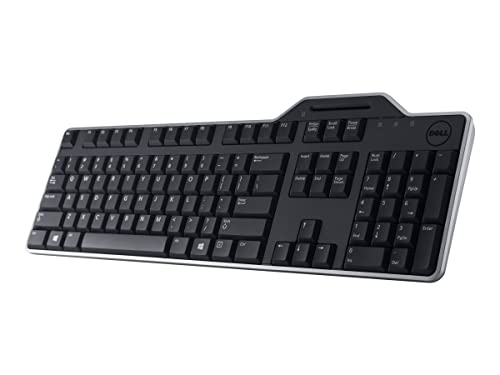
- Integrated smartcard reader for secure access
- Quiet low-profile keys with detachable palm rest
- Spill-resistant wired USB design
Best For: Dell or PC users wanting secure everyday typing
Security Office Pick
Cherry KC 1000 Smartcard Keyboard

- Integrated chip card terminal
- FIPS 201 and EMV 2000 Level 1 approved
- Windows, macOS, and Linux support
Best For: Secure workstations needing compliant smartcard login
Budget Workstation Choice
Adesso AKB-140SB Smart Card Keyboard

- EMV 4.0 Level 1 and ISO7816 certified reader
- USB-A and USB-C wired connection
- 104-key layout with large-print keycaps
Best For: Windows offices needing secure logins and easy readability
Enterprise Desktop Option
Lenovo Smartcard Wired Keyboard II

- Business-focused smartcard keyboard design
- USB-A wired connection
- 104-key QWERTY layout with tactile switches
Best For: Business desktops that need simple smartcard support
Enterprise Security Pick
Cherry Secure Board 1.0 USB Smart Card Keyboard

- Integrated smart card reader with RF/NFC support
- Secure mode with authentication and encryption
- Wired 108-key QWERTY layout for office use
Best For: Thin clients and secure office logins
Reliable Business Choice
Cherry KC 1000 Smartcard TAA Keyboard

- Integrated smartcard terminal with secure PIN entry
- EMV 2000 Level 1 approval and TAA compatibility
- Works with Windows, Linux, and MacOS
Best For: Business desks needing a dependable smart card keyboard
Value OEM Option
Dell KB813t Smart Card Reader Keyboard

- Built-in smart card reader in a simple USB keyboard
- 104-key QWERTY layout with membrane switches
- Compatible with a wide range of device types
Best For: Simple Dell-branded office setups with smart card access
Secure Office Pick – Dell KB813 Smartcard USB Keyboard
If you need a keyboard with smart card reader for a Dell-based office setup, the KB813 focuses on secure wired input and everyday comfort. Its USB connection keeps things simple, while the integrated smartcard reader supports authentication workflows without adding another device to the desk.
Best For: Dell users who want a straightforward wired smart card keyboard for secure office login.
Pros:
- Built-in smartcard keyboard for secure authentication
- Wired USB connection for fast, battery-free use
- Spill-resistant design helps protect against accidents
- Low-profile keys and detachable palm rest support comfortable typing
Cons:
- Made specifically for Dell computers
- No wireless option
- Basic black, business-focused styling only
Overall, this is a practical choice if security and reliability matter more than extras. It keeps the feature set focused on office use, with quiet typing and built-in smartcard support in a familiar full-size layout.
Ergonomic Security Choice – Adesso AKB-150SB-TAA Smart Card Keyboard
This keyboard with smart card reader is built for security-heavy environments that also want ergonomic support. The Adesso TruForm AKB-150SB-TAA combines a split key layout, integrated palm rest, and built-in smart card reader for use in government, healthcare, banking, and other secure workflows.
Best For: TAA-compliant buyers who want ergonomic comfort plus smart card login support.
Pros:
- TAA compliant for government and other regulated procurement needs
- Built-in smart card reader supports secure login and identification
- Split ergonomic design and palm rest help with long typing sessions
- 13 hotkeys add quick access to internet and multimedia functions
Cons:
- Membrane keys may not suit users who prefer mechanical switches
- Larger footprint than a standard keyboard
- Not water resistant despite the waterproof feature listing
For organizations that need compliance and secure card access, this model is especially well aligned. It adds comfort features that make it more practical for extended daily use than a basic security keyboard.
Business Slim Option – HP USB Business Slim Smartcard Keyboard
The HP USB Business Slim Smartcard Keyboard is a straightforward keyboard with smart card reader for business desktops that need secure access and a low-profile footprint. Its wired USB connection, 104-key layout, and key light indicators make it easy to fit into a Windows-based office setup.
Best For: Windows business users who want a slim smart card keyboard with simple wired reliability.
Pros:
- Built-in smart card reader for secure business use
- Wired USB connection keeps setup simple and dependable
- 104-key full-size layout with key light indicators
- Spill drain adds extra protection for desk use
Cons:
- Windows-focused compatibility
- Membrane switch feel is quieter but not premium
- Not water resistant
This HP model is a good fit if you want a compact business keyboard without giving up card-based security. It leans practical rather than flashy, which makes it easy to recommend for standard office deployments.
Classic Dell Upgrade – Dell KB813 Smart Card Reader Keyboard
If you want a keyboard with smart card reader that blends into a Dell workspace, this KB813 version keeps the formula simple and dependable. It uses wired USB connectivity, low-profile quiet keys, and a spill-resistant build to support everyday office typing and secure authentication.
Best For: Dell and PC users looking for a compact wired smartcard keyboard with comfortable typing.
Pros:
- Integrated smartcard reader for seamless authentication
- Spill-resistant construction helps guard against accidents
- Quiet, low-profile keys support comfortable typing
- Wired USB connection is fast and battery-free
Cons:
- Limited to wired use
- Best suited to Dell-focused setups
- Basic feature set with no extra media controls listed
As a practical office keyboard, it covers the essentials well: secure access, stable connectivity, and comfortable daily typing. If you already work in a Dell environment, this is an easy fit.
Security Office Pick – Cherry KC 1000 Smartcard Keyboard
The Cherry KC 1000 is a keyboard with smart card reader designed for secure desktop use, especially where chip card authentication and PIN entry are part of the workflow. Its wired USB connection, thin low-profile build, and support for Windows, macOS, and Linux make it a straightforward fit for mixed office environments.
Best For: Secure workstations that need integrated smart card login and cross-platform support.
Pros:
- Integrated chip card terminal for secure PIN entry and smartcard use
- CCID compatible with ISO 7816 reading and writing support
- Approved for FIPS 201 and EMV 2000 Level 1
- Works with Windows, MacOS-X, and Linux
Cons:
- German QWERTY layout may not suit all users
- Wired-only design limits placement flexibility
- Basic security-focused styling, not a feature-rich desktop keyboard
Overall, this is a practical choice when security certifications and dependable smart card handling matter more than extras. It suits teams that want a simple, compliant keyboard built around authentication tasks.
Budget Workstation Choice – Adesso AKB-140SB Smart Card Keyboard
The Adesso AKB-140SB is a keyboard with smart card reader built for everyday secure logins on Windows PCs. It combines a full-size 104-key layout with a built-in reader certified to EMV 4.0 Level 1 and ISO7816, making it a practical option for banking, healthcare, office, and government workflows.
Best For: Windows users who want secure authentication plus a full-size desktop layout.
Pros:
- Built-in smart card reader with EMV 4.0 Level 1 and ISO7816 certification
- USB-A and USB-C compatibility for easy wired connection
- Full 104-key layout with numeric keypad, hotkeys, and multimedia controls
- 2X larger keycap print improves readability
Cons:
- Windows-only compatibility
- Membrane switch design may not appeal to mechanical-keyboard fans
- No premium materials or advanced customization features listed
As a secure desktop keyboard, this model focuses on useful office features and straightforward setup rather than bells and whistles. It is a sensible pick if readability and authentication support are high priorities.
Enterprise Desktop Option – Lenovo Smartcard Wired Keyboard II
The Lenovo Smartcard Wired Keyboard II is a keyboard with smart card reader aimed at business desktops that need simple wired security support. It uses a standard 104-key QWERTY layout, a tactile switch design, and USB-A wired connectivity, keeping the focus on dependable smartcard-enabled workstations.
Best For: Business users who want a straightforward smartcard keyboard for Windows desktops.
Pros:
- Integrated Lenovo smartcard keyboard design for business use
- Wired USB-A connection keeps setup simple
- 104-key QWERTY layout with tactile switch feel
- Ambidextrous design and standard full-size format
Cons:
- Windows-only compatibility
- Limited detail on reader certifications or extra security features
- No listed media keys or ergonomic extras
This model is best viewed as a clean enterprise keyboard for users who want smartcard support without added complexity. It should fit well in business environments where consistent wired operation matters most.
Enterprise Security Pick – Cherry Secure Board 1.0 USB Smart Card Keyboard
If you need a keyboard with smart card reader for security-focused office use, the Cherry Secure Board 1.0 is built around authenticated access and encrypted operation. It combines a wired USB QWERTY keyboard with an integrated smart card and RF/NFC reader, making it a practical fit for environments that rely on secure logins and card-based workflows.
Best For: Thin clients, secure office setups, and users who need integrated smart card and RFID/NFC support.
Pros:
- Integrated smart card reader with PC/SC and CCID compatibility
- Supports ISO 7816 and ISO 14443 A/B cards for wider card handling
- Secure mode adds authentication and encryption
- Wired USB design with 108-key QWERTY layout
Cons:
- Not a wireless option
- Not water resistant
- Designed for security use, so it may be more than casual users need
This is the most specialized option in the group, and it makes sense where security requirements matter more than general-purpose extras. The 3-year warranty and GS approval add confidence for business deployment.
Reliable Business Choice – Cherry KC 1000 Smartcard TAA Keyboard
The Cherry KC 1000 is a straightforward keyboard with smart card reader support for buyers who want a classic wired desktop layout with security features built in. It adds an integrated smartcard terminal, secure PIN entry, and EMV 2000 Level 1 approval, while staying compatible with Windows, Linux, and MacOS.
Best For: Business users who want a dependable security keyboard with broad operating system support.
Pros:
- Integrated smartcard terminal with secure PIN entry
- EMV 2000 Level 1 approval and TAA compatibility
- Compatible with Windows, Linux, and MacOS
- Classic 104-key QWERTY layout with USB connection
Cons:
- No RF/NFC card support listed
- Basic black, classic design only
- Wired USB setup may not suit mobile use
For teams that need a security-focused keyboard without moving into more complex hardware, this model keeps the formula simple and dependable. It is a strong fit for standard business desks where smart card authentication is part of daily work.
Value OEM Option – Dell KB813t Smart Card Reader Keyboard
The Dell KB813t is a practical keyboard with smart card reader support for buyers who want a simple USB desktop keyboard from Dell. It uses a 104-key QWERTY layout, membrane switches, and a built-in smart card reader, making it a basic but functional fit for everyday office setups.
Best For: Buyers who want a straightforward Dell keyboard with integrated smart card access.
Pros:
- Built-in smart card reader
- USB-powered wired connection
- 104-key QWERTY layout with ambidextrous design
- Compatible with a wide range of devices listed by the seller
Cons:
- Membrane switch design rather than a premium mechanical feel
- Fewer security-specific details listed than the Cherry models
- Product description is more basic and less feature-rich
This is the most straightforward choice here, especially if you mainly want a Dell-branded keyboard with smart card reader support. It looks best suited to standard office use where simplicity matters more than advanced security extras.
How We Picked the Best Keyboard with Smart Card Reader
We prioritized models with integrated smart card readers, dependable wired connections, and layouts suited to daily office use. We also looked at compatibility, durability, ergonomics, and whether the keyboard fits common secure-workplace needs such as Windows environments, TAA compliance, and low-maintenance designs.
Quick Comparison
Most options here are full-size wired keyboards designed for standard business desktops. Some focus on slim profiles and quiet typing, while others emphasize compliance or ergonomic comfort. If you need a Keyboard with Smart Card Reader for frequent authentication, prioritize stable USB connectivity and a reader that is widely supported by your organization’s software stack.
Key Buying Factors for a Keyboard with Smart Card Reader
Compatibility
Check that the keyboard works with your operating system and your organization’s card authentication software. Business buyers should confirm support for the exact card standards and drivers they use.
Build and Typing Feel
Since this is a daily-use input device, key travel, layout, and overall durability matter. Membrane boards can be quieter and more affordable, while some users may prefer more tactile feedback.
Security and Compliance
For regulated environments, compliance requirements may be just as important as the reader itself. TAA compliance and similar procurement standards can narrow the field quickly.
Ergonomics and Desk Fit
If you type for long periods, consider wrist comfort, key spacing, and whether the keyboard’s footprint leaves room for a mouse and documents. A slimmer board may suit tight workspaces, while an ergonomic model may reduce strain.
Reader Placement and Workflow
Think about how often you’ll insert a card. A conveniently placed reader can speed up login and sign-out routines, especially in shared or high-security workstations.
Who Should Buy Which Keyboard with Smart Card Reader?
If you want a straightforward office staple, choose a standard wired option with a built-in reader. If compliance is a priority, look for TAA-compliant models. If comfort matters most, an ergonomic keyboard can be worth the tradeoff. For organizations standardizing fleets, a consistent Keyboard with Smart Card Reader across departments can make support and deployment easier.
In short, the best choice depends on your security needs, typing preferences, and workplace rules. Narrow your shortlist by compatibility first, then refine by comfort and compliance.