
If you want one compact accessory to add wired networking, extra ports, and less desk clutter, a USB hub with 2.5GbE Ethernet is a smart upgrade.
This roundup focuses on models that balance fast multi-gig networking, useful connectivity, and practical charging for modern laptops and tablets.
Best 10 USB Hub with 2.5GbE Ethernet Picks for 2026
Portable multiport hub
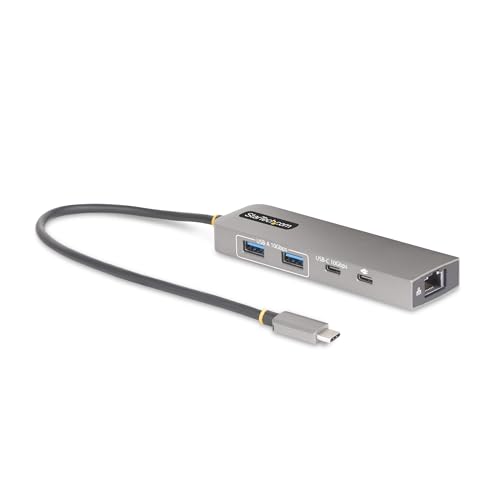
- 2.5GbE RJ45 with Wake-on-LAN
- Three 10Gbps USB data ports
- 100W PD pass-through with 15W reserved
Best For: Portable USB-C setups that need wired networking, charging, and a few extra ports
Premium travel dock

- 2.5GbE Ethernet in a USB4 travel dock
- HDMI 2.1 up to 4K@144Hz or 8K@60Hz
- 85W PD with aluminum construction
Best For: Travelers and power users who want strong display support with fast wired networking
Ethernet-only adapter

- Adds up to 2.5Gbps wired networking
- Realtek RTL8156BG for stable, low-power use
- Aluminum build with broad OS support
Best For: Anyone who only needs a simple USB-A 2.5GbE network adapter
Flexible 2-in-1 Adapter
Plugable 2.5G USB-C and USB-A Ethernet Adapter

- Dual USB-C/USB-A connector
- 2.5Gbps on compatible networks
- Plug-and-play for major OSs
Best For: People who need a versatile 2.5GbE adapter for different laptops and devices
USB-A 2.5GbE Adapter
SABRENT USB 3.0 to 2.5GbE Ethernet Adapter
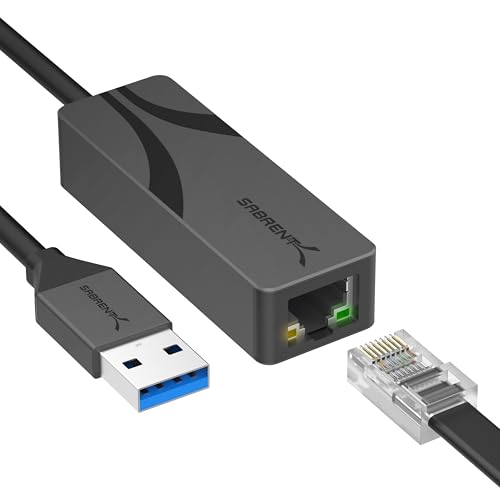
- USB-A to 2.5GbE networking
- RTL8156BG chipset for stable transfers
- Aluminum, bus-powered travel design
Best For: People with USB-A systems who want a compact and reliable 2.5GbE adapter
2.5Gb Upgrade Pick
UGREEN USB C to Ethernet Adapter 2.5G

- Up to 2.5Gb wired networking
- Realtek RTL8156BG chip for stable performance
- Aluminum build with wide device support
Best For: Users upgrading a USB-C device to faster wired networking
Travel-Friendly Hub
ORICO USB to 2.5GbE Ethernet Adapter

- 2.5GbE Ethernet plus USB-A and USB-C ports
- Compact, foldable, travel-ready design
- Plug-and-play across major operating systems
Best For: Travelers who want Ethernet and a couple of extra USB ports
High-Speed Expansion Hub
UGREEN 5-in-1 USB Hub with Ethernet

- 5-in-1 hub with Gigabit Ethernet
- Two USB-C 3.2 ports plus fast USB-A expansion
- 10Gbps data ports and extra power input
Best For: Laptop users who need a versatile hub with strong peripheral expansion
Portable multiport hub – 10Gbps 3-Port USB-C Hub
If you want a USB hub with 2.5GbE Ethernet for a MacBook, iPad, or USB-C laptop, this StarTech model combines wired networking, charging, and extra USB ports in one compact adapter. It adds three 10Gbps data ports, a 2.5Gbps RJ45 connection, and pass-through power, making it a practical desk or travel upgrade.
Best For: Users who need a portable USB-C hub with fast wired networking, charging, and a few extra high-speed ports.
Pros:
- 2.5GbE RJ45 with Wake-on-LAN support
- Three 10Gbps USB ports, including 2x USB-A and 1x USB-C
- 100W USB-C Power Delivery pass-through with 15W reserved for the hub
- Attached 1ft/30cm cable helps reduce port strain
Cons:
- Only three USB data ports total, so it is not a full docking station
- Plastic enclosure may not feel as premium as aluminum alternatives
- Best suited to USB-C systems rather than older USB-A-only laptops
Overall, this is a well-rounded hub if your priority is stable 2.5GbE Ethernet plus charging and a few fast peripherals. The included management tools for IT use are a bonus for business environments, but most buyers will mainly value the reliable wired connection and portable design.
Compact travel dock – 6-in-1 4K HDMI Dock
This USB hub with 2.5GbE Ethernet is aimed at laptop users who want a compact dock with display output, network access, and everyday expansion. The ORICO 6-in-1 combines 4K@60Hz HDMI, 2.5G Ethernet, USB-A and USB-C data ports, and 100W PD in a small aluminum body.
Best For: Laptop users who need a light, travel-friendly USB-C dock with HDMI, Ethernet, and charging.
Pros:
- 6-in-1 layout includes HDMI, 2.5G Ethernet, USB-A, USB-C, and PD
- 4K@60Hz HDMI supports higher refresh rates at lower resolutions
- 2.5G Ethernet supports adaptive speeds up to 2.5 Gbps
- Compact aluminum design is easy to carry
Cons:
- Requires USB-C video output support on the host device
- Not as port-rich as larger desktop docking stations
- Best performance on Ethernet needs a Cat 5e or better cable
For a simple mobile dock, this model covers the essentials without much bulk. It is a strong fit if you need fast wired internet, external display support, and laptop charging in one compact accessory.
Premium travel dock – USB4 Travel Hub with 2.5GbE
If you need a USB hub with 2.5GbE Ethernet and high-end display support, this Sabrent USB4 travel hub is built for demanding portable setups. It combines two USB-C data ports, one USB-A port, HDMI 2.1, 2.5GbE, and up to 85W PD in a compact aluminum body with an integrated cable.
Best For: Frequent travelers and power users who want a compact USB4 hub with fast Ethernet and advanced video output.
Pros:
- USB4 hub with 2.5GbE for fast, reliable wired networking
- HDMI 2.1 supports up to 4K@144Hz or 8K@60Hz with DSC
- Two USB-C data ports plus one USB-A port for flexible connectivity
- Aluminum build and integrated USB-C cable improve portability
Cons:
- Only three USB data ports total
- 85W charging may be limiting for some high-power laptops
- Advanced display modes depend on host and monitor support
This is the most premium-feeling option in the group if display performance matters as much as networking. It makes sense for users who want a compact travel dock that can handle fast Ethernet and high refresh-rate external monitors.
Ethernet-only adapter – 2.5Gb USB-A Ethernet Adapter
If you only need a USB hub with 2.5GbE Ethernet? This UGREEN model is better described as a compact Ethernet adapter than a full hub, but it does exactly what many buyers need: add a 2.5Gb wired connection to a USB 3.0 Type-A port. It is a simple upgrade for laptops and desktops that lack built-in multi-gig networking.
Best For: Users who want a straightforward 2.5Gb Ethernet adapter for a USB-A port.
Pros:
- Supports up to 2.5Gbps wired networking
- Realtek RTL8156BG chip is designed for stable, low-power operation
- Aluminum housing adds durability
- Widely compatible with Windows, macOS, Linux, and ChromeOS
Cons:
- Not a multiport hub, so it does not add extra USB or display outputs
- Uses USB 3.0 Type-A instead of USB-C
- Compatibility is not universal for every device listed in the notes
This is the most focused option here: no docking extras, just fast wired Ethernet in a small, durable package. If you only need multi-gig LAN on a USB-A machine, it is a clean and practical pick.
Flexible 2-in-1 Adapter – Plugable 2.5G USB-C and USB-A Ethernet Adapter
If you want a USB hub with 2.5GbE Ethernet in a simple adapter form, this Plugable model is a practical way to add faster wired networking without replacing your cables. It uses a dual-connector design that works with both USB-C and USB-A, and it’s meant for systems that can take advantage of 2.5Gbps speeds.
Best For: Users who need a flexible, plug-and-play 2.5GbE adapter for USB-C or USB-A laptops, including mixed-device setups.
Pros:
- Hybrid 2-in-1 design converts between USB-C and USB-A
- Supports 2.5Gbps networking on compatible switches, routers, and cables
- Plug-and-play support for Windows, macOS, ChromeOS, and iOS
- No need to replace existing Cat 5e or better cabling
Cons:
- Not a full multiport hub, just an Ethernet adapter
- Full performance depends on USB 3.0 or better host support
- Real-world speed still depends on ISP, cable, and network hardware
This is a straightforward choice if your main priority is adding fast wired networking with maximum host compatibility. It’s especially useful when you want one adapter that can move between USB-C and USB-A machines.
Multiport Dock with 2.5GbE – WAVLINK 6-in-1 USB-C Hub with 2.5G Ethernet
This USB hub with 2.5GbE Ethernet is built for people who want networking, display output, charging, and extra USB ports in one compact accessory. The WAVLINK hub combines a 2.5Gbps RJ45 port with 4K@120Hz HDMI, three 10Gbps data ports, and up to 85W pass-through charging.
Best For: Laptop users who want a compact multiport hub with fast Ethernet, high-refresh HDMI, and power delivery.
Pros:
- Includes 2.5Gbps Ethernet, HDMI, USB-A, USB-C, and PD charging
- Three 10Gbps data ports for fast accessory and SSD connections
- 4K@120Hz HDMI support for compatible USB-C devices
- Up to 85W pass-through charging while using the hub
Cons:
- Full 2.5GbE speed needs compatible router, cable, and host port
- USB-C video output is not supported on the data USB-C port
- Requires DP 1.4+DSC 1.2 support for the highest HDMI mode
This is the most versatile option here if you want a true desk-ready hub rather than a simple Ethernet adapter. It makes sense for users who need wired networking and multiple expansion ports at the same time.
USB-A 2.5GbE Adapter – SABRENT USB 3.0 to 2.5GbE Ethernet Adapter
If your setup already has a USB-A port and you mainly need faster wired networking, this USB hub with 2.5GbE Ethernet alternative is a compact way to upgrade. The SABRENT NT-UA25 plugs into USB 3.0 Type-A and adds a 2.5GbE connection with broad OS support and a travel-friendly build.
Best For: Users with USB-A laptops or desktops who want a durable, plug-and-play 2.5GbE adapter.
Pros:
- USB 3.0 Type-A connection with integrated cable
- Realtek RTL8156BG chipset for low-latency, low-CPU performance
- Plug-and-play support on Windows, macOS, and Linux
- Aluminum housing helps with cooling and portability
Cons:
- USB-A only, so it is not ideal for USB-C-only devices
- Full speed still requires 2.5G router/switch and Cat5e or better cable
- Windows may need an updated Realtek driver in some cases
This adapter is a strong fit when you want a simple wired upgrade without extra ports or dock features. It’s especially appealing if you prefer a rugged, bus-powered accessory that stays out of the way.
2.5Gb Upgrade Pick – UGREEN USB C to Ethernet Adapter 2.5G
If you want a USB hub with 2.5GbE Ethernet-style upgrade in a simple single-port adapter, this UGREEN model is built for fast wired networking on modern USB-C laptops, tablets, and phones. It focuses on a stable 2.5Gb connection for NAS transfers, smoother streaming, and lower-latency gaming when Wi‑Fi or Gigabit is no longer enough.
Best For: Users upgrading a USB-C device to a faster wired 2.5Gb network connection for NAS, streaming, and gaming.
Pros:
- Supports up to 2.5Gb speeds for faster downloads and high-bandwidth tasks.
- Uses an updated Realtek RTL8156BG chip for stable, low-power operation.
- Aluminum housing adds durability and a more premium feel.
- Wide compatibility includes MacBook, Dell XPS, iPad, Mac mini, and select iPhone models.
Cons:
- It is an Ethernet adapter rather than a multiport hub, so it does not add extra USB ports.
- Best results require 2.5Gb-capable networking gear.
This is a practical pick if your main goal is to add fast, reliable wired networking without extra complexity. It is especially appealing for users who care more about Ethernet performance and durability than about expanding peripheral ports.
Travel-Friendly Hub – ORICO USB to 2.5GbE Ethernet Adapter
If you need a USB hub with 2.5GbE Ethernet and a little extra port expansion, the ORICO FR3 adds a 2.5Gbps network connection plus two USB ports in a compact travel-ready design. It is a straightforward way to get stable wired internet while also connecting a keyboard, mouse, or flash drive through one small adapter.
Best For: Travelers and laptop users who want 2.5GbE Ethernet plus a couple of extra USB ports in one compact adapter.
Pros:
- Combines 2.5GbE Ethernet with one USB-A and one USB-C port.
- USB 3.0 ports support up to 5Gbps sharing total bandwidth.
- Plug-and-play operation works across Windows, macOS, Linux, Chrome OS, and Android.
- Compact body and foldable USB connector make it easy to pack.
Cons:
- The two USB 3.0 ports share a total 5Gbps bandwidth.
- Plastic enclosure is less premium than aluminum alternatives.
This is a strong all-around choice if you want wired Ethernet and basic hub functionality without carrying a larger dock. Its portability and broad compatibility make it especially useful for hybrid work and travel setups.
High-Speed Expansion Hub – UGREEN 5-in-1 USB Hub with Ethernet
If you want a USB hub with 2.5GbE Ethernet-style networking needs but also need real peripheral expansion, this UGREEN 5-in-1 hub is the most versatile option here. It pairs Gigabit Ethernet with multiple high-speed USB-C and USB-A ports, making it a better fit when your workspace needs data transfer and accessory connectivity more than raw network speed.
Best For: Laptop users who want a multiport USB hub for fast accessories, stable Ethernet, and peripheral expansion.
Pros:
- Five-in-one layout includes 2 USB-C 3.2 ports, 1 USB-A 3.2, 1 USB-A 2.0, and Gigabit Ethernet.
- USB 3.2 ports support up to 10Gbps transfers for large files and media.
- Plug-and-play on Windows 11/10/8.1/8 and macOS.
- Extra USB-C power input helps keep high-power peripherals stable.
Cons:
- Ethernet is Gigabit, not 2.5GbE.
- Windows XP/7/Vista and Linux require driver installation.
This hub makes sense if your priority is one compact device that handles both peripherals and wired internet well. While it is not a 2.5GbE model, its strong port mix and 10Gbps USB performance make it practical for demanding desk setups.
How We Picked the Best USB Hub with 2.5GbE Ethernet
We prioritized real-world usefulness over specs alone. The best USB Hub with 2.5GbE Ethernet should offer stable multi-gig wired networking, dependable USB expansion, and enough power delivery to keep a laptop charged during normal work. We also looked at portability, build quality, cable design, and compatibility with common operating systems.
Quick Comparison
Some options are true multiport hubs with HDMI, USB-A, and USB-C extras, while others are simpler adapters built mainly for networking. If you want a dock-like setup, choose a hub with video and charging. If your main goal is faster wired internet, a smaller adapter may be the better fit. The best choice depends on whether you need one cable to do everything or just a fast Ethernet upgrade.
Key Buying Factors for a USB Hub with 2.5GbE Ethernet
Port Mix
Check whether you need HDMI, SD card slots, extra USB-A ports, USB-C data ports, or only Ethernet. A more expanded hub can reduce the number of dongles you carry.
Power Delivery
Look at pass-through charging wattage, especially if you use a power-hungry laptop. A lower PD rating may be fine for ultrabooks, but larger systems usually benefit from more headroom.
Host Connection Type
USB-C and USB4 models are typically the most flexible. USB-A adapters still work well for older systems, but they may be less convenient for newer laptops that rely on USB-C.
Performance and Stability
For 2.5GbE, good chipset support and firmware stability matter as much as raw speed. A well-made adapter should deliver consistent transfers without dropped connections or excessive heat.
Travel and Desk Use
Compact adapters suit mobile users, while larger hubs are better for desktop setups. If you frequently move between locations, pay attention to cable length, size, and how easily the unit packs away.
Who Should Buy Which USB Hub with 2.5GbE Ethernet?
If you want the simplest upgrade for faster wired internet, choose a compact Ethernet adapter. If you need a single accessory for networking, charging, and peripherals, a USB Hub with 2.5GbE Ethernet is the better value. Creators, hybrid workers, and anyone using a modern ultrabook will usually get the most from a dock-style model with multiple ports and strong power delivery.
In short, buy for your actual setup: networking-only for portability, multiport hub for flexibility, and higher-wattage models for desktop-like use with one-cable convenience.