
If you want a monitor that can handle fast-paced gaming and reduce cable clutter, a gaming monitor with USB-C charging is a smart upgrade. It can deliver video, data, and power through one connection, which is especially useful for modern laptops and tidy desk setups.
In this roundup, we focused on displays that pair gaming-friendly performance with practical USB-C features, so you can choose the right balance of speed, screen size, and charging power.
Best 10 Gaming Monitor with USB-C Charging Picks for 2026
Immersive Ultrawide Pick
Pixio PXC348C Neo 34" 180Hz UWQHD Curved Gaming Monitor

- 34-inch 3440x1440 ultrawide with 1000R curve
- 180Hz refresh rate and 1ms response time
- USB-C charging up to 65W with DisplayPort Alt mode
Best For: Immersive gaming with single-cable laptop charging
Docking-Friendly All-Rounder
ASUS VA34VCPSR 34" Curved USB-C Docking Monitor

- USB-C power delivery up to 96W
- 34-inch 3440x1440 panel with 1500R curve
- RJ45 LAN and USB hub for docking-style convenience
Best For: Hybrid work and gaming setups that need one-cable docking
Fast Budget-Friendly Choice
Sceptre 32" 210Hz QHD USB-C Gaming Monitor

- 32-inch QHD VA panel with 210Hz refresh rate
- 1ms blur reduction and AMD FreeSync Premium
- USB Type-C plus HDMI and DisplayPort connectivity
Best For: Fast QHD gaming with flexible USB-C input
Value Ultrawide Option
Philips 34" Curved WQHD USB-C Gaming Monitor

- 34-inch 3440x1440 curved ultrawide display
- USB-C charging for single-cable laptop use
- 1ms MPRT with Adaptive-Sync and built-in speakers
Best For: Balanced ultrawide gaming and everyday laptop use
Budget-Friendly 24" 1080p Gaming Pick
ViewSonic VX2416A 24" 120Hz IPS Gaming Monitor

- 24-inch IPS panel with 120Hz and 1ms response
- USB-C, HDMI, and DisplayPort inputs
- Flicker-Free and Blue Light Filter for comfort
Best For: Compact gaming setups and laptop users who want simple USB-C connectivity
Ultra-Wide USB-C Productivity Gaming Monitor
Dell 34 Plus 34" Curved USB-C Ultrawide Monitor

- 3440 x 1440 ultrawide display with up to 120Hz
- USB-C with up to 65W power delivery
- 99% sRGB and 95% DCI-P3 color coverage
Best For: Users who want a clean one-cable ultrawide for work and play
High-Refresh Curved Esports USB-C Pick
ASUS ROG Strix 27" QHD 280Hz Curved Gaming Monitor
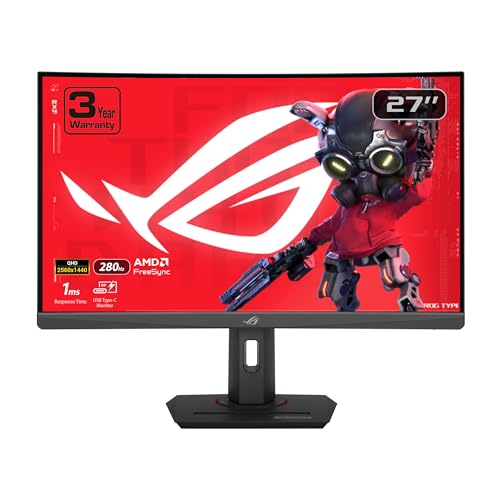
- 27-inch QHD curved display with up to 280Hz
- 1ms response time with ELMB SYNC and FreeSync
- USB-C plus HDMI and DisplayPort connectivity
Best For: Competitive players who want a fast curved 1440p monitor with USB-C
QHD USB-C All-Rounder
Dell 27 Plus QHD USB-C Monitor

- 27-inch QHD IPS panel with 144Hz and 1ms MPRT
- USB-C offers up to 65W power delivery for charging
- Built-in speakers and adjustable stand suit mixed-use setups
Best For: Clean desk setups that need gaming-ready speed and USB-C charging
Curved Budget USB-C Pick
SANSUI 27 Inch Curved USB-C Monitor

- 27-inch curved FHD display with 120Hz and 1ms MPRT
- USB Type-C and HDMI support simple device connections
- Built-in speakers and eye-comfort features add value
Best For: Budget buyers who want curved gaming basics with USB-C
Ultrawide Speed Monitor
LG UltraGear 34G630A-B Ultrawide Gaming Monitor

- 34-inch ultrawide 3440x1440 panel with 240Hz refresh
- USB-C includes 15W power delivery for simple laptop hookup
- FreeSync Premium and DisplayHDR 400 support smoother visuals
Best For: Competitive gaming and ultrawide setups with USB-C convenience
Immersive Ultrawide Pick – Pixio PXC348C Neo 34" 180Hz UWQHD Curved Gaming Monitor
If you want a gaming monitor with USB-C charging that also doubles as a productivity display, the Pixio PXC348C Neo is built around that idea. Its 34-inch 3440×1440 ultrawide panel, 1000R curve, and 180Hz refresh rate aim for a mix of immersion and speed, while the 65W USB-C port helps cut down on cable clutter.
Best For: Gamers who want an ultrawide curved screen with fast motion and simple single-cable laptop charging.
Pros:
- 34-inch UWQHD ultrawide panel with a deep 1000R curve for a more immersive view
- 180Hz refresh rate and 1ms response time for smoother-feeling gaming
- USB-C with 65W charging plus DisplayPort Alt mode for cleaner desk setups
- AMD FreeSync Premium and HDR support for tear-reduced play and richer visuals
Cons:
- USB-C charging tops out at 65W, which is lower than some docking-style monitors
- Ultrawide 3440×1440 may need a stronger GPU for gaming at native resolution
Overall, this Pixio is a strong choice if you want a gaming-first ultrawide that still handles laptop charging through USB-C. It balances speed, curve, and useful connectivity without trying to be a full office dock.
Docking-Friendly All-Rounder – ASUS VA34VCPSR 34" Curved USB-C Docking Monitor
The ASUS VA34VCPSR is a gaming monitor with USB-C charging that leans heavily into docking convenience. You get a 34-inch 3440×1440 curved panel, a USB-C port with up to 96W power delivery, plus RJ45 and a USB hub for a cleaner workstation that can still handle casual gaming.
Best For: Laptop users who want one-cable charging, wired networking, and a curved ultrawide display.
Pros:
- USB-C docking with up to 96W charging for compatible laptops
- 34-inch WQHD ultrawide screen with 1500R curvature
- RJ45 LAN port and USB hub for flexible desk connectivity
- Ergonomic stand with tilt, swivel, and height adjustment
Cons:
- 100Hz refresh rate is lower than faster esports-focused gaming monitors
- 4ms response time is more modest than dedicated competitive panels
This ASUS makes sense if your priority is a monitor that works like a docking station first and a gaming screen second. The feature set is especially practical for hybrid work setups that still want a wide, comfortable display.
Fast Budget-Friendly Choice – Sceptre 32" 210Hz QHD USB-C Gaming Monitor
If you want a gaming monitor with USB-C charging and a stronger focus on speed than size, the Sceptre E325B-QW200D is worth a look. It pairs a 32-inch 2560×1440 VA panel with a 210Hz refresh rate and 1ms blur reduction, while the USB Type-C input adds flexible connectivity for modern devices.
Best For: Fast-paced gaming on a QHD monitor with simple USB-C connectivity.
Pros:
- 210Hz refresh rate for very smooth motion in compatible games
- 1ms blur reduction and AMD FreeSync Premium for responsive gameplay
- USB Type-C input alongside dual HDMI and DisplayPort for flexible hookups
- 115% sRGB coverage and built-in speakers add everyday versatility
Cons:
- The notes list USB Type-C connectivity, but not explicit USB-C power delivery wattage
- 32-inch 16:9 layout is less immersive than an ultrawide alternative
This Sceptre is a practical pick if refresh rate is your top priority and you still want USB-C in the mix. It looks especially appealing for players who want a sharper QHD image without moving into ultrawide pricing or size.
Value Ultrawide Option – Philips 34" Curved WQHD USB-C Gaming Monitor
The Philips 346E2CUAE is a gaming monitor with USB-C charging aimed at users who want an ultrawide without jumping into the highest-end refresh rates. Its 34-inch 3440×1440 curved VA panel, 100Hz refresh rate, and one-cable USB-C power delivery make it a practical fit for mixed gaming and work use.
Best For: Buyers who want a curved ultrawide with USB-C power and a comfortable everyday gaming pace.
Pros:
- 34-inch WQHD ultrawide screen with a 1500R curve for more immersion
- USB-C charging makes it easy to power and connect a compatible notebook
- 1ms MPRT response time and Adaptive-Sync support for smoother gameplay
- Built-in speakers and height adjustment add convenience for desk setups
Cons:
- 100Hz refresh rate is solid, but not as fast as higher-end gaming panels
- Notes mention USB-C charging, but do not specify a charging wattage figure
For a gaming monitor with USB-C charging that still stays practical for work, this Philips model lands in a balanced middle ground. It is especially appealing if you want ultrawide immersion and useful extras without chasing extreme esports specs.
Budget-Friendly 24" 1080p Gaming Pick – ViewSonic VX2416A 24" 120Hz IPS Gaming Monitor
If you want a gaming monitor with USB-C charging-style convenience for a compact desk setup, the ViewSonic VX2416A is a straightforward 24-inch option. It pairs a 120Hz IPS panel with 1ms response time, FreeSync support, and USB-C plus HDMI and DisplayPort inputs, making it a practical choice for everyday gaming and mixed laptop use.
Best For: Players who want a compact 1080p gaming monitor with USB-C connectivity, smooth motion, and eye-care features.
Pros:
- 120Hz refresh rate and 1ms MPRT response time for smoother gameplay
- IPS panel with 178-degree viewing angles for consistent image quality
- USB-C, HDMI 1.4, and DisplayPort inputs for flexible device hookup
- Flicker-Free and Blue Light Filter features help reduce eye fatigue
Cons:
- 1080p resolution may feel limited for users wanting more desktop space
- USB-C connectivity is present, but charging output is not specified in the notes
This is a sensible pick if you value simple connectivity and reliable gaming basics over premium resolution or extras. It keeps the focus on smooth, comfortable play in a compact form factor.
Ultra-Wide USB-C Productivity Gaming Monitor – Dell 34 Plus 34" Curved USB-C Ultrawide Monitor
The Dell 34 Plus USB-C Curved Monitor is a strong gaming monitor with USB-C charging convenience if you want a wide screen that also handles work. Its 34-inch 3440 x 1440 VA panel, up to 120Hz refresh rate, FreeSync Premium, and single-cable USB-C setup with up to 65W power delivery make it well suited for a tidy desk and immersive use.
Best For: Buyers who want an ultrawide monitor with USB-C power delivery, rich color, and a clean one-cable setup.
Pros:
- USB-C connection supports up to 65W power delivery for simpler cable management
- 3440 x 1440 ultrawide display with 120Hz refresh rate and FreeSync Premium
- 99% sRGB and 95% DCI-P3 for vivid, accurate-looking color
- Built-in speakers and ergonomic tilt/height adjustment add convenience
Cons:
- VA panel response is listed at 0.03ms, but this model is more balanced than esports-focused
- Large 34-inch ultrawide footprint may be too much for smaller desks
For mixed gaming, media, and productivity, this Dell stands out by combining an ultrawide canvas with USB-C simplicity. It is especially appealing if you want fewer cables without giving up smooth motion or strong color coverage.
High-Refresh Curved Esports USB-C Pick – ASUS ROG Strix 27" QHD 280Hz Curved Gaming Monitor
If you need a gaming monitor with USB-C charging-style convenience and fast competitive performance, the ASUS ROG Strix XG27WCMS is built for speed. It combines a 27-inch QHD curved panel, up to 280Hz refresh rate, 1ms response time, ELMB SYNC, and FreeSync Premium support, so it is aimed at players who care about motion clarity and responsiveness.
Best For: Competitive gamers who want a fast 1440p curved monitor with USB-C connectivity and strong motion handling.
Pros:
- Up to 280Hz refresh rate for very smooth high-frame-rate gaming
- 1ms response time plus ELMB SYNC to help reduce ghosting and tearing
- QHD 1440p resolution on a 27-inch curved screen for a sharp, immersive view
- USB-C, HDMI, and DisplayPort connectivity for flexible setup options
Cons:
- Only one HDMI port is listed, so input flexibility is limited compared with some larger hub-style monitors
- USB-C is supported, but charging wattage is not specified in the product notes
This ASUS model makes the most sense if speed is your priority and you want a sharper 1440p image than standard 1080p options. It delivers a strong blend of esports-style performance and modern connectivity.
QHD USB-C All-Rounder – Dell 27 Plus QHD USB-C Monitor
If you want a gaming monitor with USB-C charging that also works well for everyday use, this 27-inch Dell keeps the setup simple without giving up speed. The QHD panel, 144Hz refresh rate, and 1ms MPRT are a strong fit for smooth play, while USB-C with up to 65W power delivery helps cut down on cable clutter.
Best For: Gamers and desk users who want one USB-C cable for display and charging plus a balanced 27-inch QHD screen.
Pros:
- 144Hz refresh rate and 1ms MPRT for smoother motion in games
- USB-C supports up to 65W power delivery for simplified charging
- QHD 2560×1440 resolution with 1500:1 contrast for sharper detail
- Built-in dual 3W speakers and ergonomic stand adjustments
Cons:
- USB-C charging is great for laptops, but the quick-access USB-C port only provides up to 15W
- Not an ultrawide or high-refresh esports model
This is a practical pick if you want a cleaner desktop and a monitor that handles both gaming and general productivity. It’s especially appealing when you value USB-C charging, decent speed, and flexible stand adjustments over flashy extras.
Curved Budget USB-C Pick – SANSUI 27 Inch Curved USB-C Monitor
This gaming monitor with USB-C charging focuses on value-friendly features for work and play. You get a 27-inch curved FHD screen, 120Hz refresh rate, 1ms MPRT, and Adaptive Sync, plus a single USB Type-C port for streamlined connectivity.
Best For: Budget-minded buyers who want a curved 27-inch monitor with USB-C connectivity and built-in speakers.
Pros:
- 120Hz refresh rate and 1ms MPRT for responsive everyday gaming
- Curved 27-inch panel with 4000:1 contrast and 110% sRGB
- USB Type-C plus HDMI connectivity for flexible device hookup
- Built-in speakers, HDR, anti-glare, anti-flicker, and low blue light features
Cons:
- FHD 1080p resolution is less detailed than QHD or ultrawide options
- USB-C power delivery is not specified in the supplied notes
If you want an affordable curved monitor with some gaming polish, this SANSUI model covers the basics well. It’s best viewed as a practical all-purpose screen rather than a premium high-resolution gaming display.
Ultrawide Speed Monitor – LG UltraGear 34G630A-B Ultrawide Gaming Monitor
If you want a gaming monitor with USB-C charging and serious speed, this 34-inch LG UltraGear is the most performance-focused option here. The 3440×1440 ultrawide panel, 240Hz refresh rate, 1ms response time, and FreeSync Premium are built for fast, fluid play, while USB Type-C with 15W power delivery helps keep laptop connections tidy.
Best For: Competitive players and ultrawide fans who want fast motion, extra screen space, and USB-C convenience.
Pros:
- 240Hz refresh rate with 1ms response time for fast gaming
- 3440×1440 ultrawide resolution gives extra room for games and overlays
- USB Type-C with 15W power delivery plus DisplayPort and HDMI
- FreeSync Premium and DisplayHDR 400 support smoother, more vivid gameplay
Cons:
- USB-C power delivery is limited to 15W, so it is not a high-power charging solution
- Ultrawide format may be more desk-space intensive than a standard 27-inch monitor
This LG is the strongest gaming-first choice in the group if speed matters most. The ultrawide format and USB-C hookup make it especially appealing for players who also want a cleaner one-cable laptop setup.
How We Picked the Best Gaming Monitor with USB-C Charging
We prioritized models that combine gaming performance with real-world USB-C usefulness. That means strong refresh rates, low response times, and panel types suited to fast motion, plus USB-C features such as charging, display connectivity, or dock-style convenience. We also looked at resolution, screen size, curvature, and extras like speakers, hubs, and network ports where they add value.
Quick Comparison: What Stands Out
The list splits into a few clear categories. Ultrawide 34-inch models are best for immersive play and multitasking. 27-inch QHD displays offer the most balanced mix of sharpness and desk-friendly size. If raw speed matters most, higher-refresh options are the better fit, while 1080p models are easier on budget and GPU demands.
Key Buying Factors for a Gaming Monitor with USB-C Charging
USB-C Power Delivery
Check how much wattage the monitor can supply. Lower power delivery may charge lightweight laptops slowly, while higher output is more useful for productivity machines that stay plugged in all day. If you want a single-cable setup, make sure the port supports both display input and meaningful charging.
Refresh Rate and Response Time
For competitive gaming, higher refresh rates and fast response times matter more than extra features. A 144Hz, 180Hz, 240Hz, or 280Hz panel can feel much smoother than a 60Hz screen, especially in shooters and racing games.
Resolution and Screen Size
QHD is a strong sweet spot for 27-inch gaming, while 34-inch ultrawides work well at 3440 x 1440. If your graphics card is midrange, higher resolutions may require more performance headroom, especially at very high refresh rates.
Panel Type and Curvature
VA panels usually deliver stronger contrast, which suits dark game scenes and cinematic play. IPS often offers better viewing angles and color consistency. Curved screens can improve immersion, especially in ultrawide formats, but they are a preference rather than a requirement.
Who Should Buy Which Gaming Monitor with USB-C Charging?
If you want the cleanest desk and use a laptop, choose a Gaming Monitor with USB-C Charging that offers enough wattage for your device. If you care most about competitive play, pick the fastest refresh rate you can afford. If you want a do-it-all display for both work and gaming, a 27-inch QHD model is usually the safest choice. For immersive single-player games and multitasking, an ultrawide 34-inch screen is often the most satisfying option.
In short, match the USB-C capability to your laptop, then let refresh rate, resolution, and panel quality determine the best fit for your gaming style.