
Flight sim rigs can outgrow a PC’s built-in USB ports fast. Between yokes, pedals, throttles, button boxes, head tracking, and VR dongles, a reliable hub helps keep everything connected and organized.
This guide focuses on practical USB hub options for flight simulator peripherals, with an emphasis on stable power delivery, enough ports for expansion, and simple access during setup and tuning.
Best 10 USB Hub for Flight Simulator Peripherals Picks for 2026
VR-Optimized Pick
Rebuff Reality 4-Port USB 3.0 Hub for Stable Gaming
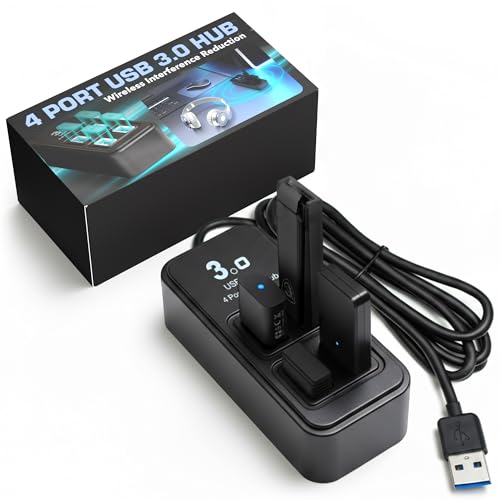
- Wide-spaced ports help reduce USB interference.
- Powered design supports stable peripheral connections.
- Compact, weighted base stays put on a desk.
Best For: Sim pilots and VR users who want a compact, stable hub.
High-Capacity Desk Hub
Wenter 10-Port Powered USB Hub with Card Readers

- 10 USB 3.0 ports add plenty of expansion room.
- Individual switches make device control easier.
- 36W powered design includes surge protection.
Best For: Busy sim or desktop setups that need lots of ports.
Expansion Pick
Rebuff Reality 7 Port USB 3.0 Hub for Gaming Stability

- Seven ports give more room for peripherals.
- Interference-focused layout supports stable connections.
- Powered, weighted design suits desk use.
Best For: Sim pilots who want more ports with stable USB performance.
Maximum-Port Pick
Wenter 13-Port Powered USB Hub with Switches

- 13 USB ports provide the most expansion room.
- Individual switches help control each device.
- Powered aluminum build includes surge protection.
Best For: Large sim setups that need maximum ports and control.
Flying V Desk Hub
4-Port USB 3.0 Tower with 2 ft Cable

- 4 USB 3.0 ports for peripherals
- 2 ft cable improves placement flexibility
- Up to 5 Gbps transfer speed
Best For: Sim rigs that want a reachable, desktop-friendly hub
Switch-Ready Utility Hub
4-Port USB 2.0 with LED Switches
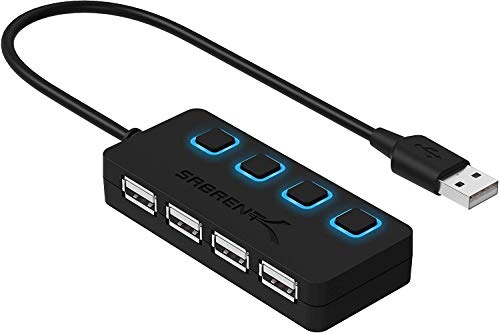
- Individual switches for each port
- 4 USB 2.0 ports with plug-and-play setup
- LED indicators show power status
Best For: Basic sim peripherals where per-port control is useful
Ultra Compact Sim Splitter

- Ultra-compact and lightweight
- 4 USB 3.0 ports at up to 5 Gbps
- Plug-and-play across major operating systems
Best For: Portable or space-saving sim setups
High-Port Expansion Pick
ONFINIO 10-Port Powered USB 3.0 Hub

- 10 USB 3.0 data ports
- 5Gbps transfer speed
- Individual on/off switches
Best For: Large sim setups needing lots of powered USB connections
Mixed Power-and-Data Option
ONFINIO 10-Port Hub with 3 Charging Ports

- 7 USB 3.0 data ports
- 3 smart-charging ports
- Independent on/off switches
Best For: Users who want sim peripherals plus device charging from one hub
RGB Gaming-Style Pick
ZIUMIER 10-Port USB 3.0 Hub with RGB
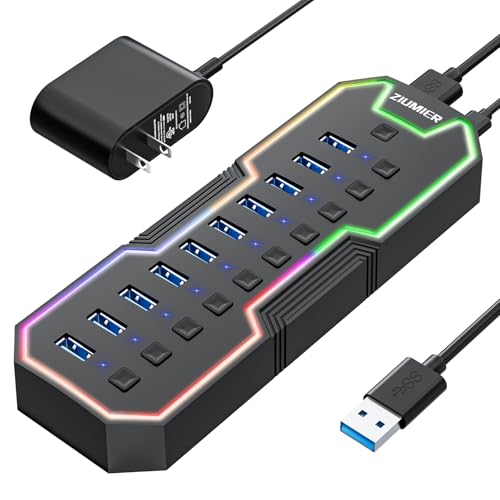
- 10 USB A ports
- RGB strip with on/off control
- Individual switches and LED status lights
Best For: Users who want a gaming look with powered USB expansion
VR-Optimized Pick – Rebuff Reality 4-Port USB 3.0 Hub for Stable Gaming
If you need a USB hub for flight simulator peripherals that also plays nicely with wireless gear, this 4-port Rebuff Reality hub is built around stability. Its wide-spaced USB 3.0 ports and interference-reduction design make it a practical choice for a cockpit setup with a mouse, keyboard, headset, and dongles that need steady performance.
Best For: Sim pilots and VR users who want a compact hub focused on reducing wireless interference.
Pros:
- Wide-spaced ports are designed to reduce USB 3.0 noise and cross-interference.
- Includes a power adapter for more consistent performance with demanding devices.
- Compact, weighted, and non-slip for a tidy sim desk.
- Plug-and-play on Windows and Mac.
Cons:
- Only four ports, so it suits smaller peripheral setups.
- Focused more on stability than maximum port count.
This is a strong fit if your priority is dependable connectivity over sheer expansion. For flight sim rigs with a few critical peripherals, the interference-focused layout is the main advantage.
High-Capacity Desk Hub – Wenter 10-Port Powered USB Hub with Card Readers
This powered USB hub is a good fit if your flight simulator peripherals are only part of a larger desk setup. With 10 USB 3.0 ports, SD/TF card readers, and individual switches, it offers lots of expansion for controllers, accessories, and other devices while keeping everything organized.
Best For: Users who need many ports and per-device control for a busy sim or desktop setup.
Pros:
- 10 USB 3.0 ports plus SD/TF readers expand a single connection into a larger hub.
- Individual on/off switches make it easier to manage multiple devices.
- 36W power adapter and surge protection support stable powered use.
- Aluminum shell helps with heat dissipation.
Cons:
- Larger than a minimal hub, so it takes more desk space.
- Designed for broad expansion rather than dongle-specific interference control.
If your sim area keeps growing, this hub gives you room to add gear without constantly swapping cables. The switchable ports are especially useful when you want to leave some devices off between sessions.
Expansion Pick – Rebuff Reality 7 Port USB 3.0 Hub for Gaming Stability
For a USB hub for flight simulator peripherals, this 7-port Rebuff Reality model is a better middle ground than a basic splitter. It keeps the same interference-reduction focus as the smaller version, but adds more room for a larger cockpit layout with multiple devices that need dependable USB 3.0 connections.
Best For: Sim pilots who want more ports without giving up the brand’s stability-focused design.
Pros:
- Seven USB 3.0 ports provide more flexibility for a growing setup.
- Wide-spaced port layout is designed to reduce interference and dropouts.
- Includes a power adapter for steady use with demanding peripherals.
- Weighted, compact design helps keep the hub anchored on the desk.
Cons:
- Still not as expansive as larger powered hubs.
- Best suited to peripherals where stability matters more than extra features.
This model makes sense when you need a few more ports but still care most about reliable signal handling. It’s a practical upgrade for sim rigs that have outgrown a smaller hub.
Maximum-Port Pick – Wenter 13-Port Powered USB Hub with Switches
If your flight simulator peripherals share space with cameras, microphones, or other desktop gear, this 13-port powered USB hub gives you a lot of expansion in one unit. It combines USB 3.0 ports, SD/TF card reading, and individual switches, making it useful when you want to manage many devices from a single powered hub.
Best For: Large sim setups that need maximum port count and per-port control.
Pros:
- 13 USB ports offer the biggest expansion in this group.
- Individual switches and LED indicators help manage connected devices.
- Powered design with a 12V/3A adapter supports stable operation.
- Aluminum housing and surge protection add durability.
Cons:
- Overkill if you only need a few flight sim peripherals.
- Bulky compared with smaller desk hubs.
This is the most flexible option here if your setup keeps expanding. It’s especially appealing when you want to connect and control many peripherals without constantly unplugging anything.
Flying V Desk Hub – 4-Port USB 3.0 Tower with 2 ft Cable
If you want a USB hub for flight simulator peripherals with a little more desk presence, this 4-port USB 3.0 tower gives you extra connections for controllers, keyboards, mice, and flash drives. The 2 ft extended cable makes it easier to place the hub where your gear is accessible, while the vertical design and adhesive tape help keep your setup tidy.
Best For: Sim rigs that need a compact, easy-to-reach hub with a long cable and a distinctive desktop footprint.
Pros:
- Four USB 3.0 ports for adding multiple peripherals to one USB connection
- 2 ft cable helps reach PCs under desks or laptops set farther away
- USB 3.0 speeds up to 5 Gbps for fast data transfers
- Includes adhesive tape to help keep the hub in place
Cons:
- Not designed to charge devices
- Vertical design and LED lighting may not suit every cockpit or desk style
This is a practical pick if your sim setup needs a straightforward expansion hub with a bit more reach than many compact models. The focus here is convenience and cable management rather than charging or advanced features.
Switch-Ready Utility Hub – 4-Port USB 2.0 with LED Switches
For a USB hub for flight simulator peripherals where simple control matters more than raw speed, this 4-port USB 2.0 model is built around individual power switches. That makes it easy to toggle specific devices on and off as needed, which can be handy when you want a neat, low-friction way to manage accessories on a busy PC or Mac setup.
Best For: Sim pilots who want per-port control for basic peripherals and don’t need USB 3.0 speeds.
Pros:
- Four USB 2.0 ports expand a single USB connection
- Individual LED-lit on/off switches for each port
- Plug-and-play setup with no driver installation required
- Reverse compatible with USB 1.1 devices
Cons:
- USB 2.0 speed tops out at 480 Mbps
- Does not support charging
This hub makes sense if your flight sim peripherals are mostly basic USB devices and you value switching them individually. It is less about speed and more about easy control and simple expansion.
Ultra Compact Sim Splitter – 4-Port USB 3.0 Pocket Hub
If you need a USB hub for flight simulator peripherals that stays out of the way, this ultra-compact 4-port USB 3.0 splitter is built for portability and simple expansion. It adds extra ports for items like a keyboard, mouse, flash drive, or printer, and the lightweight design makes it easy to move between a desktop rig and a travel setup.
Best For: Portable sim setups or small desks where a lightweight, no-fuss hub is preferred.
Pros:
- Four USB 3.0 ports expand a laptop or desktop setup
- 5 Gbps transfer speed with backward compatibility to USB 2.0 and 1.1
- Ultra-compact, lightweight design for easy travel
- Plug-and-play compatibility for Windows, macOS, Linux, Chrome OS, and more
Cons:
- Plastic enclosure may feel less substantial than metal-bodied hubs
- No mention of dedicated switches or charging support
This is the most portable option in the group and fits well if your sim peripherals need a small hub that can disappear into a bag or beside a compact rig. It favors simplicity, speed, and flexibility over extra hardware controls.
High-Port Expansion Pick – ONFINIO 10-Port Powered USB 3.0 Hub
If you need a USB hub for flight simulator peripherals, this ONFINIO powered hub is a practical way to connect a larger control setup to one computer. With 10 USB 3.0 data ports and 5Gbps transfer speed, it’s aimed at keyboards, mice, controllers, flash drives, and other peripherals that benefit from stable, fast expansion.
Best For: Sim rigs that need lots of always-ready USB ports for yokes, throttles, button boxes, and other peripherals.
Pros:
- 10 USB 3.0 ports give you plenty of room for multiple flight sim peripherals.
- 5Gbps transfer speed supports fast data handling for connected devices.
- Individual on/off switches make it easy to manage devices without unplugging them.
- 12V/2A external power adapter helps provide powered hub operation.
Cons:
- It is a data-focused hub, so it does not add dedicated charging ports.
- Plastic enclosure may feel basic in a premium cockpit setup.
This is a straightforward expansion hub for simmers who mainly want more powered USB connections and simple port control. If your setup grows over time, the 10-port layout gives you useful headroom without unnecessary extras.
Mixed Power-and-Data Option – ONFINIO 10-Port Hub with 3 Charging Ports
This USB hub for flight simulator peripherals is a smart choice if your desk also needs device charging alongside controller expansion. It combines 7 USB 3.0 data ports with 3 smart-charging ports, so you can keep sim gear connected while also topping off phones, tablets, or cameras from the same powered unit.
Best For: Sim racers and flight sim users who want both peripheral expansion and extra charging ports in one hub.
Pros:
- 7 USB 3.0 data ports provide room for multiple simulator peripherals.
- 3 smart-charging ports add convenient charging for mobile devices.
- 5Gbps transfer speed supports quick file and data transfers.
- Each port has an independent switch for easier device management.
Cons:
- Only 7 of the 10 ports are data ports, so expansion is lower than a full 10-port data hub.
- Charging ports are aimed at power, not peripheral data use.
For mixed-use desks, this hub stands out by covering both sim hardware and everyday charging needs. If you want fewer compromises on desk clutter, the split between data and charging ports can be genuinely useful.
RGB Gaming-Style Pick – ZIUMIER 10-Port USB 3.0 Hub with RGB
If you want a USB hub for flight simulator peripherals with a bit more visual flair, this ZIUMIER powered hub adds RGB lighting to a 10-port USB 3.0 layout. It still focuses on the basics that matter for a sim cockpit: 5Gbps data speed, individual port switches, and powered operation for multiple connected devices.
Best For: Flight sim setups where you want reliable USB expansion and RGB styling in the same hub.
Pros:
- 10 USB A ports offer broad connectivity for sim peripherals and accessories.
- 5Gbps transfer speed supports quick data movement.
- Individual on/off switches and LED indicators help manage connected gear.
- RGB strip adds a gaming-oriented look, and the light can be switched on or off.
Cons:
- RGB styling is optional utility-wise, so it may not matter for a purely functional cockpit.
- Plastic enclosure keeps the build simple rather than premium.
For simmers who want their desktop or cockpit to look more like a gaming station, this hub adds personality without dropping the core powered-hub features. It’s a solid pick when you want USB expansion that still feels tailored to a gaming setup.
How We Picked the Best USB Hub for Flight Simulator Peripherals
For a USB Hub for Flight Simulator Peripherals, reliability matters more than flashy extras. We prioritized powered models, sensible port counts, durable builds, and features that help prevent disconnects during long sim sessions. Hubs with individual switches, stable 5V/12V power adapters, and better spacing also scored well for cockpit-style setups.
Quick Comparison
If you only need a few low-draw devices, a compact 4-port hub can be enough. If your setup includes multiple controllers, RGB accessories, and VR-related gear, a 7- to 13-port powered hub gives you more room to grow. USB 3.0 is the safer default for most sim peripherals, while USB 2.0 can still work well for simple inputs like some switches or legacy devices.
Key Buying Factors for USB Hub for Flight Simulator Peripherals
Power Delivery
Powered hubs are the best choice for flight sim rigs because they reduce the chance of bandwidth or power-related dropouts. Look for an included adapter with enough output for every device you plan to connect.
Port Mix and Layout
More ports are useful, but placement matters too. Wider spacing can make it easier to connect bulky cables, and individual on/off switches can help isolate a misbehaving peripheral without unplugging everything.
Data Speed and Device Type
Most control devices do not need extreme speed, but USB 3.0 offers a solid modern baseline. If you use VR dongles, head tracking, or devices that benefit from lower interference, choose a hub designed for stable data connections rather than just charging.
Build Quality and Cable Management
Metal housings, sturdy connectors, and a manageable cable length make a difference in a crowded sim desk. A hub that sits securely or has a tower-style form can also keep ports within easy reach.
Who Should Buy Which USB Hub for Flight Simulator Peripherals?
Choose a compact 4-port hub if your setup is minimal and you mainly need a few input devices. Go with a powered 10- or 13-port model if you run multiple flight sim peripherals, USB accessories, and expansion gear on the same desk. If you use wireless dongles or want to reduce interference, look for a hub specifically positioned as stable for gaming or VR use. For older peripherals or simple controls, a basic hub can still be a cost-effective add-on, but powered USB hub models are the smarter long-term pick for most sim builders.