
Need one compact hub to charge your laptop, connect accessories, and keep your desk cleaner? A good USB hub with 100W power delivery can do all three without slowing your setup down.
Below, we’ve narrowed the field to 10 practical picks for everyday use, travel, and workstation builds, with an eye on charging performance, port mix, and display support.
Best 10 USB Hub with 100W Power Delivery Picks for 2026
Portable 7-in-1 4K Travel Dock

- 95W pass-through charging
- 4K HDMI plus SD/Micro SD support
- Dual USB-A and USB-C 5Gbps ports
Best For: travel-friendly laptop and tablet setups
High-Speed 4-Port Data Hub

- Four USB-C ports with 10Gbps speeds
- Up to 100W pass-through charging
- Compact aluminum build with braided cable
Best For: users who want a slim, data-focused USB-C hub
Powered 18-in-1 Desktop Dock

- 100W USB-C PD charging port
- 18-in-1 layout with HDMI, SD/TF, and audio
- Includes 65W adapter and smart button
Best For: desktop setups needing many ports and powered stability
Compact All-in-One
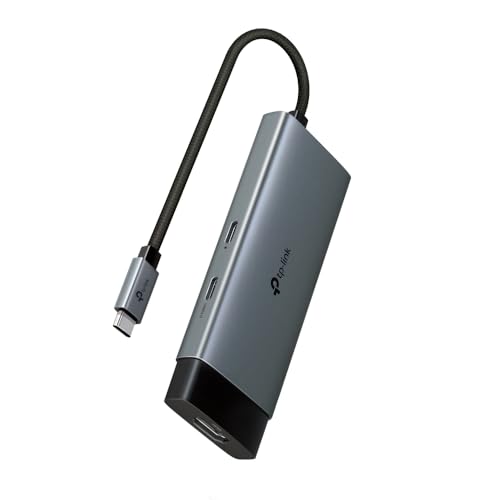
- 100W PD passthrough charging
- 4K@60Hz HDMI output
- Two USB-A plus one USB-C data port
Best For: Portable everyday use with charging and an external monitor
USB-C Data Splitter

- Four USB-C 3.2 Gen 2 data ports
- 100W PD charging support
- No video output included
Best For: USB-C-heavy users who need fast data and charging
Best Balanced All-Rounder

- Two 10Gbps USB-C and two USB-A ports
- 4K@60Hz HDMI output
- 100W PD passthrough charging
Best For: A balanced travel or desk hub with fast data and display support
Portable Data Hub
Anker 8-in-1 5Gbps USB-C/USB-A Hub

- 8 ports total with 4 USB-C and 3 USB-A data ports
- 100W PD-in supports pass-through charging with your charger
- No monitor support, so it stays focused on data and power
Best For: People who want lots of USB ports in a simple travel-friendly hub
Budget Charging Hub
TIMEJONS 5-in-1 100W USB-C Hub

- Five ports include USB 3.0, USB 2.0, USB-C data, and PD charging
- USB 3.0 supports up to 5Gbps transfers
- Pass-through charging needs your own charger
Best For: Users who want a small, easy hub for charging and everyday accessories
4K Display Hub
Acer 4-Port 10Gbps USB-C Hub with 4K Output

- Adds 4K@60Hz USB-C video output on compatible systems
- Two USB-C data ports support up to 10Gbps
- 100W PD input supports up to 90W output to the host
Best For: People who need a USB-C hub that can handle display output, data, and charging
Portable 7-in-1 4K Travel Dock – UGREEN Revodok USB-C Hub
If you want a USB hub with 100W power delivery that covers the everyday essentials, this 7-in-1 UGREEN hub is built around a balanced mix of charging, display, and data expansion. It gives you 4K HDMI output, dual USB-A ports, a USB-C data port, and SD/Micro SD card reading in a compact aluminum shell.
Best For: MacBook, iPad Pro, and USB-C laptop users who want a simple all-in-one travel hub with charging and media access.
Pros:
- Supports up to 95W pass-through charging, with 5W reserved for hub functions.
- Includes 4K HDMI plus USB-C, dual USB-A 5Gbps ports, and SD/Micro SD card slots.
- Compact aluminum design fits a wide range of USB-C devices.
- Broad compatibility covers MacBook, iPad Pro, XPS, ThinkPad, Steam Deck, and more.
Cons:
- Only one USB-C data port, so expansion is modest compared with larger hubs.
- USB ports top out at 5Gbps rather than 10Gbps.
- Best suited to lightweight docking rather than heavy peripheral setups.
This is a practical pick if you need a straightforward USB hub with 100W power delivery and a useful mix of ports without adding bulk. It leans more toward portability and core laptop needs than maximum speed or port count.
High-Speed 4-Port Data Hub – Satechi 10Gbps USB-C Hub
This USB hub with 100W power delivery is a clean fit for users who care more about fast data than extra display outputs. Satechi’s 4-in-1 design keeps things simple with four USB-C data ports, 10Gbps transfer speeds, and up to 100W pass-through charging in a very compact aluminum body.
Best For: MacBook and USB-C users who want a slim, high-speed data hub for travel or desk use.
Pros:
- Four USB-C data ports support up to 10Gbps transfer speeds.
- Up to 100W power delivery for charging power-hungry devices.
- Very compact and lightweight for pocket or carry-on storage.
- Premium aluminum enclosure with braided cable and reinforced neck.
Cons:
- No HDMI, card reader, or USB-A ports.
- Focused on data expansion rather than a full docking setup.
- All ports are USB-C, which may be limiting for mixed accessories.
If your priority is fast file transfers and easy charging, this Satechi hub keeps the formula tight and efficient. It’s a strong choice when you want a minimal USB-C hub that still handles 100W pass-through power.
Compact 4-Port USB-C Splitter – UGREEN 10Gbps PD Hub
If you need a USB hub with 100W power delivery mainly for adding more USB-C connections, this UGREEN splitter is designed for speed and simplicity. It offers four USB-C 3.2 data ports, 10Gbps transfer rates, and a dedicated PD input port in a small, lightweight body.
Best For: Users who want a compact USB-C expansion hub for fast data transfers and laptop charging.
Pros:
- Supports up to 95W charging through its PD 100W input port.
- Four USB-C data ports deliver up to 10Gbps transfers.
- Plug-and-play operation with no drivers required.
- Works with laptops, tablets, phones, and USB-C or Thunderbolt devices.
Cons:
- USB-C data ports do not support video output.
- No USB-A, HDMI, or card reader functionality.
- Best for data and charging, not for multi-display docking.
This hub is a good fit when you want a tidy USB-C splitter instead of a full dock. It keeps the focus on 10Gbps data and pass-through charging, making it easy to carry and easy to use.
Powered 18-in-1 Desktop Dock – Giftos C1 Pro USB-C Hub
For buyers looking for a more fully loaded USB hub with 100W power delivery, the Giftos C1 Pro is built like a desktop docking station. It combines 4K@60Hz HDMI, multiple 10Gbps and 5Gbps USB ports, SD/TF, audio, and a dedicated 100W USB-C charging port, all in a powered aluminum design.
Best For: Desktop users, creators, and multitaskers who want a powered hub with lots of ports and stable connectivity.
Pros:
- 18-in-1 layout includes HDMI, USB-C charging, USB data ports, SD/TF, and audio.
- Dedicated 100W USB-C PD port plus included 65W adapter for powered operation.
- 10Gbps USB 3.2 ports help move files quickly.
- Smart button adds display-off and private-charging modes.
Cons:
- Requires the included 65W adapter to function properly.
- USB-A/C data ports do not support video output.
- Two USB-C PD charging ports are not recommended for high-power computers.
This is the most feature-rich option in the group and makes the most sense for a fixed workspace. If you need a USB hub with 100W power delivery plus broad port selection, it offers a lot of utility in one powered dock.
Compact All-in-One – TP-Link 5-in-1 USB-C Hub
If you want a USB hub with 100W power delivery that also adds display output, the TP-Link UH5020C is a straightforward pick for light desk setups and mobile work. It turns one USB-C port into HDMI, charging passthrough, a USB-C data port, and two USB-A data ports, so you can keep a laptop powered while still connecting accessories and an external display.
Best For: Users who need a compact, plug-and-play hub for charging, 4K display output, and a few high-speed peripherals.
Pros:
- 100W USB-C Power Delivery lets you charge while using the hub
- 4K@60Hz HDMI output supports external monitor use
- Two USB-A data ports and one USB-C data port provide flexible connectivity
- Driver-free compatibility across major operating systems and devices
Cons:
- Only one HDMI output, so it is not aimed at multi-monitor expansion
- USB data ports are rated at 5 Gbps, not the faster 10 Gbps class
- Designed as a compact hub rather than a full docking station
This is a well-rounded choice if your priority is simple expansion with charging and a monitor connection in one portable adapter. The aluminum alloy case, braided cable, and self-storing connector add durability without making it bulky.
USB-C Data Splitter – Acer 10Gbps USB-C Hub
This USB hub with 100W power delivery is best viewed as a fast USB-C splitter for data-heavy setups, not a display adapter. The Acer hub gives you four USB-C 3.2 Gen 2 ports plus PD charging, so it suits users who need to connect multiple USB-C devices and move files quickly while keeping a laptop powered.
Best For: People who want a compact, high-speed USB-C hub for charging and multiple USB-C accessories without video output.
Pros:
- Four USB-C 3.2 Gen 2 ports support up to 10Gbps data transfer
- 100W Power Delivery port helps keep a laptop charged
- Plug-and-play support across Windows, macOS, Linux, iPadOS, iOS, and Android
- Aluminum alloy enclosure helps with heat dissipation and portability
Cons:
- No video output, so it will not connect to an external monitor
- All expansion is USB-C focused, with no USB-A ports included
- Not intended for users who need an all-purpose docking hub
If your workspace is built around USB-C peripherals, this model offers a clean, fast way to expand one port without adding display features you do not need. The compact aluminum design also makes it easy to carry for mobile office use.
Best Balanced All-Rounder – UGREEN Revodok Pro 6-in-1
The UGREEN Revodok Pro is a strong USB hub with 100W power delivery if you want a balanced mix of charging, monitor support, and high-speed ports. Its 6-in-1 layout combines two 10Gbps USB-C ports, two 10Gbps USB-A ports, 4K@60Hz HDMI, and PD charging, making it a practical one-cable expansion for laptops and compact productivity setups.
Best For: Users who need a versatile hub for charging, an external display, and multiple fast data ports.
Pros:
- Two 10Gbps USB-C ports and two 10Gbps USB-A ports support fast transfers
- 4K@60Hz HDMI adds external display capability
- 100W Power Delivery supports passthrough charging
- Works with a wide range of laptops, tablets, and handheld devices
Cons:
- Only one HDMI port is included, so it is not built for multiple displays
- Aluminum and plastic construction is functional rather than premium-heavy
- Best suited to single-hub expansion, not full desktop docking
For most users, this is the most flexible all-rounder in the group because it combines fast ports, video output, and power delivery without sacrificing portability. It is a smart choice when you want one compact hub to cover the essentials.
Portable Data Hub – Anker 8-in-1 5Gbps USB-C/USB-A Hub
If you need a USB hub with 100W power delivery for everyday port expansion, this Anker 8-in-1 model keeps the focus on data and charging support. It combines 4 USB-C ports and 3 USB-A ports at 5Gbps, plus a 100W PD-in port for pass-through laptop charging when paired with your own PD wall charger.
Best For: Users who want a compact, high-port-count USB data hub for laptops, MacBooks, and iPads without monitor output.
Pros:
- 8-in-1 layout with 4 USB-C and 3 USB-A data ports.
- 5Gbps transfer speeds for quicker file moves than USB 2.0.
- 100W max PD-in support for pass-through laptop charging.
- 2-in-1 connector improves compatibility with USB-C and USB-A devices.
Cons:
- Does not support monitor connections through any port.
- Does not charge a laptop on its own; a PD wall charger is required.
Overall, this is a practical pick if you want a straightforward USB hub for extra peripherals and charging support, not a display dock. The included 45W adapter adds value, but the hub is best suited to users who only need fast data and power pass-through.
Budget Charging Hub – TIMEJONS 5-in-1 100W USB-C Hub
This USB hub with 100W power delivery is a simple plug-and-play choice for adding a few extra connections to a USB-C laptop or tablet. It offers a mix of one USB 3.0 port, two USB 2.0 ports, one USB-C data port, and a PD pass-through port that supports up to 100W charging when used with your own charger.
Best For: Everyday users who want a compact hub for charging and basic peripherals like keyboards, mice, and flash drives.
Pros:
- 5-in-1 design with USB 3.0, USB 2.0, USB-C data, and PD charging.
- USB 3.0 transfers up to 5Gbps for faster file movement.
- USB 2.0 ports are suitable for accessories like keyboards and mice.
- Plug-and-play setup with no drivers required.
Cons:
- Pass-through charging requires a charger, which is not included.
- USB 2.0 ports are slower than the USB 3.0 connection.
As a compact hub, it covers the basics well without adding complexity. It is most appealing if you mainly need a few extra ports and 100W charging support rather than advanced features.
4K Display Hub – Acer 4-Port 10Gbps USB-C Hub with 4K Output
If you want a USB hub with 100W power delivery and real display support, this Acer USB-C hub stands out from basic data splitters. It adds 4K@60Hz USB-C video output, two 10Gbps USB-C data ports, and 100W PD charging support, but it requires a full-featured USB-C port with DP Alt Mode, USB4, or Thunderbolt.
Best For: Laptop users who need high-speed USB-C data, external display output, and charging through one hub.
Pros:
- 4K@60Hz USB-C video output for compatible monitors.
- Two USB-C data ports rated up to 10Gbps.
- 100W PD input with up to 90W output to the host device.
- All-USB-C design keeps the hub streamlined for modern devices.
Cons:
- Video output only works with full-featured USB-C, USB4, or Thunderbolt ports.
- PD port is charging-only and does not carry data or video.
- Requires a 100W+ charger and cable, which are not included.
This is the most capable option here if you need both display output and fast USB-C connectivity. Just make sure your laptop and monitor support the required video standards before buying.
How We Picked the Best USB Hub with 100W Power Delivery
We focused on hubs that balance real-world charging, useful connectivity, and broad device compatibility. That means prioritizing stable 100W pass-through support, enough ports for common peripherals, and modern data speeds that actually help with drives, cameras, and accessories.
We also weighed HDMI output where included, build quality, and whether the hub looks suitable for a laptop bag, a minimal desk, or a more permanent workstation.
Quick Comparison
If you want the simplest setup, a 4- or 5-port hub is often enough. If you need card readers, HDMI, and multiple USB ports, a larger multiport dock is the better fit. For users who move big files often, a USB Hub with 100W Power Delivery and 10Gbps ports is usually the sweet spot.
Key Buying Factors for a USB Hub with 100W Power Delivery
Power Delivery Limits
Not every 100W-rated hub delivers the full 100W to your laptop. Some reserve power for the hub itself, and the actual output can be lower. Check whether the hub supports pass-through charging and whether your charger also meets the wattage you need.
Port Types and Layout
Choose USB-C, USB-A, HDMI, SD, or audio based on what you use most. A hub with the right ports is better than one packed with extras you never touch.
Data Speed
For external SSDs, capture devices, and fast syncing, 10Gbps ports are worth it. If you only plan to connect a mouse, keyboard, and headset, 5Gbps is usually sufficient.
Display Support
If you plan to run an external monitor, confirm the resolution and refresh rate. Many compact hubs support 4K, but not all support 4K at 60Hz.
Device Compatibility
MacBook, Windows laptops, iPad Pro, Chromebook, and handheld PCs can all work well, but feature support may vary by port and operating system. Always verify compatibility with your specific model.
Who Should Buy Which USB Hub with 100W Power Delivery?
Choose a compact 4- or 5-in-1 hub if you mainly need charging plus a few essentials. Go with a larger multiport model if you want one dock for work, travel, and home use. If you rely on fast file transfers, pick one with 10Gbps data ports. If your priority is a cleaner desk and a single-cable laptop setup, a USB Hub with 100W Power Delivery and HDMI can be the most practical all-around upgrade.