
If you need more than a basic backup drive, an external hard drive with RAID can give you faster transfers, redundancy, or both. That makes it a smart pick for photographers, video editors, and anyone storing important files.
In this roundup, we focus on desktop RAID drives and RAID enclosures that balance capacity, performance, and reliability across different use cases.
Best 10 External Hard Drive with RAID Picks for 2026
Desktop RAID Storage

- 16TB desktop RAID storage
- USB 3.1 Gen 1 with USB 3.0 compatibility
- 256-bit AES encryption and password protection
Best For: Users who want a high-capacity desktop RAID drive with backup tools and security features.
RAID Enclosure

- Supports RAID 0, RAID 1, JBOD, and Single
- USB 3.2 Gen 2 up to 10Gbps
- Diskless 2-bay enclosure with tool-free trays
Best For: Buyers who want a flexible two-bay RAID enclosure and plan to supply their own drives.
Creative RAID Desktop Drive
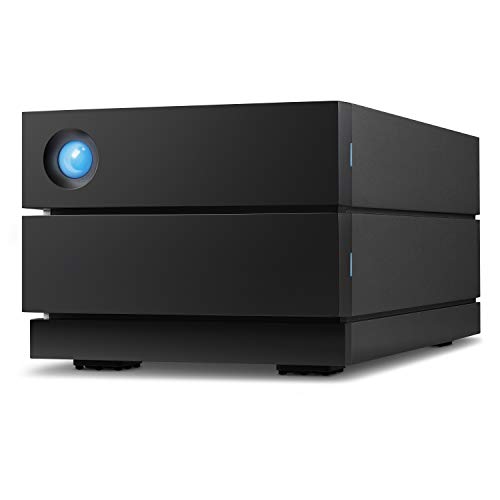
- Up to 16TB with speeds up to 440MB/s
- RAID 0/1 setup wizard and USB-C support
- Hot-swappable IronWolf Pro enterprise drives
Best For: Photographers, filmmakers, and other creators who want fast desktop RAID storage with recovery support.
Five-Bay RAID Enclosure

- Eight modes including RAID 0, 1, 3, 5, and 10
- Five bays with up to 110TB capacity
- USB 3.0 plus aluminum cooling-focused design
Best For: Users who want a large, configurable multi-drive RAID enclosure for big storage workloads.
Best for Easy Setup
- 28TB desktop enclosure with RAID-0 readiness
- 256-bit AES encryption and password protection
- Includes backup software and USB hub ports
Best For: Windows users needing secure, high-capacity desktop RAID backup
Diskless 4-Bay Enclosure

- Diskless 4-bay DAS with no RAID function
- USB 3.2 Gen2 Type-C up to 10Gbps
- Hot-swappable, tool-free drive trays
Best For: DIY storage builders who want a fast multi-bay enclosure
Pro RAID Desktop Drive

- 40TB RAID desktop drive for Mac and PC
- Up to 550MB/s with RAID 0/1 setup
- Hot-swappable enterprise-class drives included
Best For: Creative professionals needing large, reliable RAID desktop storage
5-Bay Hardware RAID Desktop Expansion
ORICO 5 Bay RAID External Hard Drive Enclosure

- RAID 0/1/3/5/10, JBOD, Clone, and Clear modes
- Up to 110TB with 2.5-inch and 3.5-inch SATA drives
- Built-in 150W power supply and USB 3.0 connectivity
Best For: Desktop users who need configurable multi-drive RAID storage
Dual-Drive Encryption Backup Desk Unit
Western Digital My Book Duo 20TB RAID
- 20TB desktop RAID storage with RAID-0 ready setup
- 256-bit AES hardware encryption and password protection
- USB 3.1 Gen 1-ready plus two USB 3.0 hub ports
Best For: Desktop backup users who want encryption and simple RAID storage
Portable Rugged RAID Shuttle
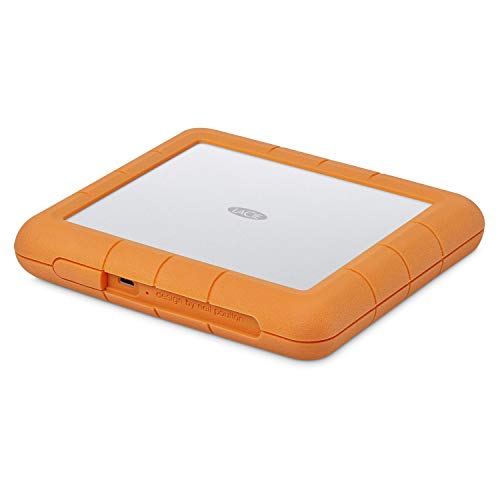
- RAID 0 and RAID 1 setup with a guided wizard
- Drop, shock, dust, and water resistant rugged build
- Flat portable design with USB-C and USB 3.0 support
Best For: Portable creators who need rugged RAID storage on the move
Desktop RAID Storage – WD My Book Duo 16TB
If you want an external hard drive with RAID that arrives ready for desktop backup and shared storage, the WD My Book Duo is built around 16TB of capacity, USB 3.1 Gen 1 connectivity, and built-in RAID-0 readiness. It also adds hardware encryption, password protection, and two USB 3.0 hub ports, making it practical for a home office or gaming setup that needs a lot of space in one enclosure.
Best For: Users who want a high-capacity desktop RAID drive with backup tools and security features.
Pros:
- 16TB desktop RAID storage with RAID-0 readiness out of the box
- USB 3.1 Gen 1 support plus USB 3.0 compatibility
- 256-bit AES hardware encryption and password protection
- Includes auto backup software and two USB 3.0 hub ports
Cons:
- Desktop form factor is not meant for portable use
- Configured around RAID-0 readiness rather than built-in redundancy
- Best suited to PC use, based on the supplied device compatibility
Overall, this is a strong pick if you need a large, all-in-one external hard drive with RAID features and straightforward backup support. Its combination of capacity, security, and extra USB ports makes it especially useful for organized desktop storage.
RAID Enclosure – TerraMaster D2-320 2-Bay
The TerraMaster D2-320 is a diskless external hard drive with RAID for users who want to build a custom direct-attached storage setup. It supports RAID 0, RAID 1, JBOD, and Single mode over USB 3.2 Gen 2 10Gbps, and it accepts both 3.5-inch and 2.5-inch SATA HDDs or SSDs up to 22TB per drive.
Best For: Buyers who want a flexible two-bay RAID enclosure and plan to supply their own drives.
Pros:
- Supports RAID 0, RAID 1, JBOD, and Single modes
- USB 3.2 Gen 2 with up to 10Gbps transfer speed
- Tool-free trays with a push-lock design for easier drive installation
- Intelligent temperature-controlled fan for heat management
Cons:
- Diskless enclosure means drives must be purchased separately
- Only two bays, so expansion is limited
- Maximum performance depends on the drives you install
This is a practical choice if you want more control over your storage hardware and RAID layout. It combines fast USB 3.2 Gen 2 connectivity with flexible mode support, making it a versatile base for a custom storage build.
Creative RAID Desktop Drive – LaCie 2big 16TB
The LaCie 2big RAID is an external hard drive with RAID designed for creators who need fast desktop storage and simple redundancy options. It offers up to 16TB of capacity, speeds up to 440MB/s, USB-C and USB 3.0 compatibility, and a step-by-step wizard for RAID 0 or RAID 1 setup.
Best For: Photographers, filmmakers, and other creators who want fast desktop RAID storage with recovery support.
Pros:
- Up to 16TB of desktop RAID storage
- Speeds up to 440MB/s with USB-C support
- RAID 0/1 setup wizard for performance or redundancy
- Includes hot-swappable IronWolf Pro enterprise-class drives
Cons:
- Desktop-only design, so it is not meant for travel
- Higher-end features may be more than casual users need
- Available storage capacity may vary
For creative workflows, this model stands out by pairing fast performance with RAID flexibility and a long warranty package. The included Rescue Data Recovery Services and enterprise-class drives add extra peace of mind for important projects.
Five-Bay RAID Enclosure – ORICO 9858RU3
If you need an external hard drive with RAID capacity for large projects, the ORICO 9858RU3 gives you a five-bay desktop enclosure with flexible mode choices and room for serious storage growth. It supports RAID 0, 1, 3, 5, 10, JBOD, CLONE, and CLEAR, runs over USB 3.0, and can hold up to 110TB with 3.5-inch SATA drives.
Best For: Users who want a large, configurable multi-drive RAID enclosure for big storage workloads.
Pros:
- Eight RAID-related modes, including RAID 0, 1, 3, 5, and 10
- Five-bay design with up to 110TB maximum capacity
- USB 3.0 transfer speeds up to 235MB/s
- Aluminum body with 80mm silent fan and front/rear vents
Cons:
- Drives are not included, so it is a diskless enclosure
- USB 3.0 is slower than newer 10Gbps RAID enclosures
- Five-bay desktop design is larger than simpler two-bay options
This enclosure is aimed at users who need flexibility and capacity more than simplicity. With multiple RAID modes, strong cooling, and a high power supply, it is a capable base for a substantial desktop storage system.
Best for Easy Setup – WD My Book Duo 28TB
If you want an external hard drive with RAID for a straightforward desktop backup and capacity upgrade, the WD My Book Duo is built around big storage, RAID-0 readiness, and password-protected hardware encryption. It’s a practical fit for Windows-based setups that need a lot of space in one enclosure.
Best For: Users who want a high-capacity desktop RAID drive for backup, file storage, and Windows-friendly use.
Pros:
- 28TB of storage in a dual-drive desktop enclosure
- RAID-0 ready out of the box for faster storage setups
- 256-bit AES hardware encryption with password protection
- Includes two USB 3.0 hub ports plus backup software support
Cons:
- Formatted NTFS for Windows, so other operating systems need reformatting
- Bulkier 3.5-inch desktop design at 7.1 pounds
- 5400 rpm drives are not aimed at peak-speed workflows
Overall, this is a strong pick if your priority is large, simple, RAID-capable storage rather than portability. It balances capacity, backup tools, and security features in a desktop form factor.
Diskless 4-Bay Enclosure – TerraMaster D4-320 4-Bay
If you’re shopping for an external hard drive with RAID flexibility, the TerraMaster D4-320 is actually a diskless DAS enclosure, not a RAID system. It gives you four individual drive bays, hot swapping, and fast USB 3.2 Gen2 connectivity, making it a useful base if you want to build your own storage setup.
Best For: DIY users who want a fast 4-bay external enclosure and plan to manage drives individually.
Pros:
- Four-bay design with support for 3.5-inch HDDs, 2.5-inch HDDs, and 2.5-inch SSDs
- USB 3.2 Gen2 Type-C connection with up to 10Gbps transfer support
- Hot-swappable, tool-free trays for easier drive changes
- Compatible with Mac, Windows, and Linux
Cons:
- No RAID function, despite the multi-bay layout
- Diskless enclosure means drives must be purchased separately
- Best throughput depends on the drives you install
This is a smart choice if you want an expandable storage enclosure and don’t need built-in RAID. It’s more about flexibility, speed, and multi-drive management than turnkey redundancy.
Pro RAID Desktop Drive – LaCie 2big 40TB
The LaCie 2big RAID is an external hard drive with RAID designed for creators who want lots of space and configurable protection or performance. With 40TB of storage, 7200 rpm enterprise-class drives, and a RAID 0/1 wizard, it fits demanding desktop workflows on Mac or PC.
Best For: Photographers, filmmakers, and YouTubers who want high-capacity RAID storage with enterprise-class drives.
Pros:
- 40TB desktop storage with speeds up to 550MB/s
- Easy RAID 0/1 setup for performance or redundancy
- Hot-swappable IronWolf Pro enterprise-class drives
- Includes a five-year limited warranty with Rescue Data Recovery Services
Cons:
- Desktop unit is not designed for portability
- Uses a larger 3.5-inch drive form factor
- Storage capacity may vary depending on configuration
For creative pros who need dependable desktop RAID storage, this model offers a strong mix of speed, capacity, and recovery support. It’s a premium option that leans into reliability and workflow-friendly performance.
5-Bay Hardware RAID Desktop Expansion – ORICO 5 Bay RAID External Hard Drive Enclosure
If you want an external hard drive with RAID for a serious desktop storage setup, this ORICO 5-bay enclosure is built for flexibility. It supports RAID 0, 1, 3, 5, 10, JBOD, Clone, and Clear modes, so you can tune it for speed, redundancy, or independent drive use depending on the job.
Best For: Creators, IT users, and backup-heavy workstations that need multi-drive RAID control and large-capacity expansion.
Pros:
- Supports multiple hardware RAID modes, including RAID 0, 1, 3, 5, 10, JBOD, Clone, and Clear.
- Massive 110TB maximum capacity with support for 2.5-inch and 3.5-inch SATA HDDs and SSDs.
- Built-in 150W power supply helps keep five drives running with stable voltage.
- USB 3.0 connection, cross-platform compatibility, and up to 230MB/s transfer rates.
Cons:
- Designed as a desktop DAS station, so it is not a portable RAID solution.
- USB 3.0 is solid, but it is not the fastest interface available for this class.
- Large enclosure footprint may be overkill for simple single-drive storage needs.
This is a practical pick if your priority is RAID flexibility, high drive count, and a stable desktop storage base. The cooling system and internal power design make it better suited to long sessions and heavy workflows than casual backup use.
Dual-Drive Encryption Backup Desk Unit – Western Digital My Book Duo 20TB RAID
The Western Digital My Book Duo is an external hard drive with RAID that focuses on straightforward desktop backup and capacity. It ships RAID-0 ready out of the box and adds password protection, 256-bit AES hardware encryption, and included backup software for users who want storage with built-in security features.
Best For: Desktop users who want a large-capacity RAID external drive with simple backup tools and hardware encryption.
Pros:
- 20TB desktop storage with RAID-0 ready configuration.
- Includes password protection and 256-bit AES hardware encryption.
- USB 3.1 Gen 1-ready with USB 3.0 compatibility.
- Two USB 3.0 hub ports add extra connectivity.
Cons:
- Designed for desktop use, so it is not meant for portability.
- RAID-0 prioritizes speed over redundancy.
- Heavier unit with an AC adapter and larger footprint than single-drive externals.
For buyers who want a ready-made dual-drive storage box instead of configuring a custom enclosure, this is an easy fit. It combines backup software, encryption, and big capacity in a simple desktop package.
Portable Rugged RAID Shuttle – LaCie Rugged Raid Shuttle 8TB
If you need an external hard drive with RAID that can travel with gear, the LaCie Rugged Raid Shuttle is built around portability and protection. It offers RAID 0 and RAID 1 setup through a step-by-step wizard, along with a rugged shell that is drop, shock, dust, and water resistant.
Best For: Field creators and Mac/PC users who need a rugged portable RAID drive for transporting projects.
Pros:
- RAID 0 and RAID 1 support with an easy step-by-step configuration wizard.
- Rugged design is drop, shock, dust, and water resistant.
- Flat portable shape is made for gear bags and shipping envelopes.
- Includes USB-C and USB 3.0 compatibility plus a one-month Adobe Creative Cloud membership.
Cons:
- 8TB capacity is smaller than desktop RAID enclosures in this roundup.
- Only supports RAID 0/1, so it offers fewer configuration options than multi-bay systems.
- Portability comes with a more specialized, workflow-focused design.
This is the strongest fit when your RAID storage needs to move between shoots, edits, or client handoffs. Its rugged build and compact form make it a practical mobile companion, not just a storage box.
How We Picked the Best External Hard Drive with RAID
We prioritized models that offer practical RAID options, strong connectivity, and enough drive capacity or bay count to scale with real-world storage needs. We also looked at features that matter for everyday use, such as hardware-based RAID support, easy setup, USB-C or USB 3.2 connectivity, hot-swap capability, and included backup or security tools.
Quick Comparison
At a high level, desktop all-in-one units are the easiest choice if you want a ready-to-use backup system, while multi-bay enclosures give you more flexibility to choose drives and configure storage yourself. Two-bay options are usually the simplest entry point for mirrored backups, while 4-bay and 5-bay systems are better for higher-capacity arrays and more advanced RAID setups.
Key Buying Factors for an External Hard Drive with RAID
RAID Level
Pick RAID 1 if your main goal is redundancy, RAID 0 if you want more speed and usable capacity, and higher-bay systems if you want options like RAID 5 for a better balance of performance and fault tolerance. Not every External Hard Drive with RAID supports every mode, so verify the available configurations before buying.
Drive Bays Vs. Preloaded Capacity
Preloaded desktop units are simpler and better for plug-and-play use. Diskless enclosures are ideal if you already own drives or want to choose your own SSDs or HDDs for cost, performance, or brand consistency.
Connection Speed
USB 3.2 Gen 2 and USB-C models can help reduce bottlenecks, especially when moving large media files or editing directly from the array. Faster interfaces matter most if you plan to use the unit as active working storage rather than just a backup destination.
Security and Backup Features
Password protection, auto-backup software, and hardware encryption can make a big difference for business files, client work, and personal archives. These features are especially useful on all-in-one desktop models.
Who Should Buy Which External Hard Drive with RAID?
If you want the easiest setup, choose a preconfigured desktop RAID unit. If you want flexibility and future expansion, choose a multi-bay enclosure. Creators who need reliable mirrored storage should lean toward two-bay RAID 1 systems, while users building larger storage pools should look at 4-bay or 5-bay enclosures with broader RAID support. If portability matters more than expansion, a rugged portable RAID drive is the better fit.
For most buyers, the best External Hard Drive with RAID is the one that matches your workflow first and your capacity needs second. Start with your preferred RAID level, then choose the bay count, interface, and features that fit how you actually store and protect data.