
Voice-driven workflows are moving fast, and the right device can turn speech into notes, summaries, and actions with far less effort.
This roundup highlights 10 of the best AI computer for voice recognition options for different budgets, use cases, and portability needs in 2026.
Best 10 AI Computer for Voice Recognition Picks for 2026
AI Supercomputer Pick
NVIDIA DGX Spark for Local AI Workloads

- Up to 1 petaFLOP FP4 AI performance
- 128GB unified memory for large models
- Full NVIDIA AI software stack included
Best For: Advanced users building local AI and voice workflows
AI Mouse Pick
Virtusx Jethro V1 Voice AI Mouse

- Built-in microphone for voice typing
- Live transcription, translation, and summarization
- Wireless ergonomic mouse with USB-C charging
Best For: Users who want voice AI inside a mouse
Embedded Voice Module Pick
Yahboom AI Voice Interaction Module

- 110+ preset commands with custom wake words
- Claims 99% recognition with noise reduction
- Works with Raspberry Pi, Jetson, ESP32, and STM32
Best For: Embedded voice control projects and smart hardware
Meeting Tablet
iFLYTEK AINOTE 2 for Live Transcription
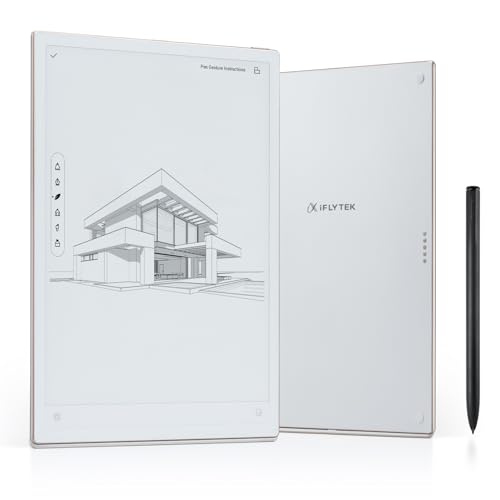
- Real-time transcription with speaker separation
- 10.65-inch anti-glare e-ink writing surface
- 16-language transcription and 11-language translation
Best For: Meetings, lectures, and distraction-free note taking
AI Voice Recorder
Plaud Note for Meetings and Calls

- 112-language transcription with app and web support
- Creates summaries, mind maps, and to-do lists
- Ultra-slim design with 30-hour recording time
Best For: Pocket recording for meetings, calls, and secure note workflows
AI Coding Board
UNIHIKER K10 for Offline Voice Recognition
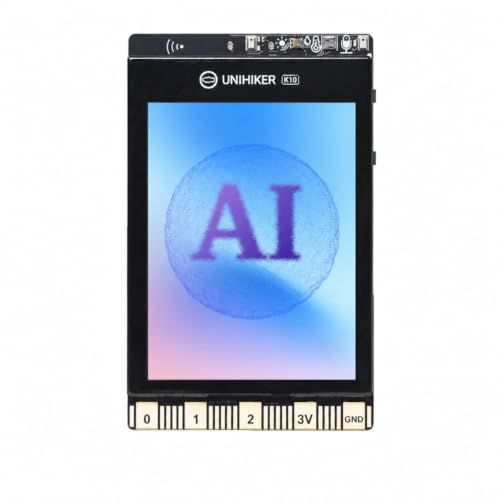
- Offline speech recognition for local control
- Pre-loaded AI models plus TinyML support
- Camera, mic, speaker, and sensors for projects
Best For: STEM learners and makers building voice-controlled AI projects
Voice Typing + AI Editing
AI VoiceWriter for Windows & Mac

- Hands-free dictation on Windows and Mac
- AI proofreading, rewriting, and formatting
- Mobile app can improve voice input clarity
Best For: Desktop users who want dictation and writing help in one tool
Meeting Notes Recorder
Plaud Note Pro AI Voice Recorder

- Transcribes and summarizes in 112 languages
- Creates structured notes, mind maps, and action lists
- Ultra-slim recorder with long battery life
Best For: Professionals who want meeting recording and AI summaries
Portable Voice Hub
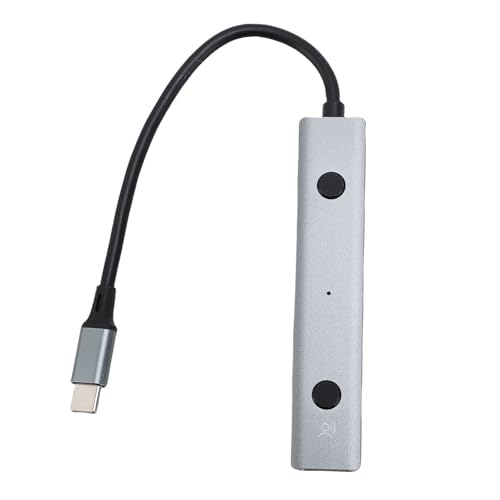
- Real-time transcription and multilingual translation
- No-driver plug-and-play setup
- Works with PCs, Chromebooks, Android tablets, and consoles
Best For: Portable voice control across multiple device types
AI Supercomputer Pick – NVIDIA DGX Spark for Local AI Workloads
NVIDIA DGX Spark™ - Personal AI Desktop Supercomputer – Desktop GB10 Grace Blackwell Chip
Check Price On AmazonIf you want an AI computer for voice recognition that can also handle serious local model work, the NVIDIA DGX Spark is built for high-end experimentation. It brings desktop-scale supercomputer performance to a compact system, with enough unified memory and AI throughput to support demanding development, inference, and analytics tasks.
Best For: Developers, researchers, and teams that need local AI compute for prototyping voice and language workflows.
Pros:
- Up to 1 petaFLOP of FP4 AI performance for fast local workloads
- 128GB of unified memory supports large models up to 200B parameters at FP4
- Full NVIDIA AI software stack helps you develop locally and deploy elsewhere
- Compact, energy-efficient desktop design with 4TB NVMe storage
Cons:
- Far more machine than most casual voice recognition users need
- Premium capability is aimed at business, education, and advanced AI work
- Not a dedicated voice-entry device; it is a general-purpose AI workstation
Overall, this is a powerful choice if voice recognition is part of a larger AI workflow and you want to test, fine-tune, and iterate locally. It makes the most sense for users who value raw AI capacity and software flexibility over simplicity.
Voice Note-Taking Pick – iFLYTEK AINOTE Air 2 Bundle
The iFLYTEK AINOTE Air 2 is a practical AI computer for voice recognition when your main goal is fast transcription, note-taking, and meeting summaries. Its 8.2-inch E Ink display, stylus support, and multi-language voice-to-text tools make it a strong fit for people who want a distraction-light digital notebook.
Best For: Professionals and students who want portable voice transcription and handwritten note conversion.
Pros:
- Real-time voice-to-text transcription with meeting summary features
- Supports 17 spoken languages and 83 handwritten text conversion languages
- 8.2-inch E Ink screen offers a paper-like writing feel
- Long battery life and lightweight design improve portability
Cons:
- Voice transcription and handwriting conversion cannot run at the same time
- E Ink display is better for notes than for rich media tasks
- Best results depend on use cases centered on meetings and study
For voice-driven note capture, this tablet is more specialized than a general Android device and easier on the eyes than a typical screen. It stands out if you want transcription, summaries, and scheduling in one focused workflow.
AI Mouse Pick – Virtusx Jethro V1 Voice AI Mouse
The Virtusx Jethro V1 is a practical AI computer accessory for voice recognition if you want speech-to-text built into the mouse you already use every day. It combines voice typing, live transcription, translation, and summarization in one wireless tool, making it a workflow upgrade for frequent writers and meeting takers.
Best For: Computer users who want voice typing and AI shortcuts built into a wireless mouse.
Pros:
- Built-in microphone supports voice typing and live transcription
- Real-time translation and instant summarization are available in the same device
- Centralized AI software platform reduces app switching
- Wireless design with rechargeable USB-C power and ergonomic shape
Cons:
- Only works with Windows and macOS computers
- AI features depend on the companion V-AI software setup
- It is a mouse first, so voice capture is not as specialized as a dedicated recorder
This is a smart pick if you want voice recognition to feel built into your normal desktop routine instead of adding another device to manage. It is best for productivity users who want fast dictation and AI assistance in one peripheral.
Embedded Voice Module Pick – Yahboom AI Voice Interaction Module
The Yahboom AI Voice Interaction Module is a developer-focused AI computer for voice recognition when you need embedded voice commands rather than a consumer desktop app. With support for preset commands, custom wake words, and multiple development platforms, it is designed for robotics, smart hardware, and interactive prototypes.
Best For: Makers and developers building smart devices, robots, or embedded voice-control systems.
Pros:
- Supports 110+ preset commands with editable online command content
- Claims up to 99% recognition accuracy with noise reduction and echo cancellation
- Compatible with STM32, ESP32, Arduino, Raspberry Pi, Jetson, and ROS1/ROS2
- Plug-and-play interface options include IIC, serial, and Type-C
Cons:
- Requires development knowledge to get the most from it
- Windows-only burning software limits setup flexibility
- It is a module, not a standalone computer or speaker device
For embedded voice recognition projects, this module is the most specialized option in the roundup. It makes sense when you are building hardware that needs custom voice control, not when you simply want dictation on a desktop.
Meeting Tablet – iFLYTEK AINOTE 2 for Live Transcription
If you want an AI computer for voice recognition that feels more like a focused work tool than a general-purpose tablet, the iFLYTEK AINOTE 2 is built around live transcription and meeting capture. It records speech in real time, identifies speakers, and produces concise summaries, while the e-ink display keeps the experience distraction-free for notes and review.
Best For: Professionals, students, and meeting-heavy users who want real-time voice-to-text plus handwritten note support.
Pros:
- Live voice-to-text transcription with speaker distinction and searchable key points
- 10.65-inch anti-glare e-ink display designed for paper-like writing
- 16-language transcription and 11-language live translation support
- Android 14 compatibility with PDF, EPUB, and MOBI support
Cons:
- Focused more on note-taking and meetings than general tablet use
- E-ink screen is better for writing and reading than fast multimedia tasks
- Best value depends on how often you need transcription features
The AINOTE 2 stands out if your main goal is turning spoken conversation into organized notes quickly. It combines transcription, summaries, and handwriting in a slim device that is clearly optimized for productivity rather than entertainment.
AI Voice Recorder – Plaud Note for Meetings and Calls
The Plaud Note is a strong AI computer for voice recognition if you need a compact recorder that turns meetings, calls, and lectures into structured notes. It supports 112 languages, works with the Plaud app and web tools, and can create transcripts, summaries, mind maps, and to-do lists from a single recording.
Best For: Professionals, teams, and sensitive-work users who want a pocketable recorder with strong transcription and privacy controls.
Pros:
- Captures conversations in 112 languages with app- and web-based transcription
- Can generate summaries, mind maps, and to-do lists from recordings
- Very slim and lightweight with up to 30 hours of continuous recording
- Includes 64GB local storage and multiple security and compliance standards
Cons:
- Requires the app or web workflow for the full AI feature set
- Recording permissions and privacy laws still need to be observed
- Not a standalone computer; it is a specialized voice recorder
For buyers who care more about accurate capture and post-meeting organization than screen size, the Plaud Note is highly practical. Its biggest strengths are language support, compact size, and secure handling of recorded audio.
AI Coding Board – UNIHIKER K10 for Offline Voice Recognition
The UNIHIKER K10 is a different kind of AI computer for voice recognition: it is a coding board designed for learning, prototyping, and STEM projects. Its offline speech recognition lets you build voice-controlled ideas without relying on the internet, and the built-in camera, sensors, and display make it a flexible platform for experimenting with AI and IoT.
Best For: Beginners, students, and makers who want an all-in-one board for offline voice control and AI learning.
Pros:
- Offline speech recognition works without internet access
- Includes pre-loaded AI models for face, pet, QR code, and motion detection
- Supports TinyML, Mind+, and MicroPython for learning and custom projects
- Built-in camera, microphone, speaker, and environmental sensors for IoT work
Cons:
- More of a learning and development board than a finished consumer device
- Small 2.8-inch display limits it compared with larger tablets or screens
- Best suited to coding projects rather than everyday productivity use
The K10 makes the most sense if you want to explore voice recognition as part of a broader AI curriculum or prototype. It is not meant to replace a laptop, but it does give beginners a hands-on way to build and test smart projects.
Voice Typing + AI Editing – AI VoiceWriter for Windows & Mac
If you want an AI computer for voice recognition workflow on your desktop, AI VoiceWriter is built for hands-free dictation and light AI editing. It lets you speak directly into common apps like Word, Google Docs, PowerPoint, Teams, and email, while the mobile app uses your phone’s microphone to help improve voice input clarity.
Best For: Users who want desktop dictation plus built-in proofreading, rewriting, and multilingual support.
Pros:
- Real-time speech-to-text on Windows 10+ and macOS 13+
- Works in many desktop apps with no special workflow changes
- Mobile app can improve voice input by using your phone’s microphone
- Supports 33 dictation languages and AI features in several major languages
Cons:
- Requires both a USB dongle and a companion mobile app
- AI writing features are limited to supported languages
- Not positioned as a dedicated recorder for meetings or calls
Overall, this is a practical pick if you need voice typing first and AI writing help second. It focuses on everyday desktop productivity, and the one-time purchase model may appeal to buyers who prefer avoiding subscriptions.
Meeting Notes Recorder – Plaud Note Pro AI Voice Recorder
For buyers searching for an AI computer for voice recognition solution focused on meetings and calls, Plaud Note Pro is designed to capture audio and turn it into structured notes. It supports transcription in 112 languages, adds speaker labels, and can generate summaries, mind maps, to-do lists, and proposals from your recordings.
Best For: Professionals and teams who need high-quality recording, transcription, and AI summaries.
Pros:
- Transcribes in 112 languages with auto speaker labels
- Creates multiple summary formats, including mind maps and to-do lists
- Includes Ask Plaud for questions and follow-up insights from your recordings
- Long battery life and ultra-slim body make it easy to carry
Cons:
- Some transcription time is tied to plan limits unless you upgrade
- Best suited to recording workflows rather than live typing into apps
- Advanced usage may require familiarity with the app and subscription plans
In practice, Plaud Note Pro is strongest when you need reliable audio capture and AI-generated meeting outputs. Its privacy and compliance claims also make it a compelling choice for business users handling sensitive conversations.
Portable Voice Hub – Yunseity AI Voice Hub
If you need an AI computer for voice recognition that stays simple and portable, Yunseity AI Voice Hub offers plug-and-play transcription, translation, and voice control. It’s aimed at meetings, classes, and remote work, with support for real-time voice-to-text and multilingual translation without driver installation.
Best For: Students, remote workers, and travelers who want a lightweight voice-control adapter.
Pros:
- Real-time voice-to-text transcription with multilingual translation
- Plug-and-play setup with no drivers required
- Compatible with PCs, Chromebooks, Android tablets, and gaming consoles
- Includes AI-related tools for document conversion and content tasks
Cons:
- Product details are more focused on features than on performance specifics
- Less specialized than dedicated dictation or meeting recorder devices
- May be more useful as a compact assistant than a full transcription system
This is a flexible choice if you want voice control and translation across different devices. It stands out for convenience and broad compatibility, especially when you need a portable tool you can use anywhere.
How We Picked the Best AI Computer for Voice Recognition
We focused on devices and systems that make speech capture, transcription, and AI-assisted organization genuinely useful in everyday work. Priority went to accuracy, language support, transcription speed, portability, app or software ecosystem, and how well each product fits a specific buyer need.
Because the term AI Computer for Voice Recognition can cover everything from desktop AI hardware to portable recorders and smart input tools, we compared products by intended use rather than forcing them into one category.
Quick Comparison: What Matters Most
Some buyers need all-day meeting capture and summaries, while others want a powerful desktop AI system, a dictation tool for writing, or an education-friendly board for learning and prototyping. The best choice depends on whether you care most about accuracy, offline use, ecosystem flexibility, or hands-free convenience.
- Best for power users: High-performance AI desktops and developer-focused boards
- Best for meetings: Dedicated voice recorders with AI summaries
- Best for writing: Dictation tools and voice typing accessories
- Best for portability: Pocketable note-takers and compact tablets
Key Buying Factors for an AI Computer for Voice Recognition
Recognition Quality and Language Support
Look for strong speech-to-text accuracy, speaker separation, and support for the languages you actually use. If you work across teams or regions, multilingual transcription and translation can be more valuable than raw hardware specs.
Offline Vs. Cloud Processing
Offline recognition can improve privacy and reliability in noisy environments, while cloud-based systems often deliver richer AI summaries and more frequent feature updates. The best AI Computer for Voice Recognition for you depends on whether your priority is security or convenience.
Workflow Integration
Check whether the product works smoothly with your laptop, mobile device, meeting apps, or note-taking platform. USB adapters, companion apps, and export options matter more than many shoppers expect.
Form Factor and Battery Life
Choose a desktop system if you need maximum performance, a tablet or recorder if you move between meetings, or a lightweight accessory if your main goal is faster dictation. Battery life becomes especially important for travel, field work, and back-to-back calls.
Who Should Buy Which AI Computer for Voice Recognition?
If you want premium compute for advanced AI workloads, a desktop supercomputer-style option makes sense. If your main need is recording meetings, calls, or lectures, a dedicated AI recorder or note-taking tablet will usually be the smarter buy. Writers and office professionals should look closely at dictation-focused tools, while students, makers, and developers may benefit more from boards and modules with voice recognition built in.
In short, pick the device that matches your daily workflow, not just the one with the biggest feature list. The right AI Computer for Voice Recognition should save time, reduce manual typing, and fit naturally into how you already work.