
The best AI development kit depends on what you want to build. A voice assistant, camera prototype, and sensor-driven edge device place very different demands on processing power, memory, connectivity, and included parts.
These nine options range from compact ESP32-S3 boards to Arduino UNO Q bundles and a dual-core microcontroller board. Use the guide below to match the hardware to your project and avoid paying for accessories you already own.
Best 9 AI Development Kit Picks for 2026
Best Hybrid Board

- Qualcomm MPU plus STM32 MCU
- 4 GB RAM and 32 GB eMMC
- Debian, Python, and Arduino support
Best For: Mixed AI and real-time Arduino projects
Best Voice Chatbot Kit
LAFVIN ESP32-S3 AI Chatbot Kit

- Preloaded voice dialogue projects
- 2-inch color chat display
- OpenAI use needs your API key
Best For: Learning ESP32-S3 voice-assistant projects
Best Accessory Bundle
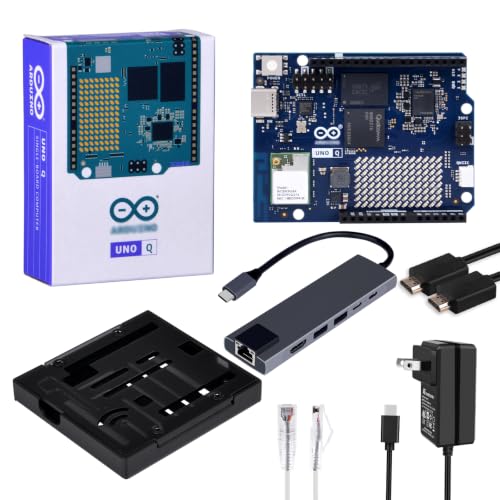
- Official UNO Q with 2 GB RAM
- Case, hub, power, and cables included
- Standalone or PC-connected use
Best For: UNO Q setups needing bundled accessories
Best for Edge Inference
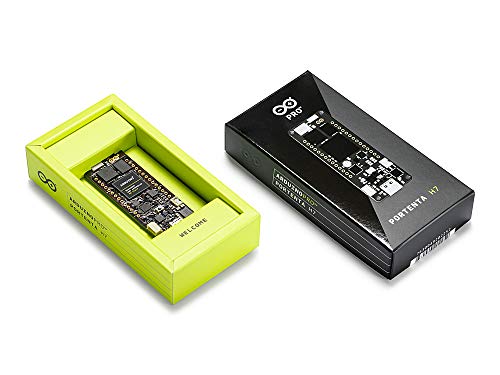
- 480 MHz M7 plus 240 MHz M4
- Built-in Wi-Fi and Bluetooth 5.1
- 8 MB SDRAM and 16 MB Flash
Best For: Embedded inference and connected IoT prototypes
Best for Natural-Language Projects
GeeekPi EmbodiQ AI Starter Kit

- Natural-language hardware control
- Sensors, servo, OLED, and mount included
- Supports multiple AI-provider APIs
Best For: AI-controlled sensor and automation experiments
Best for Voice Interfaces
T5AI-Board Voice AI Development Kit

- Dual microphones, speaker, and TFT display
- Wi-Fi, BLE 5.4, and 56 GPIOs
- TuyaOS developer resources available
Best For: Voice-control panels and IoT interface prototypes
Linux Hybrid Pick
Arduino UNO Q 2GB with 45W Power Supply

- Debian, Python, and Arduino Sketch support
- Wi-Fi 5 and Bluetooth 5.1 built in
- 45W USB-C power supply included
Best For: Linux and Arduino-based AI and robotics prototypes
Hands-On AIoT Pick
LAFVIN ESP32-S3 Voice Control Starter Kit

- Includes sensors, lights, servo, fan, and relay
- Designed for ESP32-S3 voice-control projects
- Online guides and support provided
Best For: Beginner smart-home and sensor-control experiments
Compact Vision Pick
LAFVIN ESP32-S3 LCD Camera Board

- 1.69-inch LCD, camera, mic, and speaker
- Arduino IDE and ESP-IDF support
- Open-source demos and online flashing
Best For: Compact vision, voice, and display prototypes
Best Hybrid Board – Arduino UNO Q 4GB
The Arduino UNO Q 4GB is an ai development kit option for builders who want Linux-based AI processing alongside real-time microcontroller control. Its Qualcomm Dragonwing QRB2210 MPU and STM32U585 MCU support projects such as vision, voice, robotics, and IoT prototypes.
Best For: Developers combining Arduino Sketches, Python, and AI workloads on one board.
Pros:
- 4 GB RAM and 32 GB eMMC provide room for multiple processes and larger project files.
- Supports Debian Linux, Python, Arduino libraries, and Sketches.
- UNO shield compatibility, Qwiic expansion, Wi-Fi 5, and Bluetooth 5.1 offer flexible connections.
Cons:
- Vision, audio, and display peripherals connect through headers rather than being listed as included accessories.
- Only one USB port is specified.
Choose this board if the dual-processor architecture and 4 GB configuration matter more than getting a bundled enclosure or peripheral package.
Best Voice Chatbot Kit – LAFVIN ESP32-S3 AI Chatbot Kit
The LAFVIN ESP32-S3 kit is an ai development kit focused on learning voice-assistant projects. It comes with preloaded Deepseek and OpenAI dialogue projects, a 2-inch color display, and an audio module for hands-on voice interaction after setup.
Best For: Learners who want a ready-made starting point for ESP32-S3 voice and IoT experiments.
Pros:
- Preloaded voice projects reduce initial software setup.
- Supports voice wake-up and real-time interruption.
- Includes a 2-inch TFT-SPI screen, Wi-Fi, Bluetooth LE, and online tutorials.
Cons:
- OpenAI functionality requires your own API key.
- Its voice-chatbot focus makes it less directly suited to the vision projects described for the UNO Q boards.
This is the more directed learning choice when your goal is a working conversational prototype rather than a general-purpose Linux development board.
Best Accessory Bundle – GeeekPi UNO Q Starter Kit
The GeeekPi UNO Q Starter Kit is an ai development kit bundle built around an official UNO Q with 2 GB RAM and 16 GB eMMC. Its aluminum case, USB-C hub, power supply, and cables make it a practical choice when you want the board and setup accessories together.
Best For: Buyers setting up an UNO Q as a standalone computer or a USB-C-connected Arduino development board.
Pros:
- Includes an aluminum case designed for protection and heat dissipation.
- Bundles a USB-C hub with Ethernet, power supply, HDMI cable, Cat6 cable, and assembly accessories.
- Supports standalone and PC-connected operating modes.
Cons:
- The included UNO Q has 2 GB RAM and 16 GB eMMC, less than the separate 4 GB model in this roundup.
- The supplied warranty description is six months.
Pick this package for its included hardware and connectivity extras; choose based on the 2 GB board specification rather than assuming it matches the higher-memory UNO Q.
Best for Edge Inference – Arduino Portenta H7
The Arduino Portenta H7 is an ai development kit option for builders who want to run machine-learning workloads on a compact microcontroller board. Its Cortex-M7 and Cortex-M4 cores can divide demanding application work from time-sensitive tasks.
Best For: Developers prototyping embedded inference and connected IoT devices.
Pros:
- Dual-core architecture pairs a 480 MHz Cortex-M7 with a 240 MHz Cortex-M4.
- Built-in Wi-Fi and Bluetooth 5.1 support connected projects.
- Provides 8 MB SDRAM, 16 MB Flash, and SPI, I2C, UART, and PWM interfaces.
Cons:
- Cellular connectivity requires an optional add-on.
- Vision and LTE expansion require separate add-ons.
Choose this board when on-device processing and flexible I/O matter more than getting a bundled sensor project out of the box.
Best for Natural-Language Projects – GeeekPi EmbodiQ AI Starter Kit
The GeeekPi EmbodiQ is an ai development kit for makers who want to issue natural-language instructions to connected hardware. It pairs an Arduino UNO Q-based setup with an AI Agent HAT and a selection of components for hands-on experiments.
Best For: Makers and educators exploring AI-controlled sensors and simple automation.
Pros:
- Includes soil-moisture and raindrop sensors, a 9g servo, OLED output, and an acrylic mount.
- Supports OpenAI, OpenRouter, MiniMax, and OpenAI-compatible APIs.
- Combines Python and Arduino co-processing with 4 GB RAM and 32 GB eMMC storage.
Cons:
- The advertised AI-provider options rely on a compatible API.
- Included sensors focus on a limited set of starter projects.
This kit makes the most sense if you want to test how an AI agent can coordinate physical components, rather than start with a standalone microcontroller board.
Best for Voice Interfaces – T5AI-Board Voice AI Development Kit
The T5AI-Board is an ai development kit aimed at voice-enabled smart-device prototypes. Dual microphones, a speaker, and a 3.5-inch TFT display give developers a starting point for interactive interfaces, with a DVP connection available for camera projects.
Best For: Developers evaluating voice-control panels and custom IoT interfaces.
Pros:
- Built-in dual microphones, speaker, and 3.5-inch TFT display support voice-and-screen prototypes.
- Offers 2.4 GHz Wi-Fi, Bluetooth LE 5.4, and 56 GPIOs.
- TuyaOS documentation, SDKs, and firmware examples are available through the Tuya Developer Platform.
Cons:
- The DVP camera connection is an interface, not an included camera.
- Intended for development and testing, not use as a finished consumer device.
Consider this board if voice interaction and hardware expansion are central to your prototype and you are comfortable working from developer documentation.
Linux Hybrid Pick – Arduino UNO Q 2GB with 45W Power Supply
Arduino UNO Q 2GB AI Development Board + 45W USB‑C Power Supply, Wi‑Fi, Bluetooth, Linux IoT Kit
Check Price On AmazonIf your ai development kit needs to bridge Linux software and microcontroller projects, the Arduino UNO Q pairs a Qualcomm QRB2210 with an STM32 MCU. It supports Debian, Python, and Arduino Sketches, and this bundle includes a 45W USB-C power supply.
Best For: Makers and engineers prototyping AI, robotics, and connected devices across Linux and Arduino workflows.
Pros:
- Hybrid processor setup supports edge AI and embedded control projects.
- Debian, Python, and Arduino Sketches offer flexible development options.
- Included 45W adapter and built-in Wi-Fi 5 and Bluetooth 5.1 cover power and wireless connectivity.
Cons:
- The listed 2GB RAM may be a constraint for larger Linux workloads.
- Notes do not list sensors, a camera, or other project modules in the bundle.
Choose this for its software flexibility and included power adapter; plan to source application-specific hardware separately.
Hands-On AIoT Pick – LAFVIN ESP32-S3 Voice Control Starter Kit
For an ai development kit centered on voice-controlled hardware experiments, this LAFVIN ESP32-S3 starter kit bundles a DHT11 sensor, servo, fan, relay, lights, and soil and raindrop sensors. Its precompiled firmware and online guides offer a starting point for connected-device projects.
Best For: Beginners and educators exploring voice interaction, smart-home prototypes, and sensor-based IoT projects.
Pros:
- Included modules support a range of lighting, sensing, and actuator exercises.
- ESP32-S3 kit is designed for AI voice control using the stated MCP protocol.
- Online quick-start documentation and technical support are provided.
Cons:
- Precompiled firmware must be flashed before the stated plug-and-play workflow.
- The listed warranty is two months.
This is the most component-rich option here for trying physical AIoT ideas, especially if you want to test sensors and outputs rather than start with a bare board.
Compact Vision Pick – LAFVIN ESP32-S3 LCD Camera Board
This compact ai development kit puts a 1.69-inch LCD, camera, microphone, and speaker on an ESP32-S3 board. With 16MB flash, 8MB PSRAM, and support for Arduino IDE and ESP-IDF, it suits small display, vision, and voice-interface experiments.
Best For: Students and makers building compact AI assistants, smart displays, or computer-vision learning projects.
Pros:
- Integrated display, camera, and audio hardware reduce the need for separate modules.
- Supports Arduino IDE and ESP-IDF, with open-source demos and tutorials.
- Offers one-click online firmware flashing and can function as a UVC USB camera for a PC.
Cons:
- The listed 16MB flash and 8MB PSRAM set practical limits for on-device projects.
- No separate sensors or actuators are listed among the included items.
Pick this board when a small, integrated interface matters more than a broad box of components; its included examples provide a practical place to start.
How We Picked These AI Development Kits
We compared the nine listed products by their stated hardware, included components, and likely project fit—not by assuming that every board can run the same AI model. The selection covers Linux-capable Arduino UNO Q configurations, a microcontroller-focused Portenta H7, and voice, vision, and sensor-oriented ESP32-S3 and T5AI options. We gave particular attention to what arrives in the box, since a bare board and a starter kit can have very different total costs.
Quick Comparison: Which Type Fits Your Project?
For an Arduino UNO Q setup, choose between the 2GB board-and-power-supply package, the 4GB board, and bundles that add storage, enclosures, peripherals, or project hardware. Check the exact board configuration in each listing: an included case or USB-C hub is useful, but it does not replace the RAM or storage your software needs.
The Portenta H7 is the microcontroller-oriented choice for embedded work. LAFVIN’s ESP32-S3 kits focus on voice assistants, smart-home controls, or a compact camera-and-display build. The T5AI-Board emphasizes onboard audio and a larger display, with camera support specified separately.
Key Buying Factors for an AI Development Kit
Compute Platform and Software
Start with your intended workload. A Linux-capable board suits projects that need a fuller software environment; a microcontroller may be preferable for focused, responsive device control. Before buying, confirm that your preferred framework, libraries, and model format support the exact processor and board. An “AI” label alone does not establish which models will run locally.
Memory, Storage, and Power
RAM affects how much software can run at once, while onboard storage determines how much room you have for the operating system, code, and assets. Compare the UNO Q listings carefully, as the stated configurations include 2GB and 4GB RAM and different storage bundles. Also check power requirements: one listing includes a 45W USB-C supply, while other packages list their own accessories.
Sensors, Audio, and Expansion
For voice projects, look for microphones, a speaker, and support for the interaction features you plan to implement. For vision, verify whether a camera is included or merely supported. Smart-home and robotics projects may benefit more from a relay, environmental sensors, servo, GPIO access, or an expansion HAT than from a display. Check connector compatibility before purchasing extra modules.
Who Should Buy Which AI Development Kit?
Choose an UNO Q option if you want a Linux-and-microcontroller workflow; pick the bundle that supplies the case, storage, power, or sensors you actually need. Choose Portenta H7 for a compact embedded-control project where its dual-core microcontroller architecture fits your tools. For a first voice-assistant build, the preloaded LAFVIN chatbot kit offers a project-specific starting point; for sensor-based automation, consider the LAFVIN AIoT kit. The LAFVIN camera-and-LCD board suits compact vision experiments, while the T5AI-Board suits builders prioritizing audio, display, and expansion access. Confirm current documentation and included parts before checkout, particularly when a listing describes camera support rather than an included camera.