
Choosing a professional display for print proofing is about more than resolution. You need dependable color accuracy, consistent brightness, and a panel that holds up when you compare screen to press output.
The picks below focus on monitors with strong factory calibration, wide color-gamut coverage, and practical connectivity for modern creative workflows.
Best 10 Professional Display for Print Proofing Picks for 2026
ProArt Calibration Pick
32-inch 4K HDR pro display for color-critical work
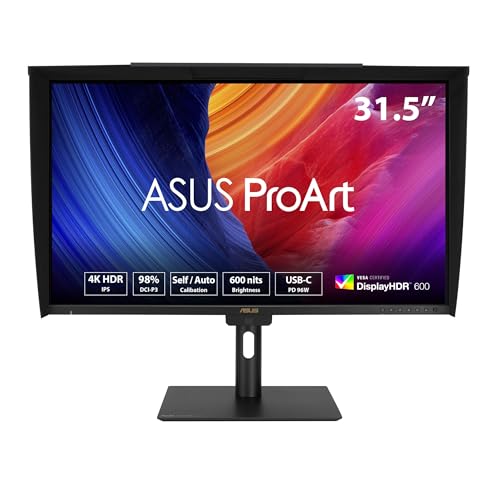
- Built-in colorimeter with self/auto calibration
- Delta E < 1 and 98% DCI-P3 coverage
- USB-C 96W, daisy-chain, and USB hub
Best For: Print proofing and calibrated studio workflows
Mac Studio Choice
27-inch 5K Retina display for Mac studios

- 5K Retina panel with 14.7 million pixels
- 600 nits, P3 wide color, and 1 billion colors
- Includes camera, mics, speakers, and Thunderbolt 5
Best For: Mac-based creative work and high-detail visual review
Calibrated ProArt Pick
27-inch 4K accuracy-first monitor

- 99% DCI-P3 and 99% Adobe RGB coverage
- Factory calibrated to Delta E < 2
- USB-C 96W with ergonomic stand
Best For: Calibrated photo, design, and print-proofing workflows
Mac Workflow Pick
Mac-friendly 27-inch 4K display with USB-C

- Mac color tuning with P3 wide gamut
- Dual USB-C with 90W charging
- Keyboard brightness and volume control
Best For: MacBook users wanting a simple creative workspace
Studio-Ready Color Control
ASUS ProArt 27" QHD Creator Monitor

- 97% DCI-P3 and 100% sRGB coverage
- Calman Verified, Delta E < 2 factory calibration
- USB-C up to 96W with ergonomic stand
Best For: Designers needing a larger calibrated display for print proofing and studio work
Compact Print-Prep Workspace

- 100% sRGB/Rec.709 with Delta E < 2
- 16:10 WUXGA panel for extra vertical space
- Tilt, pivot, swivel, and height adjustment
Best For: Photo and video editors who want a compact color-accurate monitor
USB-C Color-Accurate Pick
ASUS ProArt 24" FHD USB-C Monitor

- 100% sRGB and 100% Rec.709 coverage
- Calman Verified, Delta E < 2 calibration
- USB-C with 65W PD and built-in USB hub
Best For: Laptop and Mac users who want accurate color with easy USB-C connectivity
Editor-Ready Color Accuracy
ASUS ProArt PA278QV 27-inch WQHD Monitor

- Calman Verified, Delta E < 2
- 100% sRGB / Rec. 709 coverage
- USB hub with flexible ports
Best For: Photo editing and print proofing on a 27-inch 1440p budget-friendly ProArt display
4K Proofing and USB-C Simplicity
ASUS ProArt PA279CV 27-inch UHD Monitor

- 4K UHD IPS for finer detail
- Calman Verified, Delta E < 2
- USB-C with 65W Power Delivery
Best For: Photo and print-oriented creators who want 4K detail plus one-cable USB-C connectivity
Balanced ProArt Value
ASUS 27-inch WQHD Color-Critical Monitor

- Calman Verified Delta E<2
- 100% sRGB / Rec. 709
- Ergonomic stand with full adjustments
Best For: Designers and photographers seeking accurate 27-inch ProArt color at a balanced value
ProArt Calibration Pick – 32-inch 4K HDR pro display for color-critical work
If you need a professional display for print proofing, the ASUS ProArt PA32UCE is built around color accuracy, calibration control, and strong connectivity. Its 32-inch 4K IPS panel, built-in colorimeter, and Delta E < 1 specification make it a serious option for studios that need dependable soft-proofing and consistent results.
Best For: Print proofing, color-managed photo/video workflows, and teams that want built-in calibration support.
Pros:
- Built-in motorized colorimeter supports self/auto calibration and works with Calman and ColourSpace CMS.
- 98% DCI-P3 and 100% sRGB coverage with Delta E < 1 color accuracy.
- 32-inch 4K IPS panel with 600 nits brightness and anti-glare low-reflection finish.
- USB-C with 96W Power Delivery, DisplayPort daisy-chaining, HDMI, and USB hub.
Cons:
- 60Hz refresh rate is geared toward professional imaging, not fast-motion work.
- Larger 32-inch size may take more desk space than a 27-inch model.
- Premium feature set likely places it above basic office displays.
This is the most calibration-focused option in the group, and its built-in colorimeter is a real advantage for maintaining consistency over time. If print accuracy matters more than general-purpose versatility, it is clearly positioned for that job.
Mac Studio Choice – 27-inch 5K Retina display for Mac studios
The Apple Studio Display is a polished professional display for print proofing if your workflow is centered on Mac and you want a sharp 27-inch 5K Retina panel. With 600 nits brightness, P3 wide color, and 1 billion color support, it offers the kind of image fidelity that suits visual review and color-sensitive creative work.
Best For: Mac users who want a premium 5K display for visual review, creative work, and color-sensitive editing.
Pros:
- 27-inch 5K Retina display with 14.7 million pixels for very fine detail.
- 600 nits brightness and P3 wide color with support for 1 billion colors.
- Anti-reflective coating helps reduce glare in everyday lighting.
- Includes a 12MP Center Stage camera, studio-quality mics, and six-speaker audio.
Cons:
- Standard glass model does not include the extra glare reduction of nano-texture glass.
- Tilt-adjustable stand is included, while height adjustment requires a different configuration.
- Best value is strongest for Mac-centric setups rather than mixed-device environments.
For Mac-based studios, this display stands out for sharpness, brightness, and overall polish. It is less about calibration hardware and more about a highly refined visual experience that still fits demanding creative review work.
Calibrated ProArt Pick – 27-inch 4K accuracy-first monitor
If you want a professional display for print proofing without moving up to a 32-inch panel, the ASUS ProArt PA279CRV is a focused 27-inch option. It combines 99% DCI-P3 and 99% Adobe RGB coverage with factory calibration to Delta E < 2, making it well suited to color-managed editing and proof review.
Best For: Photographers, designers, and editors who want a calibrated 27-inch 4K monitor for color-accurate work.
Pros:
- Factory pre-calibrated to Delta E < 2 for dependable color accuracy.
- 99% DCI-P3 and 99% Adobe RGB coverage for wide-gamut workflows.
- USB-C with 96W Power Delivery plus HDMI, DisplayPort, and USB hub.
- Ergonomic stand supports tilt, swivel, pivot, and height adjustment.
Cons:
- Delta E < 2 is strong, but not as tight as the PA32UCE’s Delta E < 1 spec.
- 27-inch size may feel smaller for complex multi-window proofing sessions.
- 60Hz panel is aimed at content work, not motion-focused use.
This model hits a sweet spot for buyers who want wide color coverage and solid factory calibration in a more desk-friendly size. It is a practical choice when accuracy matters more than extra screen real estate.
Mac Workflow Pick – Mac-friendly 27-inch 4K display with USB-C
The BenQ MA270UP is a practical professional display for print proofing if you work primarily on a MacBook and want a simple USB-C setup. Its P3 wide color gamut, Mac color tuning, and 4K IPS panel are aimed at users who want a streamlined monitor that still supports color-aware creative work.
Best For: MacBook Pro and Air users who want an easy single-cable display for creative and office work.
Pros:
- Calibrated for MacBook with BenQ’s exclusive Mac color tuning and P3 wide color gamut.
- Dual USB-C ports provide 90W charging and can also charge an iPad or iPhone at 15W.
- Lets you adjust brightness and volume directly from the MacBook keyboard.
- Height, tilt, swivel, and pivot adjustment support flexible positioning.
Cons:
- 400 nits brightness is lower than some higher-end pro displays in this roundup.
- Color tuning is Mac-focused, so it is less universal for mixed-platform shops.
- Glossy screen finish may be less ideal in bright or reflective environments.
This is the most Mac-specific monitor here, and that makes it appealing for buyers who value convenience as much as color. It is less calibration-heavy than ASUS’s ProArt models, but it offers a clean, efficient setup for everyday creative work.
Studio-Ready Color Control – ASUS ProArt 27" QHD Creator Monitor
If you want a professional display for print proofing with more headroom for palettes, toolbars, and side-by-side layouts, this 27-inch ProArt model is built around accurate color and a sharp QHD panel. It combines factory calibration, Calman verification, and wide-gamut coverage with creator-friendly features like USB-C power delivery and an ergonomic stand.
Best For: Designers and content creators who want a larger calibrated screen for color-sensitive proofing and everyday studio work.
Pros:
- 97% DCI-P3 and 100% sRGB coverage for broad color work
- Calman Verified with Delta E < 2 factory calibration
- USB-C with up to 96W Power Delivery plus HDMI, DisplayPort, and USB hub
- Ergonomic stand with tilt, swivel, pivot, and height adjustment
Cons:
- QHD resolution is good for detail, but not as dense as 4K
- 27-inch size takes more desk space than a 24-inch model
For print proofing, this is the most spacious option in the group and the one most focused on a premium creator workflow. The combination of calibration, wide gamut, and strong connectivity makes it a practical all-around studio monitor.
Compact Print-Prep Workspace – ASUS ProArt 24" WUXGA Monitor
This 24-inch ProArt display is a strong fit if you want a practical professional display for print proofing without moving up to a larger panel. Its 16:10 WUXGA format gives a little extra vertical space, while 100% sRGB/Rec.709 coverage and Delta E < 2 calibration support reliable color-critical editing.
Best For: Photo and video editors who want a compact, calibrated monitor with a taller 16:10 layout.
Pros:
- 100% sRGB and Rec.709 coverage for standard creative workflows
- Calman Verified with Delta E < 2 color accuracy
- 16:10 WUXGA resolution provides extra vertical workspace
- Adjustable stand with tilt, pivot, swivel, and height control
Cons:
- 1920 x 1200 resolution is modest compared with higher-resolution pro displays
- No USB-C connectivity listed in the supplied notes
As a print-proofing monitor, this model is appealing when desk space is tight but accurate color still matters. The 16:10 layout and factory calibration make it easy to use for image review, layout work, and day-to-day creative tasks.
USB-C Color-Accurate Pick – ASUS ProArt 24" FHD USB-C Monitor
For buyers focused on a professional display for print proofing with simple laptop hookups, this 24-inch ProArt is the most connectivity-forward option in the list. It pairs IPS wide viewing angles with 100% sRGB and 100% Rec.709 coverage, plus factory calibration and USB-C with 65W Power Delivery.
Best For: Laptop and Mac users who want an accurate everyday editing monitor with USB-C convenience.
Pros:
- 100% sRGB and 100% Rec.709 color gamut support
- Calman Verified with Delta E < 2 factory calibration
- USB-C with 65W Power Delivery plus DisplayPort, HDMI, and USB hub
- IPS panel with 178-degree wide viewing angles
Cons:
- Full HD resolution is the lowest on this list
- Glossy screen finish may be less ideal in bright workspaces
This is the easiest model to recommend for creators who want accurate color and a cleaner cable setup. It is especially practical for mobile workstations, though the 1080p resolution makes it less spacious than the other ProArt options here.
Editor-Ready Color Accuracy – ASUS ProArt PA278QV 27-inch WQHD Monitor
If you need a professional display for print proofing on a desktop workflow, the ASUS ProArt PA278QV is built around accurate, factory-calibrated color and a crisp 27-inch WQHD IPS panel. Its 100% sRGB/Rec. 709 coverage and Delta E < 2 claim make it a practical choice for creators who want dependable color without overspending.
Best For: Photo editors, designers, and print-focused creators who want accurate sRGB/Rec. 709 performance in a 27-inch 1440p monitor.
Pros:
- Calman Verified with Delta E < 2 for strong out-of-box color accuracy.
- 100% sRGB and 100% Rec. 709 support suits color-managed creative work.
- 27-inch WQHD IPS panel offers sharp detail and wide 178-degree viewing angles.
- USB hub plus DisplayPort, HDMI, DVI-D, and Mini DP support flexible desk setups.
Cons:
- Not a 4K panel, so it has less resolution than higher-end proofing displays.
- Refresh rate is limited to 75 Hz, which is not aimed at fast gaming.
- Built-in speakers are basic compared with the display’s image-focused strengths.
This is a straightforward, creator-first monitor that emphasizes calibrated color, broad compatibility, and ergonomic adjustability. For buyers prioritizing reliable proofing performance in a practical 27-inch format, it is an easy monitor to shortlist.
4K Proofing and USB-C Simplicity – ASUS ProArt PA279CV 27-inch UHD Monitor
For a professional display for print proofing that also needs higher resolution, the ASUS ProArt PA279CV stands out with its 27-inch 4K UHD IPS panel and factory-calibrated color accuracy. It combines 100% sRGB/Rec. 709 coverage with Calman Verified Delta E < 2 performance, making it a strong fit for detailed creative review.
Best For: Creators who want a 4K ProArt monitor with USB-C power delivery for photo, video, and print-oriented workflows.
Pros:
- 4K UHD resolution adds extra detail for fine image inspection and layout work.
- Calman Verified, factory-calibrated color with Delta E < 2.
- USB-C with 65W Power Delivery simplifies laptop and Mac connections.
- Includes DisplayPort, HDMI, and a USB 3.1 hub for flexible desk setups.
Cons:
- 60 Hz refresh rate is geared toward creative work rather than fast motion.
- Higher power draw than the 1440p model at 65 watts.
- Premium feature set may be more monitor than casual users need.
If your workflow benefits from more screen real estate and sharper 4K detail, this model makes a compelling case. The USB-C connection and strong color credentials make it especially convenient for laptop-based creative stations.
Balanced ProArt Value – ASUS 27-inch WQHD Color-Critical Monitor
This ASUS ProArt monitor is designed as a professional display for print proofing and other color-sensitive tasks, with a 27-inch WQHD IPS panel, 100% sRGB/Rec. 709 coverage, and Calman Verified Delta E<2 calibration. It offers the core specs creators need for reliable image review while keeping the focus on practical connectivity and ergonomic comfort.
Best For: Designers and photographers who want accurate ProArt color performance with a strong balance of features and value.
Pros:
- Factory calibrated with Calman Verified Delta E<2 color accuracy.
- 100% sRGB and Rec.709 support for creator-focused color work.
- 27-inch WQHD IPS panel provides sharp detail and wide viewing angles.
- Ergonomic stand offers tilt, swivel, pivot, and height adjustment.
Cons:
- Only one HDMI port is listed, so multi-device switching may be limited.
- Not a 4K monitor, which may matter for very detail-heavy proofing workflows.
- Connectivity is strong, but this model is less feature-rich than the USB-C 4K option.
As a color-accurate 27-inch ProArt display, it covers the essentials without unnecessary extras. That makes it a sensible pick if you want dependable proofing performance, good ergonomics, and broad workstation compatibility.
How We Picked the Best Professional Display for Print Proofing
For print proofing, we prioritized factory calibration, low Delta E ratings, wide-gamut coverage, and panel quality that supports consistent viewing. We also considered screen size, resolution, USB-C convenience, hardware calibration support, and how well each model fits real-world studio use.
Quick Comparison
If you want the most flexible Professional Display for Print Proofing, look first at the 32-inch and 27-inch 4K options with Adobe RGB or DCI-P3 coverage. If you work in a smaller studio or mostly proof sRGB/Rec.709 content, the 24-inch models can offer excellent accuracy at a lower cost.
Key Buying Factors for Professional Display for Print Proofing
Color Gamut and Accuracy
Look for strong Adobe RGB or DCI-P3 coverage, depending on your print workflow. Factory-calibrated panels with Delta E under 2 are a good baseline, while Delta E under 1 is ideal for critical color work. Wide gamut matters most when you are matching rich greens, reds, and skin tones to printed output.
Resolution and Screen Size
4K on a 27-inch or 32-inch panel gives you more room for soft proofing, tool palettes, and detail checks. A 1440p display can still be effective if your workflow is more budget-conscious, but it will not provide the same level of fine detail as UHD.
Panel Consistency and Brightness
Uniform brightness and stable viewing angles are important because print proofing depends on what you see staying consistent across the panel. IPS remains the safest choice for most buyers, and higher brightness helps in well-lit studios.
Connectivity and Workflow
USB-C with power delivery is a major advantage for MacBook and laptop-based setups. Built-in hubs, DisplayPort, and HDMI are also useful if you switch between systems or need a cleaner desk setup.
Who Should Buy Which Professional Display for Print Proofing?
Choose a 32-inch 4K model if you want maximum workspace and the most premium proofing experience. Pick a 27-inch 4K display if you want the best balance of accuracy, size, and value. Go with a 24-inch monitor if you need a compact, budget-friendlier Professional Display for Print Proofing without giving up color reliability. If you are mostly editing for web, video, or Mac-based production, a wide-gamut USB-C model can offer the best everyday flexibility.