
Choosing a barebone computer for retro gaming means balancing compatibility, expansion, and a small footprint. The best systems make it easy to add the RAM, storage, and OS you want without wasting money on extras you do not need.
In this roundup, we focused on compact barebones that can handle classic emulation, front-end software, multi-display setups, and living-room-friendly builds with modern connectivity.
Best 10 Barebone Computer for Retro Gaming Picks for 2026
Retro-Style All-Rounder

- Retro design with Wi-Fi 6 and Bluetooth 5.2
- Ryzen 7 5825U for gaming and 4K media
- Barebone support for custom RAM and storage
Best For: Compact retro-styled mini PC for gaming and media
Classic Budget Barebone

- Supports Intel 8th Gen CPUs up to 65W
- Triple video outputs for flexible display use
- Ultra M.2 slot and up to 32GB DDR4
Best For: Small, simple barebone for emulation and light use
High-Performance Retro Rig

- Ryzen 7 255-class CPU with Radeon 780M graphics
- Wi-Fi 7, 2.5G LAN, Oculink, and USB4
- Supports up to four displays and major expansion
Best For: High-end gaming and emulation with strong expansion
Mini Tower Power Base

- LGA1700 support for 12th to 14th Gen Intel CPUs
- PCIe 4.0 x16 slot for a dual-slot GPU
- Built-in 500W 80+ Bronze PSU
Best For: Compact desktop build with room for discrete graphics
DIY Retro Performer
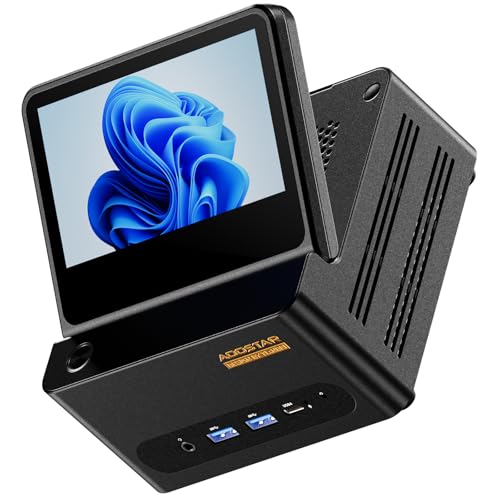
- Ryzen 7 H255 + Radeon 780M
- Dual USB4, OCuLink, dual 2.5GbE LAN
- 5-inch foldable touch secondary screen
Best For: DIY retro gaming and compact multitasking
Expandable AM5 Platform
MINISFORUM MS-A1 Barebone Workstation

- Supports AMD AM5 socket CPUs
- 4 SSD slots with RAID support
- HDMI, DP, and USB-C triple display
Best For: DIY retro gaming builds with serious upgrade potential
Modern Wireless DIY

- Ryzen 7 255 with Radeon 780M
- WiFi 7 and Bluetooth 5.4
- Quad-display support with 8K outputs
Best For: Retro gaming builders wanting modern wireless features
Upgradeable Performance Barebone

- Ryzen 7 255 with Radeon 780M graphics
- OCuLink plus dual 2.5Gbps networking
- Up to 96GB DDR5 and dual NVMe support
Best For: Builders who want stronger gaming headroom and expansion
High-Expansion Gaming Barebone

- Ryzen 7 H 255 with Radeon 780M graphics
- Three M.2 slots plus OCuLink expansion
- Dual 2.5GbE and quad-display support
Best For: Enthusiasts seeking maximum expansion and upgrade flexibility
Retro-Style All-Rounder – AYANEO AM01 Barebone Mini PC
If you want a barebone computer for retro gaming that also feels at home on a desk or TV stand, the AYANEO AM01 is a strong pick. Its retro-inspired shell hides a Ryzen 7 5825U, Wi-Fi 6, dual HDMI/DP output options, and barebone flexibility so you can choose the RAM and SSD that fit your setup.
Best For: Buyers who want a compact retro-styled mini PC for gaming, 4K media, and everyday use.
Pros:
- Retro design with modern connectivity, including Wi-Fi 6, Bluetooth 5.2, HDMI 2.0, DP 1.4, and USB-C
- 8-core/16-thread Ryzen 7 5825U handles gaming, 4K media, and light creative work
- Barebone layout supports custom RAM and storage, including dual DDR4 slots and M.2 plus 2.5-inch drive options
- Built for sustained use with 4 copper heat pipes, aluminum fins, and quiet cooling
Cons:
- Does not include RAM, SSD, or OS in barebone form
- Integrated graphics limit it to lighter gaming rather than modern AAA performance
Overall, the AM01 stands out for users who want the retro look without sacrificing practical mini PC features. It is especially appealing if you plan to build a custom, low-profile machine for emulation, media, and general gaming use.
Classic Budget Barebone – ASRock DeskMini 310W
For a barebone computer for retro gaming, the ASRock DeskMini 310W is a compact, older-platform option that focuses on the essentials. It supports Intel 8th Gen processors, DDR4 memory up to 32GB, and triple video outputs, making it a sensible choice for a simple emulation or low-power living-room build.
Best For: Builders who want a small, no-frills barebone for light gaming, emulation, or office use.
Pros:
- Very compact barebone system with a small 4-pound chassis
- Supports Intel 8th Gen CPUs and up to 32GB DDR4 memory
- Triple display outputs: DisplayPort, HDMI, and D-Sub
- Includes an Ultra M.2 PCIe Gen3 x4 slot for fast storage
Cons:
- Older Intel 8th Gen platform limits upgrade flexibility
- No modern high-end gaming features or included CPU beyond the barebone chassis
- Only supports up to 65W processors
The DeskMini 310W makes sense if you want a tiny retro-gaming box and do not need cutting-edge hardware. It is best viewed as a straightforward, compact foundation for modest performance and flexible display setups.
High-Performance Retro Rig – Reatan X7 AI Barebone Mini PC
If you need a barebone computer for retro gaming but also want plenty of headroom, the Reatan X7 AI is the most powerful option here. It pairs a Ryzen 7 255-class Zen 4 processor with Radeon 780M graphics, Wi-Fi 7, Oculink, and quad-display support, so it can handle demanding emulation setups and modern everyday multitasking.
Best For: Users who want a high-end barebone mini PC for gaming, emulation, and multi-display setups.
Pros:
- Zen 4 Ryzen 7 255-class CPU with 8 cores, 16 threads, and Radeon 780M graphics
- Dual M.2 slots and dual SODIMM slots support substantial RAM and storage expansion
- Wi-Fi 7, 2.5G LAN, Oculink, and two USB4 ports provide strong connectivity
- Supports up to four displays with DP 2.1, HDMI 2.1, and USB4 output options
Cons:
- Sold as barebone only, so RAM, SSD, and OS must be added separately
- Oculink uses one M.2 slot and does not support hot-swapping
This is the strongest fit if your retro gaming build needs modern I/O, broad expansion, and stronger integrated graphics. It is less about simplicity and more about giving you a powerful, customizable base for advanced use.
Mini Tower Power Base – ASRock DeskMeet B760 Barebone
The ASRock DeskMeet B760 is a different kind of barebone computer for retro gaming: it is larger than a mini PC, but it gives you desktop-class flexibility. With support for modern LGA1700 Intel CPUs, a PCIe 4.0 x16 graphics slot, and a built-in 500W PSU, it is a practical base if you want room for a stronger GPU or a more complete custom build.
Best For: Builders who want a compact desktop barebone with room for a discrete graphics card.
Pros:
- Supports 12th, 13th, and 14th Gen Intel Core CPUs on LGA1700
- PCIe 4.0 x16 slot fits a dual-slot graphics card up to 20cm long
- Four DDR4 DIMM slots support up to 128GB of memory
- Built-in 500W 80+ Bronze PSU simplifies the build
Cons:
- Barebone kit requires CPU, memory, storage, and possibly a GPU to be added
- Larger 8L footprint is not as small as typical mini PCs
- Cooler height is limited to 54mm
The DeskMeet B760 is best for users who want a compact chassis but do not want to give up desktop expansion. For retro gaming, that extra flexibility can be useful if you plan to add discrete graphics or build a broader all-purpose system.
DIY Retro Performer – AOOSTAR G-FLIP Mini PC
If you want a barebone computer for retro gaming that also feels modern, the AOOSTAR G-FLIP brings a lot to the table. Its Ryzen 7 H255 and Radeon 780M should handle emulation and light-to-moderate gaming with plenty of headroom, while the barebone design lets you add your own RAM, SSD, and OS.
Best For: Buyers who want a DIY mini PC for retro gaming, emulation, and compact multi-display setups.
Pros:
- Ryzen 7 H255 with Radeon 780M for strong overall performance
- Dual USB4, OCuLink, and dual 2.5GbE LAN add flexibility
- 5-inch foldable touch display for monitoring or quick controls
- Barebone build supports custom RAM, SSD, and OS choices
Cons:
- No RAM, SSD, or operating system included
- Built-in secondary screen adds complexity you may not need for simple setups
- OCuLink is not hot-swappable and requires power-off before connecting
For retro gaming fans who also want a feature-packed mini PC, this model stands out for expandability and connectivity. It is especially appealing if you plan to tune the system yourself and value extra display options.
Expandable AM5 Platform – MINISFORUM MS-A1 Barebone Workstation
As a barebone computer for retro gaming, the MINISFORUM MS-A1 is the type of system for builders who want to choose every core part themselves. It supports AMD AM5 socket CPUs and adds triple video output, so it can double as a flexible emulation box or a general-purpose mini workstation once you install your own components.
Best For: DIY builders who want an AM5-based mini PC for retro gaming, emulation, and future upgrades.
Pros:
- Supports AMD AM5 socket CPUs for upgrade flexibility
- Triple display output via HDMI, DP, and USB-C
- Two 2.5G LAN ports for fast wired networking
- Multiple SSD options with 4 M.2 slots and RAID support
Cons:
- Comes without CPU, GPU, RAM, SSD, or OS
- Requires more parts and setup than an all-in-one mini PC
- Designed more as a workstation-style platform than a simple plug-and-play box
This is a strong choice if you want maximum control over the build and expect to expand over time. For retro gaming, the appeal is in the platform flexibility rather than a ready-to-run package.
Modern Wireless DIY – Reatan X7BB Barebone Mini PC
If you’re shopping for a barebone computer for retro gaming and want a strong modern feature set, the Reatan X7BB is built around the Ryzen 7 255 and Radeon 780M. It leaves out RAM, SSD, and OS, but it adds WiFi 7, Bluetooth 5.4, built-in speakers, and multiple high-resolution display outputs for a polished custom setup.
Best For: Builders who want a WiFi 7 barebone mini PC for retro gaming and multi-display use.
Pros:
- Ryzen 7 255 with Radeon 780M graphics
- Quad-display support with HDMI 2.1, USB4, and DP outputs
- WiFi 7 and Bluetooth 5.4 for modern wireless connectivity
- Supports DDR5 RAM and PCIe 4.0 storage expansion
Cons:
- No RAM, SSD, or operating system included
- 8K and quad-display features may be more than many retro setups need
- Requires full DIY assembly before use
This model makes sense if you want a compact machine that can handle retro gaming while staying ready for newer display and connectivity standards. It is especially compelling for users who want a barebone they can tailor to performance and convenience.
Budget Barebone Living-Room Pick – Ryzen 5 3500U Mini PC Barebone
If you want a barebone computer for retro gaming without spending on a full prebuilt system, this Ryzen 5 3500U mini PC is a practical starting point. It gives you the flexibility to add your own RAM, SSD, and OS, while still offering enough Radeon Vega 8 graphics for light gaming, emulation setups, and living-room use.
Best For: Retro gaming fans who want an affordable, customizable mini PC for emulation and light indie titles.
Pros:
- AMD Ryzen 5 3500U with Radeon Vega 8 graphics for everyday use and light gaming
- Dual SO-DIMM RAM slots and dual M.2 SSD slots for flexible upgrades
- Triple 4K display support via USB-C, HDMI 2.0, and DisplayPort 1.4
- Compact 5 x 5 x 1.69-inch chassis with VESA mount for easy placement
Cons:
- No RAM, storage, or operating system included
- Not the strongest option here for demanding modern games
- Requires buyer-selected parts before first use
As a budget-friendly barebone mini PC, this model makes sense if your retro gaming library is the main goal and you want to choose your own memory and storage. Its mix of small size, multi-display output, and basic Radeon graphics is well suited to a tidy emulation or media setup.
Upgradeable Performance Barebone – Ryzen 7 255 Mini Gaming PC
For a barebone computer for retro gaming that also leaves room for more demanding use, this Ryzen 7 255 mini PC brings strong integrated graphics and modern expansion options. It ships without RAM, storage, or system software, so you can build it around the parts and operating system you prefer.
Best For: Users who want a fast, highly expandable barebone mini PC for emulation, modern indie games, and occasional heavy workloads.
Pros:
- Ryzen 7 255 with Radeon 780M graphics for stronger gaming performance
- Supports up to 96GB DDR5 and two PCIe 4.0 NVMe SSDs
- Includes OCuLink support for an external GPU path
- Wi-Fi 7, 2.5Gbps LAN, and HDMI 2.1 for modern connectivity
Cons:
- No RAM, no storage, and no operating system included
- Higher-spec features may be more than needed for simple retro setups
- External GPU use requires additional compatible hardware
This is a strong pick if you want retro gaming today but also want a mini PC that can scale into a more serious workstation later. The 780M graphics, OCuLink option, and wide expansion support make it especially appealing for builders who like headroom.
High-Expansion Gaming Barebone – GMKtec K12 Ryzen 7 Mini PC
If your priority is a barebone computer for retro gaming with serious upgrade potential, the GMKtec K12 stands out for its storage capacity and expansion-friendly design. It comes without RAM, SSD, or OS, but adds Ryzen 7 H 255 performance, Radeon 780M graphics, and multiple high-speed connection options.
Best For: Enthusiasts who want a powerful barebone mini PC for emulation, multi-display use, and future hardware expansion.
Pros:
- Ryzen 7 H 255 and Radeon 780M for strong integrated graphics performance
- Three M.2 2280 PCIe 4.0 slots for extensive storage expansion
- OCuLink and PCIe 4.0 x4 support for external GPU or add-in cards
- Dual 2.5GbE LAN, Wi-Fi 6E, and quad-display output options
Cons:
- No RAM, SSD, or operating system included
- Most attractive if you plan to use its advanced expandability
- RGB and performance features may be unnecessary for very simple retro builds
The K12 is the most ambitious option in this group, with enough connectivity and storage expansion to serve as both a retro gaming machine and a more advanced small-form-factor build. If you want to customize heavily and leave room for future upgrades, it is the most flexible pick here.
How We Picked the Best Barebone Computer for Retro Gaming
We prioritized systems that make sense for retro emulation: efficient CPUs, reliable integrated graphics, enough ports for controllers and displays, and upgrade options that extend the life of the build. We also looked for models with good thermal design, common memory and storage support, and practical I/O such as USB-C, HDMI, DisplayPort, and fast networking.
Quick Comparison
Most buyers can narrow the field by size and expansion. Smaller retro-focused minis are best for simple emulation and TV setups, while larger barebones with stronger cooling, PCIe expansion, or OCuLink are better if you want more headroom for heavier front ends, shader use, or future-proofing.
Key Buying Factors for a Barebone Computer for Retro Gaming
CPU and Graphics
For retro gaming, integrated graphics are usually enough, but not all iGPUs perform the same. Look for newer AMD or Intel chips with strong efficiency and good emulation support. Faster single-core performance helps with demanding systems, while stronger integrated graphics help with higher-resolution scaling and heavier visual filters.
Memory and Storage Support
Check whether the barebone supports DDR4 or DDR5, the maximum capacity, and how many slots are available. For storage, M.2 NVMe support is ideal, especially if you plan to load large game libraries or use multiple front ends. Some buyers will also appreciate extra SSD slots for separation between the operating system and games.
Ports and Display Output
A good Barebone Computer for Retro Gaming should connect easily to a TV, monitor, and controllers. HDMI 2.0 or 2.1, DisplayPort, and USB-C video output are helpful, especially if you plan on running multiple displays or a dual-screen arcade setup. Fast USB ports matter for wired controllers, storage, and peripherals.
Networking and Living-Room Use
Wi-Fi 6 or Wi-Fi 7 and 2.5GbE LAN are useful for downloads, updates, and streaming from a home server. If the PC will sit near your TV, consider fan noise, size, and power draw as well. Cooler, quieter systems are usually the best fit for an always-ready retro box.
Who Should Buy Which Barebone Computer for Retro Gaming?
If you want the simplest plug-and-play retro setup, choose a compact mini PC barebone with strong integrated graphics and standard display outputs. If you plan to expand later or run more demanding emulators and modern front ends, step up to a model with DDR5, multiple M.2 slots, or OCuLink/PCIe expansion. For dedicated living-room builds, prioritize quiet cooling and flexible video output. For advanced hobbyists, workstation-style barebones and higher-wattage kits offer the most room to grow.