
The most useful productivity gifts fit the way someone already works, whether that means improving a home office, simplifying laptop connections, or making focus time easier to protect. Consider his current setup and daily habits before choosing a larger upgrade.
14 Productivity Christmas Gift Ideas
1. Mount-It! Electric Standing Desk Converter
A Flexible Sit-Stand Workspace
Mount-It! Electric Standing Desk Converter

- Electric height adjustment moves the work surface from 6.3 to 19.3 inches.
- Includes a dual monitor arm for screens up to 32 inches each.
- The 47.2-inch desktop includes a keyboard tray, device channel, and USB charger.
Best For: A home-office worker who wants the option to work seated or standing.
2. VIWOODS AiPaper Mini E Ink Tablet Bundle
A Portable Reading and Notes Kit
VIWOODS AiPaper Mini E Ink Tablet Bundle
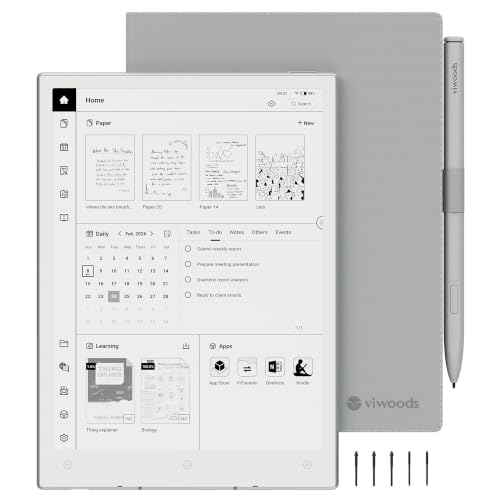
- The 8.2-inch E Ink screen supports reading, planning, handwriting, and PDF annotation.
- Includes a stylus, folio cover, five replacement nibs, and USB-C cable.
- Files can be stored locally or synced and transferred through listed cloud and wireless options.
Best For: A professional who reads, annotates, or takes notes while traveling or working.
3. INNOCN 34-Inch Ultrawide Monitor
A Wider View for Multitasking
INNOCN 34-Inch Ultrawide Monitor

- The 21:9 display provides room for side-by-side documents, charts, or editing timelines.
- Picture-in-picture and picture-by-picture modes can show two connected devices.
- The stand offers height and tilt adjustment; connections include HDMI and DisplayPort.
Best For: Someone who regularly works across documents, charts, and multiple windows.
4. Ergonomic Office Chair with Adjustable Lumbar
A More Adjustable Desk Seat
Ergonomic Office Chair with Adjustable Lumbar

- Features adjustable lumbar support, a headrest, and three-way adjustable armrests.
- The mesh chair reclines from 90 to 120 degrees and has three tilt-lock positions.
- Includes a high-density foam seat cushion and rolling base.
Best For: A desk worker who spends long stretches seated at home or in an office.
5. Acer 13-in-1 USB-C Docking Station
A Laptop Desk Connection Hub
Acer 13-in-1 USB-C Docking Station

- Ports include two HDMI, one DisplayPort, USB-C, USB-A, Ethernet, audio, and SD/TF readers.
- The included power adapter supports up to 100W charging to a connected host laptop.
- Triple-display expansion depends on laptop, graphics, and operating-system compatibility.
Best For: A laptop user who wants to connect several peripherals at a desk.
6. HUANUO FlowLift Dual Monitor Stand
A Clearer Two-Screen Desk
HUANUO FlowLift Dual Monitor Stand

- Fits two 13- to 32-inch monitors within the stated weight and VESA limits.
- Arms allow tilt, swivel, rotation, and height adjustment up to 15.75 inches.
- A clamp or grommet mount attaches to compatible wooden desks and includes cable routing.
Best For: Someone using two monitors at a fixed desk with compatible screens and desk.
7. EMEET S600 4K Webcam
A Sharper Remote-Meeting Setup

- Supports video up to 4K at 30 frames per second or 1080p at 60 frames per second.
- PDAF autofocus and automatic light adjustment help manage focus and lighting.
- Includes microphones and a built-in privacy cover; connects over USB.
Best For: A remote worker who wants a dedicated webcam for calls or content creation.
8. EMEET M0 Plus Conference Speakerphone
A Shared-Clear Audio Upgrade
EMEET M0 Plus Conference Speakerphone

- Four microphones provide 360-degree voice pickup, with noise and echo filtering described.
- Connects by USB-C or Bluetooth and supports common conferencing platforms.
- Can link with a second compatible EMEET speakerphone for larger meetings.
Best For: Someone who takes frequent calls or hosts small meetings from a home office.
9. Univivi 36-Inch Under-Desk Cable Tray
A Tidy Place for Desk Cables
Univivi 36-Inch Under-Desk Cable Tray

- The 36-inch fabric tray holds adapters, sockets, and cords beneath a desk.
- Installs with clamps or screws, and can be unfolded to add or remove items.
- Check desk clearance and dimensions, especially around drawers or support bars.
Best For: A person whose desk area has accumulated chargers and power cords.
10. JLab Go Lux ANC On-Ear Headphones
11. Redragon K689 PRO Wireless Keyboard
A Shortcut-Ready Typing Upgrade
Redragon K689 PRO Wireless Keyboard

- The full-size 108-key layout includes four hotkeys for functions such as mute and calculator.
- Connects through USB-C, Bluetooth, or 2.4GHz wireless.
- Gasket construction, noise-dampening layers, and customizable RGB lighting shape the typing setup.
Best For: A frequent typist who enjoys configuring a desk keyboard and shortcuts.
12. RIWUCT Foldable Aluminum Laptop Stand
A Portable Laptop Riser
RIWUCT Foldable Aluminum Laptop Stand
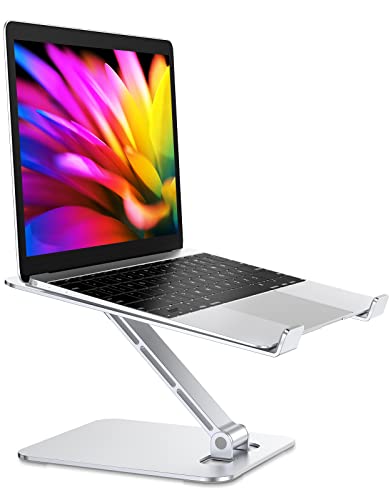
- Raises and tilts laptops, with height adjustment up to 7.48 inches.
- Folds for storage or carrying and has a space-saving open design for ventilation.
- Designed for laptops from 10 to 16 inches, with non-slip pads and hooks.
Best For: A laptop user who works in different rooms or takes a computer on the go.
13. Nulea M501 Wireless Trackball Mouse
A Precise Pointer for Tight Desks
Nulea M501 Wireless Trackball Mouse

- Thumb-operated trackball moves the cursor without moving the mouse across the desk.
- Pairs with up to three devices using Bluetooth or the included USB receiver.
- Rechargeable design includes six buttons and four DPI levels.
Best For: A desk worker who wants cursor control in a compact workspace.
14. Rotating Productivity Timer Cube
A Simple Timer for Focus Blocks
Rotating Productivity Timer Cube

- Gravity-sensing presets include 5, 25, 10, and 50 minutes; flip to start a preset countdown.
- Custom countdown and stopwatch modes allow other time settings.
- Choose silent vibration or high and low volume alerts.
Best For: Someone who likes structured focus sessions with clear breaks.
Choosing for the Recipient
Start with the friction he mentions most often. If his desk feels cramped or crowded, a monitor stand or cable tray may help reclaim space. Someone who moves between meetings, rooms, or work locations may get more use from the foldable laptop stand or portable E Ink notebook. For a person whose workday depends on calls, consider the webcam or speakerphone; headphones may be more useful when calls and concentration happen in shared spaces.
Match the gift to his existing habits. A timer cube can support someone who already uses timed work blocks, while a new desk chair or standing desk converter can change the workspace more substantially. Productivity is personal: a complex gadget is less helpful when it adds setup or routines he does not want. A good clue is whether he has described a specific annoyance, such as juggling devices, reaching awkwardly for a screen, or lacking a quiet place to focus.
Set a Budget That Fits the Scale of the Gift
These ideas range from compact accessories to substantial furniture and display upgrades. Decide on a spending range before comparing products, then consider the total setup: a monitor arm may require compatible screens and a suitable desk, and a docking station is useful only when the laptop supports its functions. Accessories such as a timer or laptop stand can be thoughtful on their own, while a chair or monitor is a larger workspace investment. Product prices can change, so check the current listing and any included components when you are ready to buy.
Check Compatibility and Personalization
Compatibility matters especially for technical and mounting gifts. For the dual monitor stand, confirm screen size, weight, VESA mounting pattern, desk material, thickness, and clearance underneath. For the docking station, verify the laptop’s USB-C capabilities, operating system, and display support; the supplied notes specify that extended desktop mode is not available across multiple displays on macOS, and some triple-display features depend on Windows laptop and graphics support. Confirm monitor inputs and available desk space before choosing a large ultrawide screen.
For smaller devices, check the recipient’s setup too. The E Ink tablet syncs through listed services and wireless options; make sure its workflow fits how he handles notes and files. Confirm laptop size for the stand, operating system and apps for the webcam, and device connections for headphones or the speakerphone. Personal touches can be practical: configure a keyboard’s shortcut keys for common tasks, or choose a timer style and alert mode that would suit his office or shared space.
Christmas Timing and Last-Minute Decisions
Plan earlier for gifts that need measurements, workspace changes, or compatibility research. A desk converter, chair, monitor, or clamp-mounted arm may require clearing space and arranging assembly. For electronics, allow time to verify ports and operating-system requirements. If those details are uncertain, a smaller accessory with straightforward fit requirements may be easier to choose, provided the recipient’s devices are still compatible.
For a last-minute decision, focus on a known need rather than a long feature list. A person who has asked for better call audio may appreciate a speakerphone; someone who already uses timed focus sessions may welcome the cube timer. Check the current seller’s shipping details and the product listing before ordering, since timing and availability can vary. A short note explaining why you chose the gift—such as helping clear the desk or making daily notes easier—can make a practical productivity gift feel personal at Christmas.