
Choosing the right desktop for a home office comes down to speed, quiet operation, display support, and how much desk space you can spare.
Below, we focus on desktop computers for home offices that balance everyday productivity, upgrade potential, and value—whether you want a compact mini PC, an all-in-one, or a full-size tower.
Best 10 Desktop Computers for Home Offices Picks for 2026
Compact AI-Ready Tower
Dell Slim Desktop with Core Ultra 5
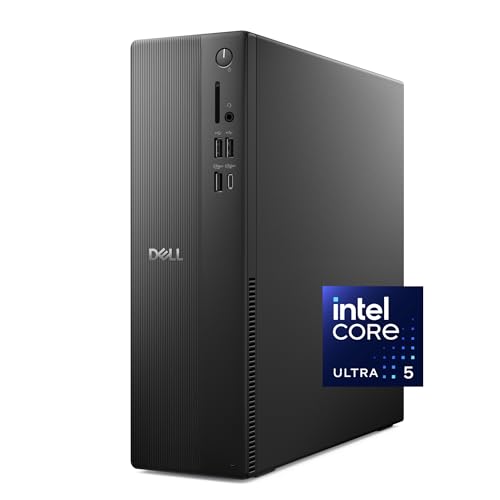
- Core Ultra 5 with built-in AI support
- Runs up to four FHD or two 4K displays
- Slim design with tool-less upgrade access
Best For: Home offices needing a secure, space-saving tower
Quiet Mini PC for Workspaces

- Core Ultra 5 125U with AI-ready processing
- Supports quad displays via USB4 and HDMI
- Near-silent cooling with dual 2.5G LAN
Best For: Space-saving home offices that need quiet multitasking
All-in-One Home Office Starter

- 23.8-inch FHD IPS display built in
- 16GB RAM and 512GB NVMe SSD
- Includes webcam, speakers, and WiFi 6
Best For: Home offices that need a simple all-in-one setup
Enterprise-Ready Tower
Dell 2026 Edition Tower Desktop Computers

- 14th Gen Core i3-14100 with Windows 11 Pro
- 512GB PCIe NVMe SSD and 8GB DDR5 RAM
- Dual 4K monitor support plus Wi-Fi 6
Best For: Home office users needing a compact, business-ready tower
Balanced All-Rounder
Lenovo IdeaCentre Tower Desktop Computer

- Core Ultra 5 225 with 10-core design
- 16GB DDR5 RAM and 512GB SSD
- Includes keyboard/mouse and Wi-Fi 6E
Best For: Home office users wanting an easy setup and solid everyday performance
Renewed Value Pick
Dell Optiplex 3060 Desktop Computer

- Core i5-8500 with Windows 11 Pro
- 32GB DDR4 RAM and 1TB SSD
- Built-in Wi-Fi, Bluetooth, HDMI, and DisplayPort
Best For: Budget home office setups that need lots of storage and memory
AI-Powered Upgrade-Friendly Tower
Dell Tower Desktop, Intel Core Ultra 7-265

- Core Ultra 7 with built-in AI support
- 32GB RAM for heavy multitasking
- Supports multiple monitors and easy upgrades
Best For: Power users who want a flexible home-office tower
Compact Pro Business Desktop
Dell Tower ECT1250 Business Desktop Computer
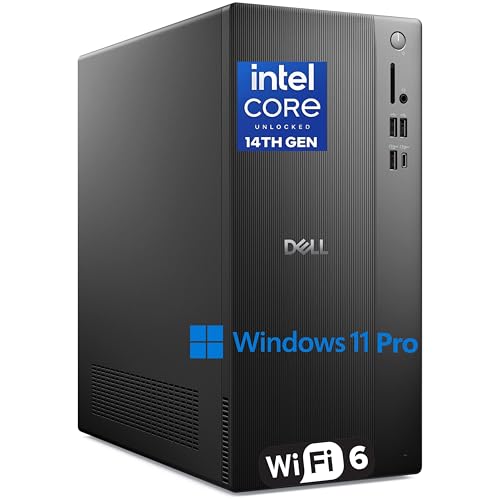
- Core i3 with 16GB DDR5 and 1TB SSD
- Windows 11 Pro with business security tools
- Compact tower with Wi-Fi 6 and multiple ports
Best For: Budget-conscious home offices needing a compact Pro desktop
Compact AI-Ready Tower – Dell Slim Desktop with Core Ultra 5
If you want desktop computers for home offices that balance speed, security, and a small footprint, the Dell Slim Desktop is built for practical everyday work. It uses Intel Core Ultra 5 with built-in AI support, adds support for multiple monitors, and keeps the design slim enough for tighter workspaces.
Best For: Home office users who want a tidy, business-ready desktop with modern connectivity and room for future upgrades.
Pros:
- Intel Core Ultra processor with built-in AI support for productivity tasks
- Can connect up to four FHD monitors or two 4K displays
- Tool-less entry and removable side panel make upgrades easier
- Includes hardware TPM security chip and lock options
Cons:
- Integrated graphics are best for everyday work, not demanding creative workloads
- External speakers are required for audio output
This is a strong fit if you value a neat desktop that can handle common home-office duties without taking over your desk. The included onsite service and Dell Migrate tool add extra convenience for setup and support.
Quiet Mini PC for Workspaces – GEEKOM IT12 MAX Mini PC
For desktop computers for home offices where desk space is limited, the GEEKOM Mini PC IT12 MAX offers a compact, low-noise setup with modern Intel Core Ultra performance. It is designed for multitasking, quad-display use, and steady operation, making it a strong fit for streamlined workstations.
Best For: Buyers who want a tiny desktop for a quiet, efficient, multi-monitor home office setup.
Pros:
- Intel Core Ultra 5 125U with CPU, NPU, and GPU support for AI-assisted work
- Quad-display capability with dual HDMI 2.0 and dual USB4
- Low-noise cooling system and switchable power modes
- Dual 2.5G LAN and commercial I/O for flexible connectivity
Cons:
- Mini PC form factor means you will need your own monitor and peripherals
- Best suited to productivity and light creative work rather than heavy graphics tasks
This model makes sense if you want a compact system that can stay on for long periods with minimal noise and power use. Its upgradeable SSD and 3-year coverage also add appeal for long-term home office use.
All-in-One Home Office Starter – Lenovo IdeaCentre 24" AIO
If you want desktop computers for home offices with a simpler setup, this Lenovo IdeaCentre all-in-one combines the PC and 23.8-inch display in one unit. It is aimed at everyday computing, light productivity, and video calls, while keeping your desk cleaner than a traditional tower setup.
Best For: Users who want an easy-to-place all-in-one for work, study, and video conferencing.
Pros:
- 23.8-inch FHD IPS anti-glare display with 99% sRGB
- 16GB RAM and 512GB NVMe SSD for responsive everyday performance
- Includes WiFi 6, Bluetooth 5.2, webcam, speakers, and microphone
- Compact all-in-one design saves desk space
Cons:
- Intel N100 is best for basic productivity, not heavy workloads
- Less upgrade flexibility than a traditional desktop tower
This is a practical pick if you want an uncluttered home office setup with the essentials already included. It delivers good everyday usability without requiring you to buy a separate monitor or camera.
Business SFF Desktop with Security – HP ProDesk 400 G9 SFF
Among desktop computers for home offices, the HP ProDesk 400 G9 SFF is a compact business-style option that focuses on security, connectivity, and everyday responsiveness. With Windows 11 Pro, dual-display support, and a small footprint, it fits well in a work-from-home setup that needs a more professional feature set.
Best For: Home office users who want a compact Windows 11 Pro desktop with business-minded security and ports.
Pros:
- Windows 11 Pro with TPM 2.0 and HP Wolf Security
- Dual 4K display support for more flexible work setups
- Includes USB-C, HDMI, DisplayPort, RJ-45, Wi-Fi, keyboard, and mouse
- Small form factor design saves space under or beside a desk
Cons:
- Celeron G6900 processor is modest for demanding workloads
- Integrated graphics are intended for general use, not advanced creative work
This desktop is best viewed as a secure, practical workstation rather than a performance machine. If your home office priorities are reliability, connectivity, and manageable size, it covers those bases well.
Enterprise-Ready Tower – Dell 2026 Edition Tower Desktop Computers
If you want desktop computers for home offices that can also handle demanding business work, this Dell tower is built around a 14th Gen Intel Core i3-14100, 8GB DDR5 RAM, and a 512GB PCIe NVMe SSD. It is a practical choice for everyday productivity, office automation, and smooth multitasking, while still staying compact enough for a desk-friendly setup.
Best For: Home office users who want a fast, Windows 11 Pro tower with modern connectivity and dual-monitor support.
Pros:
- 14th Gen Intel Core i3-14100 with Windows 11 Pro for business-focused daily use
- 512GB PCIe NVMe SSD and 8GB DDR5 RAM for quick boot and responsive multitasking
- Supports dual 4K monitors through HDMI 2.1 and DisplayPort 1.4a
- Includes Wi-Fi 6, Bluetooth, USB-C, USB-A, SD reader, and Gigabit Ethernet
Cons:
- 8GB RAM may feel limiting for heavier multi-app workloads
- Integrated graphics are best suited to office and productivity use
This Dell tower stands out if your home office needs a modern, secure desktop with strong connectivity and space-saving design. It is less about flashy extras and more about reliable day-to-day performance.
Balanced All-Rounder – Lenovo IdeaCentre Tower Desktop Computer
For desktop computers for home offices, this Lenovo IdeaCentre Tower aims at balanced everyday performance with an Intel Core Ultra 5 225, 16GB DDR5 RAM, and a 512GB SSD. It is designed for smooth office work, multitasking, and light productivity, while the included keyboard and mouse make setup simpler right out of the box.
Best For: Home office and personal users who want a well-equipped tower with strong memory, dual-monitor support, and included accessories.
Pros:
- Intel Core Ultra 5 225 with 10 cores for responsive everyday computing
- 16GB DDR5 RAM and 512GB SSD for multitasking and fast loading
- Includes wired keyboard and mouse for easy plug-and-play setup
- HDMI, VGA, Wi-Fi 6E, Bluetooth 5.1, and 7 USB ports for flexible connections
Cons:
- Windows 11 Home may not suit users who need Pro features
- Integrated graphics are aimed at office workloads rather than creative or gaming use
This Lenovo is a sensible pick if you want a home office desktop with a little more headroom than entry-level systems. Its memory, connectivity, and included accessories make it easy to deploy for work or everyday use.
Renewed Value Pick – Dell Optiplex 3060 Desktop Computer
If you are shopping for desktop computers for home offices on a tighter budget, this renewed Dell Optiplex 3060 offers a practical mix of a Core i5-8500 processor, 32GB DDR4 RAM, and a 1TB SSD. It focuses on roomy storage, Windows 11 Pro, and dependable connectivity for office tasks, web work, and everyday use.
Best For: Budget-minded home office buyers who want lots of memory and storage in a renewed tower.
Pros:
- 32GB DDR4 RAM and 1TB SSD provide generous room for multitasking and storage
- Windows 11 Pro and Intel Core i5-8500 support daily home or office work
- Built-in Wi-Fi and Bluetooth add convenient wireless connectivity
- Includes HDMI and DisplayPort for monitor flexibility, plus a full-sized keyboard
Cons:
- Renewed model comes with a shorter 90-day warranty
- Older 8th Gen processor is behind newer towers for heavier workloads
- Integrated graphics keep it focused on productivity rather than demanding visuals
This Dell makes sense if storage capacity and memory are higher priorities than having the newest processor. It is a straightforward home office desktop that leans into value and practical features.
Secure & Productive Business Tower – Lenovo IdeaCentre Secure & Productive Business Tower Desktop
If you need one of the more balanced desktop computers for home offices, this Lenovo tower is built around fast everyday productivity. The Intel Core Ultra 5 225, DDR5 memory, and SSD storage are aimed at smooth multitasking, quick boot times, and easy handling of office apps, video calls, and web-based tools.
Best For: Home-office users who want a business-style tower with modern connectivity and Windows 11 Pro.
Pros:
- 10-core Intel Core Ultra 5 processor is designed for responsive multitasking and everyday content creation.
- DDR5 memory and PCIe 4.0 NVMe storage help with fast startup and app switching.
- Wi-Fi 6E, Gigabit Ethernet, and Bluetooth 5.2 provide flexible network and peripheral support.
- Front USB-C, HDMI 2.1, VGA, and multiple USB-A ports make it easy to connect office gear.
Cons:
- 8GB RAM may feel modest if you keep many heavy apps open at once.
- 256GB SSD plus 500GB HDD is functional, but not as simple as a single large SSD setup.
This is a practical pick if you want a reliable tower for work-first use rather than a flashy all-rounder. It has the connectivity and OS features that suit a home office, while the storage split and base memory level may matter if your workload grows.
AI-Powered Upgrade-Friendly Tower – Dell Tower Desktop, Intel Core Ultra 7-265
For desktop computers for home offices that need extra headroom, this Dell tower focuses on speed, expandability, and display flexibility. The Core Ultra 7 processor with built-in AI support and 32GB of RAM make it a strong fit for demanding multitasking, while the multiple-monitor support is useful if you like to spread work across several screens.
Best For: Users who want a high-performance home-office desktop with room to grow.
Pros:
- Intel Core Ultra 7 processor with built-in AI support targets productivity and creativity tasks.
- 32GB RAM offers plenty of breathing room for multitasking.
- Supports up to four FHD monitors or two 4K displays, depending on your setup.
- Tool-less entry and a removable side panel make future upgrades easier.
Cons:
- Windows 11 Home is less business-oriented than Pro editions.
- Higher-end hardware may be more than some basic office users need.
This Dell is a smart choice if your home office work benefits from extra power and multi-monitor flexibility. It also stands out for easy internal access and included onsite service, which adds convenience for long-term ownership.
Compact Pro Business Desktop – Dell Tower ECT1250 Business Desktop Computer
If you want a straightforward work machine among desktop computers for home offices, this Dell tower keeps the focus on practical essentials. The 14th Gen Core i3, 16GB of DDR5 RAM, and 1TB PCIe SSD are a solid combination for responsive everyday computing, while the compact case helps it fit neatly into tighter desk spaces.
Best For: Home-office buyers who want a compact, business-focused desktop with Windows 11 Pro.
Pros:
- 14th Gen Intel Core i3 processor is tuned for responsive business and productivity tasks.
- 16GB DDR5 RAM and 1TB PCIe SSD support quick boot times and smooth multitasking.
- Wi-Fi 6, Bluetooth, Gigabit Ethernet, HDMI 2.1, and DisplayPort 1.4 provide broad connectivity.
- Windows 11 Pro adds remote desktop, BitLocker, and management tools for business use.
Cons:
- Core i3 performance is best for everyday work, not heavier creative workloads.
- Integrated 180W power supply and compact design suggest a more modest expansion path.
This model is a strong fit if your home office needs reliable performance without overpaying for extra horsepower. It offers the key business features most users want, plus physical security options and a size that should be easy to place on or under a desk.
How We Picked These Desktop Computers for Home Offices
We focused on models that fit real work-from-home needs: responsive processors for office apps and multitasking, enough RAM for smooth browsing and video calls, SSD storage for fast boot times, and practical ports for peripherals and external monitors. We also considered form factor, noise, expandability, and business-friendly features like Wi-Fi, USB-C, and dual-display support.
Quick Comparison
For small desks, mini PCs and all-in-ones save space. For the best balance of performance and future upgrades, tower desktops are usually the stronger choice. If you need the most straightforward setup, an all-in-one can simplify cable management. If you want room to grow, a tower with more RAM and SSD capacity is easier to live with long term.
Key Buying Factors for Desktop Computers for Home Offices
Processor and Everyday Speed
For basic office work, web apps, email, and video conferencing, modern entry-level CPUs are fine. If you multitask heavily or keep many tabs and apps open, step up to newer Core Ultra-class chips or higher-tier processors for smoother performance.
RAM and Storage
8GB RAM is acceptable for lighter use, but 16GB is the safer baseline for most home offices. Power users, large spreadsheets, and frequent multitaskers may prefer 32GB. For storage, a 512GB SSD is a good minimum, while 1TB is better if you keep local files, project assets, or backups on the machine.
Ports, Displays, and Connectivity
Check for the monitor outputs you need, especially HDMI, DisplayPort, USB-C, and support for dual monitors. Wi-Fi and Ethernet both matter if your workspace layout changes or you want a stable wired connection for calls and uploads.
Size, Noise, and Upgrades
Mini PCs and SFF desktops fit tight spaces and usually draw less power. Towers often run cooler, can be easier to upgrade, and tend to offer more ports and expansion options. All-in-ones look cleaner, but they usually trade away upgrade flexibility.
Who Should Buy Which Desktop Computers for Home Offices?
If you need a simple, clutter-free setup, an all-in-one is a good fit. If your desk is small or you want a computer you can hide behind a monitor, a mini PC makes sense. If you want the best long-term value for demanding work, choose a tower with at least 16GB RAM and a fast SSD. For most buyers shopping Desktop Computers for Home Offices, that combination offers the best mix of speed, reliability, and flexibility.