
The best USB-C cable depends on more than price. Charging wattage, data speed, length, connector design, and package size all affect how useful a cable will be at home, in the car, or at your desk.
We compared 10 affordable USB-C cable options with an emphasis on practical compatibility, fast charging, flexible lengths, and reliable everyday use. The guide below can help you choose the right cable for phones, tablets, laptops, gaming devices, and accessories.
Best 10 USB C Cables Under 50 Picks for 2026
Best High-Wattage Pick
UGREEN 100W USB-C Cable 2-Pack

- 100W charging support
- Braided, reinforced construction
- Two 3.3-foot cables
Best For: High-wattage charging at a desk or while traveling
Best Multi-Length Value

- 3.3-, 6.6-, and 10-foot lengths
- 60W Power Delivery support
- Safety protection built in
Best For: Multiple charging stations around the home
Best Brand-Backed Option

- Up to 100W charging
- Nylon cable with 5,000-bend rating
- Everlasting warranty listed
Best For: Everyday charging from a recognizable accessories brand
Best Bulk Pack

- Five cables in three lengths
- 60W fast-charging support
- Reinforced braided construction
Best For: Homes, offices, and multi-device cable storage
Compact Speed Pick

- 100W charging and 10Gbps data
- 4K 60Hz video support
- Two-pack with 1.5-foot cables
Best For: Compact desk, travel, and high-speed device connections
Multi-Device Value

- Five six-foot USB-C cables
- Up to 60W charging
- Nylon-braided durability
Best For: Homes, offices, and multi-device charging
Maximum Performance

- 240W fast charging support
- 20Gbps data transfer
- 4K 60Hz video capability
Best For: High-power laptops, SSDs, monitors, and demanding setups
Long-Reach Charging Pick

- Three 10-foot cables for flexible placement
- 60W PD charging with 480Mbps data
- Braided design with safety protections
Best For: Homes, offices, and cars needing extra-long USB-C cables
Best Heavy-Duty Pick

- Five 6-foot braided USB-C cables
- 60W charging and 480Mbps data transfer
- Includes cable ties and lifetime warranty
Best For: Families and travelers needing multiple USB-C cables
Car Connectivity Pick
Right-Angle USB-C Cable 2-Pack
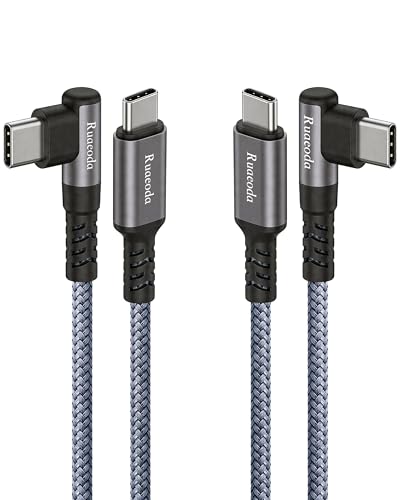
- 90-degree, case-friendly connectors
- Supports CarPlay and Android Auto
- 60W charging with reinforced braided build
Best For: Drivers and users charging in tight spaces
Best High-Wattage Pick – UGREEN 100W USB-C Cable 2-Pack
For shoppers comparing USB C cables under 50, this UGREEN 2-pack is a practical choice for USB-C phones, tablets, and laptops that benefit from higher-wattage charging. It supports up to 100W charging, while its 3.3-foot length suits desks, nightstands, and travel bags.
Best For: Users who want two short, durable USB-C-to-USB-C cables with high charging capacity.
Pros:
- Supports up to 100W charging with PD3.0 and QC3.0 compatibility.
- Nylon braid, aluminum housing, and a 250D fiber core are designed to resist fraying.
- Includes two cables and supports data transfers up to 480Mbps.
Cons:
- At 3.3 feet, the cables may be short for use across a room.
- 480Mbps data speed is suitable for basic syncing but not high-speed USB data workflows.
The UGREEN cable stands out when charging capacity and durability matter more than extra-long reach or faster-than-USB-2.0 data transfer.
Best Multi-Length Value – 3-Pack 60W USB-C Cables
Among USB C cables under 50, this three-pack is useful if you need different lengths for different locations. The included 3.3-foot, 6.6-foot, and 10-foot cables support up to 60W charging and work with a broad range of USB-C phones, tablets, laptops, and gaming devices.
Best For: Households that need short, medium, and long cables for desks, travel, bedrooms, or sofas.
Pros:
- Three lengths cover common charging setups.
- Supports up to 60W Power Delivery charging.
- Built-in protection helps guard against over-current, overheating, and short circuits.
Cons:
- 480Mbps data transfer is basic rather than high speed.
- Maximum 60W output may be limiting for some higher-power laptops.
This pack prioritizes flexibility and quantity, making it a sensible option when cable reach matters as much as charging performance.
Best Brand-Backed Option – Anker 100W USB-C Cable 2-Pack
If you are shopping for USB C cables under 50 and prefer a familiar accessories brand, this Anker two-pack offers up to 100W charging for compatible devices. Its nylon exterior and stated 5,000-bend lifespan make it suited to regular everyday use.
Best For: Buyers seeking a durable, high-wattage charging and data cable from Anker.
Pros:
- Supports charging speeds up to 100W with a compatible charger.
- Nylon construction is rated for a 5,000-bend lifespan.
- Two cables are included, along with cable ties and an everlasting warranty.
Cons:
- Does not support video output.
- Data transfer is limited to 480Mbps.
- The supplied listing information contains inconsistent length references, so verify the package details before ordering.
This is a straightforward charging-and-syncing option for users who value Anker’s support and warranty, provided video output is not required.
Best Bulk Pack – LISEN 60W USB-C Cable 5-Pack
For shoppers comparing USB C cables under 50, this LISEN five-pack offers several lengths for sharing across rooms, devices, or family members. It supports up to 60W charging and includes two 3.3-foot, two 6.6-foot, and one 10-foot cable.
Best For: Households, offices, or bulk buyers who need multiple USB-C-to-USB-C cables in varied lengths.
Pros:
- Five-cable bundle includes 3.3-, 6.6-, and 10-foot options.
- Supports up to 60W PD3.0/QC3.0/QC4.0 charging.
- Braided recycled cotton yarn and reinforced USB-C ports are designed for durability.
Cons:
- Data transfer is limited to 480Mbps.
- The notes list compatibility with newer USB-C iPhones but exclude iPhone 14 and earlier models.
- 60W may not be enough for every high-power laptop setup.
The LISEN pack is a strong quantity-focused choice when you want several lengths and cables on hand, but confirm device compatibility before purchasing.
Compact Speed Pick – Short 100W USB-C Cable
For shoppers comparing usb c cables under 50, this two-pack is a practical choice when you need short cable runs without sacrificing charging, data, or display capability. Each 1.5-foot USB-C-to-USB-C cable supports up to 100W charging, 10Gbps transfers, and 4K at 60Hz video on compatible devices.
Best For: Desks, docking stations, portable monitors, SSDs, and travel setups where excess cable length gets in the way.
Pros:
- Supports up to 100W charging with an E-Marker chip.
- Offers 10Gbps data transfer and 4K 60Hz video support.
- Two-pack design with reinforced, braided construction.
- Thunderbolt 3 compatible and broadly compatible with USB-C devices.
Cons:
- The 1.5-foot length may be too short for some setups.
- 4K output requires compatible USB-C devices on both ends.
This is the strongest fit when compactness and high performance matter more than reach. Its combination of 100W power, fast data, and display support makes it versatile for laptops, monitors, storage drives, and gaming accessories.
Multi-Device Value – Anker 60W 5-Pack
If you need several dependable leads while shopping for usb c cables under 50, this Anker five-pack emphasizes quantity and convenient reach. Each six-foot USB-C-to-USB-C cable supports up to 60W charging and uses a nylon-braided exterior for everyday durability.
Best For: Households, offices, or travel bags that need multiple long cables for phones, tablets, laptops, and gaming devices.
Pros:
- Includes five cables, each measuring six feet.
- Supports up to 60W fast charging.
- Nylon-braided construction is designed for extended durability.
- Compatible with a wide range of USB-C phones, tablets, laptops, and consoles.
Cons:
- Its 5Gbps data rate is lower than the faster cables in this roundup.
- It does not list 4K video support in the supplied specifications.
- 60W output may not meet the needs of some higher-power laptops.
The main advantage here is convenience: five long cables make it easy to equip multiple rooms or devices at once. Choose it for charging coverage and value rather than maximum data-transfer or display performance.
Maximum Performance – 240W 20Gbps USB-C Cable
For demanding setups in the usb c cables under 50 category, this three-foot cable is built around high-speed performance. It supports up to 240W charging, 20Gbps data transfers, and 4K at 60Hz video, making it suitable for compatible laptops, external SSDs, and portable monitors.
Best For: High-power laptops, fast external storage, USB-C monitors, gaming setups, and mobile workstations.
Pros:
- Supports up to 240W Power Delivery with an E-Marker chip.
- Provides 20Gbps USB 3.2 Gen 2×2 data transfer.
- Supports 4K at 60Hz for compatible DisplayPort Alt Mode devices.
- Nylon braiding and testing for more than 45,000 bends add durability.
Cons:
- The three-foot length may not suit distant ports or large desks.
- Video output requires USB-C devices with DisplayPort Alt Mode.
- Devices and chargers must support the relevant power and speed standards to reach the maximum ratings.
This is the performance-oriented option for users who regularly move large files, power demanding equipment, or connect a USB-C display. It offers the highest stated charging and data specifications here, provided the connected hardware supports them.
Long-Reach Charging Pick – 10-Foot USB-C Cable 3-Pack
If you need USB C cables under 50 for flexible charging around the house, office, or car, this three-pack stands out for its extra-long 10-foot length. It supports up to 60W Power Delivery charging and includes nylon-braided construction for everyday use.
Best For: Users who want multiple long USB-C to USB-C cables for phones, tablets, and compatible laptops.
Pros:
- Three 10-foot cables provide plenty of reach.
- Supports up to 60W PD charging and 480Mbps data transfer.
- Nylon braiding and aluminum connectors help resist fraying and bending.
- Includes over-current, over-voltage, and short-circuit protection.
Cons:
- USB-C to USB-C only, so it requires a compatible USB-C charger.
- Data transfer is suitable for everyday syncing but not positioned as a high-speed USB standard.
This is a practical value choice when length and quantity matter more than specialized features. Its 10-foot design is especially useful where a standard cable would leave you tied to the outlet.
Best Heavy-Duty Pick – 6-Foot USB-C Cable 5-Pack
Among USB C cables under 50, this five-pack is designed for households or travel kits that need several cables on hand. Each 6-foot USB-C to USB-C cord supports up to 60W charging, everyday data transfer, and a braided exterior made with recyclable cotton yarn.
Best For: Families, multi-device users, and travelers who want several matching USB-C cables with a lifetime warranty.
Pros:
- Five 6-foot cables provide strong quantity value.
- Supports up to 60W PD charging and 480Mbps data transfer.
- Recyclable cotton-yarn braiding helps reduce tangling and wear.
- Includes cable ties and a worry-free lifetime warranty.
Cons:
- USB-C to USB-C design is not compatible with USB-A charging ports without an adapter.
- 480Mbps data transfer is adequate for routine syncing but slower than high-speed USB data standards.
The main appeal is coverage: five cables can stay in different rooms, bags, or workspaces without constant unplugging. Choose it if quantity, 6-foot reach, and broad USB-C compatibility are priorities.
Car Connectivity Pick – Right-Angle USB-C Cable 2-Pack
For USB C cables under 50 that also support in-car use, this two-pack adds a 90-degree connector designed for CarPlay, Android Auto, and tight spaces. The 6-foot braided cables support up to 60W charging, 480Mbps syncing, and a case-friendly fit.
Best For: Drivers who need a durable, right-angle USB-C cable for CarPlay, Android Auto, charging, and data connections.
Pros:
- 90-degree, extended connectors help with thick phone cases and tight cable routing.
- Designed for stable Apple CarPlay and Android Auto connections.
- Supports up to 60W charging and 480Mbps data transfer.
- Nylon braiding and reinforced strain relief are rated for 20,000+ bends.
Cons:
- Two-pack provides fewer cables than some multi-pack alternatives.
- USB-C to USB-C only, requiring a compatible vehicle or charger port.
This is the most specialized option in the group. Its right-angle design makes it a strong fit for car consoles, handheld gaming, and other situations where a straight connector may bend or crowd the device.
How We Picked the Best USB C Cables Under 50
We focused on USB-C to USB-C cables priced for everyday buyers and compared the specifications that matter most in real use. Our evaluation included advertised power delivery, data-transfer ratings, cable lengths, connector shape, construction, pack size, and intended use. We also considered whether each option is better suited to phones, laptops, external drives, vehicles, or general household charging.
Wattage and speed claims depend on the connected device, charger, and accessories. A cable rated for 100W or 240W does not make a lower-powered charger deliver more power, and video or high-speed data features require compatible ports on both devices.
Quick Comparison
- Best for high-power charging: 100W and 240W-rated cables are useful for compatible laptops, tablets, and fast-charging phones.
- Best for families and multi-device homes: Three-, five-, and six-foot multipacks provide convenient spares.
- Best for long reach: Six- and 10-foot cables work well beside beds, sofas, and larger desks.
- Best for fast data or displays: Look for explicit 10Gbps or 20Gbps data and 4K video support.
- Best for vehicles: A right-angle, case-friendly cable can reduce strain and make CarPlay connections easier.
Key Buying Factors for USB-C Cables Under 50
Charging Power
Choose a cable whose wattage meets or exceeds your charger and device requirements. A 60W cable is sufficient for many phones, tablets, and smaller laptops, while 100W or higher provides more headroom for demanding devices.
Data and Video Support
Charging speed and data speed are separate specifications. If you transfer large files, connect an external SSD, or use a USB-C monitor, verify the stated gigabits-per-second rating and video support instead of assuming every USB-C cable offers the same performance.
Length and Construction
Short cables reduce clutter and are convenient for battery packs. Longer cables offer flexibility but can be less tidy. Braided jackets, reinforced connectors, and right-angle plugs may improve durability and comfort in high-use locations.
Pack Size and Compatibility
Multipacks are valuable when several devices need charging, but confirm that the cable has USB-C plugs on both ends if that is what your charger requires. Also check port standards, case clearance, and whether your device needs a specific certified feature.
Who Should Buy Which USB C Cables Under 50?
Buy a short 100W cable for compact desk setups, power banks, or travel. Choose a 60W multipack for shared household charging and phones. Long six- or 10-foot cables are better for bedside and sofa use, while a high-speed 20Gbps option makes more sense for file transfers. For laptops or other power-hungry devices, prioritize a 100W or 240W model and verify the manufacturer’s charging requirements. Drivers using wired CarPlay should look for the right-angle, case-friendly design to keep the connection secure without sharply bending the cable.