
Physical media still has a place in a photographer’s workflow when you need an offline archive, client disc, or convenient way to read older image libraries. The right external drive can also add useful ports for cards and accessories when your laptop is short on connectivity.
This roundup compares 10 optical disc drives for photographers across portability, compatibility, disc-writing features, and extra connectivity. Use the guide below to match the drive type to your backup, delivery, and travel needs.
Best 10 Optical Disc Drives for Photographers Picks for 2026
Ultra-Slim Mac-Compatible Pick

- 14mm slim, lightweight design
- Up to 8x DVD read/write speeds
- Mac OS X and M-Disc support
Best For: Portable Mac and PC photo-disc backups
Professional Labeling Pick

- Laser-etches labels on compatible discs
- SD and TF card readers included
- USB 3.0 and USB-C plug-and-play
Best For: Labeled photo archives and mobile transfers
Simple Branded Travel Pick

- Slim 14mm, 200g portable design
- USB-powered plug-and-play operation
- CyberLink Media Suite included
Best For: Basic portable CD and DVD burning
Versatile Archive Hub
SATA-Ready External CD/DVD Drive

- Reads and burns CDs and DVDs
- Includes SD, microSD, USB, and 2.5-inch SATA connectivity
- Compatible with Windows, macOS, and Linux computers
Best For: Photographers wanting disc, card, and 2.5-inch storage access in one portable unit
Fast Card Transfer Pick

- Uses USB 3.0 with advertised speeds up to 5 Gbps
- Provides SD and TF card slots plus USB-A and USB-C ports
- Reads and burns common CD and DVD formats
Best For: Photographers who want faster card transfers alongside optical-disc support
Simple Portable Burner
8-in-1 USB 3.0 and Type-C Drive
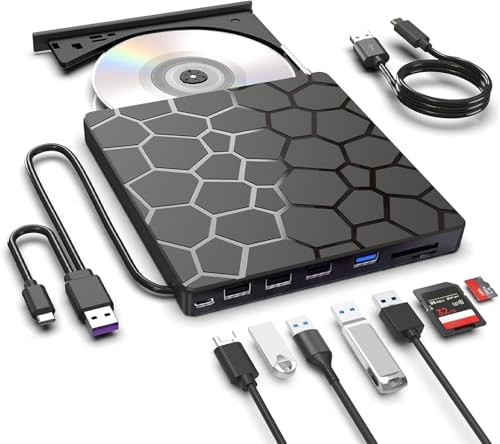
- Plug-and-play operation across major computer platforms
- Supports USB 3.0 and Type-C with up to 5 Gbps transmission
- Compact design includes a built-in cable and anti-shock protection
Best For: Photographers wanting an easy-to-carry CD/DVD burner for everyday computer use
Travel-Ready Pick
Amicool Ultra-Slim USB-C CD/DVD Drive
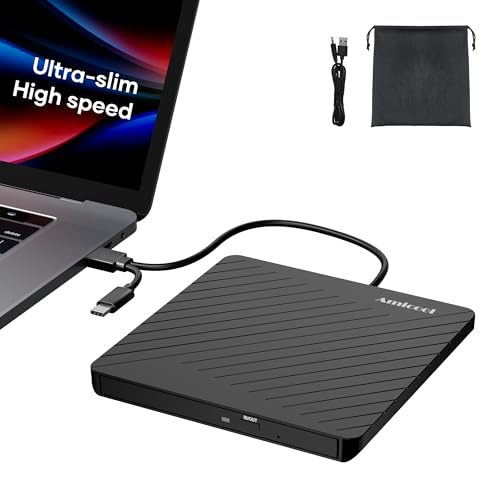
- 0.5-inch, 7.35-ounce portable design
- USB-A and USB-C connectivity
- Reads and burns CDs and DVDs
Best For: Traveling photographers handling legacy discs
Practical Archive Option
Disk Duplicator USB 3.0 CD/DVD Burner

- USB-C and USB-A cables included
- Works with Windows, Linux, and macOS
- Reads and writes at up to 24X
Best For: Routine access to standard photo CDs and DVDs
Budget-Friendly Backup Pick

- Slim, lightweight, shock-resistant design
- USB 3.0 plug-and-play operation
- Supports common CD and DVD formats
Best For: Basic photo backups on Windows or Mac computers
Ultra-Slim Mac-Compatible Pick – Portable DVD Rewriter
For photographers seeking optical disc drives for photographers, the Samsung SE-218GN/RSBD is a compact choice for reading, writing, and backing up photos to CDs or DVDs. Its 14mm profile, USB connection, Mac OS X compatibility, and M-Disc support make it practical for occasional archival and travel use.
Best For: Photographers who want a lightweight, straightforward DVD burner for Mac or PC use.
Pros:
- Ultra-slim 14mm portable design weighing about 7 ounces.
- Supports DVD reading and writing at up to 8x.
- Compatible with Mac OS X and supports M-Disc media.
- Top-mounted eject button and LED provide convenient access.
Cons:
- Uses USB 2.0, so transfers are slower than USB 3.0 alternatives.
- Supports CDs and DVDs but not Blu-ray discs.
- Its 0.75MB buffer is modest for demanding workflows.
The Samsung is best when portability and basic disc authoring matter more than modern hub features or maximum transfer speed. It is a simple option for creating and reading legacy photo discs.
All-in-One Connectivity Pick – 8-in-1 CD/DVD Drive
The ROOFULL combines an external CD/DVD burner with USB expansion and SD card slots, making it useful for photographers who need optical disc drives for photographers alongside direct memory-card transfers. USB 3.0 and USB-C connectivity support convenient use with newer laptops.
Best For: Photographers who want one portable accessory for discs, SD cards, microSD cards, and USB peripherals.
Pros:
- Reads, writes, rewrites, and rips common CD and DVD formats.
- Includes one USB 3.0 port, three USB 2.0 ports, SD, and microSD slots.
- Offers USB-A and USB-C connections with up to 8x DVD and 24x CD speeds.
- Includes a protective carrying case for travel.
Cons:
- Does not support Blu-ray or 4K discs.
- Not compatible with Chromebooks, tablets, smartphones, or gaming consoles.
- May need supplemental USB power with computers that provide limited output.
This is the most versatile option in the group for photographers managing both physical discs and memory cards. Its broader feature set adds convenience, though it is less suitable if you only need a basic DVD drive.
Professional Labeling Pick – LightScribe DVD Burner
The BUNUD LightScribe drive adds direct laser labeling to a portable CD/DVD burner, giving photographers a way to create more clearly identified photo archives. It also includes SD and TF card readers plus two USB ports for transferring files and connecting accessories.
Best For: Photographers who value labeled archival discs and convenient card-transfer features.
Pros:
- LightScribe technology etches text and images onto compatible discs without ink.
- Reads and burns CDs and DVDs at up to 24x and 8x, respectively.
- Includes SD, TF, and two USB ports.
- Supports macOS, Windows, and Linux through USB 3.0 or USB-C.
Cons:
- LightScribe requires compatible discs.
- Does not support Blu-ray media.
- Disc labeling adds value mainly for users who maintain physical archives.
For photographers building long-term, organized disc collections, the LightScribe function is the distinguishing feature. The integrated card reader and hub also reduce the need to carry separate accessories.
Simple Branded Travel Pick – Dell DW316 DVD RW
The Dell DW316 is a straightforward external DVD/CD drive for photographers who need optical disc drives for photographers without extra ports or card readers. Its slim 14mm profile, USB-powered operation, and included CyberLink Media Suite suit basic disc playback, burning, and software installation.
Best For: Photographers who want a familiar, compact drive for occasional CD and DVD tasks.
Pros:
- Low-profile 14mm design weighs about 200g.
- USB-powered with no separate battery or power cord.
- Supports DVD and CD playback and burning.
- Includes CyberLink Media Suite and a one-year limited hardware warranty.
Cons:
- Offers USB connectivity but no SD card reader or expansion hub.
- Does not provide a stated DVD write speed in the supplied details.
- Its plastic construction is less premium than metal-bodied alternatives.
The DW316 is a sensible no-frills choice for a laptop bag or home workspace. Choose it when dependable basic CD/DVD functionality matters more than card-transfer convenience or LightScribe labeling.
Versatile Archive Hub – SATA-Ready External CD/DVD Drive
For photographers comparing optical disc drives for photographers, this model stands out by combining CD/DVD burning with SD, microSD, USB, and 2.5-inch SATA access. It supports DVD speeds up to 8x and CD read/write speeds up to 24x, making it useful for moving photo files and maintaining disc-based archives.
Best For: Photographers who want one portable device for discs, memory cards, USB accessories, and a 2.5-inch SATA drive.
Pros:
- Includes SD and microSD card slots for transferring photos and videos.
- Adds a 2.5-inch SATA port for compatible hard drives or SSDs.
- Works with Windows, macOS, and Linux computers without driver installation.
- Portable design includes USB-A-to-C and power cables.
Cons:
- Does not support 3.5-inch SATA drives, Blu-ray discs, tablets, phones, TVs, or Chromebooks.
- USB 2.0 interfaces may be slower than USB 3.0 alternatives.
- Stable operation requires a direct computer connection rather than a hub or extension cable.
This is a particularly flexible choice for photographers who still use optical media but also need card and storage connectivity. Its broad computer compatibility is helpful, though the USB 2.0 ports and device restrictions should be checked before buying.
Fast Card Transfer Pick – USB 3.0 External CD/DVD Drive
Photographers looking for optical disc drives for photographers may appreciate this USB 3.0 model’s combination of disc burning and memory-card transfer. It offers SD and TF slots, USB-A and USB-C connectivity, and advertised transfer rates up to 5 Gbps for compatible computer connections.
Best For: Photographers who prioritize faster computer transfers from cards while retaining CD/DVD reading and burning capability.
Pros:
- USB 3.0 supports advertised data transfer rates up to 5 Gbps.
- Includes SD and TF card slots for moving camera photos and videos.
- Supports common CD and DVD formats with up to 8x DVD and 24x CD speeds.
- Integrated cable, carrying bag, and optional extra-power cable support portability.
Cons:
- SD and TF slots cannot be used simultaneously.
- Not compatible with Blu-ray discs, Chromebooks, phones, tablets, gaming consoles, or many other listed devices.
- Some computers may require the included extra-power cable for stable operation.
Its USB 3.0 interface makes it a stronger fit than USB 2.0 designs when card and disc transfers are part of the workflow. Confirm your computer and operating system compatibility, especially if using Windows 11 or a nonstandard device.
Simple Portable Burner – 8-in-1 USB 3.0 and Type-C Drive
For photographers seeking optical disc drives for photographers with straightforward operation, this 8-in-1 external drive supports USB 3.0 and Type-C connections, common CD/DVD formats, and up to 5 Gbps transmission. Its plug-and-play setup and built-in cable are practical for moving between editing stations.
Best For: Photographers who want a compact, easy-to-use CD/DVD reader and burner for Windows, macOS, or Linux computers.
Pros:
- Plug-and-play design requires no extra drivers.
- USB 3.0 and Type-C interfaces support advertised speeds up to 5 Gbps.
- Offers up to 8x DVD and 24x CD read/write speeds for supported media.
- Built-in cable, anti-shock protection, and error correction improve portability and usability.
Cons:
- Does not support Blu-ray, DVD-RAM, TVs, tablets, or in-car entertainment systems.
- The extra power cable supplies power only and does not transfer data.
- For best stability, desktop users should connect it directly to a rear USB port.
This drive is a sensible option when ease of setup and portability matter more than specialized storage connections. It covers common disc formats and computer platforms, but photographers using Blu-ray or DVD-RAM media will need another solution.
Travel-Ready Pick – Amicool Ultra-Slim USB-C CD/DVD Drive
For photographers who need optical disc drives for photographers that fit easily into a travel kit, the Amicool is a particularly portable option. Its 0.5-inch profile, 7.35-ounce weight, USB-A and USB-C connectivity, and included storage pouch make it convenient for accessing or backing up photo archives on compatible computers.
Best For: Photographers who travel with legacy CDs and DVDs and want a compact reader-writer with USB-C support.
Pros:
- Ultra-slim, lightweight design with cable storage and a protective pouch
- Reads and writes common CD and DVD formats, including dual-layer media
- Supports USB-A and USB-C connections and offers up to 24X CD and 8X DVD burning
- Includes error correction and a separate charging port for computers with limited USB power
Cons:
- Does not support Blu-ray discs
- Not compatible with Chrome OS, smartphones, tablets, TVs, or cars
- Requires compatible playback software such as VLC or KMPlayer for media playback
The Amicool stands out when portability and flexible connectivity matter most. It is well suited to transferring older photo collections, creating disc backups, and working with optical media away from a desktop, provided your computer and discs meet its compatibility requirements.
Practical Archive Option – Disk Duplicator USB 3.0 CD/DVD Burner
Photographers looking for optical disc drives for photographers may appreciate this portable USB 3.0 model for straightforward CD and DVD reading and writing. It includes both USB-C and USB-A cables, works with Windows, Linux, and macOS, and provides up to 24X read and write speeds for supported media.
Best For: Computer users who need a simple external drive for standard photo CDs, DVDs, and routine disc duplication.
Pros:
- Portable external form factor with USB-C and USB-A cables included
- Compatible with laptops, desktops, PCs, MacBooks, Windows, Linux, and macOS
- Offers up to 24X optical storage read and write speed
Cons:
- Some scratched, aged, poorly recorded, or copy-protected discs may not read correctly
- Playback depends partly on the computer’s compatible software
- Its listed data transfer rate is 3.6 MB/s, so performance may vary by setup
This drive is a sensible general-purpose choice for photographers with normally recorded discs and a compatible computer. Its biggest limitation is media condition and protection: it should not be treated as a guaranteed solution for every aging or encrypted disc in an archive.
Budget-Friendly Backup Pick – Antika Slim USB 3.0 DVD Drive
The Antika offers a straightforward way to add optical disc access to a laptop or desktop. For photographers comparing optical disc drives for photographers, its slim shock-resistant design, hidden cable storage, USB 3.0 interface, and support for common CD and DVD formats make it useful for installing software, viewing discs, and creating backups.
Best For: Photographers who want an affordable, plug-and-play drive for compatible Windows or Mac computers.
Pros:
- USB 3.0 supports transfer speeds up to 5Gbps and is backward compatible with USB 2.0 and USB 1.0
- Slim, lightweight, shock-resistant housing with a built-in cable storage design
- Supports common CD-R, CD-RW, DVD+R, DVD-R, CD-ROM, and DVD-ROM media
- Plug-and-play operation with no driver installation required
Cons:
- Not compatible with TVs, tablets, or car audio systems
- May need an external power source if the computer’s USB port supplies insufficient power
- Does not support Blu-ray discs
The Antika is a practical pick for basic disc-based photo backup and retrieval on supported computers. Its USB-powered setup keeps installation simple, while the power caveat is worth considering for thin laptops or systems with limited USB output.
How We Picked These Optical Disc Drives for Photographers
We selected drives that cover the main needs of photographers: reading and writing CDs and DVDs, working with modern laptops, traveling easily, and handling common archive or client-delivery tasks. The list includes slim standalone DVD writers, models with M-DISC support, drives with USB-C or USB 3.0 connectivity, and multifunction units that add SD or USB ports.
Because specifications and included accessories can vary by seller, verify the current listing for operating-system support, connector types, writing speeds, media compatibility, and whether a wall adapter is required. Optical drives are generally useful for reading and writing CDs and DVDs, but they do not replace a primary hard-drive or cloud backup.
Quick Comparison
- Best for archival-minded photographers: Choose a drive that explicitly supports M-DISC if long-term optical storage is a priority.
- Best for travel: A slim USB-powered DVD writer is easier to pack and usually needs fewer accessories.
- Best for laptops with limited ports: A hub-style model with SD slots and extra USB ports can consolidate your workflow.
- Best for newer computers: Look for USB-C support or include a dependable USB-A adapter.
- Best for occasional disc work: A basic plug-and-play external DVD writer is usually sufficient.
Key Buying Factors for Optical Disc Drives for Photographers
Connection and Power
Check whether the drive uses USB-A, USB-C, or both. USB-powered designs are convenient, but some computers may provide insufficient power through a hub. A short, attached cable can improve portability, while a detachable cable is easier to replace.
Disc Formats and Writing Capability
Confirm that the unit supports the media you plan to use, including CD-R/RW, DVD±R/RW, and dual-layer DVDs where needed. If you are creating client discs, writing software may be separate from the hardware, especially on newer macOS systems.
Archive and Workflow Features
M-DISC support can matter for photographers creating offline archives, provided you also use compatible media and maintain multiple copies. LightScribe is relevant only if you want to label compatible discs directly; it is not necessary for ordinary burning.
Build, Noise, and Compatibility
Look for an enclosed, slim design if the drive will travel in a camera bag. Check current Windows and macOS compatibility, and remember that many modern computers no longer include built-in DVD software. Disc-reading performance can also vary with scratched or poorly recorded media.
Who Should Buy Which Optical Disc Drives for Photographers?
Choose a compact standalone writer if you mainly need to read old discs, burn occasional client deliveries, or keep a lightweight travel backup tool. Choose an M-DISC-compatible model if offline archival copies are central to your storage plan.
Choose a hub-style drive if you regularly move images from SD cards and need additional USB ports. It can reduce cable clutter, but confirm that card slots and ports share bandwidth and that the included cable fits your computer.
Choose a USB-C or dual-interface drive for a newer MacBook or laptop with few USB-A ports. Whichever model you buy, treat optical discs as one layer of a broader backup strategy: keep working files on reliable primary storage and maintain at least one additional copy in a separate location.