
Dust buildup can restrict airflow, raise temperatures, and shorten the life of computer components. The best electric air dusters offer reusable cleaning power in a compact, cordless design.
We compared these 10 computer cleaning blowers under $100 for airflow, speed control, battery convenience, handling, and versatility across PCs, keyboards, consoles, and workspaces.
Best 10 Computer Cleaning Blowers Under 100 Picks for 2026
Best All-Around Pick
170,000 RPM 4-Speed Electric Air Duster

- 170,000 RPM brushless motor
- Four adjustable airflow levels
- Four nozzles plus brush and storage bag
Best For: Versatile cleaning of PCs, keyboards, cameras, consoles, and cars
Best Lightweight Option
WOLFBOX MF100 150,000 RPM Air Duster

- 0.66-pound portable design
- 45 m/s maximum airflow
- Five nozzles and two brushes included
Best For: Portable computer, car, home, and outdoor cleaning
Best for Long Low-Speed Runtime

- Up to 240 minutes on low speed
- Three gears with integrated LED light
- Five nozzles for home, car, and electronics
Best For: Extended light-duty cleaning and dimly lit spaces
Best 2-in-1 Design
320,000 RPM Air Duster and Vacuum

- Blower and vacuum in one device
- 320,000 RPM brushless motor
- 180-minute low-speed runtime claimed
Best For: PC, keyboard, car, and household cleaning with debris collection
Top Power Pick

- 150,000 RPM motor and 52 m/s airflow
- Three speeds with four nozzles and two brushes
- Up to four hours on low; two-year warranty
Best For: High-power computer and multi-surface cleaning
Best for Everyday Use

- 110,000 RPM motor with three gears
- 0.45-pound body and four included nozzles
- 3.5-hour Type-C charging; up to 240 minutes on low
Best For: Portable everyday computer, home, and car cleaning
Best Visibility Features

- 100,000 RPM motor with three speeds
- LED display shows mode and battery level
- Five nozzles, three brushes, and built-in work light
Best For: Detailed cleaning in dark or hard-to-reach areas
Best Overall
VASSON 260000RPM Cordless Air Duster

- Three speeds with strong brushless-motor airflow
- Five nozzles, brush, and storage bag included
- USB-C rechargeable with up to 150 minutes of low-speed runtime
Best For: Versatile computer, car, home, and outdoor cleaning
Best Accessory Kit
VC022 110000RPM Electric Air Duster

- Up to 110,000RPM airflow with three speed settings
- Five nozzles, four brushes, and LED light included
- Rechargeable cordless design for electronics and vehicle cleaning
Best For: Detailed cleaning with varied attachments
Best Portable Design
KKH 120000RPM Mini Turbo Blower
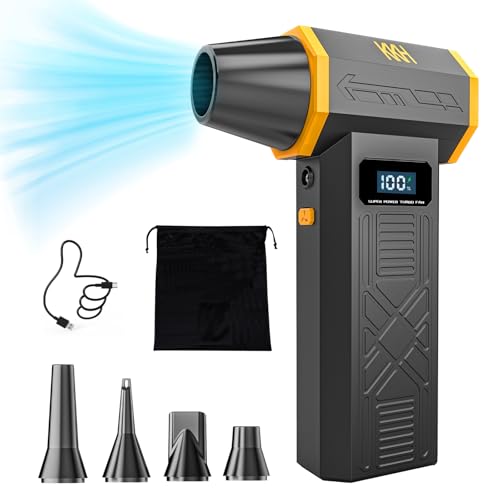
- Four speeds with airflow up to 120,000RPM
- 0.5-pound pocket-sized cordless design
- LED display, light, and five nozzles included
Best For: Portable computer and precision-device cleaning
Best All-Around Pick – 170,000 RPM 4-Speed Electric Air Duster
If you want computer cleaning blowers under 100 that balance power, control, and portability, this cordless model is a practical choice. Its brushless motor, four speed levels, and multiple attachments cover routine keyboard dusting as well as stronger cleaning around PC fans, vents, and car interiors.
Best For: Users seeking a versatile rechargeable blower for computers, keyboards, cameras, consoles, and vehicles.
Pros:
- 170,000 RPM brushless motor provides strong airflow for dust and debris.
- Four speed settings allow gentler cleaning around delicate electronics.
- Includes four nozzles, a brush, storage bag, lanyard, and Type-C cable.
- Reusable cordless design replaces disposable compressed-air cans.
Cons:
- The notes do not specify battery runtime or charging time.
- It is an air blower rather than a combined vacuum, so loosened debris must be collected separately.
This is a strong general-purpose option when adjustable airflow and a broad accessory kit matter more than built-in suction.
Best Lightweight Option – WOLFBOX MF100 150,000 RPM Air Duster
Among computer cleaning blowers under 100, the WOLFBOX MF100 stands out for its low 0.66-pound weight and useful accessory selection. It offers three speeds, a 45 m/s maximum wind speed, and enough runtime for portable cleaning at a desk, in a car, or outdoors.
Best For: Shoppers who prioritize a lightweight blower with long low-speed runtime and broad everyday versatility.
Pros:
- 150,000 RPM turbo fan produces airflow up to 45 m/s.
- Three speed settings suit different cleaning jobs.
- Includes five nozzles and two brushes for electronics, cars, home, and outdoor use.
- Type-C charging takes about 2.5 hours, with up to 100 minutes on the first gear.
Cons:
- Only three speed levels are provided, fewer than some competing models.
- The supplied notes do not give a runtime figure for the higher settings.
Its combination of compact size, quick charging, and an 18-month manufacturer warranty makes it particularly convenient for frequent portable use.
Best for Long Low-Speed Runtime – 130,000 RPM LED Air Duster
This rechargeable model is worth considering when comparing computer cleaning blowers under 100 for occasional desk, home, and car maintenance. It combines a 130,000 RPM motor, three gear settings, an integrated LED light, and a claimed runtime of up to 240 minutes on the lowest setting.
Best For: Users who want extended low-speed runtime, compact portability, and an LED for cleaning in dim spaces.
Pros:
- Three adjustable speeds handle different cleaning tasks.
- Up to 240 minutes of use is claimed on the lowest setting.
- Five nozzles support cleaning PCs, keyboards, cars, pets, and household areas.
- Built-in LED light and USB-C charging add convenience.
Cons:
- High-speed runtime is listed as about 25 minutes.
- Charging takes approximately three hours.
- Noise is specified at up to 82.5 dB during operation.
The long low-speed endurance is useful for repeated light cleaning, while the shorter high-speed runtime makes it better suited to targeted bursts of stronger airflow.
Best 2-in-1 Design – 320,000 RPM Air Duster and Vacuum
For shoppers comparing computer cleaning blowers under 100, this 2-in-1 model adds a useful feature that standalone blowers lack: suction. It can blow dust from PCs and keyboards, then collect crumbs and debris with its vacuum function, using three speed modes and a 7,800mAh rechargeable battery.
Best For: Users who want one compact tool for blowing, vacuuming, and general electronics or car cleaning.
Pros:
- Combines air-dusting and vacuum functions in one device.
- 320,000 RPM brushless motor and aluminum alloy fan blades provide strong airflow.
- Includes three nozzles, two brush heads, three cleaning brushes, a dust cup, and extension tube.
- Claims up to 180 minutes of low-speed runtime with safety protections.
Cons:
- USB-C charging takes approximately 3.5 hours.
- Only three speed modes are available.
- The larger accessory and vacuum setup may be more than needed for simple keyboard dusting.
This is the most versatile choice in the group for users who want to remove loosened debris rather than simply blow it away.
Top Power Pick – JUFINX X117 Air Duster
For shoppers comparing computer cleaning blowers under 100, the JUFINX X117 stands out for its very high listed motor speed and compact rechargeable design. Its three settings, multiple attachments, and lightweight body make it adaptable for keyboards, computers, desks, cars, and occasional outdoor use.
Best For: Buyers who want maximum listed airflow, flexible attachments, and a portable rechargeable blower.
Pros:
- 150,000 RPM brushless motor with listed airflow of 52 m/s
- Three speed settings, four nozzles, and two cleaning brushes
- Up to four hours of use on the first gear and Type-C charging
- Compact 7.68-ounce design backed by a two-year warranty
Cons:
- The longest stated runtime applies only to the lowest setting
- The supplied notes do not specify charging time
The X117 is a strong fit when power and accessory variety matter most. Its small size also makes it easy to keep near a desk or carry between cleaning jobs.
Best for Everyday Use – WOLFBOX MegaFlow 50
The WOLFBOX MegaFlow 50 is a practical choice among computer cleaning blowers under 100 for users who prioritize portability and reusable operation. Its 110,000 RPM motor, three gears, and four nozzles cover routine computer, keyboard, home, and car cleaning.
Best For: Anyone seeking a lightweight cordless blower with straightforward speed control and broad everyday use.
Pros:
- 110,000 RPM turbo fan with three adjustable speed settings
- Four nozzles for computers, keyboards, electronics, and other surfaces
- Weighs 0.45 pound and includes a carrying lanyard
- Type-C charging takes 3.5 hours, with up to 240 minutes on low
Cons:
- The stated 240-minute runtime is limited to the lowest setting
- The supplied notes do not mention included cleaning brushes
Choose the MegaFlow 50 if you want a compact general-purpose duster rather than the highest listed motor speed. Its lightweight build and four-nozzle setup are especially convenient for regular desk and vehicle cleaning.
Best Visibility Features – FRESMOL VC018 Air Blower
The FRESMOL VC018 adds useful visibility and status features to the computer cleaning blowers under 100 category. Its three-speed, 100,000 RPM motor is paired with a smart LED display, built-in light, and a broad selection of nozzles and brushes for detailed cleaning.
Best For: Users who want battery and speed information at a glance plus lighting for dark ports, vents, and tight spaces.
Pros:
- 100,000 RPM motor with three adjustable speeds
- Smart LED display shows speed mode and battery level
- Five nozzles and three brushes support detailed cleaning
- Built-in LED light helps reveal dust in dark areas
Cons:
- Its one-year manufacturer warranty is shorter than some alternatives listed here
- The supplied notes do not specify charging time or battery runtime
- At 0.5 kg, it is heavier than the two lighter models in this roundup
The VC018 is a compelling option for detail-oriented cleaning, especially around keyboard gaps, ports, vents, and camera gear. The display and work light make it easier to monitor and direct the cleaning process.
Best Overall – VASSON 260000RPM Cordless Air Duster
For shoppers comparing computer cleaning blowers under 100, the VASSON stands out as a versatile cordless option with three speeds, strong airflow, and a compact design. Its five nozzles and brush attachment make it suitable for keyboards, PC interiors, cars, and other household cleaning jobs.
Best For: Buyers who want one lightweight, rechargeable blower for computer cleaning and broader home, car, or outdoor tasks.
Pros:
- Three adjustable speeds and a high-performance brushless motor provide strong airflow for keyboards and PC interiors.
- Includes five nozzles, a brush attachment, and a storage bag.
- Lightweight cordless design weighs about 1.1 pounds and supports up to 150 minutes of runtime on the lowest setting.
- USB-C charging works with power banks, laptops, and car chargers.
Cons:
- Charger is not included.
- Requires a 5V/2A charger and a three-second press to turn on or off.
The VASSON is a practical pick when portability, reusable operation, and accessory flexibility matter as much as cleaning power. Its long low-speed runtime is useful for repeated maintenance sessions.
Best Accessory Kit – VC022 110000RPM Electric Air Duster
This VC022 is a useful choice among computer cleaning blowers under 100 for users who value accessories and visibility in tight spaces. It combines three-speed airflow with five nozzles, four brushes, and an LED light for cleaning keyboards, PCs, car vents, and narrow corners.
Best For: Users who want a rechargeable blower with multiple brush and nozzle options for electronics, vehicles, and household cleaning.
Pros:
- Up to 110,000RPM airflow is designed for dust in keyboards, laptops, cameras, and vents.
- Includes five nozzles, four brushes, and an LED light.
- Three-speed cordless design offers control for electronics maintenance and travel use.
- Rechargeable design replaces disposable canned air and can also inflate small inflatables.
Cons:
- The supplied notes do not specify battery runtime or charging time.
- Only the body is listed under included components, despite the accessory details in the product features.
The VC022 makes sense for buyers who prefer a broad accessory selection over a minimalist setup. Its LED light and brushes add useful flexibility for dark, narrow, or detailed cleaning areas.
Best Portable Design – KKH 120000RPM Mini Turbo Blower
The KKH mini turbo blower is a compact option for shoppers seeking computer cleaning blowers under 100 that are easy to carry. It offers four airflow settings, a battery-and-speed display, an LED light, and five nozzles for cleaning keyboards, PCs, precision instruments, and other surfaces.
Best For: People who prioritize pocket-sized portability, four-speed control, and quick battery-status checks.
Pros:
- Four adjustable settings and airflow reaching up to 120,000RPM.
- Lightweight 0.5-pound design is easy to carry between home, office, workshop, and car.
- LED display shows remaining battery and wind gear.
- Includes five nozzles, a charging cable, storage bag, and user manual.
Cons:
- The product notes state that standalone lithium batteries are not sold with the product.
- Battery runtime and charging time are not specified in the supplied details.
Choose the KKH when a small footprint and visible operating information are priorities. Its four settings provide more adjustment than many basic mini blowers, while the nozzles broaden its cleaning uses.
How We Picked the Best Computer Cleaning Blowers Under 100
We focused on practical performance rather than headline RPM alone. Each option was evaluated for claimed airflow, motor design, speed adjustment, rechargeable operation, included accessories, ergonomics, and usefulness for both desktop and everyday electronics cleaning. We also considered whether features such as LED lighting, brushless motors, vacuum modes, and multiple nozzles add meaningful value.
Because specifications and included accessories can vary by listing, check the current product page for battery capacity, charging requirements, noise information, warranty coverage, and exact attachments before ordering.
Quick Comparison
| Feature | What to Look For | Why It Matters |
|---|---|---|
| Speed control | Three or more settings | Helps switch from delicate keyboards to stubborn vents. |
| Motor | Brushless design | Often supports efficient, durable operation. |
| Power source | Rechargeable battery | Makes cleaning easier without disposable cans or cords. |
| Attachments | Narrow nozzles and brushes | Improves access around keys, fans, and ports. |
| Extra modes | Vacuum or LED light | Can add convenience for broader cleaning tasks. |
Key Buying Factors for Computer Cleaning Blowers Under $100
Airflow and Speed Control
Higher advertised RPM does not automatically mean better real-world cleaning. Adjustable speed is more important for controlling dust around fans, circuit boards, ports, and key switches. A lower setting helps prevent accidentally moving loose components or driving debris deeper into a device.
Battery and Charging
Look for a battery that suits your cleaning routine, along with a clear charging method and useful runtime. USB charging is convenient, while heavier-duty users should prioritize capacity and thermal management over the smallest possible body.
Size, Grip, and Noise
A compact blower is easier to use between cables and desk equipment, but very small models may require more frequent charging. Consider the handle, trigger or button layout, weight, and expected noise level, especially if you clean in a shared office or living space.
Nozzles and Safe Technique
A narrow nozzle concentrates airflow, while a brush can loosen packed dust. Hold fans still while cleaning, keep the nozzle slightly away from sensitive parts, and avoid touching components with static-prone materials. Always disconnect equipment before cleaning.
Who Should Buy Which Computer Cleaning Blowers Under 100?
Choose a multi-speed cordless duster for routine desktop, laptop, keyboard, and console maintenance. A higher-output model is better for users cleaning several PCs, workshop equipment, or heavily clogged vents. If you want one tool for dust and small debris, consider a 2-in-1 blower-and-vacuum design, but verify that its vacuum attachments are suitable for electronics.
LED-equipped models are useful in dark case interiors and behind desks, while the smallest four-speed options suit occasional users who value portability. Whichever model you choose, prioritize controllable airflow, reliable charging, and useful attachments over the highest RPM claim alone.