
If you shoot with a CFexpress Type B camera, the right reader can save real time on every offload. The best models balance speed, reliable thermal design, and the right mix of USB-C and USB-A support.
This roundup focuses on readers that make transferring large photo and video files faster, simpler, and more consistent for everyday creators and professionals.
Best 10 Memory Card Reader with CFexpress Type B Picks for 2026
Dual-Slot 10Gbps Pick
CFexpress Type B + SD Card Reader

- Reads CFexpress Type B and SD cards
- USB-C and USB-A connectors for wide compatibility
- 10Gbps transfer speed with aluminum housing
Best For: Creators who want one compact reader for CFexpress Type B and SD
Pro-Level Speed Pick
USB 4.0 CFexpress Type B Reader

- Up to 40Gbps transfer speed
- Single-slot CFexpress Type B reader
- Includes certified USB 4.0 cable
Best For: Professionals who want the fastest dedicated CFexpress Type B reader
Travel-Friendly Dual-Slot Choice
2-in-1 CFexpress Type B Reader
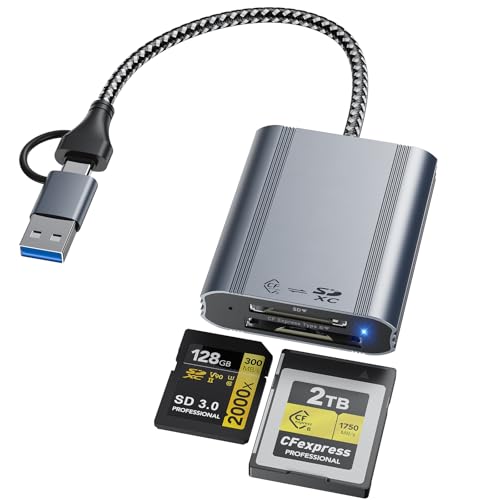
- CFexpress Type B and SD dual-slot design
- USB-C and USB-A connectors for broad compatibility
- 10Gbps speed with aluminum alloy construction
Best For: Creators who need a portable reader for both CFexpress Type B and SD
Dedicated Type B Pick

- Built only for CFexpress Type B cards
- USB 3.2 Gen 2 with 10Gbps transfer speed
- USB-C and USB-A connectors plus aluminum shell
Best For: People who want a simple dedicated CFexpress Type B reader
ProGrade Dual-Slot Workhorse
ProGrade CFexpress Type B + SD Reader

- CFexpress Type B and SD UHS-II dual-slot design
- USB 3.2 Gen 2 with up to 10Gb/s transfer speed
- Magnetic mounting plate and 2-year warranty
Best For: Pro creators who want a rugged dual-slot reader for fast offloads
Portable USB-C/A Option
Rocketek 2-in-1 CFexpress Type B Reader

- USB-C and USB-A 2-in-1 connectivity
- 10Gbps USB 3.2 Gen 2 transfer speed
- Compact aluminum body with CFexpress Type B + SD slots
Best For: Traveling photographers and vloggers with mixed USB ports
Compact Dual-Slot Favorite
Lexar RW520 CFexpress Type B Reader

- Dual-slot reader for CFexpress Type B and SD cards
- USB 3.2 Gen 2 with up to 10Gbps speeds
- Includes USB-C cable, USB-C/A adapter, and 2-year warranty
Best For: Creators who want a compact, easy-to-use offload reader
Triple-Slot Flex
CFexpress Type B + SD & Micro SD Reader

- Supports CFexpress Type B, SD, and microSD cards
- USB 3.2 Gen 2 rated up to 10Gbps
- Works with USB-A and USB-C devices
Best For: Mixed-card workflows that need broad format support
Field-Ready Dual Slot
Professional CFexpress Type B & SD Reader

- Dual-slot design for CFexpress Type B and SD
- USB 3.2 Gen 2 with 10Gbps transfer speed
- USB-C and USB-A support for flexible connections
Best For: Portable photographers who offload CFexpress and SD cards
Simple Aluminum Pick
CFexpress Type B & SD Reader with USB-A Adapter

- Dual-slot reader for CFexpress Type B and SD
- USB-C 3.2 Gen 2 with 10Gbps speeds
- Includes USB-C to USB-A adapter
Best For: People who want a straightforward reader with adapter support
Dual-Slot 10Gbps Pick – CFexpress Type B + SD Card Reader
If you want a memory card reader with CFexpress Type B support that also handles SD cards, this 2-in-1 model is built for fast day-to-day offloads. Its USB 3.2 Gen 2 connection supports up to 10Gbps transfer speeds, and the aluminum shell is designed to help with heat dissipation during long transfers.
Best For: Photographers and videographers who use both CFexpress Type B and SD cards and want a compact USB-C/USB-A reader.
Pros:
- 2-in-1 design reads CFexpress Type B and SD cards in one compact adapter.
- USB-C and USB-A plugs improve compatibility with MacBook Pro, Windows PCs, iPad, and Android.
- 10Gbps USB 3.2 Gen 2 speed helps move 4K/8K RAW files quickly.
- Aluminum housing and small size make it easy to carry on shoots.
Cons:
- Only one card can be used at a time.
- Not compatible with CFexpress Type A or XQD cards.
This is a practical travel reader if you need both CFexpress Type B and SD support without carrying separate adapters. It leans more toward convenience and portability than premium single-slot performance extras.
Pro-Level Speed Pick – USB 4.0 CFexpress Type B Reader
This memory card reader with CFexpress Type B support is aimed at users who want top-tier transfer speed for a streamlined workflow. The ProGrade Digital PG05.6 uses USB 4.0 and is rated up to 40Gbps, making it a strong fit for fast file transfers and demanding post-production work.
Best For: Professionals who want a high-speed single-slot CFexpress Type B reader with USB 4.0 performance.
Pros:
- Up to 40Gbps transfer speeds for fast downloads.
- Single-slot CFexpress Type B design keeps the workflow focused.
- Includes a certified USB 4.0 cable for peak performance.
- Magnetic attachment plate helps create a compact mobile workstation.
Cons:
- Single-slot design does not add SD card support.
- Best performance depends on USB 4.0-compatible hardware.
For creators who prioritize speed and pro-grade build quality, this reader is the most performance-focused option in the group. It is especially appealing if you want a dedicated CFexpress Type B reader rather than a multi-format unit.
Travel-Friendly Dual-Slot Choice – 2-in-1 CFexpress Type B Reader
If you need a memory card reader with CFexpress Type B support for both desktop and mobile use, this dual-slot model keeps the setup simple. It uses USB 3.2 Gen 2 for up to 10Gbps transfer speeds and includes USB-C and USB-A connectivity, so it can plug into a wide range of devices without extra adapters.
Best For: Photographers and videographers who want a compact dual-slot reader for CFexpress Type B and SD cards.
Pros:
- Dual slots support CFexpress Type B and SD cards.
- USB-C and USB-A connections work with modern and older devices.
- 10Gbps USB 3.1 Gen 2 transfer speed suits large 4K/8K files.
- Aluminum alloy body helps with durability and heat dissipation.
Cons:
- One card at a time, despite the dual-slot design.
- Warranty is only listed as 12 months.
This is a balanced option if you want the flexibility of SD support and broad device compatibility in a travel-ready format. It is a sensible everyday pick for creators who move between laptops, tablets, and phones.
Dedicated Type B Pick – CFexpress Type B Only Reader
For buyers who want a memory card reader with CFexpress Type B support and nothing extra, this Acer model keeps the focus on a single card format. It is designed only for CFexpress Type B cards and uses USB 3.2 Gen 2 for up to 10Gbps transfer speeds, which makes it a straightforward option for moving large video and photo files.
Best For: Users who only need a compact CFexpress Type B reader for fast transfers on compatible devices.
Pros:
- Dedicated CFexpress Type B support avoids format confusion.
- USB-C and USB-A connectors add flexible device compatibility.
- 10Gbps transfer speed is suitable for 4K/8K video and high-res images.
- Compact aluminum-alloy design includes a spring-lock card mechanism.
Cons:
- Not compatible with SD, microSD, XQD, or CFexpress Type A cards.
- Requires OTG support on compatible mobile devices.
This reader makes sense if you want a simple, dedicated workflow around CFexpress Type B cards. It is the most focused option here, but that also means you give up multi-format flexibility.
ProGrade Dual-Slot Workhorse – ProGrade CFexpress Type B + SD Reader
If you want a dependable memory card reader with CFexpress Type B support for fast offloads, this ProGrade dual-slot model is built for serious photo and video workflows. It combines CFexpress Type B and SD UHS-II in one compact reader, with USB 3.2 Gen 2 speeds and simultaneous transfer support to help reduce downtime after a shoot.
Best For: Filmmakers, photographers, and content creators who want a rugged dual-slot reader for fast on-location or studio transfers.
Pros:
- Transfers up to 10Gb/s, with notes claiming up to 1.25GB/s from both cards simultaneously
- Dual-slot design handles CFexpress Type B and SD UHS-II cards
- Includes an adhesive metal plate with magnetic mounting for mobile setups
- Backed by a 2-year warranty and Refresh Pro support
Cons:
- Bulkier than a bare-bones single-slot reader at 200 g
- Designed for performance-focused workflows rather than basic everyday use
This is the strongest pick if your priority is speed, dual-card convenience, and a workflow-friendly design that can travel with you. The mounting accessory and pro-oriented build make it especially appealing for creators who move between locations often.
Portable USB-C/A Option – Rocketek 2-in-1 CFexpress Type B Reader
This memory card reader with CFexpress Type B support is aimed at creators who want a flexible, travel-friendly way to move files quickly. It uses USB 3.2 Gen 2 for 10Gbps transfers, supports CFexpress Type B and SD cards, and includes both USB-C and USB-A connectivity for broader device compatibility.
Best For: Photographers and vloggers who need a compact dual-slot reader that works with USB-C or USB-A ports.
Pros:
- USB 3.2 Gen 2 interface supports 10Gbps transfer speeds
- 2-in-1 USB-C/USB-A design for easier connection to different devices
- Dual-slot support for CFexpress Type B and SD cards with simultaneous reading
- Aluminum body helps with passive heat dissipation and portability
Cons:
- Warranty is listed as 12 months in the notes
- Compatibility details are broad, so some users may need to verify device support
For buyers who care more about versatility and portability than premium branding, this Rocketek reader covers the core features well. The USB-C/USB-A flexibility makes it a practical grab-and-go option for mixed-device workflows.
Compact Dual-Slot Favorite – Lexar RW520 CFexpress Type B Reader
For creators looking for a straightforward memory card reader with CFexpress Type B support, the Lexar RW520 keeps the focus on speed and simplicity. It offers dual slots for CFexpress Type B and SD cards, USB 3.2 Gen 2 performance up to 10Gbps, and a portable design that works well both on location and in the studio.
Best For: Users who want a compact branded reader for quick simultaneous offloads from CFexpress Type B and SD cards.
Pros:
- Up to 10Gbps transfer speeds via USB 3.2 Gen 2
- Two slots support simultaneous offloads from CFexpress Type B and SD cards
- Includes a USB-C to USB-C cable plus a USB-C to USB-A adapter
- Compact design with a two-year limited warranty
Cons:
- Does not emphasize extra features beyond speed and portability
- Dimensions and weight suggest a slightly larger footprint than ultra-mini readers
The Lexar RW520 is a solid all-around choice if you want a trusted name and a simple, efficient transfer setup. Its included adapter and dual-slot design make it easy to integrate into most editing workflows.
Triple-Slot Flex – CFexpress Type B + SD & Micro SD Reader
If you want a memory card reader with CFexpress Type B support that also covers your everyday SD and microSD cards, this triple-slot model keeps the workflow simple. Its USB 3.2 Gen 2 connection is rated up to 10Gbps, so it’s aimed at photographers and videographers who want fast offloads without carrying multiple adapters.
Best For: Creators who need one compact reader for CFexpress Type B, SD, and microSD cards across mixed devices.
Pros:
- Three slots support CFexpress Type B, SD/SDXC/SDHC, and microSD formats.
- USB 3.2 Gen 2 performance is rated up to 10Gbps for faster transfers.
- Includes both USB-A and USB-C connectivity for broader device compatibility.
- Plug-and-play design works across Windows, Mac, Linux, Chrome OS, and Android.
Cons:
- Designed for practicality rather than premium materials.
- No simultaneous multi-card features are stated in the notes.
Overall, this is a flexible all-in-one option if your kit includes CFexpress Type B plus SD and microSD media. It’s especially useful when you want broad compatibility without giving up the speed of a 10Gbps reader.
Field-Ready Dual Slot – Professional CFexpress Type B & SD Reader
This memory card reader with CFexpress Type B support is built for faster offloads when you’re handling large RAW files or 4K/8K video. It pairs a CFexpress Type B slot with an SD slot, uses USB 3.2 Gen 2 for 10Gbps transfers, and adds USB-C plus USB-A compatibility for flexible use on the go.
Best For: Photographers and videographers who want a compact dual-slot reader for CFexpress Type B and SD cards.
Pros:
- Dual slots support CFexpress Type B and SD cards for efficient offloads.
- USB 3.2 Gen 2 interface is rated at 10Gbps.
- USB-C and USB-A compatibility works with laptops, desktops, smartphones, and tablets.
- Aluminum alloy shell and nylon cord are designed for portability and heat dissipation.
Cons:
- Only two slots, so it won’t cover microSD cards.
- Best fit is clearly centered on CFexpress Type B and SD use cases.
If your priority is speed and portability, this reader offers a clean two-card setup without extra bulk. The aluminum build and plug-and-play design make it a practical choice for both studio work and field shooting.
Simple Aluminum Pick – CFexpress Type B & SD Reader with USB-A Adapter
For anyone looking for a memory card reader with CFexpress Type B support and straightforward SD compatibility, this dual-slot model keeps things focused. It uses USB-C 3.2 Gen 2 for up to 10Gbps transfers and includes a USB-C to USB-A adapter, making it easier to use with both newer and older computers.
Best For: Users who want a simple CFexpress Type B and SD reader with USB-A flexibility.
Pros:
- Supports CFexpress Type B and SD cards, including UHS-II/UHS-I, SDHC, and SDXC.
- USB-C 3.2 Gen 2 delivers up to 10Gbps transfer speed.
- Includes a USB-C to USB-A adapter for wider compatibility.
- Aluminum alloy housing is built to help with heat dissipation.
Cons:
- Does not include a microSD slot.
- Feature set is more basic than multi-slot alternatives.
This is a good pick if you mainly work with CFexpress Type B and SD cards and want a durable, no-fuss reader. The included adapter adds convenience for mixed laptop and desktop setups.
How We Picked the Best Memory Card Reader with CFexpress Type B
We looked for a Memory Card Reader with CFexpress Type B support that offers strong real-world transfer performance, broad host compatibility, and a design suited to repeated use. We also favored dual-slot models that can handle SD cards alongside CFexpress, since that’s a practical setup for many camera users.
Build quality mattered too. Aluminum housings, compact layouts, and clearly labeled ports are useful because they help with heat management, portability, and day-to-day reliability. We gave extra attention to models that support USB-C and, where useful, USB-A connectivity.
Quick Comparison
The fastest options are usually the USB 3.2 Gen 2 and USB 4 readers, while 10Gbps models cover most users at a lower cost. If you regularly transfer large RAW bursts or long-form video, faster readers may shorten ingest time noticeably. If you mainly shoot stills or moderate video, a solid 10Gbps reader is often the better value.
Key Buying Factors for a Memory Card Reader with CFexpress Type B
Speed and Bus Support
Check the advertised interface first. A reader can only perform as fast as its connection and your computer’s port support. USB 4 and 40Gb/s ratings are helpful for high-volume workflows, but a well-built 10Gbps reader is still enough for many users.
Single Slot Versus Dual Slot
Dual-slot readers are convenient if you use both CFexpress Type B and SD cards. They reduce desk clutter and simplify offloading from multiple cameras. If you only own CFexpress cards, a dedicated single-slot reader can be a cleaner, more focused choice.
USB-C and USB-A Compatibility
Many creators work across desktops, laptops, and older systems. A reader that includes both USB-C and USB-A support is more flexible, but make sure the included cable or adapter matches your machine and desired speed.
Thermal Management and Build
Fast transfers can generate heat, especially during long sessions. Metal enclosures and well-ventilated designs are worth considering if you often move large footage libraries.
Who Should Buy Which Memory Card Reader with CFexpress Type B?
Professional photographers and filmmakers should lean toward the fastest and most robust readers, especially if they routinely ingest huge files. Hybrid shooters who use CFexpress Type B and SD cards will likely prefer a dual-slot model for convenience. Budget-conscious buyers can safely choose a dependable 10Gbps option, provided it matches their computer’s ports and typical transfer needs.
In short, the best Memory Card Reader with CFexpress Type B is the one that fits your workflow: speed for heavy offloads, dual-slot convenience for mixed-card use, and proven compatibility for stress-free transfers.