
The best RGB computer cases combine eye-catching lighting with the airflow, component clearance, and cable-management features a modern gaming PC needs.
These 10 options range from airflow-focused mid-towers to spacious dual-chamber designs, with differences in included fans, radiator support, connectivity, and overall build convenience.
Best 10 RGB Computer Cases Picks for 2026
Airflow Advantage

- Two 160mm ARGB front fans plus a 140mm rear fan
- Supports GPUs up to 392mm and 360mm radiators
- Flexible motherboard placement and cable management
Best For: High-airflow gaming builds with large components
Balanced RGB Build

- Includes three 120mm RGB fans
- Tempered-glass side panel for component visibility
- Supports ATX, micro-ATX, and Mini-ITX boards
Best For: Mainstream RGB gaming and desktop builds
Customizable Cooling

- Three pre-installed RS ARGB PWM fans
- InfiniRail enables flexible fan positioning
- Modular FRAME system supports future customization
Best For: Builders who prioritize adaptable cooling and upgrades
Dual-Chamber Showcase

- Dual-chamber layout improves organization and cable routing
- Includes RGB fans and NZXT Control Hub
- Supports up to 420mm radiators and extensive fan layouts
Best For: High-end showcase builds with expansive cooling needs
Most Immersive RGB Showcase
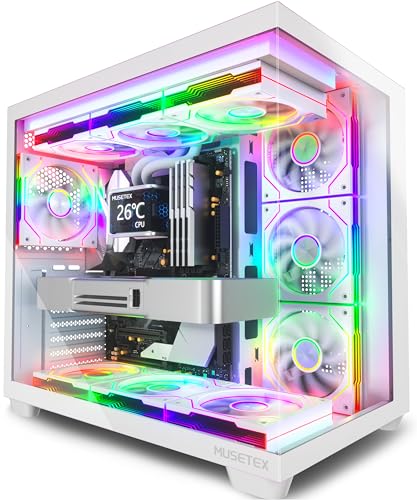
- Seven pre-installed Infinity Mirror ARGB fans
- 270° dual tempered-glass viewing area
- Supports GPUs up to 410mm and 360mm radiators
Best For: RGB-focused showcase gaming builds
Best Balanced Glass Design
Thermaltake View 270 Plus TG ARGB

- Pillarless front and side tempered glass
- Three included 120mm ARGB fans
- Supports E-ATX and 360mm radiators
Best For: Panoramic ATX or E-ATX gaming systems
Best Airflow Features

- Four pre-installed prism ARGB PWM fans
- Supports up to 10 fans or a 360mm AIO setup
- 420mm GPU clearance with built-in support bracket
Best For: Airflow-focused ATX gaming builds
Best Value Airflow Pick
MOROVOL 621 RGB Mid-Tower Case

- Four pre-installed fixed-RGB fans
- Diamond mesh front for airflow
- Supports ATX, Micro-ATX, and Mini-ITX
Best For: Budget-conscious RGB gaming builds
Best High-Airflow Showcase

- Seven PWM ARGB fans included
- Supports up to a 400mm GPU
- 270-degree dual-glass panoramic view
Best For: Large, high-performance ATX builds
Best Easy-Access Design
MUSETEX NN8 ARGB Mid-Tower Case

- Six PWM ARGB fans included
- Opening magnetic tempered-glass side door
- Flexible SSD and HDD storage layouts
Best For: Builders prioritizing maintenance access and RGB presentation
Airflow Advantage – Lian Li LANCOOL 216 RGB
If cooling performance is your priority, the Lian Li LANCOOL 216 is one of the more airflow-focused RGB computer cases in this roundup. It includes two large 160mm ARGB front fans and a 140mm rear fan, plus mesh panels across key areas. Its flexible interior also accommodates large graphics cards and multiple radiator configurations.
Best For: High-performance gaming builds that need strong airflow, generous GPU clearance, and straightforward installation.
Pros:
- Includes two 160mm ARGB front fans and one 140mm rear fan.
- Supports graphics cards up to 392mm and radiators up to 360mm.
- Modular motherboard positioning supports air- or water-cooled systems.
- Provides dedicated cable-routing features and flexible installation options.
Cons:
- Its airflow-oriented design may appeal less to shoppers seeking a fully enclosed front panel.
- The case weighs 10.5 kg, making it relatively substantial to move.
The LANCOOL 216 is a practical choice when cooling and component compatibility matter more than minimal size. Its pre-installed fans, mesh construction, and room for large GPUs make it especially suitable for demanding gaming systems.
Balanced RGB Build – Fractal Design Pop Air RGB
The Fractal Design Pop Air RGB is a straightforward option among RGB computer cases, combining a tempered-glass side panel with three included 120mm RGB fans. It supports ATX, micro-ATX, and Mini-ITX motherboards, while its storage layout can accommodate several HDDs and SSDs.
Best For: Mainstream gaming and desktop builds that want RGB lighting, a visible component display, and flexible motherboard support.
Pros:
- Includes three 120mm Aspect 12 RGB fans.
- Tempered-glass side panel showcases internal components.
- Supports ATX, micro-ATX, and Mini-ITX motherboards.
- Can hold up to three HDDs and six SSDs in supported configurations.
Cons:
- Its included fans are smaller than those in some airflow-focused alternatives.
- Top radiator support is limited to 240mm.
The Pop Air RGB offers a balanced feature set for a conventional gaming PC. Choose it if you want built-in RGB fans, broad motherboard compatibility, and useful storage capacity without moving to a larger case design.
Customizable Cooling – Corsair 4000D RS ARGB
The Corsair 4000D RS ARGB stands out among RGB computer cases for its modular FRAME system and flexible fan mounting. It arrives with three RS ARGB PWM fans, while the InfiniRail system lets you reposition supported fans to target airflow where your components need it most.
Best For: Builders who want a customizable mid-tower with pre-installed RGB fans, adaptable cooling, and tidy cable-management options.
Pros:
- Includes three daisy-chainable RS ARGB PWM fans.
- InfiniRail supports flexible front and roof fan positioning.
- FRAME system allows future customization of selected case components.
- Supports air cooling, liquid cooling, and dual 360mm radiators.
Cons:
- Its modular features may be more than needed for a basic build.
- The supplied notes do not specify a maximum graphics-card length.
The 4000D RS ARGB is a strong fit for builders who expect their setup to evolve. Its adjustable fan layout and modular construction provide more configuration freedom than a typical fixed-layout mid-tower.
Dual-Chamber Showcase – NZXT H9 Flow RGB+
The NZXT H9 Flow RGB+ is a showcase-oriented choice among RGB computer cases, pairing wraparound tempered glass with a dual-chamber layout. It includes two F420 RGB Core fans, one F120 RGB Core rear fan, and an NZXT Control Hub, while supporting extensive fan and radiator configurations for high-performance systems.
Best For: Enthusiasts building a visually focused ATX system with extensive cooling, clean cable routing, and large components.
Pros:
- Dual-chamber design separates core components from the PSU and drives.
- Includes RGB fans and an NZXT Control Hub.
- Supports up to nine 140mm fans plus one 120mm rear fan.
- Accommodates radiators up to 420mm and supports back-connect motherboards.
Cons:
- Its 13.4 kg weight makes it less convenient to relocate.
- The panoramic glass and dual-chamber layout favor a larger showcase build over compact simplicity.
The H9 Flow RGB+ is designed for builders who want both a dramatic presentation and substantial cooling capacity. Its separated chambers help organize cables, while the broad radiator and fan support suits powerful, highly customized systems.
Most Immersive RGB Showcase – MUSETEX Y6 White ATX Case
For builders prioritizing dramatic lighting and component visibility, the MUSETEX Y6 is one of the most visually focused rgb computer cases in this roundup. It combines seven pre-installed Infinity Mirror ARGB fans with 270° dual tempered-glass panels, while still accommodating ATX, Micro-ATX, and Mini-ITX builds.
Best For: RGB-focused gaming builds and anyone who wants a wide display area for premium hardware or collectibles.
Pros:
- Includes seven speed-adjustable Infinity Mirror ARGB fans with gradient lighting.
- 270° tempered-glass design provides a broad view of the interior.
- Supports GPUs up to 410mm and top-mounted radiators up to 360mm.
- Includes a front Type-C port, USB 3.0, and USB 2.0.
Cons:
- CPU cooler clearance is limited to 160mm.
- Power supply length is limited to 230mm.
- Motherboard, graphics card, power supply, and radiator are not included.
The Y6 is a strong choice when built-in RGB presentation matters as much as basic compatibility. Its spacious layout and extensive fan package reduce the need for immediate lighting upgrades, though builders should verify cooler and PSU dimensions first.
Best Balanced Glass Design – Thermaltake View 270 Plus TG ARGB
The Thermaltake View 270 Plus TG ARGB offers a clean panoramic look for builders comparing rgb computer cases with practical cooling support. Its pillarless front-and-side tempered glass layout is paired with three included 120mm ARGB fans, E-ATX support, and room for a 360mm top radiator.
Best For: Builders who want a recognizable brand, a glass-forward design, and flexible ATX or E-ATX compatibility.
Pros:
- Front and side pillarless tempered-glass panels create a full-view presentation.
- Includes three 120mm ARGB fans.
- Supports up to a 360mm top-mounted radiator and up to nine fans.
- Provides USB 3.2 Gen 2 Type-C plus two USB 3.0 ports.
Cons:
- Only three fans are included, so additional cooling may be needed.
- The supplied notes do not specify CPU cooler height clearance.
- Its larger E-ATX support may be more than compact builds require.
This case is a sensible middle ground for a high-visibility build without the seven-fan package of the MUSETEX model. Its 420mm graphics-card clearance and three-year manufacturer warranty add useful flexibility for longer-term builds.
Best Airflow Features – RUIX OV303 ATX Mid-Tower
The RUIX OV303 emphasizes cooling flexibility and useful build support in a budget-conscious rgb computer case. It arrives with four 120mm prism ARGB PWM fans, supports up to 10 fans or a seven-fan configuration with a 360mm AIO, and includes magnetic dust filters plus a built-in GPU support bracket.
Best For: Airflow-minded ATX builders who want included RGB fans, broad cooling capacity, and support for large graphics cards.
Pros:
- Includes four pre-installed 120mm ARGB prism PWM fans.
- Supports up to 10 fans or up to seven fans with a 360mm AIO.
- Accepts graphics cards up to 420mm.
- Includes top and bottom magnetic dust filters and a GPU support bracket.
Cons:
- Supports ATX motherboards only according to the supplied specifications.
- Only one 2.5-inch drive and two 3.5-inch drives are specified.
- Limited to a one-year warranty.
The OV303 is particularly appealing for builders who value expansion room for fans and liquid cooling over an unusually large stock-fan bundle. Its GPU bracket and dust filters add practical touches for a modern, high-performance gaming system.
Best Value Airflow Pick – MOROVOL 621 RGB Mid-Tower Case
If you want a straightforward entry in the rgb computer cases category, the MOROVOL 621 combines four pre-installed RGB fans with a diamond-shaped mesh front panel for practical airflow. Its tempered-glass side panel also provides a clear view of your components.
Best For: Budget-conscious builders using ATX, Micro-ATX, or Mini-ITX hardware.
Pros:
- Includes four pre-installed 120mm RGB fans.
- Mesh front panel supports airflow while adding visual appeal.
- Supports graphics cards up to 300mm and CPU coolers up to 155mm.
- Removable tempered-glass side panel makes installation easier.
Cons:
- Fan lighting is fixed RGB rather than addressable.
- Only one USB 3.0 port is provided on the I/O panel.
- Component clearance is more limited than on larger cases.
The 621 is a sensible choice for a compact, affordable gaming build where included lighting and front-panel airflow matter more than extensive expansion room or advanced lighting control.
Best High-Airflow Showcase – MUSETEX K2 ARGB Gaming Case
The MUSETEX K2 stands out among rgb computer cases with seven pre-installed PWM ARGB fans, a 270-degree dual-tempered-glass view, and room for substantial components. It is designed for builders who want both adjustable cooling and a prominent hardware display.
Best For: High-end ATX builds with large graphics cards, liquid cooling, and customizable lighting.
Pros:
- Seven pre-installed adjustable-speed PWM ARGB fans, expandable to ten.
- Supports graphics cards up to 400mm and top-mounted radiators up to 360mm.
- Dual tempered-glass panels provide a wide panoramic component view.
- Includes a USB Type-C port alongside two USB 3.0 ports.
Cons:
- Power-supply clearance varies depending on whether the hard-drive cage is installed.
- The larger mid-tower footprint may not suit compact desks.
- Lighting customization depends on compatible motherboard software.
With generous clearance and seven controllable fans, the K2 is a strong showcase-oriented option for powerful systems, particularly when radiator support and ARGB flexibility are priorities.
Best Easy-Access Design – MUSETEX NN8 ARGB Mid-Tower Case
For builders comparing rgb computer cases with convenient maintenance features, the MUSETEX NN8 offers six PWM ARGB fans and a magnetically secured, opening tempered-glass side panel. Its polygonal mesh front is intended to balance airflow with a display-friendly design.
Best For: RGB-focused builders who frequently access components or want flexible storage capacity.
Pros:
- Six adjustable-speed PWM ARGB fans come pre-installed.
- Opening glass side door allows easier access without removing screws.
- Supports multiple storage configurations, including up to five SSDs and one HDD.
- Room for a top-mounted 280mm liquid cooler.
Cons:
- Motherboard control requires a compatible 3-pin RGB connection.
- The supplied notes do not specify complete GPU and CPU-cooler clearance figures.
- I/O connectivity is limited to two USB 3.0 ports in the listed details.
The NN8’s standout feature is its opening side panel, making it appealing for users who value quick access, hardware presentation, and adjustable ARGB cooling in an ATX mid-tower layout.
How We Picked the Best RGB Computer Cases
We focused on cases that balance attractive lighting with practical PC-building performance. Each selection was evaluated by its included fan setup, airflow design, hardware compatibility, cooling support, front-panel connectivity, tempered-glass construction, and cable-management potential. We also considered whether the case offers meaningful value for its size and feature set rather than simply adding more lights.
Because RGB preferences vary, this list includes both established case designs and feature-rich alternatives with multiple pre-installed ARGB or PWM fans. Check the exact product specifications before buying, since fan layouts, included controllers, radiator clearances, and front-panel ports can vary by revision or retailer.
Quick Comparison
| What to Compare | Best For | What to Look For |
|---|---|---|
| Airflow | High-performance gaming PCs | Mesh panels, large intake fans, and unobstructed exhaust paths |
| Cooling support | Hot CPUs or liquid cooling | 360mm radiator compatibility and sufficient top or front clearance |
| Included fans | Lower-cost builds | Several PWM or ARGB fans that reduce extra purchases |
| Interior layout | Large GPUs and clean builds | Generous GPU clearance, cable channels, and removable panels |
| Connectivity | Modern peripherals | Front USB-C, USB 3.0, audio, and accessible controls |
Key Buying Factors for RGB Computer Cases
Airflow and Fan Quality
RGB lighting is secondary to temperature control. Look for mesh intake areas and fans with PWM control so the system can respond to workload changes. Large front fans can move substantial air at lower noise levels, while multiple smaller fans may offer more flexible placement.
Size and Component Clearance
Confirm motherboard support, graphics-card length, CPU cooler height, and power-supply dimensions before ordering. A mid-tower may fit standard ATX parts, but thick GPUs, front radiators, or cable extensions can reduce usable space.
Cooling and Noise
If you plan to use a high-wattage processor, check radiator support and whether the mounting position interferes with memory or motherboard heatsinks. Fan curves, dust filters, and solid cable routing also affect long-term noise and maintenance.
Lighting and Front I/O
Check whether the case uses standard 3-pin 5V ARGB connections or a proprietary controller. Standard connectors make motherboard synchronization easier. USB-C is increasingly useful for fast storage and newer peripherals, so it is worth prioritizing if your motherboard supports the necessary header.
Who Should Buy Which RGB Computer Cases?
- Airflow-first builders: Choose a mesh-front design with large included intake fans and straightforward exhaust placement.
- Showcase builders: Look for expansive tempered-glass viewing areas, dual-chamber layouts, and unobstructed component visibility.
- First-time builders: Prioritize pre-installed PWM fans, accessible cable-routing spaces, removable panels, and clear front-panel wiring.
- Liquid-cooling users: Confirm support for the radiator size you intend to use before choosing based on appearance alone.
- Value-focused gamers: A case with four to seven included ARGB fans can reduce the total build cost, but verify fan quality and controller compatibility.
The right case should match your components, cooling plan, and preferred lighting ecosystem. Measure the GPU and cooler first, then compare airflow, included fans, and connectivity before making the final choice.