
The right computer case affects cooling, component compatibility, noise, cable management, and the overall look of your build. This roundup covers compact, practical, airflow-focused, and showcase-ready options for a range of budgets and motherboard sizes.
Whether you are assembling a first gaming PC or upgrading a high-performance workstation, use the guide below to narrow your choices by fit, airflow, included fans, expansion room, and design.
Best 10 Computer Cases Picks for 2026
Best Airflow Pick

- Fine mesh panels support high airflow
- Includes two 120mm fans
- Supports up to a 360mm front radiator
Best For: Airflow-focused ATX gaming builds
Best Compact Micro-ATX Design
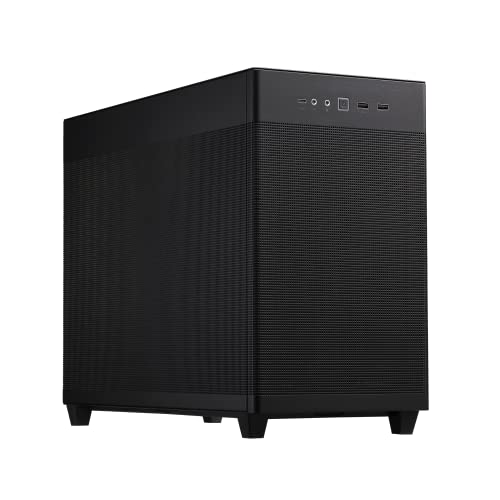
- 33-liter footprint with efficient component layout
- Supports 360mm radiators and six fans
- Fits graphics cards up to 338mm
Best For: Compact Micro-ATX performance builds
Best Customizable Mid-Tower

- Modular FRAME system supports future upgrades
- Includes three RS ARGB PWM fans
- Flexible InfiniRail fan mounting
Best For: Customizable ATX builds with RGB lighting
Best Expandable Budget Layout

- Supports up to eight 120mm fans
- Fits GPUs up to 340mm long
- Includes mesh airflow and tempered glass
Best For: Expandable multi-form-factor gaming builds
Panoramic Airflow Pick

- Three pre-installed RS120-R ARGB fans
- Supports Mini-ITX through EATX
- Room for up to 10 120mm fans
Best For: Showcase builds with expandable cooling
Maximum Cooling Choice

- Six PWM fans included
- Supports up to 12 fans
- Fits 420mm and 360mm radiators together
Best For: Large, high-airflow E-ATX builds
Flexible Mid-Tower Pick

- Four PWM ARGB fans included
- Supports GPUs up to 420mm
- Tool-less side panels and back-connect support
Best For: Versatile high-end mid-tower builds
Best RGB Airflow Value

- Seven PWM ARGB fans included
- 270-degree dual-glass showcase
- Supports GPUs up to 400 mm
Best For: RGB gaming builds needing strong out-of-box airflow
Best Premium Airflow Design

- Five PWM fans included
- Oversized 170 mm front fans
- Real walnut accents and flexible PSU mounting
Best For: Air-cooled ATX gaming builds with a polished appearance
Best Stylish Mid-Tower

- Genuine walnut front details
- Two 140 mm PWM fans included
- Supports ATX, mATX, and ITX
Best For: Elegant airflow-focused builds with restrained styling
Best Airflow Pick – Compact NZXT H5 Flow
The NZXT H5 Flow is a practical choice for computer cases if you want a compact ATX mid-tower with strong airflow potential. Its fine mesh panels, perforated PSU shroud, included fans, and broad radiator support make it well suited to a first performance-focused build.
Best For: Airflow-focused ATX gaming builds and first-time system builders.
Pros:
- Fine mesh on the top, front, and side panels promotes airflow while filtering dust.
- Includes two 120mm Quiet Airflow fans for solid out-of-the-box cooling.
- Supports a 360mm front radiator and a 240mm top radiator.
- Wide cable-routing channels, hooks, and straps simplify cable management.
Cons:
- The two PSU-shroud intake fans are not included.
- Its compact mid-tower design may provide less room than larger cases.
Choose the H5 Flow when cooling performance and straightforward assembly matter more than maximum interior space. It offers a balanced combination of ATX compatibility, radiator support, and useful included hardware.
Best Compact Micro-ATX Design – ASUS Prime AP201
The ASUS Prime AP201 stands out among computer cases for compact Micro-ATX systems that still need room for powerful components. Its 33-liter layout supports long graphics cards, ATX power supplies, large radiators, and extensive cable routing while using highly perforated mesh panels.
Best For: Space-conscious Micro-ATX builds with high-performance cooling hardware.
Pros:
- Precision-machined mesh panels use more than 57,000 holes to encourage airflow.
- Supports 280mm and 360mm radiators and up to six fans.
- Accommodates graphics cards up to 338mm and ATX PSUs up to 180mm long.
- Tool-free side panels and a 32mm cable-management gap simplify building.
Cons:
- It supports only Mini-ITX and Micro-ATX motherboards.
- The compact interior requires more careful component planning.
The AP201 is a strong option when you want a smaller footprint without giving up liquid-cooling support or graphics-card clearance. Its mesh construction and efficient internal layout make it particularly appealing for compact performance systems.
Best Customizable Mid-Tower – CORSAIR 4000D RS ARGB
The CORSAIR 4000D RS ARGB is a flexible option among computer cases, combining a modular FRAME system with high-airflow panels and pre-installed RGB fans. Its adjustable fan rails and configurable side-panel area let builders prioritize either a cleaner appearance or additional cooling.
Best For: ATX builders who want customizable cooling and integrated RGB lighting.
Pros:
- FRAME system supports future customization of components such as the motherboard tray and front I/O.
- Three pre-installed RS ARGB PWM fans provide an effective starting point.
- InfiniRail mounting supports flexible front and roof fan positioning.
- The 3D Y-pattern front panel is designed for high airflow with minimal restriction.
Cons:
- The case is designed around ATX support, though it is compatible with smaller motherboard formats.
- Some customization options may require additional components.
This 4000D variant makes sense for builders who value expandability beyond the initial setup. It arrives with useful cooling hardware while leaving room to change the airflow layout, appearance, and connectivity over time.
Best Expandable Budget Layout – DARKROCK EC2
The DARKROCK EC2 is a versatile pick among computer cases for builders who need broad motherboard and graphics-card compatibility. It combines a mesh front panel, tempered-glass side panel, magnetic dust filters, and support for up to eight 120mm fans or a 360mm front radiator.
Best For: ATX, Micro-ATX, or Mini-ITX gaming builds needing generous cooling expansion.
Pros:
- Supports up to eight 120mm fans and a 360mm front radiator.
- Fits graphics cards up to 340mm long and power supplies up to 200mm long.
- Tempered-glass side panel showcases the installed hardware.
- Magnetic top and bottom dust filters help limit dust entering the chassis.
Cons:
- Only one fan is pre-installed.
- It supports a 360mm radiator only at the front.
- Its 1-year warranty is shorter than the 2-year warranties listed for several alternatives.
The EC2 is best suited to buyers who prefer to select and install their own cooling setup. Its broad compatibility and large fan capacity provide useful room for future upgrades, while the mesh and glass construction balance cooling with visibility.
Panoramic Airflow Pick – CORSAIR 3500X RS ARGB
The CORSAIR 3500X RS ARGB is a stylish option for shoppers comparing computer cases with strong airflow and a clear view of the components. Its tempered-glass panels, three included RS120-R ARGB fans, and support for up to 10 120mm fans make it well suited to showcase-focused builds.
Best For: Builders who want panoramic glass, expandable cooling, and support for reverse-connection motherboards.
Pros:
- Includes three pre-installed RS120-R ARGB fans.
- Supports Mini-ITX through EATX motherboards.
- Accommodates up to 10 120mm fans and radiators up to 360mm.
- Removable front and side tempered-glass panels simplify access.
Cons:
- The listed package includes only the three pre-installed fans; other components are separate.
- Its glass-forward design may not suit buyers seeking a compact or understated enclosure.
Choose this CORSAIR case when presentation and flexible cooling matter as much as component compatibility. Its reverse-motherboard support also helps keep cable connections out of the visible showcase area.
Maximum Cooling Choice – Antec FLUX PRO Full-Tower
The Antec FLUX PRO is a large full-tower choice for computer cases designed around high airflow and substantial cooling hardware. It includes six PWM fans, supports up to 12 fans total, and can fit a 420mm radiator alongside a 360mm radiator.
Best For: Enthusiasts building large E-ATX systems with extensive air or liquid cooling requirements.
Pros:
- Includes six PWM fans with a multi-directional vent design.
- Supports E-ATX, ATX, Micro-ATX, and ITX motherboards.
- Allows simultaneous installation of 420mm and 360mm radiators.
- Features a 90-degree iShift PSU mount and CPU/GPU temperature display.
Cons:
- The full-tower dimensions and 29-pound weight require substantial space.
- The listed power-supply maximum output is 800 watts, which may limit some very high-power builds.
The FLUX PRO stands out when cooling capacity and internal room take priority over a smaller footprint. Its removable cooling brackets and included PWM fans make it a practical foundation for demanding builds.
Flexible Mid-Tower Pick – Lian Li V100-ATX
The Lian Li V100-ATX is a flexible mid-tower among computer cases, combining four pre-installed PWM-controlled ARGB fans with room for high-end hardware. It supports GPUs up to 420mm, CPU coolers up to 178mm, and a top radiator up to 360mm.
Best For: Builders seeking a feature-rich mid-tower with back-connect motherboard support and generous GPU clearance.
Pros:
- Includes four daisy-chainable 120mm PWM ARGB fans.
- Supports ATX, Micro-ATX, Mini-ITX, and select back-connect boards.
- Fits GPUs up to 420mm and top radiators up to 360mm.
- Tool-less side panels provide quick component access.
Cons:
- The listed internal bay quantity is four, offering less storage expansion than some larger cases.
- Its one-year warranty is shorter than the two-year warranties listed for the other products.
This Lian Li is a strong middle ground for buyers who want a manageable mid-tower without giving up modern GPU and radiator clearance. The integrated 26-LED ARGB strip and included GPU bracket add useful build-focused features.
Best RGB Airflow Value – MUSETEX K2 ATX PC Case
For builders comparing computer cases with cooling, lighting, and component room in mind, the MUSETEX K2 is a feature-rich ATX mid-tower. It arrives with seven PWM ARGB fans, panoramic tempered-glass panels, and support for large graphics cards and radiators.
Best For: Gaming builds that prioritize abundant pre-installed cooling, customizable RGB lighting, and a wide view of the components.
Pros:
- Includes seven adjustable-speed PWM ARGB fans and supports up to 10 fans total.
- 270-degree dual tempered-glass design provides an expansive component showcase.
- Supports GPUs up to 400 mm, CPU coolers up to 165 mm, and top radiators up to 360 mm.
- Includes a front USB Type-C port, two USB 3.0 ports, and dust filtration.
Cons:
- The power-supply length limit is tighter with the hard-drive cage installed.
- Its RGB-focused presentation may not suit understated builds.
- Power supply, motherboard, graphics card, and radiator are not included.
The K2 is a strong choice when cooling hardware and visual impact matter more than a minimalist exterior. Check your PSU dimensions and preferred storage layout before building.
Best Premium Airflow Design – Lian Li LANCOOL 217
The Lian Li LANCOOL 217 stands out among computer cases for its large front fans, flexible airflow setup, and distinctive real-wood accents. Its five included PWM fans are designed to keep both CPU and GPU temperatures in check during demanding use.
Best For: ATX gaming systems that need high airflow with a refined black-walnut appearance and flexible power-supply placement.
Pros:
- Includes two 170 mm front fans, two 120 mm reverse-blade fans, and one 140 mm rear fan.
- Front fans can be repositioned to emphasize CPU cooling.
- Supports back-connect motherboards for cleaner cable routing.
- Offers dual PSU mounting options and accommodates power supplies up to 220 mm.
Cons:
- It is listed for ATX motherboards rather than a broader range of board sizes.
- Its cooling setup is air-focused, with no supplied liquid-cooling specification.
- The wood-accent design may not appeal to builders seeking a conventional gaming look.
With oversized intake fans and thoughtful placement options, the LANCOOL 217 is built for airflow-focused systems. Its wood details and back-connect support also make it a compelling choice for a clean, showcase-oriented build.
Best Stylish Mid-Tower – Fractal Design North
For shoppers seeking computer cases that blend naturally with a desk setup, the Fractal Design North combines a charcoal exterior, genuine walnut front details, and a tempered-glass side panel. Its open mesh front and two included 140 mm PWM fans support a straightforward airflow-focused build.
Best For: ATX, micro-ATX, or Mini-ITX systems where understated styling, natural ventilation, and component visibility are priorities.
Pros:
- Genuine walnut front bars and alloy details provide a distinctive, furniture-inspired look.
- Includes two 140 mm Aspect PWM fans.
- Supports GPUs up to 355 mm, or up to 300 mm with a 360 mm front radiator.
- Offers seven bridgeless expansion slots and four drive mounts.
Cons:
- Only two fans are included, fewer than the other cases in this selection.
- GPU clearance decreases when a 360 mm front radiator is installed.
- Its storage bay count is more limited than some larger mid-tower designs.
The North is a strong fit for a clean, living-space-friendly gaming PC rather than an overtly RGB-focused build. Confirm graphics-card and radiator dimensions together before finalizing the parts list.
How We Picked These Computer Cases
We selected these cases based on the features that matter most during a real PC build: motherboard support, graphics card and CPU cooler clearance, ventilation, included fans, radiator compatibility, cable-management space, front-panel connectivity, and overall practicality. The lineup includes micro-ATX, ATX, and E-ATX-compatible designs, along with compact airflow cases, panoramic glass models, and larger enclosures for demanding hardware.
We also considered whether each case provides useful value out of the box. Pre-installed PWM or ARGB fans can reduce the cost and effort of a build, while modular panels, removable filters, and accessible interior layouts can make installation and future upgrades easier.
Quick Comparison
| Best For | Recommended Case Type | What to Prioritize |
|---|---|---|
| Compact gaming PC | Airflow-focused mid-tower or micro-ATX case | GPU clearance, ventilation, and efficient cable routing |
| Showcase build | Panoramic tempered-glass case | Component visibility, fan support, and clean assembly |
| High-end workstation | Full-tower or spacious ATX case | Cooling capacity, expansion room, and radiator support |
| Value-oriented build | Case with included fans | Fan count, airflow layout, and front I/O |
| Quiet everyday PC | Well-ventilated case with controlled fan support | Dust filters, fan curves, and solid construction |
Key Buying Factors for Computer Cases
Motherboard and Component Fit
Confirm that the case supports your motherboard size before comparing aesthetics. ATX cases generally offer the broadest compatibility, while micro-ATX models can save desk space but may provide less room for large graphics cards, power supplies, or storage drives. Check maximum GPU length, CPU cooler height, and power-supply dimensions as well.
Airflow and Cooling
Prioritize a ventilated front, top, or side panel if your system will use a powerful processor or graphics card. Included fans are useful, but their placement matters as much as the number. Look for a balanced intake-and-exhaust setup, removable dust filters, and support for additional fans or liquid-cooling radiators.
Build Convenience and Connectivity
Features such as a spacious cable-routing area, tool-free panels, removable brackets, and a front USB Type-C port can make a noticeable difference. If you plan frequent upgrades, choose a case with accessible mounting points and enough clearance around the motherboard and power supply.
Size, Noise, and Appearance
A larger enclosure is not automatically better. Choose the smallest case that comfortably fits your components and cooling plan. Tempered glass and wood accents can improve appearance, while solid panels and slower PWM fan profiles may help reduce noise.
Who Should Buy Which Computer Cases?
- Choose a compact micro-ATX case if you want a smaller footprint and are building around a micro-ATX motherboard.
- Choose an airflow-focused mid-tower for the best balance of compatibility, cooling, upgrade room, and everyday usability.
- Choose a panoramic glass case if presentation and RGB component visibility are central to your build.
- Choose a full-tower case for E-ATX hardware, multiple radiators, extensive storage, or unusually large components.
- Choose a model with pre-installed PWM or ARGB fans when you want to reduce extra purchases and simplify setup.
Before ordering, compare the case’s published clearance measurements with every major component, especially the graphics card, CPU cooler, radiator, and power supply. That final compatibility check is the best way to avoid fit problems and select the computer case that matches your build plan.