
The best computer cases for compact builds save desk and floor space without forcing you to compromise on cooling, component compatibility, or upgrade potential. This roundup compares 10 options across ATX, Micro-ATX, and Mini-ITX-friendly designs.
Whether you want a compact gaming system, a clean workstation, or a smaller case with room for a powerful graphics card, use the guide below to match the enclosure to your motherboard, hardware, and build priorities.
Best 10 Computer Cases for Compact Builds Picks for 2026
Balanced Airflow Pick

- ATX and Micro-ATX support
- Two included 120mm fans
- 360mm front radiator support
Best For: Airflow-focused first-time ATX builds
High-Airflow RGB Pick

- Two 180mm ARGB/PWM fans included
- USB Type-C front connectivity
- Supports up to 340mm graphics cards
Best For: Compact gaming builds with built-in RGB cooling
Showcase Dual-Chamber Pick

- Three tempered-glass panels
- Back-connect motherboard support
- Top mesh panel for a 360mm AIO
Best For: Display-oriented ATX and back-connect builds
Complete Budget Mini-Tower

- 400W power supply included
- Micro-ATX and Mini-ITX support
- 240mm front radiator support
Best For: Entry-level compact PCs and office systems
Panoramic ATX Showcase

- ATX mid-tower with 360mm AIO support
- Fits graphics cards up to 380mm
- Dual glass panels with hidden-connector support
Best For: Showcase-oriented ATX gaming builds
Budget Panoramic Compact

- Micro-ATX and Mini-ITX support
- Three fans included
- 270-degree tempered-glass view
Best For: Compact, ready-to-build gaming systems
High-Airflow Small Footprint
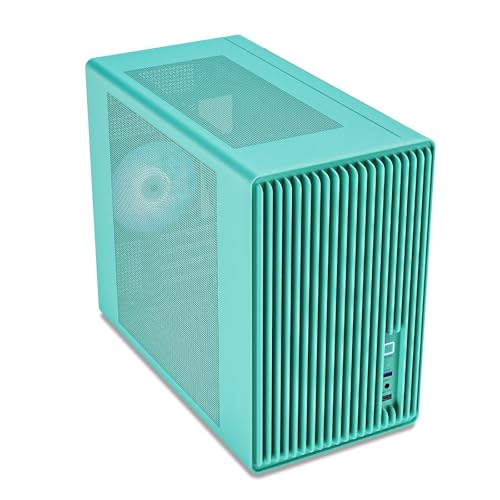
- Micro-ATX/Mini-ITX Mini-Tower design
- Supports five 120mm fans and a 240mm radiator
- Fits GPUs up to 355mm with USB-C I/O
Best For: Airflow-focused compact gaming builds
Best Showcase Mid-Tower
MUSETEX Y6 with Four Non-LED Fans

- Supports ATX, Micro-ATX, and Mini-ITX boards
- Fits GPUs up to 410mm and radiators up to 360mm
- Includes four fans, dust filters, and USB Type-C
Best For: ATX showcase builds needing flexible cooling and included airflow
Best Space Saver
Zalman CUBIX-G Micro-ATX Mini Tower
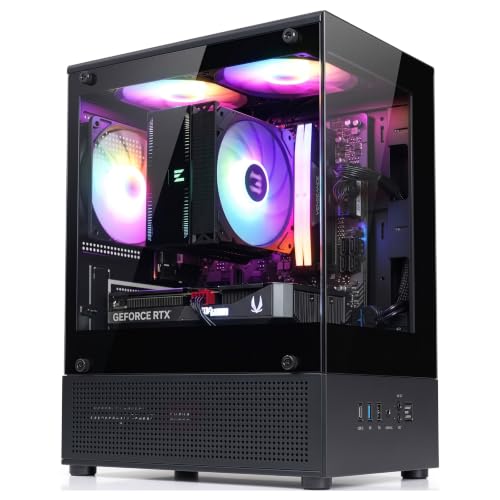
- Compact Micro-ATX mini-tower footprint
- Includes three 120mm FRGB fans
- Fits GPUs up to 280mm and coolers up to 155mm
Best For: Small Micro-ATX gaming and desktop builds
Best RGB Cooling Package
MUSETEX Y6 with Seven ARGB Fans

- Seven preinstalled Infinity Mirror ARGB fans
- Supports software-controlled lighting and fan speed
- Fits GPUs up to 410mm and radiators up to 360mm
Best For: ARGB gaming showcases needing included cooling and broad clearance
Balanced Airflow Pick – NZXT H5 Flow
The NZXT H5 Flow is a practical choice for computer cases for compact builds when you want ATX compatibility without moving to a full tower. Its mesh panels, included fans, and broad radiator support make it well suited to a straightforward airflow-focused build.
Best For: First-time ATX or Micro-ATX gaming builds prioritizing airflow and manageable cable routing.
Pros:
- Includes two 120mm Quiet Airflow fans.
- Ultra-fine mesh panels support high airflow while filtering dust.
- Supports radiators up to 360mm in front and 240mm on top.
- Wide cable channels, hooks, and straps simplify cable management.
Cons:
- The two additional 120mm intake fans described for the PSU shroud are not included.
- Its mid-tower format is larger than a mini-tower.
The H5 Flow offers a balanced feature set for builders who need ATX support but still want a relatively compact mid-tower with cooling flexibility and useful included hardware.
High-Airflow RGB Pick – Cougar Airface 180 ES
The Cougar Airface 180 ES is a strong option among computer cases for compact builds when you want substantial airflow and lighting included from the start. Its two 180mm ARGB/PWM fans and offset power-supply cabin help make cooling a central part of the build.
Best For: Gamers and office users wanting a compact ATX-compatible case with large pre-installed fans and ARGB lighting.
Pros:
- Comes with two 180mm ARGB/PWM fans and an ARGB controller.
- Offset PSU placement leaves more room for airflow through the side vent.
- Magnetic front filter is designed for easy removal.
- Offers USB 3.0, USB Type-C, and four-pole headset connectivity.
Cons:
- Graphics card support is limited to 340mm.
- The supplied details identify it as a mid-tower rather than a mini-tower.
With large fans, modern front-panel connectivity, and support for up to seven 120mm fans, the Airface 180 ES is suited to builders who want cooling performance and visible RGB hardware without assembling the fan setup separately.
Showcase Dual-Chamber Pick – Lian Li O11 Vision Compact
The Lian Li O11 Vision Compact targets builders who want computer cases for compact builds with a strong emphasis on component presentation. Its three tempered-glass panels, dual-chamber layout, and support for back-connect motherboards create a clean showcase-oriented platform.
Best For: Display-focused ATX builds using back-connect components or a side-mounted AIO.
Pros:
- Three tempered-glass panels provide an uninterrupted view of the components.
- Supports Extended ATX, ATX, Micro-ATX, and Mini-ITX motherboards.
- Included top mesh panel supports installation of a 360mm AIO.
- Second chamber can conceal AIO tubing when the cooler is side-mounted.
Cons:
- The showcase design weighs 26.4 pounds.
- Back-connect compatibility is most useful when paired with compatible hardware.
- Only three internal bays are listed.
The O11 Vision Compact is less about minimum size and more about combining a mid-tower footprint with premium visibility and cleaner component presentation, especially for carefully planned water-cooled or back-connect builds.
Complete Budget Mini-Tower – Rosewill FBM-X5
The Rosewill FBM-X5 is a compact mini-tower option among computer cases for compact builds, particularly when a basic power supply is needed in the same package. It supports Micro-ATX and Mini-ITX systems while offering room for additional fans or a front radiator.
Best For: Budget office systems and entry-level compact gaming PCs using Micro-ATX or Mini-ITX hardware.
Pros:
- Includes a non-modular 400W power supply.
- Compact 15.2-by-7.8-by-15.2-inch mini-tower footprint.
- Supports one 240mm front radiator or multiple 120mm fan positions.
- Provides two 2.5-inch bays, one 3.5-inch bay, and four expansion slots.
Cons:
- Only one 120mm PWM fan is pre-installed.
- The included power supply is non-modular, which can make cable organization less flexible.
- It does not support ATX motherboards.
The FBM-X5 keeps the basic build package simple by combining a small chassis, included 400W PSU, and modest cooling flexibility. It is best suited to systems whose power and expansion needs fit within its Micro-ATX or Mini-ITX limits.
Panoramic ATX Showcase – ASUS A31
For shoppers comparing computer cases for compact builds, the ASUS A31 is a larger mid-tower option aimed at mainstream ATX systems that need substantial component support. Its dual-sided glass, hidden-connector compatibility, and support for large cooling hardware make it well suited to showcase-oriented builds.
Best For: ATX gaming or performance builds where panoramic visibility, clean cable management, and extensive cooling support matter.
Pros:
- Supports ATX, micro-ATX, and Mini-ITX motherboards.
- Accommodates 360mm AIO radiators and graphics cards up to 380mm.
- Dual-sided tempered glass and a frameless, pillar-free design provide an unobstructed view.
- Hidden-connector support helps keep cables concealed behind the motherboard.
Cons:
- Its 17.13-inch depth and 20.12-inch height are less space-conscious than a true compact case.
- The panoramic glass design and 18.1-pound weight may not suit minimalist or highly portable setups.
The A31 prioritizes component compatibility and presentation over the smallest footprint. It is a strong choice when your compact-build search still allows a mid-tower and you want room for a large GPU, 360mm liquid cooling, and a polished display build.
Budget Panoramic Compact – MOROVOL MATX V3
The MOROVOL MATX V3 is a practical pick among computer cases for compact builds, combining Micro-ATX and Mini-ITX compatibility with a relatively compact desktop footprint. Three pre-installed fans and panoramic tempered glass make it ready for an airflow-conscious gaming setup without requiring a large case.
Best For: Compact Micro-ATX gaming builds that value included airflow and a wide view of the components.
Pros:
- Supports Micro-ATX and Mini-ITX motherboards.
- Includes three pre-installed fans for out-of-box airflow.
- Three-sided 270-degree tempered glass offers broad visibility.
- Provides a front USB 3.0 port for convenient connectivity.
Cons:
- Its four expansion slots and Micro-ATX focus may limit larger or more expansion-heavy builds.
- The listed cooling method is air cooling, with no supplied radiator-support specification.
With dimensions of 15 by 8.3 by 15.75 inches, this case keeps the footprint manageable while retaining a gaming-focused presentation. It is best suited to builders who want a compact enclosure with included fans rather than extensive ATX-level expansion.
High-Airflow Small Footprint – Vetroo M06
The Vetroo M06 is one of the more space-conscious computer cases for compact builds, using a mesh front and Mini-Tower layout for a balance of airflow and component flexibility. Despite its compact dimensions, it supports up to five 120mm fans, a 240mm top radiator, and graphics cards up to 355mm.
Best For: Compact gaming systems that need strong airflow, modern front-panel connectivity, and support for a full-size graphics card.
Pros:
- Supports Micro-ATX and Mini-ITX motherboards in a compact Mini-Tower design.
- High-airflow mesh front supports up to five 120mm fans.
- Supports a 240mm top radiator and GPUs up to 355mm long.
- Adjustable PSU mounting and front USB Type-C add layout and connectivity flexibility.
Cons:
- It does not support full-size ATX motherboards.
- The adjustable PSU area supports power supplies up to 160mm, which may restrict PSU selection.
The M06 offers a particularly useful mix for compact builders: a 15.55-inch depth, 7.87-inch width, mesh ventilation, and room for substantial cooling hardware. Its Micro-ATX and Mini-ITX focus makes it a sensible choice when minimizing case size is more important than ATX compatibility.
Best Showcase Mid-Tower – MUSETEX Y6 with Four Non-LED Fans
For builders searching for computer cases for compact builds without giving up ATX compatibility, the MUSETEX Y6 offers a space-conscious mid-tower layout with a striking 270° tempered-glass view. Its support for ATX, Micro-ATX, and Mini-ITX boards makes it flexible for a range of systems.
Best For: ATX builders who want a panoramic showcase design, included airflow, and broad hardware compatibility.
Pros:
- Supports ATX, Micro-ATX, and Mini-ITX motherboards.
- Accommodates GPUs up to 410mm and top-mounted radiators up to 360mm.
- Includes four 120mm non-LED fans, magnetic dust filters, and a dual-chamber layout.
- Provides front USB Type-C connectivity.
Cons:
- Its 16.73-inch depth and ATX mid-tower format may be larger than some compact-build desks allow.
- The included fans do not provide built-in lighting.
The Y6 is a practical choice when compact-build goals still include full-size components and a clean display-oriented layout. Check cooler, PSU, and GPU dimensions before purchase.
Best Space Saver – Zalman CUBIX-G Micro-ATX Mini Tower
The Zalman CUBIX-G is a strong option for computer cases for compact builds, using a Micro-ATX mini-tower format to reduce desk footprint. It includes three preinstalled FRGB fans, a tempered-glass panoramic view, and modern front connectivity.
Best For: Budget-conscious Micro-ATX gaming systems and clean desktop setups where physical size matters.
Pros:
- Compact 11.42-inch-deep, 7.87-inch-wide mini-tower design.
- Includes three 120mm FRGB fans for out-of-the-box airflow and lighting.
- Supports GPUs up to 280mm and CPU air coolers up to 155mm.
- Offers USB Type-C and two USB 3.0 ports.
Cons:
- Supports Micro-ATX motherboards only.
- GPU clearance is limited to 280mm, which may restrict larger graphics cards.
- ATX power supplies are limited to 140mm.
Choose the CUBIX-G when a genuinely smaller chassis is more important than maximum component clearance. Confirm your graphics card, power supply, and cooler measurements before building.
Best RGB Cooling Package – MUSETEX Y6 with Seven ARGB Fans
For builders comparing computer cases for compact builds with a strong visual focus, this MUSETEX Y6 combines a 270° tempered-glass presentation with seven preinstalled Infinity Mirror ARGB fans. The ATX mid-tower supports smaller motherboard formats as well as full ATX boards.
Best For: Gaming builds that prioritize synchronized ARGB lighting, included cooling, and a showcase-style interior.
Pros:
- Includes seven speed-adjustable 120mm Infinity Mirror ARGB fans.
- Supports motherboard software control for fan speed and lighting modes.
- Fits GPUs up to 410mm, CPU coolers up to 160mm, and radiators up to 360mm.
- Supports ATX, Micro-ATX, and Mini-ITX motherboards with front USB Type-C.
Cons:
- Its mid-tower dimensions may not suit very small desk or cabinet spaces.
- The extensive lighting and seven-fan setup may be unnecessary for minimalist builds.
This version is the most feature-rich Y6 option for a colorful gaming showcase. Its generous component clearances improve flexibility, but compact-build shoppers should still verify the case dimensions and component fit.
How We Picked the Best Computer Cases for Compact Builds
We focused on cases that reduce unnecessary bulk while still supporting practical PC components. Our comparison considers motherboard compatibility, graphics-card clearance, CPU-cooler and radiator support, airflow, included fans, cable-management space, front-panel connectivity, and ease of installation.
Because “compact” can mean different things, this list includes smaller ATX mid-towers as well as Micro-ATX and Mini-ITX-compatible cases. Some prioritize high airflow, while others emphasize panoramic glass, pre-installed fans, or a smaller footprint.
Quick Comparison
| Best For | Recommended Type | What to Prioritize |
|---|---|---|
| Full-size components in a smaller footprint | Compact ATX mid-tower | GPU clearance, radiator support, and cable space |
| Small gaming builds | Micro-ATX case | Airflow, cooler height, and expansion slots |
| Minimal desk setups | Mini-ITX or compact MATX | Overall dimensions and PSU placement |
| Showcase builds | Panoramic-glass case | Cooling capacity and component visibility |
Key Buying Factors for Computer Cases for Compact Builds
Motherboard and Component Compatibility
Check the case specification against your motherboard before buying. ATX cases generally offer the broadest compatibility, while Micro-ATX and Mini-ITX cases can limit expansion slots and internal clearance. Also confirm the maximum graphics-card length, CPU-cooler height, and power-supply format.
Cooling and Airflow
A smaller case can heat up quickly if intake and exhaust paths are restricted. Look for a ventilated front or side panel, multiple fan mounts, and enough clearance for the fans or radiator you plan to use. Included fans add value, but verify their size, location, and connector type.
Build Convenience
Compact interiors leave less room for routing cables and installing components. Removable panels, a spacious rear cable channel, accessible drive mounts, and tool-free features can make a noticeable difference during assembly.
Connectivity and Appearance
Front USB-C is useful for newer storage devices and accessories, but it may require a compatible motherboard header. Tempered-glass panels suit showcase systems, whereas solid or mesh panels often improve airflow and reduce fingerprints.
Who Should Buy Which Computer Cases for Compact Builds?
Choose a compact ATX case if you need a full-size motherboard, several storage drives, or a large graphics card but still want a smaller enclosure. Select a Micro-ATX model for a balanced gaming or productivity build with fewer expansion needs. Mini-ITX-oriented designs are best for buyers who value the smallest possible footprint and are comfortable planning every component carefully.
For high-performance hardware, prioritize airflow and clearance over visual features. For a display-focused build, panoramic glass and included RGB fans may be worthwhile, but make sure the cooling layout can handle your CPU and GPU. Finally, measure your available space before ordering, including room for cable connections and airflow around the case.