
The best portable memory card readers make it easy to move photos, videos, and other files between memory cards and your everyday devices. The right model can simplify camera backups, trail-camera viewing, and mobile editing without adding much bulk to your kit.
Our selection includes compact USB-C readers, multi-port adapters, dual-slot designs, and versatile models that support SD, microSD, CF, or MS cards. Use the guide below to narrow your choice by device compatibility, workflow, and portability.
Best 10 Portable Memory Card Readers Picks for 2026
Versatile Four-Card Pick
BENFEI 4-in-1 USB-C Card Reader

- Reads SD, microSD, MS, and CF simultaneously
- Offers USB-C and USB 3.0 connectivity
- Up to 160MB/sec UHS-I transfer rate
Best For: Multi-format card users with USB-C and USB-A devices
Travel-Friendly Dual-Slot Pick
UGREEN USB-C and USB-A Card Reader

- USB-C and USB-A interfaces in one reader
- Reads SD and microSD simultaneously
- USB 3.0 supports up to 5Gbps
Best For: Mobile photographers using modern and legacy devices
Classic Multi-Format Pick
SmartQ C368 USB 3.0 Card Reader

- Supports SD, microSD, MS, and CF cards
- USB 3.0 transfer rates up to 5Gbps
- Works with Windows, Mac, and Linux
Best For: USB-A computers and mixed legacy card collections
Best Dual-Slot Pick

- USB-C and USB 3.0 connectivity
- Simultaneous SD and microSD access
- Plug-and-play across major operating systems
Best For: Photographers and creators managing SD and microSD cards
Best Ultra-Compact Option
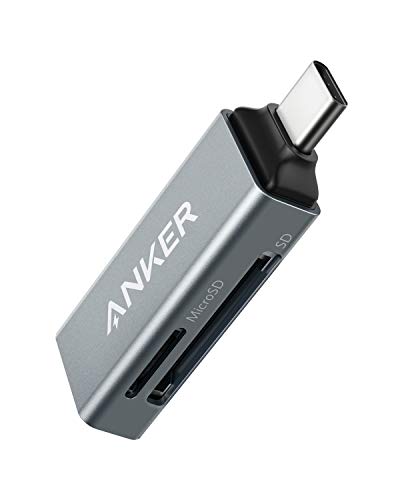
- Small design for laptops and phones
- Standard SD and microSD slots
- Up to 5 Gbps transfer rates
Best For: USB-C users who prioritize portability
Best Multi-Connector Pick

- Built-in Lightning, USB-C, and USB-A cables
- Dual SD and microSD slots
- Plug-and-play iOS file transfers
Best For: Mixed-device households and trail-camera users
Best Dual-Slot USB-C Pick

- Simultaneous SD and microSD access
- USB 3.0 speeds up to 5Gbps
- USB-A and USB-C headers
Best For: Fast file transfers across USB-A and USB-C devices
Best iPhone and iPad Value
SUNTRSI Dual-Connector Card Reader

- Dual SD and microSD slots
- iPhone connector plus USB-C
- No computer or app required
Best For: Direct camera-file transfers to compatible Apple devices
Best Multi-Device OTG Option

- Lightning and USB-C connectivity
- SD, microSD, and USB-A support
- Two-way plug-and-play transfers
Best For: Creators moving files across Apple, Android, Windows, and USB devices
Versatile Four-Card Pick – BENFEI 4-in-1 USB-C Card Reader
For shoppers comparing portable memory card readers, the BENFEI 4-in-1 stands out for its broad card support and dual USB-C/USB-A connectivity. It can read and write SD, microSD, MS, and CF cards simultaneously, with UHS-I transfer rates of up to 160MB/sec when paired with compatible cards and ports.
Best For: Users who need one reader for several card formats and both USB-C and USB-A devices.
Pros:
- Supports SD, microSD, MS, and CF cards at the same time.
- Integrated USB-C and USB 3.0 connectors improve device flexibility.
- Plug-and-play design works with Windows and Mac systems.
- Includes an 18-month warranty.
Cons:
- Not compatible with standard Memory Stick, M2, or CF Type I cards.
- Actual transfer speeds depend on the card and USB port.
- Some older operating systems may not support exFAT SDXC cards.
The BENFEI is a practical choice for photographers and file managers handling multiple card standards. Its simultaneous four-card access is particularly useful when convenience matters more than the smallest possible footprint.
Travel-Friendly Dual-Slot Pick – UGREEN USB-C and USB-A Card Reader
The UGREEN is a compact option among portable memory card readers, combining USB-C and USB-A connectivity in a slim body. Its SD and microSD slots can operate simultaneously, while USB 3.0 supports data transfer rates up to 5Gbps for compatible devices and cards.
Best For: Photographers, creators, and travelers moving files between cameras, laptops, tablets, and phones.
Pros:
- USB-C and USB-A interfaces support a wide range of devices.
- Reads SD and microSD cards at the same time.
- Plug-and-play operation requires no drivers or external power.
- Supports SD, SDHC, SDXC, microSD, MMC, and RS-MMC formats.
Cons:
- Limited to SD and microSD card slots.
- Maximum performance depends on the host device and card.
- Its compact cable-free form may be less convenient for ports positioned tightly together.
With dual-interface support and simultaneous SD/microSD access, the UGREEN balances portability and everyday flexibility. It is a strong fit for users who do not need CF or Memory Stick support.
Phone-Centered Portable Pick – SUNTRSI 4-in-1 Card Reader
The SUNTRSI 4-in-1 is designed for direct file transfers across iPhone, iPad, Android, Mac, and computer devices. As portable memory card readers go, it offers a useful combination of USB, USB-C, micro USB, SD, and microSD connections, plus a charging port for supported iPhone and iPad use.
Best For: Phone and tablet users who want to view or transfer SD and microSD files while traveling.
Pros:
- Supports iOS, Android OTG devices, Macs, and computers.
- Includes SD and microSD slots with multiple device connectors.
- Charging port can support charging while transferring on compatible iPhone and iPad devices.
- Small keychain design helps make it easy to carry.
Cons:
- Listed transfer speed is up to 25MB/sec.
- Charging support is limited to iPhone 15 and earlier models under the stated iOS conditions.
- It supports SD and microSD cards only.
The SUNTRSI favors mobile convenience over maximum speed. Its integrated connectors and charging feature make it a useful travel accessory for users who frequently move camera-card files directly to phones or tablets.
Classic Multi-Format Pick – SmartQ C368 USB 3.0 Card Reader
The SmartQ C368 is a straightforward choice for shoppers seeking portable memory card readers with broad format support. Its four-in-one design handles SD, microSD, MS, and CF cards, connects through USB 3.0 Type-A, and uses a blue LED to show when the reader is powered.
Best For: Windows, Mac, and Linux users who need a traditional USB-A reader for varied card formats.
Pros:
- Supports SD, microSD, Memory Stick, and CompactFlash families.
- USB 3.0 offers transfer rates up to 5Gbps.
- Plug-and-play compatibility requires no driver installation.
- Blue LED indicator provides a clear power-status signal.
Cons:
- Uses USB Type-A rather than USB-C.
- Memory cards are not included.
- Transfer performance depends on the connected card and USB port.
The SmartQ C368 is a sensible fit for desktops and laptops that still provide USB-A ports. It offers broad legacy-card compatibility and simple operation, though USB-C-only users will need an adapter or another reader.
Best Dual-Slot Pick – uni USB-C/USB 3.0 Card Reader
For shoppers comparing portable memory card readers, the uni model stands out with both USB-C and USB 3.0 connectivity plus simultaneous SD and microSD access. It supports common SD and microSD formats and transfers data at up to 5 Gbps without requiring drivers or an extra power supply.
Best For: Photographers, Android users, and creators who regularly move files between SD and microSD cards.
Pros:
- USB-C and USB 3.0 interfaces support transfer speeds up to 5 Gbps.
- Dual slots can read and write SD and microSD cards simultaneously.
- Plug-and-play operation works with Windows, Mac, Android, and compatible devices.
- Protective covers and a compact design suit camera bags and backpacks.
Cons:
- It does not support Lightning devices directly.
- It cannot read CFexpress, SIM, XQD, or Memory Stick cards.
- The reader transfers data from cards but does not connect directly to a camera.
This is a versatile choice when dual-card workflows and broad USB-C/USB-A compatibility matter. Its simultaneous access is especially useful for photo, video, surveillance, and 3D-printer files.
Best Ultra-Compact Option – Anker USB-C Dual-Slot Reader
The Anker PowerExpand is one of the more compact portable memory card readers for USB-C devices. Its standard SD and microSD slots support common card formats and provide a convenient way to sync, swap, and share files from a laptop or smartphone.
Best For: USB-C laptop and smartphone users who want a small, straightforward dual-slot reader.
Pros:
- Ultra-compact design fits easily beside other computer peripherals.
- Includes separate standard SD and microSD slots.
- Supports USB-C devices such as compatible MacBooks and Galaxy phones.
- Offers transfer rates up to 5 Gbps and an 18-month warranty.
Cons:
- It is designed around USB-C connectivity and does not provide built-in USB-A or Lightning connectors.
- A device case may need to be removed for a proper connection.
- The supplied compatibility details emphasize Chrome OS and Mac OS rather than Windows.
Anker’s reader is a practical minimalist pick for USB-C users who value portability. It keeps the essentials—two card slots and high-speed transfers—in a small form factor.
Best Multi-Connector Pick – BKYMPR 3-in-1 Card Reader
Among portable memory card readers, the BKYMPR model is built for households with mixed devices. Its fixed Lightning, USB-C, and USB-A cables connect directly to iPhones, iPads, Android devices, Macs, and computers, while dual slots handle SD and microSD cards.
Best For: Users who transfer camera or trail-camera photos across Lightning, USB-C, and USB-A devices.
Pros:
- Three built-in cables cover Lightning, USB-C, and USB-A connections.
- Dual SD and microSD slots support direct photo and video transfers.
- USB OTG functionality supports compatible flash drives and peripherals.
- Plug-and-play operation works through built-in iOS Photos and Files features without a third-party app.
Cons:
- The cables are fixed and non-detachable.
- Printers are not supported through the OTG function.
- Its listed media support is limited to SD and microSD cards.
This is the most flexible option for users moving files among older Lightning devices, newer USB-C hardware, and USB-A computers. The integrated cables reduce the need to carry separate adapters.
Best Dual-Slot USB-C Pick – Acer USB-C SD Card Reader
For shoppers comparing portable memory card readers, the Acer USB-C SD Card Reader stands out for its dual-header design and simultaneous SD and microSD support. USB 3.0 connectivity offers transfers up to 5Gbps, while plug-and-play compatibility keeps file access simple across computers, tablets, smartphones, and other supported devices.
Best For: Photographers, video editors, and travelers who need USB-C and USB-A connectivity with simultaneous dual-card access.
Pros:
- Supports simultaneous reading and writing on SD and microSD cards.
- Provides USB 3.0 transfer speeds up to 5Gbps and backward compatibility with USB 2.0.
- Compact aluminum design includes protective covers and an attached cord.
- Works without drivers on Windows, macOS, Android, Chrome OS, Linux, and supported devices.
Cons:
- Does not connect directly to cameras; it reads and transfers card data.
- Thick device cases may prevent full connector insertion.
- Does not support CFexpress, SIM, XQD, MS, or Memory Stick cards.
This is a practical choice when fast transfers and broad USB-A/USB-C compatibility matter more than support for specialty card formats. Note that cards are not included, and Lightning devices are not supported.
Best iPhone and iPad Value – SUNTRSI Dual-Connector Card Reader
Among portable memory card readers for Apple devices, this SUNTRSI model offers a convenient two-slot design and both an iPhone connector and USB-C connector. It supports direct photo and video transfers without a computer or additional app, making it useful for reviewing camera files while traveling.
Best For: iPhone and iPad users who want a compact reader for SD and microSD cards, with added USB-C device flexibility.
Pros:
- Reads standard SD and microSD cards through two card slots.
- Supports iPhone and iPad models running the stated compatible iOS versions.
- Offers plug-and-play transfers without installing an application.
- Supports JPEG, RAW, H.264, and MPEG-4 files, with cards up to 2TB.
Cons:
- Advertised transfer speeds are up to 20–30MB/s, slower than some USB 3.0 readers.
- Requires about five seconds after connection before use.
- Compatibility details vary by connector and device generation.
This reader is a straightforward option for moving camera photos and videos directly to Apple devices. Its dual connector design broadens compatibility, though users prioritizing maximum transfer speed may prefer a faster USB 3.0 model.
Best Multi-Device OTG Option – AkHolz 3-Slot Card Reader
This AkHolz adapter is one of the more versatile portable memory card readers for users moving files among Apple, Android, Windows, and USB-equipped devices. It combines Lightning and USB-C connectivity with SD, microSD, and USB-A support, while plug-and-play operation enables direct photo, video, and document transfers.
Best For: On-the-go photographers and creators who need card access, USB OTG functionality, and compatibility with both Lightning and USB-C devices.
Pros:
- Supports full-size SD and microSD card formats through dual card slots.
- Includes Lightning and USB-C connectivity for a broad range of devices.
- USB-A female port supports compatible flash drives and peripherals.
- Enables two-way file transfers without drivers or third-party apps.
Cons:
- Does not support less common XD-MS card formats.
- Printers are not supported through the USB-A port.
- The supplied notes do not specify the full data-transfer-rate details.
Choose this model if cross-platform flexibility and OTG features are priorities. Its ability to work with both Lightning and USB-C devices makes it especially useful for mixed-device households and field workflows.
How We Picked the Best Portable Memory Card Readers
We focused on practical features that matter during real file-transfer workflows: supported card formats, connector compatibility, transfer interface, simultaneous card access, portability, and ease of use. Models were also compared for how well they fit common setups involving cameras, iPhones, iPads, Android devices, Macs, Windows PCs, and trail cameras.
Because product specifications and device compatibility can vary, check the listing details before buying—especially if you need Lightning support, USB-C connectivity, CF or Memory Stick support, or direct access from a mobile device.
Quick Comparison
| Best For | Look For |
|---|---|
| Everyday camera transfers | SD and microSD support with USB 3.0 |
| Modern laptops and phones | Native USB-C connector |
| Mixed card collections | SD, microSD, CF, and MS compatibility |
| Mobile file access | Lightning, USB-C, or OTG support |
| Working with two cards | Dual slots and clearly stated simultaneous-read support |
Key Buying Factors for Portable Memory Card Readers
Connector and Device Compatibility
Start with the devices you use most. USB-C is common on newer Android phones, iPads, Macs, and Windows laptops, while older computers may require USB-A. iPhone users should verify whether they need Lightning, USB-C, or a model with both connectors. Mobile access may also depend on operating-system support and the device’s file-management apps.
Card Formats and Slot Layout
Most photographers need full-size SD and microSD support, but older cameras and specialty equipment may use CompactFlash or Memory Stick cards. A dual-slot reader is convenient when you regularly copy between card types, though two slots do not always mean both cards can transfer simultaneously.
Speed and Reliability
USB 3.0 readers can offer faster transfers than USB 2.0 models, but actual performance also depends on the card, device, cable, and files being copied. For large video files or frequent backups, prioritize a reputable reader with a secure connection and clear speed specifications.
Portability and Protection
Compact readers are easy to keep in a camera bag or travel pouch. Look for a sturdy housing, protected connectors, short integrated cables, or caps that help keep dust away from the slots. A small reader is useful only if it remains easy to plug in and remove.
Who Should Buy Which Portable Memory Card Readers?
Choose a compact USB-C reader if you primarily use a modern laptop, tablet, or Android phone and want the simplest setup. Choose a multi-connector model if your household includes Lightning and USB-C devices or you move files between older and newer computers. Choose a multi-format reader if you use CF, MS, SD, and microSD cards across several cameras. Choose a dual-slot reader if you frequently manage two card sizes or want a more flexible travel workflow.
Before ordering, confirm the connector, supported card types, operating-system compatibility, and whether the reader supports simultaneous read/write operation if that feature is important to your workflow.