
High-speed memory card readers can make a noticeable difference when transferring large photo libraries, 4K video clips, and project files. The right model depends on your card format, computer ports, and whether you need one card slot or several.
We compare 10 card readers across USB performance, UHS-II and CFexpress support, compatibility, portability, and workflow flexibility so you can choose a dependable match for your devices and media.
Best 10 High Speed Memory Card Readers Picks for 2026
Best Dual-Interface Pick
uni USB-C/USB 3.0 SD Card Reader

- USB-C and USB 3.0 connectivity
- Simultaneous SD and microSD access
- Plug-and-play across major systems
Best For: Photographers and mobile users working with SD and microSD cards
Fastest Pro Workflow
ProGrade Digital Dual-Slot UHS-II Reader

- Up to 10 Gb/s transfer speeds
- Simultaneous dual-slot transfers
- Two-year warranty included
Best For: Professional creators using UHS-II SD cards
Best Format Variety
SmartQ C368 4-in-1 USB 3.0 Reader

- Supports SD, microSD, MS, and CF
- Reads cards independently
- Works with Windows, macOS, and Linux
Best For: Users managing multiple card formats, including legacy media
Best 3-in-1 USB-C Hub

- SD, microSD, and USB 3.0 ports
- Up to 5 Gbps transfers
- Aluminum, compact construction
Best For: USB-C users needing card access and an extra USB port
Best UHS-II USB-C Pick

- Up to 312MB/s with UHS-II cards
- Simultaneous SD and microSD transfers
- Durable aluminum body and braided cable
Best For: Creators using USB-C devices and UHS-II SD or microSD cards
Fastest Professional Workflow
ProGrade CFexpress Type B Reader
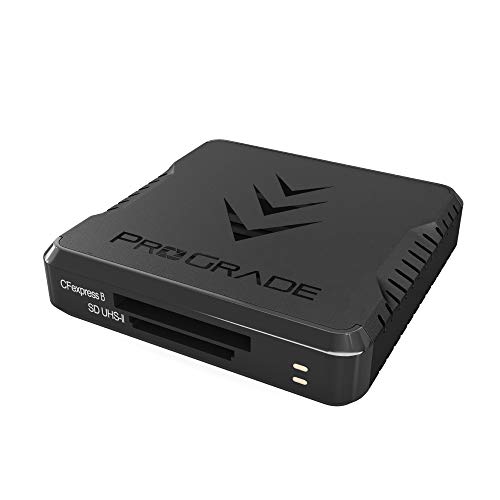
- Up to 1.25GB/s transfer performance
- Dual CFexpress Type B and SD slots
- Magnetic mounting system and two-year warranty
Best For: Professional photo and video workflows using CFexpress Type B cards
Best Compact Dual-Slot Value
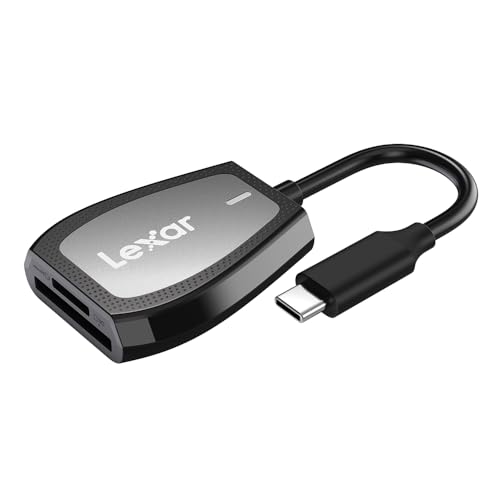
- Up to 312MB/s read speeds
- Dual SD and microSD slots
- LED indicator and two-year limited warranty
Best For: Everyday SD and microSD transfers on USB-C computers
Most Versatile

- Reads CF, SD, microSD/TF, and MS cards
- USB-C connector with included USB adapter
- Plug-and-play support across major operating systems
Best For: Cross-platform users with multiple card formats
Fastest Multi-Format Pick
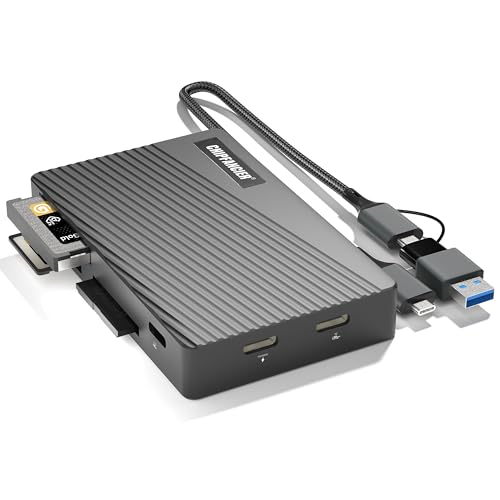
- Supports SD, microSD, MS, and CF cards
- USB-C and USB-A connectors
- Up to 104 MB/s in UHS-I mode
Best For: Fast transfers across multiple card formats
Best Dual-Slot Design

- Reads SD and microSD cards simultaneously
- USB-A and USB-C dual-header design
- Compact, plug-and-play aluminum construction
Best For: Photographers managing SD and microSD cards
Best Dual-Interface Pick – uni USB-C/USB 3.0 SD Card Reader
If you need high speed memory card readers for both USB-C and USB-A devices, the uni reader offers a flexible setup with dual card slots and transfer speeds up to 5 Gbps. It can read SD and microSD cards at the same time, making it useful for camera, phone, and laptop workflows.
Best For: Photographers, mobile users, and anyone who regularly moves files between SD and microSD cards.
Pros:
- USB-C and USB 3.0 interfaces support transfers up to 5 Gbps.
- Reads and writes SD and microSD cards simultaneously.
- Plug-and-play operation with Windows, macOS, and Android devices.
- Compact design includes protective covers and a cable.
Cons:
- Does not support Lightning devices or CF, XQD, MS, or Memory Stick cards.
- Cards are not included.
- Transfers files from cards but does not connect directly to a camera.
The uni is a practical all-rounder for users who need dual-slot convenience and broad USB compatibility, particularly when working with both full-size SD and microSD media.
Fastest Pro Workflow – ProGrade Digital Dual-Slot UHS-II Reader
For demanding photography and video workflows, this ProGrade Digital model is one of the high speed memory card readers built around UHS-II performance. Its USB 3.2 Gen 2 connection supports transfers up to 1.25 GB/s, with both slots able to operate simultaneously.
Best For: Professional photographers, videographers, and creators who use UHS-II SD cards and need fast downloads.
Pros:
- Supports transfer speeds up to 1.25 GB/s, or 10 Gb/s.
- Dual SD UHS-II slots can transfer from both cards simultaneously.
- Includes an adhesive metal plate for magnetic laptop mounting.
- Comes with a two-year warranty and supports Refresh Pro.
Cons:
- Designed for SD, SDXC, and UHS-II media rather than a broad range of card formats.
- Its performance depends on compatible cards and a suitable host connection.
- It is less versatile if you also need microSD, CF, or Memory Stick support.
The ProGrade stands out when speed and a streamlined mobile workstation matter more than format variety. It is a strong fit for users building a professional post-production workflow around UHS-II SD cards.
Best Format Variety – SmartQ C368 4-in-1 USB 3.0 Reader
The SmartQ C368 is a useful choice among high speed memory card readers when you need support for more than SD and microSD. Its four-slot design handles Micro SD, SD, MS, and CF cards, with USB 3.0 transfer speeds up to 5 Gbps.
Best For: Travelers and households managing a mix of modern and legacy memory card formats.
Pros:
- Supports Micro SD, SD, Memory Stick, and CompactFlash cards.
- Reads cards independently for flexible file transfers.
- Works with Windows, macOS, Linux, and other systems without drivers.
- Blue LED indicates when the reader is powered.
Cons:
- Uses a USB Type-A connection rather than USB-C.
- Cards are not included.
- Maximum listed transfer rate is up to 5 Gbps, below the ProGrade model’s stated speed.
The C368 prioritizes compatibility over premium throughput. It is a sensible pick for users who still work with CF or Memory Stick cards and want one compact reader instead of several adapters.
Best 3-in-1 USB-C Hub – Acer USB-C SD Card Reader
This Acer adapter combines card reading and USB expansion in a compact USB-C design. As one of the high speed memory card readers rated for up to 5 Gbps, it can access SD and microSD cards while also connecting a USB-A peripheral or storage device.
Best For: USB-C laptop, tablet, and smartphone users who want card access plus an extra USB 3.0 port.
Pros:
- Three-in-one design includes SD, microSD, and USB 3.0 ports.
- Supports simultaneous transfers at speeds up to 5 Gbps.
- Aluminum shell helps with heat dissipation during use.
- Plug-and-play compatibility includes Windows, macOS, Chrome OS, Linux, and Android.
Cons:
- Not compatible with Lightning devices or USB-A host devices.
- Does not support UHS-II, CF, MS, XQD, SDUC, or other listed formats.
- Thick device cases may prevent full connector insertion.
The Acer is a convenient travel option for newer USB-C devices, especially when an extra USB-A port is as valuable as SD and microSD access. Its format limitations make it less suitable for professional UHS-II or legacy-card workflows.
Best UHS-II USB-C Pick – UGREEN SD 4.0 Card Reader
If you need high speed memory card readers for SD and microSD media, the UGREEN SD 4.0 reader is a practical USB-C option. Its UHS-II slots support transfer speeds up to 312MB/s, while the dual-slot design lets you read and write two cards simultaneously.
Best For: Photographers, vloggers, and mobile users who work with UHS-II SD or microSD cards and USB-C devices.
Pros:
- Supports SD 4.0 UHS-II cards with speeds up to 312MB/s.
- Reads and writes SD and microSD cards at the same time.
- Works across Windows, macOS, Linux, ChromeOS, iPadOS, and Android with plug-and-play setup.
- Aluminum housing and braided cable add durability.
Cons:
- Android devices need OTG support.
- Its USB-C connection may require an adapter for USB-A-only computers.
With fast UHS-II support, broad compatibility, and two-card transfers, this UGREEN model is a versatile choice for creators who want a compact reader for both computers and mobile devices.
Fastest Professional Workflow – ProGrade CFexpress Type B Reader
For demanding photo and video workflows, the ProGrade Digital dual-slot reader is one of the high speed memory card readers built for maximum throughput. Its USB 3.2 Gen 2 interface reaches up to 1.25GB/s, with support for CFexpress Type B and SD cards simultaneously.
Best For: Professional photographers, videographers, and editors transferring large files or managing post-production workloads.
Pros:
- Transfers data at up to 1.25GB/s, or 10Gb/s.
- Supports CFexpress Type B and SD cards in a dual-slot design.
- Includes a magnetic mounting system with an adhesive metal plate.
- Covered by a two-year warranty.
Cons:
- Its CFexpress-focused design may be more than casual users need.
- Listed compatibility emphasizes devices with USB 3.0 Type-A ports.
- At 200g, it is heavier than the other readers in this group.
This is the performance-oriented choice for users working with CFexpress Type B media and large creative files. The mounting system also helps create a more organized mobile workstation.
Best Compact Dual-Slot Value – Lexar USB-C Card Reader
The Lexar dual-slot reader is a straightforward option for shoppers comparing high speed memory card readers for everyday SD and microSD transfers. It offers read speeds up to 312MB/s through USB 3.2 Gen 1 and includes an LED activity indicator for easy status checks.
Best For: Laptop and desktop users who need a compact USB-C reader for SD and microSD cards.
Pros:
- Read speeds reach up to 312MB/s.
- Dual-slot design supports SD and microSD cards.
- Backwards compatible with UHS-I cards and USB 2.0 ports.
- LED light shows activity, and a two-year limited warranty is included.
Cons:
- UHS-I cards are limited to speeds up to 170MB/s.
- Compatibility details focus on desktop and laptop use rather than phones or tablets.
Lexar keeps the feature set practical: fast stated read performance, two card slots, broad backward compatibility, and a useful activity light. It is a sensible fit for routine transfers on USB-C computers.
Most Versatile – 4-in-1 USB-C Card Reader
This 4-in-1 reader is a practical choice among high speed memory card readers when you need broad card support and flexible device connectivity. It accepts CF, SD, TF/microSD, and MS cards, while its USB-C connector and included USB adapter support newer and older computers.
Best For: Users transferring photos, videos, and files across USB-C phones, tablets, Macs, PCs, and other compatible devices.
Pros:
- Supports CF, SD, microSD/TF, and Memory Stick formats.
- Includes USB-C connectivity plus a detachable USB adapter for USB devices.
- Plug-and-play operation with support for iOS, Android, Windows, and macOS.
Cons:
- Its listed transfer rate is 480 Mbps, below the fastest USB 3.x readers.
- Does not support Wi-Fi SD cards.
Choose this model for its broad format compatibility and cross-platform flexibility. It is especially useful if your workflow includes both legacy cards and modern USB-C devices, though speed-focused users may prefer a newer USB 3.x model.
Fastest Multi-Format Pick – USB 3.2 10Gbps Card Reader
This multi-format reader is a strong contender among high speed memory card readers, pairing USB 3.2 connectivity with support for four common card types. It offers USB-C and USB-A access and can reach up to 104 MB/s in UHS-I mode according to the supplied specifications.
Best For: Photographers, camera users, and computer owners who want fast transfers from SD, microSD, MS, or CF cards.
Pros:
- Supports SD, microSD/TF, MS, and CF cards.
- USB-C and USB-A design works with newer and older computers.
- Up to 104 MB/s UHS-I transfer performance is listed.
- Braided housing and aluminum construction support durability.
Cons:
- The supplied details do not specify simultaneous reading for all card slots.
- Its broad computer and mobile compatibility may still depend on the host device’s port support.
This is the most speed-oriented option in the group, with a USB 3.2 interface and a stated UHS-I performance figure. Its dual-connector design and reinforced build also make it a practical general-purpose reader for home, studio, or travel use.
Best Dual-Slot Design – Acer USB-C SD Card Reader
The Acer dual-slot reader is a compact option among high speed memory card readers, offering USB 3.0 transfer rates up to 5 Gbps and simultaneous reading and writing for SD and microSD cards. Its USB-A and USB-C headers make it convenient for computers, phones, tablets, and other compatible devices.
Best For: Photographers and video editors who regularly move files between full-size SD and microSD cards.
Pros:
- Supports simultaneous reading and writing from SD and microSD cards.
- USB-A and USB-C connectors provide flexible device compatibility.
- Compact 15-gram design includes protective port covers and an attached cord.
- Plug-and-play operation requires no driver or software installation.
Cons:
- Does not support CF Express, SIM, XQD, MS, or Memory Stick cards.
- Not compatible with Lightning-port devices.
- Thick device cases may prevent full insertion.
This reader makes the most sense for SD and microSD workflows rather than mixed-format collections. Its dual-slot design can save time when managing two supported cards, while the small aluminum body is well suited to travel and mobile editing.
How We Picked the Best High Speed Memory Card Readers
We focused on readers that support commonly used SD, microSD, CompactFlash, Memory Stick, or CFexpress formats and provide a practical connection for modern laptops, tablets, phones, and desktops. We also considered advertised interface speeds, UHS-II compatibility, slot configuration, simultaneous reading, plug-and-play operation, and adapter flexibility.
Speed claims depend on the card, host device, file size, cable, and port standard. A USB 3.2 reader cannot deliver its full potential through an older USB port, and a UHS-II card will not reach its top speed in a UHS-I-only reader.
Quick Comparison
| Best For | Look For | Recommended Reader Type |
|---|---|---|
| Everyday SD and microSD transfers | USB 3.0 or faster, compact design | Single- or dual-slot USB-C reader |
| Professional photography | UHS-II support and USB 3.2 | Dual-slot UHS-II reader |
| CFexpress workflows | CFexpress Type B and high-bandwidth USB | Dedicated CFexpress reader |
| Multiple legacy formats | SD, microSD, CF, and MS support | All-in-one multi-format reader |
Key Buying Factors for High-Speed Memory Card Readers
Card and Slot Compatibility
Check the exact card types you use. SDXC and microSDXC support is important for larger cards, while UHS-II compatibility matters if your cards have a second row of contacts. Photographers using newer professional cameras may need CFexpress Type B support rather than a standard SD reader.
Connection Speed and Connector Type
USB 3.0 is sufficient for many everyday transfers, but USB 3.2 and USB 3.2 Gen 2 models can reduce waiting times with fast cards. Confirm whether the reader uses USB-C, USB-A, or a detachable cable. If you work across phones, tablets, and older computers, a reader with an included adapter can be more convenient.
Single, Dual, or Simultaneous Reading
Dual-slot readers are useful for copying between cards or handling SD and microSD media without swapping. However, some readers support only one active card at a time. If simultaneous transfers are part of your workflow, verify that feature instead of assuming every multi-slot design provides it.
Build, Portability, and Reliability
A compact reader is easier to keep in a camera bag, while a sturdier enclosure and strain relief may suit frequent desktop use. Look for clear activity indicators, secure card insertion, and a cable or connector that does not place excessive stress on your device port.
Who Should Buy Which High Speed Memory Card Readers?
Choose a compact USB-C SD or microSD reader for routine phone, tablet, and laptop transfers. Pick a UHS-II dual-slot model if you regularly move large RAW photo batches or high-bitrate video. Choose a CFexpress-compatible reader for cameras that use Type B cards, and select an all-in-one reader if your equipment spans SD, microSD, CompactFlash, and Memory Stick formats.
Before buying, match the reader to your fastest card and your computer’s actual port standard. That simple check will help ensure that your new reader delivers a meaningful improvement rather than becoming the slowest part of the transfer chain.