
Choosing an audio interface with MIDI ports is the easiest way to connect instruments, controllers, and your computer in one reliable studio hub. The right model can simplify recording while keeping your setup flexible for the future.
In this roundup, we focus on options that offer practical I/O, solid conversion, and the features most musicians, podcasters, and producers actually need.
Best 10 Audio Interface with MIDI Ports Picks for 2026
Studio Hub for Multi-Input Setups
Focusrite Scarlett 4i4 4th Gen

- MIDI in/out plus 4-in/4-out audio
- Two mic preamps, two Hi-Z inputs, four line inputs
- 24-bit/192kHz recording with Auto Gain and Clip Safe
Best For: Musicians and creators with synths, guitars, and vocals
Compact Monitoring Pick

- 2-in/2-out layout with two preamps
- Hardware monitoring for low-latency tracking
- 24-bit/192kHz with USB-C connectivity
Best For: Solo recordists who want simple, clean monitoring
Budget 4x4 MIDI Workhorse

- 4x4 audio/MIDI interface with one MIDI I/O
- Four MIDAS-designed mic preamps with phantom power
- 24-bit/192kHz support in a rugged metal chassis
Best For: Budget users who need four inputs and MIDI connectivity
Portable Starter Interface

- MIDI I/O plus two mic preamps and two instrument inputs
- USB bus-powered for mobile recording
- Zero-latency monitoring with bundled software
Best For: Beginners and mobile recordists needing MIDI support
Premium USB-C Pick
Yamaha URX22C 2x2 Audio/MIDI Interface

- MIDI I/O plus 2-in/2-out analog connectivity
- 32-bit/192 kHz support with USB-C/USB 3.0
- DSP monitoring with reverb, channel strip, and amp effects
Best For: Home studios that want MIDI ports and onboard DSP
Budget-Friendly MIDI Choice

- MIDI I/O in a compact 2-in/2-out interface
- Two Onyx preamps with 48V phantom power
- Bus-powered USB 2.0 with zero-latency monitoring
Best For: Portable studios needing MIDI ports and basic recording features
Recording All-Rounder
Focusrite Scarlett 2i2 4th Gen

- 120 dB dynamic range with 24-bit/192 kHz recording
- Auto Gain, Clip Safe, and Air modes for easy tracking
- Includes a broad software and plugin bundle
Best For: Vocal, guitar, and streaming setups that don’t need MIDI
Portable MIDI-Capable Two-Channel Pick

- Two XLR/TRS combo inputs
- Built-in MIDI I/O for hardware connections
- Runs on batteries or optional AC power
Best For: Mobile musicians and compact PC/Mac setups needing MIDI and basic recording
High-Input Studio Choice
Tascam SERIES 102i 10 IN/2 OUT
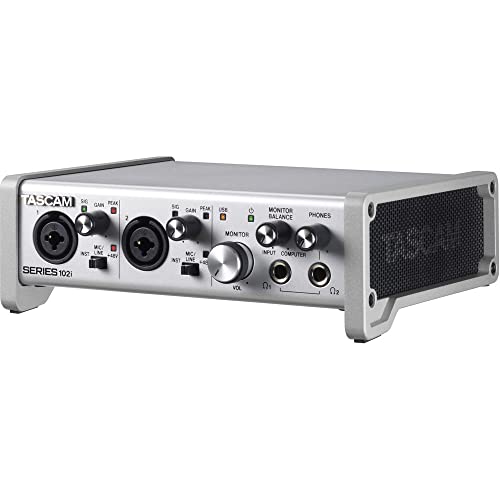
- 10-input interface with MIDI support
- Optical expansion adds up to 8 channels
- Dual headphone outputs for monitoring
Best For: Songwriters, podcasters, and home studios needing more I/O and MIDI
Budget Basic Recording Pick
M-AUDIO M-Track Solo USB Interface

- One combo XLR/Line input plus one line/instrument input
- 48 kHz resolution with zero-latency monitoring
- Compact starter interface for recording and streaming
Best For: Beginners needing a simple, low-cost audio interface
Studio Hub for Multi-Input Setups – Focusrite Scarlett 4i4 4th Gen
If you want an audio interface with MIDI ports that can handle mics, guitars, synths, and drum machines, the Scarlett 4i4 4th Gen is built for that kind of flexible home studio workflow. It combines 4-in/4-out connectivity, two mic preamps, two Hi-Z inputs, four line inputs, and MIDI I/O, so you can keep several sources connected without constantly repatching.
Best For: Musicians and creators who need a compact interface for recording instruments, vocals, and MIDI gear together.
Pros:
- Includes MIDI in/out alongside 4-in/4-out audio connectivity.
- Two 4th Gen mic preamps, two Hi-Z inputs, and four line inputs support a wide range of gear.
- 24-bit/192kHz recording with a 120dB dynamic range for studio-quality capture.
- Auto Gain, Clip Safe, and Air modes add useful recording tools for everyday sessions.
Cons:
- Only two mic preamps, so larger mic setups will need more channels.
- Designed as a desktop hub, not a large-format interface.
Overall, the 4i4 4th Gen is a strong pick if you need an audio interface with MIDI ports and enough I/O to build a practical small studio around it. The included software bundle is another plus for getting started quickly.
Compact Monitoring Pick – MOTU M2 USB-C Interface
The MOTU M2 is a straightforward USB-C audio interface for recording a small number of sources with clean monitoring and high-resolution audio. It offers 2-in/2-out operation, two preamps, and hardware monitoring at up to 24-bit/192kHz, making it a simple choice when you do not need a larger MIDI-equipped setup.
Best For: Solo recordists and small setups that prioritize easy monitoring and compact size.
Pros:
- 2-in/2-out design keeps the interface simple and easy to manage.
- Hardware monitoring helps with low-latency tracking.
- 24-bit/192kHz support offers high-resolution recording.
- USB-C connectivity and macOS/Windows/iOS compatibility broaden usability.
Cons:
- No MIDI ports are listed, so it is not suited to MIDI hardware connections.
- Only two inputs and two outputs limit expansion.
The M2 is best viewed as a compact, high-quality recording interface rather than an all-in-one studio hub. If MIDI I/O is essential, this model is not the right fit, but it remains a solid option for lean recording rigs.
Budget 4×4 MIDI Workhorse – Behringer UMC404HD
If you need an audio interface with MIDI ports and more routing flexibility than a basic two-channel model, the Behringer UMC404HD is a practical budget-friendly option. It delivers 4×4 USB audio/MIDI connectivity, four MIDAS-designed mic preamps, and 24-bit/192kHz resolution, so it can handle recording sessions with microphones, instruments, and external MIDI gear.
Best For: Budget-minded users who want four-input recording and MIDI I/O in one interface.
Pros:
- 4×4 USB audio/MIDI interface with one MIDI I/O port.
- Four MIDAS-designed mic preamps with +48V phantom power.
- 24-bit/192kHz audio support for professional-quality capture.
- Metal chassis gives it a rugged, built-like-a-tank feel.
Cons:
- Uses USB 2.0 rather than newer USB-C connectivity.
- Bulkier than compact two-channel interfaces.
For anyone building a small studio around MIDI hardware, the UMC404HD covers the essentials without pushing the price into premium territory. It is a strong choice when you want more I/O and durability than a basic starter interface.
Portable Starter Interface – PreSonus AudioBox USB 96
The PreSonus AudioBox USB 96 is a compact choice for recording on the go, and it includes MIDI I/O for simple hardware integration. With two Class-A mic preamps, two instrument inputs, 24-bit/96kHz converters, and USB bus power, it fits well into a small mobile setup where convenience matters as much as sound.
Best For: Beginners and mobile recordists who want a simple interface with MIDI support.
Pros:
- Includes MIDI I/O for connecting compatible MIDI hardware.
- USB bus-powered design keeps the setup portable.
- Two mic preamps and two instrument inputs cover basic recording needs.
- Zero-latency monitoring via the mixer control helps with tracking.
Cons:
- 24-bit/96kHz max sample rate is lower than 192kHz competitors.
- Only a 2-channel design, so it is not ideal for larger sessions.
This is a sensible entry-level audio interface with MIDI ports if you value portability and bundled software. It is especially appealing for straightforward recording setups that do not require lots of inputs or advanced routing.
Premium USB-C Pick – Yamaha URX22C 2×2 Audio/MIDI Interface
If you want an audio interface with MIDI ports that also feels ready for serious recording, the Yamaha URX22C is built around a 2-in/2-out layout with 32-bit/192 kHz support, MIDI I/O, and onboard DSP. It suits users who want clean mic inputs, low-latency monitoring, and a compact interface that can handle both music production and simple tracking setups.
Best For: Home studios and mobile creators who want MIDI connectivity, high-resolution audio, and built-in monitoring effects.
Pros:
- Includes MIDI I/O alongside 2 analog inputs and 2 TRS main outputs
- 32-bit/192 kHz conversion with USB-C and USB 3.0 audio support
- Two Class-A D-PRE combo inputs with +48 V phantom power and Hi-Z support
- DSP-powered monitoring with REV-X reverb, Channel Strip, and Guitar Amp Classics
Cons:
- Only 2-in/2-out, so it is not aimed at larger multi-input sessions
- Best value depends on whether you will use the included DSP features and software
Overall, the URX22C stands out if you want a sturdy, modern interface with MIDI support and practical onboard processing. It is especially appealing for musicians who record one or two sources at a time and want a streamlined setup across Windows, macOS, and iOS.
Budget-Friendly MIDI Choice – Mackie Onyx Producer 2X2
Mackie Audio Interface, Onyx Producer 2X2 USB Audio Interface with MIDI (Onyx Producer 2-2)
Check Price On AmazonThe Mackie Onyx Producer 2X2 is a practical audio interface with MIDI ports for users who want straightforward recording without a lot of extra setup. Its 2-in/2-out design, 24-bit/192 kHz recording, and bus-powered USB 2.0 connection make it a compact option for small studio rigs and portable sessions.
Best For: Budget-minded producers and mobile recordists who need MIDI I/O in a simple 2×2 interface.
Pros:
- Includes MIDI I/O with 2-in/2-out recording
- Two Onyx mic preamps with 48V phantom power for condenser mics
- Zero-latency direct monitoring with dedicated monitor outputs and headphone output
- Bus-powered USB 2.0 design for easy mobile use
Cons:
- USB 2.0 is not as current as newer USB-C interfaces
- Compatibility notes are split across Windows, macOS, and iOS support details
For a simple interface that still adds MIDI connectivity, the Onyx Producer 2X2 keeps the focus on essential recording features. It is a solid fit if you want dependable inputs, direct monitoring, and a rugged build you can move between setups.
Recording All-Rounder – Focusrite Scarlett 2i2 4th Gen
The Focusrite Scarlett 2i2 4th Gen is a strong pick if your priority is polished recording quality rather than MIDI connectivity. As a compact audio interface, it offers two mic preamps, two Hi-Z inputs, Auto Gain, Clip Safe, and Air modes for recording vocals and instruments with a simple, modern workflow.
Best For: Singer-songwriters, podcasters, and streamers who want high-quality 2-in/2-out recording without needing MIDI ports.
Pros:
- 120 dB dynamic range with 24-bit/192 kHz recording
- Auto Gain and Clip Safe help set levels and prevent clipping
- Air mode adds presence and harmonic drive to vocals and guitars
- Includes Pro Tools Intro+, Ableton Live Lite, Cubase LE, and Hitmaker Expansion
Cons:
- Does not include MIDI ports, so it is not the right choice for hardware MIDI setups
- Limited to 2 inputs and 2 outputs
While it is not an audio interface with MIDI ports, the Scarlett 2i2 4th Gen excels for users who care most about recording quality and software bundle value. If your workflow is centered on mics, guitars, and quick content creation, it is an easy interface to recommend.
Portable MIDI-Capable Two-Channel Pick – Zoom U-24 Handy USB Interface
If you want an audio interface with MIDI ports that stays portable, the Zoom U-24 is built around simple two-channel recording and playback for PC, Mac, and iPad setups. It combines two XLR/TRS combo inputs, MIDI I/O, and RCA outputs in a compact unit that can run on AA batteries or an optional AC adapter.
Best For: Mobile musicians and small setups that need MIDI I/O plus basic stereo recording.
Pros:
- Includes MIDI I/O alongside two XLR/TRS combo inputs
- Portable power options with 2 AA batteries or optional AC adapter
- Supports up to 24-bit/96 kHz recording and playback
- Comes with Pro Tools | First and Ableton Live 9 Lite download access
Cons:
- Limited to a 2-channel interface design
- iPad connection requires a separate adapter
- No expanded input count for larger recording sessions
The U-24 makes sense if your priority is portability and MIDI connectivity rather than lots of inputs. It’s a straightforward choice for compact recording rigs that still need reliable audio and hardware MIDI support.
High-Input Studio Choice – Tascam SERIES 102i 10 IN/2 OUT
For buyers comparing an audio interface with MIDI ports in a more expandable recording setup, the Tascam SERIES 102i stands out for its 10-input/2-output layout and built-in MIDI support. It adds two Ultra-HDDA mic preamps, an optical S/MUX expansion port, and dual headphone outputs, making it a practical pick for songwriting and podcast work.
Best For: Users who need more inputs, MIDI support, and flexible monitoring in a desktop setup.
Pros:
- 10 inputs with an optical expansion port for up to 8 more channels
- Built-in MIDI support for gear integration
- Two Ultra-HDDA mic preamps with low-noise design
- Dual headphone outputs and 2 analog outputs for monitoring
Cons:
- Larger, less portable than compact 2-channel interfaces
- Only a 2-out design for main analog outputs
- Windows support is highlighted in the supplied notes
This is the strongest option here if you need input flexibility and MIDI in one unit. It’s better suited to a fixed workspace than a grab-and-go rig, but the expansion and monitoring options add real utility.
Budget Basic Recording Pick – M-AUDIO M-Track Solo USB Interface
The M-AUDIO M-Track Solo is the simplest choice if you want an affordable starter interface, though it does not include MIDI ports. It offers one combo XLR/Line input with phantom power, one line/instrument input, RCA outputs, and a USB/Direct switch for zero-latency monitoring.
Best For: Beginners who need a compact entry-level interface for vocals, instruments, or streaming.
Pros:
- Compact USB interface with 48 kHz audio resolution
- Combo XLR/Line input with phantom power for microphones
- Separate line/instrument input for guitar or other sources
- USB/Direct switch supports zero-latency monitoring
Cons:
- No MIDI ports included
- Only 2 channels total
- 48 kHz max sample rate is lower than some higher-end options
If MIDI connectivity is required, this model is not the right fit. But as a simple recording and streaming interface, it covers the essentials well and keeps the setup easy to manage.
How We Picked the Best Audio Interface with MIDI Ports
We focused on models that combine dependable audio performance with useful MIDI connectivity, plus enough input and output flexibility for real-world studio work. Priority went to interfaces with strong driver support, good preamps, and a sensible mix of portability and expansion.
We also considered compatibility, onboard monitoring features, and value for the price so this list covers beginners, home-recording musicians, and users who need more than a basic 2-in/2-out box.
Quick Comparison
If you want the simplest setup, a compact 2-in/2-out model is often enough for vocals, guitars, and a MIDI keyboard. If you need to record multiple sources or route external gear, look at 4×4 or higher-channel designs. For larger sessions, a more expandable Audio Interface with MIDI Ports can save you from upgrading too soon.
Key Buying Factors for an Audio Interface with MIDI Ports
Input and Output Count
Match the interface to your workflow. Solo creators can usually get by with two inputs, while bands, drum machines, or synth-heavy setups may need four or more.
MIDI I/O
Check whether you need standard 5-pin MIDI ports for keyboards, sound modules, and hardware sequencers. Some users only need MIDI in, but true in/out support is better for growing rigs.
Audio Quality and Monitoring
Look for low-noise preamps, direct monitoring, and enough headroom for clean recording. Higher-resolution converters are useful, but stable performance matters more than spec-sheet chasing.
Software and Connectivity
USB-C support, bundled recording software, and compatibility with your DAW can make setup much easier. If you work between laptops or desktop systems, driver reliability is a major plus.
Who Should Buy Which Audio Interface with MIDI Ports?
Choose a compact 2-channel model if you mostly record vocals, guitar, or podcasts and only need basic MIDI integration. Step up to a 4-input interface if you want more recording flexibility, hardware synth connectivity, or room to expand.
If you’re building a serious home studio, prioritize the interface that best balances MIDI support, input count, and monitoring features rather than choosing on channel count alone. The best Audio Interface with MIDI Ports is the one that fits your current gear and leaves room for the next piece you add.