
Choosing the right network adapter for a Proxmox server can make a bigger difference than many buyers expect. Driver support, chipset compatibility, port count, and link stability all affect how smoothly your virtualized workloads run.
This roundup focuses on proven options that suit home labs and small servers alike, with an emphasis on dependable performance, easy deployment, and the features Proxmox users actually need.
Best 10 Network Adapter for Proxmox Server Picks for 2026
Budget 2.5GbE Upgrade
TP-Link TX201 2.5Gb PCIe Network Card

- Up to 2.5 Gbps with backward compatibility
- Supports Linux and Windows Server editions
- Includes standard and low-profile brackets
Best For: Home lab Proxmox servers needing an easy 2.5GbE step up
Reliable Intel Single-Port Pick

- Single-port Intel Gigabit Ethernet card
- Includes EEE and DMA Coalescing features
- Compact PCIe design for simple installs
Best For: Proxmox hosts that need dependable 1GbE from Intel hardware
Simple Gigabit Value
TP-Link TG-3468 PCIe Gigabit Card

- 10/100/1000Mbps PCIe adapter
- Wake-on-LAN and power-saving features
- Includes low-profile and standard brackets
Best For: Budget Proxmox servers needing a basic gigabit adapter
Dual-Port Server Choice
Intel PRO/1000 PT Dual Port Adapter

- Two Gigabit Ethernet ports
- PCIe x4 server-oriented design
- Full-height retail form factor
Best For: Proxmox servers that need two physical 1GbE connections
Budget Broadcom PCIe Pick
Broadcom BCM5751 Gigabit PCIe NIC
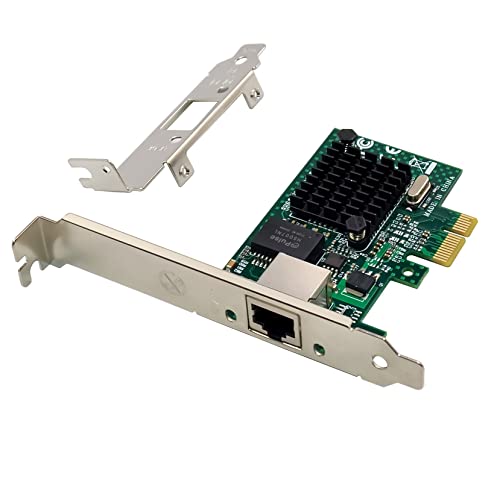
- PCIe x1 Gigabit Ethernet adapter
- Low-profile and full-height brackets included
- Linux support listed in the notes
Best For: Older or budget Proxmox servers needing a basic 1GbE NIC
Trusted Intel Server Choice

- Intel single-port Gigabit Ethernet adapter
- PCIe 2.1 with compact design
- Linux and Windows compatibility listed
Best For: Stable Proxmox hosts that need a dependable Intel 1GbE NIC
Wireless Bridge Alternative
VONETS VAP11S-232 WiFi Ethernet Bridge

- WiFi bridge, repeater, and router modes
- Converts WiFi to Ethernet or Ethernet to WiFi
- 2.4GHz 300Mbps with external antennas
Best For: When a Proxmox setup needs Ethernet over WiFi instead of a PCIe NIC
4-Port Intel Server Pick
Intel I350-T4V2 Gigabit Adapter

- 4 Ethernet ports on one card
- 1000 Mbps Gigabit Ethernet
- Compatible with Linux and Windows
Best For: Proxmox servers that need four Intel Gigabit ports in a single card
Feature-Rich Budget Pick
Intel I210AT PCIe Gigabit Card

- PCIe x1 Intel I210AT adapter
- Supports Windows Server and Linux
- Includes low-profile bracket
Best For: Proxmox users who want a PCIe x1 Intel I210AT card with broad OS support
Simple Single-Port Pick

- Single-port Gigabit Ethernet
- Compatible with Linux and Windows
- Very light compact adapter
Best For: Simple Proxmox builds that only need one reliable Intel Gigabit port
Budget 2.5GbE Upgrade – TP-Link TX201 2.5Gb PCIe Network Card
If you want a network adapter for Proxmox server use without jumping to enterprise pricing, the TP-Link TX201 is a straightforward 2.5GbE PCIe option. It supports Linux, includes standard and low-profile brackets, and negotiates backward to 1Gbps or 100Mbps when your switch or cabling is slower.
Best For: Home lab and small-server Proxmox builds that need a simple 2.5GbE upgrade with broad OS support.
Pros:
- Up to 2.5 Gbps Ethernet for faster-than-gigabit networking.
- Linux support makes it a practical fit for Proxmox-based systems.
- Includes standard and low-profile brackets for different case types.
- Backward compatible with 1Gbps and 100Mbps connections.
Cons:
- Single-port design limits you to one network link.
- Best value is only realized if your network gear supports 2.5GbE.
For a cost-conscious Proxmox server, this card offers a clean upgrade path from gigabit without adding complexity. Its compatibility and bracket options make it an easy fit for many desktop-style server builds.
Reliable Intel Single-Port Pick – Intel I210-T1 Gigabit Adapter
The Intel I210-T1 is a classic network adapter for Proxmox server setups when you want a proven single-port Gigabit card. It uses a PCI-Express interface, supports energy-saving features like EEE and DMA Coalescing, and is built around Intel’s established Gigabit Ethernet platform.
Best For: Reliable Proxmox hosts that only need one solid 1GbE port and value proven Intel hardware.
Pros:
- Intel-branded Gigabit Ethernet adapter with a strong reliability reputation.
- Energy Efficient Ethernet and DMA Coalescing help reduce power use.
- PCI Express Gen 2.1 support for straightforward host compatibility.
- Very compact single-port design.
Cons:
- Limited to 1Gbps speeds.
- Only one Ethernet port, so it is not ideal for multi-link setups.
If your Proxmox server just needs dependable wired networking and not higher throughput, this is a conservative choice. It favors stability and efficiency over speed, which can be exactly what a small virtualization host needs.
Simple Gigabit Value – TP-Link TG-3468 PCIe Gigabit Card
The TP-Link TG-3468 is a basic Gigabit network adapter for Proxmox server builds where affordability and compatibility matter most. It supports 10/100/1000Mbps, includes Wake-on-LAN, and comes with both low-profile and standard brackets for flexible installation.
Best For: Budget Proxmox servers that only need a dependable gigabit PCIe network adapter.
Pros:
- Gigabit Ethernet support with auto-negotiation and Auto MDI/MDIX.
- Wake-on-LAN and power-saving features add useful management flexibility.
- Includes both low-profile and standard brackets.
- Supports Windows 11/10/8.1/8/7 and older Windows versions.
Cons:
- Limited to standard Gigabit speeds.
- Windows-focused support makes it less relevant if you only care about Linux compatibility details.
This is a no-frills choice for Proxmox hosts that just need a working wired port. It is best when you want an inexpensive, familiar PCIe adapter and do not need more than 1GbE.
Dual-Port Server Choice – Intel PRO/1000 PT Dual Port Adapter
The Intel PRO/1000 PT Dual Port Server Adapter is the most server-oriented network adapter for Proxmox server use in this group. It provides two Gigabit Ethernet ports on a PCI Express x4 interface, making it a strong fit when you want separate links or extra flexibility in a server chassis.
Best For: Proxmox servers that benefit from dual Gigabit ports and a more server-focused adapter design.
Pros:
- Dual-port Gigabit Ethernet gives you more connectivity options.
- PCI Express x4 interface is designed for server use.
- Intel branding and server adapter positioning suit virtualization hosts.
- Full-height retail design for standard server installs.
Cons:
- Still limited to 1Gbps per port.
- Dual-port cards are less useful if you only need a single uplink.
For Proxmox users who want a practical server adapter rather than a basic desktop NIC, this model stands out for its dual-port layout. It is a sensible choice when you want more than one physical Ethernet connection in the host.
Budget Broadcom PCIe Pick – Broadcom BCM5751 Gigabit PCIe NIC
If you need a basic network adapter for Proxmox server use, this Broadcom BCM5751 card is a simple Gigabit Ethernet option with PCIe x1 support. It works with common Linux distributions and also includes both low-profile and full-height brackets, which makes it easier to fit into a range of server cases.
Best For: Home lab or older server builds that need a straightforward 1GbE PCIe adapter with flexible bracket options.
Pros:
- PCIe x1 card compatible with x1, x4, x8, and x16 slots
- Includes both low-profile and full-height brackets
- Broad Linux support listed in the notes
- Built-in IOV support for VMware NetQueue and Microsoft VMQ
Cons:
- Only 1GbE performance, not faster multi-gig networking
- Not compatible with legacy PCI slots
- Older chipset design may be less appealing for new builds
This is a practical, no-frills adapter if your Proxmox setup just needs reliable Gigabit Ethernet and broad compatibility. The included bracket choices and PCIe x1 form factor make installation easier in mixed chassis sizes.
Trusted Intel Server Choice – Intel I210T1 Gigabit Adapter
The Intel I210T1 is a solid network adapter for Proxmox server builds when you want a proven single-port Gigabit card. Its compact design, PCIe 2.1 support, and listed Linux compatibility make it a straightforward choice for a dependable wired connection.
Best For: Users who want a reputable Intel 1GbE adapter for a stable Proxmox host or homelab server.
Pros:
- Intel-branded Gigabit server adapter with a strong reliability reputation
- Low-halogen, compact single-port design
- PCI Express generation 2.1 support
- Energy Efficient Ethernet and DMA Coalescing features listed
Cons:
- Single-port design may be limiting for some server builds
- Only supports 1GbE speeds
- Warranty described as 1 year
For a Proxmox machine that needs a mainstream, well-known NIC, this Intel card is an easy recommendation. It focuses on stable Gigabit networking rather than extra features, which is often exactly what a server adapter should do.
Wireless Bridge Alternative – VONETS VAP11S-232 WiFi Ethernet Bridge
If your Proxmox server can’t get a direct Ethernet run, this WiFi-to-Ethernet adapter offers a practical bridge option. It is designed for converting WiFi to wired networking or wired to WiFi, with router, repeater, and bridge modes that can help in unusual installation spots.
Best For: Situations where a Proxmox server or nearby device needs Ethernet access through WiFi instead of a traditional PCIe NIC.
Pros:
- Works as a WiFi bridge, repeater, or router
- Can convert WiFi to Ethernet or Ethernet to WiFi
- 2.4GHz 300Mbps wireless support with external antennas
- Wide DC5V-24V power input for flexible installation
Cons:
- Not a PCIe internal network adapter for the server itself
- 2.4GHz-only wireless support
- Wireless bridge performance depends on placement and obstacles
This is less of a classic Proxmox NIC and more of a workaround when cabling is difficult. It makes sense for network devices that need a quick Ethernet bridge, but it is best treated as a connectivity helper rather than a standard server adapter.
4-Port Intel Server Pick – Intel I350-T4V2 Gigabit Adapter
If you want a network adapter for Proxmox server builds with plenty of onboard ports, this Intel I350-T4V2 is a straightforward option. It uses Gigabit Ethernet over PCI and is rated for 1000 Mbps, making it a practical fit for Linux-based virtualized systems where multiple wired connections matter.
Best For: Proxmox servers that need four Intel Gigabit ports in a single card.
Pros:
- 4-port design gives you multiple Ethernet connections from one PCI adapter.
- Intel server adapter branding and Linux compatibility fit server-focused setups.
- Gigabit Ethernet with 1000 Mbps transfer rate keeps it simple and widely usable.
- Low 0.12 kg weight makes it easy to slot into a desktop-class build.
Cons:
- Only Gigabit speed, not faster multi-gig networking.
- Uses a PCI interface rather than newer PCIe.
This is a sensible pick if your Proxmox host needs reliable, multi-port wired networking more than cutting-edge speed. The four-port layout is the main advantage, especially for homelab users who want flexibility without adding extra cards.
Feature-Rich Budget Pick – Intel I210AT PCIe Gigabit Card
This network adapter for Proxmox server builds is aimed at users who want Intel I210AT hardware in a PCIe x1 form factor. It supports Gigabit Ethernet and lists broad OS support for Windows Server and Linux, which makes it easy to consider for a server or homelab machine that needs a single wired uplink.
Best For: Proxmox users who want a PCIe x1 Intel I210AT card with broad OS support.
Pros:
- Intel I210AT controller with PCI Express x1 interface.
- Supports Windows Server and multiple Linux distributions.
- Includes PXE support and several Ethernet-related protocols.
- Comes with a low-profile bracket and user manual.
Cons:
- Single-port design only.
- Gigabit throughput may be limiting for faster network plans.
- Extra features like AVB and timestamping may be more than many Proxmox users need.
For a straightforward Proxmox NIC, this card focuses on compatibility and practical extras rather than raw speed. The PCIe x1 design and included low-profile bracket make it a flexible fit for compact systems.
Simple Single-Port Pick – Intel I210-T1 Server Adapter
If you need a basic network adapter for Proxmox server use, the Intel I210-T1 keeps the spec list simple. It offers 1000 Mbps Gigabit Ethernet over Ethernet hardware interface support and is listed as compatible with Linux and Windows, which suits a no-fuss server networking upgrade.
Best For: Simple Proxmox builds that only need one reliable Intel Gigabit port.
Pros:
- Intel server adapter with familiar Gigabit Ethernet support.
- Linux and Windows compatibility broadens its use.
- Compact single-port design keeps installation straightforward.
- Very light at 0.04 pounds.
Cons:
- Only one Ethernet port.
- No PCIe details listed in the supplied notes.
- Limited to 1000 Mbps transfer rate.
This card makes sense when you want a dependable, uncomplicated network interface for a Proxmox host. It is the least complex option here, which can be exactly what a small server or spare machine needs.
How We Picked the Best Network Adapter for Proxmox Server
We prioritized models with strong Linux compatibility, well-known chipsets, and a track record of stable operation in virtualization environments. For a Network Adapter for Proxmox Server use, that usually means mature driver support, clean passthrough behavior, and sensible port options rather than just the highest advertised speed.
We also considered whether each adapter is a good fit for common Proxmox jobs such as host management, VM traffic separation, storage networking, and lab expansion.
Quick Comparison
Single-port Intel cards are often the safest default when you want straightforward host networking. Dual-port and quad-port adapters are better when you need VLAN separation, dedicated uplinks, or multiple bridges. 2.5GbE models can be a smart step up if your switches and storage can benefit from faster links without moving to more expensive 10GbE hardware.
Key Buying Factors for a Network Adapter for Proxmox Server
Chipset and Driver Maturity
For Proxmox, chipset quality matters more than marketing speed. Intel-based adapters are frequently favored because they tend to have mature kernel support and predictable behavior. If you want less troubleshooting, choose a card with a long history in server and Linux environments.
Port Count and Layout
A single-port card works well for basic host connectivity. Dual-port cards help separate management and VM traffic or create redundancy. Four-port cards are best when you want multiple bridges, lab segmentation, or several physical networks without adding more hardware.
Speed and Switch Compatibility
Match the adapter speed to the rest of your network. A 2.5GbE card is ideal if you already have compatible switches or direct-attached storage. If your environment is still mostly 1GbE, a solid gigabit adapter may be the more practical choice.
Use Case: VM Passthrough Vs. Shared Bridging
If you plan to pass a NIC directly to a VM, favor stable, well-supported hardware. If the adapter will serve multiple bridges on the Proxmox host, look for reliable multiport operation and drivers known to work cleanly with Linux bridging and VLANs.
Who Should Buy Which Network Adapter for Proxmox Server?
Home lab users who want simple, dependable networking should lean toward a single-port Intel gigabit adapter. Buyers building a more flexible Proxmox host should consider dual-port models for cleaner traffic separation. If your storage and switching stack can use more bandwidth, a 2.5GbE option is a strong upgrade path. For multi-VM or segmented lab environments, a quad-port server adapter gives the most routing and bridge flexibility.
In short, the best Network Adapter for Proxmox Server use is the one that matches your driver needs, port layout, and upgrade path—not just the highest spec sheet number.