
Choosing the right switch can make or break a camera install. The best network switch for security cameras should deliver enough PoE power, stable gigabit performance, and the right mix of ports for your layout.
In this roundup, we focus on practical options for home systems, small businesses, and larger multi-camera setups—so you can match capacity, features, and budget with confidence.
Best 10 Network Switch for Security Cameras Picks for 2026
Compact 8-Port PoE
TP-Link 8 Port PoE+ Gigabit Switch

- 8 PoE+ gigabit ports
- 65W total PoE budget
- Extend Mode to 820 ft
Best For: Small camera systems with quiet, plug-and-play installation
High-Power 16-Port PoE
ONWOTE 16-Port PoE Security Switch

- 16 PoE ports for camera loads
- 300W total power budget
- Gigabit uplinks plus SFP slot
Best For: Large security camera installs needing high port count and flexible uplinks
Smart Managed 8-Port PoE

- 8 gigabit PoE+ ports
- 62W total PoE budget
- VLAN, QoS, and port monitoring
Best For: Small businesses or users who want smart management for camera networks
Editor’s Choice
10-Port PoE Switch with 8 Camera Ports

- 8 PoE+ Gigabit ports with 60W total budget
- 2 Gigabit uplinks for network connections
- Extend mode supports up to 820 ft
Best For: Small-to-medium camera setups with longer cable runs
Budget Pick
Compact 5-Port PoE Switch for Basic Camera Setups

- 4 PoE+ ports with 63W total budget
- 5 Gigabit ports in a compact metal case
- Fanless, plug-and-play operation
Best For: Simple camera installs with a few PoE devices
Best Value
6-Port PoE Switch with Isolation and Extend Mode
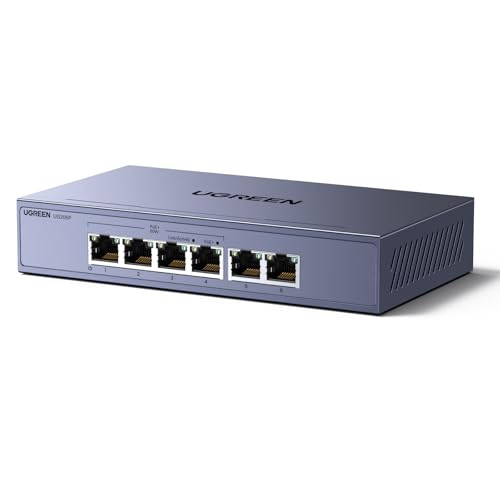
- 4 PoE+ ports plus 2 Gigabit uplinks
- 60W budget with automatic PoE detection
- One-touch Standard, Isolation, and Extend modes
Best For: Small security systems needing useful deployment features
REOLINK Smart PoE Pick

- 4 PoE ports plus 1 uplink at gigabit speeds
- Extend Mode reaches up to 820 ft with Cat5E+
- Fanless metal housing with 4KV surge protection
Best For: REOLINK camera setups and simple home or business PoE installs
Goalake Managed PoE Choice
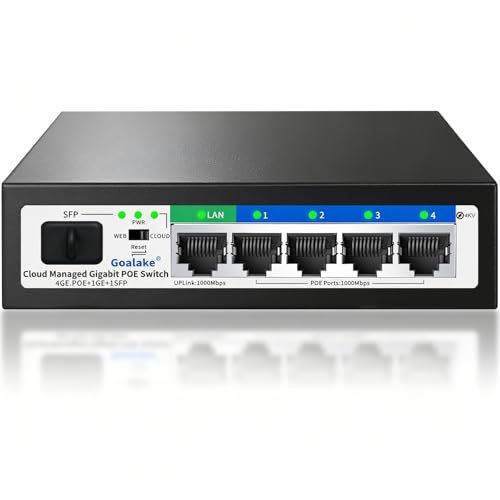
- 4 PoE+ ports with a 52W power budget
- Cloud or web management for remote control
- VLAN, QoS, and 250m extend mode support
Best For: Small camera and AP networks that benefit from managed features and fiber-ready expansion
Compact 8-Port PoE – TP-Link 8 Port PoE+ Gigabit Switch
If you want a simple network switch for security cameras, the TP-Link LS108GP gives you 8 PoE+ gigabit ports in an unmanaged, plug-and-play design. It combines enough power for a small camera setup with handy surveillance-focused features like Extend Mode and PoE Auto Recovery.
Best For: Small camera systems that need easy setup, quiet operation, and basic PoE management.
Pros:
- 8 PoE+ gigabit ports with up to 30W per port and a 65W total PoE budget
- Extend Mode supports PoE transmission up to 820 ft for larger surveillance runs
- PoE Auto Recovery can reboot unresponsive powered devices automatically
- Fanless metal design keeps operation silent for home or office installs
Cons:
- Unmanaged design means no advanced VLAN or traffic controls
- Total power budget may be limiting for larger multi-camera deployments
This is a practical choice if you want a straightforward security camera switch with useful camera-specific features and no configuration overhead.
High-Power 16-Port PoE – ONWOTE 16-Port PoE Security Switch
For a larger network switch for security cameras, the ONWOTE 16-port PoE switch is built around a 300W power budget and a mix of PoE access ports plus uplink options. It is aimed at PoE IP security camera systems, and it can also work with a PoE NVR setup through the included PoE injector support.
Best For: Larger camera installations that need more ports, higher power, and flexible uplinks.
Pros:
- 16 PoE ports give you room for more cameras
- 300W total power input supports up to 30W per port max
- Includes 2 Gigabit RJ45 uplink ports and 1 Gigabit SFP uplink slot
- Designed for 4K 8MP and 5MP PoE IP security cameras
Cons:
- PoE access ports are 10/100M rather than gigabit
- More of a camera-focused unit than a general-purpose smart switch
Overall, this is the strongest fit here when your priority is powering many security cameras and keeping the uplink side flexible.
Budget 5-Port PoE – YuanLey 4-Port PoE+ Gigabit Switch
The YuanLey 5-port model is a compact network switch for security cameras when you only need a few PoE connections. It offers gigabit ports, a 78W built-in power supply, and a plug-and-play setup that works well for small camera systems and mixed PoE/non-PoE devices.
Best For: Small home or office camera setups that want a compact PoE switch with VLAN isolation.
Pros:
- 4 PoE+ gigabit ports plus 1 gigabit uplink port
- 78W total power with up to 30W per PoE port
- One-key VLAN mode adds traffic isolation between PoE ports
- Unmanaged, plug-and-play design keeps installation simple
Cons:
- Only 4 PoE ports, so it is best for smaller systems
- Not a fit if you need advanced management features
If your camera count is modest, this switch covers the basics well and adds a useful VLAN isolation option that many budget models skip.
Smart Managed 8-Port PoE – NETGEAR GS308EP PoE Switch
The NETGEAR GS308EP is a network switch for security cameras that adds easier management to the usual PoE basics. With 8 PoE+ gigabit ports, VLAN support, QoS, and port monitoring, it is a stronger pick when you want more control over traffic and security than a basic unmanaged switch provides.
Best For: Small businesses or advanced home users who want smart management with their camera switch.
Pros:
- 8 gigabit PoE+ ports with a 62W total power budget
- Easy Smart Managed Essentials features include VLANs and QoS
- Port monitoring and per-port PoE controls add flexibility
- Fanless metal design supports silent, energy-efficient operation
Cons:
- Made for U.S. and Canada only
- 62W power budget may not suit larger camera arrays
Choose this model if your camera setup needs a better balance of PoE power and network control, especially when VLANs and traffic prioritization matter.
Editor’s Choice – 10-Port PoE Switch with 8 Camera Ports
If you need a network switch for security cameras that can power multiple devices from one box, this UGREEN 10-port model is built for that job. It offers 8 PoE+ Gigabit ports, 2 Gigabit uplinks, and a 60W power budget, plus mode options that help with long cable runs and traffic isolation.
Best For: Small-to-medium camera setups that need multiple PoE ports, uplink flexibility, and simple mode switching.
Pros:
- 8 PoE+ ports with up to 30W per port and 60W total budget
- 2 Gigabit uplink ports for connecting to a router or recorder
- Extend mode supports PoE up to 820 ft for longer deployments
- Port isolation mode helps reduce network storms between ports
Cons:
- Unmanaged design means no advanced configuration options
- Total PoE budget may limit how many high-draw devices can run at once
Overall, this is the most flexible option in the group if your camera layout is growing or spread out. The combination of more PoE ports, dual uplinks, and auto recovery features makes it a strong practical choice for dedicated surveillance networks.
Budget Pick – Compact 5-Port PoE Switch for Basic Camera Setups
For a straightforward network switch for security cameras, this NETGEAR GS305P keeps things simple: five Gigabit ports, four PoE+ ports, and a 63W power budget. It is designed for plug-and-play use, so it suits users who want quick expansion without dealing with setup steps.
Best For: Simple, low-maintenance camera installs that need compact sizing and silent operation.
Pros:
- 4 PoE+ ports with a 63W total power budget
- 5 Gigabit ports for high-speed connectivity
- Fanless design for silent operation
- Desktop or wall-mount placement for flexible installation
Cons:
- No uplink ports listed in the supplied details
- Unmanaged design offers no configuration controls
This is the most compact option here and works well when you only need to power a few cameras. If your priority is easy setup and quiet operation over advanced network features, it fits the bill.
Best Value – 6-Port PoE Switch with Isolation and Extend Mode
This UGREEN network switch for security cameras balances port count, power, and useful deployment features. You get 4 PoE+ Gigabit ports, 2 Gigabit uplink ports, and a 60W budget, along with one-touch switching between Standard, Port Isolation, and Extend modes.
Best For: Camera systems that need a practical mix of PoE ports, uplinks, and long-distance support.
Pros:
- 4 PoE+ ports and 2 Gigabit uplink ports
- 60W total power budget with automatic PoE detection
- Port isolation mode helps separate ports to prevent network storms
- Extend mode supports PoE up to 820 ft
Cons:
- Only 4 PoE ports, so larger camera systems may outgrow it
- Unmanaged switch limits advanced network control
If you do not need the larger port count of a bigger switch, this model offers a strong middle ground. Its isolation and extend features make it especially useful for small security systems that still need flexibility during installation.
REOLINK Smart PoE Pick – PoE Switch with Stability 4+1
If you want a network switch for security cameras that stays simple but adds useful protection, this REOLINK PoE switch is built around reliability. It offers 4 PoE downlink ports plus 1 uplink port, gigabit speeds, and IEEE 802.3af/at support for a straightforward camera or NVR setup.
Best For: Home or small business users who want a plug-and-play PoE switch for REOLINK cameras and other PoE devices.
Pros:
- 4 PoE ports plus 1 uplink, all supporting 10/100/1000Mbps
- Smart power management helps protect higher-priority devices when total draw exceeds 65W
- Extend Mode can push PoE distance up to 820 ft with Cat5E or higher cable
- Recovery Mode can reboot unresponsive PoE devices automatically
Cons:
- Only 4 PoE downlink ports, so larger camera systems will outgrow it quickly
- Extend Mode reduces ports 1–2 to 10Mbps, which is a tradeoff for longer runs
- Best suited to REOLINK PoE gear, so compatibility planning matters
This is a practical choice if you want a compact camera-focused switch with safety features and no setup hassle. The metal housing, fanless design, and wall or desktop mounting make it easy to place in a home or office network.
Hohtouying Dual-Uplink PoE – 4 Port Gigabit PoE with 2 Uplink
If you need a network switch for security cameras with a little more flexibility on the uplink side, this hohtouying model combines 4 PoE ports with 2 gigabit uplinks and a built-in 65W power supply. It is a plug-and-play unmanaged switch, but it also includes VLAN and CCTV mode options for more control.
Best For: Small camera systems that need gigabit PoE, dual uplinks, and optional VLAN or CCTV mode.
Pros:
- 4 PoE ports with up to 30W per port and 65W total budget
- 2 gigabit uplink ports for NVRs, routers, or other network devices
- CCTV mode can extend PoE transmission up to 820 ft
- VLAN mode isolates downlink ports and supports PoE watchdog
Cons:
- Unmanaged design means it is not for users who want deep configuration
- 24V wireless APs are not supported without a PoE splitter
- Features like CCTV mode and VLAN may be more than some basic users need
This is a solid fit if you want a straightforward PoE switch with extra uplink capacity and a few useful switching modes. The metal, fanless design and 4KV lightning protection make it better suited to always-on camera deployments.
Goalake Managed PoE Choice – 4 PoE, SFP, 52W Smart Switch
For buyers comparing a network switch for security cameras, this Goalake model stands out because it blends basic PoE needs with smart management features. You get 4 gigabit PoE+ ports, a gigabit uplink, and an SFP fiber slot, plus cloud or web management for monitoring and control.
Best For: Home and small business users who want managed PoE features for camera networks, WiFi APs, and long cable runs.
Pros:
- 4 PoE+ ports with a 52W total budget for up to four devices
- Cloud management or web access lets you monitor ports and restart devices remotely
- Extend mode supports runs up to 250 meters
- VLAN, QoS, storm control, and port mirroring add strong network control
Cons:
- PoE budget is lower than some larger switches, so power-hungry setups may need more headroom
- Includes advanced features that some plug-and-play buyers may never use
- Best fit is still a small network, not a large multi-camera deployment
This is the most feature-rich option in the group if you want more than a basic camera switch. Its fanless metal build, 4KV lightning protection, and easy managed controls make it a strong fit for organized, always-on installations.
How We Picked the Best Network Switch for Security Cameras
We prioritized PoE budget, port count, uplink options, and ease of installation. For a Network Switch for Security Cameras, reliability matters more than flashy extras, so we favored models with gigabit ports, solid power delivery, and useful protections like PoE auto recovery or port isolation.
We also considered whether the switch is unmanaged or smart-managed, since that affects how much control you get over camera traffic and troubleshooting.
Quick Comparison
Smaller systems usually do well with 4 to 5 PoE ports, while standard home and office camera setups often need 8 ports. Larger installations should look at 10- to 16-port models with higher total wattage, plus uplink or SFP support for connecting to an NVR, router, or backbone switch.
If you want simple plug-and-play operation, unmanaged options are easiest. If you need traffic separation, camera segmentation, or more control, a smart-managed switch can be worth it.
Key Buying Factors for Network Switch for Security Cameras
PoE Standard and Power Budget
Check whether the switch supports 802.3af, 802.3at, or both. Then compare the total wattage to the number of cameras you plan to run. High-resolution cameras, PTZ units, and IR-heavy models often need more headroom than basic fixed cameras.
Port Count and Uplinks
Count only PoE ports for cameras, then make sure you still have room for an NVR or router connection. Gigabit uplink ports help avoid bottlenecks, especially when multiple cameras stream at once. SFP can be useful for longer or more flexible backbone connections.
Managed Vs Unmanaged
Unmanaged switches are best when you want fast setup and minimal configuration. Smart-managed models can help isolate camera traffic, reduce congestion, and improve troubleshooting in more complex systems.
Installation and Reliability
Look for fanless metal designs if the switch will sit in a quiet room or enclosed space. Features like PoE auto recovery, extend mode, and desktop or wall-mount support can make real-world installs easier.
Who Should Buy Which Network Switch for Security Cameras?
If you’re wiring a few indoor or outdoor cameras, a compact 4- or 5-port PoE switch is usually enough. For most homes and small offices, an 8-port model offers the best balance of flexibility and cost. If you are building a multi-zone system or expect expansion, choose a 10- to 16-port switch with a generous power budget.
For brand-matched camera systems, a compatible switch from the same ecosystem may simplify setup. For everyone else, focus on PoE budget, port layout, and uplink needs first—those factors matter most for dependable security camera performance.