
If you need faster file transfers, lower latency, or a better NAS-to-PC link, an SFP+ upgrade can make a huge difference. The right adapter depends on your slot type, switch, cabling, and whether you want fiber, DAC, or copper.
This roundup focuses on the best SFP+ network adapter for PC setups in 2026, including single-port, dual-port, USB-C, and M.2 options for different builds and budgets.
Best 10 SFP+ Network Adapter for PC Picks for 2026
Compliance-focused PCIe pick
TRENDnet 10G PCIe SFP+ Adapter

- PCIe 3.0 x4 to one 10Gbps SFP+ port
- Includes standard and low-profile brackets
- NDAA/TAA compliant with 3-year protection
Best For: Windows desktops and compliance-sensitive installs
Copper conversion module

- Converts SFP+ ports to RJ45 copper Ethernet
- 1G/2.5G/5G/10G auto-negotiation support
- Hot-pluggable and plug-and-play
Best For: Existing SFP+ setups that need RJ45 output
Two-pack copper transceivers
10G SFP+ to RJ45 Transceiver 2-Pack

- Two-pack of SFP+ to RJ45 modules
- 1G/2.5G/5G/10G auto-negotiation
- Plug-and-play with hot-plug support
Best For: Pairs of devices needing copper RJ45 conversion
USB 4 SFP+ Bridge

- Single 10Gb SFP+ port
- Fanless, quiet external design
- USB 4 cable included
Best For: Quiet external 10GbE on USB 4/Thunderbolt desktops
PCIe SFP+ Desktop NIC

- Intel 82599 10GbE controller
- PCIe x4 card with low-profile bracket
- Supports DAC, AOC, and optical transceivers
Best For: Internal PCIe 10GbE upgrades for desktop PCs and NAS
Multi-Speed SFP+ Converter

- Auto-sensing 10G/5G/2.5G/1G
- Plug-and-play, no software needed
- Low power under 2.5W
Best For: Converting an SFP+ port to copper RJ45 Ethernet
Single-Port Server Upgrade
10Gtek 10Gb SFP+ Single-Port PCIe NIC
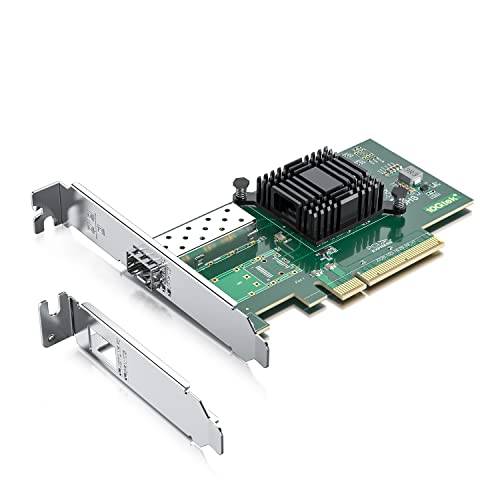
- Intel 82599EN controller
- Single SFP+ 10GbE port
- Includes full-height and low-profile brackets
Best For: A simple 10GbE SFP+ adapter for servers and desktops running Windows Server, Linux, or VMware.
Dual-Port Performance Upgrade
LinksTek X520-DA2 Dual 10Gb SFP+ PCIe NIC

- Dual 10GbE SFP+ ports
- Intel 82599ES with SR-IOV and VMDq
- Broad OS support, including Windows Server and Linux
Best For: Users who want two 10GbE SFP+ ports for servers, NAS, or workstation builds.
Budget Dual-Port Option
VIMIN Dual 10Gb SFP+ PCIe Adapter

- Two 10Gbps SFP+ ports
- Intel 82599-based X520-DA2 chipset
- Standard and slim brackets included
Best For: A dual-port 10GbE SFP+ adapter for users who want broad compatibility and flexible mounting.
Compliance-focused PCIe pick – TRENDnet 10G PCIe SFP+ Adapter
If you want an SFP+ network adapter for PC that adds a straightforward 10Gbps fiber uplink, this TRENDnet PCIe card is built for desktop installs and Windows environments. It turns a PCIe 3.0 x4 slot into a single SFP+ port and includes both standard and low-profile brackets for flexible fitting.
Best For: Windows desktops, small servers, and buyers who need NDAA/TAA-compliant networking hardware.
Pros:
- PCIe 3.0 x4 interface with one 10Gbps SFP+ port
- Includes standard and low-profile brackets for easier installation
- Supports VLAN tagging, RSS, MSI, checksum offloading, and jumbo frames up to 16 KB
- NDAA and TAA compliant, with 3-year manufacturer protection
Cons:
- Designed around Windows compatibility, so it is not the most universal choice
- Uses an SFP+ port, so you will need compatible optics or DAC hardware
This is a practical pick if your priority is a simple PCIe-to-SFP+ upgrade with business-friendly compliance and included mounting options. It focuses on solid feature support rather than extra complexity.
Copper conversion module – 10G SFP+ to RJ45 Transceiver
This SFP+ network adapter for PC use case is really a transceiver module, not a PCIe card, and it is useful when you want to convert an SFP+ port to RJ45 copper Ethernet. It supports 1G, 2.5G, 5G, and 10G auto-negotiation, making it a flexible way to connect to standard Ethernet cabling.
Best For: Users who already have an SFP+ port and need a copper RJ45 connection without changing switches or servers.
Pros:
- Multi-rate support with 1G/2.5G/5G/10G auto-negotiation
- Hot-pluggable and plug-and-play, with no reboot required
- Supports CAT6a/CAT7 cabling up to 30m
- Broad compatibility with many Cisco, UniFi, Mikrotik, Meraki, Netgear, and D-Link devices
Cons:
- Not compatible with HP/HPE switches
- Not a PCIe adapter, so it does not add an SFP+ port to a PC by itself
Choose this if your setup already has SFP+ hardware and you simply need a copper RJ45 handoff. It is a convenience accessory for the right network environment, not a standalone PC network card.
Internal M.2 10GbE option – Vogzone M.2 Intel 82599 SFP+ NIC
If you are shopping for an SFP+ network adapter for PC and your motherboard has an available M.2 slot, this Vogzone card is an internal 10GbE option built around the Intel 82599 chipset. It uses an M.2 plus SFF-8087 connection with a 35cm cable and targets users who want high-speed networking in a compact internal format.
Best For: PCs with a compatible M.2 slot and users who want broad OS support plus advanced networking features.
Pros:
- Intel 82599 chipset for low latency and high performance
- Supports PXE, UEFI, DPDK, jumbo frames, FCoE, iSCSI, and SR-IOV
- Wide operating system support across Windows, Linux, BSD, VMware ESXi, and more
- Includes 35cm cable and requires SATA power for installation
Cons:
- Requires a free M.2 slot, which may not work alongside PCIe on some boards
- Power supply is not included
- Windows 11 use depends on correct driver setup
This is a specialized choice for builders who can meet the slot and power requirements. In return, it offers a feature-rich internal 10GbE path with an established Intel controller.
Two-pack copper transceivers – 10G SFP+ to RJ45 Transceiver 2-Pack
This SFP+ network adapter for PC buyers is a two-pack of 10GBASE-T transceiver modules for converting SFP+ ports to RJ45 Ethernet. It supports 1G, 2.5G, 5G, and 10G auto-negotiation and is aimed at users who need more than one copper uplink module for compatible SFP+ gear.
Best For: Multi-device setups that need two RJ45 copper transceivers for SFP+ ports.
Pros:
- Two-pack format for equipping multiple ports or devices
- Supports 1G/2.5G/5G/10G auto-negotiation
- Hot-pluggable and plug-and-play for easier deployment
- Works with many Cisco, UniFi, Mikrotik, Meraki, Netgear, Broadcom, Supermicro, and D-Link devices
Cons:
- Not compatible with HP/HPE switches
- Requires an existing SFP+ port and does not add one to a PC
Opt for this version when you need the same copper conversion module in a pair. It is most useful as a compatibility accessory for existing SFP+ networking equipment, not as a standalone adapter card.
USB 4 SFP+ Bridge – QNAP 10GbE Network Adapter
QNAP 10GbE SFP+ Network Adapter to USB 4 Type-C & Thunderbolt 3/4 Compatible (QNA-UC10G1SF)
Check Price On AmazonIf you want a practical SFP+ network adapter for PC without opening the chassis, the QNAP QNA-UC10G1SF is built around USB 4 and Thunderbolt 3/4 connectivity. It offers a single 10Gb SFP+ port, making it a straightforward way to add high-speed networking to compatible Windows, macOS, or Linux systems, with a fanless design for quieter long-term use.
Best For: Desktop users who need a quiet external 10GbE SFP+ connection over USB 4 or Thunderbolt.
Pros:
- Single 10Gb SFP+ port for high-speed networking devices
- Fanless design for reduced noise and maintenance
- Includes a 1-meter USB 4 C-to-C cable
- Supports Windows, macOS, and Linux with driver installation
Cons:
- Requires USB 4 or Thunderbolt 3/4 ports
- Driver installation is required
- Only one SFP+ port is included
This is a strong choice if you want an external adapter that keeps the setup clean and quiet, but it is best suited to systems that already have the right high-speed USB-C-class port.
PCIe SFP+ Desktop NIC – Intel X520-DA1 Fiber Adapter
For buyers looking for an internal SFP+ network adapter for PC, the LinksTek X520-DA1 is a PCIe x4 card built around the Intel 82599 controller. It is designed for 10Gb/s SFP+ fiber connectivity in desktop PCs, NAS boxes, and server-style setups, and it supports DAC, AOC, and optical transceivers for flexible network cabling.
Best For: Desktop and NAS users who want a PCIe-based 10GbE SFP+ card with broad cable and OS support.
Pros:
- Intel 82599 controller with 10Gb/s SFP+ fiber support
- Works with DAC, AOC, and optical transceivers
- Includes both full-height and low-profile bracket options
- Supports Windows Server, Windows, and multiple Linux distributions
Cons:
- Requires a PCIe x4, x8, or x16 slot
- Driver installation is needed on many desktop Windows versions
- Must be used with compatible SFP+ transceivers or DAC/AOC cables
Overall, this is the most traditional internal upgrade in the group and makes sense if you want a dedicated PCIe 10GbE port with enterprise-friendly features and broad OS coverage.
Multi-Speed SFP+ Converter – 10G RJ45 Adapter
If your SFP+ network adapter for PC needs to connect to copper Ethernet instead of fiber, this SFP+ to RJ45 adapter is a plug-and-play option. It supports 10G, 5G, 2.5G, and 1G auto-sensing over Cat6a or Cat7 cabling, which makes it useful for mixed-speed wired networks and quick upgrades without extra software.
Best For: Users who need to turn an SFP+ port into a copper RJ45 connection with simple plug-and-play setup.
Pros:
- Auto-sensing speeds from 10G down to 1G
- Plug-and-play with no software needed
- Low power draw under 2.5W
- Supports hot-swapping and jumbo frames up to 9KB MTU
Cons:
- Not compatible with every switch brand listed in the notes
- 10G reach is limited to 30m on supported cabling
- RJ45-only design does not provide fiber connectivity
This is a good fit when the goal is copper Ethernet compatibility rather than a direct fiber link, especially if you want a simple, low-power module for everyday network expansion.
Single-Port Server Upgrade – 10Gtek 10Gb SFP+ Single-Port PCIe NIC
If you need an SFP+ network adapter for PC that keeps things simple, this 10Gtek single-port card is a straightforward 10GbE option for desktop or server use. It uses an Intel 82599EN controller, supports PCIe x8 or x16 slots, and is designed for 10Gb SFP+ modules, DAC, or AOC connections rather than slower 1G/2.5G/5G links.
Best For: Users who want a single-port 10GbE SFP+ adapter for Windows Server, Linux, or VMware systems.
Pros:
- Single SFP+ port for 10GbE fiber, DAC, or AOC setups
- Intel 82599EN controller for stable, virtualization-friendly performance
- Includes full-height and low-profile brackets for flexible installation
- Works with Windows Server, Linux, and ESX/ESXi environments
Cons:
- Does not support 1G, 2.5G, or 5G speeds
- Win11 setup requires correct Windows 10 driver installation
- Not compatible with hot swapping
This is a practical pick if you want a no-frills 10GbE upgrade with broad server-style compatibility. The main tradeoff is that it is limited to single-port, 10Gb-only use, so it fits best when you already know you need SFP+ networking.
Dual-Port Performance Upgrade – LinksTek X520-DA2 Dual 10Gb SFP+ PCIe NIC
This SFP+ network adapter for PC is built for users who want two 10GbE ports in one card. The LinksTek X520-DA2 uses the Intel 82599ES controller, supports PCIe x8 slots, and is aimed at LAN, SAN, NAS, virtualization, and high-speed desktop workloads that need dual SFP+ connectivity.
Best For: Buyers who need dual 10GbE SFP+ ports for servers, NAS, or a desktop workstation.
Pros:
- Two SFP+ ports for flexible 10GbE connectivity
- Intel 82599ES chipset with virtualization features like SR-IOV and VMDq
- Supports Windows Server versions and many Linux, BSD, and Ubuntu releases
- Includes both full-height and low-profile brackets
Cons:
- Requires 10GbE SFP+ transceivers, LC fiber cables, or DAC/AOC cables
- Windows 11, 10, 8.x, and 7 need driver installation
- Does not provide RJ45 Ethernet ports
If you want dual-port capacity and broad OS support, this is the strongest all-around option in the group. It makes the most sense when you need redundant links, separate network paths, or simply more than one 10GbE connection.
Budget Dual-Port Option – VIMIN Dual 10Gb SFP+ PCIe Adapter
For a budget-minded SFP+ network adapter for PC, this VIMIN dual-port card delivers two 10Gbps SFP ports with an Intel 82599-based X520-DA2 chipset. It fits PCIe x8 or x16 slots and is positioned for desktop, laptop, server, and VMware or Linux setups that need reliable 10GbE connectivity.
Best For: Buyers looking for a dual-port 10GbE SFP+ card with broad OS compatibility and included bracket options.
Pros:
- Dual 10Gbps SFP+ ports for high-speed networking
- Supports Windows, Linux, and VMware environments
- Compatible with PCIe x8 and x16 slots
- Includes standard and slim brackets for different chassis heights
Cons:
- Does not support 2.5Gbps or 5Gbps speeds
- No RJ45 port for direct Ethernet cable connection
- Windows 11 and other listed Windows versions require driver setup
This card is a sensible choice when you want dual 10GbE ports without overcomplicating the install. The heat sink and gold-finger design are practical touches, but the real value is getting two SFP+ ports in a broadly compatible package.
How We Picked the Best SFP+ Network Adapter for PC
We focused on compatibility, host interface, chipset reputation, port count, and real-world flexibility. For an SFP+ Network Adapter for PC, the best choice is usually the one that matches your motherboard or expansion slot with the least hassle while still supporting stable 10GbE speeds.
We also looked for options that fit different use cases: desktops with PCIe slots, compact systems using M.2, USB-C/TB systems, and buyers who need copper-ready transceivers instead of a full NIC.
Quick Comparison
Single-port PCIe cards are the simplest fit for most desktop PCs and NAS builds. Dual-port cards make more sense for power users, server-style setups, or users connecting to multiple networks. M.2-based adapters can be ideal in small form factor systems, while USB4/Thunderbolt models are the easiest path for laptops and systems without a spare PCIe slot.
If your switch uses SFP+ cages, a fiber or DAC setup is typically the cleanest and most efficient. If you need to connect to standard RJ45 Ethernet, a 10GBASE-T SFP+ module can be the right bridge, but it may run warmer and consume more power than native SFP+ cabling.
Key Buying Factors for SFP+ Network Adapter for PC
Host Interface
Check whether your system supports PCIe x4, x8, M.2, or USB4/Thunderbolt. A fast adapter is only useful if the interface has enough bandwidth and the physical connector fits your build.
Chipset and Driver Support
Well-known controllers often mean easier setup and better operating system support. This matters a lot if you want a plug-and-play experience on Windows, Linux, or a mixed home lab environment.
Port Count and Network Layout
Single-port cards are usually enough for a desktop or direct connection to a switch. Dual-port models are better when you want more routing options, link aggregation, or separate storage and internet paths.
Media Type
Choose based on your network hardware. Fiber and DAC are common in SFP+ setups; copper transceivers are useful when your switch or router only offers RJ45 ports. Make sure your module, cable, and switch all support the same speed and standards.
Power, Heat, and Noise
Some SFP+ modules and adapters run hotter than others. In small cases or quiet builds, low-power designs are easier to live with over time.
Who Should Buy Which SFP+ Network Adapter for PC?
Desktop PC users usually do best with a PCIe single-port card. NAS builders and home lab users may prefer dual-port hardware for flexibility. Compact-PC owners should look closely at M.2 solutions, and laptop users should prioritize USB4 or Thunderbolt models. If you only need to connect legacy Ethernet gear, a 10GBASE-T transceiver may be the most practical choice.
In short, the best SFP+ Network Adapter for PC is the one that matches your platform, your switch, and your cabling plan—not just the one with the highest speed rating.