
Choosing the right mouse for music production can make editing faster, mixing smoother, and long sessions far less fatiguing. The best options balance comfort, precision, and useful shortcuts.
Below, we focus on mice that suit DAW workflows, repeated timeline work, and detailed plugin control—whether you prefer a traditional shape, a vertical design, or a trackball.
Best 10 Mouse for Music Production Picks for 2026
Premium Ergonomic Pick
Logitech MX Master 3S Wireless Mouse

- Quiet clicks for lower desk noise
- 8K DPI sensor tracks on glass and other surfaces
- MagSpeed scrolling helps move through DAWs fast
Best For: long studio sessions and multi-device workflows
Feature-Rich Gaming Option
Razer Basilisk V3 Customizable Ergonomic Mouse

- 11 programmable buttons for shortcuts and macros
- HyperScroll wheel for fast or precise scrolling
- 26K DPI sensor and thumb rest for control
Best For: users who want lots of customization and a right-handed ergonomic shape
Classic Wireless Workhorse
Logitech MX Master 2S Bluetooth Wireless Mouse

- Ergonomic shape for long sessions
- Hyper-fast scrolling for quick navigation
- Connects to up to 3 computers
Best For: general studio productivity and multi-computer setups
Wired Precision Choice
Logitech G502 HERO Wired Gaming Mouse

- 25,600 DPI HERO sensor for precise tracking
- 11 programmable buttons for shortcuts
- Adjustable weights for custom feel
Best For: users who want a wired mouse with high precision and button customization
Ergonomic Trackball Pick
Logitech Ergo M575S Wireless Trackball Mouse

- Thumb control reduces hand movement at the desk.
- Certified ergonomic shape supports all-day comfort.
- Bluetooth or USB receiver with up to 18 months battery life.
Best For: Producers who want a comfortable, space-saving trackball for long sessions.
Long-Life Scroll Mouse
Logitech M705 Marathon Wireless Mouse
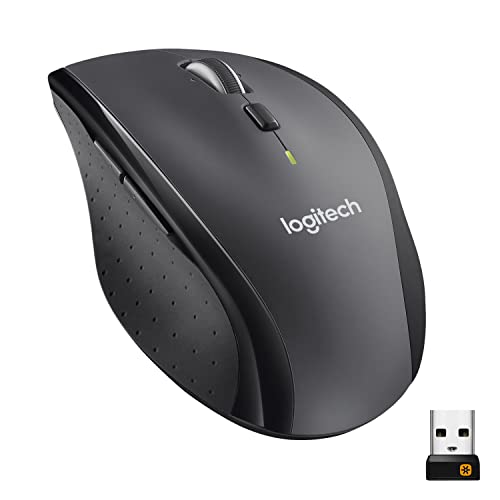
- Hyper-fast scrolling helps you move quickly through long projects.
- Five programmable buttons add extra control.
- Up to 3 years of battery life keeps upkeep low.
Best For: Users who want a dependable wireless mouse with quick scrolling and minimal battery changes.
Compact Ergonomic Trackball

- Thumb control saves desk space and reduces hand movement.
- Ergonomic design supports improved forearm posture.
- Bluetooth connectivity and long battery life simplify daily use.
Best For: Music producers who want a compact ergonomic trackball with low desk movement.
Vertical Desk Control
seenda Ergonomic Mouse with Volume Knob

- Built-in volume control for fast playback tweaks
- Vertical ergonomic shape reduces wrist strain
- Silent clicks and 3-device switching add convenience
Best For: Producers and streamers who want media control and comfort
Precision Ergonomics
Logitech MX Ergo S Trackball Mouse

- Thumb trackball reduces arm movement during editing
- 20-degree tilt supports better forearm posture
- Six programmable buttons boost workflow speed
Best For: Studio users who want precision with minimal movement
Quiet Everyday Workflow
Logitech Signature M650 L Mouse

- Silent clicks keep studio noise low
- Full-size shape suits larger hands
- SmartWheel and side buttons aid daily editing
Best For: Large-handed users who want a quiet, comfortable all-rounder
Premium Ergonomic Pick – Logitech MX Master 3S Wireless Mouse
If you want a mouse for music production that stays comfortable through long editing and mixing sessions, the Logitech MX Master 3S is built around control and quiet operation. Its 8K DPI sensor, quiet clicks, and MagSpeed scrolling make it a strong choice for navigating DAWs, timelines, plugin windows, and large arrangements without a lot of desk noise.
Best For: Producers who want a comfortable, quiet mouse for long studio sessions and multi-device workflows.
Pros:
- Quiet Clicks reduce button noise, which is helpful in recording spaces.
- 8K DPI tracking works on many surfaces, even glass.
- MagSpeed scrolling is fast, precise, and near silent for moving through projects.
- Supports up to 3 devices via Bluetooth, plus cross-computer file control with FLOW.
Cons:
- The Logi Bolt receiver is not included with this standard edition.
- Some advanced features require the Logi Options+ app.
Overall, this is the most productivity-focused option here and a very practical mouse for music production if you value comfort, silence, and fast navigation over gaming-style extras.
Feature-Rich Gaming Option – Razer Basilisk V3 Customizable Ergonomic Mouse
The Razer Basilisk V3 is a mouse for music production if you also want strong precision, lots of programmable controls, and a fast scroll wheel for moving around dense sessions. Its ergonomic shape, 11 programmable buttons, and 26K DPI sensor make it a flexible choice for users who like to map shortcuts and speed up repeated tasks.
Best For: Producers who want a highly customizable mouse with lots of buttons and a comfortable right-handed shape.
Pros:
- 11 programmable buttons can be assigned to macros and frequent commands.
- HyperScroll tilt wheel offers free-spin speed or tactile precision.
- 26K DPI optical sensor is designed for crisp, precise tracking.
- Ergonomic design with thumb rest supports longer sessions.
Cons:
- It is wired, so it is less flexible on a crowded desk than a wireless mouse.
- RGB lighting may be unnecessary if you prefer a simpler studio setup.
This is a strong pick for users who like to customize controls heavily and want a mouse that can handle both production workflow shortcuts and general PC use.
Classic Wireless Workhorse – Logitech MX Master 2S Bluetooth Wireless Mouse
The Logitech MX Master 2S is a practical mouse for music production when you want a familiar ergonomic shape and dependable wireless control. With hyper-fast scrolling, Bluetooth connectivity, and support for up to three computers, it works well for navigating sessions, switching between apps, and handling everyday studio tasks.
Best For: Producers who want a proven ergonomic wireless mouse for general studio productivity.
Pros:
- Ergonomic design supports comfortable use over long sessions.
- Hyper-fast scrolling helps move through tracks and menus quickly.
- Connects to up to 3 Mac or PC computers.
- Rechargeable wireless design keeps the desk cleaner than a wired mouse.
Cons:
- It uses Bluetooth only in this version, so there is no USB receiver listed in the supplied details.
- Older hardware than the MX Master 3S, with fewer modern refinements.
If you want a straightforward productivity mouse rather than a feature-heavy gaming model, the MX Master 2S still covers the essentials well for studio work.
Wired Precision Choice – Logitech G502 HERO Wired Gaming Mouse
The Logitech G502 HERO is a wired mouse for music production if you want precise tracking and a lot of programmable control. Its 25,600 DPI sensor, 11 buttons, and adjustable weights can make it useful for users who like to fine-tune how their mouse feels while moving around a DAW or editing interface.
Best For: Producers who want a wired, highly adjustable mouse with precise tracking and extra buttons.
Pros:
- HERO sensor delivers high-precision tracking up to 25,600 DPI.
- 11 programmable buttons can be customized for workflow shortcuts.
- Adjustable weights let you tune balance and feel.
- Dual-mode scroll wheel adds flexibility for fast or controlled scrolling.
Cons:
- It is corded, so cable management matters on a busy desk.
- Gaming styling and RGB lighting may be more than some studio users need.
For producers who value tactile control and custom button mapping, this model is a capable utility mouse with very strong tracking precision.
Ergonomic Trackball Pick – Logitech Ergo M575S Wireless Trackball Mouse
If you want a mouse for music production that keeps movement low during long editing sessions, the Logitech Ergo M575S is built around thumb control rather than full-hand swipes. That can make it easier to stay comfortable while adjusting timelines, clips, and mixer settings at a desk with limited space.
Best For: Producers who want a comfortable, space-saving trackball for long studio sessions.
Pros:
- Thumb-operated trackball helps reduce hand movement and save desk space.
- Ergonomic shape is certified for all-day comfort and improved forearm posture.
- Quiet clicks and customizable buttons can support focused workflow.
- Bluetooth or Logi Bolt receiver connection with up to 18 months of battery life.
Cons:
- Trackball control takes some adjustment if you are used to a standard mouse.
- Only two primary buttons are listed in the product details.
Overall, the M575S is a practical choice if your priority is comfort and reduced desk movement over a traditional pointer feel. It fits especially well in compact production setups where space and wrist posture matter.
Long-Life Scroll Mouse – Logitech M705 Marathon Wireless Mouse
The Logitech M705 Marathon is a straightforward mouse for music production if you want reliable navigation and fast scrolling through long projects. Its hyper-fast scroll wheel and programmable buttons can be useful when moving through dense timelines, file lists, or project folders.
Best For: Users who want a dependable wireless mouse with long battery life and quick scrolling.
Pros:
- Hyper-fast scrolling makes it easier to move through long documents and pages.
- Five programmable buttons add useful control options.
- Laser tracking is designed for smooth, precise cursor control on tricky surfaces.
- Up to 3 years of battery life reduces maintenance.
Cons:
- Its feature set is more utilitarian than ergonomic-focused.
- The 1000 DPI max sensitivity is modest compared with some precision-oriented mice.
For studio users who value efficiency and low upkeep, the M705 is an easy fit. It is less about specialized comfort and more about fast navigation, programmable control, and very long battery life.
Compact Ergonomic Trackball – Logitech Ergo M575S Black
Logitech Ergo M575S Wireless Ergonomic Trackball Mouse, Black/Blue (910-007026)
Check Price On AmazonFor a mouse for music production that emphasizes comfort and reduced movement, the black Logitech Ergo M575S offers the same thumb-control trackball design in a compact ergonomic package. It is a sensible pick for users who spend long hours editing and want to keep their hand anchored while navigating the screen.
Best For: Music producers who want a compact ergonomic trackball with low desk movement.
Pros:
- Thumb control helps save space and limit repetitive hand motion.
- Ergonomic shape is designed to improve forearm posture.
- Bluetooth support and long battery life make setup simple.
- Five buttons give more control options than a basic mouse.
Cons:
- Trackball operation may not suit users who prefer a traditional mouse feel.
- Battery is not included in the product details.
As a studio companion, the M575S Black focuses on comfort, desk efficiency, and straightforward wireless use. It is best if you want a trackball that reduces movement without adding complexity.
Vertical Desk Control – seenda Ergonomic Mouse with Volume Knob
If you want a mouse for music production that also helps with long editing sessions, the seenda MOU-302 adds a useful volume control button right on the body. Its vertical ergonomic shape keeps your wrist in a more natural position, while silent clicks and adjustable DPI make it practical for DAW work, browsing samples, or general studio use.
Best For: Producers, streamers, and multitaskers who want quick audio control plus a more wrist-friendly mouse.
Pros:
- Built-in volume button lets you pause, play, and adjust sound without switching windows.
- Vertical ergonomic design supports a neutral handshake grip for comfort during long sessions.
- Silent clicks help keep a shared workspace or late-night setup quiet.
- Connects to up to 3 devices via Bluetooth or 2.4G USB.
Cons:
- Right-hand only design won’t suit left-handed users.
- 2400 DPI max is more about steady control than ultra-high speed.
- The vertical shape may take some getting used to if you prefer a standard mouse.
Overall, this is a strong pick if you value comfort and quick media control more than raw performance features. For music production, the volume knob is the standout touch, especially in a busy workflow.
Precision Ergonomics – Logitech MX Ergo S Trackball Mouse
The Logitech MX Ergo S is a mouse for music production users who want precise control with less hand movement. Its thumb-operated trackball, 20-degree tilt, and customizable buttons make it well suited to detailed DAW tasks, especially when you spend hours arranging, editing, or mixing on a desk.
Best For: Studio users who prefer a trackball and want an ergonomic, low-movement workflow.
Pros:
- Thumb trackball gives control with less arm movement than a standard mouse.
- 20-degree tilt improves forearm posture and is designed to reduce strain.
- Six programmable buttons can speed up common actions in software.
- Quiet clicks and USB-C charging make it practical for daily studio use.
Cons:
- Trackball control has a learning curve if you are used to regular mice.
- Best suited to medium- and large-sized hands.
- USB-C cable is not included for charging.
This is a smart choice if your priority is accuracy, comfort, and keeping movement to a minimum. For music production, the trackball format can be especially useful when you want stable pointer control across long sessions.
Quiet Everyday Workflow – Logitech Signature M650 L Mouse
The Logitech Signature M650 L is a straightforward mouse for music production if you want comfort, quiet clicks, and a familiar shape for long computer sessions. It does not add specialty controls, but its silent buttons, large-hand fit, and customizable side buttons make it a solid all-rounder for editing, browsing plugins, and everyday studio work.
Best For: Larger hands and users who want a comfortable, quiet mouse for general studio tasks.
Pros:
- SilentTouch technology reduces click noise, which is useful in quiet studios.
- Full-size shape with soft thumb area and rubber grips improves comfort.
- SmartWheel offers both precise line scrolling and faster page scrolling.
- Long 24-month battery life means less downtime.
Cons:
- No dedicated media or volume controls for DAW playback.
- Best fit is specifically for large hands.
- Only 3 buttons, so it is less customizable than more advanced productivity mice.
If you want a dependable mouse that stays out of the way and keeps noise down, this is an easy recommendation. It is less specialized than the other two, but it covers the basics very well for music production and everyday use.
How We Picked the Best Mouse for Music Production
We looked for models that support real studio work: accurate tracking, comfortable ergonomics, dependable wireless performance, and controls that help with DAW navigation. For a Mouse for Music Production, the best picks are usually not the flashiest gaming models, but the ones that reduce strain and keep you moving efficiently.
Quick Comparison
In simple terms, traditional mice are best if you want familiar pointing and fast drag-and-drop control. Trackballs help keep your hand still and can be excellent for tight desks or repetitive editing. Vertical mice are worth considering if you want a more neutral wrist position during long mixing sessions. Silent-click options can also be a real advantage in quiet studio spaces.
Key Buying Factors for Mouse for Music Production
Comfort Over Long Sessions
Music production often means hours of arranging, mixing, and automation editing. A shape that fits your hand matters more than extreme sensor specs. Look for a palm-friendly body, good thumb support, or a trackball if you want less arm movement.
Buttons and Workflow Shortcuts
Extra buttons can speed up common actions like undo, zoom, switching tools, or scrolling through tracks. Programmable buttons are especially useful if your DAW supports custom commands or macros.
Scroll Behavior and Precision
Fast or free-spinning scrolling is helpful for moving through long sessions, while precise step scrolling is better for detailed edits. If you work with automation lanes or sample libraries, scroll quality can be just as important as pointer speed.
Noise, Connectivity, and Battery Life
Quiet clicks matter in shared or recording spaces. Reliable Bluetooth or USB receiver connectivity helps avoid dropouts, and long battery life reduces interruptions. USB-C charging is a nice bonus if you want a simpler setup.
Who Should Buy Which Mouse for Music Production?
If you want the most balanced all-around choice, look for a comfortable ergonomic mouse with a few programmable buttons and smooth scrolling. If your priority is wrist relief, a vertical mouse or trackball may be the smarter pick. If you prefer a familiar feel for both studio and general use, a full-size wireless mouse with silent clicks is a safe, practical option.
For most buyers, the best Mouse for Music Production is the one that keeps your hand relaxed, your edits accurate, and your workflow consistent from session to session.