
The best MIDI interfaces for recording make it easier to connect keyboards, controllers, microphones, instruments, and studio monitors without adding unnecessary complexity. The right model depends on your input needs, computer or mobile setup, latency expectations, and plans for expanding your studio.
We compare 10 USB audio/MIDI interfaces across compact, affordable, and higher-channel-count options so you can choose a reliable centerpiece for recording, production, and live performance.
Best 10 Midi Interfaces for Recording Picks for 2026
Best All-Around Pick

- 5-pin MIDI input and output
- Two combo inputs with phantom power
- Includes software and five-year warranty
Best For: Beginners and compact home studios needing audio and MIDI
Best Budget Plug-and-Play Option

- USB-C bus-powered operation
- Two combo inputs with 48V phantom power
- Direct monitoring and loopback
Best For: Portable two-input recording on laptops and mobile setups
Best for Expanded I/O

- 4-in/4-out USB-C connectivity
- MIDI I/O and two microphone preamps
- LCD metering, loopback, and low-latency monitoring
Best For: Home studios and podcasts needing flexible routing
Best for DSP Monitoring

- MIDI I/O with two combo inputs
- DSP-powered latency-free effects
- Rugged metal housing and 32-bit/192kHz support
Best For: Performers tracking vocals, guitar, and MIDI instruments
Flexible Studio Hub
Focusrite Scarlett 4i4 4th Gen

- MIDI I/O with broad analog connectivity
- Two mic preamps and two Hi-Z inputs
- Auto Gain, Clip Safe, and Air modes
Best For: Expanding home studios with multiple instruments
Vintage-Toned MIDI Pick
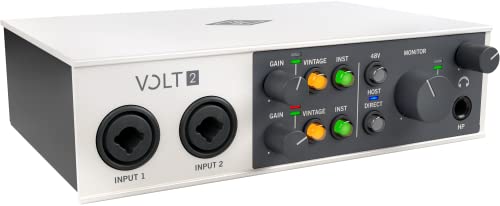
- 2x2 USB-C interface with MIDI
- 610 tube preamp emulation in Vintage mode
- Up to 24-bit/192kHz recording
Best For: Portable two-channel recording with vintage-style tone
Simple Artist Setup
Focusrite Scarlett 2i2 4th Gen

- Two mic preamps and two Hi-Z inputs
- 120dB dynamic range and 192kHz support
- Auto Gain, Clip Safe, and Air modes
Best For: Solo vocal and guitar recording
Compact Creator Pick
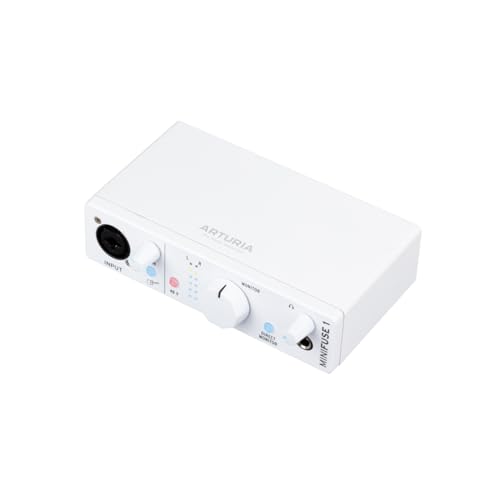
- 5-pin MIDI input and output
- 192 kHz recording and loopback
- 5-year warranty and bundled software
Best For: Solo musicians and compact home studios
Complete Starter Studio

- Two-channel recording with two Hi-Z inputs
- Includes microphone and headphones
- Auto Gain, Clip Safe, and Air mode
Best For: Beginners needing a ready-to-record studio bundle
Expandable Production Hub

- 18 inputs, 16 outputs, and MIDI I/O
- Four mic preamps plus ADAT and S/PDIF
- 122dB dynamic range and 192 kHz support
Best For: Producers and expanding multitrack studios
Best All-Around Pick – Arturia MiniFuse 2
For musicians who want flexible midi interfaces for recording, the Arturia MiniFuse 2 combines 5-pin MIDI I/O with two combo inputs, balanced outputs, and a straightforward USB workflow. Its compact design and included software make it a practical home-studio starting point.
Best For: Beginners, guitarists, vocalists, and producers needing MIDI plus audio recording in a compact interface.
Pros:
- Includes 5-pin MIDI input and output for synths, controllers, and drum machines.
- Two combo mic/instrument/line inputs with 48V phantom power.
- Loopback, USB hub, extensive software bundle, and a five-year warranty.
Cons:
- Only two analog outputs, which may limit larger monitoring setups.
- USB connectivity and the included hub may require adapters depending on the computer.
The MiniFuse 2 is a well-rounded choice when MIDI connectivity, beginner-friendly features, and long-term value matter more than a high input count.
Best Budget Plug-and-Play Option – PIYONE Q2 Alloy Red
The PIYONE Q2 is a simple 2×2 option for creators comparing midi interfaces for recording alongside basic audio capture. USB-C bus power, class-compliant operation, and direct monitoring make it convenient for laptop and mobile-oriented setups.
Best For: Solo musicians and mobile creators who need two audio inputs, phantom power, and portable USB-C operation.
Pros:
- USB-C plug-and-play design requires no drivers on Mac and PC.
- Two combo inputs support microphones and Hi-Z guitar sources.
- 24-bit/192kHz recording, direct monitoring, loopback, and a 3.5mm headphone jack.
Cons:
- The supplied notes do not identify dedicated MIDI input or output connections.
- Two-channel I/O is less suitable for expanded recording setups.
This interface is appealing for straightforward, portable audio recording, but buyers specifically needing hardware MIDI should verify the connection set before choosing it.
Best for Expanded I/O – MOTU M4
The MOTU M4 is suited to producers and podcasters who need more room than a basic 2×2 box. Its 4-in/4-out USB-C design, MIDI I/O, LCD metering, loopback, and low-latency monitoring make it a strong candidate among midi interfaces for recording.
Best For: Home studios, podcasting, and recording setups that need four inputs and four outputs with MIDI connectivity.
Pros:
- Provides 4-in/4-out USB-C connectivity and MIDI I/O.
- Includes two microphone preamps and hardware monitoring.
- LCD screen, loopback, iOS compatibility, and bundled production software.
Cons:
- The supplied notes do not specify the type or number of MIDI connectors.
- Its larger I/O set may be unnecessary for simple one-source recording.
Choose the M4 when routing flexibility and visual monitoring are priorities. It offers more expansion potential than a typical compact 2×2 interface while retaining USB-C connectivity.
Best for DSP Monitoring – Yamaha URX22C
The Yamaha URX22C combines 2×2 audio with MIDI I/O, 32-bit/192kHz support, and DSP-powered monitoring. For shoppers evaluating midi interfaces for recording, its latency-free effects and rugged metal housing add useful advantages for tracking vocals, instruments, and guitar.
Best For: Musicians who want hardware MIDI, Class-A preamps, and monitor effects while recording on Windows, macOS, or iOS.
Pros:
- Includes MIDI I/O, two XLR/TRS combo inputs, and a Hi-Z input.
- Class-A D-PRE preamps support +48V phantom power.
- DSP monitoring includes REV-X reverb, channel strip, and guitar amp effects.
Cons:
- Provides two analog inputs and two main outputs, limiting larger sessions.
- The listed warranty is one year and has authorized-retailer and U.S.-use conditions.
The URX22C is a focused 2×2 interface for performers who value durable construction and real-time monitoring effects. Its included Cubase and Steinberg software further support a ready-to-record setup.
Flexible Studio Hub – Focusrite Scarlett 4i4 4th Gen
If you need MIDI interfaces for recording alongside several instruments, the Focusrite Scarlett 4i4 4th Gen offers a versatile setup. It combines MIDI I/O with two mic preamps, two Hi-Z inputs, four line inputs, and four line outputs, making it well suited to a growing home studio.
Best For: Producers recording microphones, guitars, synths, and drum machines who need expanded I/O.
Pros:
- MIDI I/O plus four line inputs and four line outputs
- Two Hi-Z inputs and two Scarlett 4th Gen mic preamps
- 120dB dynamic range with up to 24-bit/192kHz operation
- Auto Gain, Clip Safe, and Air modes support easier recording
Cons:
- Its larger I/O set may be more than a basic two-input setup requires
- USB-C power supply and included cables add setup considerations
The 4i4 is the most expandable choice in this group. Its MIDI connectivity and broader analog I/O make it a practical centerpiece for hardware-based recording, while the included software bundle helps complete a new setup.
Vintage-Toned MIDI Pick – Universal Audio Volt 2
For musicians seeking MIDI interfaces for recording with a characterful preamp sound, the Universal Audio Volt 2 is a compact 2×2 USB-C option. Its Vintage mode is designed to evoke UA’s classic 610 tube preamp tone, while 24-bit/192kHz recording supports detailed captures.
Best For: Musicians, podcasters, and streamers who want MIDI connectivity and Vintage-mode preamp coloration in a portable interface.
Pros:
- Includes MIDI and a 2×2 USB-C interface layout
- Vintage mode provides 610 tube preamp emulation
- Supports up to 24-bit/192kHz recording
- Works with macOS, Windows, iPad, and iPhone with the required accessories
Cons:
- Mobile iPhone/iPad use may require an external power supply and adapter
- Offers fewer channels than the Scarlett 4i4
- Warranty is listed as one year
The Volt 2 is a straightforward fit when two channels are enough and a vintage-inspired input sound is appealing. Its MIDI support adds useful hardware integration without making the interface especially large.
Simple Artist Setup – Focusrite Scarlett 2i2 4th Gen
The Focusrite Scarlett 2i2 4th Gen is a compact option for anyone comparing MIDI interfaces for recording but primarily needs a simple two-input setup. It provides two mic preamps, two Hi-Z instrument inputs, and up to 24-bit/192kHz operation for vocals, guitars, and other direct sources.
Best For: Solo artists and small home studios recording vocals, guitar, or another instrument two channels at a time.
Pros:
- Two mic preamps and two Hi-Z instrument inputs
- 120dB dynamic range with up to 24-bit/192kHz recording
- Auto Gain and Clip Safe help manage recording levels
- Includes Air modes and a substantial software bundle
Cons:
- Two-channel I/O is less suitable for larger hardware setups
- The supplied notes do not list MIDI I/O for this model
The 2i2 keeps the recording workflow focused and portable. It is a strong choice for direct guitar and vocal recording, but buyers specifically needing hardware MIDI should verify that requirement before choosing it over the Scarlett 4i4 or Volt 2.
Compact Creator Pick – Arturia MiniFuse 1
For musicians seeking midi interfaces for recording without a bulky setup, the Arturia MiniFuse 1 offers a compact, plug-and-play option. It combines a microphone/instrument input, MIDI connectivity, loopback, balanced outputs, and a 5-year warranty in a lightweight desktop design.
Best For: Solo musicians, vocalists, guitarists, and home-studio creators who need MIDI connectivity in a compact interface.
Pros:
- Includes 5-pin MIDI input and output for synths, controllers, and drum machines.
- Supports recording at up to 192 kHz with 48V phantom power.
- Loopback makes it useful for voiceovers and capturing in-app or in-game audio.
- Includes Ableton Live Lite, Analog Lab Intro, Arturia FX, and other creative software.
Cons:
- Its single-channel design is less suitable for recording multiple microphones or instruments at once.
- The included USB hub is limited to 250mA.
The MiniFuse 1 is a strong choice when portability, straightforward operation, and direct MIDI integration matter more than having several simultaneous audio inputs.
Complete Starter Studio – Scarlett 2i2 Studio 4th Gen
The Focusrite Scarlett 2i2 Studio 4th Gen is a practical starting point for midi interfaces for recording when you also need a microphone and headphones. Its two-channel interface includes a CM25 MkIII condenser mic, SH-450 headphones, Auto Gain, Clip Safe, and software for recording and production.
Best For: Beginners and singer-songwriters building a complete recording setup for vocals, guitars, and other instruments.
Pros:
- Includes two mic preamps, two Hi-Z inputs, a condenser microphone, and headphones.
- Offers 120dB dynamic range and recording up to 24-bit/192kHz.
- Auto Gain helps set levels, while Clip Safe helps prevent clipping.
- Air mode adds presence and harmonic drive to vocals and guitars.
Cons:
- The supplied notes do not list dedicated MIDI input or output connections.
- It is less expandable than a larger multichannel interface.
This bundle is best viewed as an all-in-one recording launchpad: it provides the core gear for two-channel recording, though dedicated hardware MIDI users may prefer an interface with specified MIDI I/O.
Expandable Production Hub – Scarlett 18i16 4th Gen
For producers comparing midi interfaces for recording across a larger setup, the Focusrite Scarlett 18i16 4th Gen provides substantial expansion. It combines four mic preamps, two Hi-Z inputs, eight line inputs, ADAT, S/PDIF, and MIDI I/O with 18 inputs and 16 outputs.
Best For: Producers, bands, and expanding studios that need multiple simultaneous connections and digital expansion options.
Pros:
- Provides 18 inputs and 16 outputs, including dedicated MIDI I/O.
- Includes four mic preamps, two Hi-Z inputs, eight line inputs, ADAT, and S/PDIF.
- Uses 24-bit/192kHz converters with a stated 122dB dynamic range.
- Auto Gain, Clip Safe, and Air modes support faster, controlled recording.
Cons:
- Its larger feature set may be more than a solo creator needs.
- Requires an external power supply.
The Scarlett 18i16 is the most flexible option in this group for a growing studio, especially if you need hardware MIDI alongside multiple microphones, line-level instruments, and expansion systems.
How We Picked the Best Midi Interfaces for Recording
We focused on interfaces that combine dependable MIDI connectivity with useful audio-recording features. The lineup includes compact 1-in/2-out and 2-in/2-out models, flexible 4-input interfaces, and larger options for multi-microphone or hardware-heavy studios. We also considered USB-C compatibility, recording resolution, monitoring features, bundled software, portability, and the practical needs of home producers.
Specifications can vary by operating system and connection type, so confirm current driver, iOS, and computer compatibility before buying. MIDI ports, audio inputs, and bundled software should match the equipment you already own rather than only the features you may use someday.
Quick Comparison
| Studio need | Best interface type | What to prioritize |
|---|---|---|
| Small desktop or mobile setup | Compact 1-in/2-out model | Low power demands, simple monitoring, portability |
| Keyboard and microphone recording | 2-in/2-out interface | Combo inputs, MIDI I/O, headphone control |
| Several synths or performers | 4-in or larger interface | More inputs, outputs, and independent monitoring |
| Expanding home studio | 8-input interface | Expandability, routing, and reliable driver support |
Key Buying Factors for Midi Interfaces for Recording
MIDI Connectivity
Check whether the interface provides standard 5-pin MIDI input and output or only USB MIDI through a computer. Traditional MIDI ports are useful for keyboards, drum machines, and older hardware, while USB MIDI may be sufficient for a controller-based setup.
Audio Inputs and Outputs
Count the sources you plan to record at the same time. Two combo inputs suit vocals, guitar, stereo keyboards, or basic overdubbing. Four or more inputs are better for recording a drum machine alongside vocals, multiple microphones, or several hardware instruments.
Recording Quality and Latency
Higher sample-rate support is helpful for demanding production, but stable drivers and responsive direct monitoring matter more in everyday use. Look for headphone monitoring, balanced outputs, and a mixer or control app that makes input-to-output routing straightforward.
Compatibility and Expandability
USB-C does not automatically mean every device uses the same power or protocol. Verify compatibility with your Mac, PC, iPad, or other mobile device, including adapters and external power requirements. If your setup is likely to grow, prioritize additional inputs, outputs, and digital expansion options.
Who Should Buy Which Midi Interfaces for Recording?
Choose a compact interface if you mainly record one or two sources, travel, or want a clean desktop setup. Choose a 2-in/2-out model for general-purpose vocal, guitar, keyboard, and MIDI production. Choose a 4-input interface if you use multiple synthesizers, stereo instruments, or occasional collaborative recording. Choose an 8-input model if you need to record a band, several microphones, or a growing collection of external hardware.
For most buyers, the best choice is the smallest interface that handles today’s workflow while leaving enough room for the next stage of your setup.