
Small bands need MIDI gear that keeps keyboards, drum machines, controllers, and recording software working together without adding unnecessary complexity. The right interface can make rehearsals faster, simplify a compact studio, and provide dependable connections on stage.
This roundup compares 10 practical options, including dedicated MIDI interfaces, USB-to-MIDI cables, wireless adapters, and audio interfaces with MIDI support. Use the guide below to match connection types, I/O, portability, and expansion needs to your setup.
Best 10 Midi Interfaces for Small Bands Picks for 2026
Best Routing Hub

- 3-in/3-out MIDI hardware routing
- Merge, split, filter, and map functions
- Works with computers and mobile devices
Best For: Multi-instrument MIDI rigs needing flexible routing
Best Recording Interface
Focusrite Scarlett 2i2 4th Gen

- Two mic and Hi-Z instrument inputs
- 24-bit/192kHz recording with 120dB range
- Includes recording software and plugins
Best For: Small-band audio recording and production
Best Simple MIDI Connection

- One MIDI input and one MIDI output
- Driver-free operation across major OS platforms
- Built-in filtering, routing, and mapping tools
Best For: Connecting one MIDI instrument to a computer
Best Budget Audio Option
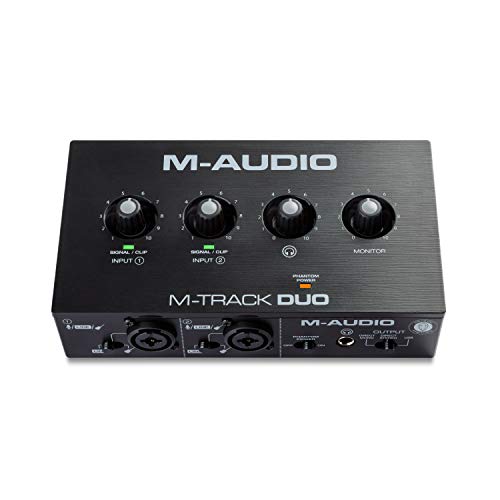
- Two combo mic, line, and instrument inputs
- Zero-latency USB/direct monitoring
- Includes MPC Beats production software
Best For: Affordable two-input band recording and streaming
Most Versatile

- Standalone USB Host supports up to eight USB MIDI ports
- Advanced routing with split, merge, mapping, and filtering
- Compact, preset-based design with USB or 9V power
Best For: Small-band rigs with multiple MIDI instruments and pedals
Best Simple Wired Pick

- One MIDI input and one MIDI output
- Plug-and-play connection for supported computers and iPad
- LEDs indicate power and MIDI data activity
Best For: Single-instrument recording and editing setups
Best Wireless Setup
K1 Wireless MIDI USB Interface

- Wireless 5-pin DIN MIDI connection for computers and mobile devices
- Advertised 3ms latency and up to 32 feet of range
- Supports paired two-device wireless MIDI operation
Best For: Cable-conscious rehearsals and live MIDI setups
Versatile Recording Hub

- 2-in/2-out audio plus MIDI I/O
- Two combo inputs with phantom power
- DSP monitoring and cross-platform support
Best For: Small bands needing MIDI and two-channel audio recording
USB-C MIDI Link
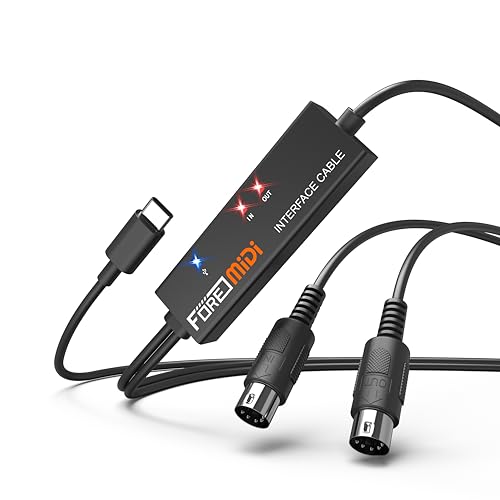
- One MIDI input and one MIDI output
- Plug-and-play USB-C connection
- Works with computers and mobile devices
Best For: USB-C users connecting one traditional MIDI device
Legacy Computer Connection

- One MIDI input and one MIDI output
- USB-A plug-and-play connection
- LED status indicators and broad software support
Best For: USB-A computer setups with one MIDI device
Best Routing Hub – CME U6MIDI Pro
For small bands comparing MIDI interfaces for small bands, the CME U6MIDI Pro stands out when you need multiple hardware connections and flexible routing. Its 3-in/3-out design supports MIDI merging, splitting, filtering, and mapping, while USB-C connectivity works across major desktop and mobile operating systems.
Best For: Small bands using several keyboards, drum machines, digital pianos, or synthesizers that need advanced MIDI routing.
Pros:
- Three MIDI inputs and three MIDI outputs provide useful expansion for multi-instrument setups.
- Standalone router supports merge, split, thru, filtering, and mapping.
- Supports all MIDI channels and messages, including clock, SysEx, MTC, and MPE.
- Plug-and-play compatibility with macOS, iOS, Windows, Android, Linux, and Chrome OS.
Cons:
- Designed for MIDI only, so it does not provide microphone, instrument, or audio outputs.
- Advanced configuration requires the UxMIDI Tools software.
The U6MIDI Pro is a strong choice when a small band’s setup is becoming MIDI-heavy. Its routing flexibility and standalone operation offer more control than a basic one-cable interface.
Best Recording Interface – Focusrite Scarlett 2i2 4th Gen
Although it is an audio interface rather than a dedicated MIDI unit, the Scarlett 2i2 4th Gen can suit small bands looking beyond MIDI interfaces for small bands and needing to record microphones or instruments. It offers two inputs, high-resolution recording, automatic level tools, and a substantial included software bundle.
Best For: Small bands recording vocals, guitars, and other audio sources while using a computer-based setup.
Pros:
- Two mic preamps and two Hi-Z instrument inputs support vocals and guitar recording.
- 24-bit/192kHz recording and a 120dB dynamic range provide detailed audio capture.
- Auto Gain and Clip Safe help manage recording levels.
- Includes Ableton Live Lite, Cubase LE, Pro Tools Intro+, and Hitmaker Expansion.
Cons:
- It is not a dedicated MIDI interface and does not list MIDI input or output.
- Its two-channel design may be limiting for recording a full band simultaneously.
The Scarlett 2i2 is better viewed as a compact recording hub than a MIDI solution. Choose it when audio capture is the priority, and pair it with a separate MIDI interface if your band uses multiple MIDI instruments.
Best Simple MIDI Connection – CME U2MIDI Pro
For bands that need a straightforward computer connection, the CME U2MIDI Pro is a compact option among MIDI interfaces for small bands. This USB-to-MIDI cable provides one MIDI input and one MIDI output, with no-driver plug-and-play operation and software tools for filtering, routing, and mapping.
Best For: Small bands connecting one MIDI instrument to a computer, tablet, or mobile device.
Pros:
- Simple 1-in/1-out design keeps a basic MIDI setup easy to connect.
- Supports macOS, iOS, Windows, Android, Linux, and Chrome OS without drivers.
- Handles all 16 MIDI channels and messages including clock, SysEx, MTC, and MPE.
- Integrated 6.5-foot cable and LED indicators help reduce clutter and show activity.
Cons:
- One input and one output do not accommodate larger multi-device MIDI rigs.
- The USB connector is USB-A, which may require an adapter for some newer devices.
The U2MIDI Pro makes sense when the band needs one reliable MIDI link rather than a multi-port hub. Its routing and filtering features add useful control without adding a separate interface box.
Best Budget Audio Option – M-AUDIO M-Track Duo
The M-AUDIO M-Track Duo is an audio interface for small bands that need to record, stream, or monitor microphones and instruments. While it is not a dedicated MIDI interface, its two combo inputs, phantom power, direct monitoring, and included MPC Beats software make it a practical entry-level recording option.
Best For: Small bands needing an affordable two-input interface for vocals, guitar, keyboards, streaming, or podcasting.
Pros:
- Two combo XLR/line/instrument inputs support microphones, guitars, keyboards, and line sources.
- Phantom power accommodates condenser microphones.
- USB/Direct switching enables zero-latency monitoring.
- Includes MPC Beats and supports macOS, Windows, iOS, and Android.
Cons:
- It does not provide dedicated MIDI input or output.
- Maximum recording resolution is 48kHz, below the Scarlett 2i2’s stated 192kHz capability.
- Two inputs may not be enough for recording several band members at once.
The M-Track Duo is a sensible budget pick when your immediate need is audio recording rather than MIDI control. For a keyboard-centered rig with multiple MIDI devices, choose a dedicated MIDI interface instead.
Most Versatile – CME H4MIDI WC
For small bands that need to connect several controllers, keyboards, pedals, or synths, the CME H4MIDI WC is a flexible choice among MIDI interfaces for small bands. It can operate without a computer, route MIDI through configurable presets, and connect to USB MIDI gear through a hub.
Best For: Guitarists, producers, and compact live or studio rigs needing advanced MIDI routing and multiple connection options.
Pros:
- Standalone USB Host mode supports up to eight USB MIDI device ports with a standard hub.
- Offers MIDI thru, split, merge, mapper, and filter functions through HxMIDI Tools.
- Supports USB-C computer connectivity, 5-pin DIN MIDI, and optional WIDI Bluetooth expansion.
- Compact design, four onboard presets, and USB or 9V DC standalone power suit mobile setups.
Cons:
- Advanced routing features require configuration through HxMIDI Tools.
- Optional WIDI Bluetooth functionality requires the separate WIDI Core module.
The H4MIDI WC is more capable than a basic computer-to-keyboard adapter, making it a strong fit when a small band’s setup includes several MIDI devices or changing performance configurations.
Best Simple Wired Pick – LEKATO USB-C MIDI Cable
The LEKATO USB-C MIDI Cable is a straightforward option for small bands that mainly need to connect one MIDI keyboard, synthesizer, drum pad, or similar device to a computer or iPad. Its plug-and-play design keeps setup simple for recording and editing.
Best For: Musicians who need a basic one-in/one-out wired connection for a computer-based MIDI setup.
Pros:
- Provides one MIDI input and one MIDI output with support for up to 16 channels.
- Plug-and-play operation requires no special driver installation on supported systems.
- LED indicators show power and MIDI signal activity for easier troubleshooting.
- Six-and-a-half-foot cable length offers useful reach around a small studio setup.
Cons:
- It provides only one MIDI input and one MIDI output, limiting larger multi-device rigs.
- Compatibility may require checking for older instruments or models with proprietary requirements.
This cable is best viewed as a practical connection tool rather than a routing hub. It makes sense when a small band’s MIDI needs are limited to linking one instrument with a Mac, Windows PC, or iPad.
Best Wireless Setup – K1 Wireless MIDI USB Interface
The K1 Wireless MIDI USB Interface helps small bands reduce cable clutter between compatible MIDI instruments and mobile devices or computers. Its paired transmitter-and-receiver approach supports wireless 5-pin DIN connections while also offering a USB-based computer mode.
Best For: Performers and rehearsal spaces seeking a cleaner wireless MIDI connection for keyboards, synths, electronic drums, or foot controllers.
Pros:
- Supports wireless connections with iOS, Android, macOS, and Windows systems.
- Can connect two MIDI devices wirelessly when using a two-pack of MIDI A units.
- Advertises ultra-low 3ms latency and transmission up to 32 feet or 10 meters.
- Driver-free plug, pair, and play operation simplifies setup on supported devices.
Cons:
- Direct connection to an iOS device’s Bluetooth menu is not supported; a compatible app workflow is required.
- Wireless operation depends on the paired units, correct MIDI IN/OUT placement, and available power.
- It is designed for 5-pin DIN MIDI devices rather than general-purpose audio connections.
The K1 is a useful cable-reduction option when the band’s instruments have standard 5-pin DIN MIDI ports. Its app-dependent iOS setup is worth considering before choosing it for a performance workflow.
Versatile Recording Hub – Yamaha URX22C
For small bands looking beyond basic MIDI connections, the Yamaha URX22C combines MIDI I/O with two analog inputs and outputs. Its combo inputs, phantom power, DSP monitoring, and USB-C connectivity make it a practical choice for recording vocals, instruments, and MIDI parts in a compact setup.
Best For: Small bands that need MIDI plus two-channel audio recording and low-latency monitoring.
Pros:
- Provides 2-in/2-out audio alongside MIDI I/O.
- Two XLR/TRS combo inputs include Class-A D-PRE preamps and +48V phantom power.
- DSP-powered monitoring includes REV-X reverb, Channel Strip, and Guitar Amp Classics.
- Supports Windows, macOS, and iOS with USB connectivity and included software.
Cons:
- Only two analog input channels are available.
- Its broader recording features may be more than needed for MIDI-only setups.
- iOS use may require a compatible connection and setup.
The URX22C is the most complete option here for a small band that wants one device for MIDI and basic audio capture. Its rugged metal housing and DSP features add useful flexibility for rehearsals, demos, and home recording.
USB-C MIDI Link – FORE T1 MIDI Interface
The FORE T1 is a straightforward cable-style option for small bands that need to connect a 5-pin MIDI keyboard, synthesizer, drum machine, or other device to a USB-C computer or mobile device. Its plug-and-play design keeps setup simple for recording and editing MIDI tracks.
Best For: USB-C users connecting one traditional MIDI device to a computer, phone, or tablet.
Pros:
- Offers one MIDI input and one MIDI output with 16 MIDI channels.
- USB-C connection works with iOS, Android, Windows, and macOS devices.
- Built-in driver and LED indicators support simple plug-and-play setup.
- Bus-powered 6.5-foot cable requires no separate power supply.
Cons:
- It handles MIDI data only, not audio signals.
- An included USB A-to-C adapter is not provided.
- Its single MIDI input/output pair may limit larger multi-device rigs.
The T1 is a convenient MIDI-only solution when the band’s computer or mobile device has USB-C. It is especially useful for basic keyboard or synthesizer connections, but it cannot replace an audio interface for recording microphones or instruments.
Legacy Computer Connection – FORE USB-A MIDI Interface
For small bands using a computer with a standard USB-A port, this FORE interface provides a simple connection between one 5-pin MIDI device and recording software. It is designed for keyboards, synthesizers, electronic drums, and similar equipment, with plug-and-play operation and an integrated cable.
Best For: Computer-based MIDI setups using USB-A ports and one traditional MIDI device.
Pros:
- Provides one MIDI input and one MIDI output with 16 MIDI channels.
- Plug-and-play operation avoids a separate driver installation.
- LED indicators show power and signal transfer.
- Compatible with Windows, macOS, iOS, Android, and software including GarageBand, Cubase, and FL Studio.
Cons:
- It transfers MIDI data but does not provide audio inputs or outputs.
- A USB A-to-C adapter is not included for newer USB-C devices.
- One MIDI input/output pair may not suit multiple-hardware setups.
This USB-A version is a practical budget-style link for connecting a single MIDI instrument to a compatible computer. Choose it when your setup has USB-A; users with USB-C-only devices should consider the Type-C version or an adapter.
How We Picked the Best Midi Interfaces for Small Bands
We focused on the connection and workflow problems that small groups encounter most often: linking multiple keyboards and hardware instruments, recording MIDI into a computer, controlling software instruments, and keeping a portable rig easy to troubleshoot. The selection includes traditional multi-port interfaces, simple one-device USB MIDI cables, wireless options, USB host hardware, and audio interfaces that combine MIDI with microphone and instrument inputs.
We also considered compatibility, connector types, portability, likely setup effort, and whether each product suits rehearsal, live use, home recording, or a combination of those jobs. Because a compact cable interface can be the right choice for one band while a multi-port hub is essential for another, the list covers several price and capability levels.
Quick Comparison
| Best For | Recommended Type | What to Look For |
|---|---|---|
| One keyboard or synth | USB-to-MIDI cable | Reliable drivers, clear In/Out labeling, and the correct USB connector |
| Several hardware instruments | Multi-port MIDI interface | Multiple independent MIDI inputs and outputs |
| Computer-free MIDI routing | USB MIDI host/interface | Host capability, power options, and standalone operation |
| Recording vocals and instruments | Audio/MIDI interface | Mic preamps, phantom power, monitoring, and MIDI I/O |
| Minimal cable clutter | Wireless MIDI adapter | Stable range, latency, pairing, and device compatibility |
Key Buying Factors for Midi Interfaces for Small Bands
MIDI I/O and Routing
Count the hardware devices you need to connect now, then allow room for one future addition. A single In/Out connection is adequate for one keyboard or controller, while multiple ports are better for rigs with synths, drum machines, effects processors, and external sequencers. Independent ports are generally more useful than relying on MIDI Thru chains.
USB, Host, and Connector Compatibility
Check whether your computer or tablet uses USB-A, USB-C, or another connection, and confirm that the interface includes the required cable or adapter. A standard computer MIDI interface expects a host device. A USB MIDI host interface is different: it can connect USB MIDI equipment to conventional five-pin MIDI hardware without a computer.
Audio Features and Monitoring
If the band also records microphones, guitars, or line-level instruments, an audio interface with MIDI can reduce the amount of equipment to carry. Compare input count, combo-jack flexibility, headphone monitoring, phantom power, latency, and bundled software rather than choosing on MIDI connectivity alone.
Reliability and Portability
For rehearsals and gigs, prioritize solid connectors, straightforward status indicators, bus power where practical, and a design that does not require repeated reconfiguration. Wireless adapters can reduce cable runs, but wired connections are usually easier to diagnose and may be preferable for critical timing.
Who Should Buy Which Midi Interfaces for Small Bands?
Choose a compact USB-to-MIDI cable if one performer needs to connect a keyboard or synth to a computer. Select a multi-port interface if the band sequences several external instruments or needs flexible routing between devices. A host interface is the better fit when USB MIDI gear must communicate with five-pin hardware without a laptop.
Buy an audio/MIDI interface if recording microphones and instruments is as important as controlling MIDI equipment. A wireless model suits performers who value mobility and have compatible devices, provided the setup’s range and latency are acceptable. For most small bands, the best choice is the simplest interface that provides enough ports, connectors, and expansion capacity for the next stage of the rig.