
The right power supply protects every component in your PC while delivering stable, efficient power for gaming, content creation, and demanding upgrades. With modern ATX 3.1 and PCIe 5.1 models now available below $200, you can find capable options without overspending.
This roundup compares 10 computer power supplies under $200 across several useful wattage levels, modular designs, efficiency ratings, and GPU compatibility features. Use the guide below to narrow the choices based on your system and future upgrade plans.
Best 10 Computer Power Supplies Under 200 Picks for 2026
Best Overall Upgrade

- 750W, 80 PLUS Gold certified
- Fully modular with ATX 3.1 and PCIe 5.1 support
- Includes native 12V-2x6 cable and 10-year warranty
Best For: Modern 750W gaming builds
Best Quiet 850W Option

- 850W fully modular power supply
- ATX 3.1 and PCIe 5.1 ready
- 120mm fan with low-noise fan curve
Best For: Quiet, higher-capacity gaming PCs
Best Budget-Capacity Pick

- 800W, 80 Plus Gold certified
- Active PFC with single 12V output
- Includes multiple PCIe, SATA, and peripheral connectors
Best For: Conventional budget gaming builds
Best High-Wattage Headroom

- 1000W fully modular output
- ATX 3.1 and PCIe 5.1 ready
- Native 12V-2x6 cable and low-noise fan
Best For: Power-hungry builds and future upgrades
Straightforward Mainstream Choice

- 650W, 80 PLUS Gold certified
- Compact non-modular ATX design
- Five listed protection features
Best For: Mainstream PCs with moderate power requirements
Next-Gen GPU Ready

- 750W, 80 PLUS Gold certified
- PCIe 5.1 12V-2x6 cable included
- Fully modular compact design
Best For: Modern gaming PCs with current-generation graphics cards
Balanced Gold Efficiency

- 650W ATX 3.1 output for mainstream builds
- 80 PLUS Gold and 105°C-rated capacitors
- Fully modular cabling with a five-year warranty
Best For: Mainstream ATX systems needing efficient, modular power
Best Heavy-Duty Pick
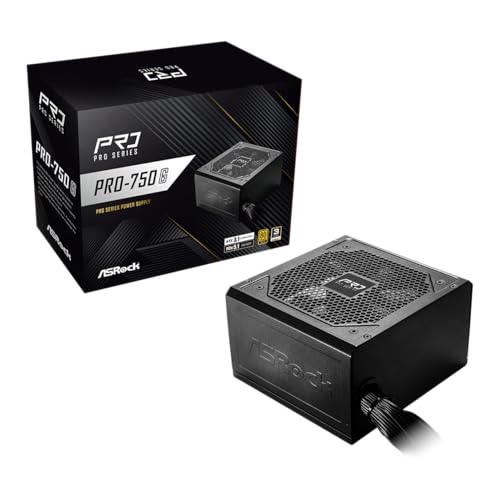
- 750W capacity for higher-performance systems
- Native 12V-2x6 connector for compatible GPUs
- ATX 3.1, PCIe 5.1, and 80 PLUS Gold
Best For: Mid-range to high-end PCs with modern graphics cards
High-Wattage Feature Set

- 1000W ATX 3.1 and PCIe 5.1 output
- Native dual-color 12V-2x6 GPU cable
- Fully modular design with 10-year warranty
Best For: High-performance ATX systems needing substantial power headroom
Best Overall Upgrade – MSI MAG A750GL PCIE5
For shoppers comparing computer power supplies under 200, the MSI MAG A750GL PCIE5 offers a well-rounded 750W option with modern standards, efficient operation, and convenient installation features. Its fully modular design helps keep unused cables out of the build.
Best For: Gaming PCs needing 750W and current PCIe 5.1 compatibility.
Pros:
- 80 PLUS Gold certified for efficient operation.
- Fully modular cabling simplifies cable management.
- ATX 3.1 and PCIe 5.1 ready with a native 12V-2×6 cable.
- Backed by a 10-year limited manufacturer warranty.
Cons:
- Its 750W output may be limiting for especially power-hungry builds.
- The listed weight is 3 kg, so it is not among the lightest options.
This is a strong choice when you want modern GPU support and long-term warranty coverage without moving to a higher-capacity unit.
Best Quiet 850W Option – CORSAIR RM850e (2025)
Among computer power supplies under 200, the CORSAIR RM850e (2025) stands out for builders who want 850W capacity, modular cabling, and a noise-conscious design. It also supports current ATX and PCIe power standards for newer systems.
Best For: Gaming and performance PCs that need extra capacity with low-noise operation.
Pros:
- 850W output provides more headroom than a typical 750W unit.
- Fully modular cables make installation and cable management easier.
- ATX 3.1 and PCIe 5.1 ready with a native 12V-2×6 cable.
- 120mm rifle bearing fan and calculated fan curve help reduce noise.
Cons:
- The warranty is seven years, shorter than some competing models listed here.
- Its 850W capacity may be more than necessary for modest systems.
Choose this model if quiet operation and a flexible 850W platform matter more than maximizing warranty length or wattage.
Best Budget-Capacity Pick – Apevia Prestige 800W
The Apevia ATX-PR800W Prestige is worth considering when comparing computer power supplies under 200 and prioritizing 800W capacity with a straightforward ATX gaming design. It includes active PFC, a single 12V output, and support for multiple GPU platforms.
Best For: Budget-oriented gaming PCs using conventional PCIe power connections.
Pros:
- 800W output supports systems with substantial power requirements.
- 80 Plus Gold certified with active PFC.
- Includes two 6+2-pin PCIe connectors, seven SATA connectors, and four peripheral connectors.
- 135mm auto-thermally controlled fan and built-in protections.
Cons:
- It does not list ATX 3.1 or PCIe 5.1 support.
- The supplied notes list a one-year warranty, shorter than the other options here.
- It uses a less modern connector set than newer 12V-2×6-equipped models.
This unit makes the most sense for a conventional upgrade where its available PCIe, SATA, and peripheral connectors match the rest of the hardware.
Best High-Wattage Headroom – CORSAIR RM1000e (2025)
For shoppers seeking computer power supplies under 200 with maximum capacity, the CORSAIR RM1000e (2025) provides 1000W alongside modern ATX 3.1 and PCIe 5.1 support. Its fully modular layout and included 12V-2×6 cable suit demanding builds with newer graphics hardware.
Best For: High-power gaming or workstation-style PCs that need substantial wattage headroom.
Pros:
- 1000W output offers the highest capacity among these listed models.
- Fully modular design reduces unnecessary cable clutter.
- ATX 3.1 and PCIe 5.1 ready with a native 12V-2×6 cable.
- 105°C-rated capacitors, Modern Standby compatibility, and a low-noise 120mm fan.
Cons:
- Its 1000W capacity is unnecessary for lower-power systems.
- The seven-year warranty is shorter than the MSI model’s coverage.
If your build includes power-hungry components or you want substantial upgrade headroom, this is the most capable choice in the group.
High-Capacity Gold Pick – ARESGAME AGT 850W
For shoppers comparing computer power supplies under 200, the ARESGAME AGT 850W combines high output with a fully modular design. Its compact 140mm depth, Gold certification, and 10-year warranty make it a practical option for performance-oriented desktop builds.
Best For: Gaming PCs and other systems needing 850 watts with flexible cable management.
Pros:
- 850W output with 80 PLUS Gold certification.
- Fully modular cabling simplifies installation and airflow management.
- Compact 140mm size and a quiet FDB fan.
- Includes OVP, UVP, OPP, SCP, OCP, and OTP protection.
Cons:
- Its 850W capacity may be more than needed for modest systems.
- The supplied notes do not identify a native next-generation GPU power connector.
The AGT 850W stands out when you want substantial headroom, modular construction, and long warranty coverage in a relatively short ATX chassis.
Straightforward Mainstream Choice – MSI MAG A650GN II 650W
MSI MAG A650GN II Gaming Power Supply - 80 Plus Gold - 650W - Non-Modular - Low Noise ATX PSU
Check Price On AmazonAmong computer power supplies under 200, the MSI MAG A650GN II is a practical mainstream option for systems that do not require modular cables. It delivers 650 watts, 80 PLUS Gold efficiency, and a compact design in a straightforward ATX package.
Best For: Mainstream desktop and gaming builds with moderate power requirements.
Pros:
- 650W output with 80 PLUS Gold certification.
- Compact sizing helps it fit a range of desktop cases.
- Full-Bridge, DC-DC, and LLC design supports stable power delivery.
- Includes OVP, OCP, SCP, OPP, and OTP protection.
Cons:
- Non-modular cabling can make cable management less flexible.
- Its 3-year warranty is shorter than the coverage listed for some competing options.
The MAG A650GN II favors simplicity and adequate capacity over modular convenience, making it a sensible fit for conventional 650W-class builds.
Next-Gen GPU Ready – Rosewill VMG 750W ATX 3.1
For computer power supplies under 200 aimed at newer graphics hardware, the Rosewill VMG 750W offers ATX 3.0 and 3.1 compatibility plus a dedicated PCIe 5.1 12V-2×6 cable. Its fully modular layout, Gold certification, and compact 140×150×86mm chassis add flexibility for modern builds.
Best For: Gaming systems using current-generation GPUs that benefit from a native high-power graphics connector.
Pros:
- 750W output with 80 PLUS Gold certification.
- Includes a PCIe 5.1 12V-2×6 cable rated for direct 600W GPU power.
- Fully modular design and compact chassis support cleaner, flexible builds.
- 120mm FDB fan, Japanese electrolytic capacitors, and six listed protections.
Cons:
- The 5-year warranty is shorter than the 10-year coverage listed for the ARESGAME model.
- Its advanced GPU connectivity may be unnecessary for older or lower-power graphics cards.
The VMG 750W is the most forward-looking choice here, pairing modern GPU support with modular construction and a space-conscious enclosure.
Balanced Gold Efficiency – PCCOOLER KN650 650W
For shoppers comparing computer power supplies under 200, the PCCOOLER KN650 is a practical choice for a mainstream ATX build. Its 650W output, ATX 3.1 design, 80 PLUS Gold certification, and fully modular cabling cover common system-building needs while helping keep cable routing tidy.
Best For: Mainstream ATX systems that need efficient, modular 650W power.
Pros:
- ATX 3.1 standard supports changing system loads.
- 80 PLUS Gold efficiency and 100–240V input range.
- Fully modular cables, Japanese bulk capacitor, and 105°C-rated capacitors.
- Includes dual CPU cables and a five-year warranty.
Cons:
- The listed package does not include a 12V-2×6 cable.
- Only one SATA cable set is included.
The KN650 is best suited to buyers whose graphics-card connector needs are covered by its two PCIe 6+2-pin cables. Confirm connector compatibility before ordering, especially for newer GPUs.
Best Heavy-Duty Pick – ASRock PRO 750G 750W
Among computer power supplies under 200, the ASRock PRO 750G stands out for pairing 750W capacity with ATX 3.1 and PCIe 5.1 compliance. Its native 12V-2×6 connector is designed for compatible modern graphics cards, while the standard ATX form factor fits most PC cases.
Best For: Mid-range to high-end PCs using a compatible modern GPU.
Pros:
- 750W output supports mid-range to high-end configurations.
- ATX 3.1 and PCIe 5.1 compliant.
- Native 12V-2×6 connector supports up to 450W power delivery.
- 80 PLUS Gold certification and a low-noise 120mm fan.
Cons:
- Non-modular design leaves all cables attached.
- Warranty coverage is three years.
- Verify chassis space and system power requirements before purchase.
This model makes sense when native 12V-2×6 support is more important than modular cable management. Its fixed-cable design may require more planning inside a compact case.
High-Wattage Feature Set – Auotac 1000W Modular PSU
For buyers seeking computer power supplies under 200 with substantial headroom, this Auotac unit offers 1000W output, ATX 3.1 and PCIe 5.1 support, and a native dual-color 12V-2×6 cable. Its fully modular design, 140mm fan, and included testing and cable-management tools add practical flexibility for demanding builds.
Best For: High-performance ATX systems needing 1000W and modern GPU connectivity.
Pros:
- 1000W capacity with ATX 3.1 and PCIe 5.1 support.
- Native dual-color 12V-2×6 cable for compatible graphics cards.
- Fully modular cables and a 140mm RGB fan with silent mode.
- Includes a PSU tester, cable comb, cable ties, and a 10-year warranty.
Cons:
- RGB lighting may not suit builds seeking a subdued appearance.
- Confirm that the 12V-2×6 connector matches your graphics card.
The Auotac is the most feature-rich option here for a high-power build, particularly if you value modular wiring, visual cable guidance, and long warranty coverage. Check case clearance and component requirements before purchase.
How We Picked the Best Computer Power Supplies Under 200
We focused on models offering a practical balance of wattage, efficiency, connectivity, size, warranty coverage, and value. The selection includes 650W, 750W, 800W, 850W, and 1000W units to suit mainstream gaming PCs through more power-hungry builds.
Modern standards received particular attention. ATX 3.1 compatibility, PCIe 5.1 support, and a native 12V-2×6 connector can simplify installation with newer graphics cards and improve readiness for future upgrades. We also considered fully modular and non-modular designs, cooling features, fan noise, and manufacturer claims such as Japanese capacitors or extended warranties.
Quick Comparison
| Wattage range | Best suited for | Recommended headroom |
|---|---|---|
| 650W | Midrange gaming PCs | Mainstream GPUs and CPUs |
| 750W–800W | Performance gaming systems | Most single-GPU builds |
| 850W | High-end gaming and workstation PCs | Powerful GPUs and upgrades |
| 1000W | Enthusiast and creator systems | High-power components or future expansion |
Key Buying Factors for Computer Power Supplies Under $200
Wattage and Headroom
Choose based on the complete system, not just the graphics card. A 650W unit can suit an efficient midrange build, while 750W or 850W is often a more flexible choice for modern gaming PCs. A 1000W model makes sense for flagship GPUs, high-core-count processors, multiple drives, or substantial future upgrades. Aim for reasonable headroom rather than operating continuously at the unit’s maximum output.
Efficiency and Build Quality
An 80 Plus Gold rating can reduce wasted energy and heat compared with lower-rated designs, although the certification alone does not guarantee every aspect of quality. Look for reputable manufacturers, appropriate protections, a suitable warranty, and components designed for sustained loads.
Connectors and Standards
ATX 3.1 and PCIe 5.1 support are valuable for newer builds, especially when paired with a native 12V-2×6 GPU cable. Native cabling is generally preferable to relying on adapters. Before buying, confirm that the power supply includes every connector your motherboard, graphics card, storage devices, and accessories require.
Modularity, Size, and Noise
Fully modular units let you remove unused cables, improving cable management and airflow. Non-modular supplies can cost less but may be harder to route in compact cases. Check the unit’s length, fan behavior, and cable flexibility against your case before ordering.
Who Should Buy Which Computer Power Supplies Under 200?
Choose 650W for a balanced mainstream gaming PC with a moderate-power GPU. Choose 750W or 800W if you want a versatile option for a performance build without moving into enthusiast wattage. Choose 850W for a high-end single-GPU system or a build with substantial upgrade headroom. Choose 1000W when using premium components, heavy workloads, or a power-hungry graphics card.
For a clean new build, prioritize a fully modular ATX 3.1 supply with a native 12V-2×6 cable. If price and basic capacity matter most, a non-modular option may be sufficient. Finally, verify independent testing, current pricing, dimensions, and warranty terms before purchase, since specifications and retailer listings can change.