
Choosing a power supply is one of the most important decisions in a budget PC build. The right unit delivers stable power, appropriate connectors, efficient operation, and enough headroom for your components without overspending.
This roundup compares 10 computer power supplies under $100, ranging from basic 450W and 500W models to modern modular 750W and 850W options. Use the guide below to match wattage, efficiency, cabling, and compatibility to your system.
Best 10 Computer Power Supplies Under 100 Picks for 2026
Reliable Everyday Pick

- 500W continuous output
- Two PCIe 6+2-pin connectors
- Five-year warranty
Best For: Mainstream desktops and budget builds
Efficient Budget Choice

- 500W continuous output
- 80 PLUS Bronze certified
- Five-year warranty
Best For: Affordable standard ATX desktops
High-Capacity Value Pick
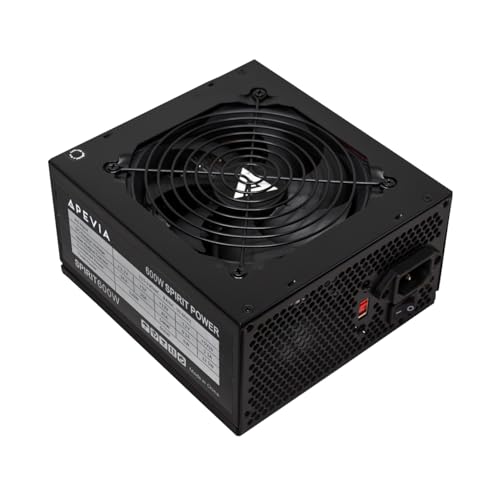
- 600W output with 45A on 12V
- Two PCIe 6+2-pin connectors
- Multiple SATA and Molex connectors
Best For: Budget gaming and multi-core desktop builds
Modern Upgrade Pick

- 750W and 80 PLUS Gold certified
- Fully modular with ATX 3.1 support
- 10-year limited warranty
Best For: Modern gaming PCs and future-focused upgrades
Proven Everyday Power

- 600W ATX output with active PFC
- 80 Plus efficiency certification
- 120mm intelligent-speed fan
Best For: Standard desktop systems needing dependable 600W power
High-Capacity Budget Choice

- 700W ATX output
- Multiple PCIe, SATA, PATA, and CPU connectors
- Six listed electrical protections
Best For: Budget desktop builds needing extra wattage and connectors
Efficiency-Focused Build Option

- 80 PLUS Bronze certified
- 650W ATX output with 100–240V input
- Five-year warranty and temperature-controlled fan
Best For: Mainstream gaming, office, and multitasking PCs
Efficient Midrange Pick

- 650W output with 80 Plus Gold rating
- Non-modular ATX design
- Five listed protection features
Best For: Midrange desktop systems using conventional cable routing
Reliable Everyday Pick – Thermaltake Smart 500W
For buyers comparing computer power supplies under 100, the Thermaltake Smart 500W offers a straightforward ATX solution for everyday desktop builds. It provides continuous 500W output, 80 PLUS efficiency, a 120mm fan, and support for two PCIe 6+2-pin connectors.
Best For: Mainstream PCs and budget-conscious builds needing dependable 500W capacity.
Pros:
- 500W continuous output with an 80 PLUS certification
- Includes two PCIe 6+2-pin connectors for compatible graphics cards
- Active PFC and OPP, OVP, and SCP protections
- Five-year warranty and 100,000-hour MTBF rating
Cons:
- Non-modular cabling can make cable management less flexible
- Specified for operation up to 40°C
This is a practical choice when you want a familiar 500W ATX power supply with basic protections and a long warranty without adding modular-cable complexity.
Efficient Budget Choice – ARESGAME AGV 500W Bronze
Among computer power supplies under 100, the ARESGAME AGV 500W stands out for pairing budget-friendly capacity with 80 PLUS Bronze certification. Its non-modular design, black cables, quiet 120mm fan, and five-year warranty suit uncomplicated desktop builds.
Best For: Affordable PCs that need 500W output and a Bronze-rated efficiency target.
Pros:
- 500W continuous output for standard desktop systems
- 80 PLUS Bronze certified with 85% or higher efficiency under typical loads
- Includes OVP, UVP, OPP, and SCP protection
- Black cables and a 120mm ultra-quiet fan
Cons:
- Non-modular design limits cable customization
- The supplied notes do not list PCIe connector details
The AGV 500W is a sensible value option for a conventional ATX system, especially if Bronze certification and understated black cabling matter more than modularity.
High-Capacity Value Pick – Apevia SPIRIT600W
For shoppers seeking computer power supplies under 100 with extra rated capacity, the Apevia SPIRIT600W delivers 600W through a single 12V output. It also provides two PCIe 6+2-pin connectors, four SATA connectors, and a thermally controlled 120mm fan.
Best For: Budget gaming or multi-core desktop builds needing 600W and several legacy connectors.
Pros:
- 600W output with a 45A single 12V rail
- Two PCIe 6+2-pin connectors for compatible graphics cards
- Four SATA and four Molex connectors
- Includes short-circuit, over-current, over-voltage, over-power, under-voltage, and over-temperature protection
Cons:
- Only a one-year replacement warranty is listed
- Non-modular cabling can complicate cable management
- The supplied notes do not specify an efficiency certification
The SPIRIT600W offers useful connector variety and more capacity than many entry-level units, but its shorter warranty and unspecified efficiency rating deserve consideration.
Modern Upgrade Pick – MSI MAG A750GL PCIE5
Although pricing should be checked before purchase, the MSI MAG A750GL PCIE5 is a strong candidate when comparing computer power supplies under 100 for newer gaming hardware. It combines 750W capacity, 80 PLUS Gold certification, fully modular cables, ATX 3.1 and PCIe 5.1 readiness, and a 10-year warranty.
Best For: Modern gaming PCs and upgrades that benefit from high capacity, modular cabling, and current power standards.
Pros:
- 750W output with 80 PLUS Gold certification
- Fully modular design improves cable-management flexibility
- ATX 3.1 and PCIe 5.1 ready with a native 12V-2×6 cable
- Backed by a 10-year limited warranty
Cons:
- Higher capacity may be unnecessary for basic office systems
- Its listed dimensions and 3kg weight may require more case-planning than smaller units
The MAG A750GL is the most forward-looking option in this group, making it attractive for a powerful or upgrade-focused system where modern GPU support and long-term warranty coverage are priorities.
Proven Everyday Power – Thermaltake Smart 600W PSU
For shoppers comparing computer power supplies under 100, the Thermaltake Smart 600W is a straightforward ATX option for standard desktop builds. It combines 600 watts of output, active PFC, a dedicated +12V line, and a temperature-aware 120mm fan in a non-modular design.
Best For: Standard desktop systems needing dependable 600W ATX power and simple installation.
Pros:
- 600W output supports standard systems with demanding requirements.
- Intelligent fan-speed control helps balance airflow and noise.
- Dedicated +12V line is designed for stable performance.
- Active PFC and 80 Plus certification add efficiency-focused features.
Cons:
- Non-modular cables can make cable management less flexible.
- The notes do not specify a warranty length.
This is a practical pick when you want a familiar 600W capacity and basic efficiency features without paying for modular cabling. Check your case and component connectors before buying.
High-Capacity Budget Choice – ESGAMING 700W Non-Modular PSU
Among computer power supplies under 100, this ESGAMING model stands out for its 700W capacity and broad connector selection. Its non-modular ATX design includes PCIe, SATA, PATA, and CPU connections, while a 120mm fan and built-in protection features target everyday desktop use.
Best For: Budget desktop builds that need 700W and several pre-installed power connectors.
Pros:
- 700W output provides useful capacity for compatible desktop builds.
- Includes two PCIe 6+2-pin connectors for supported graphics cards.
- Offers four SATA, four PATA, and split 4+4-pin CPU connections.
- Lists short-circuit, over-current, over-voltage, over-power, under-voltage, and over-temperature protection.
Cons:
- Non-modular cables may add clutter inside the case.
- Input voltage is selected with a 110–230V switch rather than automatically.
- The notes do not mention an efficiency certification.
This unit is best evaluated for connector count and wattage first. Its 700W rating and 12-month manufacturer warranty may appeal to value-focused builders, but verify the voltage setting and your hardware requirements during installation.
Efficiency-Focused Build Option – EVOUNIC 650W Bronze PSU
For buyers researching computer power supplies under 100, the EVOUNIC 650W offers a useful middle ground between capacity and efficiency features. It carries 80 PLUS Bronze certification, supports 100–240V input, and includes a temperature-controlled 120mm fan plus several standard PC protections.
Best For: Mainstream gaming, office, and multitasking PCs using standard ATX components.
Pros:
- 80 PLUS Bronze certification addresses efficiency and heat waste.
- 650W output suits many mainstream desktop and gaming builds.
- 100–240V wide-voltage input supports flexible use.
- Includes two PCIe 6+2-pin connectors and four SATA connectors.
Cons:
- Non-modular cables are permanently attached.
- The notes do not identify a detachable-cable option.
- Compatibility should be checked because the listed connector set is fixed.
With a five-year warranty, Bronze certification, and temperature-controlled cooling, this is the most efficiency- and warranty-oriented option of the group. Confirm that its fixed connector layout matches your planned components.
Budget Basic – Apevia Venus 450W
For shoppers comparing computer power supplies under 100, the Apevia Venus 450W is a straightforward ATX option for compatible personal computers. It includes a 120mm thermally controlled fan, adaptable motherboard and CPU connectors, and a broad set of built-in protections.
Best For: Basic PC builds and replacement systems that need a 450W ATX power supply.
Pros:
- 450W ATX output with a 120mm auto-thermally controlled fan
- Split 20+4-pin motherboard and 4+4-pin CPU connectors support different motherboard requirements
- Includes short-circuit, over-current, over-voltage, over-power, under-voltage, and over-temperature protection
Cons:
- Uses a manual 115V/230V input-voltage switch
- Provides fewer connectors than higher-wattage models, including three SATA and three peripheral connectors
- Requires all power cables to be connected properly before the PC will power on
The Venus 450W makes sense when connector flexibility and basic protection matter more than modular cabling or high capacity. Confirm your system’s power needs and connector requirements before installation.
Quiet Gold Upgrade – Thermaltake Toughpower GF1 850W
Among computer power supplies under 100, the Thermaltake Toughpower GF1 850W stands out for its high capacity and efficiency-focused design. This fully modular ATX unit is 80 Plus Gold certified and combines a zero-RPM Smart Zero Fan mode with a quiet 140mm fluid-bearing fan.
Best For: Higher-power PC builds that benefit from 850W capacity, modular cabling, and quiet operation.
Pros:
- 850W output with 80 Plus Gold certification
- Fully modular design helps reduce unused cable clutter
- Smart Zero Fan mode and a 140mm fluid-bearing fan are designed to minimize noise
- Includes a single high-amperage 12V rail, DC-to-DC design, and industrial-grade protections
Cons:
- Its 850W capacity may be unnecessary for lower-power systems
- As an ATX unit, it may not suit compact or non-ATX cases
Choose the GF1 when your build needs substantial power headroom and cleaner cable management. Its 10-year manufacturer warranty is an additional consideration for long-term use.
Efficient Midrange Pick – MSI MAG A650GN II 650W
MSI MAG A650GN II Gaming Power Supply - 80 Plus Gold - 650W - Non-Modular - Low Noise ATX PSU
Check Price On AmazonThe MSI MAG A650GN II is a practical candidate for shoppers seeking computer power supplies under 100 for a midrange PC. It delivers 650W, carries an 80 Plus Gold rating, and uses a non-modular ATX design with Full-Bridge, DC-DC, and LLC circuitry.
Best For: Midrange computers that need 650W of power and Gold-rated efficiency in a non-modular format.
Pros:
- 650W output with 80 Plus Gold certification
- Full-Bridge, DC-DC, and LLC design
- Industrial-level OVP, OCP, SCP, OPP, and OTP protection
- Single-rail design and compact sizing
Cons:
- Non-modular cables cannot be detached
- Its supplied notes list a three-year warranty, shorter than some competing models
- The product details do not specify a modular cable system or fan size
The MAG A650GN II balances useful capacity and Gold-rated efficiency for a conventional desktop build. Consider case clearance and cable-management needs before choosing this non-modular design.
How We Picked the Best Computer Power Supplies Under 100
We focused on the specifications that matter most in real-world PC builds: rated wattage, efficiency certification, protection features, cable design, connector compatibility, cooling, warranty coverage, and overall value. The selection includes entry-level units for office computers and affordable upgrades, as well as higher-capacity models for gaming systems with dedicated graphics cards.
Because power supplies can affect every component in a computer, advertised wattage was not the only consideration. We also looked for useful features such as active power factor correction, modular cabling, quiet fan operation, and support for newer PCIe power standards. Buyers should still confirm independent testing and exact connector availability before purchase.
Quick Comparison
| Best For | Recommended Capacity | Features to Prioritize |
|---|---|---|
| Office or basic home PC | 450W–500W | Reliable protections, quiet cooling, warranty |
| Budget gaming PC | 550W–650W | 80 Plus Bronze or Gold, suitable GPU connectors |
| Midrange gaming build | 650W–750W | Gold efficiency, strong 12V output, modular cables |
| Powerful graphics card or upgrades | 750W–850W | ATX 3.1, PCIe 5.x, native 12V-2×6 support |
Key Buying Factors for Computer Power Supplies Under $100
Wattage and Headroom
Estimate your system’s peak draw and leave practical overhead for transient spikes, additional drives, and future upgrades. A 500W unit may suit integrated graphics or an entry-level GPU, while modern gaming systems commonly benefit from 650W or more. Avoid choosing solely by the largest wattage number; build quality and suitable connectors matter just as much.
Efficiency Certification
80 Plus White models can be appropriate for inexpensive, low-demand computers. Bronze generally offers a better balance for budget gaming builds, while Gold models can run more efficiently and may produce less heat. Certification does not independently guarantee overall quality, so consider protections, platform design, warranty, and testing as well.
Cabling and Compatibility
Non-modular supplies include permanently attached cables and usually cost less, but unused wires can complicate cable management. Semi-modular or fully modular designs make installation cleaner. Check the motherboard connector, CPU EPS cable, GPU power plugs, SATA connections, and—especially for newer graphics cards—whether the supply includes a native PCIe 5.x or 12V-2×6 cable.
Protection, Noise, and Warranty
Look for over-voltage, under-voltage, over-power, short-circuit, and over-temperature protection. Larger or temperature-controlled fans can reduce noise, but fan behavior varies by model and load. A longer warranty is a useful signal of manufacturer confidence and provides additional value for a component expected to operate for years.
Who Should Buy Which Computer Power Supplies Under 100?
Choose a 450W–500W model for office computers, compact systems, and entry-level builds without a demanding graphics card. Choose 550W–650W for most affordable gaming PCs using a mainstream GPU. Choose a 750W Gold unit when you need more headroom, quieter operation, or a cleaner fully modular installation. Choose an 850W model for high-end components and planned upgrades, provided the case and graphics card requirements justify it.
Before ordering, compare the manufacturer’s output table and connector list with your exact parts. A properly sized, well-protected power supply is a better investment than saving a few dollars on a unit that lacks the capacity or cabling your system needs.