
A front panel memory card reader for desktop makes transfers faster and everyday access easier by moving SD, microSD, and USB ports to the front of your PC.
Whether you want a simple bay reader or a full-featured hub with USB-C, our picks focus on compatibility, speed, and practical desktop expansion.
Best 10 Front Panel Memory Card Reader for Desktop Picks for 2026
Broad Legacy Card Support
SABRENT 74-in-1 Legacy Media Reader
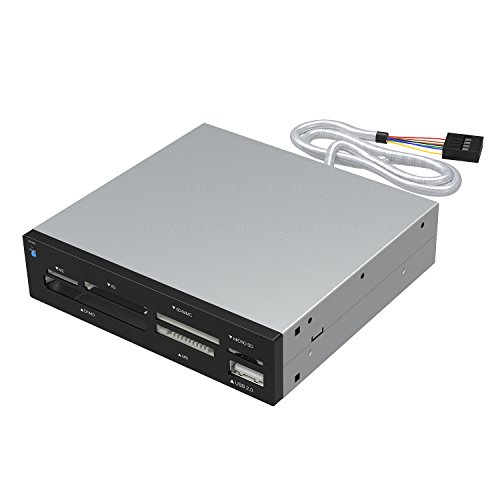
- Supports 74 different card types
- Adds 6 reader slots and 1 USB 2.0 port
- Compatible with Windows, Linux, and Mac OS X
Best For: People who need wide support for older and mixed-format memory cards
Modern 6-in-1 Front Bay

- Adds SD/microSD plus USB-C and USB-A ports
- One USB-C port supports up to 20Gbps
- Needs 19-pin USB 3.0 and 20-pin Type-C headers
Best For: Desktop builders who want a modern hub with card reader and USB expansion
Broad Multi-Format Reader
StarTech 22-in-1 Internal Reader
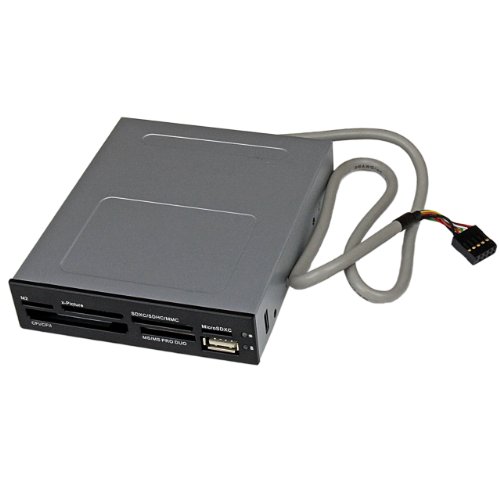
- Supports CompactFlash, SD, microSD, MMC, Memory Stick, and xD
- Simultaneous access to multiple card types
- Works with Windows, macOS, and Linux
Best For: Users who want wide card compatibility and OS-independent operation
Front-Bay Expansion Hub
GRAUGEAR 5.25” USB-C + Card Reader

- SD and microSD UHS-I card slots
- 20Gbps USB-C plus dual USB-A ports
- Dual 2.5-inch SATA drive bays
Best For: Desktop users needing a front card reader and extra connectivity
All-in-One Front Bay
Kingwin 5.25” USB 3.0 Hub and Card Reader
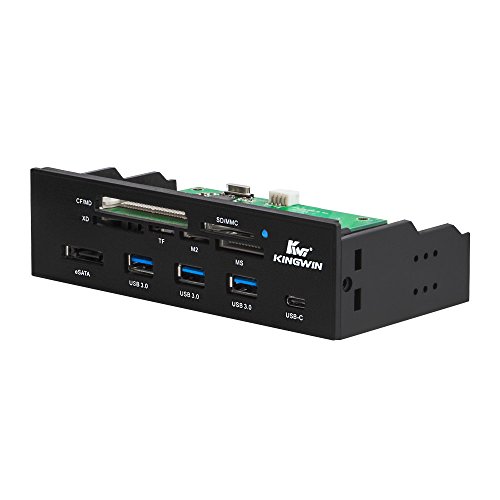
- 3 USB 3.0 Type-A ports plus USB-C
- Supports SD, CF, MS, XD, TF/T-Flash, and M2
- Powered 5.25-inch front-bay design
Best For: Desktop buyers who want many card formats and extra front ports
Pro Multi-Card Reader
StarTech 3.5in UHS-II Bay Reader
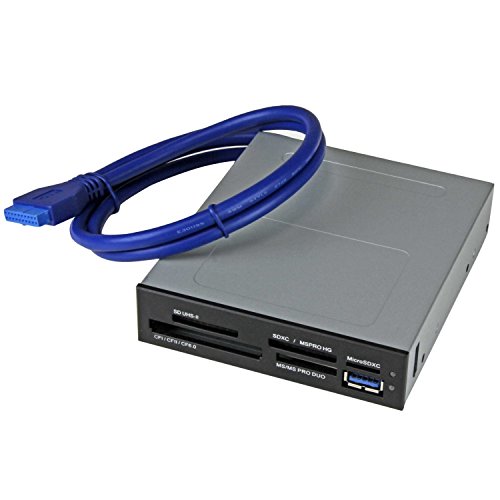
- Supports CF, SD/microSD, Memory Stick, and xD
- Four-slot simultaneous access
- 3.5-inch bay with internal 20-pin header
Best For: Photo, video, and IT desktops needing broad card support
Compact 3.5-Inch Expansion
Front Panel Hub with SD and USB-C

- 3.5-inch bay design with SD/microSD reader
- Adds 2 USB-A ports plus 1 USB-C port
- USB 3.0 speeds with SATA-powered stability
Best For: Desktop users who need a compact front-bay card reader and USB expansion
High-Speed 5.25-Inch Hub
10Gbps Front Panel Card Reader

- USB 3.2 Gen 2 transfers up to 10Gbps
- Adds SD/microSD, USB-C, USB-A, and audio
- Built for 5.25-inch bays with SATA power
Best For: Users with a 5.25-inch bay who want fast front-panel card access and more ports
All-in-One Drive Bay Hub

- Dual USB-C ports with 10Gbps transfer
- SD/TF slots plus USB-A and audio jacks
- 5.25-inch bay design with SATA power
Best For: People who want a single front-bay hub for cards, USB-C, USB-A, and audio
Fast USB-C Front Bay – GRAUGEAR 3.5-Inch USB-C Expansion Bay
If you want a front panel memory card reader for desktop use with modern speed and extra USB ports, this GRAUGEAR 3.5-inch bay unit is built for that job. It combines SD and microSD access with USB-C and USB-A expansion, while also requiring the right internal headers and SATA power connection.
Best For: Desktop users who want a fast, all-in-one front bay hub with SD/microSD support and USB-C expansion.
Pros:
- 2x USB-C, 2x USB-A, SD, and microSD in one 3.5-inch front bay
- USB-C port supports up to 20Gbps for high-speed transfers
- Includes USB 3.0, Type-E, and SATA power cables for installation
- Metal/plastic build with over-current, over-voltage, and short-circuit protection
Cons:
- Needs both a 19-pin USB 3.0 header and a 20-pin Type-E/Key-A header
- SATA power is required for operation
- SD card must be inserted upside down, label down
Overall, this is a practical upgrade if your motherboard supports the required headers and you want faster front-panel access to cards and USB devices. It offers strong expansion in a standard floppy-bay format without giving up speed.
Broad Legacy Card Support – SABRENT 74-in-1 Legacy Media Reader
SABRENT 74 in 1 3.5 Inch Internal Flash Media Card Reader/Writer with USB Port (CR-USNT)
Check Price On AmazonThis front panel memory card reader for desktop systems is aimed at users who still need broad legacy card support. SABRENT’s 3.5-inch internal reader fits a drive bay, adds a front USB port, and supports a wide range of flash media formats.
Best For: Desktop users who need support for many older and mixed memory card formats.
Pros:
- Supports 74 different types of memory cards
- Includes 6 card reader slots plus 1 USB 2.0 port
- Internal power connector helps provide sufficient power for USB devices
- Works with Windows, Linux, and Mac OS X
Cons:
- Uses USB 2.0, so it is slower than newer internal readers
- Some cards may require an adapter
- Older format support may be more than many users need today
If your workflow still involves older memory cards, this reader is valuable for its compatibility breadth. It is less about speed and more about convenience and format coverage in a standard 3.5-inch bay.
Modern 6-in-1 Front Bay – GRAUGEAR 6-in-1 Front Bay Hub
If you’re shopping for a front panel memory card reader for desktop expansion with a modern USB layout, this GRAUGEAR 3.5-inch unit is a strong fit. It combines SD/microSD slots with USB-C and USB-A ports, and it is designed for systems with the proper internal headers and SATA power.
Best For: Desktop builders who want a front bay hub with card reading and fast USB-C access.
Pros:
- 6-in-1 design with 2x USB-C, 2x USB-A 3.0, SD, and microSD
- One USB-C port supports up to 20Gbps with the right motherboard header
- SATA-powered for stable transfer and enough power for higher-draw devices
- Steel frame and included mounting screws simplify installation
Cons:
- Requires both a 20-pin Type-C Key-A header and a 19-pin USB 3.0 header
- Does not suit motherboards without the needed internal connections
- Only the specified USB-C port reaches the top speed rating
This model is a practical all-in-one front bay upgrade if your motherboard is compatible. It balances card access, USB expansion, and stable powered operation in a sturdy 3.5-inch form factor.
Broad Multi-Format Reader – StarTech 22-in-1 Internal Reader
This front panel memory card reader for desktop use is built for broad compatibility and straightforward internal installation. StarTech’s 3.5-inch bay reader supports many common card formats, adds a front USB 2.0 port, and allows simultaneous access to different media types.
Best For: Professional and home desktop users who need a dependable multi-format internal card reader.
Pros:
- Supports CompactFlash, SD, microSD, MMC, Memory Stick, and xD formats
- Allows simultaneous access to multiple media card types
- OS-independent design works with Windows, macOS, and Linux
- Includes built-in power and activity LED plus mounting kit
Cons:
- Uses USB 2.0, which limits transfer speed to older-generation performance
- Requires a 9-pin motherboard header for internal connection
- Some same-type media cannot be accessed simultaneously
For users who value compatibility and convenience over raw speed, this is a dependable internal reader. It fits neatly into a 3.5-inch bay and handles a wide range of formats without needing drivers.
Front-Bay Expansion Hub – GRAUGEAR 5.25” USB-C + Card Reader
If you want a front panel memory card reader for desktop use that does more than just read cards, this GRAUGEAR 5.25-inch bay unit is built for modern cases. It combines SD/microSD access with a USB-C hub and internal drive support, so it can serve as a practical front-panel upgrade for everyday file transfers and device hookups.
Best For: Desktop users who want a front-bay card reader, USB-C connectivity, and extra internal SSD/HDD mounting in one unit.
Pros:
- Built-in SD and microSD UHS-I card slots for cameras, drones, and media storage.
- Includes a Gen2x2 20Gbps USB-C port plus dual USB-A ports for fast front-panel access.
- Fits a standard 5.25-inch bay and connects with USB 3.2 Type-E A-Key, USB 3.0 19-pin, and SATA power.
- Also adds dual tool-free 2.5-inch SATA drive slots for 7mm and 9.5mm drives.
Cons:
- Requires a compatible 5.25-inch bay, so it won’t suit newer cases without that expansion space.
- Some of its features depend on having the right internal headers available on the motherboard.
This is a strong pick if you want a multi-function front bay rather than a basic card reader. The combination of card slots, high-speed USB-C, and SSD mounting makes it especially useful for power users who want more from a desktop front panel.
All-in-One Front Bay – Kingwin 5.25” USB 3.0 Hub and Card Reader
This front panel memory card reader for desktop setups is aimed at users who want a broad mix of ports in a single 5.25-inch bay. The Kingwin unit combines USB expansion, USB-C, eSATA, and support for many card formats, making it a flexible front-bay accessory for older tower cases.
Best For: Users who want a budget-friendly all-in-one front bay with broad legacy card support.
Pros:
- Includes 3 USB 3.0 Type-A ports, 1 USB-C port, and 1 eSATA port.
- Supports a wide range of memory cards including SD, CF, MS, XD, TF/T-Flash, and M2 formats.
- Fits any 5.25-inch computer case front bay and is backward compatible with USB 2.0, 1.1, and 1.0.
- Powered design can help with desktop accessories and charging needs.
Cons:
- Uses a plastic enclosure rather than a metal one.
- Best suited to cases that still have a 5.25-inch external bay available.
If you need broad format support instead of just SD and microSD, this model stands out. It is especially appealing for desktops that still rely on older removable media and want several front-access ports at the same time.
Pro Multi-Card Reader – StarTech 3.5in UHS-II Bay Reader
For a desktop build that needs a reliable front panel memory card reader for desktop workflows, this StarTech 3.5-inch bay model is designed for serious file handling. It supports multiple popular card families, connects to an internal 20-pin header, and offers simultaneous access to several slots for efficient transfers.
Best For: IT, photo, and content-creation desktops that need a compact internal multi-card reader with broad support.
Pros:
- Supports CompactFlash, SD/microSD family cards, Memory Stick formats, and xD Picture cards.
- Can access four different card slots simultaneously, excluding same-type media.
- Fits a 3.5-inch bay and connects internally via a 20-pin motherboard header.
- OS-independent with Windows, macOS, and Linux support, plus built-in power and activity LEDs.
Cons:
- Uses a 3.5-inch bay, so it is not a 5.25-inch front-bay expansion.
- Its design is focused on card reading rather than extra USB hub functionality.
This is the most workstation-oriented option in the group, especially if you deal with multiple card types and want efficient simultaneous access. The broad compatibility and OS-independent setup make it a strong internal reader for mixed desktop environments.
Compact 3.5-Inch Expansion – Front Panel Hub with SD and USB-C
If you want a front panel memory card reader for desktop use, this 3.5-inch bay hub adds SD/microSD reading plus extra USB-C and USB-A ports right on the case front. It is a practical upgrade for reducing desk clutter and making quick file transfers easier for creators and everyday users.
Best For: Desktop builders who want a compact front-bay hub with card reading and mixed USB connectivity.
Pros:
- Includes SD/microSD card slots for front-access media transfers
- USB 3.0 speeds support quick transfers of RAW photos and 4K videos
- Adds 2 USB-A ports and 1 USB-C port in a 3.5-inch bay format
- SATA power helps keep performance stable with multiple devices connected
Cons:
- Requires a free 19-pin USB 3.0 motherboard header
- Needs SATA power for full operation
Overall, this is a solid choice if your case has a 3.5-inch bay and you want a straightforward internal reader that also expands your front-panel USB options. Its metal housing and built-in protection add reassurance for regular use.
High-Speed 5.25-Inch Hub – 10Gbps Front Panel Card Reader
This front panel memory card reader for desktop builds is designed for users who want maximum connectivity from a 5.25-inch bay. With SD and microSD slots, dual USB-C, dual USB-A, and audio jacks, it turns unused drive space into a highly capable front-access hub.
Best For: Power users and older desktops with open 5.25-inch bays that need fast card reading and broad I/O.
Pros:
- USB 3.2 Gen 2 support reaches up to 10Gbps
- Includes SD and microSD card slots for easy front access
- Offers 2 USB-C ports, 2 USB-A ports, and audio I/O
- Metal build and safety protections add durability
Cons:
- Requires both 19-pin USB 3.0 and 20-pin Type-E headers
- Needs SATA power to operate
- 5.25-inch bay fit limits compatibility with newer cases
For desktops that can support it, this model stands out for speed and expansion density. It is especially useful if you regularly move large media files and want a single front-panel solution.
All-in-One Drive Bay Hub – 10Gbps Front Panel Reader
If you need a front panel memory card reader for desktop convenience along with a full set of front I/O, this 5.25-inch hub is built to do both. It combines SD/TF reading with dual USB-C, dual USB-A, and audio ports, making it a strong fit for users who want one bay to handle most daily connections.
Best For: Desktop users who want an all-in-one 5.25-inch hub with fast USB-C charging and card slots.
Pros:
- Dual USB 3.2 Gen 2 Type-C ports support up to 10Gbps
- Includes SD/TF card slots for quick front-panel transfers
- Adds 2 USB-A ports plus headphone and microphone jacks
- Metal construction and SATA power support stable use
Cons:
- Needs both a 20-pin Type-E header and a 19-pin USB header
- Only fits standard 5.25-inch desktop bays
This is a flexible pick if your case has the right headers and open bay space. It offers a balanced mix of card reading, USB-C speed, and front audio without requiring separate add-on devices.
How We Picked the Best Front Panel Memory Card Reader for Desktop
We prioritized real desktop usefulness: case fit, header compatibility, supported card formats, transfer speed, power delivery, and the number of front-facing ports. A good Front Panel Memory Card Reader for Desktop should be easy to install and match the way you actually move files.
Quick Comparison
Basic models are best if you mainly need SD and microSD access. Midrange options add USB-A, USB-C, and better build quality. Feature-rich units combine card reading with extra USB ports, audio jacks, or even drive bays, which is useful if you want to maximize one front panel cutout.
Key Buying Factors for a Front Panel Memory Card Reader for Desktop
Bay Size and Case Support
Check whether your case has a 3.5-inch or 5.25-inch external bay. Some modern cases need adapters or may not support legacy bays at all, so fit matters before features.
Header and Motherboard Compatibility
Look closely at the internal connectors: USB 3.0, USB 3.2 Gen 2, USB Type-E, SATA power, and audio headers. The best choice is the one your motherboard already supports without awkward workarounds.
Card Formats and Speed
Match the reader to your cards. Casual users usually need SD and microSD, while photographers and pros may want broader support such as UHS-II, CompactFlash, or Memory Stick. If you move large files often, speed matters more than sheer format count.
Port Mix and Power
If your desk setup is light on accessible ports, choose a model with front USB-A and USB-C in addition to the card slots. Powered designs are also helpful when you connect several devices or need more stable performance.
Who Should Buy Which Front Panel Memory Card Reader for Desktop?
If you want simple photo and media transfers, choose a compact reader with SD and microSD support. If you edit content, back up drives, or connect peripherals often, a hub-style model with USB-C and multiple USB ports is the better long-term buy. If you need legacy card support or more expansion, step up to a multi-format unit with a full 3.5-inch or 5.25-inch bay design.
For most builders, the best Front Panel Memory Card Reader for Desktop is the one that balances case compatibility, connector support, and the exact cards and devices you use every week.