
If your laptop screen feels too cramped for spreadsheets, editing, meetings, or trading, a portable add-on display can make a big difference.
Our roundup of the best laptop screen extenders for 2026 focuses on easy setup, travel-friendly designs, display quality, and compatibility across common laptop sizes.
Best 10 Laptop Screen Extenders Picks for 2026
Flexible Detachable Workstation
15.6" Rotating Triple Monitor Extender
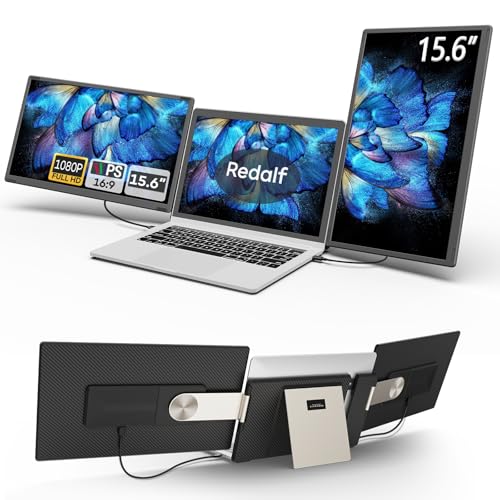
- 235° horizontal and 90° vertical rotation
- Detachable single-side use for travel
- USB-C, USB-A, and HDMI plug-and-play
Best For: Traveling professionals and multitaskers who want adjustable screen layouts
Compact Dual-Screen Pick
KEFEYA 14" FHD Laptop Extender

- 14" FHD IPS panel with 300 nit brightness
- 180° rotation with mirror and extend modes
- USB-C, USB-A, and HDMI included
Best For: Remote workers and travelers who want a smaller dual-screen extender
Portable Triple-Screen Productivity Pick
Synnov 15.6“ Laptop Screen Extender

- 15.6-inch FHD IPS display
- 4 lb, 0.19" thin portable build
- Plug-and-play via USB-C or HDMI
Best For: Travelers and remote workers who want a lightweight triple-screen setup
Ultra-Light Triple Screen Performer
Blackview DCM6 Triple Laptop Screen Extender

- 2 lb ultra-light, 0.17-inch thin build
- TÜV SÜD low blue light certification
- 14.1-inch FHD IPS with 100% sRGB
Best For: Mobile users who want a lightweight triple-screen extender with eye comfort
Desk-First Productivity Pick

- 15.6" FHD IPS display with 100% sRGB and HDR support
- Freestanding aluminum frame with reinforced metal stand
- Dual-cable plug-and-play on supported devices
Best For: Users who want a stable desk-friendly triple-monitor setup
Clean-Cable Multitasker
15.6" Slim Triple Portable Monitor

- Two 15.6" FHD panels with 280 nits brightness
- 2 USB-C cables on supported devices for simpler setup
- 4 lb aluminum design with carry bag included
Best For: Frequent travelers who want a lighter, cleaner triple-screen setup
Triple-Screen Productivity Upgrade – KYY 15.6" Dual 1080P Portable Extender
If you’re shopping for laptop screen extenders that make multi-window work easier, this KYY model is built around a practical triple-screen setup. It pairs two 15.6-inch 1080p IPS panels with a one-cable USB-C connection option, making it a strong fit for users who want a cleaner, faster workstation without a complicated setup. The included stand and 360-degree screen rotation also add flexibility for office, travel, and sharing use.
Best For: Stock traders, financial analysts, designers, and mobile professionals who want a portable triple-screen workflow.
Pros:
- Dual 15.6-inch FHD IPS screens with 178° viewing angles and 300 cd brightness.
- One USB-C to USB-C connection option for a simpler cable setup.
- Built-in adjustable stand and 0° to 360° screen rotation for flexible viewing.
- Wide compatibility across Windows, macOS, Chrome OS, Android, and Linux.
Cons:
- Drivers must be downloaded first, so it is not fully driver-free.
- Not compatible with PS5, Xbox Series X, and other gaming consoles.
For buyers who want a clean, portable multi-monitor expansion, this KYY extender focuses on convenience and solid visual quality. Its strength is the combination of easy connectivity, travel-friendly design, and a setup aimed squarely at productivity.
Flexible Detachable Workstation – 15.6" Rotating Triple Monitor Extender
Among laptop screen extenders, this model stands out for its highly adjustable mounting system and detachable design. It supports 235° horizontal rotation and 90° vertical rotation, so you can use it in landscape, portrait, or stacked configurations. If you need a triple-screen setup that can also break down into two single screens for travel or sharing, this one is designed with that kind of flexibility in mind.
Best For: Frequent travelers, presenters, programmers, and multitaskers who want adjustable dual-side expansion.
Pros:
- 235° horizontal and 90° vertical rotation for more viewing positions.
- Detachable design lets you use a single side independently when traveling.
- 15.6-inch 1080p IPS panels with built-in speakers and anti-glare, flicker-free support.
- Plug-and-play connection via USB-C, USB-A, or HDMI.
Cons:
- Mac support excludes M1/M2/M3 chip models according to the notes.
- HDMI use requires an additional USB-A to USB-C cable for power.
This is a strong pick if adjustability matters as much as screen space. The ability to reconfigure, detach, and rotate the displays makes it especially useful for people who split time between office work, travel, and client-facing tasks.
Clip-Free Travel Expander – 15.6" Ultra-Slim Triple Monitor
If you want laptop screen extenders without a clip-on design, this ultra-slim 15.6-inch model is worth a look. It uses a clip-free setup that avoids pressure on the laptop screen while still turning a notebook into a three-screen workstation. With USB-C or HDMI plug-and-play support and a slim aluminum shell, it is aimed at people who need extra screen space on the road.
Best For: Business travelers, students, digital nomads, and anyone who wants a clip-free portable triple display.
Pros:
- Clip-free design avoids attaching directly to the laptop screen.
- 15.6-inch IPS panels with 1920×1080 resolution, 300 cd/m² brightness, and 178° viewing angles.
- Thin, lightweight aluminum alloy build for easy transport.
- USB-C or HDMI plug-and-play compatibility with no drivers required.
Cons:
- HDMI use requires an extra USB-A to USB-C cable for power.
- It does not use a clip-based attachment, which some users may prefer for tighter mounting.
This extender makes sense if you want a portable three-screen setup with less physical contact on the laptop itself. Its combination of slim build, easy setup, and broad use cases makes it a practical travel companion for productivity.
Compact Dual-Screen Pick – KEFEYA 14" FHD Laptop Extender
For buyers comparing laptop screen extenders, this KEFEYA model is a smaller, dual-screen option that still delivers strong everyday productivity features. Its 14-inch 1080p IPS panel, 180° rotation, and plug-and-play connectivity make it easy to use for work, entertainment, and mobile setups. It is also compatible with a wide range of systems, which makes it a flexible choice for mixed-device households and teams.
Best For: Remote workers, programmers, stock traders, and users who want a compact dual-screen extender.
Pros:
- 14-inch Full HD IPS panel with 300 nit brightness and 72% NTSC color gamut.
- Plug-and-play connection with USB-C, USB-A, and HDMI cables included.
- 180° rotation and multiple display modes, including mirror, extend, landscape, and portrait.
- Wide compatibility with Windows, Mac, Android, Chrome, Linux, Switch, PS5, and more.
Cons:
- Smaller 14-inch screen size may feel less spacious than 15.6-inch models.
- HDMI use still requires an extra USB-A to USB-C cable for power.
This KEFEYA extender is a practical way to add a second screen without jumping to a larger triple-display system. It balances portability, broad compatibility, and simple setup, making it an easy fit for everyday mobile productivity.
Portable Triple-Screen Productivity Pick – Synnov 15.6“ Laptop Screen Extender
If you want laptop screen extenders that make multitasking feel immediate, the Synnov 15.6-inch model is built around a simple plug-and-play workflow. It adds a bright FHD IPS side-by-side setup for extend, mirror, and portrait use, making it useful for travel, remote work, coding, meetings, and everyday office tasks.
Best For: Travelers, remote workers, developers, and anyone who wants a lightweight triple-monitor setup.
Pros:
- 15.6-inch FHD 1080P IPS panel with 178° wide viewing angle
- Lightweight 4 lb design, 0.19″ thin, with aluminum alloy body and metal stand
- Plug-and-play setup with 2 full-featured USB-C or USB-C plus HDMI
- Includes cables, power adapter, and leather carry bag
Cons:
- Requires at least one full-featured USB-C port
- Not compatible with MacBook models using M1/M2/M3 chips
Overall, this Synnov option leans hard into portability and quick setup, while still giving you a large, practical screen area. It is a strong fit if you need a travel-friendly screen extender and can verify your laptop’s port support first.
Travel-Friendly Dual/Triple Display Option – CIDETTY 14'' FHD Extender
Among laptop screen extenders, the CIDETTY 14-inch model is a compact choice if you want a portable second or third display without adding much bulk. It focuses on straightforward plug-and-play use, built-in speakers, and a protective case, so it works well for work trips, casual media use, and simple multitasking setups.
Best For: Users who want a slim, travel-ready dual or triple display with built-in speakers.
Pros:
- 14-inch FHD 1080P IPS screen with anti-glare and blue light filtering
- Ultra-slim 0.24-inch design with included protective case
- Built-in speakers add convenience for media and calls
- Supports mirror and extended display modes via USB-C or HDMI
Cons:
- Not compatible with MacBook M1/M2/M3 models
- Surface devices with only one Type-C port are excluded
- Compatibility depends on having the required ports
This CIDETTY monitor is a practical middle-ground pick for users who value portability and a lighter feature set. It is especially appealing if you want a compact extender that still covers core productivity needs and includes the accessories to travel with it.
Ultra-Light Triple Screen Performer – Blackview DCM6 Triple Laptop Screen Extender
If you are comparing laptop screen extenders for mobility and comfort, the Blackview DCM6 stands out for its very light 2 lb design and TÜV SÜD-certified low blue light protection. It delivers a 14.1-inch FHD IPS image and supports mirror, extension, landscape, and portrait modes, making it a flexible option for work, study, and travel.
Best For: Mobile professionals who want a very light triple-screen extender with eye-comfort features.
Pros:
- Ultra-light 2 lb body with 0.17-inch thin screen
- TÜV SÜD-certified low blue light filtering for eye comfort
- 14.1-inch FHD IPS panel with 300 nits brightness and 100% sRGB
- Multiple display modes plus 180° rotation for flexible use
Cons:
- Setup depends on compatible full-function USB-C or HDMI-based connections
- Laptop support is limited to 13-17 inch devices
The DCM6 is a strong pick if you want a portable screen extender that stays focused on weight, image quality, and eye comfort. Its included carry case and multi-device compatibility make it a sensible option for frequent travelers and on-the-go productivity.
Travel-Ready Triple Workspace – 15.6" Ultra-Slim FHD Triple Monitor
If you want laptop screen extenders that are easy to carry and quick to set up, this 15.6-inch model is built around portability and simple plug-and-play use. It gives you three FHD displays in a slim aluminum frame, so you can expand your laptop workspace without a permanent desk setup.
Best For: Remote workers, travelers, and multitaskers who want a lightweight triple-screen setup for work on the go.
Pros:
- 15.6″ 1080P IPS panels with 300 nits brightness and a 1000:1 contrast ratio.
- Ultra-slim 0.18″ design and 3.9 lb weight with a soft leather carry bag.
- Plug-and-play setup via 2x USB-C or USB-C + HDMI, with no driver needed.
- Free-standing aluminum build with adjustable 0-180° screen folding and low blue light mode.
Cons:
- Requires compatible laptop video output ports for straightforward setup.
- M1-M4 MacBooks need the H5 cable, which must be obtained separately through customer service.
- Best suited to users who want a full triple-screen extension rather than a compact single-panel add-on.
This is a practical pick if your priority is portability, easy transport, and a true three-screen workflow. The no-lid-attachment design also helps reduce stress on the laptop itself, which is useful for regular travel use.
Desk-First Productivity Pick – 15.6" FHD IPS Triple Monitor
Among laptop screen extenders, this Rizpak model is aimed at users who want a bigger working area without adding pressure to the laptop lid. It combines a 15.6-inch FHD IPS display with a freestanding aluminum design, making it a straightforward choice for office, home, or travel workspaces.
Best For: Office workers, students, and remote professionals who want a stable freestanding triple-monitor setup.
Pros:
- 15.6″ FHD 1080P IPS screen with 100% sRGB, HDR support, and wide viewing angles.
- Dual-cable plug-and-play setup on supported devices, with no driver installation required.
- Freestanding aluminum alloy frame and reinforced metal stand help avoid hinge pressure.
- Supports 12″-17.3″ laptops and multiple systems including Windows, macOS, ChromeOS, Linux, and Android.
Cons:
- Some setups may need an external 5V/3A or higher power supply for best brightness and stability.
- Laptops without full-function USB-C, including certain M1/M2/M3 MacBooks, may need an H5 adapter and extra steps.
- At 4 pounds, it is portable but not the lightest option in this category.
Overall, this extender stands out for its freestanding structure and broad compatibility notes. It suits users who want a more desk-stable triple-screen solution and are comfortable checking connection requirements before buying.
Clean-Cable Multitasker – 15.6" Slim Triple Portable Monitor
This laptop screen extender is designed for people who want a simpler cable setup and a quick jump to triple-screen productivity. With two 15.6-inch FHD displays, an aluminum shell, and a carry bag included, it targets mobile professionals who need extra workspace without a bulky setup.
Best For: Professionals and frequent travelers who want a slim, cable-light triple-screen monitor for multitasking.
Pros:
- Two 15.6″ 1080P FHD displays with 280 nits brightness and a 178° viewing angle.
- Uses 2 USB-C to USB-C cables on fully supported devices for a cleaner connection.
- Ultra-slim aluminum shell, 4 lb weight, and included leather carry bag.
- Supports extend, mirror, and portrait-style use cases for work or presentations.
Cons:
- M1/M2/M3 MacBooks or devices without full-featured USB-C may need an H5-T cable setup.
- That alternate connection path requires additional cables, external power, and driver installation.
- It is built for compatibility with 13″ to 17.3″ laptops, so smaller or different devices may not fit the intended use.
If you value a tidier workspace and a lightweight travel form factor, this model makes a strong case. Just be sure your laptop’s video output matches the simplified connection path, since the fallback setup is more involved.
How We Picked These Laptop Screen Extenders
We focused on practical features that matter most to buyers: screen size, Full HD resolution, IPS panel quality, portability, mounting stability, and whether the unit supports plug-and-play setup. We also looked for models that suit common laptop sizes and everyday workflows rather than niche use cases.
Quick Comparison
Most Laptop Screen Extenders in this roundup fall into two camps: 14-inch options for lighter travel setups and 15.6-inch models for more workspace. Larger displays generally give you more room for side-by-side apps, while smaller models are easier to carry and often feel better balanced on compact laptops. Check whether the extender supports dual-screen or triple-screen expansion, since that affects both productivity and weight.
Key Buying Factors for Laptop Screen Extenders
Compatibility
Make sure the extender fits your laptop size and operating system, and confirm whether your device supports USB-C video output or needs HDMI plus USB power. Some models are better suited to 13- to 17.3-inch laptops, while others work best with narrower size ranges.
Display Quality
For clear text and comfortable long sessions, look for 1080p resolution and an IPS panel. IPS generally provides better viewing angles and more consistent color than basic panels, which matters if you share your screen or work on creative tasks.
Portability and Setup
If you travel often, choose a slim, lightweight unit with a simple mounting system and minimal cable clutter. Plug-and-play designs are ideal when you need fast setup in hotels, coworking spaces, or between meetings.
Rotation and Adjustability
Some Laptop Screen Extenders offer folding, rotating, or detachable panels. These features can improve ergonomics and make it easier to position multiple screens for different tasks.
Who Should Buy Which Laptop Screen Extenders?
Choose a 14-inch extender if portability is your top priority or if you use a smaller laptop and want a lighter carry. Pick a 15.6-inch model if you need more workspace for data, design, coding, or side-by-side document review. If you want the most flexible setup, look for detachable or triple-screen designs; if you want the simplest experience, prioritize plug-and-play compatibility and a stable single-cable connection where possible.
In short, the best Laptop Screen Extenders are the ones that match your screen real estate needs, travel habits, and connection options without adding unnecessary setup hassle.