
If you need reliable cloning or backup hardware for a Mac setup, the right dock can save time and reduce hassle. The best options handle SATA drives cleanly, support offline duplication, and fit everything from simple home backups to heavier workflows.
Below, we’ve narrowed the field to 10 practical choices for different needs, from compact dual-bay docks to higher-capacity stations and portable Mac-compatible drives.
Best 10 Hard Drive Duplicators for Mac Picks for 2026
Dual-Bay Offline Cloning Dock
SABRENT USB 3.0 Dual Bay Hard Drive Docking Station & Cloner

- Supports 2.5"/3.5" SATA HDDs and SSDs
- Offline cloning up to 60 Mbps
- USB 3.0 dock with plug-and-play setup
Best For: Mac users wanting an easy dual-bay SATA dock and offline cloner
Mac-Ready Portable Backup Drive

- Designed for Mac and USB-C compatible
- Includes backup software and password protection
- Portable slim drive for file storage
Best For: Mac users needing portable backup storage, not cloning hardware
Pro Dual-Bay SATA Duplicator Dock
StarTech Dual-Bay 2.5/3.5in SATA Duplicator Dock

- Standalone sector-by-sector cloning
- Supports 2.5"/3.5" SATA HDDs and SSDs
- USB-C and USB-A cables included
Best For: IT users needing a standalone dual-bay duplicator dock
Encrypted Portable Mac Drive
WD 5TB My Passport Ultra for Mac

- Formatted for Mac with USB-C and USB 3.1
- Password protection with 256-bit AES encryption
- Refined metal cover and portable design
Best For: Mac users seeking secure portable backup storage
Offline Cloning Specialist
Systor 1:5 HDD/SSD Hard Drive Duplicator/Eraser

- Standalone operation with no computer needed
- Copies up to five drives at once
- Supports duplication and DoD-style erasure
Best For: Users who need a dedicated offline duplicator and eraser
Multi-Bay Clone Dock
ORICO USB C 5 Bay Hard Drive Docking Station

- Offline 1:4 duplication without a computer
- Mac OS 10 or later compatibility
- Five-bay dock with USB-C and heat-dissipating aluminum build
Best For: Mac users wanting a dock plus offline cloning
Basic SATA Dock
SSK USB 3.0 to SATA Hard Drive Docking Station Adapter
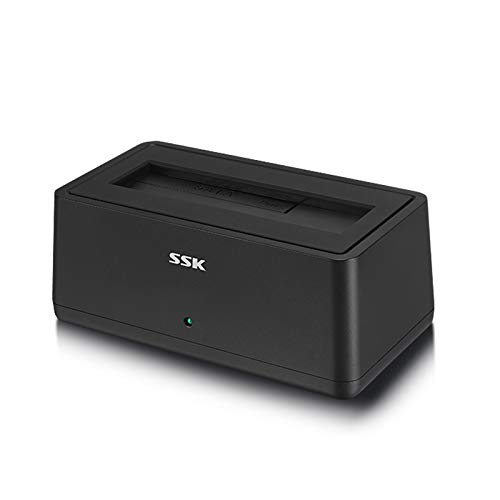
- Works with 2.5-inch and 3.5-inch SATA drives
- USB 3.0 with up to 5Gbps transfer and UASP
- Mac OS 10.4 to 10.11 support
Best For: Older Mac systems needing a simple SATA dock
Dual-Bay USB-C Cloner Dock

- Offline SATA cloning without a computer
- Dual-bay USB-C dock for separate drive access
- Mac plug-and-play with no drivers
Best For: Mac users who need a simple SATA dock and duplicator
USB-C SATA Clone Dock

- USB-C and USB 3.0 connectivity
- Offline cloning up to 60Mbps
- Tool-free support for 2.5-inch and 3.5-inch SATA drives
Best For: Mac users who need USB-C docking with offline clone support
4-Bay USB 3.0 Clone Dock

- Supports up to four SATA HDDs or SSDs
- Offline cloning without a computer
- Trayless plug-and-play design
Best For: Mac users managing multiple SATA drives from one dock
Dual-Bay Offline Cloning Dock – SABRENT USB 3.0 Dual Bay Hard Drive Docking Station & Cloner
If you want hard drive duplicators for mac that keep things simple, this Sabrent dual-bay dock is built for easy offline cloning and quick SATA access. It supports 2.5-inch and 3.5-inch SATA HDDs or SSDs, works without drivers, and also doubles as a USB 3.0 docking station for everyday transfers.
Best For: Mac users who want a straightforward dual-bay SATA dock with offline cloning and plug-and-play setup.
Pros:
- Supports standard 2.5″ and 3.5″ SATA hard drives and SSDs
- Offline cloning up to 60 Mbps without needing a computer
- Plug-and-play design with no drivers required
- USB 3.0 transfer speeds up to 5 Gbps
Cons:
- Cloning speed is modest compared with higher-end duplicators
- Designed around SATA drives, so it is not a universal adapter
This is a practical pick if you need a simple dock and duplicator in one unit. It is especially useful when you want quick drive copying and don’t want extra software or setup getting in the way.
Mac-Ready Portable Backup Drive – WD 4TB My Passport for Mac
This WD My Passport for Mac is not a duplicator, but it belongs in a roundup of hard drive duplicators for mac if you also need a portable destination drive for backups and file transfers. It is designed for Mac, USB-C compatible, and includes backup software plus password protection for everyday storage.
Best For: Mac owners who need a portable backup drive to pair with cloning or transfer workflows.
Pros:
- Designed for Mac with Mac-ready functionality
- USB-C compatible and also works with USB 3.1/USB 3.0
- Includes backup software with ransomware defense
- Portable slim design for carrying files on the go
Cons:
- It is a portable external drive, not a duplicator dock
- No offline cloning hardware or dual-bay copying features
If your priority is storage rather than drive-to-drive duplication, this model is a clean Mac-friendly option. It works best as the backup target alongside a separate cloning solution.
Pro Dual-Bay SATA Duplicator Dock – StarTech Dual-Bay 2.5/3.5in SATA Duplicator Dock
For hard drive duplicators for mac buyers who want a more professional cloning tool, this StarTech dual-bay dock offers standalone sector-by-sector duplication with no computer required. It handles 2.5-inch and 3.5-inch SATA HDDs and SSDs, and it also works as a USB-to-SATA docking station for drive access over USB.
Best For: IT-focused Mac users who need standalone SATA cloning and dual-bay docking in one unit.
Pros:
- Standalone cloning with no computer required
- Copies 2.5″/3.5″ SATA HDDs and SSDs up to the target disk size
- Sector-by-sector duplication works with any file format
- USB-C and USB-A cables included for flexible connection options
Cons:
- Target drive must be equal to or larger than the source drive
- IDE support requires a separate adapter
This dock is the strongest fit when cloning accuracy and standalone operation matter more than basic convenience. Its professional feature set makes it a good choice for repeat drive duplication and recovery-style workflows.
Encrypted Portable Mac Drive – WD 5TB My Passport Ultra for Mac
This WD My Passport Ultra for Mac is a portable external drive, so it is not a true duplicator, but it can complement hard drive duplicators for mac as a secure storage destination. It is formatted for Mac, supports USB-C and USB 3.1, and adds password protection with 256-bit AES hardware encryption.
Best For: Mac users who want a secure portable drive for backups and transferred files.
Pros:
- Formatted for Mac and ready for business or personal use
- USB-C and USB 3.1 compatible
- Includes password protection with 256-bit AES hardware encryption
- Refined metal cover gives it a more premium look
Cons:
- Does not offer drive cloning or duplicator functions
- Portable storage only, so it is not a dock-style solution
If you need secure Mac-compatible storage rather than direct drive copying, this model fits well. It is best used as a companion drive in backup and migration workflows, not as the duplicator itself.
Offline Cloning Specialist – Systor 1:5 HDD/SSD Hard Drive Duplicator/Eraser
If you need hard drive duplicators for mac workflows where speed, standalone operation, and sanitizing matter, this Systor unit is built for straightforward cloning without a computer. It can copy data only or an entire drive, and it supports both HDDs and SSDs in 2.5-inch and 3.5-inch sizes.
Best For: Mac users who want a fully standalone duplicator/eraser for multi-drive cloning and data sanitization.
Pros:
- No computer or software required
- Copies multiple drives simultaneously at up to 90MB/s
- Works with both 2.5-inch and 3.5-inch drives
- Can duplicate or erase drives, including DoD 5220.22-M sanitization
Cons:
- Designed for SATA drives, so it is not a direct USB cloning solution
- Best suited to users who need dedicated hardware rather than a simple dock
This is the most purpose-built option in the group if you want a true offline duplicator for repeated drive work. The built-in erasure feature also makes it useful when you need to repurpose or dispose of old drives securely.
Multi-Bay Clone Dock – ORICO USB C 5 Bay Hard Drive Docking Station
For hard drive duplicators for mac users who also want a flexible dock, this ORICO 5-bay unit combines offline cloning with broad connectivity. It can duplicate four copies from one source without a computer, and it also supports Mac OS 10 or later through its USB-C/USB-A cable setup.
Best For: Mac users who want a multi-bay dock that can also perform offline 1:4 duplication.
Pros:
- Offline 1:4 duplication with a one-button process
- Compatible with Mac OS 10 or later
- USB 3.2 Gen 1 Type-C interface for flexible connectivity
- Supports 2.5-inch and 3.5-inch SATA SSDs/HDDs up to 20TB per bay
Cons:
- Requires backup before cloning because the target disk is overwritten
- Larger dock format may be more than some users need for simple one-to-one copying
This model stands out if you want more than a basic duplicator and need a dock that can grow with your storage needs. The aluminum-alloy design, LED indicators, and anti-vibration pads also make it a practical desktop station.
Basic SATA Dock – SSK USB 3.0 to SATA Hard Drive Docking Station Adapter
If your version of hard drive duplicators for mac is really about quick access, swapping, and transfer convenience, this SSK docking station is the simplest pick here. It is a USB 3.0 SATA dock for 2.5-inch and 3.5-inch drives, and it works with Mac systems from OS 10.4 to 10.11.
Best For: Mac users who need a straightforward SATA dock for drive access and file transfer rather than offline cloning.
Pros:
- Compatible with 2.5-inch and 3.5-inch SATA HDDs/SSDs
- Supports Mac OS 10.4 to 10.11
- USB 3.0 with up to 5Gbps transfer rate and UASP support
- Plug-and-play design with LED status indicator
Cons:
- Does not offer offline duplication features like a true hard drive duplicator
- Mac compatibility is limited to older OS versions listed in the notes
This is the most basic choice in the roundup, but that also makes it easy to use for everyday drive access. If you do not need cloning hardware and just want a reliable SATA dock, it fits the job well.
Dual-Bay USB-C Cloner Dock – SABRENT EC-CH2B
If you want hard drive duplicators for mac that can also double as a daily-use dock, this SABRENT dual-bay model keeps things simple. It can clone one SATA drive to another without a computer, and when connected over USB-C it mounts both drives separately so you can move files or work from them directly.
Best For: Mac users who want a straightforward SATA dock with offline cloning and dual-drive access.
Pros:
- Offline cloning works at the press of a button with no computer needed.
- Both bays can mount as separate drives over USB-C for file transfers and workflow use.
- Supports 2.5-inch and 3.5-inch SATA HDDs and SATA SSDs.
- Plug and play on Mac with no drivers to install.
Cons:
- Cloning is limited to SATA drives only.
- The target drive must be the same size as the source or larger.
- USB-C cable is included, so Mac users need a USB-C port or their own adapter cable.
This is a practical choice if you want a Mac-compatible docking station that handles both everyday drive access and simple offline duplication. It is best suited to SATA-only workflows where convenience matters more than advanced cloning features.
USB-C SATA Clone Dock – WAVLINK Dual-Bay
For shoppers comparing hard drive duplicators for mac, this WAVLINK dual-bay dock covers both file access and offline cloning in one unit. It supports 2.5-inch and 3.5-inch SATA drives, offers USB 3.0 and USB-C connectivity, and can duplicate a drive without a computer when the source and target meet the capacity requirement.
Best For: Mac users who want a feature-rich SATA dock with offline cloning and USB-C support.
Pros:
- Supports 2.5-inch and 3.5-inch SATA HDDs and SSDs.
- Offline cloning works up to 60Mbps with no drivers required.
- USB 3.0 with UASP is rated up to 6Gbps.
- Tool-free, hot-swappable design makes drive changes easy.
Cons:
- Offline cloning is not supported online through the computer.
- Not compatible with M1/M2-based Macs, per the supplied notes.
- Target drive must be larger or equivalent to the source drive.
This dock makes sense if you need a straightforward cloning station and want the flexibility of both USB 3.0 and USB-C connections. The Mac support is broad in the supplied notes, but newer Apple Silicon systems are called out as incompatible.
4-Bay USB 3.0 Clone Dock – SABRENT DS-U3B4
If your Mac workflow involves multiple drives at once, this SABRENT four-bay dock is a more capacity-focused option among hard drive duplicators for mac. It supports up to four SATA HDDs or SSDs, connects over USB 3.0 for standard file access, and includes an offline clone function when you want to duplicate drives without a computer.
Best For: Mac users who need to manage several SATA drives from one dock.
Pros:
- Holds up to four 2.5-inch or 3.5-inch SATA HDDs and SSDs.
- Offline clone function lets you duplicate drives without a computer.
- USB 3.0 connection supports file transfers up to 5Gbps.
- Trayless, plug-and-play design keeps setup simple.
Cons:
- Only supports SATA drives, not other drive types.
- Requires an external power adapter for operation.
- USB 3.0 host connection may be more than some simple clone-only users need.
This dock is the best fit when you want multi-drive access on a Mac and the option to clone drives offline from the same unit. Its bigger four-bay design is especially useful for users juggling backups, archives, or multiple SATA disks.
How We Picked the Best Hard Drive Duplicators for Mac
We focused on compatibility, duplication speed, ease of use, and real-world flexibility. For Hard Drive Duplicators for Mac, that means looking for reliable SATA support, sensible bay layouts, USB-C or USB 3.0 connectivity, offline clone capability, and clear support for both 2.5-inch and 3.5-inch drives where relevant.
We also favored models that make Mac workflows easier, such as straightforward drive mounting, broad macOS compatibility, and backup-friendly designs that can double as everyday storage docks.
Quick Comparison
Dual-bay docks are usually the best fit for most Mac users because they balance cost, desk space, and cloning convenience. If you only need occasional cloning or a simple external drive connection, a compact single-bay dock may be enough. If you manage multiple drives, a 4-bay or 5-bay station is the better long-term buy. Portable My Passport drives are not duplicators, but they can be a smart companion for Mac backups and travel storage.
Key Buying Factors for Hard Drive Duplicators for Mac
Mac Compatibility
Check that the dock works smoothly with macOS for reading, writing, and drive recognition. If your workflow includes frequent use, favor models with USB-C or strong USB 3.x support.
Offline Cloning Support
Many users want standalone duplication without a computer. Look for a dedicated clone mode if you plan to copy drives directly from source to target.
Drive Size and Type Support
Confirm support for the drives you actually own, whether that is 2.5-inch SSDs, 3.5-inch HDDs, or both. Some docks handle only SATA drives, while others are more versatile.
Speed and Workflow
Faster transfer specs matter, but actual performance also depends on the drive type and connection standard. UASP, USB 3.0, and USB-C can all improve everyday responsiveness.
Capacity and Expansion
If you plan to duplicate or manage several drives at once, extra bays are worth the added cost. Multi-bay docks are especially useful for creators, IT users, and anyone maintaining backup rotations.
Who Should Buy Which Hard Drive Duplicators for Mac?
Choose a dual-bay duplicator if you want the best all-around balance of simplicity and value. Pick a 4-bay or 5-bay dock if you regularly swap, archive, or clone multiple drives. Go with a single-bay dock if you mainly need a straightforward bridge between a Mac and one drive. And if your priority is portable backup storage rather than duplication, a Mac-ready external drive may be the better match.