
Architects need a laptop that can handle CAD, BIM, rendering, large project files, and long work sessions without slowing down. The best options balance CPU power, GPU capability, memory, display quality, and portability.
In this roundup, we focus on workstation-class machines and a few lighter AI laptops that make sense for design review, drafting, and on-the-go productivity.
Best 10 Laptop for Architects Picks for 2026
Mobile Workstation Choice

- ISV-certified for AutoCAD, SolidWorks, Creo, ANSYS, and MATLAB
- Core i7-14700HX plus RTX 2000 Ada 8GB for demanding workloads
- 16-inch 4K-class 3840 x 2400 display with 800 nits
Best For: Architects who need a durable workstation for heavy CAD and 3D work
Lightweight Creative Pick
- 16-inch 3K OLED display with 100% DCI-P3 color
- Ryzen AI 7 350 with XDNA NPU for AI-assisted productivity
- 3.31-pound chassis with up to 14 hours of battery life
Best For: Architects who prioritize portability, OLED visuals, and all-day mobility
High-End Workstation Upgrade
- Core i7-13850HX with 64GB DDR5 CAMM and 2TB SSD
- RTX 2000 Ada 8GB for CAD, rendering, and engineering
- Supports up to 4 external monitors and has ISV certifications
Best For: Architects needing maximum RAM, storage, and workstation-grade expandability
Portable AI Budget Pick
- Core Ultra 7 with NPU and Intel Arc graphics
- Up to 22 hours of battery life in a 3.09-pound chassis
- 1TB SSD and 16GB LPDDR5X for everyday productivity
Best For: Architects who need a light travel laptop for planning and AI-assisted work
Best for Easy Setup
Lenovo ThinkPad P15 for CAD and BIM

- RTX A2000 graphics with ISV-certified app support
- 64GB RAM and 2TB SSD for large architectural files
- Thunderbolt 4, HDMI, Ethernet, and included hub
Best For: Architects and engineers needing workstation-grade reliability
Large-Screen Budget Choice
HP 17.3-Inch Business Laptop for Drafting

- 17.3-inch anti-glare FHD screen for a roomy workspace
- 32GB RAM and 1TB SSD support multitasking and storage
- Fingerprint reader, backlit keyboard, and Windows 11 Pro
Best For: Architects who want a big screen for office productivity
Premium Visualization Option
Dell Precision 7680 for 3D Design

- 4K UHD+ OLED touchscreen with 100% DCI-P3 color
- RTX 1000 Ada 6GB for professional graphics workloads
- 32GB DDR5 memory, Thunderbolt 4, and Wi-Fi 6E
Best For: Architects focused on visualization and high-end CAD work
Workstation Value Pick

- NVIDIA T1200 graphics for pro design workloads
- 32GB RAM and 1TB SSD for heavy projects
- ISV-certified for AutoCAD, SolidWorks, and more
Best For: Architects needing a dependable CAD and 3D modeling workstation
Next-Gen Workstation Pick

- Ryzen AI 7 PRO with 50 TOPS NPU
- 32GB DDR5 and 1TB SSD for large projects
- Wi-Fi 7, Thunderbolt 4, and touchscreen mobility
Best For: Architects who want a compact AI workstation with strong connectivity
Mobile Workstation Choice – ThinkPad P16 for Architects
If you want a laptop for architects that can handle heavy CAD and 3D workflows, the Lenovo ThinkPad P16 is built like a true mobile workstation. Its ISV certifications, RTX 2000 Ada graphics, and 20-core Intel Core i7 make it a strong pick for professional design software and complex project work.
Best For: Architects, engineers, and designers who need workstation-grade performance, strong security, and a bright 4K-class display.
Pros:
- ISV-certified for professional apps like AutoCAD, SolidWorks, Creo, ANSYS, and MATLAB
- Intel Core i7-14700HX and NVIDIA RTX 2000 Ada 8GB support demanding creative and technical tasks
- 16-inch 3840 x 2400 display with HDR 400, 100% DCI-P3, and 800 nits brightness
- Useful business features like fingerprint reader, IR webcam, Thunderbolt 4, and Windows 11 Pro
Cons:
- At 6.5 pounds, it is not the most portable option
- Premium workstation hardware will likely be overkill for light sketching or basic office work
The ThinkPad P16 is the most specialized option here for serious architectural work, especially if compatibility, durability, and display quality matter as much as raw speed.
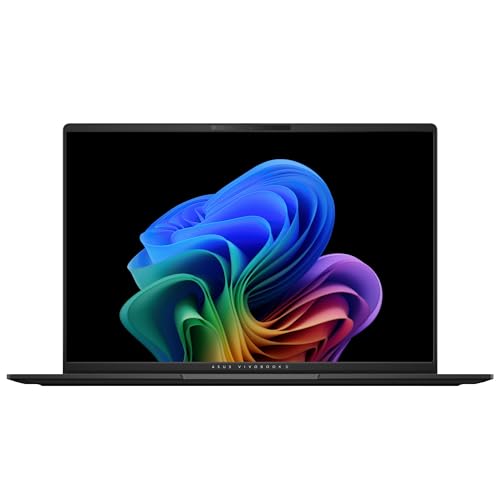
Lightweight Creative Pick – Vivobook S16 AI OLED
The ASUS Vivobook S16 is a practical laptop for architects who want a thinner, lighter machine for concept work, presentations, and everyday design tasks. Its 3K OLED screen, Ryzen AI processor, and 1TB SSD make it attractive for users who value a vivid display and responsive multitasking.
Best For: Architects who want a slim, stylish laptop with a high-quality OLED display and good battery life for on-the-go work.
Pros:
- 16-inch 2880 x 1800 OLED panel with 100% DCI-P3 color and 600-nit peak HDR brightness
- AMD Ryzen AI 7 350 with XDNA NPU for AI-enhanced productivity and multitasking
- 1TB SSD and 16GB memory for fast loading and everyday project handling
- Light 3.31-pound build plus up to 14 hours of battery life for mobile use
Cons:
- 16GB memory is less workstation-like than the higher-capacity models in this roundup
- Windows 11 Home is less business-focused than Pro
This is the best fit if your architectural workflow leans toward mobility, visuals, and general productivity rather than the heaviest rendering jobs.
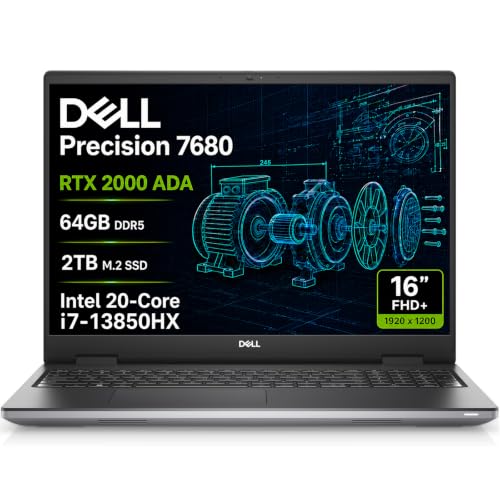
High-End Workstation Upgrade – Dell Precision 7680 Pro Max
If your laptop for architects needs desktop-class muscle, the Dell Precision 7680 is the most powerful workstation-style option in this group. It pairs a high-end Intel HX processor with 64GB of memory and a 2TB SSD, making it a strong match for demanding CAD, rendering, and multitasking workflows.
Best For: Architects and technical professionals who want a top-tier workstation with lots of RAM, large storage, and broad connectivity.
Pros:
- Intel Core i7-13850HX, 64GB DDR5 CAMM RAM, and 2TB SSD for heavy workloads
- NVIDIA RTX 2000 Ada 8GB supports design, 3D rendering, and engineering tasks
- Connects up to 4 external monitors via HDMI, USB-C, and Thunderbolt
- ISV certifications and MIL-STD-810H testing add confidence for professional use
Cons:
- 16-inch FHD+ 1920 x 1200 display is less sharp than the ThinkPad’s 4K-class panel
- Likely heavier and more workstation-like than casual users need
Choose the Precision 7680 when raw workstation specs matter more than thinness or screen resolution, especially if your projects regularly push system limits.
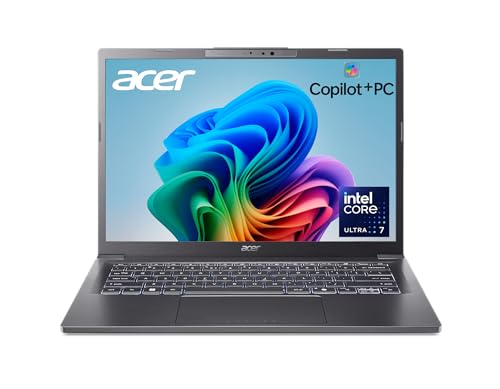
Portable AI Budget Pick – Acer Aspire 14 AI
The Acer Aspire 14 AI is a compact laptop for architects who want an efficient, portable system for planning, note-taking, and lighter creative work. It stands out for its AI-focused Intel Core Ultra processor, long battery life, and slim aluminum design.
Best For: Architects who want a lightweight 14-inch machine for travel, productivity, and everyday AI-assisted workflows.
Pros:
- Intel Core Ultra 7 processor with NPU and Intel Arc 140V graphics for modern AI features
- Up to 22 hours of battery life for long days away from the desk
- 16GB LPDDR5X memory and 1TB SSD offer solid everyday responsiveness
- Light 3.09-pound aluminum chassis with a 180-degree lie-flat hinge
Cons:
- 14-inch 1920 x 1200 display is better for portability than detailed drafting work
- More of a productivity laptop than a full workstation-class machine
This is the most travel-friendly choice here, but it makes the most sense if your architectural workload is lighter and you value battery life over maxed-out graphics power.
Best for Easy Setup – Lenovo ThinkPad P15 for CAD and BIM
If you need a laptop for architects that prioritizes certified performance over thin-and-light portability, the ThinkPad P15 is built for serious CAD, BIM, and 3D workflows. Its RTX A2000 graphics, 64GB of RAM, and 2TB SSD give it the headroom to handle demanding project files, while the 15.6-inch FHD anti-glare panel keeps day-to-day drafting comfortable.
Best For: Architects, engineers, and design students who need workstation-class stability for AutoCAD, Revit, SOLIDWORKS, and similar tools.
Pros:
- RTX A2000 4GB dedicated graphics with ISV support for professional apps
- 64GB DDR4 memory and 2TB NVMe SSD for large files and multitasking
- Thunderbolt 4, HDMI, Ethernet, and included 7-in-1 hub expand connectivity
- Backlit keyboard, fingerprint reader, and Windows 11 Pro add practical security
Cons:
- 15.6-inch 300-nit display is practical, but not the brightest option here
- Heavier workstation design is less portable than standard business laptops
- Focused on professional performance rather than premium display features
This is the most specialized workstation in the group, and it makes sense if your work depends on proven compatibility and strong sustained performance. For architects who want reliability with no compromise on memory or storage, it is a very capable choice.
Large-Screen Budget Choice – HP 17.3-Inch Business Laptop for Drafting
For buyers looking for a laptop for architects with a big display and straightforward business features, this HP 17.3-inch model offers a roomy workspace at a practical spec level. The 32GB of RAM and 1TB SSD support heavy multitasking, while the anti-glare FHD screen makes it easier to compare plans, notes, and reference material side by side.
Best For: Architects who want a large-screen Windows 11 Pro laptop for everyday office work, planning, and multitasking.
Pros:
- 17.3-inch Full HD anti-glare display gives you plenty of working space
- 32GB RAM and 1TB NVMe SSD are solid for multitasking and file storage
- Backlit keyboard with numeric keypad is useful for productivity work
- Fingerprint reader and Windows 11 Pro add convenient security features
Cons:
- Integrated Intel UHD Graphics are not designed for demanding 3D rendering
- At 13.1 pounds, it is much less portable than smaller alternatives
- Display brightness is modest at 250 nits
This HP is better suited to office-heavy architectural workflows than to high-end visualization or rendering. If screen size and general productivity matter more than dedicated graphics, it is a sensible large-format option.
Premium Visualization Option – Dell Precision 7680 for 3D Design
If your laptop for architects needs a display and GPU setup that supports detailed visual work, the Dell Precision 7680 is the strongest premium option here. Its 16-inch 4K UHD+ OLED touchscreen, RTX 1000 Ada graphics, and 32GB of DDR5 memory are built for demanding design sessions, while the workstation chassis is aimed at reliable professional use.
Best For: Architects and design professionals who want a high-end workstation for CAD, 3D rendering, and color-accurate visualization.
Pros:
- 16-inch 4K UHD+ OLED touchscreen with 100% DCI-P3 color gamut
- RTX 1000 Ada 6GB graphics for professional design and rendering workloads
- 32GB DDR5 CAMM memory and 512GB SSD support fast multitasking
- Strong connectivity with Thunderbolt 4, USB-C, HDMI, Ethernet, and Wi-Fi 6E
Cons:
- 512GB SSD is smaller than the storage on some competing workstations
- Premium workstation design is aimed at performance, not low cost
- Touchscreen OLED and powerful components may be more than casual users need
This Precision is the most display-focused and graphics-capable choice in the roundup. For architects who spend time reviewing visuals, refining models, and moving between office and field work, it offers a polished workstation experience.
AI Mobility Pick – Acer Aspire AI 14 for Business & Creators
If you’re looking for a laptop for architects that can handle drawings, client presentations, and everyday project management, this Acer Aspire AI is built for portable productivity. The Intel Core Ultra 7, 32GB of RAM, and 1TB SSD give it enough headroom for multitasking, while the 14-inch touchscreen and bundled USB hub make it easier to work across office, studio, and client sites.
Best For: Architects and design professionals who want a lightweight, AI-assisted laptop for mobile work, presentations, and general creative tasks.
Pros:
- Intel Core Ultra 7 with a dedicated NPU supports local AI features and automation.
- 32GB LPDDR5X RAM and 1TB SSD are well-suited to heavy multitasking and fast file access.
- 14-inch touchscreen with stylus support adds useful input flexibility for visual work.
- USB hub adds HDMI, USB-A, USB-C, SD card, and Ethernet without extra adapters.
Cons:
- Integrated graphics are less specialized for demanding CAD or 3D rendering workloads.
- 14-inch screen may feel compact for detailed plan review over long sessions.
Overall, this is a strong fit if portability matters more than workstation-class graphics power. It looks best for architects who split time between office work, meetings, and light-to-moderate creative tasks.
Workstation Value Pick – HP ZBook Power 15.6 for CAD
For a laptop for architects that needs more serious workstation hardware, the HP ZBook Power brings a proven pro-focused setup. Its Intel Core i7 H-series chip, NVIDIA T1200 graphics, 32GB of memory, and 1TB SSD are aimed at CAD, 3D modeling, and other demanding design workloads, while the 15.6-inch anti-glare display and broad port selection support day-to-day office use.
Best For: Architects and designers who need a portable workstation for CAD, 3D modeling, and connected multi-monitor work.
Pros:
- Dedicated NVIDIA T1200 graphics are better suited to pro design workloads than integrated graphics.
- 32GB memory and 1TB SSD support large projects and fast load times.
- ISV certifications add confidence for apps like AutoCAD, SolidWorks, CREO, ANSYS, and MATLAB.
- Thunderbolt 4, HDMI, Ethernet, and Wi-Fi 6 cover a wide range of office and studio setups.
Cons:
- It is a renewed model, which may matter if you prefer brand-new hardware.
- At 4.19 pounds, it is less travel-friendly than lighter 14-inch options.
As a practical workstation choice, this ZBook is the most graphics-focused option in the group. It makes the most sense for architects who spend real time in CAD and 3D tools and want a more traditional mobile workstation.
Next-Gen Workstation Pick – HP ZBook 8 G1ak 14 Touch
If you want a laptop for architects that blends workstation performance with newer AI features, the HP ZBook 8 G1ak is the most modern-feeling option here. The Ryzen AI 7 PRO 350, 32GB of RAM, 1TB SSD, and 50 TOPS NPU support professional multitasking, local AI workloads, and demanding design apps, while the 14-inch touchscreen keeps it compact enough for mobile use.
Best For: Architects who want a compact mobile workstation with AI acceleration, strong multitasking, and pro app support.
Pros:
- Ryzen AI 7 PRO 350 plus a 50 TOPS NPU supports local AI and efficient computing.
- 32GB DDR5 RAM and 1TB SSD are well matched to large files and multiple projects.
- 14-inch WUXGA touchscreen is useful for portable review, markup, and presentation work.
- Thunderbolt 4, HDMI 2.1, Ethernet, Wi-Fi 7, and the included hub improve connectivity.
Cons:
- Integrated Radeon graphics are not as specialized as dedicated workstation GPUs for the heaviest 3D tasks.
- 14-inch screen may be tight for extended detailed drafting without external monitors.
This ZBook stands out for combining modern AI hardware with workstation-class memory and storage. It is a smart pick for architects who value mobility, secure collaboration, and flexible multi-monitor setups.
How We Picked the Best Laptop for Architects
We prioritized performance that matters for architecture workflows: strong multi-core CPUs, dedicated GPUs for 3D modeling and viewport acceleration, at least 16GB of RAM, and fast SSD storage. We also looked at display quality, thermals, port selection, and whether the machine is better suited to desk-based work or portable field use.
Because a Laptop for Architects often needs to run software like AutoCAD, Revit, Archicad, SketchUp, Rhino, and Adobe tools, we gave extra weight to systems with workstation-grade graphics and higher memory capacity.
Quick Comparison: What These Laptops Are Best for
Mobile workstations are the safest choice for heavy BIM, rendering, and complex 3D scenes. Midrange AI laptops are better for drafting, presentations, markup, and lighter modeling when portability matters more than raw graphics power.
If you spend most of your time in the office or studio, prioritize a larger screen and stronger GPU. If you travel between site visits, client meetings, and class, a lighter 14-inch or 16-inch model may be the smarter fit.
Key Buying Factors for a Laptop for Architects
CPU and GPU Performance
Choose a high-performance processor for multitasking and model manipulation, and a dedicated GPU if you work in 3D or render often. Integrated graphics can work for basic drafting, but they are not ideal for demanding visualization.
Memory and Storage
For most professionals, 32GB RAM is a practical baseline, while 64GB is preferable for larger projects and smoother multitasking. A 1TB SSD is a strong starting point for software, project files, and local asset libraries.
Display and Portability
A sharp, color-accurate display helps with linework, presentation boards, and review sessions. Larger 15- to 16-inch screens improve productivity, while 14-inch systems are easier to carry. If you often work away from your desk, battery life and weight matter more than peak performance.
Thermals, Ports, and Upgradability
Architectural workloads can run for hours, so good cooling is essential. Look for enough USB-C, USB-A, HDMI, and card-reader support for monitors, tablets, and peripherals. Upgradable memory and storage can extend the life of a Laptop for Architects and reduce future replacement costs.
Who Should Buy Which Laptop for Architects?
Buy a full mobile workstation if you handle large BIM files, complex 3D models, or rendering on a regular basis. Choose a lighter AI or business laptop if your work is mostly drafting, markups, presentations, or remote collaboration.
Students and early-career designers can often save money with a balanced midrange option, while senior architects, visualization specialists, and CAD power users should favor higher-end CPUs, more RAM, and stronger RTX-class graphics.