
If you need dependable serial connectivity in a compact system, an industrial computer with serial ports is still one of the most practical choices for automation and control tasks. These machines are built for stable operation, easier device integration, and long-term use.
In this roundup, we focus on fanless mini PCs and desktop-style industrial systems that offer the port mix, performance, and expansion options buyers typically need for POS, HMI, machine control, and edge computing.
Best 10 Industrial Computer with Serial Ports Picks for 2026
Flagship 6-COM Triple-Display Build

- 6 COM ports with RS232/RS422/RS485 options
- Triple display via HD, EDP, and Type-C
- 2 LAN, 8 USB, GPIO, WiFi, and SIM slot
Best For: Industrial users needing lots of serial connectivity and multi-display support
Classic 6-COM Metal Chassis Pick
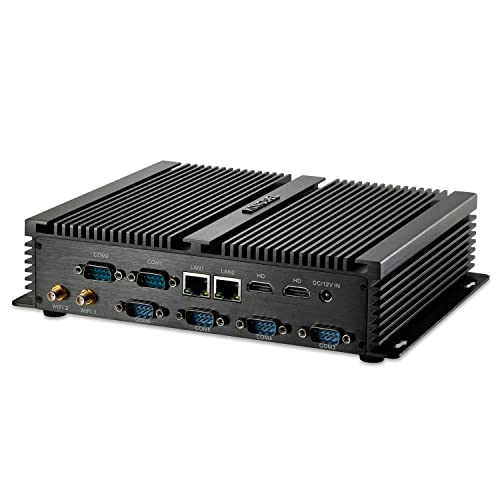
- 6 COM RS232 ports for legacy devices
- All-metal fanless case for silent operation
- 2 LAN, 2 HDMI, and 8 USB ports
Best For: Quiet industrial setups that still depend on multiple RS232 connections
Balanced 2-COM 3-Screen Option

- 2 COM ports with RS232/RS422/RS485 support
- Triple display with 2 HDMI and 1 DP
- Windows 11 Pro plus Linux/Ubuntu support
Best For: Moderate serial-port needs with strong display and OS flexibility
High-I/O Rugged Workhorse
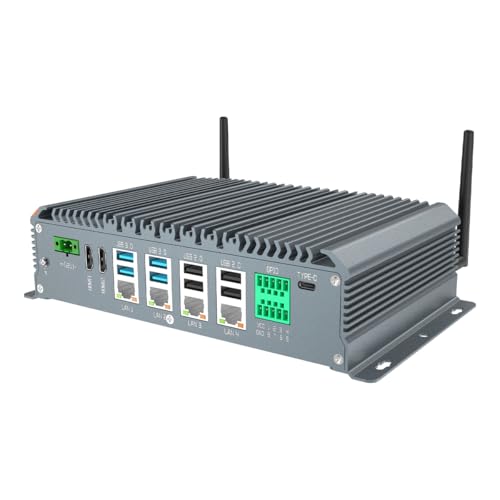
- 6 COM ports with RS232/RS485 on COM1-COM4
- 4 LAN ports and 8 GPIO for industrial control
- Dual HDMI, VGA, and Type-C outputs
Best For: Dense industrial setups needing serial, network, and GPIO connectivity
Compact Serial I/O Workhorse
KINGDEL Fanless Mini PC with 4x COM and Dual NIC
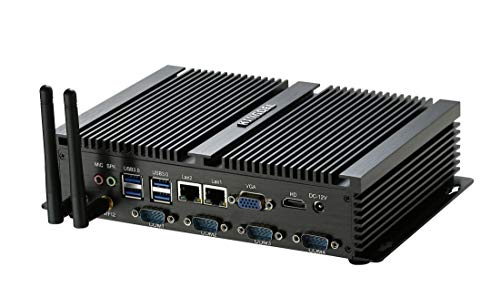
- 4x COM RS232 ports
- Fanless all-metal chassis
- Dual NICs and HDMI/VGA outputs
Best For: Light industrial and education setups needing multiple serial ports
High-Port Industrial Controller
Fanless i5 Mini PC with 6 DB9 COM

- 6 DB9 COM ports
- Core i5-10310U, 16GB RAM, 512GB SSD
- Dual LAN and dual-display support
Best For: Automation and control systems needing many serial connections
Performance-Focused Serial Box
msecore Core i7 Mini PC with 6x COM

- Core i7, 32GB RAM, 1TB SSD
- 6 RS232 COM ports
- Dual 2.5G LAN plus Wi‑Fi 6
Best For: Industrial and office users who need strong performance and serial I/O
Fanless Dual-LAN Value Pick
Compact i5 with 2 RS232 and 2.5GbE

- 2 RS232 COM ports
- Dual 2.5GbE LAN and Wi‑Fi/BT
- Dual HDMI, fanless 24/7 design
Best For: Compact deployments that need quiet operation and basic serial connectivity
High-Port Industrial Workhorse
i7 Mini PC with 6 RS232 and Dual 2.5GbE

- Six RS232 COM ports
- Dual 2.5GbE LAN plus SIM slot
- HD/VGA dual display and fanless design
Best For: Industrial setups that need lots of serial connections and wired network ports
Quiet Rack-Friendly Choice
Fanless i7 with 2 COM and Dual LAN

- 2 RS232 COM ports
- Fanless enclosed design with rack-friendly size
- Dual LAN with HDMI/VGA output
Best For: Compact cabinet installs that need quiet operation and basic serial support
Flagship 6-COM Triple-Display Build – Core i7 Fanless Mini PC
If you need an industrial computer with serial ports for controls, terminals, or multi-device integration, this fanless mini PC is built around connectivity. It pairs a Core i7-10610U with 6 COM ports, dual LAN, GPIO, and three-display output, making it a strong fit for compact industrial setups that still need modern performance.
Best For: Users who want a high-connectivity industrial computer for PLCs, POS gear, scanners, CNC equipment, and triple-monitor workstations.
Pros:
- 6 DB9 COM ports with RS232, or a mix of RS232 and RS422/RS485 modes
- Core i7-10610U, 16GB RAM, and 256GB SSD for responsive everyday use
- HD + EDP + Type-C triple display support for multi-screen workflows
- 2 LAN ports, 8 USB ports, GPIO, WiFi, and SIM slot for broad integration
Cons:
- 4G/5G module is not included
- Focused on industrial connectivity rather than a slim consumer design
Overall, this model stands out when port count matters as much as CPU power. It’s a practical choice for control rooms, embedded deployments, and other spaces where serial connections are still essential.
Classic 6-COM Metal Chassis Pick – Fanless i7 Industrial PC
This industrial computer with serial ports leans into a durable, straightforward design for stable everyday operation. With 6 COM RS232 ports, dual LAN, and a full-metal fanless case, it’s a sensible option when you want basic industrial connectivity in a quiet mini PC.
Best For: Buyers who want a simple, silent industrial PC for legacy serial devices, office use, or compact control setups.
Pros:
- 6 COM RS232 ports for connecting serial equipment
- Fanless all-metal case for silent working and durability
- 2 LAN ports plus 2 HDMI outputs for flexible networking and displays
- 8 total USB ports and built-in WiFi for general expansion
Cons:
- Older Core i7 platform and DDR3L memory limit upgrade headroom
- COM ports are listed as RS232 only in the supplied notes
It’s not the newest platform here, but it offers the serial-port count and rugged, fanless build many industrial buyers prioritize. For basic integration work, it keeps the feature set focused and dependable.
Balanced 2-COM 3-Screen Option – WEIDIAN H6 Industrial Mini PC
If you want an industrial computer with serial ports but don’t need a huge COM count, this WEIDIAN model is a balanced pick. It combines a 10th Gen Core i7, dual-channel expansion, and 2 configurable COM ports with triple-display output and solid networking for compact industrial or business use.
Best For: Users who need a flexible industrial PC for moderate serial connectivity, dual LAN networking, and triple-monitor operation.
Pros:
- 2 COM ports with RS232/RS422/RS485 support
- Triple display support through 2 HDMI ports and 1 DP port
- 2 LAN ports, 6 USB ports, WiFi, and Bluetooth for connected setups
- Supports Windows 11 Pro, Linux, and Ubuntu
Cons:
- Only 2 serial ports, so it may be limiting for heavier legacy-device installs
- 4G module support is mentioned, but the module is not included by default
This is a practical middle-ground machine for buyers who need serial support without overbuying port count. It’s especially appealing if you also value flexible OS support and three-screen output.
High-I/O Rugged Workhorse – Fanless i7 6-COM PC
For buyers comparing an industrial computer with serial ports, this SunKol unit emphasizes I/O density and rugged operation. It pairs a Core i7-10710U with 6 COM ports, 4 LAN ports, 8 GPIO, and multiple video outputs, making it well suited to control-heavy environments that need plenty of wired connections.
Best For: Industrial users who need many Ethernet, GPIO, and serial connections in a compact fanless PC.
Pros:
- 6 COM ports, with COM1-COM4 supporting RS232/RS485 switching
- 4 LAN ports and 8 GPIO for dense industrial integration
- Dual HDMI, VGA, and Type-C outputs for flexible display setups
- Fanless aluminum-alloy design with wide operating temperature support
Cons:
- Serial configuration is mixed, so RS485 is limited to specific COM ports
- More specialized than a general-purpose mini PC
This model is a strong fit when your application needs both serial connectivity and lots of network/control interfaces. The rugged, fanless build adds to its appeal for industrial deployments where reliability matters.
Compact Serial I/O Workhorse – KINGDEL Fanless Mini PC with 4x COM and Dual NIC
If you need an industrial computer with serial ports for basic control, legacy device connections, or office-side automation, this KINGDEL fanless mini PC keeps things simple and practical. It pairs a Celeron dual-core CPU with 8GB RAM and a 128GB SSD, while giving you 4x COM RS232 ports, dual NICs, and both HDMI and VGA output in a silent metal chassis.
Best For: Light industrial tasks, education labs, and small setups that need multiple RS232 connections.
Pros:
- 4x COM RS232 ports for serial-connected equipment
- Fanless all-metal design for quiet operation
- Dual NICs plus HDMI and VGA for flexible hookups
- 8GB RAM and 128GB SSD cover basic everyday workloads
Cons:
- Celeron dual-core platform is best for lighter workloads
- 8GB RAM maximum limits upgrade headroom
- Storage starts at 128GB, which may be modest for heavier use
Overall, this model is a sensible pick when serial connectivity matters more than raw performance. It fits best in quiet, compact environments where reliability and port count are the main priorities.
High-Port Industrial Controller – Fanless i5 Mini PC with 6 DB9 COM
For buyers comparing an industrial computer with serial ports, this fanless mini PC stands out for its six DB9 COM ports and stronger Core i5-10310U processor. It combines 16GB DDR4, a 512GB SSD, dual Gigabit LAN, and dual-display support in a full aluminum alloy case designed for quiet operation.
Best For: Automation, monitoring, and business/industrial installs that need a higher serial port count.
Pros:
- 6 DB9 COM ports, including 4 that support RS422/RS485
- Core i5-10310U with 16GB RAM and 512GB SSD
- Dual HDMI/VGA display support plus 2 RJ45 LAN ports
- Fanless aluminum alloy build for low-noise use
Cons:
- More capable than entry-level units, but still a compact mini PC
- Port-rich design may be more than needed for simple desktop use
- Industrial focus means it is less about consumer entertainment features
This is the strongest choice here if your workflow depends on multiple serial connections and stable 24/7 operation. The extra ports, stronger CPU, and dual LAN make it a better fit for demanding industrial control environments.
Performance-Focused Serial Box – msecore Core i7 Mini PC with 6x COM
If you want an industrial computer with serial ports and more headroom for heavier multitasking, this msecore fanless mini PC is the most performance-oriented option in the group. It brings a Core i7-8550U, 32GB RAM, and a 1TB SSD, along with dual 2.5G LAN, six RS232 COM ports, Wi‑Fi 6, and both HDMI and VGA outputs.
Best For: Industrial and office environments that need strong performance plus multiple serial connections.
Pros:
- Core i7-8550U with 32GB RAM and 1TB SSD
- Six RS232 COM ports for serial-device compatibility
- Dual 2.5G LAN and Wi‑Fi 6 for flexible networking
- Fanless metal case helps reduce noise and dust intake
Cons:
- Still a compact mini PC, so expansion is naturally limited
- SIM/4G cannot be used at the same time as Wi‑Fi
- Built around industrial utility rather than general consumer styling
Among these options, this model offers the best mix of serial connectivity and overall performance. It is well suited to users who need to run more demanding applications without giving up a full set of COM ports.
Fanless Dual-LAN Value Pick – Compact i5 with 2 RS232 and 2.5GbE
If you need an industrial computer with serial ports for signage, light automation, or office-style deployments, this fanless Baieyu mini PC covers the basics well. It pairs an 8th Gen Core i5-8260U with dual 2.5GbE LAN, dual HDMI outputs, and 2 RS232 COM ports in a compact chassis that is built for quiet 24/7 operation.
Best For: Users who want a compact, fanless industrial PC with dual serial ports, dual LAN, and dual-display support.
Pros:
- 2 RS232 COM ports for serial devices and peripheral connectivity
- Dual 2.5GbE LAN plus Wi‑Fi and Bluetooth 4.2 for flexible networking
- Dual HDMI outputs for two-screen setups
- Fanless 15W design supports quiet continuous use
Cons:
- Storage expansion requires separately purchased SSD or HDD
- Only 2 serial ports, so it may be too limited for heavier industrial setups
Overall, this model is a practical entry point if your industrial computer with serial ports needs are modest and you value low noise, dual networking, and simple dual-monitor support.
High-Port Industrial Workhorse – i7 Mini PC with 6 RS232 and Dual 2.5GbE
This industrial computer with serial ports is built for setups that need more device connections than a typical mini PC provides. The Core i7-8550U, six RS232 COM ports, dual 2.5GbE LAN, and HD/VGA dual-display outputs make it a strong fit for industrial, kiosk, and automation environments that rely on multiple wired peripherals.
Best For: Buyers who need a fanless mini PC with a high count of serial ports and broad wired connectivity.
Pros:
- Six RS232 COM ports for multiple industrial devices
- Dual 2.5GbE LAN for strong wired networking
- HD plus VGA dual-display support
- Auto Power On, Wake On LAN, and PXE add deployment flexibility
Cons:
- More serial capacity than many users need, so it may be overkill for simple setups
- Its feature set is geared more toward industrial use than everyday home computing
If you want a serial-heavy industrial PC, this one stands out for its six COM ports and dual 2.5GbE networking, giving you room to connect more equipment without adding external adapters.
Quiet Rack-Friendly Choice – Fanless i7 with 2 COM and Dual LAN
For buyers searching for an industrial computer with serial ports in a small, rack-friendly form factor, this msecore fanless mini PC is a straightforward option. It uses a Core i7-5500U, includes 2 RS232 COM ports, dual LAN, and HDMI/VGA outputs, while its passive cooling and enclosed metal case are designed for quieter, dust-resistant operation.
Best For: Small industrial cabinets, office automation, or embedded installs that need reliable serial support in a compact chassis.
Pros:
- 2 RS232 COM ports for serial-connected equipment
- Fanless passive cooling with enclosed case helps reduce dust ingress
- Dual LAN and HDMI/VGA outputs for flexible integration
- Rack-mount friendly size for cabinet installation
Cons:
- Only 2 COM ports, so it is less expandable than higher-port industrial models
- Windows 10 Pro is preinstalled rather than Windows 11 Pro
This is a sensible pick when you want a compact, quiet system with basic serial connectivity and dependable long-run operation, especially in a cabinet or enclosed workspace.
How We Picked the Best Industrial Computer with Serial Ports
We prioritized models that combine the right balance of processor performance, RAM, storage, and I/O for real-world deployment. For an Industrial Computer with Serial Ports, the port count and port type matter just as much as CPU speed, so we looked closely at RS232 availability, multi-protocol support like RS422/RS485, and related connectivity such as LAN, USB, HDMI, and GPIO.
We also favored fanless designs for quieter operation and fewer moving parts, since that usually improves reliability in dusty or always-on environments.
Quick Comparison
The strongest options for heavy multi-device integration are the systems with 4 to 6 COM ports, while lighter-duty setups may only need 2 COM ports plus dual LAN. If you are connecting legacy instruments, barcode scanners, PLCs, receipt printers, or access-control devices, start by matching the port count and signal type before comparing CPUs.
For general use, Intel Core i5 and i7 models offer plenty of headroom. Celeron-based systems can still work well for basic control stations, thin clients, and simple serial workloads.
Key Buying Factors for an Industrial Computer with Serial Ports
1. Port Type and Count
Check whether you need standard RS232 or multi-mode serial ports that can switch between RS232, RS422, and RS485. The number of ports should match your current devices plus any near-term expansion.
2. Processing Power and Memory
Choose a CPU and RAM level based on workload. HMI software, data logging, multitasking, and virtualized edge apps benefit from Core i5 or Core i7 processors and at least 8GB to 16GB of memory.
3. Storage and Reliability
SSD capacity affects not just space but also update headroom and local data logging. For industrial use, SSD-based systems are preferred because they are faster and generally more durable than mechanical drives.
4. Networking and Expansion
Dual LAN is useful for separating machine networks from office networks. Multiple NICs, 2.5G Ethernet, USB 3.0, HDMI, DP, and GPIO can all improve integration flexibility.
Who Should Buy Which Industrial Computer with Serial Ports?
If you need the most serial ports for multiple legacy devices, prioritize the 4- to 6-COM models. If your setup depends on a mix of serial devices and modern peripherals, a balanced Core i5 or Core i7 system with dual display support is often the sweet spot.
For simpler deployments, such as kiosks, basic control panels, or lightweight automation stations, a lower-cost fanless unit with fewer COM ports may be the best fit. In short, the best Industrial Computer with Serial Ports is the one that matches your device count, environmental demands, and software workload without overbuying unnecessary features.