
Choosing the right laptop for 3D modeling means balancing CPU power, GPU capability, memory, and thermals—not just chasing the newest specs. The best options can handle demanding scenes, viewport performance, and long render sessions without slowing your workflow.
Below, we focus on machines that make sense for real creative work, from mobile workstations to creator-focused laptops with strong graphics and high-memory configurations.
Best 10 Laptop for 3D Modeling Picks for 2026
Elite Workstation Pick
Dell Precision 7680 RTX 2000 Ada 64GB

- RTX 2000 Ada 8GB for pro graphics work
- 64GB DDR5 CAMM RAM with 1TB SSD
- Built for CAD, 3D rendering, and engineering
Best For: Professionals who need a dependable mobile workstation for 3D modeling
Value Creator Upgrade
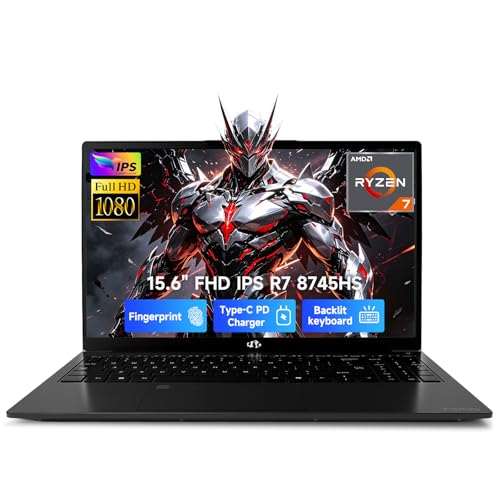
- Ryzen 7 8745HS with Radeon 780M graphics
- 32GB DDR5 RAM and 1TB SSD included
- USB4 and upgradeable to 64GB RAM
Best For: Students and creators who want a flexible, upgrade-friendly 3D modeling laptop
OLED Visual Pro
Dell Precision 7680 RTX 1000 Ada OLED

- 4K OLED touchscreen with 100% DCI-P3
- RTX 1000 Ada 6GB workstation graphics
- 32GB RAM, Thunderbolt 4, and Wi-Fi 6E
Best For: Designers who prioritize a sharp OLED display for 3D modeling and presentations
Gaming Power Choice

- RTX 5060 graphics with DLSS 4 support
- Core i7-14650HX and 1TB Gen 4 SSD
- Advanced cooling for sustained performance
Best For: Creators who want a fast GPU and strong cooling for 3D modeling and gaming
Mobile Workstation Pick

- 4K OLED touchscreen with 100% DCI-P3
- 32GB DDR5 and 1TB SSD
- Thunderbolt 4, HDMI 2.1, Wi-Fi 7
Best For: Creators who want a premium mobile workstation and sharp display
Budget Workstation Value

- RTX T600 4GB dedicated graphics
- Core i7 H-series CPU with DDR5 RAM
- Thunderbolt 4 and HDMI 2.0 ports
Best For: Refurbished workstation buyers needing dedicated graphics
Creator Display Choice

- 2.8K OLED 120Hz display
- Core Ultra 9 with 32GB RAM
- Light 3.3-pound 16-inch design
Best For: Creators who want a vivid OLED screen and portable power
Creator-Ready Workhorse
Dell Precision 3561 with i7-11800H, 32GB RAM

- i7-11800H with 32GB DDR4 memory
- Nvidia Quadro T1200 workstation graphics
- 512GB SSD and 15.6-inch FHD display
Best For: 3D modeling, CAD, and dependable workstation use
Premium Mobile Studio
Dell Precision 5570 with RTX A2000 8GB

- 12th Gen Core i7 with 32GB DDR5 RAM
- RTX A2000 8GB for design and rendering
- 15-inch UHD touchscreen with 512GB NVMe SSD
Best For: Professional 3D modeling and demanding creative workflows
Budget Workstation Pick
Dell Precision 5550 with Quadro T1000

- Core i7-10850H with 32GB RAM
- Quadro T1000 4GB dedicated graphics
- 512GB SSD and 15.6-inch FHD screen
Best For: Entry to mid-level 3D modeling on a budget
Elite Workstation Pick – Dell Precision 7680 RTX 2000 Ada 64GB
If you want a laptop for 3D modeling that leans toward workstation reliability, the Dell Precision 7000 7680 is built for demanding creative and engineering workflows. Its RTX 2000 Ada 8GB GPU, 64GB of DDR5 CAMM memory, and Intel Core i7-13850HX make it a strong fit for heavy multitasking, CAD work, and rendering tasks.
Best For: Architects, designers, engineers, and technical users who need a certified mobile workstation for 3D rendering and complex professional software.
Pros:
- NVIDIA RTX 2000 Ada 8GB graphics for creative and engineering workloads
- 64GB DDR5 CAMM RAM and 1TB SSD for fast multitasking and storage
- 16-inch FHD+ anti-glare display plus support for up to four external monitors
- Thunderbolt 4, USB-C, USB-A, HDMI, Ethernet, Wi-Fi 6E, and Bluetooth 5.2
Cons:
- FHD+ panel is less detailed than 4K options for visual-heavy work
- 5.9-pound build is relatively heavy for frequent travel
- More workstation-focused than value-focused
This is a serious pro-grade option if stability, expandability, and compatibility matter more than flashy specs. It makes the most sense for users who need dependable performance across 3D modeling, simulation, and other advanced workflows.
Value Creator Upgrade – NIMO Ryzen 7 8745HS 32GB
For buyers looking for a laptop for 3D modeling without jumping straight to a full workstation price tag, the NIMO 15.6-inch creator laptop offers a practical middle ground. The Ryzen 7 8745HS, Radeon 780M graphics, 32GB of DDR5 memory, and 1TB SSD give it the core resources needed for creative software, multitasking, and student projects.
Best For: Students, creators, and budget-conscious users who want solid performance for 3D modeling, rendering, and multitasking.
Pros:
- Ryzen 7 8745HS with Radeon 780M graphics for creator-focused performance
- 32GB RAM and 1TB SSD with room to upgrade to 64GB and dual SSDs
- USB4 support with external GPU docking potential
- 100W PD fast charging and a 2-year warranty
Cons:
- Integrated graphics are not as strong as dedicated workstation GPUs
- 15.6-inch FHD display is more practical than premium
- Not as specialized as a certified mobile workstation
This model stands out for flexibility and value, especially if you want enough power to handle creative projects now and upgrade later. It is a smart choice when you need a capable all-rounder for design work, remote streaming, and lighter 3D tasks.
OLED Visual Pro – Dell Precision 7680 RTX 1000 Ada OLED
If display quality matters as much as core performance, this Dell Precision 7680 is a strong laptop for 3D modeling and content work. It combines an OLED 4K UHD+ touchscreen with an RTX 1000 Ada 6GB GPU, Intel Core i5-13600HX, 32GB of DDR5 CAMM memory, and a 512GB SSD for professional-level creative use.
Best For: Designers and professionals who want a workstation with a sharp 4K OLED screen for modeling, review, and client presentations.
Pros:
- 16-inch 4K UHD+ OLED touchscreen with 100% DCI-P3 color
- NVIDIA RTX 1000 Ada 6GB for professional graphics workloads
- 32GB DDR5 CAMM RAM supports multitasking and demanding apps
- Thunderbolt 4, USB-C, HDMI, Ethernet, and Wi-Fi 6E connectivity
Cons:
- 512GB SSD is smaller than the 1TB options in this group
- RTX 1000 Ada is a lower-tier GPU than the RTX 2000 Ada model
- At 5.9 pounds, it is still a substantial machine to carry
This is the pick for people who want workstation stability but also care about color, contrast, and touch input. It is especially appealing if your 3D modeling workflow includes visual review, presentations, or mixed creative production.
Gaming Power Choice – ASUS ROG Strix G16 RTX 5060
The ASUS ROG Strix G16 is a strong gaming-style laptop for 3D modeling if you want high-end consumer performance in a more aggressive chassis. With an Intel Core i7-14650HX, GeForce RTX 5060, 16GB of DDR5 memory, and a 1TB Gen 4 SSD, it has the hardware to handle creative apps, fast scene loading, and smooth daily use.
Best For: Creators and gamers who want a high-performance 3D modeling laptop with strong cooling and a fast GPU.
Pros:
- GeForce RTX 5060 with Blackwell architecture, DLSS 4, and Max-Q features
- Intel Core i7-14650HX for strong CPU performance
- 165Hz FHD+ display with reduced glare for creation and entertainment
- Advanced cooling with vapor chamber, tri-fan tech, and liquid metal
Cons:
- 16GB RAM is the lowest memory capacity in this roundup
- Windows 11 Home is less business-oriented than Pro editions
- Gaming styling may not suit every professional setting
This is the most performance-forward consumer-style option here, especially if you also care about gaming or want excellent thermals. It makes sense for users who want a fast GPU and strong cooling more than workstation certifications or ultra-refined portability.
Mobile Workstation Pick – Lenovo ThinkPad P16s Gen 4
If you want a laptop for 3D modeling that leans more toward a portable workstation than a general-use notebook, the ThinkPad P16s Gen 4 brings a strong mix of power, connectivity, and a high-end OLED panel. The AMD Ryzen AI 7 PRO 350, 32GB of DDR5 memory, and 1TB SSD should handle demanding project files well, while the 16-inch 4K OLED touchscreen is a major plus for detailed creative work.
Best For: Designers and 3D artists who want a premium mobile workstation with a sharp OLED display and business-grade features.
Pros:
- 16-inch 4K OLED touchscreen with 100% DCI-P3 and Dolby Vision
- 32GB DDR5 memory and 1TB SSD for heavier creative workloads
- Thunderbolt 4, HDMI 2.1, Ethernet, and Wi-Fi 7 for flexible setups
- Fingerprint login, ThinkShield security, and military-grade durability testing
Cons:
- Integrated graphics only, so it is not a discrete-GPU workstation
- Premium workstation features may push it beyond entry-level budgets
- Touchscreen and 4K OLED may trade some battery efficiency for image quality
Overall, this is the most workstation-oriented option in the group, especially if display quality and pro-level connectivity matter as much as raw specs. It is a smart fit for users who value a refined, durable laptop for 3D modeling and design review.
Budget Workstation Value – Dell Precision 3571
The Dell Precision 3571 is a practical laptop for 3D modeling if you want workstation branding and dedicated graphics without moving into a top-tier price bracket. It pairs a Core i7-12700H with an Nvidia RTX T600 4GB GPU, plus 16GB of DDR5 RAM and a 512GB SSD, which makes it a sensible choice for lighter CAD, modeling, and editing tasks.
Best For: Buyers who want a refurbished workstation laptop with dedicated graphics and solid core specs.
Pros:
- Dedicated Nvidia RTX T600 4GB graphics for creative workloads
- Core i7 H-series processor and 16GB DDR5 memory
- Business-friendly ports including Thunderbolt 4 and HDMI 2.0
- Windows 11 Pro and workstation-oriented design
Cons:
- Refurbished unit with a 90-day limited warranty
- 16GB RAM and 512GB SSD may feel modest for large 3D projects
- FHD non-touch display is less immersive than higher-resolution creator panels
This is the most affordable workstation-style pick here, and the RTX T600 gives it a real advantage over integrated-graphics laptops. It is best suited to users who need dependable hardware for entry-level to midrange 3D work rather than the brightest display or the latest refresh.
Creator Display Choice – ASUS Vivobook S16 AI
The ASUS Vivobook S16 AI is a strong laptop for 3D modeling if you care about screen quality and fast general performance. Its 16-inch 2.8K OLED 120Hz display, Core Ultra 9 285H, 32GB of RAM, and 1TB SSD make it a polished option for modeling workflows, especially when you also want a lighter 3.3-pound chassis for everyday carry.
Best For: Creators and professionals who want a vivid OLED display and strong all-around performance in a slim laptop.
Pros:
- 16-inch 2.8K OLED panel with 120Hz refresh rate and 100% DCI-P3
- Core Ultra 9 285H, 32GB RAM, and 1TB SSD
- Light 3.3-pound design for a 16-inch laptop
- Thunderbolt 4, HDMI 2.1, Wi-Fi 7, and microSD support
Cons:
- Integrated Intel Arc graphics, not a discrete GPU
- Windows 11 Home, which is less business-focused than Pro
- Creator appeal is high, but it is not marketed as a workstation
For buyers who prioritize display quality and portable performance, this ASUS stands out as the most polished creator-oriented option. It makes sense when your 3D modeling work benefits from a sharp OLED canvas and you do not need workstation-grade discrete graphics.
Creator-Ready Workhorse – Dell Precision 3561 with i7-11800H, 32GB RAM
If you want a laptop for 3D modeling that leans toward workstation stability, the Dell Precision 3561 is built around an 11th Gen Intel Core i7-11800H, 32GB of RAM, and an Nvidia Quadro T1200. That combination is aimed at smoother viewport work, multitasking, and everyday CAD or modeling tasks, while the 15.6-inch FHD display keeps the layout practical.
Best For: Designers and students who need a dependable mobile workstation for 3D modeling, CAD, and general creative work.
Pros:
- Intel Core i7-11800H and 32GB DDR4 RAM support demanding multitasking.
- Nvidia Quadro T1200 graphics are suited to workstation-style design workflows.
- 512GB NVMe SSD helps with quick boot times and project loading.
- 15.6-inch 1080p display gives you a straightforward workspace for modeling.
Cons:
- FHD resolution is useful, but not as detailed as higher-end UHD panels.
- Listed as a renewed unit, so condition may vary by seller.
- 90-day limited warranty is shorter than many new laptops.
This is a practical choice if you want workstation graphics and plenty of RAM without moving into a higher-priced flagship tier. It focuses on the essentials that matter most for 3D modeling productivity.
Premium Mobile Studio – Dell Precision 5570 with RTX A2000 8GB
The Dell Precision 5570 is a strong laptop for 3D modeling if you want a higher-end mobile workstation with a 12th Gen Intel Core i7, 32GB DDR5 RAM, and NVIDIA RTX A2000 8GB graphics. Its 15-inch UHD touchscreen gives you a sharper view of detailed scenes, and the 512GB NVMe SSD supports quick access to files and apps.
Best For: Professional designers and creators who want a sharper display and stronger workstation graphics for demanding 3D workflows.
Pros:
- NVIDIA RTX A2000 8GB is well matched to design, rendering, and engineering applications.
- 32GB DDR5 RAM and 12th Gen Core i7 support heavier multitasking.
- 15-inch UHD touchscreen offers high resolution for detailed visual work.
- Fingerprint reader and Windows 11 Pro add business-focused convenience.
Cons:
- Only 512GB storage, which may fill up quickly with large project files.
- Touchscreen is useful, but not necessary for every modeling workflow.
- Renewed condition means buyers should check seller details carefully.
This model stands out for users who value a sharper panel and more modern workstation hardware. For 3D modeling, it offers a better premium balance of display quality, memory, and professional GPU support.
Budget Workstation Pick – Dell Precision 5550 with Quadro T1000
The Dell Precision 5550 is a straightforward laptop for 3D modeling if you want workstation graphics on a more accessible setup. It pairs an Intel Core i7-10850H, 32GB RAM, a 512GB SSD, and an Nvidia Quadro T1000 4GB, giving you the core specs needed for modeling, scene handling, and everyday creative work.
Best For: Buyers who want an affordable workstation-style laptop for entry to mid-level 3D modeling.
Pros:
- Intel Core i7 and 32GB RAM provide a solid base for multitasking.
- Nvidia Quadro T1000 4GB offers dedicated workstation-class graphics.
- 512GB SSD supports fast startup and responsive storage access.
- 15.6-inch FHD display is practical for day-to-day modeling work.
Cons:
- Older 10th Gen CPU is less current than the other Precision options here.
- Quadro T1000 4GB is more modest than the stronger RTX A2000 option.
- Supplied notes mention 16GB memory in the bullets, so listing details should be checked carefully.
If your priority is getting workstation-style hardware without stepping up to the newest premium tier, this model fits the brief. It covers the essentials well for 3D modeling, especially when budget matters more than cutting-edge specs.
How We Picked the Best Laptop for 3D Modeling
For a Laptop for 3D Modeling, we prioritized the parts that affect actual production work: strong multi-core processors, capable NVIDIA or integrated graphics where appropriate, at least 16GB of RAM with 32GB or more preferred, fast SSD storage, and displays that help with detail and color accuracy. We also considered professional workstation features, portability, and whether the system is better suited to modeling, texturing, or rendering.
Quick Comparison
In simple terms, the most powerful mobile workstations here are best for heavy CAD, large scenes, and longer rendering tasks. Creator and gaming laptops can offer excellent value for modeling and GPU-accelerated workflows. If you need the most reliable stability for professional software, workstation-class models are usually the safer choice. If you want faster everyday speed and better portability, a thinner creator laptop may be enough.
Key Buying Factors for a Laptop for 3D Modeling
CPU Performance
3D workloads use the CPU for simulation, scene prep, exports, and CPU-based rendering. Look for high-performance Intel HX chips, Ryzen 7/AI 7-class processors, or similar chips with strong sustained performance.
GPU Capability
A dedicated GPU matters for viewport fluidity, GPU rendering, and acceleration in tools like Blender, Maya, or Cinema 4D. Higher-tier RTX workstation or GeForce GPUs are better when your projects become more complex.
Memory and Storage
32GB RAM is the practical sweet spot for most serious creators, while 64GB is better for large assemblies, high-res textures, and multitasking. A 1TB SSD is ideal so project files, caches, and software do not crowd each other.
Display Quality and Size
For modeling accuracy, a sharp 16-inch display is a strong balance of workspace and portability. OLED and high-resolution panels help with detail and color work, while touchscreens can be useful for review and sketching.
Who Should Buy Which Laptop for 3D Modeling?
If you need workstation reliability for professional CAD or production pipelines, choose a Dell Precision or ThinkPad P-series model. If you want strong performance for the money and also game occasionally, a gaming-creator laptop can be the better value. If you travel often, prioritize a slimmer creator laptop with 32GB RAM and a modern CPU, even if it has a less powerful GPU than a full mobile workstation.
Overall, the best Laptop for 3D Modeling is the one that matches your scenes, software, and mobility needs—not just the highest headline spec. Choose more GPU and RAM for heavier rendering, or a lighter, efficient system if your work is mostly modeling, sculpting, and review.