
If you’re running two high-refresh 4K displays, not every KVM will keep up. The right switch has to handle bandwidth, peripheral sharing, and reliable monitor detection without killing performance.
We narrowed this roundup to practical options for gamers, creators, and power users who want a cleaner desk and smooth dual-monitor switching.
Best 10 KVM Switch for Dual 4K 144Hz Monitors Picks for 2026
DisplayPort-Only High-Refresh Pick
4K@144Hz DP KVM for 2 PCs, 2 Monitors

- Up to 4K@144Hz and 8K@60Hz
- Shares 2 monitors plus 4 USB devices
- Requires 2 DP outputs per PC and DP-input monitors
Best For: Users with fully DisplayPort-based dual-monitor PCs
Dock-Style USB-C Option
Dual HDMI KVM Dock for 2 Laptops

- Dual HDMI KVM plus 12-in-1 docking station
- Charges both laptops up to 60W each
- EDID emulation enables fast 2-3 second switching
Best For: USB-C laptop users who want a dock and KVM in one
No-Frills DP Pick

- Supports dual displays at up to 4K@144Hz
- Shares 4 USB 3.0 devices between 2 PCs
- Panel button and wired controller switching
Best For: Users who want a simple DisplayPort KVM with USB 3.0
Mixed-Connection Flexible Pick

- Supports up to 8K@60Hz and 4K@144Hz
- Shares 2 monitors plus 4 USB 3.0 ports
- Requires at least one HDMI and one DP output per PC
Best For: Mixed HDMI/DisplayPort systems that need dual-monitor KVM switching
Triple-PC Dual-4K Option

- Supports up to 4K@144Hz over DP 1.4.
- Shares dual monitors and 4 USB 3.0 devices.
- Built for 3 computers with button or wired switching.
Best For: Sharing two DP monitors across three computers
Premium 2-PC Dual-4K Pick

- Supports 4K@144Hz and up to 8K@60Hz.
- Shares 2 monitors and 4 USB 3.0 devices.
- Includes a desktop controller and aluminum design.
Best For: Two-PC dual-monitor desks that want a premium DP switch
Mixed-Input Dual-4K Choice
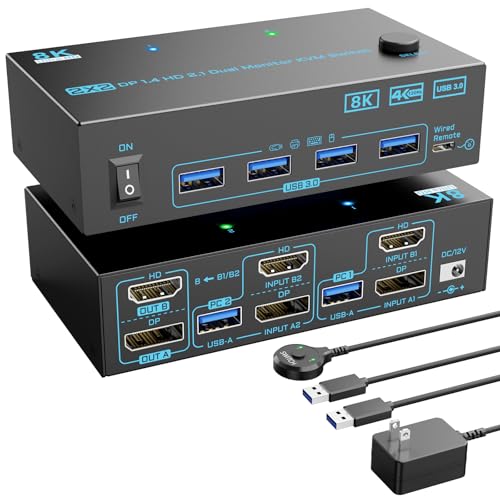
- Supports 4K@144Hz with DP 1.4 and HDMI 2.1.
- Shares 2 monitors and 4 USB 3.0 devices.
- Includes wired remote switching and 12V power.
Best For: Dual-monitor setups that need both DP and HDMI inputs
4-PC Dual-Display Pick

- Controls 4 computers on 2 monitors
- Up to 8K@60Hz / 4K@144Hz support
- Includes 4 USB 3.0 ports and wired controller
Best For: multi-PC dual-monitor setups with HDMI and DP outputs
Balanced 4-Computer Choice

- 4 computers share 2 monitors
- Supports 8K@60Hz and 4K@144Hz
- Button and desktop-controller switching
Best For: clean 4-PC dual-monitor sharing with easy switching
DisplayPort-Only High-Refresh Pick – 4K@144Hz DP KVM for 2 PCs, 2 Monitors
If you need a KVM switch for dual 4K 144Hz monitors and your setup is all-DisplayPort, this model is built for that exact use case. It shares two monitors and four USB devices between two computers, supports extended or mirror mode, and stays focused on high-refresh DP workflows rather than mixed-video compatibility.
Best For: Dual-PC desktop setups with two DisplayPort outputs per computer and two DP-input monitors.
Pros:
- Supports up to 4K@144Hz and 8K@60Hz, with backward compatibility for lower resolutions.
- Works with extended and mirror mode for multitasking or presentations.
- Shares up to 4 USB devices and includes USB 3.0 speeds up to 5 Gbps.
- Includes a desktop controller and external 12V power adapter for stable operation.
Cons:
- Requires two DP cables per computer; adapters and HDMI conversion cables are not supported.
- Both computers must have two DP outputs, and each monitor needs a DP input.
- Hotkey switching is not supported.
This is a strong fit if your hardware already matches the DisplayPort-only requirements and you want a straightforward dual-monitor switch with high refresh support. It is less flexible than hybrid HDMI/DP options, but that tradeoff helps keep the design simple and performance-focused.
Dock-Style USB-C Option – Dual HDMI KVM Dock for 2 Laptops
This KVM switch for dual 4K 144Hz monitors is designed more like a dock-and-switch station for two laptops than a classic desktop KVM. It combines dual HDMI monitor sharing, USB-C laptop connectivity, Ethernet, and peripheral ports into one unit, making it practical for a home office that needs fewer cables and fast desk switching.
Best For: Two USB-C laptops and a shared dual-HDMI workstation with charging and dock features.
Pros:
- Combines a dual-monitor KVM switch with a 12-in-1 docking station.
- Supports 2 HDMI monitors, 1G Ethernet, SD card, audio, and multiple USB ports.
- Charges two laptops at up to 60W each through the dual USB-C connections.
- Uses EDID emulation and automatic PC wake-up for 2-3 second switching.
Cons:
- Extended display mode requires USB-C laptops with DP alt mode and DP MST support.
- macOS does not support MST, so dual screens will show duplicate content.
- Not compatible with 5K monitors and not ideal for some gaming/display features.
This model makes the most sense if you want a streamlined laptop dock that also handles monitor switching. It is less universal than a raw DisplayPort KVM, but the extra networking, storage, and charging features make it a compelling all-in-one desk hub.
No-Frills DP Pick – 4K@144Hz Dual DisplayPort KVM
If you want a KVM switch for dual 4K 144Hz monitors without extra dock features, this DisplayPort-only model keeps the focus on the essentials. It supports two computers, two displays, four USB 3.0 ports, and both extended and copy modes, making it a practical pick for a clean high-refresh workspace.
Best For: Dual-DisplayPort PC setups that need high-resolution switching and USB 3.0 sharing.
Pros:
- Supports up to 4K@144Hz and is backward compatible with DP 1.2.
- Shares two monitors and four USB 3.0 devices between two computers.
- Includes panel-button and wired-controller switching options.
- Comes with external 12V power for stable USB device operation.
Cons:
- Each computer needs two DP cables plus one USB cable to work properly.
- Hotkey switching is not supported.
- DP cables are not included.
This is a straightforward choice if your rig already has the right DisplayPort outputs and you want reliable dual-monitor switching at high refresh rates. It is a no-frills option, but that can be an advantage if you care more about compatibility with the right hardware than about extra features.
Mixed-Connection Flexible Pick – 8K Dual Monitor HDMI/DP KVM
This KVM switch for dual 4K 144Hz monitors is aimed at mixed-output computers that need one HDMI and one DisplayPort connection per system. It shares two monitors and four USB 3.0 ports, supports both extended and mirrored display modes, and adds a wired remote for convenient switching at a desk or workstation.
Best For: Mixed HDMI/DisplayPort computer setups that need dual-monitor sharing and a wired remote.
Pros:
- Supports up to 8K@60Hz and 4K@144Hz, with lower-resolution compatibility.
- Shares two monitors and four USB 3.0 devices at up to 5 Gbps.
- Works with Windows, Mac, and Linux according to the product notes.
- Includes button switching and a wired remote controller.
Cons:
- Your graphics card must have at least 1 HDMI and 1 DP output.
- Resolution depends on the graphics card, monitors, and cables used.
- It is a dual HDMI/DisplayPort design, so it is less uniform than a pure DP setup.
If your system mixes HDMI and DisplayPort outputs, this model gives you a more flexible path to dual-monitor switching. It is especially useful when you want higher refresh support but do not have a fully DisplayPort-based desktop.
Triple-PC Dual-4K Option – 3 Computers, 2 DP Monitors
If you need a KVM switch for dual 4K 144Hz monitors and want room for multiple machines, this DisplayPort 1.4 model is built around a 3-computer, 2-monitor setup. It supports up to 8K@30Hz and 4K@144Hz, includes 4 USB 3.0 ports, and offers both button and wired switching for a practical desktop workflow.
Best For: Users who want to share two high-refresh DP monitors between three computers.
Pros:
- Supports up to 4K@144Hz and is DP 1.4 compliant.
- Shares 2 monitors and 4 USB 3.0 devices across 3 computers.
- Includes a desktop controller and LED indicators for switching.
- Has an external 12V power port and separate power switch.
Cons:
- Each PC needs 2 DP connections plus 1 USB connection.
- Maximum performance depends on monitors, sources, and cables also supporting the target resolution.
- Designed for DisplayPort setups only.
This is a strong pick if your priority is multi-PC flexibility with dual 4K 144Hz capability on a DP-only setup. The extra computer support makes it especially useful for mixed work, gaming, or lab-style desks.
Premium 2-PC Dual-4K Pick – Aluminum DP 1.4 KVM for 2 PCs
For a KVM switch for dual 4K 144Hz monitors, this UGREEN DisplayPort 1.4 model is aimed at users who only need two computers but want a polished, high-resolution desktop hub. It supports up to 8K@60Hz and 4K@144Hz, includes 4 USB 3.0 ports, and comes with a desktop controller for easy switching.
Best For: Two-computer setups that want a clean, high-end DP dual-monitor switch.
Pros:
- Supports 4K@144Hz and even 8K@60Hz on compatible gear.
- Shares dual monitors plus 4 USB 3.0 devices.
- Includes a desktop controller and aluminum housing.
- Works with Windows, MacOS, and Linux.
Cons:
- Does not support hotkey switching.
- Requires each computer to have 2 DP ports and 1 USB-A port.
- DP cables are not included.
This is the most refined DisplayPort-only option here if you want strong 4K144 support and don’t need a third computer. Just be sure your PCs can handle dual-display output before buying.
Mixed-Input Dual-4K Choice – DP 1.4 and HDMI 2.1 KVM
If your KVM switch for dual 4K 144Hz monitors needs to handle different display inputs, this 2-in-2-out design combines DisplayPort 1.4 and HDMI 2.1 in one unit. It supports up to 8K@60Hz and 4K@144Hz, shares 4 USB 3.0 ports, and includes both a wired remote and a 12V power cable for easier day-to-day use.
Best For: Users who want dual-monitor switching with both DP and HDMI support.
Pros:
- Supports up to 4K@144Hz and 8K@60Hz.
- Works with both DisplayPort and HDMI connections.
- Includes 4 USB 3.0 ports for shared peripherals.
- Offers button switching and a wired remote.
Cons:
- Only supports 2 computers.
- Each PC must be connected properly for USB and display sharing.
- Users need to confirm their computers support multi-display before setup.
This is the most versatile option if your monitors or computers use a mix of DP and HDMI. It’s a smart fit for gaming or workstations where flexible video inputs matter as much as refresh rate support.
4-PC Dual-Display Pick – HDMI+DP KVM for 4 Computers
If you need a KVM switch for dual 4K 144Hz monitors that can juggle more than two PCs, this model is built for a busy multi-system desk. It supports 4 computers sharing 2 monitors, with HDMI + DisplayPort connections per computer for extend or copy display modes, so it suits setups where each machine already has the right video outputs.
Best For: Users who want one dual-monitor KVM for up to four HDMI/DP-equipped computers and value a wired controller plus front-panel switching.
Pros:
- Supports 4 PCs sharing 2 monitors in extend or copy mode.
- Rated up to 8K@60Hz / 4K@144Hz, with DP supporting 4K@144Hz.
- Includes 4 USB 3.0 ports for keyboard, mouse, printer, scanner, and other USB devices.
- Comes with both panel button switching and a wired controller.
Cons:
- Requires HDMI + DP connections on each connected computer.
- Display performance depends on using 8K cables and shorter runs.
- Not suitable for VGA or DVI-based systems.
For a four-PC desk, this unit stands out by combining dual-monitor support, USB 3.0 expansion, and flexible switching in one box. If your computers already have the right HDMI and DisplayPort outputs, it offers a practical way to simplify a complex workstation.
Balanced 4-Computer Choice – 8K Dual Monitor KVM
This KVM switch for dual 4K 144Hz monitors is a strong fit if you want a straightforward way to share two displays across four computers. It supports extend and copy modes, adds four USB 3.0 ports for peripherals, and uses either the button or the desktop controller for switching.
Best For: Buyers who want a 4-computer, 2-monitor KVM with simple switching and 8K-class headroom.
Pros:
- Shares 2 monitors across 4 computers with HDMI + DisplayPort connections.
- Supports up to 8K@60Hz and 4K@144Hz backward compatibility.
- Includes 4 USB 3.0 ports for keyboard, mouse, printer, and similar devices.
- Comes with both button switching and a desktop controller.
Cons:
- Each connected computer must have both HDMI and DP ports.
- Best performance depends on HDMI 2.1 and DP 1.4 cables.
- Not recommended for VGA or DVI connections.
This model keeps the feature set practical rather than flashy: four-host support, dual monitors, and a clean remote-style control option. If your priority is dependable dual-display sharing with 4K 144Hz support, it is a very usable middle-ground choice.
3-PC Dual-Display Pick – HDMI+DP KVM for 3 Computers
If your workspace only needs to split one pair of monitors across three systems, this KVM switch for dual 4K 144Hz monitors gives you the right mix of capability and simplicity. It supports extend or copy display modes, includes four USB 3.0 ports, and ships with a wired controller for convenient switching.
Best For: Users who only need to connect 3 computers to 2 monitors and want a simpler dual-monitor KVM layout.
Pros:
- Designed for 3 computers sharing 2 monitors in extend or copy mode.
- Supports up to 8K@60Hz / 4K@144Hz resolution.
- Includes 4 USB 3.0 ports for common peripherals and devices.
- Provides button switching plus a wired controller.
Cons:
- Only supports 3 computers, not 4.
- Requires HDMI + DP on each connected computer.
- Not intended for VGA or DVI systems.
For smaller multi-PC setups, this model can be the easiest way to get dual-monitor KVM control without paying for capacity you will not use. It keeps the same high-resolution support and USB expansion as larger models, but with a more compact 3-host design.
How We Picked the Best KVM Switch for Dual 4K 144Hz Monitors
For a KVM Switch for Dual 4K 144Hz Monitors, the main priorities are video bandwidth, stable dual-display support, and enough USB ports for your keyboard, mouse, and accessories. We also favored models with modern inputs like DisplayPort 1.4, HDMI 2.1, USB 3.0, and features such as EDID emulation, MST support, and power delivery where relevant.
Just as important, we looked for realistic use cases: some buyers need the simplest two-PC setup, while others want room to expand to three or four computers. The best choice is the one that matches your monitor inputs, GPU outputs, and daily workflow.
Quick Comparison
Most shoppers should first confirm whether their monitors are DisplayPort, HDMI, or a mix of both. Dual 4K at 144Hz is demanding, so port matching matters just as much as the rated specs. If your monitors and graphics cards support DisplayPort 1.4, that is often the easiest path to full refresh-rate performance. HDMI 2.1 models can also work well, but cable quality and device compatibility become more important.
Two-PC models are the most common and usually the cleanest fit for gaming or home-office setups. Three- and four-PC switches make sense for shared workstations, lab benches, streaming rigs, or users who regularly hop between systems.
Key Buying Factors for a KVM Switch for Dual 4K 144Hz Monitors
Video Standard and Bandwidth
Make sure the switch can truly handle dual 4K at 144Hz, not just 4K at 60Hz. Check the supported resolution and refresh rate per port, and verify whether that spec applies to both monitors at once.
Connector Match
Choose DisplayPort if your gear supports it and you want the best chance of hitting high refresh rates. Choose HDMI if your monitors are HDMI-first or if you need compatibility with consoles or mixed-device setups. Dual-input models can be more flexible, but only if your exact devices are supported.
USB and Peripheral Sharing
Look for enough USB ports for keyboards, mice, webcams, audio interfaces, and external drives. USB 3.0 is a better choice if you plan to move data-heavy peripherals through the switch.
EDID, MST, and Power
EDID support helps keep windows and monitor layouts from reshuffling during switching. MST can be useful for certain dual-monitor configurations, especially on USB-C laptop docks. If you use laptops, power delivery can reduce cable clutter and charging headaches.
Who Should Buy Which KVM Switch for Dual 4K 144Hz Monitors?
If you want the simplest high-performance setup, choose a two-PC DisplayPort model built around dual 4K 144Hz support. If you need a laptop-friendly desk with charging and docking features, look for a KVM dock with USB-C, PD, and EDID. If you share monitors across multiple desktops, a three- or four-computer switch is the better long-term fit.
In short, the best KVM is the one that matches your ports, refresh-rate goals, and number of systems without forcing compromises. For a dual high-refresh workstation, reliability and compatibility matter as much as raw specs.