
The right gaming mouse can improve aiming, comfort, and control across Windows PCs, whether you prefer competitive shooters, strategy games, or everyday play.
We selected 10 options spanning wired and wireless designs, ergonomic shapes, programmable buttons, adjustable DPI, and different budgets so you can find a practical match for your setup.
Best 10 Gaming Mice for Windows Picks for 2026
Precision Wired Pick

- 25,600 DPI HERO sensor
- 11 programmable buttons
- Adjustable weights and LIGHTSYNC RGB
Best For: Windows PC gamers wanting extensive wired customization
Versatile Wireless Pick

- 2.4G, Bluetooth, and USB-C modes
- Up to 8000 DPI and 1000Hz polling
- Up to 250 hours with RGB off
Best For: Windows gaming and work across multiple connection modes
Lightweight Wireless Pick

- 12,000 DPI HERO sensor
- 1 ms LIGHTSPEED report rate
- Up to 250 hours on one AA battery
Best For: Portable Windows gaming with low weight and long battery life
Macro-Friendly Budget Pick

- 11 remappable buttons
- Up to 8000 DPI through software
- Rapid-fire key and RGB backlighting
Best For: Windows gamers prioritizing macros and wired control
Reliable Wired Pick

- 6,400 DPI optical sensor
- Five programmable buttons
- Right-handed ergonomic design
Best For: Windows gamers seeking a durable, comfortable wired mouse
Customizable RGB Value

- Up to 7,200 adjustable DPI
- Eight programmable buttons
- Seven RGB lighting modes
Best For: Windows users who want macros, remapping, and RGB customization
Simple Plug-and-Play Choice

- No-driver plug-and-play setup
- Four DPI settings up to 3,600
- Six buttons with multicolor lighting
Best For: Casual Windows gamers wanting simple wired control and lighting
Best Overall

- 11 programmable buttons with macro support
- 26,000 DPI optical sensor for precise tracking
- Hyperscroll wheel and 11-zone Chroma RGB
Best For: Windows gamers seeking extensive customization and wired precision
Best Wireless Value
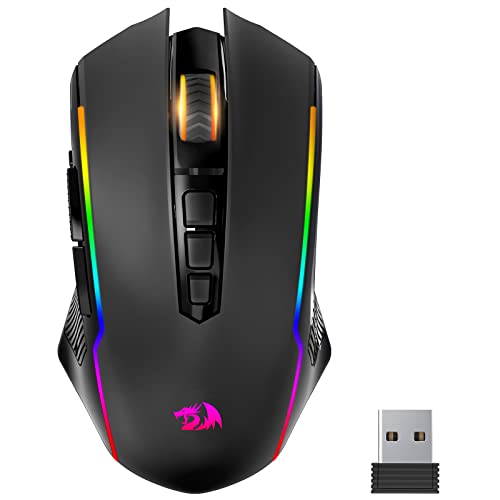
- 2.4GHz wireless and wired modes
- Up to 70 hours of battery life with RGB off
- Adjustable 8,000 DPI and programmable buttons
Best For: Windows users wanting flexible wireless gaming without giving up wired mode
Best Budget Wired Pick
ONIKUMA CW902 Wired Gaming Mouse

- Seven programmable buttons with RGB lighting
- Up to 3,600 DPI optical tracking
- Plug-and-play support for Windows, macOS, and Linux
Best For: Budget-minded Windows gamers seeking a simple wired setup
Precision Wired Pick – Logitech G502 Hero
The Logitech G502 HERO is a strong choice for shoppers comparing gaming mice for windows who want a wired, highly customizable setup. Its HERO sensor reaches 25,600 DPI, while 11 programmable buttons, adjustable weights, and LIGHTSYNC RGB let you tailor control and appearance through Logitech software.
Best For: Windows PC gamers who prefer a feature-rich wired mouse with extensive button customization and adjustable weight.
Pros:
- HERO sensor offers up to 25,600 DPI with precision tracking.
- 11 programmable buttons support customized game controls.
- Adjustable weights and mechanical button tensioning enable personalized handling and crisp clicks.
- LIGHTSYNC RGB provides customizable lighting.
Cons:
- Wired design is less flexible than a wireless mouse.
- Right-handed shape may not suit left-handed users.
- Custom lighting requires Logitech Gaming Software.
The G502 HERO makes the most sense when button count, sensor precision, and physical customization matter more than a lightweight or cable-free design.
Versatile Wireless Pick – Redragon M814
The Redragon M814 stands out among gaming mice for windows because it supports 2.4G wireless, Bluetooth, and wired USB-C operation. It combines an ergonomic medium-to-large-hand shape with seven customizable primary buttons, an 8000 DPI sensor, RGB lighting, and a battery rated for up to 250 hours in 2.4G mode with RGB off.
Best For: Windows users who want one mouse for gaming, office work, and flexible wireless or wired use.
Pros:
- Tri-mode connectivity supports 2.4G, Bluetooth, and USB-C wired operation.
- Seven primary buttons can be customized through Windows software.
- Adjustable sensitivity reaches 8000 DPI with a 1000Hz polling rate.
- Battery life reaches up to 250 hours in 2.4G mode with RGB off.
Cons:
- Software customization is not supported on Mac OS.
- The contoured design is intended for medium to large hands.
- RGB use reduces the maximum stated battery life.
Choose the M814 if connection flexibility is a priority and you want a mouse that can move between Windows gaming and everyday work without changing peripherals.
Lightweight Wireless Pick – Logitech G305 Lightspeed
The Logitech G305 is a practical option for gaming mice for windows shoppers seeking a lightweight wireless design. Its HERO sensor delivers up to 12,000 DPI and 400 IPS precision, while LIGHTSPEED wireless provides a 1 ms report rate. A single AA battery is rated for up to 250 hours of continuous gameplay.
Best For: Windows gamers who want a lightweight, portable wireless mouse with long battery life.
Pros:
- LIGHTSPEED wireless offers a 1 ms report rate.
- HERO sensor provides up to 12,000 DPI and 400 IPS precision.
- Lightweight 3.4-ounce design supports easy maneuverability.
- One AA battery provides up to 250 hours of gameplay.
Cons:
- Uses a replaceable AA battery rather than a rechargeable battery.
- Six buttons provide less customization than higher-button alternatives.
- The compact design may not suit users seeking a larger ergonomic shape.
The G305 is an appealing balance of portability, low weight, and wireless performance, particularly for laptop users or gamers who do not need numerous macro buttons.
Macro-Friendly Budget Pick – Redragon M612
The Redragon M612 is a wired choice for gaming mice for windows buyers who value programmable controls and an ergonomic grip. It offers 11 editable buttons, five DPI presets with software adjustment up to 8000 DPI, a rapid-fire key, side macro buttons, and RGB backlighting.
Best For: Windows gamers who want many remappable controls and a comfortable wired claw-grip design.
Pros:
- 11 programmable buttons can be reassigned for games or work.
- Five DPI levels are available, with software adjustment up to 8000 DPI.
- Rapid-fire and side macro keys add extra control options.
- Frosted coating, textured rubber, and a streamlined claw-grip shape support comfort.
Cons:
- Wired connectivity limits placement flexibility.
- Right-handed design may not fit left-handed users.
- RGB backlighting offers five modes rather than fully described customization.
The M612 is best suited to Windows users who would rather maximize programmable inputs and grip features than move to a wireless design.
Reliable Wired Pick – Razer DeathAdder Essential
The Razer DeathAdder Essential is a straightforward choice for shoppers comparing gaming mice for Windows. Its right-handed ergonomic shape, wired connection, 6,400 DPI optical sensor, and five programmable buttons suit everyday PC gaming and creative work without requiring wireless charging or batteries.
Best For: Right-handed Windows PC gamers who want a durable, ergonomic wired mouse with programmable controls.
Pros:
- 6,400 DPI optical sensor with reprogrammable DPI buttons
- Five programmable buttons support remapping and macro assignments through Razer Synapse
- Mechanical switches are rated for up to 10 million clicks
- Ridged, rubberized scroll wheel offers tactile control
Cons:
- Wired design limits cable-free flexibility
- Right-hand orientation is not suited to left-handed users
- Requires Windows 10 or newer according to the supplied minimum operating-system specification
The DeathAdder Essential focuses on dependable core features rather than an extensive button layout. It is a sensible Windows option when comfort, sensor control, and long-term switch durability matter more than wireless operation.
Customizable RGB Value – Redragon M602
The Redragon M602 offers a feature-rich approach to gaming mice for Windows, pairing a wired USB connection with adjustable sensitivity up to 7,200 DPI. Its eight-button layout, macro editing, ergonomic right-handed shape, and configurable RGB lighting give PC users plenty of ways to tailor the mouse.
Best For: Windows gamers and multitasking PC users who want adjustable DPI, remapping, macros, and RGB lighting at a practical price.
Pros:
- Adjustable sensitivity up to 7,200 DPI
- Eight buttons support remapping and macro editing through the software
- Seven RGB lighting modes and effects can be customized or turned off
- Ergonomic design includes dedicated finger positions for comfort
Cons:
- Wired USB connection does not provide wireless freedom
- Right-handed design may not suit left-handed users
- Customization software must be downloaded from Redragon
With more buttons and customization options than a basic gaming mouse, the M602 is well suited to users who enjoy configuring controls and lighting. Its broad Windows compatibility and adjustable DPI also make it useful beyond gaming.
Simple Plug-and-Play Choice – BENGOO Gaming Mouse
The BENGOO Gaming Mouse is a basic plug-and-play option for shoppers seeking gaming mice for Windows. It connects by USB, includes six buttons, offers four DPI settings from 1,200 to 3,600, and adds multicolor lighting without requiring a driver for direct use.
Best For: Casual Windows gamers who want an inexpensive wired mouse with adjustable speed, extra side buttons, and RGB-style lighting.
Pros:
- Plug-and-play operation requires no driver
- Four adjustable DPI settings from 1,200 to 3,600
- Six-button layout includes forward and back controls
- Ergonomic, skin-friendly design is intended to reduce fatigue
Cons:
- Maximum sensitivity is lower than the other listed mice at 3,600 DPI
- Supplied compatibility details list Windows XP through Windows 8 rather than newer Windows versions
- No warranty is listed in the supplied details
The BENGOO keeps setup simple and provides the essential controls many casual players need. It is most appealing for users who prioritize easy installation, basic DPI adjustment, and lighting over advanced software customization.
Best Overall – Razer Basilisk V3
For shoppers comparing gaming mice for windows, the Razer Basilisk V3 stands out as a feature-rich wired option for Windows 10 and Windows 11 PCs. Its right-handed ergonomic shape, extensive button layout, high-resolution sensor, and customizable controls suit players who want detailed setup options without managing a wireless battery.
Best For: Windows gamers who want extensive remapping, a comfortable right-handed design, and precise wired performance.
Pros:
- 11 programmable buttons support macros and secondary functions.
- 26,000 DPI Focus+ optical sensor is designed for precise tracking.
- Hyperscroll tilt wheel offers free-spinning and tactile modes.
- 11-zone Razer Chroma RGB lighting works with more than 150 integrated games.
Cons:
- Wired connection may be less convenient than a wireless model.
- Its many controls and lighting options may be more than casual users need.
- The ergonomic shape is designed for right-handed use.
The Basilisk V3 is a strong all-around pick when customization and control matter most. Razer Synapse adds further configuration options, while the corded design keeps charging out of the equation.
Best Wireless Value – Redragon Ranger M910-KS
The Redragon Ranger M910-KS is a flexible choice among gaming mice for windows, combining 2.4GHz wireless operation with a wired mode. It offers adjustable sensitivity, programmable controls, RGB lighting, and a rechargeable battery rated for up to 70 hours with the lighting off.
Best For: Windows gamers who want wireless freedom, long battery life, and configurable controls at a practical price point.
Pros:
- Dual-mode 2.4GHz wireless and wired connectivity supports flexible use.
- Adjustable DPI from 250 to 8,000 and four polling-rate settings.
- Rechargeable battery provides up to 70 hours with RGB off.
- All buttons can be programmed through the driver, including macro functions.
Cons:
- Battery life drops to about 35 hours with RGB enabled.
- It has seven buttons, fewer than some highly customizable wired mice.
- The rapid-fire button may not suit every game or user preference.
Choose the Ranger M910-KS if avoiding a permanent cable is a priority. It also remains usable while charging, giving Windows players a convenient fallback during longer sessions.
Best Budget Wired Pick – ONIKUMA CW902 Wired Gaming Mouse
The ONIKUMA CW902 is a straightforward wired option for gaming mice for windows, with plug-and-play support for Windows 10 and 11 plus macOS, Linux, and Chrome-compatible setups. Its seven-button layout, RGB backlighting, adjustable DPI, and right-handed ergonomic shell cover everyday gaming and office needs.
Best For: Budget-conscious Windows users who want a programmable wired mouse with RGB lighting and broad platform compatibility.
Pros:
- Plug-and-play design supports Windows, macOS, and Linux.
- Seven programmable buttons provide access to commands, macros, and shortcuts.
- PMW3389 optical sensor offers up to 3,600 DPI and four listed DPI settings.
- Ergonomic palm-rest design and textured surface target longer sessions.
Cons:
- DPI resets to 1,200 when the connected device restarts.
- Maximum sensitivity is lower than the other listed options.
- It is corded, so it does not provide wireless flexibility.
The CW902 makes sense for shoppers who want essential gaming controls without a complicated setup. Its multi-platform support is useful, while the wired connection keeps operation simple.
How We Picked the Best Gaming Mice for Windows
We focused on features that have the greatest effect on Windows gaming: sensor precision, responsive tracking, button layout, software or onboard customization, connection stability, comfort, and overall value. The lineup includes proven wired models, low-latency wireless mice, and affordable choices with useful extras such as RGB lighting and remappable controls.
Because hand size, grip style, game genre, and desk setup vary, no single mouse is ideal for every player. Our comparison is designed to make those trade-offs easier to identify before you buy.
Quick Comparison
| Type | Best For | Main Advantage | Potential Trade-Off |
|---|---|---|---|
| Wired | Competitive and budget gaming | Consistent connection and no charging | Cable drag or desk clutter |
| Wireless | Clean setups and flexible play | Freedom of movement | Battery charging and higher cost |
| Ergonomic | Long sessions and palm grips | More hand support | Usually less compact |
| Programmable | MMOs, productivity, and shortcuts | Extra command flexibility | More setup may be required |
Key Buying Factors for Gaming Mice for Windows
Sensor and DPI
A higher maximum DPI does not automatically mean better performance. Look for smooth, consistent tracking and a DPI range that suits your sensitivity. Most players benefit more from reliable sensor behavior than from extreme numbers.
Connection and Response
Wired mice are simple and continuously powered. Modern 2.4GHz wireless models can also feel highly responsive, while Bluetooth is convenient for general use but may not be the first choice for fast competitive play. Check whether the mouse supports the connection type your Windows PC offers.
Shape, Grip, and Weight
Consider whether you use a palm, claw, or fingertip grip. Larger ergonomic shells can support the palm, while smaller or lighter designs may suit fingertip control. A flexible cable, balanced weight, and smooth feet also affect comfort during long sessions.
Buttons and Software
Extra programmable buttons are useful for ability shortcuts, macros where permitted, media controls, and productivity tasks. Confirm that configuration software supports your version of Windows and that essential settings can be saved if you switch computers.
Lighting and Build Quality
RGB lighting is mainly cosmetic, so prioritize durable switches, a dependable scroll wheel, and a comfortable finish first. If you choose a budget model, check the warranty and return policy.
Who Should Buy Which Gaming Mice for Windows?
- Competitive players: Choose a responsive wired model or a low-latency 2.4GHz wireless mouse with a shape that supports precise control.
- Players wanting flexibility: A tri-mode wireless design can cover gaming, Bluetooth devices, and USB charging in one mouse.
- MMO and shortcut-heavy users: Prioritize multiple programmable buttons and dependable configuration software.
- Comfort-focused buyers: Look for an ergonomic body, suitable dimensions, and a grip that keeps your wrist relaxed.
- Budget shoppers: A wired mouse usually delivers the strongest value because it avoids battery hardware while still offering adjustable DPI and remapping.
- Mixed-use Windows users: Consider a balanced model with a precise sensor, moderate button count, and comfortable shape for both games and daily work.