
Finding the best gaming mouse for Mac means balancing macOS compatibility, connection reliability, comfort, sensor performance, and the features you actually use. The right model can make games, creative software, and everyday navigation feel faster and more precise.
We compared 10 popular wired and wireless options across different budgets and play styles, from compact travel-friendly mice to feature-rich ergonomic models.
Best 10 Gaming Mice for Mac Picks for 2026
Best Lightweight Wireless Pick

- Lightweight 3.4-ounce design
- Up to 250 hours per AA battery
- 12,000 DPI HERO sensor
Best For: Portable Mac gaming setups and users who prioritize long battery life
Best Budget Wired Controls

- 11 programmable buttons
- Up to 8,000 DPI sensitivity
- Five RGB backlight modes
Best For: Mac gamers wanting many remappable controls without battery management
Best Wireless Customization
Razer Basilisk V3 X HyperSpeed

- HyperSpeed and Bluetooth connectivity
- Up to 535 hours on Bluetooth
- Nine customizable controls
Best For: Mac gaming and productivity setups needing flexible wireless connections
Best High-Precision Wired Pick

- Up to 25,600 DPI tracking
- 11 programmable buttons
- Adjustable five-weight system
Best For: Right-handed Mac gamers seeking extensive wired control and customization
Best Battery Life
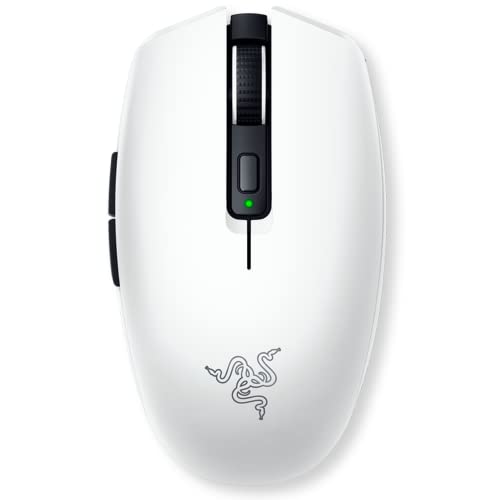
- Bluetooth and HyperSpeed Wireless connectivity
- Up to 950 hours of battery life
- Lightweight 18,000 DPI optical sensor
Best For: Portable Mac gaming and productivity
Best Wired Value

- Mac-compatible USB Type-A connection
- 8,000 DPI adjustable optical sensor
- Six buttons and customizable LIGHTSYNC RGB
Best For: Simple wired Mac gaming setups
Best Programmable Controls

- 2.4GHz wireless connection
- Eight programmable buttons and macros
- Rechargeable battery rated up to 45 hours
Best For: Windows gaming with extensive customization
Power User Pick
Logitech G502 Lightspeed Wireless

- 11 programmable buttons for macros and shortcuts
- Up to 25,600 DPI HERO tracking
- Up to 60 hours of battery life
Best For: Mac gamers who want extensive controls and adjustable customization
Best Lightweight Value

- Lightweight 3.4-ounce design
- Up to 250 hours from one AA battery
- 1 ms LIGHTSPEED wireless report rate
Best For: MacBook users and travelers who prioritize portability and battery life
Premium Feature Pick
Logitech G502 X Plus Wireless RGB

- 13 programmable controls
- Up to 120 hours of rechargeable battery life
- Customizable LIGHTSYNC RGB with eight LEDs
Best For: Mac gamers who want extensive controls, RGB, and premium wireless features
Best Lightweight Wireless Pick – Logitech G305 Lightspeed
For shoppers seeking gaming mice for mac, the Logitech G305 Lightspeed is a compact wireless option with a HERO optical sensor, a 1 ms report rate, and up to 12,000 DPI sensitivity. Its lightweight design and single-AA power system make it practical for gaming laptops and portable setups.
Best For: Mac users who want a lightweight wireless gaming mouse for desktop or travel use.
Pros:
- LIGHTSPEED wireless technology is designed for responsive, low-latency performance.
- HERO sensor offers up to 12,000 DPI and 400 IPS precision.
- Runs for up to 250 hours on one AA battery, with an Endurance mode available through Logitech G HUB.
- Weighs about 3.4 ounces and includes built-in nano-receiver storage.
Cons:
- Uses a replaceable AA battery rather than a rechargeable internal battery.
- The supplied operating-system details emphasize Windows, so Mac software support should be checked before purchase.
The G305 stands out when low weight, portability, and long battery life matter more than extensive customization. It is a sensible Mac-compatible hardware choice for users who prefer a simple wireless setup.
Best Budget Wired Controls – Redragon M612 Predator
The Redragon M612 Predator gives gaming mice for mac shoppers a wired option with 11 programmable buttons, RGB lighting, and adjustable sensitivity up to 8,000 DPI. Its corded connection avoids battery management and suits users who want numerous remappable controls.
Best For: Mac gamers who want a wired mouse with extensive button customization and RGB lighting.
Pros:
- Offers 11 editable buttons for custom keybinds, macros, and rapid-fire functions.
- Provides five preset DPI levels, with software options between 500 and 8,000 DPI.
- Includes five backlight modes and a matte, frosted surface for grip.
- Its corded design requires no battery replacement or charging.
Cons:
- The right-handed, claw-grip design may not suit every hand or grip style.
- Software-based customization may require checking macOS compatibility before use.
- At 126 g, it is heavier than the lightweight wireless options in this roundup.
The M612 is a practical pick for buyers who value programmable controls and lighting at a wired price point. Its strongest advantage is flexibility, though Mac users should verify that the configuration software supports their setup.
Best Wireless Customization – Razer Basilisk V3 X HyperSpeed
Among gaming mice for mac, the Razer Basilisk V3 X HyperSpeed is a feature-rich wireless choice with HyperSpeed and Bluetooth connectivity, nine customizable controls, and an 18,000 DPI optical sensor. It also offers long stated battery life for users who switch between gaming and everyday Mac use.
Best For: Mac users who want a customizable right-handed wireless mouse with Bluetooth flexibility.
Pros:
- Supports both low-latency HyperSpeed wireless and Bluetooth connections.
- Offers up to 285 hours on HyperSpeed or 535 hours over Bluetooth.
- Includes nine customizable controls and a high-resolution 18,000 DPI sensor.
- Gen-2 mechanical switches are rated for up to 60 million clicks.
Cons:
- Requires one AA battery and is not described as rechargeable.
- Its right-handed shape may not suit left-handed users.
- Advanced customization relies on the Razer Synapse app, so Mac software support should be confirmed.
The Basilisk V3 X HyperSpeed is a strong all-around option for Mac users who want both Bluetooth convenience and gaming-focused wireless performance. Its many controls and long battery ratings make it especially useful for mixed gaming and productivity setups.
Best High-Precision Wired Pick – Logitech G502 HERO
The Logitech G502 HERO is a wired contender for gaming mice for mac, combining a HERO sensor with up to 25,600 DPI, 11 programmable buttons, adjustable weights, and customizable RGB lighting. Its corded design makes it a straightforward choice for users who prefer consistent power during long sessions.
Best For: Right-handed Mac gamers who want maximum wired control, adjustable weight, and high sensor sensitivity.
Pros:
- HERO tracking reaches up to 25,600 DPI without smoothing, filtering, or acceleration.
- Provides 11 programmable buttons and a dual-mode hyper-fast scroll wheel.
- Five removable 3.6 g weights allow balance and weight adjustments.
- Mechanical button tensioning is designed to provide crisp click feedback.
Cons:
- The right-handed design limits suitability for left-handed users.
- It is a wired mouse, so the cable may be less convenient than wireless alternatives.
- RGB synchronization and some customization require Logitech software, whose Mac support should be checked.
The G502 HERO favors control and adjustability over minimalism. It is well suited to Mac gamers who want many buttons and a tunable physical feel, provided a wired connection fits their desk.
Best Battery Life – Razer Orochi V2
For shoppers comparing gaming mice for mac, the Razer Orochi V2 stands out as a compact wireless option with macOS compatibility, dual connectivity, and exceptionally long battery life. Its lightweight design and high-resolution sensor also suit portable setups and fast-paced games.
Best For: Mac users who want a lightweight wireless mouse for gaming, travel, and everyday productivity.
Pros:
- Supports macOS and offers Bluetooth plus low-latency Razer HyperSpeed Wireless.
- Up to 950 hours of Bluetooth battery life or 425 hours with HyperSpeed Wireless.
- 18,000 DPI optical sensor and six programmable-style control buttons for precise gameplay.
- Compact design weighs under 60g before the battery is installed.
Cons:
- Uses a replaceable AA or AAA battery rather than a built-in rechargeable battery.
- Right-handed design may not suit left-handed users.
The Orochi V2 is a strong all-around pick when wireless freedom, portability, and minimal charging interruptions matter more than a larger ergonomic shape.
Best Wired Value – Logitech G203
The Logitech G203 is a straightforward wired choice among gaming mice for mac, with Mac compatibility, an 8,000 DPI optical sensor, and customizable RGB lighting through Logitech G HUB. Its USB connection avoids wireless battery concerns while keeping the setup simple.
Best For: Mac gamers who prefer a dependable wired mouse with customizable controls and lighting.
Pros:
- Compatible with Mac computers and connects through USB Type-A.
- 8,000 DPI optical sensor provides adjustable sensitivity for gaming.
- Six buttons support customized commands and key binds through Logitech G HUB.
- LIGHTSYNC RGB lighting offers customizable colors and effects.
Cons:
- Wired design may be less convenient for cable-free setups.
- Advanced customization depends on Logitech G HUB software.
Choose the G203 if you want an affordable, low-maintenance Mac gaming mouse and do not mind managing its 6.89-foot cable.
Best Programmable Controls – Redragon M810 PRO
The Redragon M810 PRO is a feature-focused wireless option for shoppers considering gaming mice for mac, though the supplied compatibility information is centered on Windows systems rather than macOS. It combines a 2.4GHz connection, eight programmable buttons, adjustable DPI, and RGB lighting for customizable gaming control.
Best For: Windows-focused gamers who want wireless play, macro controls, and extensive button customization.
Pros:
- 2.4GHz wireless connection uses a nano receiver for cable-free movement.
- Eight programmable buttons support custom keybinds and macros.
- Offers five adjustable DPI levels, with settings up to 10,000 DPI listed in the product features.
- Rechargeable battery provides up to 45 hours of use in eco mode.
Cons:
- Supplied operating-system details list Windows versions, not macOS.
- Battery life is considerably shorter than the Razer Orochi V2’s stated runtime.
- At 250g, it is substantially heavier than the other listed options.
The M810 PRO is appealing for programmable-button enthusiasts, but Mac users should verify software and driver support before choosing it for a macOS setup.
Power User Pick – Logitech G502 Lightspeed Wireless
For Mac gamers who want extensive controls and a customizable wireless setup, the Logitech G502 Lightspeed combines LIGHTSPEED connectivity with an adjustable HERO sensor and a familiar right-handed design. Its 11 programmable buttons make it especially useful for games with many commands.
Best For: Mac users who want lots of programmable controls, adjustable weights, and high-sensitivity tracking.
Pros:
- 11 customizable buttons support macros and shortcuts through Logitech G HUB.
- HERO sensor offers 1:1 tracking and up to 25,600 DPI after the supported software update.
- Wireless battery life is rated at up to 60 hours, with optional PowerPlay charging support.
Cons:
- PowerPlay wireless charging requires a separately sold system.
- Its right-handed shape and feature set may feel less streamlined for users wanting a compact mouse.
The G502 Lightspeed is a strong feature-focused choice among gaming mice for Mac, particularly if button access and customization matter more than minimal weight.
Best Lightweight Value – Logitech G305 Lightspeed
The Logitech G305 Lightspeed is a compact, lightweight option for Mac gamers who want wireless performance without a rechargeable battery. It uses a supplied AA battery, a low-latency wireless connection, and a portable design that works well with laptops.
Best For: MacBook users, travelers, and gamers who prefer a lightweight wireless mouse with long battery life.
Pros:
- Weighs 3.4 ounces for easy maneuverability.
- LIGHTSPEED wireless provides a 1 ms report rate for responsive play.
- One AA battery provides up to 250 hours of gameplay, or up to nine months in Endurance mode.
Cons:
- Uses a replaceable AA battery rather than a rechargeable internal battery.
- With six buttons, it offers fewer controls than the G502 models in this roundup.
For buyers comparing gaming mice for Mac, the G305 stands out as a simple and portable choice with strong battery efficiency and useful wireless performance.
Premium Feature Pick – Logitech G502 X Plus Wireless RGB
The Logitech G502 X Plus is a premium wireless option for Mac gamers who want broad customization, RGB lighting, and a high-resolution sensor. It provides 13 programmable controls, a rechargeable battery, and a dual-mode scroll wheel for switching between fast and precise navigation.
Best For: Mac desktop gamers seeking maximum controls, customizable lighting, and a rechargeable wireless design.
Pros:
- 13 programmable controls provide extensive in-game customization.
- HERO 25K-class tracking is listed with up to 25,600 DPI and sub-micron accuracy.
- Rechargeable battery life is rated at up to 120 hours, with customizable LIGHTSYNC RGB.
Cons:
- Its larger feature set and 13.44-ounce weight may be more than casual users need.
- Mac compatibility requires macOS 10.14 Mojave or later according to the supplied specifications.
The G502 X Plus is an appealing high-end pick among gaming mice for Mac when programmable inputs, lighting, and long rechargeable battery life are priorities.
How We Picked the Best Gaming Mice for Mac
We focused on the factors that matter most when choosing Gaming Mice for Mac: dependable wired or wireless connectivity, accurate tracking, button layout, comfort, battery expectations, and useful software support. We also included a range of shapes, sizes, prices, and feature sets so different Mac users can find a practical match.
Compatibility can vary by macOS version and companion software. Basic pointing, clicking, and many onboard functions generally work without extra software, while advanced button mapping, lighting, profiles, and sensitivity controls may require a compatible desktop app or browser-based utility. Check the manufacturer’s current macOS support before buying if customization is important.
Quick Comparison
| Type | Best For | Main Advantage | Potential Trade-Off |
|---|---|---|---|
| Wired | Budget-conscious and competitive users | No battery charging or wireless interference | Cable can restrict movement |
| Wireless | Clean desks and flexible setups | Freedom of movement | Requires charging or battery replacement |
| Lightweight | Fast-paced games and smaller hands | Easy, low-effort movement | May have fewer controls or less palm support |
| Ergonomic | Long sessions and palm grip users | More hand support | Usually larger and less ambidextrous |
Key Buying Factors for Gaming Mice for Mac
Connection and MacOS Support
Choose a wired model for the simplest setup, or select wireless Bluetooth or 2.4GHz connectivity based on your Mac’s ports and available USB adapters. Wireless models with USB receivers may need a USB-C hub or adapter on newer Macs.
Shape, Size, and Grip
Hand size and grip style often matter more than headline specifications. Palm grips typically suit fuller ergonomic designs, while claw and fingertip grips may benefit from shorter or lighter mice. Check dimensions and weight before ordering.
Sensor and Sensitivity
A reliable sensor with adjustable sensitivity is more important than an extremely high DPI number. Look for consistent tracking, a comfortable lift-off distance, and controls that let you adjust sensitivity without disrupting your game.
Buttons and Software
Extra buttons can help with shortcuts, abilities, editing commands, and productivity, but only if they are easy to reach. Confirm that the configuration software supports your Mac, or prioritize models with onboard memory and straightforward default controls.
Battery and Lighting
For wireless use, consider battery life, charging options, and whether RGB lighting is worth the added power demand. A simpler mouse may be preferable for travel or extended sessions away from a charger.
Who Should Buy Which Gaming Mice for Mac?
Choose a wired mouse if you want low upfront cost, uninterrupted use, and minimal setup. It is also a sensible choice for a desk-based Mac gaming station.
Choose a lightweight wireless mouse if you value portability, quick movements, or a clutter-free desk. Compact models are especially useful with MacBooks and smaller workspaces.
Choose an ergonomic, button-rich mouse if you play strategy, MMO, or productivity-heavy workflows and want shortcuts close at hand. Make sure its shape suits your grip before prioritizing extra controls.
Choose a premium wireless model if you want a refined combination of tracking, comfort, customizable controls, and fewer cable compromises. Before checkout, verify receiver connectivity, macOS software support, and the return policy.