
If you manage large RAW libraries, edited exports, or archive drives, the right dock can make photo storage faster and far less frustrating.
This roundup of hard drive docking stations for photo storage focuses on speed, capacity, cloning features, and everyday reliability for creators and backup-minded users.
Best 10 Hard Drive Docking Stations for Photo Storage Picks for 2026
Simple Single-Bay Dock for Bare SATA Drives

- Supports 2.5-inch and 3.5-inch SATA drives
- Tool-free, hot-swap design
- Includes 12V adapter for 3.5-inch drives
Best For: Simple bare-drive photo backups and transfers
Clone-Ready Dock with RGB Lighting
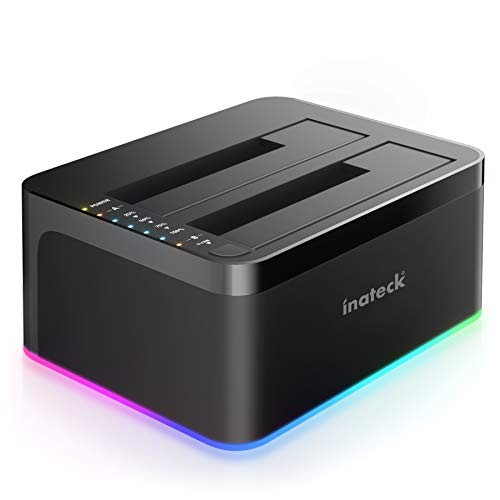
- Offline cloning works without a computer
- Supports 2.5-inch and 3.5-inch drives
- USB 3.0 with UASP support
Best For: Backup workflows that need quick drive-to-drive cloning
Dual-Bay Cloner with USB Hub

- Dual-bay dock with offline cloning
- Three USB 3.0 hub ports included
- Supports 2.5-inch and 3.5-inch SATA drives
Best For: Desk setups that need cloning plus extra USB connectivity
Dual-Bay Cloning Dock
SABRENT EC-CH2B Dual-Bay USB-C Dock

- Offline cloning works without a computer.
- Mounts two SATA drives as separate volumes.
- Tool-free, hot-swappable bays with LEDs.
Best For: Photographers who want simple two-drive access and direct-drive cloning.
High-Capacity Backup Dock
UGREEN Dual-Bay 48TB SATA Dock

- Supports two SATA drives up to 32TB each.
- Offline cloning copies drives without a computer.
- Cooling, dust cover, and anti-slip pads included.
Best For: Users who want a high-capacity photo backup dock with easy cloning.
USB-C Dock with Hub
WAVLINK Dual-Bay USB-C Dock with USB Hub
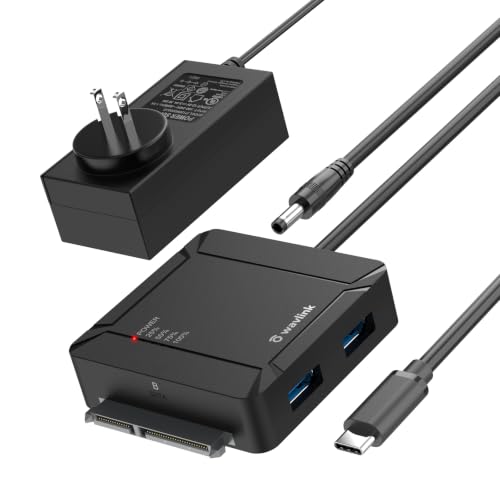
- One-button A-to-B offline cloning.
- Two USB 3.0 ports add desk-friendly convenience.
- Supports two SATA drives up to 36TB total.
Best For: Photographers who want a dock-plus-hub setup for photo backups and transfers.
Dual-Bay Cloner Dock
SABRENT USB 3.0 Dual Bay Hard Drive Docking Station & Cloner

- Dual bay for 2.5"/3.5" SATA HDDs and SSDs
- Offline cloning up to 60Mbps
- USB 3.0 transfer speeds up to 5Gbps
Best For: simple local photo backups and offline drive cloning
Four-Bay Storage Cloner
MAIWO 4 Bay Hard Drive Docking Station Cloner
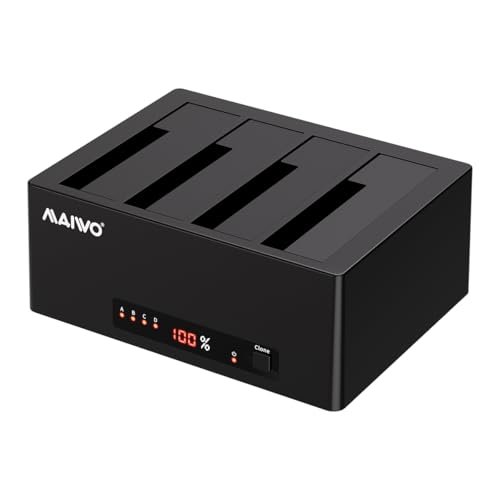
- Four bays with up to 96TB total capacity
- 1-to-3 offline cloning without a computer
- USB 3.0 plus UASP for up to 6Gbps
Best For: large photo archives and multi-drive direct-attached storage
USB-C Dual Dock
WAVLINK USB 3.0 and USB C to SATA Dual-Bay Dock

- USB 3.0 and USB-C connectivity
- Supports 2.5"/3.5" SATA HDDs and SSDs
- UASP speeds up to 6Gbps with offline cloning
Best For: USB-C photo backups and two-drive cloning
Simple Single-Bay Dock for Bare SATA Drives – SABRENT USB 3.0 SATA Dock
If you want hard drive docking stations for photo storage that keep things straightforward, this SABRENT dock is built for bare SATA drives only. It supports 2.5-inch and 3.5-inch SATA HDDs and SSDs, making it a practical pick for moving photo libraries, backing up archives, or reviewing images directly from a drive.
Best For: Photographers and home users who need a simple, tool-free dock for bare SATA drives and regular backup work.
Pros:
- Works with 2.5-inch and 3.5-inch SATA I/II/III drives and SSDs
- Tool-free, hot-swap design for quick drive changes
- Includes 12V power adapter for stable use with 3.5-inch drives
- USB 3.0 with UASP support for solid real-world transfer speeds
Cons:
- Does not support IDE/PATA, M.2, SAS, or drives already in a USB enclosure
- Uses USB Type-A host cable, so USB-C-only systems need an adapter
- S.M.A.R.T. diagnostics are not passed through the USB bridge
This is a no-frills dock that focuses on compatibility with standard SATA drives and easy plug-and-play operation. For photo storage workflows centered on bare drives, it offers the basics without extra complexity.
Clone-Ready Dock with RGB Lighting – Inateck SA02003 Dock
Among hard drive docking stations for photo storage, this Inateck model stands out because it adds offline cloning to standard USB 3.0 drive access. It works with 2.5-inch and 3.5-inch HDDs and SSDs, so it can handle photo backups, drive swaps, and duplication jobs without needing to stay connected to a computer.
Best For: Users who want an easy dual-drive dock with offline cloning for backup and duplication tasks.
Pros:
- Supports offline cloning without a computer
- Compatible with 2.5-inch and 3.5-inch HDDs and SSDs
- UASP support for faster USB 3.0 transfers
- RGB indicator shows drive activity and sleep status
Cons:
- No detailed compatibility limits are listed in the notes
- RGB lighting may be unnecessary for buyers who want a plain desktop dock
This dock is useful if your photo storage workflow includes copying one drive to another on the desk, not just mounting a single archive drive. The cloning feature and broad drive support make it a practical backup-focused option.
Dual-Bay Cloner with USB Hub – MAIWO 2-Bay SATA Dock
If you’re comparing hard drive docking stations for photo storage and want more than basic drive access, this MAIWO unit combines a dual-bay cloner with three USB 3.0 hub ports. It supports 2.5-inch and 3.5-inch SATA HDDs and SSDs, making it handy for moving large photo collections, duplicating drives, and keeping accessories connected in one spot.
Best For: Users who want a dual-bay dock with offline cloning and extra USB ports for a desk setup.
Pros:
- Dual-bay design supports two SATA drives at once
- Offline cloning works without connecting to a computer
- Includes 3 USB 3.0 hub ports, with one port offering 2.4A charging
- 12V/3A power supply is included for stable operation
Cons:
- Uses USB 3.0 Type-A connectivity
- Not a fit for non-SATA drive types
This model makes sense when your photo archive work needs both duplication and desktop convenience. The dual bays and hub ports add flexibility beyond a standard single-drive dock.
Versatile Dock for Larger SATA Archives – ORICO 2.5/3.5 Dock
This ORICO model is a practical choice in hard drive docking stations for photo storage because it combines UASP support, wide device compatibility, and support for SATA drives up to 22TB. It accepts 2.5-inch and 3.5-inch SATA HDDs and SSDs, so it works well for mounting large photo archives, transferring files, or imaging disks on different systems.
Best For: People who need a flexible dock for large SATA photo archives across multiple devices.
Pros:
- Supports 2.5-inch and 3.5-inch SATA I/II/III HDDs and SSDs
- Compatible with drives up to 22TB
- UASP and TRIM support with up to 5Gbps transfer speed
- Works with Windows, Mac, Linux, iPad OS, Raspberry Pi, and more
Cons:
- Does not support IDE or SAS drives
- Brand-new or unallocated drives need initialization and formatting first
For photo storage work that spans several devices or operating systems, this dock offers strong flexibility. Its large-drive support and tool-less design make it a good fit for bigger, more organized archive setups.
Dual-Bay Cloning Dock – SABRENT EC-CH2B Dual-Bay USB-C Dock
If you want hard drive docking stations for photo storage that can also duplicate a drive without a computer, the SABRENT Dual-Bay USB-C dock is built for that workflow. It supports two SATA drives at once, lets each bay mount separately over USB, and includes offline cloning for simple direct-to-drive backups.
Best For: Photographers who want a simple dual-bay SATA dock for copying and working with two drives at once.
Pros:
- Offline cloning works without a connected PC.
- Reads and writes two drives at once as separate volumes.
- Tool-free, hot-swappable bays with an access LED for each drive.
- Supports 2.5-inch and 3.5-inch SATA HDDs and SATA SSDs.
Cons:
- Cloning is limited to SATA drives and requires the target drive to be the same size or larger.
- Does not support IDE/PATA, M.2, or NVMe drives.
- USB-C cable is included, so USB-A users may need their own adapter cable.
For photo archiving, this is a practical dock if your library lives on bare SATA drives and you want quick access plus a straightforward clone button. The actual transfer speed depends on the drives installed, but the dock itself is designed for easy plug-and-play use on Windows and Mac.
High-Capacity Backup Dock – UGREEN Dual-Bay 48TB SATA Dock
Among hard drive docking stations for photo storage, the UGREEN dual-bay dock is aimed at users who want high capacity and simple backup features. It supports two 2.5-inch or 3.5-inch SATA drives at once, offers offline cloning, and uses a USB 3.0 connection for quick file transfers.
Best For: Photographers building a large SATA-based photo archive with offline cloning and dual-drive access.
Pros:
- Supports simultaneous use of two SATA drives with up to 32TB x 2 capacity.
- Offline cloning lets you copy one drive to another without a computer.
- Includes a 1-meter USB B to USB C cable for a less cramped setup.
- 360° surround cooling, dust cover, and anti-slip pads add convenience and protection.
Cons:
- Cloning requires the target drive to be at least as large as the source.
- Only supports SATA 7+15-pin hard drives, not other drive types.
- Uses USB 3.0 speeds up to 5Gbps, so it is not a Thunderbolt-class dock.
If your photo workflow centers on large bare SATA drives, this dock is a solid fit because it combines capacity, cloning, and dual-bay access in one unit. The cooling and dust protection features also make it appealing for drives that may sit out during frequent archive work.
USB-C Dock with Hub – WAVLINK Dual-Bay USB-C Dock with USB Hub
If you need hard drive docking stations for photo storage that do more than just mount drives, the WAVLINK USB-C dual-bay dock adds a practical bonus: two built-in USB 3.0 ports. It supports two SATA HDDs or SSDs at once, offers one-button offline cloning, and is designed for straightforward plug-and-play use.
Best For: Photographers who want a dual-bay SATA dock with cloning plus extra USB ports for a desk setup.
Pros:
- One-button offline cloning copies from drive A to drive B without a PC.
- Dual-bay design supports two SATA drives up to a total of 36TB.
- Two side USB 3.0 ports add convenience for keyboard, mouse, or file transfer.
- Supports hot-swap and works with 2.5-inch and 3.5-inch SATA HDDs/SSDs.
Cons:
- Cloning only works from A to B, and the B drive must be the same size or larger.
- Requires the included 12V/3A power adapter for operation.
- USB-C power bank use is limited to 2.5-inch SSD setups, not all drive combinations.
For a photo workstation, this dock stands out because it combines dual-drive access, cloning, and a built-in USB hub in one device. The 5Gbps USB 3.0 connection and broad OS support make it a flexible pick for everyday archive management, backups, and transfers.
Dual-Bay Cloner Dock – SABRENT USB 3.0 Dual Bay Hard Drive Docking Station & Cloner
If you want a straightforward option among hard drive docking stations for photo storage, this SABRENT dual-bay dock keeps things simple: insert two SATA drives, back up locally, and clone drives offline when you need a quick copy. It supports standard 2.5-inch and 3.5-inch SATA HDDs or SSDs, and the plug-and-play design means there are no drivers to install.
Best For: Photographers who want a simple dual-drive dock for local backups and offline cloning.
Pros:
- Supports 2.5-inch and 3.5-inch SATA HDDs and SSDs
- Offline cloning supported up to 60Mbps
- Plug and play with no drivers needed
- USB 3.0 transfer speeds up to 5Gbps
Cons:
- Only two drive bays, so expansion is limited
- Cloning speed is slower than the data transfer rate
- Maximum drive support is listed up to 10TB
This is a practical pick if your priority is easy drive access and basic duplication rather than a large storage array. For photo backups, it offers a clean balance of speed, simplicity, and offline cloning.
Four-Bay Storage Cloner – MAIWO 4 Bay Hard Drive Docking Station Cloner
For larger photo libraries, this MAIWO model stands out in hard drive docking stations for photo storage because it adds four SATA bays and works as a direct-attached storage expansion. It supports 2.5-inch and 3.5-inch HDDs and SSDs, so you can consolidate multiple drives into one USB-connected setup without needing network configuration.
Best For: Users who need a high-capacity multi-bay dock for archiving large photo collections.
Pros:
- Four-bay design with support for up to 96TB total capacity
- Compatible with 2.5-inch and 3.5-inch SATA HDDs and SSDs
- 1-to-3 offline cloning without a computer
- USB 3.0 with UASP and up to 6Gbps transfer speed
Cons:
- Large multi-drive setup may be more than casual users need
- Offline cloning is limited to 1-to-3 workflows
- Requires external power from the included 12V 7A adapter
If your photo storage needs are growing fast, this dock gives you more room to organize and access multiple drives from one place. It is especially useful when you want high-capacity storage and straightforward cloning in a single unit.
USB-C Dual Dock – WAVLINK USB 3.0 and USB C to SATA Dual-Bay Dock
If you prefer a dual-bay dock with both USB 3.0 and USB-C connectivity, this WAVLINK unit fits well into a photo backup workflow. It supports 2.5-inch and 3.5-inch SATA HDDs and SSDs, includes UASP for faster transfers, and offers offline cloning when you want to duplicate a drive without connecting to a computer.
Best For: Photo editors and backup users who want USB-C support plus offline cloning.
Pros:
- USB 3.0 and USB-C connectivity
- Supports 2.5-inch and 3.5-inch SATA HDDs and SSDs
- UASP transfer speeds up to 6Gbps
- Built-in power switch and automatic sleep mode after 30 minutes
Cons:
- Offline cloning is limited to source-to-target disk copying
- Not compatible with M1/M2-based Mac systems
- Target drive must be equal to or larger than the source drive for cloning
This dock is a solid fit if you want modern connectivity and a simple two-drive setup for photo storage. Its combination of UASP, dual-interface support, and no-driver installation makes everyday backups easy to manage.
How We Picked the Best Hard Drive Docking Stations for Photo Storage
We prioritized docks that fit real photo workflows: easy drive insertion, broad SATA compatibility, stable transfer speeds, and enough power for 2.5-inch and 3.5-inch drives. For many photographers, the best option also needs offline cloning, UASP support, or dual-bay flexibility for backup copies and archive rotation.
Quick Comparison: What Matters Most
Single-bay docks are usually the simplest choice for importing or offloading one drive at a time. Dual-bay models are better if you want to clone drives, compare backups, or keep a working disk and archive disk connected together. Multi-bay docks make more sense for bigger libraries, but they take up more desk space and are best when you regularly move large volumes of files.
Key Buying Factors for Hard Drive Docking Stations for Photo Storage
Drive Type and Capacity
Make sure the dock supports both 2.5-inch SSDs and HDDs as well as 3.5-inch desktop drives if you store high-capacity photo archives. Check the maximum supported capacity, especially if you plan to scale beyond a few terabytes.
Transfer Speed and Connection
USB 3.0, USB-C, and UASP support can improve performance and reduce wait times during large file transfers. If you regularly move RAW shoots or video alongside stills, a faster connection is worth paying for.
Cloning and Backup Workflow
Offline cloning is useful if you want to duplicate a drive without using software. That can be a big advantage when you are refreshing an archive or creating a second copy before travel.
Power and Stability
Higher-capacity drives need adequate power delivery, especially in dual-bay and multi-bay units. Look for a sturdy external power supply and a dock design that keeps drives seated securely.
Extras and Expandability
Some docks add USB hub ports or RGB lighting, but those features are secondary to speed, compatibility, and reliability. For photo storage, practical extras only matter if they do not compromise stability.
Who Should Buy Which Hard Drive Docking Stations for Photo Storage?
Choose a single-bay dock if you mainly ingest, back up, or clone one drive at a time. Pick a dual-bay model if you want a better all-around solution for working drives and backups. Go with a multi-bay dock if you maintain a large image archive and need to rotate several disks regularly. In short, the best Hard Drive Docking Stations for Photo Storage are the ones that match your workload, not just the biggest spec sheet.