
A desk converter can add sit-stand flexibility without replacing your existing desk. The best options balance a stable platform, useful height range, smooth adjustment, and enough room for your monitor and keyboard.
We compared 10 desk converters under $300 across sizes, monitor capacity, keyboard space, adjustment design, and workspace fit to help you choose a practical riser for home or office use.
Best 10 Desk Converters Under 300 Picks for 2026
Best Compact Lift
VIVO Black 32 in Standing Desk Converter

- 31.5-inch surface supports dual-monitor setups
- Synchronized keyboard tray included
- 33-pound lift assist with 4.5- to 20-inch adjustment
Best For: Compact home-office dual-monitor workstations
Best Wide Work Surface
G-Pack Pro 38-Inch Standing Desk Converter

- 38-inch desktop for dual monitors and accessories
- Gas-spring adjustment reaches 17.3 inches
- Supports up to 33 pounds
Best For: Large, organized dual-monitor workstations
Best Spring Mechanism
FLEXISPOT 32-Inch Standing Desk Converter
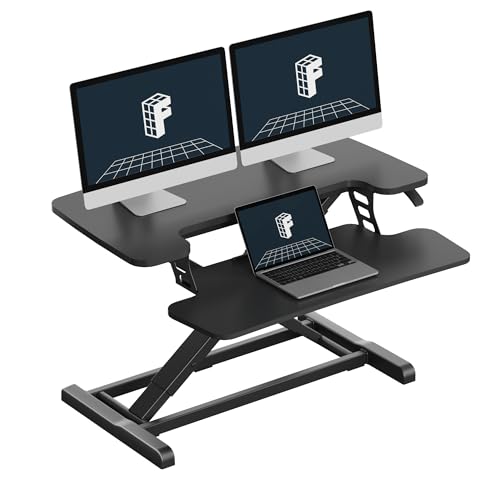
- Mechanical spring lift for stable adjustment
- 32-inch surface supports laptops and dual monitors
- 33-pound top capacity with included keyboard tray
Best For: Compact home-office sit-stand setups
Best Extra-Large Platform
37-Inch Pneumatic Desk Converter

- 37-inch platform fits two large monitors
- 37.5-pound desktop capacity
- One-touch pneumatic lift from 5.9 to 18.8 inches
Best For: Spacious dual-monitor and document-heavy workstations
Best Wide-Surface Pick
37-Inch Dual-Monitor Desk Converter

- 37-inch platform for dual monitors
- 5.9–18.8-inch height range
- Separate keyboard tray included
Best For: Dual-monitor workstations needing generous surface space
Best High-Capacity Option
31.5-Inch Standing Desk Converter

- 44-pound main-platform capacity
- 5.3–19.5-inch height adjustment
- Synchronized detachable keyboard tray
Best For: Sturdy dual-monitor or monitor-and-laptop setups
Best Compact Pick
Slim 25-Inch Adjustable Desk Riser
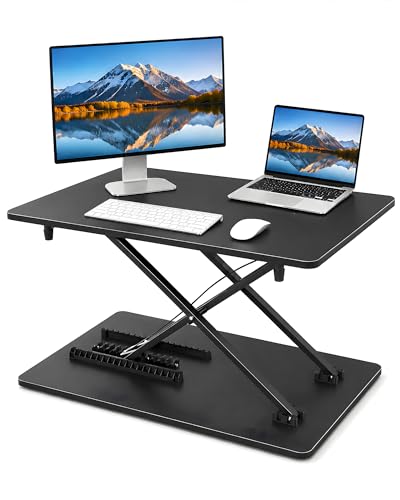
- Compact 25.16-inch work surface
- 12 height settings
- No assembly required
Best For: Small desks, dorms, and single-monitor setups
Best Overall
VIVO 36-Inch Standing Desk Converter

- Spacious surface for single or dual monitors
- Smooth pneumatic height adjustment
- 3-year manufacturer warranty
Best For: Roomy home or office sit-stand setups
Best for Large Setups
47-Inch Corner Standing Desk Converter

- Extra-wide surface for dual monitors
- Dual-pneumatic height adjustment
- Supports up to 33 pounds
Best For: Large office, gaming, and multi-device setups
Best Portable Option
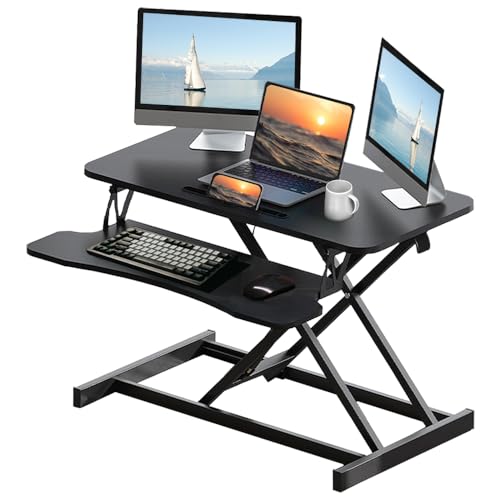
- 15.5-inch height adjustment range
- Carrying handle and five-minute setup
- Supports up to 30 pounds
Best For: Portable home-office and study workstations
Best Compact Lift – VIVO Black 32 in Standing Desk Converter
For shoppers comparing desk converters under 300, the VIVO DESK-V000K is a practical 32-inch option with a compact dual-monitor surface, synchronized keyboard tray, and straightforward manual height adjustment.
Best For: Home-office users who want a space-efficient riser for dual monitors and occasional standing work.
Pros:
- 31.5-inch surface provides room for dual monitors while conserving desk space.
- Keyboard tray raises with the desktop for a more consistent workstation setup.
- 33-pound lift assist and 4.5- to 20-inch adjustment range support sit-to-stand transitions.
- Requires minimal assembly and includes a steel frame with manufacturer warranty coverage.
Cons:
- Manual adjustment has a limited number of height positions.
- The 33-pound maximum load may not suit especially heavy equipment setups.
Its compact footprint, included keyboard tray, and near-ready-to-use design make this a well-rounded choice when you want a basic dual-monitor converter without replacing your existing desk.
Best Wide Work Surface – G-Pack Pro 38-Inch Standing Desk Converter
Among desk converters under 300, this G-Pack Pro model stands out for its wide 38-inch desktop, gas-spring lift, and removable keyboard tray. It is designed to add standing capability while keeping the converter within its existing footprint.
Best For: Users who need extra horizontal space for dual monitors, accessories, and documents.
Pros:
- 38-inch work surface offers generous room for dual monitors and office accessories.
- Gas-spring system adjusts the riser up to 17.3 inches.
- Heavy-duty steel frame supports up to 33 pounds.
- Removable keyboard tray and non-slip pads add setup flexibility and desk protection.
Cons:
- The manual model lifts slightly outward, so adjustment clearance is necessary.
- At 35.2 pounds, it may be less convenient to reposition than lighter converters.
If your priority is a broad working area rather than the smallest possible riser, the 38-inch layout provides useful room for a more fully equipped workstation.
Best Spring Mechanism – FLEXISPOT 32-Inch Standing Desk Converter
For shoppers seeking desk converters under 300 with a compact footprint, this FLEXISPOT 32-inch riser combines a mechanical spring lift with a reinforced steel frame. Its included keyboard tray is intended to support a more ergonomic laptop or monitor workstation.
Best For: Home-office and remote-work setups that need a compact riser with stable height adjustment.
Pros:
- Mechanical spring system is designed for smooth, stable adjustment without gas-spring air leakage concerns.
- 32-inch surface accommodates laptop and dual-monitor configurations.
- Top supports up to 33 pounds, while the keyboard tray holds up to 4.4 pounds.
- Nearly assembled design allows quick setup after attaching the keyboard tray.
Cons:
- The 24.9-inch depth may require careful placement on smaller desks.
- Height adjustment details are not specified in the supplied product information.
This model is a sensible option if you value a spring-based lifting system and reinforced construction while still wanting a converter sized for a typical home office.
Best Extra-Large Platform – 37-Inch Pneumatic Desk Converter
This 37-inch riser is a compelling entry among desk converters under 300 for users who want a broad platform and an extra-large keyboard tray. Its pneumatic lift and one-touch control are designed for quick transitions between sitting and standing.
Best For: Two-monitor users who need space for peripherals, documents, and everyday desk items.
Pros:
- 37-inch by 25-inch desktop is sized for two 17- to 32-inch monitors.
- Desktop supports up to 37.5 pounds, with stated monitor compatibility from 2.2 to 19.8 pounds each.
- Pneumatic lifting system and one-touch control enable smooth height changes from 5.9 to 18.8 inches.
- Wide 29.5-inch keyboard tray raises in sync with the desktop.
Cons:
- Its large platform may take up substantial space on a smaller desk.
- Product specifications provide limited detail about the exact lifting mechanism and finish.
Choose this converter when platform size is the deciding factor: it offers considerable room for a dual-monitor setup and work materials while retaining sit-to-stand functionality.
Best Wide-Surface Pick – 37-Inch Dual-Monitor Desk Converter
If you need desk converters under 300 with room for a multi-screen setup, this 37-inch riser prioritizes workspace. Its gas-spring adjustment and separate keyboard tray make switching between sitting and standing practical without replacing your existing desk.
Best For: Users who need space for two monitors, a laptop, speakers, and documents.
Pros:
- Wide 37 x 15.7-inch main surface accommodates dual monitors and accessories.
- Height adjusts from 5.9 to 18.8 inches for seated or standing work.
- Supports up to 37.4 pounds on the desktop and 4.4 pounds on the tray.
- Includes a separate 29.5 x 11.8-inch keyboard tray.
Cons:
- At 25.9 pounds, it is less convenient to move frequently.
- The large footprint may be limiting on compact desks.
This is a strong choice when surface area matters most. The broad platform and dual-monitor capacity are useful for demanding workstations, while the gas-spring lift provides flexible height adjustment.
Best High-Capacity Option – 31.5-Inch Standing Desk Converter
Among desk converters under 300, this model stands out for its steel frame and 44-pound main-platform capacity. The gas-spring lift, synchronized keyboard tray, and nearly pre-assembled design make it a practical option for a home or office workstation.
Best For: Users wanting a sturdy converter for dual monitors or a monitor-and-laptop arrangement.
Pros:
- 31.5 x 15.7-inch work surface fits dual monitors or a monitor-laptop setup.
- Adjusts from 5.3 to 19.5 inches with controlled gas-spring movement.
- Supports up to 44 pounds on the main platform.
- Wide detachable keyboard tray raises and lowers with the platform.
Cons:
- Its 32-inch width may be too large for smaller desks.
- The supplied details list three height positions, which may offer less fine control than models with more settings.
This converter balances capacity, height range, and ease of setup. Choose it if you want a robust platform and a full-size typing area, especially for heavier monitor equipment.
Best Compact Pick – Slim 25-Inch Adjustable Desk Riser
For shoppers comparing desk converters under 300 for a smaller workspace, this slim desktop riser keeps the setup simple. It requires no assembly, offers 12 height settings, and provides a flat surface that can support a monitor, laptop, keyboard, and mouse.
Best For: Students, remote workers, and anyone with limited desktop space.
Pros:
- Compact 25.16 x 15.75-inch surface suits smaller desks.
- Offers 12 adjustable height settings for more positioning flexibility.
- No assembly is required; place it on a desk and select a height.
- Flat platform can function as a keyboard surface without a separate tray.
Cons:
- Supports up to 33 pounds, less than the larger converters in this roundup.
- The compact surface may be restrictive for dual-monitor setups.
- The supplied details do not specify a height range.
This is the most space-conscious option of the three. Its low-profile design and multiple height settings make it well suited to straightforward laptop or single-monitor workstations where portability and simplicity matter.
Best Overall – VIVO 36-Inch Standing Desk Converter
For shoppers comparing desk converters under 300, the VIVO DESK-V000V is a practical all-around option with a spacious two-tier workstation, smooth pneumatic lifting, and minimal assembly. Its 36-inch surface supports a single- or dual-monitor setup while the keyboard tray moves with the desktop.
Best For: Home and office users who want a roomy, dual-monitor sit-stand workstation with a keyboard tray.
Pros:
- 91 x 56 cm work surface accommodates single or dual monitors and laptops.
- Dual pneumatic springs provide smooth height adjustment from 17 to 43 cm.
- Includes a 64 x 27 cm keyboard tray and requires very little assembly.
- Steel construction is backed by a 3-year manufacturer warranty.
Cons:
- Its 33-pound weight recommendation may limit heavier equipment setups.
- The two-tier design needs sufficient desk depth for comfortable placement.
The VIVO stands out as a balanced choice for everyday work because it combines useful surface area, synchronized keyboard positioning, and straightforward height adjustment without complicated installation.
Best for Large Setups – 47-Inch Corner Standing Desk Converter
Among desk converters under 300, this 47.2-inch corner-style riser is designed for users who need substantial workspace. Its large work surface, wide keyboard tray, dual-pneumatic lifting system, and steel frame make it suitable for dual monitors, laptops, or office and gaming arrangements.
Best For: Users who need a wide workstation for dual monitors, gaming equipment, or multiple devices.
Pros:
- 47.2 x 23.6 inch surface provides generous room for monitors and laptops.
- Height adjusts from 5.9 to 17.3 inches with a dual-pneumatic lifting system.
- Includes a 31.5 x 11.8 inch keyboard tray.
- Steel frame supports up to 33 pounds and assembles in several minutes.
Cons:
- The broad 47.2-inch width requires a large desk area.
- At 20.43 kg, it is relatively heavy to reposition.
This converter is the strongest fit when surface area is the priority. Measure your existing desk carefully, since its wide footprint and 30-inch listed depth can take up considerable space.
Best Portable Option – 32-Inch Sit-Stand Workstation
This 32-inch model is a flexible choice among desk converters under 300, combining a compact workstation with a 15.5-inch height range and a carrying handle. It is designed for home offices, study spaces, drafting, gaming, and other uses where straightforward setup and portability matter.
Best For: Remote workers, students, and users who want a portable converter with broad height adjustment.
Pros:
- 31.5 x 15.7 inch worktop accommodates monitors, laptops, and accessories.
- Adjusts from 4.3 to 19.8 inches for a wide range of working positions.
- Supports up to 30 pounds and is described as stable for dual-monitor use.
- Assembles in about five minutes and includes a carrying handle.
Cons:
- Its 30-pound capacity is lower than the 33-pound options in this roundup.
- The smaller worktop offers less room than the 47-inch converter.
- Assembly is required, despite the short setup time.
Choose this model if you value flexibility over maximum desktop area. Its portable design and 4.3-to-19.8-inch adjustment range make it convenient for changing work locations or sharing a workstation.
How We Picked the Best Desk Converters Under 300
We focused on the features that matter most in daily use: platform width and depth, stated weight capacity, height-adjustment range, stability, keyboard-tray design, and compatibility with one or two monitors. We also considered whether each converter suits a compact workstation, a larger desktop, or a corner setup.
Because desk dimensions and monitor arrangements vary, no single model is ideal for everyone. The right choice depends on how much equipment you use, how often you switch positions, and how much room your desk can spare.
Quick Comparison
- Best for a compact setup: Choose a smaller 25-inch-class riser for a laptop or single monitor.
- Best for two monitors: Look for a 32- to 37-inch platform with adequate depth and a broad keyboard tray.
- Best for larger workspaces: A 38- or 47-inch converter offers more room for multiple displays and accessories.
- Best for corner desks: A corner-shaped model can use otherwise wasted desktop space, but verify measurements carefully.
Key Buying Factors for Desk Converters Under $300
Size and Workspace Fit
Measure the usable width and depth of your desk before buying. Leave room for cables, speakers, and a comfortable mouse position. A wide converter may support two monitors but can overwhelm a shallow or narrow desk.
Monitor and Weight Support
Check the product’s stated weight capacity rather than judging stability by appearance. Two monitors, a laptop, keyboard, and accessories can add up quickly. If you use monitor arms, confirm that the platform or mounting design supports them.
Height Range and Ergonomics
At standing height, your elbows should remain near a relaxed 90-degree angle and the top of the screen should sit around eye level. Compare the converter’s maximum height with your own stature and the height of your existing desk.
Adjustment and Stability
Consider whether you prefer a gas-spring lift, a manual mechanism, or another adjustment style. Smooth movement encourages more frequent position changes, while a broad base and sturdy frame help reduce wobble when typing.
Keyboard Tray and Daily Comfort
A separate tray can create better wrist and screen positioning, especially for dual-monitor setups. Make sure it leaves enough space for your mouse and does not interfere with desk drawers or the front edge of your desk.
Who Should Buy Which Desk Converters Under 300?
Choose a compact riser if you have limited desk space or primarily use a laptop and one display. Choose a 32- to 37-inch model if you need a practical dual-monitor workstation without taking over the entire desk. Choose a wider 38- or 47-inch option if you use several displays, paperwork, or larger peripherals. For a corner desk, prioritize footprint and shape over maximum width.
Whichever model you select, use the converter as part of a broader ergonomic setup. Keep your monitor centered, place frequently used items within easy reach, and alternate sitting and standing rather than remaining in one position all day.