
The best docking stations with 2.5GbE LAN turn a laptop into a capable desktop workstation, combining fast wired networking with display outputs, USB expansion, and power delivery.
We selected 10 docks for different setups, including Thunderbolt 5, USB4, Thunderbolt 4, USB-C, Mac, Windows, and ChromeOS systems. Use the guide below to match port selection, monitor support, bandwidth, and charging performance to your needs.
Best 10 Docking Stations with 2 5gbe Lan Picks for 2026
Powerhouse Thunderbolt 5 Pick

- 15-port Thunderbolt 5 dock with 2.5GbE
- Up to 140W host charging
- Supports high-resolution, high-refresh displays
Best For: Power users with Thunderbolt 5 laptops and demanding displays
Enterprise Multi-Monitor Value

- Supports up to three HDMI monitors
- Includes 100W charging and six USB 3.0 ports
- Uses Gigabit Ethernet for wired networking
Best For: Hybrid offices needing triple-display support
High-Connectivity Thunderbolt 4 Pick

- 18 ports with extensive USB and Thunderbolt connectivity
- 2.5GbE with backward-compatible networking
- Up to 98W laptop charging
Best For: Thunderbolt 4 workstations with many peripherals
Future-Ready High-Speed Pick

- Three downstream Thunderbolt 5 ports
- Up to 140W laptop charging
- 2.5GbE and support for high-resolution displays
Best For: New Thunderbolt 5 Mac and Windows workstations
Enterprise USB4 Pick
StarTech Triple-Display USB4 Dock
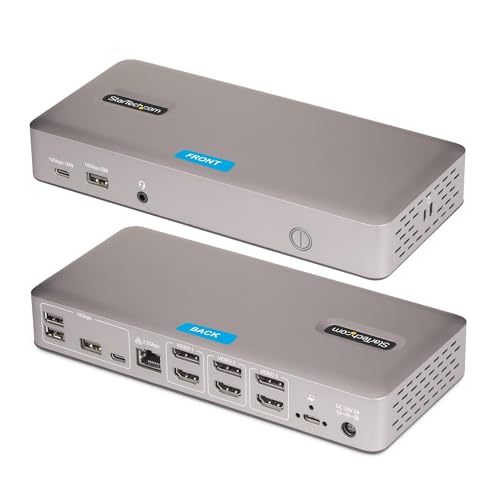
- Triple 4K 60Hz display support
- 2.5GbE with PXE Boot and Wake-on-LAN
- Driverless Windows and ChromeOS setup
Best For: Managed Windows and ChromeOS workspaces
Universal DisplayLink Pick
Kensington SD4760P 11-in-1 Dock

- Triple-monitor DisplayLink support
- 100W charging and six USB-A ports
- Compatible with Mac, Windows, and ChromeOS
Best For: Mixed-device offices needing multiple HDMI displays
High-Performance Thunderbolt Pick
Plugable TBT-UDH2 Thunderbolt 5 Dock

- 2.5GbE and 140W laptop charging
- Dual HDMI 2.1 for high-resolution displays
- Six USB-C ports and UHS-II readers
Best For: Newer Thunderbolt systems and demanding display workflows
Best Cross-Platform USB4 Dock

- Driverless USB4 support for Mac and Windows
- Dual 4K 144Hz or single 8K 60Hz output
- 2.5GbE, 100W charging, and IT management features
Best For: Mixed-platform offices and shared workstations
Best Budget Dual-Monitor Dock

- Dual HDMI output up to 4K 60Hz on supported hosts
- Driverless Windows and ChromeOS setup
- Gigabit Ethernet, 65W charging, USB, and audio
Best For: Everyday Windows and ChromeOS desk setups
Best High-Refresh Windows Dock
StarTech Dual 4K 120Hz HDMI Dock

- Dual 4K 120Hz HDMI output over USB4
- Uncompressed video using the native laptop GPU
- 2.5GbE, PXE Boot, Wake-on-LAN, and lock slots
Best For: Windows and ChromeOS high-refresh workstations
Powerhouse Thunderbolt 5 Pick – CalDigit TS5
The CalDigit TS5 is a premium choice among docking stations with 2 5gbe lan, offering a 2.5GbE connection alongside Thunderbolt 5, extensive USB connectivity, fast card readers, and high-power charging. Its 140W host charging and 240W power supply make it particularly suited to demanding desktop setups.
Best For: Power users with Thunderbolt 5 laptops, high-resolution displays, and fast wired networks.
Pros:
- 15 ports, including Thunderbolt 5, USB, DisplayPort 2.1, SD/microSD, audio, and 2.5GbE.
- Up to 140W host charging with a sustained 240W power supply.
- Supports demanding multi-display configurations, including up to dual 8K on compatible systems.
Cons:
- Maximum performance requires a Thunderbolt 5 or USB4 v2 host.
- Older Thunderbolt and USB-C systems may have reduced functionality.
The TS5 stands out for users who need both substantial power and high-bandwidth expansion. Its 2.5GbE port is faster than standard Gigabit Ethernet, though buyers should confirm host compatibility before paying for its advanced capabilities.
Enterprise Multi-Monitor Value – Plugable Triple Display Dock
The Plugable 12-in-1 dock is a practical option for office setups needing multiple monitors, USB peripherals, and wired networking from one USB-C connection. It supports up to three HDMI displays and includes Gigabit Ethernet, rather than 2.5GbE, so it is better suited to standard network environments than to the fastest wired workflows.
Best For: Hybrid offices and Windows, macOS, or ChromeOS users who need triple-display productivity and broad device compatibility.
Pros:
- Supports up to three HDMI monitors, including one 4K display and two 1080p displays.
- Provides six USB 3.0 peripheral ports and 100W USB-C Power Delivery.
- Works with compatible USB-C, USB4, and Thunderbolt systems across Windows, macOS, and ChromeOS.
- Includes North American-based lifetime technical support.
Cons:
- Uses Gigabit Ethernet, not 2.5GbE LAN.
- DisplayLink requires driver installation on macOS.
- Not compatible with Linux, and HDCP is not supported.
This dock is a strong productivity choice when three-screen support matters more than multi-gigabit networking. It offers broad enterprise compatibility, but shoppers specifically seeking docking stations with 2 5gbe lan should consider one of the CalDigit or Thunderbolt 5 Plugable models instead.
High-Connectivity Thunderbolt 4 Pick – CalDigit TS4
The CalDigit TS4 combines 18 ports with 98W charging and 2.5GbE, making it a well-rounded choice for users comparing docking stations with 2 5gbe lan. It connects numerous USB, Thunderbolt, audio, and card-reader devices while supporting high-resolution displays on compatible computers.
Best For: Thunderbolt 4 users who want maximum peripheral connectivity and faster-than-Gigabit networking.
Pros:
- Offers 18 ports, including three Thunderbolt 4 ports and eight 10Gb/s USB ports.
- Includes 2.5GbE with backward compatibility for 1GbE networks.
- Provides 98W host charging for many larger laptops.
- Supports up to dual 6K displays on compatible Mac systems or dual 4K displays on Windows.
Cons:
- Maximum performance requires Thunderbolt 4 or a fully featured USB4 port.
- Display support varies significantly by operating system and computer hardware.
- It uses Thunderbolt 4 rather than the newer Thunderbolt 5 standard.
The TS4 remains a strong all-purpose dock for a crowded workstation, especially when its 18-port layout and 2.5GbE connection will be used regularly. Check your laptop’s display limits and port capabilities before purchase.
Future-Ready High-Speed Pick – Plugable Thunderbolt 5 Dock
The Plugable TBT-UDT3 is a forward-looking option among docking stations with 2 5gbe lan, pairing 2.5GbE networking with three Thunderbolt 5 downstream ports and up to 140W laptop charging. It is designed for high-performance Mac and Windows systems that need fast displays, storage, and networking from a single dock.
Best For: Thunderbolt 5 laptop owners running high-resolution or high-refresh-rate multi-display setups.
Pros:
- Includes three downstream Thunderbolt 5 ports with video support and up to 15W charging each.
- Provides up to 140W charging to compatible laptops.
- Supports up to three 6K displays on Mac or two 8K displays on Windows, subject to system limits.
- Offers driverless compatibility with supported macOS and Windows Thunderbolt or USB4 systems.
Cons:
- Its advanced features require compatible Thunderbolt 5, Thunderbolt 4, or full-featured USB4 systems.
- Display counts and resolutions depend on the host computer.
- It has fewer total ports than the 18-port CalDigit TS4.
The TBT-UDT3 is a compelling choice for newer high-performance systems, particularly when 140W charging and high-refresh displays are priorities. Its 2.5GbE port adds faster wired networking, while Thunderbolt 5 provides room for demanding future peripherals.
Enterprise USB4 Pick – StarTech Triple-Display USB4 Dock
For buyers comparing docking stations with 2 5gbe lan, this StarTech model offers a driverless USB4 setup with a 2.5GbE wired network connection. It supports up to three 4K displays at 60Hz through a compatible USB4 or Thunderbolt 4 host, making it especially suitable for managed Windows and ChromeOS workspaces.
Best For: IT-managed Windows or ChromeOS deployments that need triple 4K output, PXE Boot, Wake-on-LAN, and a secure mounting option.
Pros:
- Supports up to three uncompressed 4K 60Hz displays using the laptop’s native GPU.
- Includes 2.5GbE networking with PXE Boot and Wake-on-LAN support.
- Driverless on Windows and ChromeOS, with lock slots and surface or VESA mounting support.
Cons:
- Not compatible with macOS.
- Mounting accessories are sold separately.
This is a strong business-oriented choice when deployment simplicity and remote-management features matter more than broad Mac compatibility. Its 2.5GbE port and triple-display capability give it a clear advantage for demanding office workflows.
Universal DisplayLink Pick – Kensington SD4760P 11-in-1 Dock
The Kensington SD4760P is worth considering alongside docking stations with 2 5gbe lan if your priority is broad laptop compatibility and multiple HDMI outputs rather than multi-gigabit networking. It supports Windows, macOS, and ChromeOS systems, but its Ethernet connection is Gigabit Ethernet rather than 2.5GbE.
Best For: Mac and Windows users who need triple-monitor connectivity, 100W charging, and a large selection of USB-A ports.
Pros:
- Supports up to three external displays through DisplayLink: one 4K display at 30Hz and two 1080p displays at 60Hz.
- Provides up to 100W laptop charging and six USB-A 3.2 Gen 1 ports.
- Works with Windows, macOS, ChromeOS, Thunderbolt, USB4, and USB-C laptops.
Cons:
- Uses Gigabit Ethernet, not 2.5GbE or dual 5GbE networking.
- DisplayLink drivers are required.
- The maximum 4K display refresh rate listed is 30Hz.
This dock is a practical universal option for mixed-device households and offices. Choose it for its monitor flexibility and USB-A connectivity, but look elsewhere if faster-than-Gigabit LAN is essential.
High-Performance Thunderbolt Pick – Plugable TBT-UDH2 Thunderbolt 5 Dock
For users seeking docking stations with 2 5gbe lan, the Plugable TBT-UDH2 combines a 2.5Gbps Ethernet port with Thunderbolt 5 connectivity, high-speed display support, and 140W laptop charging. Its feature set is aimed at newer Thunderbolt 5, Thunderbolt 4, and USB4 systems rather than older USB-C laptops.
Best For: Modern MacBook Pro and Windows Thunderbolt systems that need high-resolution dual displays, multiple USB-C ports, and fast wired networking.
Pros:
- Includes 2.5Gbps Ethernet and up to 140W laptop charging.
- Dual HDMI 2.1 ports support up to dual 8K 60Hz or 4K 144Hz with Thunderbolt 5 hosts.
- Offers six USB-C ports, UHS-II card readers, and driverless operation on supported systems.
Cons:
- Thunderbolt 3, standard USB-C, Windows ARM, and gaming laptops with DisplayPort MUX are not supported.
- Display capabilities vary by host system and processor.
- Compatibility is limited to Windows 11 or newer and macOS 13 or newer.
This is the most performance-focused option of the group, especially for newer professional laptops and high-resolution displays. Verify host compatibility carefully before buying, since its advanced features depend on Thunderbolt generation and system hardware.
Best Cross-Platform USB4 Dock – Dual 4K 144Hz StarTech Dock
If you need docking stations with 2 5gbe lan capabilities, note that this StarTech model provides 2.5GbE networking rather than two 5GbE ports. Its driverless USB4 design supports Windows and newer M4/M5 MacBook systems, with dual high-refresh displays and 100W laptop charging for demanding desk setups.
Best For: Mixed Mac and Windows workstations, shared desks, and IT-managed deployments that need fast networking and simple setup.
Pros:
- Supports dual 4K 144Hz or a single 8K 60Hz DisplayPort display setup.
- Provides 2.5GbE, 100W charging, PXE Boot, and Wake-on-LAN.
- Driverless plug-and-play operation across supported macOS and Windows systems.
- Includes lock slots and supports surface or VESA mounting with accessories.
Cons:
- It has 2.5GbE, not two 5GbE LAN connections.
- VESA mounting accessories are sold separately.
This is a strong choice when cross-platform compatibility and high-refresh video matter more than having multiple high-speed Ethernet ports. Its testing, security features, and lifetime multilingual technical assistance also suit business rollouts.
Best Budget Dual-Monitor Dock – Plugable USB-C Dual HDMI Dock
For buyers comparing docking stations with 2 5gbe lan options, this Plugable dock is a simpler alternative with Gigabit Ethernet, not 5GbE networking. It focuses on a driverless dual-HDMI workstation setup for Windows and ChromeOS laptops with compatible USB-C video output.
Best For: Windows and ChromeOS users who want two external 4K monitors, everyday peripherals, and 65W laptop charging from one cable.
Pros:
- Can support two HDMI monitors at up to 4K 60Hz on compatible systems.
- Offers 10-in-1 connectivity, including USB-C, USB-A, Gigabit Ethernet, and audio.
- Driverless setup works with supported Windows, ChromeOS, USB4, and Thunderbolt systems.
- Includes a 110W power adapter, host cable, and lifetime North American support.
Cons:
- Networking is Gigabit Ethernet rather than 2.5GbE or dual 5GbE LAN.
- Not recommended for macOS users who need dual extended displays.
- Dual 4K 60Hz output depends on host-system capabilities and DP Alt Mode support.
This dock makes sense for a conventional office setup where dual HDMI displays and common USB accessories are the priority. It is not the right match for high-speed multi-port networking, but its included power supply and straightforward compatibility checklist simplify deployment.
Best High-Refresh Windows Dock – StarTech Dual 4K 120Hz HDMI Dock
Among docking stations with 2 5gbe lan, this StarTech model still offers only one 2.5GbE connection, but it stands out for high-refresh HDMI output. Its USB4 design can drive two 4K 120Hz displays without compressed video on supported Windows and ChromeOS systems.
Best For: Windows or ChromeOS users who need smooth dual-monitor performance, faster-than-Gigabit networking, and enterprise-friendly deployment features.
Pros:
- Supports two 4K 120Hz or 60Hz HDMI displays through one USB4 or Thunderbolt 4 connection.
- Uses the laptop’s native GPU for uncompressed video output.
- Includes 2.5GbE with PXE Boot and Wake-on-LAN support.
- Offers driverless deployment, lock slots, and surface or VESA mounting support.
Cons:
- It provides 2.5GbE rather than two 5GbE LAN ports.
- It is not compatible with macOS.
- Mounting accessories are sold separately.
This is the strongest fit of the three for high-refresh HDMI productivity or visual workflows on Windows and ChromeOS. Its lack of macOS support and single 2.5GbE connection should be checked carefully before purchase, especially for mixed-device environments.
How We Picked the Best Docking Stations with 2 5gbe Lan
We focused on docks that provide a practical balance of connectivity, display support, charging, and dependable networking. The lineup includes Thunderbolt 5 and USB4 models for newer laptops, Thunderbolt 4 docks for proven high-bandwidth performance, and USB-C options for broader compatibility.
We also considered the number and type of display outputs, maximum resolution and refresh rate, host compatibility, USB speeds, power-delivery capacity, Ethernet performance, and whether the dock requires drivers. A dock should support your laptop and monitors without relying on features your computer cannot use.
Quick Comparison
| Best For | What to Prioritize | Recommended Type |
|---|---|---|
| High-end workstation | Maximum bandwidth, many ports, high charging capacity | Thunderbolt 5 |
| Modern Mac or Windows laptop | USB4 or Thunderbolt 4 display and storage support | USB4 or Thunderbolt 4 |
| Several high-resolution monitors | Display output count, refresh rate, and GPU compatibility | Thunderbolt 5 or USB4 |
| General office setup | Reliable dual or triple display support and 100W charging | USB-C or DisplayLink |
| Simple plug-and-play use | Driverless operation and broad OS support | USB4 or compatible USB-C |
Key Buying Factors for Docking Stations with 2.5GbE LAN
Network and Host Bandwidth
2.5GbE networking is faster than standard gigabit Ethernet, but actual speeds depend on your switch, router, cabling, storage, and internet or local-network traffic. For the dock to deliver its best performance, your laptop connection must also have sufficient USB4 or Thunderbolt bandwidth.
Display Compatibility
Check the required resolution and refresh rate before buying. Dual 4K at 60Hz is suitable for most productivity work, while 4K at 120Hz, 144Hz, or 8K support is more relevant to gaming, creative work, and newer monitors. Mac display support can differ from Windows, particularly when multiple displays are connected through a single dock.
Power Delivery and Port Selection
Choose a dock that supplies enough power for your laptop under load. A 100W or higher rating is useful for many productivity notebooks, while mobile workstations may benefit from more powerful Thunderbolt 5 models. Count the ports you actually need, including USB-A, USB-C, audio, card readers, HDMI, and DisplayPort.
Drivers and Compatibility
Driverless USB4 and Thunderbolt docks are generally simpler to deploy, but DisplayLink models can offer flexible multi-monitor support when the computer’s native display capabilities are limited. Confirm operating-system support and any required software before purchase.
Who Should Buy Which Docking Stations with 2 5gbe Lan?
Choose a Thunderbolt 5 dock if you want maximum throughput, extensive expansion, high-wattage charging, or a setup designed to remain useful with future laptops. USB4 docks are a strong choice for modern Windows systems and Macs that need fast displays and networking without moving to Thunderbolt 5.
Thunderbolt 4 remains a dependable option for premium productivity desks, especially when you need many USB ports and stable display connectivity. USB-C docks are better for straightforward office setups and mixed-device environments, while DisplayLink models make sense when triple-monitor support matters more than native video processing. Before ordering, verify your laptop’s port capabilities, monitor requirements, charging needs, and network equipment.