
Finding the right computer air cooler under $200 depends on whether you need to cool a desktop processor or improve airflow beneath a laptop. The options in this roundup span compact low-profile designs, tower CPU coolers, and adjustable laptop cooling pads.
We focus on practical differences such as compatibility, fan control, noise, size, cooling capacity, and installation convenience so you can choose a solution that fits your hardware and workload.
Best 10 Computer Air Coolers Under 200 Picks for 2026
Best Display-Equipped CPU Cooler
Peerless Assassin 120 Vision MAX

- 5-inch IPS system-monitoring display
- Dual-tower design with six heat pipes
- Supports Intel and AMD sockets
Best For: Feature-focused desktop builds
Best Large-Laptop Cooling Stand

- Fits laptops up to 18 inches
- Adjustable 120mm cross-flow fan
- Adds USB 2.0 and USB-C ports
Best For: Large laptops at a stationary desk
Best Multi-Fan Laptop Pad

- Five fans with selectable operating modes
- Six adjustable height settings
- Fits 12- to 17-inch laptops
Best For: Adjustable cooling for everyday laptops
Compact RGB Pick

- 133 mm compact design for smaller PC cases
- 800–2200 RPM PWM speed control
- ARGB lighting with AM4/AM5 and Intel support
Best For: Compact gaming PCs with RGB builds
Portable Laptop Pick
TECKNET Triple-Fan Cooling Pad

- Three 110 mm fans run at 1200 RPM
- Fits laptops from 12 to 17 inches
- Dual USB ports and two height settings
Best For: Laptop cooling during gaming or extended use
Best RGB Laptop Cooling Pad
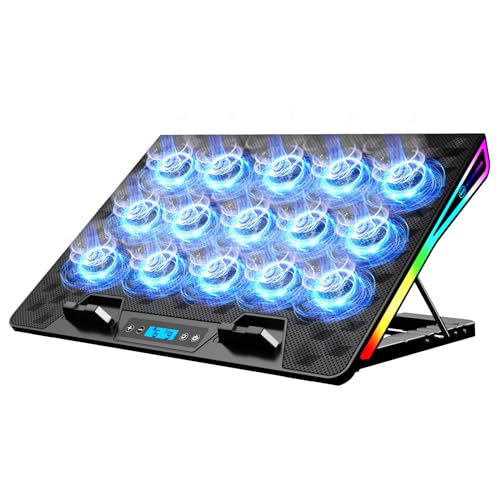
- 15 fans rated at 2200–2300 RPM each
- Four height settings with anti-slip baffles
- LCD controls, RGB modes, and dual USB-A ports
Best For: Large gaming laptops and RGB-focused desk setups
Best Desktop CPU Air Cooler
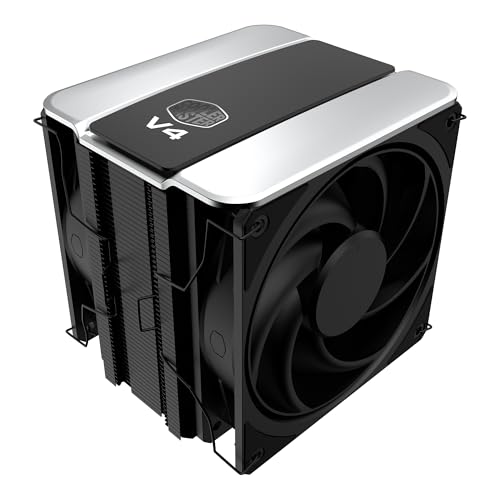
- Patented 3DHP design targets improved cooling
- Dual 120 mm PWM fans use push-pull airflow
- Supports current AMD and Intel sockets
Best For: Desktop PC builders wanting broad compatibility
Best Adjustable Laptop Stand Cooler
ICE COOREL 6-Fan Laptop Cooling Pad

- Six adjustable-speed 70 mm cooling fans
- Five height settings with two anti-slip baffles
- Two USB 2.0 ports and metal mesh construction
Best For: Home and office laptop use with adjustable positioning
Best Display-Equipped CPU Cooler – Peerless Assassin 120 Vision MAX
For shoppers comparing computer air coolers under 200, the Thermalright Peerless Assassin 120 Vision MAX stands out with a dual-tower design and built-in 5-inch IPS display. It combines six copper heat pipes, two 2150 RPM fans, and broad Intel and AMD socket support.
Best For: Performance-focused desktop builders who want visible system monitoring and ARGB styling.
Pros:
- 5-inch 480×854 IPS screen supports real-time monitoring and custom backgrounds through TRCC software.
- Dual-tower heatsink, six heat pipes, and two high-speed fans provide strong air cooling.
- Supports current Intel LGA1851/1700/1200/115x sockets and AMD AM4/AM5.
- Rated airflow reaches 69 CFM with noise listed at 27 dB(A) or less.
Cons:
- At 164mm tall, it requires a case with sufficient CPU-cooler clearance.
- The display requires a motherboard 9-pin USB connection and TRCC software setup.
- AMD installation uses the motherboard’s original backplate, which is not included.
This is a feature-rich choice for a compatible ATX system, especially if the integrated display is part of the appeal. Check case clearance, motherboard headers, and socket support before buying.
Best Large-Laptop Cooling Stand – Thermaltake Massive EXTREME
Among computer air coolers under 200, the Thermaltake Massive EXTREME is designed for laptops rather than desktop CPUs. Its sealed airflow chamber, adjustable cross-flow fan, and support for laptops up to 18 inches make it a substantial cooling stand for larger notebooks.
Best For: Users with large gaming or workstation laptops who want adjustable airflow and extra USB connectivity.
Pros:
- 120mm cross-flow fan adjusts from 800 to 3500 RPM and delivers up to 48.5 CFM.
- Sealed chamber uses high-density memory foam to help direct airflow.
- Supports laptops up to 18 inches with two-stage height and angle adjustment.
- Includes three USB 2.0 ports and one USB 3.2 Gen 2 Type-C port.
Cons:
- Its 2.27kg weight and large footprint make it less portable than compact pads.
- It uses one fan rather than a multi-fan layout.
- The temperature sensor provides airflow-temperature information, not a detailed system-monitoring display.
The Massive EXTREME is best viewed as a robust, adjustable laptop stand with directed cooling and useful ports. Its size makes it most practical for a fixed desk setup and larger notebooks.
Best Low-Profile CPU Cooler – Noctua NH-L12 Ghost S1 Edition
For compact computer air coolers under 200, the Noctua NH-L12 Ghost S1 Edition prioritizes low height and quiet operation. Its 66mm profile, 92mm PWM fan, four heat pipes, and Ghost S1 compatibility suit small-form-factor systems with moderate CPU heat loads.
Best For: Quiet SFF and ITX builds where cooler height and acoustic performance matter.
Pros:
- 66mm height is designed for space-constrained small-form-factor cases.
- Noise is listed at 17.6 dB, with PWM support and a Low-Noise Adaptor included.
- Supports Intel LGA1851, LGA1700, LGA200, LGA115x and AMD AM4/AM5.
- Includes the SecuFirm2 mounting system and NT-H2 thermal compound.
Cons:
- It is intended for CPUs with moderate heat loads rather than unrestricted high-heat operation.
- The single 92mm fan offers less airflow headroom than larger dual-tower coolers.
- Compatibility should be checked against the specific case and CPU list before installation.
This Noctua is a sensible choice when a low-profile, quiet cooler is more important than maximum thermal capacity. It is particularly well matched to Ghost S1 and other carefully planned SFF builds.
Best Multi-Fan Laptop Pad – Kootek 5-Fan Cooling Stand
The Kootek cooling pad is a practical option among computer air coolers under 200 for users who want broad laptop airflow and an adjustable stand. Five USB-powered fans, six height settings, and support for 12- to 17-inch laptops make it suitable for everyday work, entertainment, and gaming.
Best For: 12- to 17-inch laptop users who want adjustable ergonomics, multiple fan modes, and extra USB ports.
Pros:
- Five fans provide broad cooling coverage, with separate controls for one, four, or all five fans.
- Six adjustable height settings help customize the viewing and typing angle.
- Built-in dual USB hub adds connectivity for peripherals.
- Front stoppers help secure compatible laptops from slipping.
Cons:
- It is limited to laptops up to 17 inches, so larger models may not fit.
- Blue LED lighting cannot be separated from the fan controls according to the supplied design.
- For best performance, the USB cable should connect to a 5V 1A adapter; Type-C devices need an adapter.
The Kootek offers a useful balance of airflow, adjustability, and connectivity for standard-size laptops. Confirm your laptop’s dimensions and plan the USB connection carefully for reliable fan operation.
Compact RGB Pick – Vetroo V3 CPU Air Cooler
For computer air coolers under 200, the Vetroo V3 is a compact CPU option with adjustable PWM control and customizable ARGB lighting. Its 133 mm height suits smaller builds, while the adjustable fan position can help create additional RAM clearance.
Best For: Compact gaming PCs and builders who want integrated ARGB lighting.
Pros:
- Compact 133 mm height is suited to smaller cases.
- PWM speed range of 800–2200 RPM supports a balance between airflow and noise.
- ARGB lighting connects through a 5V 3-pin motherboard header.
- Supports AMD AM4/AM5 and several Intel sockets, including LGA1851 and LGA1700.
Cons:
- Its 92 mm fan and 38.09 CFM airflow capacity are more modest than larger tower coolers.
- ARGB synchronization requires a compatible 5V 3-pin motherboard connection.
The Vetroo V3 makes the most sense when case height, RAM access, and appearance matter as much as basic CPU cooling. Check your socket and motherboard lighting-header compatibility before buying.
Portable Laptop Pick – TECKNET Triple-Fan Cooling Pad
Among computer air coolers under 200, the TECKNET cooling pad is designed for laptops rather than desktop CPUs. Three 110 mm fans run at 1200 RPM, draw power from a laptop USB port, and support laptops from 12 to 17 inches.
Best For: Laptop users who need portable airflow for extended work, gaming, or other demanding use.
Pros:
- Three fans provide airflow beneath compatible laptops.
- USB-powered design needs no separate power adapter.
- Two adjustable height settings can improve viewing comfort.
- Dual USB ports include a pass-through port for peripherals.
Cons:
- The included cable is USB-A to USB-A, which may not suit every laptop.
- It is an external laptop pad, not an internal desktop CPU cooler.
- Its 15-inch length and 1.4-pound weight are less convenient for ultralight travel.
The TECKNET is a practical choice if you want a simple, adjustable laptop cooling surface with a USB pass-through. Confirm your laptop has a compatible USB-A port and fits the 12–17-inch range.
High-Performance Tower Pick – ARCTIC Freezer 36 CPU Cooler
For desktop builders comparing computer air coolers under 200, the ARCTIC Freezer 36 offers a larger single-tower design with push-pull 120 mm fans and four heatpipes. Its pressure-optimized fans run from 200 to 1800 RPM, while the included MX-6 thermal compound simplifies installation.
Best For: High-end CPU builds that have room for a full-size tower cooler.
Pros:
- Push-pull airflow uses two pressure-optimized 120 mm fans.
- Four offset heatpipes transfer heat into the aluminum fin stack.
- Supports AMD AM4/AM5 and Intel LGA1851/LGA1700 sockets.
- Includes an Intel contact frame and MX-6 thermal compound.
Cons:
- At 6.25 inches tall, it requires more case clearance than compact coolers.
- Its 879 g weight and larger tower format may be excessive for small builds.
- Compatibility is limited to the listed AMD and Intel socket families.
The Freezer 36 is the strongest fit here for buyers prioritizing desktop cooling capacity over compact dimensions. Measure your case clearance and verify the CPU socket before installation.
Best RGB Laptop Cooling Pad – KeiBn 15-Fan Laptop Cooler
For shoppers comparing computer air coolers under 200, the KeiBn cooling pad is a feature-rich choice for larger gaming laptops. Its 15 fans, metal mesh surface, adjustable stand, and RGB controls focus on airflow, comfort, and desk-friendly customization.
Best For: Gamers and users with 10- to 17.3-inch laptops who want strong cooling, RGB lighting, and adjustable ergonomics.
Pros:
- Uses 15 fans rated at 2200–2300 RPM each for active cooling.
- Four height settings and anti-slip baffles improve positioning and stability.
- LCD controls, 10 RGB modes, and dual USB-A ports add convenience.
Cons:
- At 1.6 kg, it is less portable than lighter cooling stands.
- Its USB-A connection may not suit computers without a USB-A port.
- The larger design may be more than compact laptops need.
The KeiBn stands out when cooling capacity and gaming-focused features matter more than minimal size. Its broad laptop range and four-position adjustment also make it practical for extended desk use.
Best Desktop CPU Air Cooler – Cooler Master V4 Alpha 3DHP
Among computer air coolers under 200, the Cooler Master V4 Alpha 3DHP is a desktop CPU option designed for balanced performance and quieter operation. Its single-tower layout combines patented 3D heat pipes with dual pre-installed PWM fans.
Best For: Desktop builders seeking a compact single-tower CPU cooler with broad socket support and push-pull airflow.
Pros:
- Patented 3DHP design is rated for 30% better cooling than standard designs.
- Dual Mobius 120P PWM fans provide push-pull airflow.
- Supports AMD AM5/AM4 and Intel LGA1851/1700 platforms.
- Includes a five-year manufacturer warranty.
Cons:
- Its 161 mm height requires checking available case clearance.
- It is intended for desktop CPUs rather than laptops or general room cooling.
- The supplied specifications list a maximum speed of 2050 RPM, which may not suit every noise or performance preference.
The V4 Alpha 3DHP is a sensible fit for new or upgraded desktop systems that need socket flexibility and a conventional air-cooling design. Confirm case clearance and motherboard compatibility before installation.
Best Adjustable Laptop Stand Cooler – ICE COOREL 6-Fan Laptop Cooling Pad
For buyers searching computer air coolers under 200, the ICE COOREL laptop cooling pad offers a straightforward cooling-and-stand combination. Six adjustable-speed fans, a metal mesh surface, multiple height settings, and two USB ports make it suited to everyday laptop use.
Best For: Home and office users with laptops up to 17 inches who want basic cooling, positioning flexibility, and accessory connectivity.
Pros:
- Six 70 mm fans run at adjustable speeds from 2400–2600 RPM.
- Five height settings and two baffles help improve viewing angle and stability.
- Two USB 2.0 ports support data transmission or connecting devices.
- Metal mesh construction helps dissipate laptop heat.
Cons:
- Its six-fan setup is less extensive than 15-fan alternatives.
- The listed size range is 13–15.6 inches, while compatibility is stated up to 17 inches, so fit should be checked.
- At 1.03 kg, it is portable but not especially lightweight.
The ICE COOREL is a practical everyday stand for users who want airflow and ergonomic adjustment without gaming-oriented lighting. Its two USB ports are useful when the laptop has a suitable USB connection available.
How We Picked the Best Computer Air Coolers Under 200
We selected these models based on their cooling design, intended device size, airflow features, adjustability, noise-control options, and overall practicality. Desktop CPU coolers were considered for radiator layout, fan configuration, clearance, and mounting needs. Laptop cooling pads were evaluated for supported screen sizes, fan count, height adjustment, portability, USB connectivity, and ease of use.
Because “air cooler” can mean different things, this list includes both processor heatsinks and external laptop cooling stands. Check your device type before buying: a CPU cooler cannot replace a laptop cooling pad, and a laptop pad is not designed for desktop processor cooling.
Quick Comparison
- Best for high-performance desktop CPUs: Thermalright Peerless Assassin 120 Vision MAX ARGB White.
- Best for compact desktop builds: Noctua NH-L12 Ghost S1 Edition.
- Best single-tower value option: ARCTIC Freezer 36.
- Best for large gaming laptops: Thermaltake Massive EXTREME.
- Best portable laptop option: TECKNET Laptop Cooling Pad.
- Best for extensive fan coverage: KeiBn Laptop Cooling Pad.
Key Buying Factors for Computer Air Coolers Under 200
Device and Hardware Compatibility
For a desktop cooler, confirm the CPU socket, case height limit, RAM clearance, and graphics-card or motherboard clearance. Twin-tower models generally provide more thermal capacity but need more room. Low-profile coolers suit small-form-factor systems, though they may have less cooling headroom.
Cooling Capacity and Airflow
Look at radiator size, heat-pipe layout, fan diameter, fan count, and rated airflow. Push-pull configurations can improve heat removal, while laptop pads with several fans may spread airflow across a broader base. Fan quantity alone does not guarantee better cooling, so placement and contact with the laptop’s intake vents matter.
Noise and Control
PWM control lets a motherboard adjust a CPU fan according to temperature. Laptop pads may offer manual speed settings, multiple fan modes, or quieter low-speed operation. If you work or game in a quiet room, prioritize fluid-dynamic bearings, speed control, and a stable stand that does not vibrate.
Size, Clearance, and Convenience
Measure your case, laptop, and available desk space before ordering. For laptop pads, match the supported screen range and check whether the front lip, USB ports, height settings, or RGB controls interfere with your setup. Compact models are easier to carry, while larger stands may provide better support for gaming laptops.
Who Should Buy Which Computer Air Coolers Under 200?
Choose a large twin-tower CPU cooler if you run a power-hungry processor, sustain long workloads, or want additional thermal headroom. Pick a compact low-profile model for a small case where standard tower coolers will not fit. A single-tower cooler is a sensible middle ground for mainstream gaming and everyday productivity systems.
Laptop owners should choose a large cooling pad when using a 17-inch gaming notebook or needing broad airflow coverage. A slimmer portable pad works better for travel and office use. Models with multiple height levels are useful if you want a more ergonomic typing angle, while extra USB ports and RGB lighting are convenience features rather than cooling essentials.