
Choosing a CPU cooler can feel harder than building the rest of a PC. Compatibility, case clearance, noise, and installation all matter—but the right air cooler can deliver dependable performance without liquid-cooling complexity.
We selected 10 computer air coolers for beginners across compact, budget, quiet, RGB, laptop, and high-performance categories, so you can match cooling capability to your processor and case.
Best 10 Computer Air Coolers for Beginners Picks for 2026
Best Beginner CPU Cooler With Display
Thermalright Assassin X 120R Digital

- Digital display shows CPU and GPU information
- 151mm single-tower design
- Supports AM4/AM5 and multiple Intel sockets
Best For: First-time desktop builders wanting simple monitoring
Best Beginner Laptop Cooler
TECKNET Triple-Fan Cooling Pad

- Three USB-powered fans
- Fits 12- to 17-inch laptops
- Adjustable stand with an extra USB port
Best For: Laptop users wanting simple portable cooling
Best High-Performance Beginner Cooler
Thermalright Peerless Assassin 120 Digital
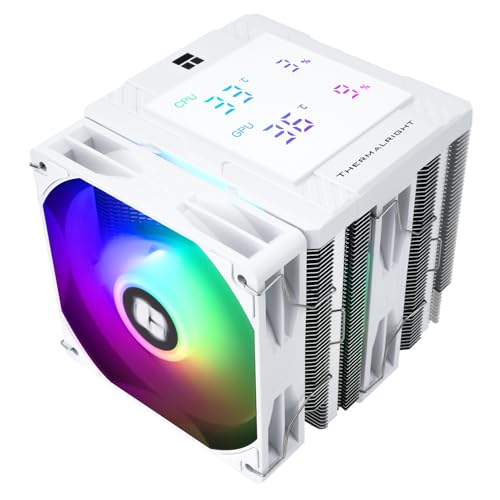
- Dual-tower design with six copper heat pipes
- Two 120mm fans and 88.89CFM airflow
- Digital display and white ARGB styling
Best For: Builders wanting strong cooling and extra features
Best Quiet Beginner Dual-Tower Cooler

- Dual towers with six copper heat pipes
- Two PWM fans rated up to 27.2dB
- 157mm height with useful RAM clearance
Best For: Quiet, understated desktop builds
Compact RGB Pick
Vetroo V3 Compact CPU Air Cooler

- 133 mm height fits compact cases
- 800–2200 RPM PWM control
- Adjustable fan height and ARGB sync
Best For: Compact beginner PC builds with RGB lighting
Value Performance Pick
Thermalright Assassin Spirit 120 EVO Dark

- 120 mm PWM fan with 70.4 CFM airflow
- Four heat pipes with direct-touch copper base
- Supports AM4/AM5 and multiple Intel sockets
Best For: Everyday desktop builds needing capable, quiet cooling
Quiet Dual-Fan Pick
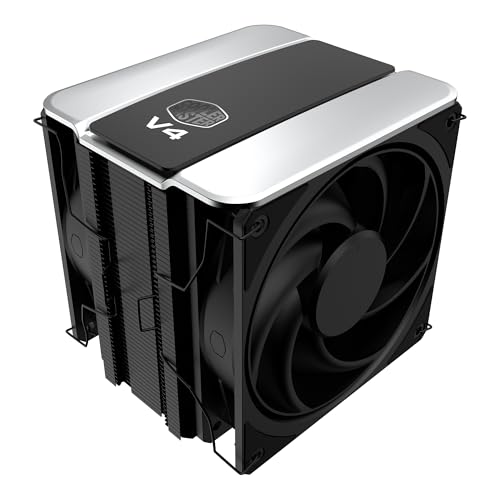
- Dual 120 mm PWM fans in push-pull setup
- 3DHP design targets improved cooling
- Supports AM4/AM5 and LGA1851/1700
Best For: Quiet beginner builds with room for a 161 mm cooler
Compact Starter Pick

- Compact fit for ITX and mATX builds
- 100mm PWM fan with three heatpipes
- Universal Intel and AMD mounting bracket
Best For: Beginners building compact desktop PCs
Feature-Rich Performance Pick
Peerless Assassin 120 Vision MAX

- Dual-tower design with six copper heatpipes
- Integrated 5-inch IPS monitoring display
- Supports AM4, AM5, and multiple Intel sockets
Best For: Beginners wanting cooling performance and display features
Best Beginner CPU Cooler With Display – Thermalright Assassin X 120R Digital
For beginners comparing computer air coolers for beginners, the Thermalright Assassin X 120R Digital offers a straightforward single-tower design with a useful digital display. Its 120mm PWM fan automatically adjusts speed based on motherboard temperature, while the screen can show CPU and graphics-card information through TRCC software.
Best For: First-time desktop builders who want a compact cooler with temperature monitoring and broad socket compatibility.
Pros:
- Digital top cover displays CPU temperature, usage, and graphics-card information.
- Compact 151mm height suits many desktop builds.
- Supports AM4, AM5, and several Intel sockets, including LGA1851 and LGA1700.
- 2000RPM PWM fan provides automatic speed control with listed noise up to 29.8dB.
Cons:
- The AMD installation uses the motherboard’s original backplate.
- The single-tower design has less cooling hardware than larger dual-tower options.
This is an approachable option when you want simple air cooling plus at-a-glance system information. Check your case clearance and motherboard socket before installation.
Best Beginner Laptop Cooler – TECKNET Triple-Fan Cooling Pad
The TECKNET cooling pad is a practical starting point for anyone shopping for computer air coolers for beginners and using a laptop rather than a desktop. Three USB-powered fans help pull cool air through the laptop’s underside, and the pad includes adjustable height settings, a fan switch, and a spare USB port.
Best For: Laptop users with 12- to 17-inch computers who want portable cooling and a more comfortable viewing angle.
Pros:
- Three 110mm fans run at up to 1200RPM for additional airflow.
- Powered directly through USB without a separate power adapter.
- Two height settings and rubber grips support comfortable, stable use.
- Extra USB port can connect a keyboard, mouse, or other accessory.
Cons:
- The included cable is USB-A to USB-A.
- It is designed for laptops and similar devices rather than desktop CPU cooling.
For beginners, this pad is easy to operate: connect the USB cable, switch on the fans, and adjust the stand. Confirm that your laptop’s ports and size fit the stated requirements.
Best High-Performance Beginner Cooler – Thermalright Peerless Assassin 120 Digital
For beginners building a higher-performance desktop, the Thermalright Peerless Assassin 120 Digital combines a dual-tower heatsink, six copper heat pipes, and two 120mm fans. It also adds a magnetic digital display and ARGB lighting, giving new builders both substantial cooling hardware and visible system feedback.
Best For: New desktop builders who need stronger air cooling and want a white cooler with digital monitoring and lighting.
Pros:
- Dual towers, six copper heat pipes, and two fans support strong heat transfer.
- 88.89CFM airflow and listed noise up to 25.6dB provide a useful performance balance.
- Digital display can show CPU and graphics-card temperature and occupancy information.
- Supports AM4, AM5, and multiple Intel platforms, including LGA1851 and LGA1700.
Cons:
- The 162mm height requires a case with sufficient cooler clearance.
- AMD installation requires the motherboard’s original backplate.
- ARGB lighting uses a 5V 3-pin motherboard connection.
This cooler offers more hardware and features than a basic single-tower model, but beginners should carefully check case, RAM, motherboard, and ARGB compatibility before installing it.
Best Quiet Beginner Dual-Tower Cooler – ID-COOLING FROZN A620 PRO SE
The ID-COOLING FROZN A620 PRO SE is a solid choice for people learning about computer air coolers for beginners and wanting a capable, understated desktop cooler. Its dual-tower heatsink, six copper heat pipes, and two PWM fans are designed for efficient cooling, while the 157mm height fits many tower cases.
Best For: Beginner builders who prioritize quiet dual-tower cooling, black styling, and standard memory clearance.
Pros:
- Dual-tower heatsink and six 6mm copper heat pipes support heat transfer.
- Two 120mm PWM fans offer automatic speed control and listed noise up to 27.2dB.
- 157mm height fits many tower cases.
- Provides 40mm standard RAM clearance, with up to 63mm at the fin cutout.
Cons:
- Its 58CFM airflow rating is lower than some larger or faster alternatives.
- As a dual-tower cooler, it needs more installation space than a compact single-tower model.
This model keeps the feature set focused on cooling and installation flexibility rather than displays or lighting. Check your case’s maximum cooler height and the socket support before ordering.
Compact RGB Pick – Vetroo V3 Compact CPU Air Cooler
For beginners comparing computer air coolers, the Vetroo V3 is a compact option with straightforward PWM control, adjustable fan height, and broad support for current AMD and Intel sockets. Its 133 mm height makes it especially practical for smaller PC cases.
Best For: Beginners building compact PCs who want adjustable cooling and customizable ARGB lighting.
Pros:
- Compact 133 mm design suits space-conscious builds.
- 800–2200 RPM PWM range balances airflow and noise.
- Supports AM4, AM5, LGA1851, LGA1700, LGA1200, and LGA115X.
- Fan comes pre-installed, simplifying installation.
Cons:
- Its 92 mm fan and 38.09 CFM airflow are more modest than larger 120 mm designs.
- ARGB synchronization requires a compatible 5V 3-pin motherboard header.
The Vetroo V3 is an approachable choice when case clearance and easy setup matter more than maximum cooling capacity. Adjustable fan height also gives beginners more flexibility around RAM clearance.
Value Performance Pick – Thermalright Assassin Spirit 120 EVO Dark
The Thermalright Assassin Spirit 120 EVO Dark is a practical starting point for shoppers seeking computer air coolers with a standard 120 mm fan. Its four heat pipes, aluminum fin stack, and 70.4 CFM maximum airflow provide a performance-focused design while keeping rated noise at or below 27 dB(A).
Best For: Beginners who want strong everyday cooling, broad socket compatibility, and a subdued black finish.
Pros:
- Four heat pipes and a direct-touch copper base support heat transfer.
- 120 mm PWM fan reaches 1850 RPM and up to 70.4 CFM.
- Supports AMD AM4/AM5 and several Intel sockets, including LGA1700.
- Rated noise is 27 dB(A) or lower.
Cons:
- At 156 mm tall, it needs more case clearance than compact coolers.
- AMD installation uses the motherboard’s original backplate.
With a familiar tower layout and standard 4-pin PWM connection, this cooler offers a balanced introduction to aftermarket CPU cooling. Check your case clearance and motherboard socket before buying.
Quiet Dual-Fan Pick – Cooler Master V4 Alpha 3DHP
For beginners who want extra airflow without moving to liquid cooling, the Cooler Master V4 Alpha 3DHP uses a single-tower design with two pre-installed 120 mm PWM fans. Its push-pull layout and 3DHP heat-pipe design are aimed at efficient, quieter cooling across supported CPU platforms.
Best For: Beginners prioritizing dual-fan airflow, quiet operation, and broad modern socket support.
Pros:
- Dual Mobius 120P PWM fans use a push-pull airflow configuration.
- 3DHP design is specified to improve cooling over standard designs.
- Supports AMD AM4/AM5 and Intel LGA1851/1700.
- Includes a five-year manufacturer warranty.
Cons:
- Its 161 mm height may not fit smaller cases.
- Dual-fan construction makes it larger and heavier than compact alternatives.
The V4 Alpha 3DHP is a strong fit for a beginner building a mainstream desktop who has adequate case clearance and prefers a ready-to-use dual-fan tower. Its minimalist styling also blends easily with many systems.
Compact Starter Pick – ID-COOLING SE-903-XT V2
For beginners choosing computer air coolers for beginners, the ID-COOLING SE-903-XT V2 is a straightforward compact option for daily desktop use and gaming. Its 100mm PWM fan, three heatpipes, and low-profile footprint suit small and mid-size builds, including ITX and mATX systems.
Best For: Beginners building compact Intel or AMD desktops who want simpler installation and broad component compatibility.
Pros:
- Compact design helps avoid interference with RAM and motherboard components.
- Upgraded universal mounting bracket supports Intel and AMD platforms.
- 100mm PWM fan provides up to 47.1 CFM of airflow at up to 2,500 RPM.
- Reinforced fin locking and fan clips are designed to reduce vibration.
Cons:
- Its compact three-heatpipe design is less substantial than larger dual-tower coolers.
- The listed 29.1 dB noise level may be noticeable at maximum speed.
The SE-903-XT V2 is an approachable choice when case space and installation simplicity matter more than oversized cooling hardware. Check your socket and case clearance before buying.
Feature-Rich Performance Pick – Peerless Assassin 120 Vision MAX
For beginners exploring computer air coolers for beginners, the Thermalright Peerless Assassin 120 Vision MAX combines substantial dual-tower cooling with an integrated 5-inch IPS display. It is aimed at mainstream ATX systems and supports current Intel and AMD sockets.
Best For: Beginners who want strong air cooling plus system monitoring and customizable display features.
Pros:
- Dual-tower heatsink, six copper heatpipes, and two fans provide up to 69 CFM of airflow.
- 5-inch 480×854 IPS screen can show system parameters and custom themes through TRCC software.
- Supports Intel LGA1851/1700/115x/1200 and AMD AM4/AM5 platforms.
- Listed operating noise is up to 27 dB(A).
Cons:
- At 164mm tall, it requires a compatible case with sufficient CPU-cooler clearance.
- The display requires a motherboard 9-pin USB connection and software setup.
- AMD installation uses the motherboard’s original backplate, which is not included.
This cooler offers an impressive feature set, but its larger size and display wiring make installation more involved than a basic cooler. Confirm case height, socket support, and available internal connections first.
Balanced RGB Pick – KINGCOOL Iron Wind 120
The KINGCOOL Iron Wind 120 is a practical choice for beginners comparing computer air coolers for beginners, especially when airflow and RGB appearance are both priorities. Its dual-tower layout, six copper heatpipes, and two 120mm PWM fans are designed for gaming and content-creation systems.
Best For: Beginners assembling Intel or AMD desktops who want a dual-tower cooler with synchronized ARGB lighting.
Pros:
- Six copper heatpipes and a nickel-plated copper base support heat transfer from the CPU.
- Two 120mm PWM fans provide up to 59.63 CFM of airflow.
- 5V 3-pin ARGB connector enables lighting synchronization with a compatible motherboard.
- Supports Intel LGA1851/1700/1200/115X and AMD AM4/AM5 sockets.
Cons:
- Its 154mm height still requires checking case and motherboard clearance.
- ARGB synchronization requires a compatible 5V 3-pin motherboard header.
- Its listed 29.8 dB noise level is higher than the Peerless Assassin 120 Vision MAX’s listed figure.
The Iron Wind 120 balances substantial air-cooling hardware with a decorative white finish and ARGB fans. It is a sensible middle ground for a beginner, provided the case supports its dimensions and the motherboard has the needed lighting header.
How We Picked the Best Computer Air Coolers for Beginners
We focused on practical details that matter to first-time buyers: cooling design, advertised heat capacity, fan control, noise-oriented features, physical size, installation simplicity, and platform support. The list includes conventional CPU tower coolers as well as a laptop cooling pad, because “air cooling” can mean different things depending on the computer you own.
Specifications such as height, radiator size, fan speed, and stated wattage are useful starting points, but real performance also depends on your CPU, case airflow, room temperature, and thermal paste application. Always verify the current mounting hardware and socket compatibility before purchasing.
Quick Comparison
| Best For | Recommended Type | What to Prioritize |
|---|---|---|
| Basic office PC | Compact single-tower cooler | Compatibility, low noise, easy installation |
| Gaming or sustained workloads | Dual-tower air cooler | Large heatsink, twin fans, case clearance |
| Small-form-factor build | Low-profile or compact cooler | Cooler height and RAM clearance |
| RGB-focused build | ARGB-equipped tower cooler | Motherboard lighting-header support |
| Laptop user | USB cooling pad | Screen-size fit, portability, fan control |
Key Buying Factors for Computer Air Coolers for Beginners
Socket and Case Compatibility
Check that the cooler supports your CPU socket, such as current AMD or Intel platforms. Then compare its height with your case’s maximum CPU-cooler clearance. Large dual-tower models can also interfere with tall memory modules or nearby motherboard heatsinks.
Cooling Capacity
A larger heatsink and multiple heat pipes generally provide more thermal headroom. For entry-level processors, a compact single-tower design is often sufficient. Higher-wattage CPUs, gaming chips, and sustained rendering workloads benefit from a dual-tower cooler with two fans.
Noise and Fan Control
PWM fans let the motherboard adjust speed according to temperature. Look for fluid-dynamic or similarly durable bearings, a broad speed range, and a design marketed for quiet operation. More fans can improve cooling, but they may also add noise at high speed.
Installation and Maintenance
Beginners should favor clear mounting systems, included brackets, and accessible fan clips. Keep dust filters clean, confirm the fan direction, and recheck temperatures after installation. Digital displays and ARGB lighting are optional features, not substitutes for proper mounting.
Who Should Buy Which Computer Air Coolers for Beginners?
Choose a compact single-tower model for an everyday desktop or modest gaming system where value and simplicity matter most. Pick a dual-tower cooler for a hot-running processor, frequent gaming, video editing, or other sustained workloads—provided your case has enough room.
Builders who want visual customization should consider an ARGB model, while users seeking useful on-system information may prefer a cooler with a temperature or status display. For laptops, select a cooling pad that matches the laptop’s screen-size range and uses a stable, comfortable stand. In every case, compare the cooler’s dimensions and mounting support with your exact computer before ordering.