
The right audio mixer can make a streaming setup easier to control, cleaner to hear, and more flexible as your content grows. Whether you need quick mute buttons, separate game and microphone levels, or full XLR connectivity, the best choice depends on how you broadcast.
We selected 10 options ranging from beginner-friendly gaming mixers to advanced creator consoles and microphone bundles. Use the guide below to match features, connections, and workflow to your streaming setup.
Best 10 Audio Mixer for Streaming Setup Picks for 2026
Immersive Control

- XLR input with 48V phantom power
- Game/chat balance and virtual 7.1 surround
- Voice effects, presets, and RGB lighting
Best For: Gamers and streamers using an XLR microphone
Pro Audio Routing
Roland BRIDGE CAST ONE Streaming Mixer

- Dual buses for separate streamer and audience mixes
- 32-bit DSP with comprehensive vocal processing
- USB-C support for computers and selected consoles
Best For: Streamers needing independent mixes and polished vocals
Hands-On Streaming Control
FIFINE Ampligame SC3 Audio Mixer

- Individual fader and channel volume controls
- Front mute and monitoring buttons
- Custom sound, voice-changing, and RGB features
Best For: Beginners and solo XLR-mic streamers
Two-Person Podcast Hub
MAONO MaonoCaster E2 Gen2C Bundle

- Dual XLR inputs with 60dB preamps
- Noise reduction, loopback, and monitoring
- Eight sound pads plus Bluetooth and battery power
Best For: Two-person podcasts and collaborative streams
Best Control Surface

- LCD keys, touch strip, and dials
- Multi-actions and smart profiles
- Wave Link, OBS, and broad plugin support
Best For: Custom streaming and production workflows
Best XLR Starter Bundle
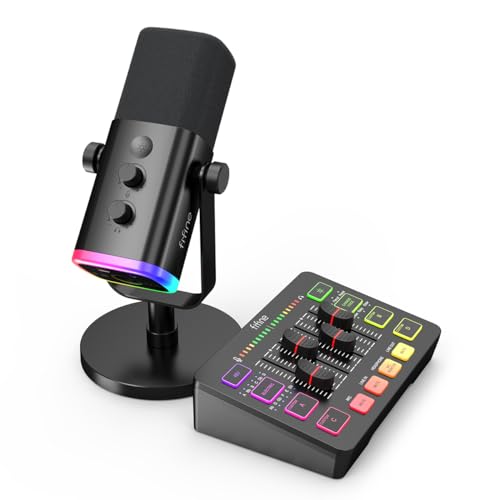
- Four independent channel controls
- XLR input with 48V phantom power
- Includes cardioid dynamic microphone
Best For: New streamers and single-mic setups
Best Macro Control Deck
Streonor S10 Stream Controller

- 10 LCD keys, touchscreen, and four knobs
- Multi-action macros and OBS scene control
- 100+ plugins for Windows and Mac
Best For: Streamers managing complex app workflows
Best for Multi-Source PC Control

- Four assignable faders for key sources
- Three submixes for separate listener mixes
- XLR input, dual USB-C, and 57 dB preamp
Best For: Windows PC gamers and multi-source streamers
Best All-in-One Starter Bundle

- Includes mixer, condenser microphone, and accessories
- Voice effects, noise reduction, and follow singing mode
- Works with PC, phone, and tablet
Best For: Beginners, singers, podcasters, and mobile creators
Best for Hardware-Controlled XLR Streaming

- Four channels with physical mute controls
- XLR preamp and built-in voice processing
- Requires Windows, Synapse, and an XLR mic
Best For: Windows streamers with XLR microphones and Razer gear
Immersive Control – FIFINE SC8 Gaming Audio Mixer
The FIFINE SC8 is a feature-rich audio mixer for streaming setup, combining XLR microphone support, game/chat balancing, virtual 7.1 surround sound, and customizable effects. Its USB-C, optical, and 3.5mm connections make it suitable for PC and console-focused setups.
Best For: Gamers and streamers who want hands-on control, voice effects, and surround-sound features.
Pros:
- 48V phantom power and Dynamic/Condenser support accommodate compatible XLR microphones.
- Dedicated game/chat balance control helps prioritize gameplay or teammate communication.
- Includes voice changing, customizable sound buttons, RGB lighting, and three EQ modes.
- Supports USB-C, optical, and 3.5mm audio connections across several platforms.
Cons:
- Not compatible with USB microphones.
- XLR cable is not included.
- The listed dimensions make it less compact than some basic desktop mixers.
The SC8 stands out when gaming controls and effects matter as much as microphone quality. It is a strong match for streamers using an XLR microphone, but USB-mic owners will need another solution.
Pro Audio Routing – Roland BRIDGE CAST ONE Streaming Mixer
The Roland BRIDGE CAST ONE is a compact audio mixer for streaming setup built around separate audio buses and hardware DSP. It supports USB-C connections for computers and selected consoles while offering professional microphone processing and monitoring features.
Best For: Streamers who want independent personal and audience mixes with dedicated vocal processing.
Pros:
- Dual audio buses allow separate mixes for the streamer and online audience.
- 32-bit hardware DSP handles EQ, compression, noise suppression, de-essing, and reverb.
- Its high-gain preamp and phantom power support professional XLR microphones.
- USB-C connectivity works with Windows, Mac, PlayStation 5, and Nintendo Switch.
Cons:
- The interface has three listed channels, which may limit more complex audio setups.
- Advanced configuration uses the BRIDGE CAST app.
- It is designed primarily for digital USB audio input rather than a broad range of analog inputs.
Choose the BRIDGE CAST ONE if clean routing and vocal processing are priorities. Its compact design and DSP-based workflow are especially appealing for creators who want polished audio without heavily loading the computer.
Hands-On Streaming Control – FIFINE Ampligame SC3 Audio Mixer
The FIFINE Ampligame SC3 offers accessible physical controls for an audio mixer for streaming setup, including an individual microphone fader and separate volume controls. It also adds mute and monitoring buttons, sound effects, voice changing, and RGB lighting for gaming and content creation.
Best For: Beginners and solo streamers who want straightforward control over microphone, line-in, headphone, and line-out levels.
Pros:
- Individual controls cover microphone, line-in, headphone, and line-out channels.
- Front-mounted mute and monitor buttons are convenient during live broadcasts.
- Offers four customizable sound buttons, six voice-changing modes, and auto-tune effects.
- Plug-and-play operation supports Mac, Windows, OBS, Twitch, YouTube, and TikTok workflows.
Cons:
- Not compatible with USB microphones.
- XLR cable is not included.
- Its single XLR microphone input is intended for one-mic setups.
The SC3 is a practical choice for creators who prefer tactile controls over software adjustments. Its focused one-microphone design keeps operation approachable, while the effects and RGB features add flexibility for casual streaming.
Two-Person Podcast Hub – MAONO MaonoCaster E2 Gen2C Bundle
The MAONO MaonoCaster E2 Gen2C is a bundled audio mixer for streaming setup designed for two-person podcasts and collaborative broadcasts. It combines two XLR inputs, 60dB preamps, noise reduction, loopback, Bluetooth, sound pads, and included cables in one ready-to-use package.
Best For: Two-person podcasts, interviews, and streamers who need dual microphone inputs and flexible device connectivity.
Pros:
- Two XLR combo inputs and 60dB preamps support dual-microphone recording.
- Built-in noise reduction, real-time monitoring, and one-touch mute simplify live production.
- Eight customizable sound-effect buttons can store intros, jingles, and sound bites.
- Supports USB-C, 3.5mm, Bluetooth, loopback, and up to eight hours of battery use.
Cons:
- The bundle is more equipment than a solo streamer may need.
- Its feature set may require more setup than a basic single-mic mixer.
- The supplied notes do not specify the included microphones as USB models or provide detailed microphone specifications.
For collaborative content, the E2 Gen2C offers a broader starting point than a single-input mixer. Its dual XLR design and bundled accessories make it well suited to podcasts and interviews, while Bluetooth and loopback expand its streaming options.
Best Control Surface – Elgato Stream Deck +
The Elgato Stream Deck + is a versatile audio mixer for streaming setup that combines physical dials, an LCD touch strip, and customizable keys. It is particularly useful for creators who want hands-on control over audio, scenes, lighting, and app actions without relying entirely on on-screen menus.
Best For: Streamers and creators building a customizable Mac or PC control center around Wave Link, OBS, and other supported apps.
Pros:
- Combines LCD keys, a touch strip, and tactile dials for quick adjustments.
- Supports multi-actions and smart profiles for app-specific workflows.
- Works with Wave Link, OBS, Twitch, YouTube, Discord, Spotify, and other plugins.
- Drag-and-drop setup with access to additional plugins and customization options.
Cons:
- Requires software setup to unlock its broader customization features.
- Its audio controls are part of a wider production console rather than a dedicated standalone mixer.
Choose this model if flexible workflow control matters as much as audio adjustment. Its smart profiles and broad plugin support make it a strong fit for streamers managing several production tools.
Best XLR Starter Bundle – FIFINE SC3 + AM8 Mixer Bundle
The FIFINE SC3 + AM8 bundle is a practical audio mixer for streaming setup when you want a microphone and mixer together. Its four-channel design provides separate control for microphone, line-in, headphone, and line-out levels, while the XLR input and 48V phantom power leave room to expand microphone options.
Best For: New streamers, gamers, and podcasters who want individual channel controls, headphone monitoring, and an included dynamic microphone.
Pros:
- Includes a four-channel mixer and directional cardioid dynamic microphone.
- XLR input and built-in 48V phantom power support compatible microphone setups.
- Separate controls for microphone, line-in, headphone, and line-out channels.
- Provides a headphone jack, monitoring volume control, mic gain knob, and RGB lighting.
Cons:
- XLR cable is not included.
- The microphone’s listed frequency response is 50Hz–16kHz.
- Some gain and monitoring functions are available only through USB connection.
This bundle makes sense for a single-mic streaming station that needs straightforward level control. It offers a clear upgrade path to compatible XLR microphones, though buyers should plan for the missing XLR cable.
Best Macro Control Deck – Streonor S10 Stream Controller
The Streonor S10 is an audio mixer for streaming setup in controller form, pairing 10 customizable LCD keys with an integrated touchscreen and four programmable rotary knobs. It is suited to streamers who want to adjust audio, switch OBS scenes, launch apps, and trigger multi-step commands from one desktop device.
Best For: Windows and Mac streamers, editors, gamers, and multitaskers who need programmable shortcuts plus hands-on knob controls.
Pros:
- Combines 10 customizable LCD keys, a touchscreen, and four rotary knobs.
- Knobs can be assigned to volume, microphone levels, media, scrolling, zoom, or timelines.
- Supports multi-action macros and dedicated profiles for OBS, Twitch, YouTube, and other workflows.
- Offers access to more than 100 plugins through its software ecosystem.
Cons:
- Linux is not supported.
- Requires Windows 10 64-bit or later, or macOS Big Sur 11.0 or later.
- Some third-party services may require an active account or subscription.
The S10 is a good fit when your streaming setup involves frequent app switching and repeated commands. Its multiple control types provide more flexibility than a basic macro pad, but compatibility requirements should be checked before purchase.
Best for Multi-Source PC Control – MAONO G3
If you need an audio mixer for streaming setup that keeps voice, game audio, chat, music, and alerts within easy reach, the MAONO G3 is built for Windows-based desktop workflows. Its four assignable faders, three submixes, XLR input, and dual USB connectivity suit gamers and solo creators who want hands-on control without repeatedly switching screens.
Best For: Windows PC gamers, streamers, dual-PC setups, live commentary, and creators balancing several audio sources.
Pros:
- Maps mic, game, music, chat, or alerts to four physical faders.
- Three submixes can provide different mixes for the creator, audience, and teammates.
- XLR input includes 48V phantom power, direct monitoring, and up to 57 dB of low-noise preamp gain.
- Dual USB-C connectivity supports more flexible desktop streaming workflows.
Cons:
- Its Arena control software is designed for Windows PC use.
- Advanced routing may require setup before the controls work as intended.
The G3 stands out when fast source control and separate listener mixes matter more than a minimalist interface. It is a practical choice for a PC streaming desk with multiple audio feeds and an XLR microphone.
Best All-in-One Starter Bundle – TENLAMP G10 Creator Bundle
The TENLAMP G10 is an audio mixer for streaming setup buyers who want the core equipment in one package. It combines a two-channel mixer, condenser microphone, and accessories with voice effects, noise reduction, Bluetooth, and connections for computers, phones, and tablets.
Best For: Beginners, podcasters, singers, mobile creators, and streamers who want a bundled microphone-and-mixer solution.
Pros:
- Includes an audio mixer, condenser microphone, and essential accessories.
- Provides real-time bass, treble, reverb, and pitch controls.
- Offers voice changing, sound effects, and a follow singing mode for interactive content.
- Supports Windows, Mac, iOS, and Android with USB, Bluetooth, auxiliary, and OTG/Type-C connections.
Cons:
- The two-channel design is less suited to complex multi-source routing.
- Its battery-powered design and listed 3.5mm/6.35mm outputs may require checking cable needs for a specific setup.
For creators starting from scratch, the G10 simplifies shopping by combining the mixer and microphone. Its effects and performance-focused controls make it particularly appealing for singing, casual streaming, and voice content rather than elaborate broadcast routing.
Best for Hardware-Controlled XLR Streaming – Razer Audio Mixer
The Razer Audio Mixer is an audio mixer for streaming setup users who want physical controls and built-in processing for an XLR microphone. Its four-channel design separates mic, game, music or chat, and system audio, while Razer Synapse handles channel assignment and configuration.
Best For: Windows streamers using an XLR microphone, especially those already invested in Razer Chroma.
Pros:
- Provides hardware-controlled adjustment for four audio channels with individual mute buttons.
- Includes an XLR preamp with adjustable gain and low-noise amplification.
- Built-in EQ, compressor, and noise gate settings process voice without relying as heavily on PC resources.
- Chroma RGB can indicate volume or mute status and integrate with the Razer ecosystem.
Cons:
- Requires Razer Synapse and Windows 10 or later.
- Does not support macOS or USB microphones.
- Only one direct mic line-out is included; other channels are assigned through Synapse.
This mixer is a focused choice for Windows creators who already use an XLR mic and want tactile controls plus voice processing. Buyers using macOS or a USB microphone should choose a different model.
How We Picked the Best Audio Mixer for Streaming Setup
We focused on mixers and control surfaces designed for live streaming, gaming, podcasting, and creator workflows. The selection includes USB and XLR connectivity, multiple-channel control, microphone support, routing features, sound effects, monitoring options, and software or hardware controls where applicable.
We also considered setup complexity and use case. A compact gaming mixer may be ideal for a single streamer, while a podcast bundle or multi-channel interface may better suit interviews, multiple microphones, or a more demanding broadcast. Product claims such as noise reduction, phantom power, surround support, and customizable controls should be checked against your computer, microphone, operating system, and streaming software before purchase.
Quick Comparison
- Best for flexible gaming control: Look for separate controls for microphone, game audio, chat, music, and alerts.
- Best for XLR microphones: Choose a mixer with a quality preamp and 48V phantom power if you use a condenser microphone.
- Best for beginners: A USB mixer with simple controls and plug-and-play software reduces setup time.
- Best for advanced creators: Multi-bus routing, customizable pads, onboard processing, and multiple inputs provide more control.
- Best for compact desks: Prioritize small footprints, front-facing controls, and a single USB connection.
Key Buying Factors for an Audio Mixer for Streaming Setup
Inputs and Microphone Compatibility
Check whether the mixer supports USB microphones, 3.5mm microphones, XLR microphones, or a combination. XLR models generally offer a broader upgrade path, but they may require additional cables and a separate microphone stand. Phantom power is necessary for many condenser microphones, while dynamic microphones typically do not need it.
Routing and Channel Control
Separate channels let you balance your voice, game, music, callers, and alerts without repeatedly opening software menus. If you stream interviews or use multiple audio sources, confirm the number of inputs and whether the mixer provides independent buses or monitor mixes.
Monitoring and Latency
A headphone output with direct monitoring can help you hear your microphone without distracting delay. Look for accessible headphone volume, mute, and microphone gain controls. If you use speakers, verify that the mixer supports the output connections your desk setup requires.
Software, Effects, and Controls
Assignable buttons, sound pads, voice effects, equalization, compression, and noise reduction can simplify live production. However, software compatibility matters: confirm support for your operating system and preferred streaming application before relying on advanced features.
Desk Space and Future Upgrades
Measure your available space and consider cable placement, stand clearance, and access to controls. A basic mixer can be sufficient for a single microphone, but creators planning guests, instruments, or multiple computers should choose a model with spare inputs and flexible routing.
Who Should Buy Which Audio Mixer for Streaming Setup?
Choose a Compact Gaming Mixer If You Stream from One PC
Gamers who mainly need quick microphone, game, chat, and music adjustments should favor an accessible control layout over a large number of inputs.
Choose an XLR Mixer or Bundle If Audio Quality Is Your Priority
Creators using broadcast-style microphones, condenser microphones, or multiple microphones should look for XLR inputs, clean gain control, phantom power when needed, and reliable headphone monitoring.
Choose a Controller-Style Device If You Already Own an Audio Interface
A control deck can provide buttons, faders, sound effects, and shortcuts without replacing existing audio hardware. This is useful when your main need is faster software control rather than more physical inputs.
Choose a Feature-Rich Mixer If You Produce Podcasts or Complex Broadcasts
Multi-person shows and professional streams benefit from independent channels, flexible routing, onboard processing, and dedicated controls for callers, music, and monitoring. Before buying, confirm that the mixer’s inputs and software match the way you plan to record and stream.