
A useful gaming gift can improve a player’s desk, sound, controls, or streaming setup. This guide brings together accessory ideas for PC and console gamers, with compatibility details to check before choosing.
Gaming Accessory Christmas Gift Ideas
1. COMHOMA Big and Tall Ergonomic Gaming Chair
A More Supportive Battlestation Seat
COMHOMA Big and Tall Ergonomic Gaming Chair

- Wide seat and backrest with thick padding and built-in lumbar pocket springs.
- Adjustable armrests, tilt function, reclining positions, and an integrated footrest.
- Faux leather upholstery; assembly is required.
Best For: A desk-based gamer who wants a roomy chair for long sessions.
2. HUANUO TitanLift Heavy Duty Monitor Arm
A Flexible Screen Positioning Upgrade
HUANUO TitanLift Heavy Duty Monitor Arm

- Supports compatible 17–49 inch monitors weighing 6.6–44 pounds.
- Adjusts by tilt, swivel, rotation, extension, and height.
- Requires a wooden desk 0.8–3.5 inches thick with clear space underneath; monitor needs 75x75 or 100x100 VESA holes.
Best For: A gamer with a compatible ultrawide or large monitor and desk.
3. Nylavee 2.1 PC Speakers with Subwoofer
Room-Filling Desktop Audio
Nylavee 2.1 PC Speakers with Subwoofer

- 2.1 speaker setup with a dedicated subwoofer and up to 60W peak power.
- Connects by USB, AUX, or Bluetooth 5.4; the listing describes wired gaming use.
- Offers eight RGB lighting modes and a single rotary control.
Best For: A PC gamer who prefers desktop speakers to wearing a headset.
4. Wireless PS5 Controller with Hall Effect Joysticks
Extra Controls for Console Play
Wireless PS5 Controller with Hall Effect Joysticks

- Includes Hall-effect joysticks, two rear paddles, and programmable macro keys.
- Bluetooth 5.0 and wired USB-C connectivity are listed, along with a 3.5mm audio jack.
- Listed for PS5, PS5 Pro, PS5 Slim, and Windows PC; check setup notes for other platforms.
Best For: A PS5 or PC player who wants paddles and customizable controls.
5. Valorise Wireless Gaming Headset with 7.1 Sound
A Headset for Long Play Sessions
Valorise Wireless Gaming Headset with 7.1 Sound
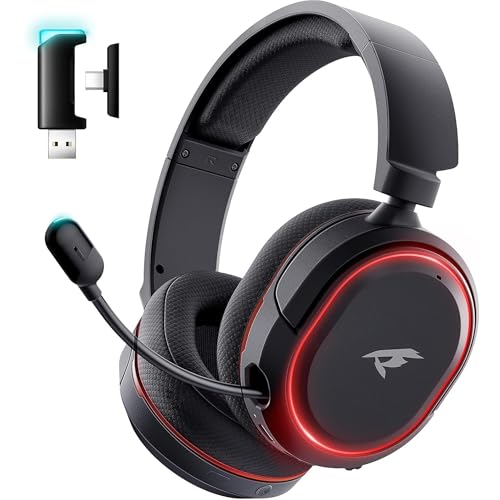
- Supports 2.4GHz wireless, Bluetooth, and wired 3.5mm connections.
- Features a retractable microphone, one-touch mute, and ambient lighting.
- The listing states up to 100 hours in Bluetooth mode with lights and microphone off; usage changes battery life.
Best For: A gamer who wants wireless audio and a microphone for team chat.
6. NEWDERY Dual PS5 Controller Charging Station
A Tidy Charging Spot for Controllers
NEWDERY Dual PS5 Controller Charging Station
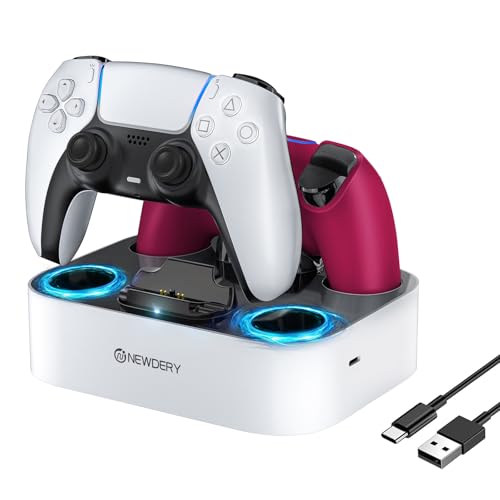
- Charges two compatible PS5 or DualSense Edge controllers at the same time.
- Has charging indicator lights, four anti-slip mats, and four controller slots.
- USB cable is included; remove controller skins or cases before charging.
Best For: A PS5 household that keeps two controllers in regular rotation.
7. Crucial X9 2TB Portable SSD
Extra Portable Game Storage

- Provides 2TB of portable solid-state storage over USB-C.
- Listed as compatible with Windows, Mac, Android, PS4, PS5, and Xbox; check the console's storage requirements.
- The listing gives transfer speeds up to 1050MB/s and IP55 water and dust resistance.
Best For: A gamer who needs portable space for files, captures, or games.
8. Elgato Stream Deck + Audio Mixer
Quick Controls for Streaming
Elgato Stream Deck + Audio Mixer

- Uses LCD keys, a touch strip, and dials to control audio, video, lighting, and more.
- Supports customizable actions and smart profiles for different apps.
- Works with Mac and PC and lists plugins for OBS, Twitch, YouTube, Discord, Spotify, and other services.
Best For: A streamer or PC multitasker who wants shortcuts within reach.
9. Logitech G920 Racing Wheel, Pedals and Shifter
A Driving Sim Starter Setup
Logitech G920 Racing Wheel, Pedals and Shifter

- Set includes a force-feedback wheel, pedals, and six-speed H-pattern shifter.
- Built-in clamps secure the wheel and shifter to a table or racing rig.
- Listed for Xbox Series X|S, Xbox One, and PC; confirm game and platform support.
Best For: A racing-game fan who wants wheel-and-pedal controls.
10. Logitech Litra Glow Streaming Light
Softer Light for Webcam Setups
Logitech Litra Glow Streaming Light

- Adjustable brightness and color temperature help tailor on-camera lighting.
- Three-way monitor mount adjusts in height, tilt, and rotation.
- USB-powered and controllable through Logitech G HUB on PC or Mac.
Best For: A streamer or video caller who wants adjustable desk lighting.
11. GL.iNet Flint 2 Wi-Fi 6 Gaming Router
A Network Upgrade for Online Play
GL.iNet Flint 2 Wi-Fi 6 Gaming Router

- Wi-Fi 6 router with dual 2.5G ports and four 1G ports.
- Includes access point and guest modes, plus QoS features.
- The listing recommends updating firmware during initial setup; actual network performance depends on the connection and environment.
Best For: A gamer upgrading a home network for multiple connected devices.
12. AULA F75 Pro Hot-Swappable Mechanical Keyboard
A Customizable Compact Keyboard
AULA F75 Pro Hot-Swappable Mechanical Keyboard

- Compact 75% layout has 81 keys and retains arrow keys.
- Connects by Bluetooth 5.0, 2.4GHz wireless, or USB-C; supports up to five devices.
- Hot-swappable base supports 3-pin or 5-pin switches, and the keyboard has RGB lighting and a control knob.
Best For: A PC gamer who likes mechanical keyboards and customization.
13. ASUS TUF Gaming 27-Inch QHD Monitor
A Sharper, Smoother Display
ASUS TUF Gaming 27-Inch QHD Monitor

- 27-inch QHD display with 2560 × 1440 resolution and a listed 180Hz refresh rate.
- Fast IPS panel, 1ms response time, and FreeSync Premium and G-SYNC Compatible support are listed.
- Connects by HDMI or DisplayPort; check the gaming system's output and supported refresh rate.
Best For: A PC gamer seeking a higher-resolution, high-refresh display.
14. Elgato 4K X HDMI 2.1 Capture Card
A Capture Upgrade for Creators
Elgato 4K X HDMI 2.1 Capture Card

- HDMI 2.1 input and output with VRR passthrough are listed.
- Supports capture up to 1080p at 240fps; the listing also describes 4K at 144fps capability.
- Works with apps including OBS and Streamlabs; check system requirements and USB port capabilities.
Best For: A console gamer who records or streams gameplay through a computer.
Choosing a Gaming Accessory Gift
Start with how the recipient plays. A player focused on competitive PC games may value a monitor, keyboard, or desk setup adjustment. A console gamer might get more use from a controller, charging dock, or extra storage. Streamers have different needs: a capture card helps move gameplay into a computer workflow, while a control pad or light supports the production side of a setup.
Look for the daily friction the gift could remove. A headset suits someone who chats with teammates or needs to keep game audio private. Desktop speakers suit a player with room for sound outside headphones. A roomy chair, monitor arm, or compact keyboard can make a desk more functional, but each depends on the recipient’s space and existing equipment. For racing fans, a wheel and pedals are a more specialized choice that can make driving games feel distinct from standard controller play.
Match the Gift to Your Budget
Set a comfortable spending limit before comparing accessories. Smaller additions such as a controller charging station or adjustable streaming light can be practical without changing the entire setup. Storage, speakers, a keyboard, or a controller may be a midrange upgrade, depending on current pricing. A monitor, racing set, heavy-duty chair, or capture setup represents a larger commitment and may involve other equipment or space.
Consider the full setup cost. A monitor arm needs a suitable desk and a VESA-compatible screen. A capture card may need a sufficiently capable computer and USB port. A wheel needs room to mount and store it. If the recipient’s setup is unknown, an accessory with fewer dependencies may be a more reliable Christmas gift than a major replacement component.
Check Compatibility and Personalization
Compatibility is the most important check for gaming accessory Christmas gifts. Confirm the console or computer model, available ports, and any size or mounting requirements. The controller in this guide is listed for PS5 variants and Windows PC, while the racing wheel is listed for Xbox Series X|S, Xbox One, and PC. Do not assume accessories support every platform just because they connect wirelessly or by USB.
For a monitor arm, verify screen weight, screen size, VESA pattern, desk material, desk thickness, and clearance beneath the desk. For a portable SSD, check the target console’s external storage rules and what types of games it can run from external storage. For a keyboard, decide whether the recipient prefers a compact layout, wired or wireless use, and switch customization. A gift can feel personal when it fits a known preference, such as tactile keyboard controls, room audio, or a clean streaming desk.
Network equipment also calls for a little care. A new router may require setup and firmware updates, and online performance depends on the home internet service, placement, and connected devices. The product’s listed Wi-Fi standard and ports are useful comparison points, but they do not guarantee a particular gaming connection.
Timing and Last-Minute Decisions
For a Christmas purchase, allow time to confirm platform details and setup needs before ordering. If the gift depends on a monitor model, desk dimensions, or a computer’s specifications, ask discreetly or check what the recipient already owns. Keep packaging and model information accessible so the fit can be checked during setup.
If time is short, favor a gift whose compatibility is already clear from the recipient’s known setup. A charging dock for a PS5 player with compatible controllers, for example, is easier to assess than a new network or capture system. For more technical gifts, a printed note describing the intended upgrade can preserve the surprise while leaving room to confirm equipment details together. A thoughtful gaming accessory gift works best when it fits how the person actually plays, streams, or spends time at their desk.