
Finding a responsive gaming mouse does not require a premium budget. The best gaming mice under $100 can deliver reliable tracking, comfortable shapes, customizable controls, and low-latency wireless performance.
This roundup compares 10 strong options across wired and wireless designs, lightweight shells, ergonomic bodies, programmable buttons, RGB lighting, and different grip preferences. Use the guide below to narrow the list by the features that matter most to your setup and games.
Best 10 Gaming Mice Under 100 Picks for 2026
Best Wireless Value

- 12,000 DPI HERO sensor with 1 ms wireless report rate
- Up to 250 hours on one AA battery
- Lightweight 3.36-ounce compact design
Best For: Gamers seeking dependable wireless performance and long battery life
Best for Custom Controls

- 11 programmable buttons for game and work shortcuts
- Adjustable sensitivity up to 8,000 DPI
- Textured comfort grip with five RGB modes
Best For: Users who want extensive remapping and macro controls
Best Ultra-Light Wireless

- 49-gram body with three connection modes
- PAW3395 sensor supports up to 26,000 DPI
- Rechargeable battery rated for up to 200 hours
Best For: FPS players prioritizing low weight and flexible connectivity
Best for Adjustable Control

- 25,600 DPI HERO sensor with precise tracking
- 11 programmable buttons and dual-mode scroll wheel
- Five removable weights for balance customization
Best For: Right-handed gamers wanting extensive physical customization
Flexible Wireless Pick

- Tri-mode connectivity for up to four saved devices
- 12,000 DPI and 1000Hz polling rate
- Rechargeable, lightweight, and programmable
Best For: Multi-device gaming and everyday computer use
Feature-Rich Wired Pick

- 11 programmable buttons and a thumb rest
- 26,000 DPI optical sensor
- Hyperscroll wheel and 11-zone RGB lighting
Best For: Right-handed PC gamers who want extensive customization
Lightweight RGB Pick

- Tri-mode connectivity with four-device storage
- Honeycomb shell and rechargeable 600mAh battery
- Seven programmable buttons with RGB lighting
Best For: Lightweight wireless gaming with customizable lighting
Reliable Wired Pick

- 6,400 DPI optical sensor
- Five programmable buttons
- Ergonomic wired design
Best For: Right-handed PC gamers seeking a dependable wired mouse
Portable Wireless Pick
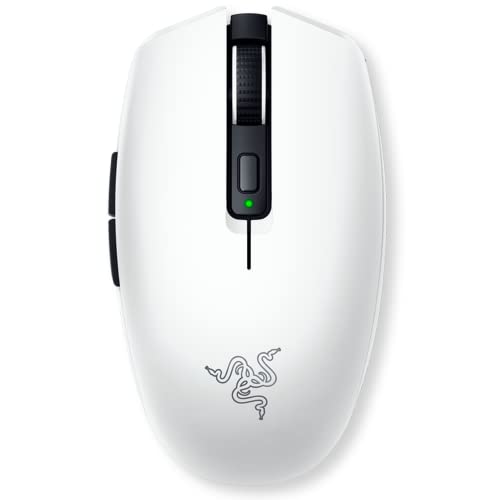
- Up to 950-hour Bluetooth battery life
- Dual wireless connectivity
- Under-60g compact design
Best For: Traveling gamers and users who prioritize lightweight wireless control
Customizable Wireless Pick
Razer Basilisk V3 X HyperSpeed

- Nine customizable controls
- Up to 535-hour Bluetooth battery life
- 18,000 DPI sensor with RGB
Best For: Right-handed gamers wanting wireless control and extensive customization
Best Wireless Value – Logitech G305 Lightspeed
For shoppers comparing gaming mice under 100, the Logitech G305 Lightspeed is a practical wireless option focused on responsive performance, low weight, and long battery life. Its HERO sensor reaches 12,000 DPI, while LIGHTSPEED wireless uses a 1 ms report rate.
Best For: Gamers who want a lightweight, reliable wireless mouse without rechargeable-battery maintenance.
Pros:
- HERO optical sensor offers up to 12,000 DPI and 400 IPS precision.
- LIGHTSPEED wireless provides a stated 1 ms report rate.
- Runs for up to 250 hours on one included AA battery, or up to nine months in Endurance mode.
- Compact 3.36-ounce design includes storage for the nano receiver.
Cons:
- Uses a replaceable AA battery rather than a rechargeable battery.
- Has six buttons, so it offers fewer programmable controls than some MMO-oriented mice.
The G305 is a strong everyday pick when wireless convenience and battery efficiency matter more than extensive macro controls or RGB lighting.
Best for Custom Controls – Redragon M612 Predator
The Redragon M612 Predator stands out among gaming mice under 100 for its extensive button customization and RGB lighting. It is a wired, right-handed model with 11 programmable buttons, adjustable DPI settings, and a comfort-focused textured surface.
Best For: Players and multitaskers who need numerous remappable buttons and prefer a wired connection.
Pros:
- Offers 11 editable programmable buttons, including rapid-fire and macro controls.
- Supports five preset DPI levels and software adjustment from 500 to 8,000 DPI.
- Frosted coating and textured side grip are designed for comfortable control.
- Includes five dynamic RGB backlight modes.
Cons:
- Wired design does not provide wireless freedom.
- Its 126-gram weight is substantially heavier than ultra-light alternatives.
- Right-handed shape may not suit left-handed users.
Choose the M612 when button quantity and configurable shortcuts are priorities; it is less compelling for shoppers specifically seeking a lightweight or wireless mouse.
Best Ultra-Light Wireless – ATTACK SHARK X3
For gaming mice under 100 that emphasize speed and minimal weight, the ATTACK SHARK X3 combines a 49-gram body with tri-mode connectivity. Its PAW3395 sensor supports up to 26,000 DPI, and the rechargeable battery is rated for up to 200 hours.
Best For: FPS players and competitive users who value an ultra-light design, high sensor specifications, and flexible connectivity.
Pros:
- Very light 49-gram construction supports quick mouse movements.
- PAW3395 sensor offers up to 26,000 DPI, 650 IPS, and a 1,000 Hz polling rate.
- Supports 2.4 GHz wireless, Bluetooth 5.2, and wired USB use.
- Rechargeable battery is rated for up to 200 hours.
Cons:
- The supplied specifications list no warranty.
- Software is required for advanced button, DPI, lift-off-distance, and macro customization.
- Its symmetrical design may not provide a contoured fit for every hand.
The X3 is an appealing performance-focused choice for users who want to minimize weight without giving up wireless flexibility or a high-resolution sensor.
Best for Adjustable Control – Logitech G502 HERO
The Logitech G502 HERO is a wired option for gaming mice under 100 that prioritizes customization. It pairs a 25,600 DPI HERO sensor with 11 programmable buttons, adjustable weights, LIGHTSYNC RGB, and a dual-mode scroll wheel.
Best For: Right-handed gamers who want to tune mouse weight, lighting, buttons, and scroll behavior.
Pros:
- HERO sensor tracks at up to 25,600 DPI without smoothing, filtering, or acceleration.
- Eleven programmable buttons provide extensive gameplay controls.
- Five removable 3.6-gram weights allow balance and weight adjustment.
- LIGHTSYNC RGB and a dual-mode hyper-fast scroll wheel add customization.
Cons:
- Wired connection limits cable-free movement.
- Right-handed shape is not designed for left-handed use.
- Its feature-rich design may be more than needed for users who prefer a simple, lightweight mouse.
The G502 HERO makes the most sense for players who appreciate a configurable, feature-heavy control setup and do not mind using a cable.
Flexible Wireless Pick – AULA SC580
The AULA SC580 is a versatile option for shoppers comparing gaming mice under 100 who want wireless convenience without giving up a wired fallback. Its tri-mode connectivity, 12,000 DPI maximum sensitivity, and programmable controls suit both gaming and everyday computer use.
Best For: Right-handed users who want one mouse for multiple devices, gaming, and general productivity.
Pros:
- Supports 2.4G wireless, dual Bluetooth 5.0 connections, and USB-C wired mode.
- Offers six DPI levels up to 12,000 and a 1000Hz polling rate.
- Includes six programmable buttons, a rechargeable 500mAh battery, and an 82g design.
Cons:
- Driver software works only on Windows and in 2.4GHz wireless or USB-C wired mode.
- The ergonomic shape is designed for right-handed users.
The SC580 stands out for device flexibility and a useful mix of gaming and work features. It is particularly appealing if you regularly switch between a PC, laptop, tablet, or other compatible device.
Feature-Rich Wired Pick – Razer Basilisk V3
The Razer Basilisk V3 is a strong choice among gaming mice under 100 for players who prefer a dependable wired connection and extensive customization. Its ergonomic right-handed shape, 11 programmable buttons, and high-resolution sensor are built for control across a wide range of games.
Best For: Right-handed PC gamers who want many controls, customizable RGB lighting, and a wired setup.
Pros:
- Provides 11 programmable buttons for macros and secondary functions.
- Features a 26,000 DPI optical sensor and Gen 2 optical switches rated for up to 70 million clicks.
- Includes a thumb rest, adjustable Hyperscroll tilt wheel, and 11 Chroma RGB lighting zones.
Cons:
- Uses a USB wired connection rather than wireless operation.
- Razer Synapse and the listed operating-system support are centered on Windows PCs.
The Basilisk V3 favors customization and button access over a minimalist design. It makes the most sense for gamers who will use its extra controls and prefer the consistency of a wired mouse.
Lightweight RGB Pick – SOLAKAKA SM600
The SOLAKAKA SM600 is a lightweight wireless option for shoppers browsing gaming mice under 100 who like an airy honeycomb shell and colorful lighting. It combines three connection modes with programmable controls, adjustable DPI, and a rechargeable battery.
Best For: Right-handed gamers who want a lightweight honeycomb mouse with wireless flexibility and RGB effects.
Pros:
- Supports 2.4G wireless, Bluetooth 5.1, and USB-C wired connections while saving up to four devices.
- Offers seven programmable buttons, six DPI levels, and a claimed polling rate up to 1000Hz.
- Uses a honeycomb shell, rechargeable 600mAh battery, and switchable RGB lighting modes.
Cons:
- The honeycomb shell may not suit users who prefer a fully enclosed design.
- Its listed maximum sensitivity differs between the product title, bullets, and specifications.
The SM600 is a feature-packed pick for users who prioritize low weight, visual customization, and multi-device connectivity. Check the current listing details if maximum DPI is especially important to your buying decision.
Reliable Wired Pick – Razer DeathAdder Essential
For shoppers comparing gaming mice under 100, the Razer DeathAdder Essential is a straightforward wired option with an ergonomic right-handed design, a 6,400 DPI optical sensor, and programmable controls. Its corded connection avoids battery management for desktop gaming setups.
Best For: Right-handed PC gamers who want a simple, dependable wired mouse.
Pros:
- 6,400 DPI optical sensor with reprogrammable DPI buttons
- Five programmable buttons support remapping and macros through Razer Synapse
- Mechanical switches are rated for up to 10 million clicks
- Rubberized, ridged scroll wheel provides tactile control
Cons:
- Wired design is less convenient for portable or clutter-free setups
- Right-handed shape limits flexibility for left-handed users
- Lower maximum DPI than the wireless Razer models in this roundup
The DeathAdder Essential focuses on core performance rather than wireless convenience or extensive customization. It is a practical choice when a comfortable wired connection and essential programmable controls matter most.
Portable Wireless Pick – Razer Orochi V2
Among gaming mice under 100, the Razer Orochi V2 stands out for travel-friendly wireless use. It weighs under 60g excluding the battery, offers Bluetooth and HyperSpeed wireless connectivity, and pairs long battery life with an 18,000 DPI optical sensor.
Best For: Gamers and mobile users who want a compact wireless mouse for home, travel, and everyday work.
Pros:
- Up to 950 hours on Bluetooth or 425 hours on HyperSpeed wireless
- Dual wireless connectivity supports productivity and low-latency gaming
- 18,000 DPI optical sensor is designed for precise tracking
- Second-generation mechanical switches are rated for up to 60 million clicks
Cons:
- Compact right-handed shape may not suit every hand size or grip
- Battery weight and battery choice can affect handling
- Designed with six buttons rather than a larger command layout
The Orochi V2 is a strong fit for users who value low weight, portability, and minimal charging interruptions. Its dual wireless modes make it flexible, while the compact design may require an adjustment for users accustomed to larger mice.
Customizable Wireless Pick – Razer Basilisk V3 X HyperSpeed
For gaming mice under 100 with extra controls, the Razer Basilisk V3 X HyperSpeed combines an ergonomic right-handed shape with wireless flexibility. It includes HyperSpeed and Bluetooth connectivity, an 18,000 DPI sensor, customizable controls, and Chroma RGB lighting.
Best For: Right-handed gamers who want a feature-rich wireless mouse with extra buttons and lighting.
Pros:
- Nine customizable controls support remapping and macros
- HyperSpeed wireless and Bluetooth offer different performance and battery priorities
- Up to 285 hours on HyperSpeed or 535 hours on Bluetooth
- 18,000 DPI sensor, Gen-2 mechanical switches, and Chroma RGB lighting
Cons:
- At 110g, it is heavier than the compact Orochi V2
- Right-handed ergonomic shape is not ambidextrous
- Customization features require compatible Razer software and supported systems
The Basilisk V3 X HyperSpeed is the most versatile choice here for gamers who use multiple commands and want wireless convenience without giving up customization. Its larger, heavier body favors supported grips and control over ultra-light movement.
How We Picked the Best Gaming Mice Under 100
We focused on features that have a noticeable effect during everyday gaming: sensor responsiveness, connection reliability, shape, weight, button layout, battery demands, and software customization. The selection includes both wired and wireless mice, so shoppers can choose between plug-and-play simplicity and a cleaner desktop.
We also considered variety. Competitive players may prioritize low weight and precise tracking, while MMO, strategy, and productivity users may benefit more from extra programmable buttons. Ergonomic designs, ambidextrous options, RGB lighting, and multiple connection modes are represented where they add practical value.
Quick Comparison
- Best budget wired option: Redragon M612 for adjustable controls and RGB features at a low price.
- Best lightweight wireless choices: ATTACK SHARK X3 and SOLAKAKA SM600 for reduced hand fatigue and agile movement.
- Best feature-rich ergonomic mice: Logitech G502 Hero, Razer Basilisk V3, and Basilisk V3 X HyperSpeed.
- Best compact wireless options: Logitech G305 Lightspeed and Razer Orochi V2.
- Best straightforward ergonomic pick: Razer DeathAdder Essential for a familiar right-handed shape.
Key Buying Factors for Gaming Mice Under $100
Shape and Grip
Shape usually matters more than headline specifications. Palm grips often favor fuller ergonomic designs, while claw and fingertip grips may feel better with shorter or lighter bodies. Check the mouse dimensions and button placement, especially if you have larger or smaller hands.
Weight and Movement
Lightweight mice can make rapid aiming and sweeping movements easier, but some players prefer the controlled feel of a heavier model. A honeycomb shell or ultralight construction is useful for agility, while a heavier ergonomic mouse may provide more stability and support.
Wired or Wireless Connectivity
Wired mice avoid charging and usually offer the simplest setup. Wireless models provide a cleaner workspace and can perform very well when using a dedicated 2.4GHz receiver. Tri-mode designs add flexibility by supporting multiple connection methods, while Bluetooth is convenient for laptops and general use.
Buttons and Software
Extra buttons are valuable for games with frequent abilities, macros, or shortcuts, but they can feel unnecessary for simple competitive setups. Look for remapping support, onboard memory, adjustable sensitivity, and software that works with your operating system.
Sensor, Battery, and Lighting
Most modern gaming sensors offer more than enough resolution for typical play; consistent tracking and sensible sensitivity adjustment matter more than the maximum DPI number. For wireless models, consider battery life and charging requirements. RGB lighting is largely a style preference and may affect battery life on wireless mice.
Who Should Buy Which Gaming Mice Under 100?
Choose the Logitech G305 Lightspeed or Razer Orochi V2 if you want a compact wireless mouse for a laptop, smaller hands, or a portable setup. Pick the ATTACK SHARK X3 or SOLAKAKA SM600 if low weight is your top priority.
For broad customization and a supportive right-handed shape, the Logitech G502 Hero, Razer Basilisk V3, or Basilisk V3 X HyperSpeed are better fits. The wired Basilisk V3 suits users who want extensive features without charging, while the X HyperSpeed adds wireless convenience.
Choose the DeathAdder Essential for a simpler ergonomic design, or the Redragon M612 if you want an affordable wired mouse with RGB and remappable controls. The AULA SC580 is worth considering when you want wireless flexibility, a high-DPI sensor, and a more feature-oriented design.