
Choosing a reliable encoder can make live production smoother without pushing your equipment budget past $500. The right model converts HDMI, SDI, or DisplayPort video into a stream your platform, network, or production system can use.
This roundup compares 10 affordable streaming encoders by resolution, codec support, connectivity, protocol compatibility, and practical setup features.
Best 10 Streaming Encoders Under 500 Picks for 2026
Best Multi-Protocol 4K Encoder

- 4K H.265/H.264 encoding
- Up to four protocol outputs
- Lifetime warranty and support
Best For: Multi-platform 4K HDMI streaming
Best Compact NDI Encoder

- 4K HDMI passthrough
- Native NDI and SRT support
- PoE, USB-C, and tripod mounting
Best For: Compact gaming and IP video workflows
Best SDI Encoder for Cameras

- SDI input and loop output
- H.264/H.265 up to 1080p60
- Computer-free live streaming
Best For: SDI camera and 1080p production setups
Best 4K HDMI Encoder-Decoder
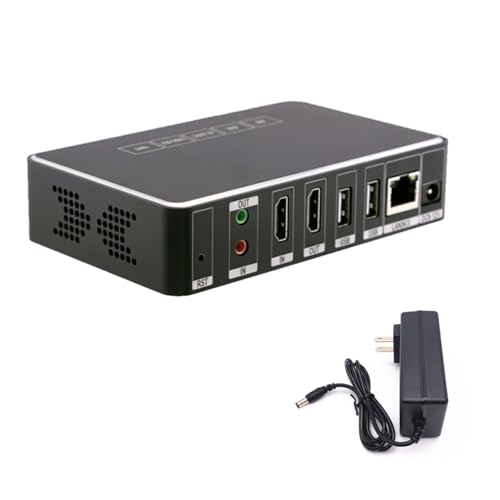
- 4K HDMI video at 30fps
- NDI and SRT compatibility
- 8GB onboard flash storage
Best For: 4K streaming, recording, and NDI/SRT setups
Best for Multi-Platform HDMI Streaming

- 1080p at 60Hz output
- Analog audio embedding
- Four-platform simultaneous streaming
Best For: Live events and mixer-based HDMI streaming
Best 4K DisplayPort Pick
UNISHEEN 4K30 Streaming Encoder

- 4K30 input and output
- Four simultaneous streams
- H.264 and H.265 support
Best For: DisplayPort 4K multi-server broadcasts
Best for Advanced Protocol Support
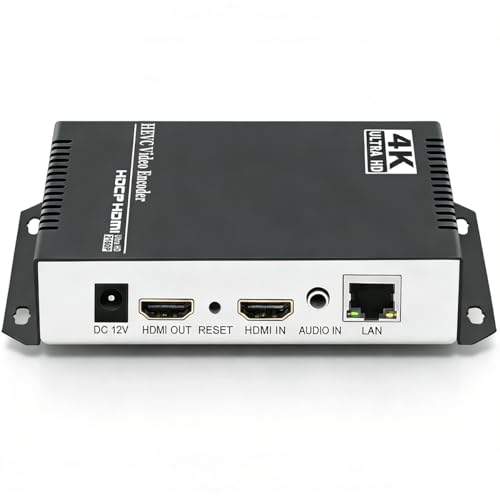
- 4K30 H.265/H.264 encoding
- Broad protocol compatibility
- Four customizable output streams
Best For: Flexible professional HDMI streaming workflows
Best 4K Versatility

- 4K30 H.264/H.265 hardware encoding
- Encoder and decoder functions with HDMI output
- Multi-protocol streaming, OSD, and recording
Best For: IPTV, live events, churches, classrooms, and 4K distribution
Best Compact 1080p60 Pick

- 1080p60 H.264/H.265 hardware encoding
- Browser setup with no PC software required
- Broad protocol support in a compact enclosure
Best For: Compact live-streaming, monitoring, and digital-signage systems
Best Multi-Stream Control

- 1080p60 H.265/H.264 encoding
- Up to four simultaneous protocol outputs
- Flexible audio, overlay, and image controls
Best For: Multi-platform streaming, IPTV, OBS, and NVR workflows
Best Multi-Protocol 4K Encoder – URayCoder UHE265-1L-4K
For shoppers comparing streaming encoders under 500, the URayCoder UHE265-1L-4K stands out for 4K HDMI input, broad protocol support, and flexible stream customization. It can encode H.265 or H.264 video and deliver up to four streams using different protocols.
Best For: Multi-platform broadcasters, IPTV workflows, and users who need 4K HDMI encoding with extensive protocol options.
Pros:
- Supports 4K input and output at up to 30fps, plus up to 120fps at 2K and lower resolutions.
- Works with RTMP(S), RTSP, SRT, HLS, UDP, WebRTC, and other streaming protocols.
- Offers text, scrolling captions, logos, timestamps, cropping, rotation, and mirroring.
- Includes lifetime warranty and technical support.
Cons:
- Its extensive settings may be more than casual users need.
- 4K performance is limited to 30fps.
This is a feature-rich choice when protocol flexibility and stream customization matter more than a minimal setup. Its HDMI connectivity and network-based management also make it practical for professional or multi-destination streaming.
Best Compact NDI Encoder – Zowietek ZowieBox
The Zowietek ZowieBox is a strong option among streaming encoders under 500 for users who want a compact device with HDMI passthrough, NDI conversion, and standalone streaming. Its small enclosure includes an LCD status screen and tally light.
Best For: Game streaming, compact IP video setups, PTZ workflows, and users needing NDI, SRT, or RTMP connectivity.
Pros:
- Captures up to 4K with zero-lag HDMI passthrough.
- Supports NDI|HX3, NDI|HX2, NDI|HX, SRT, RTMP(S), and RTSP workflows.
- Can operate as an encoder or decoder for flexible HDMI/IP conversion.
- Offers USB-C power, PoE, tripod mounting, and web-based control.
Cons:
- Encoder and decoder modes cannot run simultaneously.
- Full NDI signals are not supported.
- USB capture card functionality is currently unavailable.
With its compact design and multiple power options, ZowieBox is particularly useful where space and installation flexibility matter. Review the mode limitations before buying if your workflow depends on simultaneous conversion or USB capture.
Best SDI Encoder for Cameras – LILLIPUT SE1117
For camera-based setups seeking streaming encoders under 500, the LILLIPUT SE1117 provides a focused SDI solution with H.264/H.265 encoding, Ethernet connectivity, and direct computer-free streaming. It supports video up to 1080p at 60Hz.
Best For: SDI cameras, live production systems, and broadcasters who need dual streaming with analog audio input.
Pros:
- Includes SDI input and SDI loop output for local monitoring or signal pass-through.
- Supports H.264 and H.265 encoding up to 1080p60.
- Handles RTSP, RTP, RTMPS, RTMP, HTTP, UDP, and SRT streams.
- Provides image/text overlays, mirroring, flipping, and dual-stream output.
Cons:
- Maximum listed resolution is 1080p rather than 4K.
- Its SDI-focused design is less suitable for HDMI-only sources.
The SE1117 is a practical pick for users already working with SDI cameras and wanting a dedicated encoder without connecting a computer. Its loop output and analog audio input add useful flexibility for live production.
Best 4K HDMI Encoder-Decoder – youyeetoo Link Pi ENC1-V3
The youyeetoo Link Pi ENC1-V3 is worth considering among streaming encoders under 500 if you need 4K HDMI handling, onboard storage, and compatibility with NDI and SRT devices. Its quad-core CPU and 2GB of RAM are designed for 4K video workflows.
Best For: YouTube streaming, surveillance recording, content sharing, and mixed NDI/SRT environments.
Pros:
- Supports 4K video at 30fps and H.264 or H.265/HEVC encoding.
- Works with RTSP, RTMP, HLS, and UDP streaming methods.
- Includes 8GB of onboard flash storage for network video storage.
- Designed to integrate with devices supporting NDI and SRT.
Cons:
- Its supplied details do not specify a broad connector set beyond HDMI.
- 4K operation is listed at 30fps.
- The included warranty is one year, shorter than some competing options.
The ENC1-V3 offers a useful balance of 4K capability and built-in storage for recording-oriented deployments. It is most compelling when your equipment already uses NDI or SRT and you want several standard network streaming choices.
Best for Multi-Platform HDMI Streaming – J-Tech Digital H.264 Encoder
If you need streaming encoders under 500 for a 1080p production setup, the J-Tech Digital JTECH-ENCH4A combines HDMI video encoding with analog audio embedding. It supports several streaming protocols, 1080p at 60Hz, and simultaneous delivery to up to four platforms.
Best For: Live events, houses of worship, and creators who need to pull audio from a mixer while streaming HDMI video.
Pros:
- Supports 1080p at 60Hz for smooth HD broadcasts.
- Embeds analog mixer audio with a digital HDMI signal.
- Supports RTSP, RTP, RTMPS, RTMP, HTTP, UDP, and TS protocols.
- Can broadcast to four streaming platforms simultaneously.
Cons:
- Maximum stated broadcast resolution is 1080p rather than 4K.
- Requires a separate analog audio source when HDMI audio is not used.
The JTECH-ENCH4A is a practical choice when reliable HD output, flexible protocol support, and mixer integration matter more than 4K resolution. Its mobile control app and one-year manufacturer replacement warranty add convenience for ongoing use.
Best 4K DisplayPort Pick – UNISHEEN 4K30 Streaming Encoder
Among streaming encoders under 500, this UNISHEEN model stands out for 4K30 DisplayPort video and support for multiple broadcast protocols. It can send up to four streams at once, with H.264 or H.265 encoding for different platform and bandwidth needs.
Best For: DisplayPort-based 4K broadcasts, multi-server streaming, and users who want built-in image adjustment and on-screen overlays.
Pros:
- Supports 3840×2160 video input and output at 30fps.
- Can output four streams simultaneously using different protocols.
- Supports SRT, RTSP, RTMPS, UDP, NVR, H.264, and H.265.
- Includes de-interlacing, noise reduction, cropping, rotation, and OSD overlays.
Cons:
- Its listed connectivity is DisplayPort/type-C, so source compatibility should be checked carefully.
- 4K output is specified at 30fps rather than 60fps.
This encoder is a strong fit for workflows built around DisplayPort sources and 4K30 delivery. Its four-stream output and image-processing tools make it more flexible than a basic single-destination encoder, while included lifetime technical support and firmware upgrades may help with long-term deployment.
Best for Advanced Protocol Support – URayCoder 4K HDMI Encoder
For buyers comparing streaming encoders under 500, this URayCoder hardware encoder offers a broad feature set: 4K input and output, H.265/H.264 encoding, four simultaneous streams, and extensive protocol support. It is designed for HDMI sources that need flexible network distribution.
Best For: Advanced live-streaming setups that need 4K support, multiple delivery protocols, overlays, and adjustable audio inputs.
Pros:
- Supports 4K at up to 30fps and up to 120fps at 2K and lower resolutions.
- Supports HTTP, RTSP, RTMP(S), SRT, HLS, UDP/RTP, ONVIF, FLV, WebRTC, and other protocols.
- Can output four streams with different protocols simultaneously.
- Offers captions, logos, timestamps, cropping, rotation, mirroring, and HDMI or line-in audio.
Cons:
- 4K frame rate is limited to 30fps according to the supplied specifications.
- The extensive settings may be more than a basic one-platform streamer requires.
The URayCoder is the most feature-rich option here for users who need protocol flexibility and production customization. Its HDMI-to-Ethernet design, browser or mobile management, and stated lifetime warranty and technical support make it suitable for more demanding streaming and distribution environments.
Best 4K Versatility – 4K HDMI Encoder Decoder
If you need streaming encoders under 500 with both high-resolution capture and network playback capabilities, this 4K HDMI model is a flexible option. It supports 4K at 30fps, H.264 and H.265 encoding, multiple streaming protocols, HDMI loopout, local recording, and decoding back to HDMI.
Best For: Churches, classrooms, IPTV installations, digital signage, control rooms, and live-event setups that need 4K input plus encoder/decoder functionality.
Pros:
- Captures HDMI video up to 4K at 30fps with H.264 or H.265 hardware encoding.
- Supports RTMP, RTSP, SRT, HLS, FLV, TS, RTC, and UDP Multicast output.
- Can decode network streams back to 4K HDMI and create multi-view layouts.
- Offers OSD overlays, USB or network recording, and a metal chassis rated for continuous operation.
Cons:
- 4K output is limited to 30fps rather than 60fps.
- The broad feature set and network configuration may be more than a basic single-platform streamer requires.
- The listing identifies the brand as Generic.
This is the most feature-rich choice of the three for hybrid broadcast and IPTV work. Choose it when 4K, decoding, multi-view display, and recording matter as much as streaming.
Best Compact 1080p60 Pick – BM1000 HDMI Streaming Encoder
Among streaming encoders under 500, the UNISHEEN BM1000 is a practical fit for users who want 1080p60 hardware encoding in a small enclosure. It uses a browser-based setup, supports H.264 and H.265, and works with a wide range of IP streaming protocols without requiring PC software.
Best For: YouTube and Facebook Live users, remote monitoring, digital signage, and compact installations that need reliable 1080p60 streaming.
Pros:
- Provides hardware H.264/H.265 encoding at up to 1080p60.
- Supports RTMP(S), RTSP, SRT, UDP, HTTP, HLS, WebRTC, TRTC, Icecast, and SHOUTcast.
- Browser-based configuration avoids dedicated software, drivers, and operating-system compatibility issues.
- Compact palm-sized design supports flexible placement and 24/7 operation.
Cons:
- It accepts one HDMI input and does not offer the 4K capture of the first product.
- Advanced setups require basic networking knowledge.
- The listed power specification is 42 watts, which may be more than some compact streaming installations expect.
The BM1000 prioritizes straightforward deployment and broad protocol support over 4K features. It is a sensible choice when 1080p60 is sufficient and you want browser-based control in a compact box.
Best Multi-Stream Control – URayCoder HEVC HDMI Encoder
For buyers comparing streaming encoders under 500, the URayCoder UHE265-1S stands out for flexible 1080p streaming and customization. It supports H.265, H.264, and MJPEG, can output up to four streams with different protocols, and includes audio, overlay, and image-adjustment controls.
Best For: Multi-platform streaming, OBS workflows, IPTV, NVR integration, and users who need detailed control over captions, logos, audio, and video presentation.
Pros:
- Supports 1080p input and output at up to 60fps with H.265/H.264 encoding.
- Can simultaneously output four streams using different protocols, including RTSP, RTMP(S), SRT, HLS, and UDP variants.
- Accepts HDMI or 3.5mm line-in audio and supports text, scrolling captions, logos, and timestamps.
- Includes video cropping, rotation, flipping, mirroring, and management from computers or mobile phones.
Cons:
- It is limited to 1080p rather than 4K capture.
- The feature-rich configuration may require more setup than a basic encoder.
- The product dimensions and supplied specifications are less compact and detailed than the BM1000 listing.
This model is a strong fit when simultaneous distribution and presentation customization are priorities. Its four-stream capability makes it particularly useful for more involved IPTV, OBS, and multi-platform workflows.
How We Picked the Best Streaming Encoders Under 500
We focused on hardware encoders priced below $500 that support practical live-production workflows rather than simple capture alone. The selected models cover HDMI, SDI, and DisplayPort inputs, with options for 1080p and 4K sources. We also considered H.264 and H.265 support, streaming protocols, audio handling, network connectivity, loop-through outputs, and compatibility with platforms such as YouTube and Facebook Live.
Because specifications can vary by firmware and configuration, verify the seller’s current listing before purchase. In particular, check whether a stated 4K resolution refers to input passthrough, recording, or actual encoded output.
Quick Comparison
| Best For | Features to Look For |
|---|---|
| Basic HDMI streaming | 1080p60, H.264, RTMP, simple web control |
| Higher-quality 4K workflows | H.265, 4K input, 4K30 support, HDMI loopout |
| Broadcast cameras | SDI input, embedded or external audio, stable Ethernet |
| Flexible production networks | NDI, SRT, RTSP, multicast, and decoder support |
| IPTV or institutional use | HLS, UDP, HTTP, WebRTC, and centralized configuration |
Key Buying Factors for Streaming Encoders Under $500
Input and Output Resolution
Match the encoder to your source device and delivery needs. A 1080p60 encoder is often the best value for webcams, cameras, gaming systems, and online broadcasts. Choose a 4K-capable unit if you need to accept UHD sources, preserve a 4K signal through passthrough, or build a system that can be upgraded later.
Codec and Bitrate Support
H.264 offers broad compatibility and is the safest choice for mainstream streaming services. H.265 can deliver similar image quality at a lower bitrate, which is useful on constrained networks, but platform and software support is less universal. Check available bitrate ranges and whether the encoder lets you control keyframe intervals and rate modes.
Protocols and Network Features
RTMP is convenient for public platforms, while SRT is better suited to unreliable links and long-distance contribution. RTSP, UDP, HLS, and multicast are more common in CCTV, IPTV, education, and internal distribution. NDI can simplify video-over-IP production when your switcher or software already supports it.
Audio, Control, and Reliability
Look for embedded HDMI or SDI audio, an analog audio input when needed, and clear monitoring options. Ethernet is generally preferable for dependable live transmission. A browser-based control panel, status indicators, firmware updates, and automatic reconnect features can matter as much as headline resolution.
Who Should Buy Which Streaming Encoders Under 500?
Choose a straightforward HDMI H.264 model for occasional YouTube, Facebook, or presentation streaming. Pick an H.265 4K encoder if you need better bandwidth efficiency or UHD source compatibility. SDI models are the better fit for professional cameras and longer cable runs. Buyers building a flexible studio or IP workflow should prioritize NDI, SRT, loopout, and multiple protocol options. For IPTV, surveillance, campuses, and internal distribution, prioritize multicast, UDP, HLS, RTSP, and centralized network management over consumer-focused platform presets.