
Choosing a hot swap hard drive enclosure can make storage upgrades, drive testing, and backups much faster. The best models balance easy access, reliable cooling, and the right mix of bay count and connection speed.
Below, we focus on practical options for home labs, media libraries, cloning workflows, and desktop expansion so you can match the enclosure to how you actually use your drives.
Best 10 Hot Swap Hard Drive Enclosure Picks for 2026
4-Bay Desktop DAS Value Pick
CENMATE Aluminum 4 Bay Hot Swap Enclosure

- 4 bays for 2.5-inch and 3.5-inch SATA drives
- Tool-free hot-swappable design
- Aluminum body with built-in fan and USB 3.0
Best For: Simple multi-drive desktop storage with easy drive swapping
5.25-Inch Bay Cage Security Pick
SilverStone FS304-12G Trayless Hot-Swap Cage

- Converts three 5.25-inch bays into four 3.5-inch slots
- Trayless, screwless design with individual key locks
- All-aluminum build with LED and fan control
Best For: Secure internal hot-swap storage in a desktop tower
Single-Bay Dock Convenience Pick

- Supports 2.5-inch and 3.5-inch SATA drives
- Hot-swappable with LED indicator and UASP
- Plug-and-play for Windows, macOS, and Linux
Best For: Quick one-drive access for transfers, testing, or backups
Internal Hot-Swap Expansion Pick
SilverStone FS304-V Hot-Swap Cage

- Holds four 3.5-inch SAS/SATA drives
- Trayless hot-swap trays with built-in fan
- Independent LEDs for drive status monitoring
Best For: Fan-cooled internal expansion with easy drive swapping
Docking Station & Cloner
SABRENT Dual-Bay USB 3.0 Docking Station

- Fits 2.5-inch and 3.5-inch SATA drives
- Offline cloning supports quick drive duplication
- Plug-and-play USB 3.0 dock for easy swaps
Best For: People who want a dual-bay dock with offline cloning
Trayless Backplane
StarTech 3-Bay Hot Swap Backplane

- Fits three 3.5-inch SATA or SAS drives
- Trayless bays with eject levers and key lock
- Vented aluminum body with fan speed control
Best For: Internal systems needing secure hot-swap drive access
Tool-Free Dual-Bay Enclosure
CENMATE Aluminum 2-Bay SATA Enclosure

- Hot-swappable dual-bay design with tool-free trays
- Supports 2.5-inch and 3.5-inch SATA HDDs/SSDs
- Built-in fan and aluminum body help manage heat
Best For: People who want an easy-to-use external dual-bay enclosure
Dense 2.5-Inch Bay Cage
ICY DOCK MB326SP-B 6-Bay Hot Swap Cage
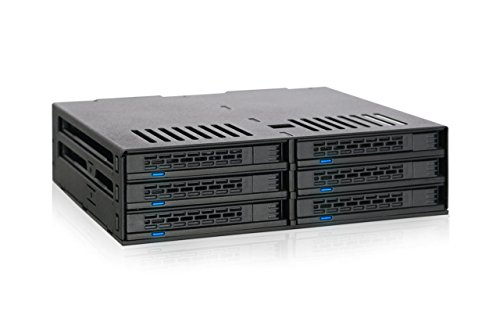
- Fits up to 6 x 2.5-inch SATA drives
- Tool-less, hot-swappable bay design
- Dual 40mm fans with manual or auto control
Best For: Space-saving internal builds with lots of 2.5-inch SATA drives
USB-C Multi-Bay Dock
SABRENT DS-SC5B 5-Bay Hot-Swap Dock

- Five tray-less 3.5-inch hot-swap bays
- 10Gbps USB-C with independent drive controllers
- 120mm PWM cooling fan and per-bay power switches
Best For: Multi-drive USB-C workflows that need simple direct-attached storage
Mixed-Drive External DAS
CENMATE 6-Bay Hot Swap Tool-Free Enclosure

- Supports 2.5-inch and 3.5-inch SATA drives
- Tool-free hot-swap trays with aluminum build
- USB A/C 3.0 plus daisy-chain expansion
Best For: Flexible external storage setups that need mixed-drive support
4-Bay Desktop DAS Value Pick – CENMATE Aluminum 4 Bay Hot Swap Enclosure
If you want a practical hot swap hard drive enclosure for a small office or personal archive, this CENMATE 4-bay DAS is built around capacity, cooling, and straightforward USB connectivity. It supports 2.5-inch and 3.5-inch SATA HDDs/SSDs, uses a metal enclosure with a built-in fan, and is designed for plug-and-play use on Windows, Mac, and Linux.
Best For: Users who need a simple multi-drive desktop enclosure for mixed SATA storage and regular drive swapping.
Pros:
- Supports up to four 2.5-inch or 3.5-inch SATA HDDs/SSDs, with up to 80TB total capacity.
- Tool-free, hot-swappable design makes drive changes easier in day-to-day use.
- Aluminum-alloy body and built-in fan help with heat management during longer sessions.
- USB 3.0 with UASP support and USB A/C cables included for broad connectivity.
Cons:
- The fan is noted at around 40-50 dB, so it may not suit very noise-sensitive setups.
- It is a DAS enclosure with no RAID or NAS functions.
- Best suited to desktop use because it relies on an external 12V power adapter.
Overall, this is a straightforward option if you want a hot swap hard drive enclosure with room for multiple SATA drives and a focus on easy setup rather than advanced storage features.
5.25-Inch Bay Cage Security Pick – SilverStone FS304-12G Trayless Hot-Swap Cage
For a more permanent PC installation, this hot swap hard drive enclosure turns three 5.25-inch bays into four 3.5-inch SAS-12G or SATA 6G drive slots. Its trayless, screwless layout is aimed at users who want fast drive access inside a desktop chassis, while the metal body and individual key locks add a more secure feel.
Best For: Desktop builders who want a secure internal hot-swap cage for four 3.5-inch drives.
Pros:
- Fits four 3.5-inch SAS-12G/SATA 6G drives in three 5.25-inch bays.
- Trayless and screwless design makes drive changes quicker and cleaner.
- Individual metal key locks provide extra security for each drive.
- All-aluminum body includes adjustable drive status LED and fan control system.
Cons:
- Requires available internal 5.25-inch bays, so it is not for slim or bay-free systems.
- Designed for 3.5-inch drives only, not 2.5-inch SSD/HDD use.
- It is an internal cage, not an external USB enclosure.
This model makes sense if you want a hot swap hard drive enclosure that stays inside the case and emphasizes security, drive access, and native SAS/SATA support.
Single-Bay Dock Convenience Pick – Sabrent Lay-Flat USB 3.0 Dock
If you need a simple hot swap hard drive enclosure for quick disk access, this Sabrent lay-flat dock is a practical single-bay choice. It supports 2.5-inch and 3.5-inch SATA HDDs and SSDs, runs over USB 3.0 with UASP support, and is designed for plug-and-play use on Windows, macOS, and Linux.
Best For: Users who want an easy dock for fast drive swaps, cloning, or file transfers.
Pros:
- Supports SATA I/II/III 2.5-inch and 3.5-inch HDDs and SSDs.
- Hot-swappable dock with LED activity indicator for quick drive use.
- USB 3.0 with UASP support can improve transfer performance on compatible systems.
- Plug-and-play operation with no drivers required for common desktop operating systems.
Cons:
- Only supports SATA drives, not IDE/PATA, M.2, SAS, or USB-connected drives.
- A 12V power adapter is required for 3.5-inch drives.
- It is a single-drive dock, so it is not meant for multi-bay expansion.
As a no-frills docking solution, this model is best when you want fast access to one drive at a time rather than a larger enclosure with multiple bays.
Internal Hot-Swap Expansion Pick – SilverStone FS304-V Hot-Swap Cage
When you want a hot swap hard drive enclosure that lives inside a desktop and supports four 3.5-inch SAS or SATA drives, the SilverStone FS304-V is aimed at exactly that job. It mounts into three 5.25-inch bays, adds trayless hot-swap convenience, and includes a built-in fan plus independent drive status LEDs for easier monitoring.
Best For: Desktop users who want a fan-cooled internal cage with hot-swap trays and four-drive capacity.
Pros:
- Fits four 3.5-inch SAS 12G or SATA 6G drives in three 5.25-inch bays.
- Supports hot-swap functionality with trayless hot-swap trays.
- Built-in cooling fan helps with heat dissipation.
- Independent LED indicators make it easier to monitor drive status.
Cons:
- Requires a desktop with available 5.25-inch bay space.
- Only supports 3.5-inch drives, not 2.5-inch media.
- Internal installation makes it less flexible than an external USB dock.
This is a strong fit if you want an internal, high-capacity hot swap hard drive enclosure with cooling built in and a layout designed for ongoing drive changes.
Docking Station & Cloner – SABRENT Dual-Bay USB 3.0 Docking Station
If you want a hot swap hard drive enclosure that doubles as a straightforward dock, this SABRENT dual-bay model is built for quick access to 2.5-inch and 3.5-inch SATA HDDs and SSDs. It supports plug-and-play use, offline cloning, and USB 3.0 speeds, making it a practical choice for backups and drive swaps without extra software.
Best For: Users who want a simple dual-bay dock with offline cloning for SATA drives.
Pros:
- Supports 2.5-inch and 3.5-inch SATA HDDs and SSDs
- Offline cloning is included for drive-to-drive duplication
- Plug and play with no drivers needed
- USB 3.0 support for up to 5Gbps transfer speeds
Cons:
- Supports hard drives up to 10TB per the supplied notes
- Designed as a dock, not a fully enclosed desktop chassis
Overall, this is a strong fit if you mainly need a hot swap hard drive enclosure for fast access, cloning, and easy day-to-day drive handling. Its value is in simplicity and versatility rather than advanced enclosure features.
Trayless Backplane – StarTech 3-Bay Hot Swap Backplane
This StarTech hot swap hard drive enclosure is aimed at users who need internal trayless access to multiple 3.5-inch drives. It turns two 5.25-inch bays into a 3-bay backplane for SATA or SAS drives, with individual eject levers, lockable bays, and built-in cooling to support frequent drive changes.
Best For: IT-focused systems that need trayless hot-swap support for up to three 3.5-inch drives.
Pros:
- Hot-swaps up to three 3.5-inch SATA or SAS drives
- Trayless design with individual ejection levers
- Key-lock design adds optional drive security
- Built-in fan with speed control and vented aluminum enclosure
Cons:
- Designed for two 5.25-inch bays, so it is not an external enclosure
- Supports 3.5-inch drives only
As a backplane, this is a more specialized option than a basic external dock, but it makes sense when you need reliable internal hot-swap access. The aluminum build and active cooling also make it better suited to systems that run drives often.
Tool-Free Dual-Bay Enclosure – CENMATE Aluminum 2-Bay SATA Enclosure
For buyers looking for a hot swap hard drive enclosure with everyday desktop convenience, this CENMATE dual-bay model combines tool-free installation, USB 3.0 connectivity, and active cooling. It supports 2.5-inch and 3.5-inch SATA HDDs and SSDs, making it a flexible option for removable storage and quick drive changes.
Best For: Users who want an external dual-bay enclosure with hot-swap support and a cooling fan.
Pros:
- Supports 2.5-inch and 3.5-inch SATA HDDs and SSDs
- Hot-swappable and tool-free for easy drive changes
- Built-in fan and aluminum-alloy construction for cooling
- USB A/C 3.0 cable included with plug-and-play setup
Cons:
- Noise from the fan is noted at around 40–50 decibels
- It is a DAS unit with no RAID/NAS features
This is a balanced choice if you want a practical dual-bay enclosure with easy swapping and broad compatibility. Its cooling and tool-free design are the main advantages for users who frequently move drives around.
Dense 2.5-Inch Bay Cage – ICY DOCK MB326SP-B 6-Bay Hot Swap Cage
If you need a hot swap hard drive enclosure for packing a lot of 2.5-inch SATA drives into one 5.25-inch bay, the ICY DOCK MB326SP-B is built for exactly that job. It supports up to six 2.5-inch SATA HDDs or SSDs, uses a tool-less tray design, and includes dual 40mm fans with HIGH, LOW, and AUTO cooling modes for better drive management in tight builds.
Best For: System builders and power users who want a compact, hot-swappable 2.5-inch SATA cage with active cooling.
Pros:
- Supports up to 6 x 2.5-inch SATA HDD/SSD in a single 5.25-inch bay
- Tool-less, hot-swappable drive bays for fast swaps
- Dual 40mm fans with selectable HIGH, LOW, and AUTO modes
- Handles 5mm, 7mm, and 9.5mm drive heights
Cons:
- Designed mainly for 2.5-inch drives, not 3.5-inch models
- Requires a 5.25-inch bay and dual SATA power connections
- Cooling fans may be unnecessary for low-heat, light-use setups
This is a strong choice if your priority is dense internal storage with easy swapping and built-in cooling. It is especially appealing for builders who want to save space while keeping multiple SATA drives accessible.
USB-C Multi-Bay Dock – SABRENT DS-SC5B 5-Bay Hot-Swap Dock
The SABRENT DS-SC5B is a hot swap hard drive enclosure in dock form, aimed at users who want fast access to multiple 3.5-inch SATA drives over USB-C. It offers five tray-less bays, a 10Gbps USB 3.1 Gen 2 connection, individual power switches, and a 120mm PWM fan for temperature-controlled cooling during heavier transfers.
Best For: Users who need a reliable multi-drive USB-C dock for 3.5-inch SATA storage and frequent drive changes.
Pros:
- Five tray-less hot-swap bays for 3.5-inch SATA HDDs/SSDs
- 10Gbps USB-C connection with dedicated controller per bay
- 120mm PWM fan helps keep noise down during lighter use
- Per-bay power switches plus locking key and Kensington slot
Cons:
- Not a RAID enclosure; drives mount individually
- Built for 3.5-inch drives, so it is not the right fit for smaller 2.5-inch bays
- Large desktop footprint compared with single-bay docks
If you want direct-attached storage with easy hot-swapping and no RAID complexity, this dock is a practical choice. It works well for workflows that involve rotating several large SATA drives through one USB-C connection.
Mixed-Drive External DAS – CENMATE 6-Bay Hot Swap Tool-Free Enclosure
If you want a hot swap hard drive enclosure that works as an external multi-bay storage box, the CENMATE 6-bay model covers both 2.5-inch and 3.5-inch SATA HDDs and SSDs. It uses a tool-free tray design, supports hot swapping, and includes aluminum-alloy construction plus two 2.7-inch fans to help manage heat in a six-drive setup.
Best For: Users who want a no-RAID external enclosure for mixed 2.5-inch and 3.5-inch SATA drives with easy expansion.
Pros:
- Supports both 2.5-inch and 3.5-inch SATA HDDs/SSDs
- Tool-free, hot-swappable drive trays for easy replacement
- Aluminum-alloy build with two fans for cooling
- USB A/C 3.0 connectivity and daisy-chain expansion support
Cons:
- USB 3.0 speed tops out at 5Gbps, below newer 10Gbps options
- Fan noise is listed around 40-50 decibels
- No RAID or NAS functionality
This enclosure makes sense when flexibility matters more than advanced storage features. It is a straightforward way to build a large, hot-swappable DAS setup with broad drive compatibility and room to expand.
How We Picked the Best Hot Swap Hard Drive Enclosure
We prioritized enclosures and docks that offer broad drive compatibility, solid build quality, and convenience features like tool-free trays, trayless access, and hot-swappable bays. We also looked for useful real-world details such as fan cooling, USB or backplane connectivity, and support for both 2.5-inch and 3.5-inch SATA drives where relevant.
Since buyer needs vary, the lineup includes compact single- and dual-bay docks as well as larger multi-bay solutions for heavier storage workloads.
Quick Comparison
Single-bay docks are best for quick drive access and occasional cloning. Dual-bay models add flexibility for copy jobs and rotating storage. Four- and six-bay enclosures are better for home servers, content libraries, and users who want several drives ready at once. If speed matters most, look for faster USB standards or a native backplane design; if uptime matters more, focus on airflow, power handling, and bay spacing.
Key Buying Factors for a Hot Swap Hard Drive Enclosure
Drive Type and Form Factor
Make sure the enclosure supports the drives you own, especially 2.5-inch SSDs, 3.5-inch HDDs, or both. Not every bay layout handles both sizes equally well, and some backplane-style options are designed for specific chassis dimensions.
Cooling and Noise
More bays usually mean more heat. A Hot Swap Hard Drive Enclosure with active cooling is often the safer choice for multi-drive setups, especially if you plan to run mechanical disks for long periods.
Connection and Speed
USB 3.x docks are convenient for flexible desktop use, while internal SAS/SATA backplanes are a better fit for permanent installations. Consider whether your workload benefits more from fast file transfers, offline cloning, or always-ready installed storage.
Swap Convenience and Build Quality
Trayless designs and tool-free access are the main reasons buyers choose hot-swap hardware in the first place. Sturdy latches, secure connectors, and good bay alignment matter more than cosmetic extras.
Who Should Buy Which Hot Swap Hard Drive Enclosure?
If you want a simple way to mount and test drives, a single-bay dock is the easiest option. If you copy drives often or keep a working backup nearby, a dual-bay model or cloner makes more sense. For NAS-like desktop expansion, media work, or a home lab, choose a four- or six-bay enclosure with stronger cooling and better physical organization. If you are building into a PC chassis, an internal Hot Swap Hard Drive Enclosure or backplane is usually the cleanest long-term solution.
In short, the best choice depends on whether you value portability, cloning, capacity, or permanent multi-drive access.