
A wired connection can deliver more consistent speed and lower latency than Wi-Fi, but many modern laptops and compact PCs no longer include an Ethernet port. The best ethernet adapters for Windows add reliable RJ45 networking through USB-A or USB-C without requiring a full dock.
This roundup compares 10 practical options, from compact gigabit adapters to faster 2.5Gbps models and USB hubs. Use the buying guide below to match the adapter’s connector, speed, compatibility, and extra features to your setup.
Best 10 Ethernet Adapters for Windows Picks for 2026
Best Windows Value
Amazon Basics USB 3.0 Gigabit Ethernet Adapter
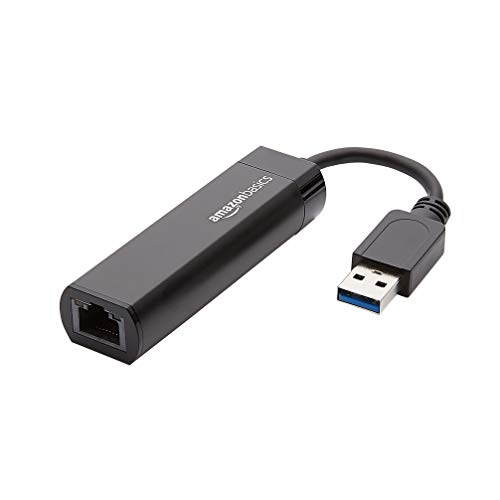
- Gigabit Ethernet over USB 3.0
- Supports Wake-on-LAN and Energy Efficient Ethernet
- Designed for compatible computers and laptops
Best For: Straightforward wired networking on Windows PCs and laptops
Best Portable Pick
TP-Link UE300 USB 3.0 Ethernet Adapter

- Foldable USB 3.0 design
- Supports up to 1000 Mbps
- Two-year warranty and lifetime technical support
Best For: Portable wired networking for Windows laptops
Best for Switch Compatibility
UGREEN USB 3.0 Gigabit Ethernet Adapter

- Up to 1000 Mbps over USB 3.0
- Works with Nintendo Switch and Switch OLED
- Plug-and-play on supported Windows versions
Best For: Windows PCs and USB-A devices that also need Switch support
Best USB-C Option
Anker PowerExpand USB-C Ethernet Adapter

- Up to 1 Gbps wired networking
- Compact aluminum body with braided cable
- Includes an 18-month warranty
Best For: USB-C-equipped Windows devices and portable setups
Best for Easy Setup
UGREEN USB-C to Ethernet Adapter

- Up to 1000Mbps Gigabit Ethernet
- Driver-free on Windows 11/10/8.1/8
- Compact aluminum housing with LED indicator
Best For: USB-C Windows laptops and tablets
Best Broad Compatibility
BENFEI USB A/C Gigabit Ethernet Adapter

- USB-A and USB-C connectivity
- Supports Windows XP through Windows 11
- 10/100/1000Mbps with link and activity LEDs
Best For: Mixed Windows devices and older PCs
Best for Nintendo Switch
TP-Link UE306 USB 3.0 Ethernet Adapter

- Gigabit speeds up to 1000Mbps
- Plug and play on Windows 11/10/8.1/8
- Foldable, portable design with Switch support
Best For: Windows users and Nintendo Switch gaming
Best Plug-and-Play Pick
uni USB 3.0 Gigabit Ethernet Adapter
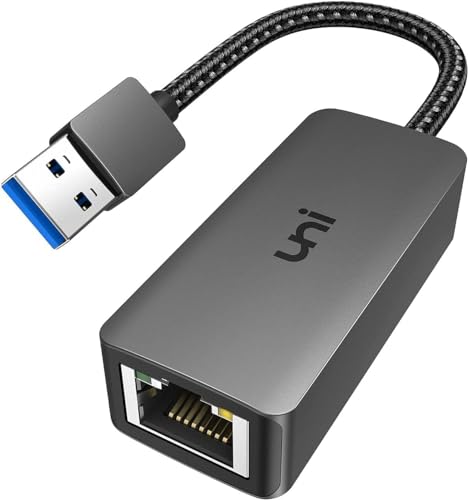
- Up to 1,000 Mbps over USB 3.0
- Braided cable and aluminum housing
- Windows 11 requires a driver
Best For: Everyday wired networking on USB-A Windows laptops and desktops
Best for 2.5Gbps Networks
UGREEN 2.5Gb USB Ethernet Adapter

- Supports wired speeds up to 2.5Gbps
- Low-power RTL8156BG chip
- Aluminum body with status lights
Best For: Windows users upgrading compatible routers, switches, or NAS networks
Best Ethernet Hub Combo
ABLEWE USB 3.0 Ethernet Adapter Hub
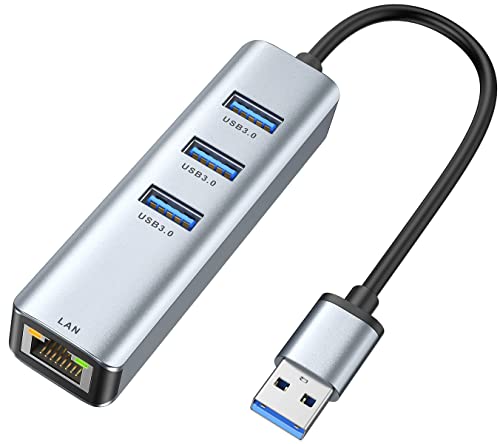
- Gigabit Ethernet plus three USB 3.0 ports
- Ports can operate simultaneously
- Compact aluminum design with 24-month warranty
Best For: Windows laptops needing wired Ethernet and extra USB connectivity
Best Windows Value – Amazon Basics USB 3.0 Gigabit Ethernet Adapter
If you need ethernet adapters for windows, this Amazon Basics model is a straightforward USB 3.0 option for connecting a compatible computer or laptop to a router, modem, or network switch. It supports Gigabit Ethernet and works with Windows 8.1 or later, along with macOS and other listed platforms.
Best For: Windows users who want a simple USB 3.0-to-RJ45 adapter for wired Gigabit networking.
Pros:
- Supports up to 1000 Mbps Gigabit Ethernet.
- Includes Wake-on-LAN, Energy Efficient Ethernet, and checksum offload support.
- Compatible with computers and laptops running Windows, macOS, ChromeOS, or Linux.
Cons:
- Not intended for Smart TVs or gaming consoles such as Nintendo Switch.
- Windows support is listed from Windows 8.1 or later, with Windows 10 specified in the product details.
This is a practical pick when you need wired networking on a Windows computer without extra ports or features. Its main limitation is the restricted device compatibility outside computers and laptops.
Best Portable Pick – TP-Link UE300 USB 3.0 Ethernet Adapter
The TP-Link UE300 is one of the more travel-friendly ethernet adapters for windows, pairing a foldable design with USB 3.0 Gigabit performance. It is driver-free on Windows XP and later and supports a broad range of computers, including Windows PCs, Surface devices, Chromebooks, Macs, and Linux systems.
Best For: Travelers and laptop users who want a foldable Gigabit adapter with broad operating-system support.
Pros:
- Delivers 10/100/1000 Mbps Ethernet performance through USB 3.0.
- Foldable, compact design is convenient for carrying.
- Driver-free installation for Windows XP and later, ChromeOS, and Linux.
- Includes a two-year manufacturer warranty and lifetime technical support.
Cons:
- Does not support Nintendo Switch, Wii U, or Wii.
- Older Mac OS versions 10.6 through 10.8 require a separate driver.
The UE300 stands out for portability and operating-system coverage. Choose it for a Windows laptop or travel kit, but look elsewhere if console compatibility is important.
Best for Switch Compatibility – UGREEN USB 3.0 Gigabit Ethernet Adapter
For shoppers comparing ethernet adapters for windows that can also serve other devices, the UGREEN USB 3.0 adapter offers up to 1000 Mbps and driver-free setup on supported Windows versions. Its compatibility extends to Nintendo Switch and Switch OLED, as well as many desktops, laptops, TV boxes, and Macs with USB-A ports.
Best For: Windows users who also want wired networking for Nintendo Switch, Switch OLED, or other USB-A devices.
Pros:
- Provides Gigabit network speeds for gaming, streaming, uploads, and downloads.
- Plug-and-play on Windows 11, 10, 8.1, and 8, plus macOS and ChromeOS.
- Compatible with Nintendo Switch and Switch OLED.
- Compact design and a 24-month UGREEN warranty.
Cons:
- Requires a USB-A port, which may limit use with newer USB-C-only devices.
- The listed Windows compatibility begins at Windows 7.
This is the most versatile choice in the group if console support matters alongside Windows compatibility. Confirm that your computer or laptop has the required USB-A connection before buying.
Best USB-C Option – Anker PowerExpand USB-C Ethernet Adapter
The Anker PowerExpand is a useful alternative among ethernet adapters for windows when your device has a USB-C port rather than USB-A. It connects compatible USB-C 3.0 devices to Gigabit Ethernet, with a compact aluminum body and braided-nylon cable for easy portability.
Best For: Windows and other USB-C device users who want a compact 1 Gbps wired connection.
Pros:
- Supports stable connection speeds of up to 1 Gbps.
- Designed for USB-C 3.0 devices.
- Lightweight, compact build with an aluminum exterior and braided-nylon cable.
- Includes an 18-month warranty and customer support.
Cons:
- Uses USB-C, so it is not the direct choice for USB-A-only computers.
- The supplied details list tablet compatibility but do not specify Windows version support.
Choose this adapter when USB-C connectivity and portability are higher priorities than broad device documentation. Its 1 Gbps capability makes it suitable for a compatible Windows device with USB-C 3.0.
Best for Easy Setup – UGREEN USB-C to Ethernet Adapter
If you need ethernet adapters for windows and your laptop has a USB-C port, the UGREEN adapter adds a wired Gigabit connection without requiring a separate power source. It supports up to 1000Mbps and is plug and play on Windows 11, 10, 8.1, and 8.
Best For: USB-C laptops, tablets, and phones that need a compact, stable wired connection.
Pros:
- Supports up to 1000Mbps and is backward compatible with 100Mbps and 10Mbps networks.
- Driver-free on Windows 11/10/8.1/8, with an LED status indicator.
- Aluminum housing, reinforced cable tail, and compact design support portability and durability.
Cons:
- Windows XP, 7, Vista, and Linux require drivers.
- Requires a USB-C or Thunderbolt 3/4 port.
This is a straightforward choice for newer Windows devices without built-in Ethernet. Its USB-C connection and aluminum construction make it especially appealing for mobile workstations, though users with USB-A ports will need a different adapter.
Best Broad Compatibility – BENFEI USB A/C Gigabit Ethernet Adapter
For shoppers comparing ethernet adapters for windows across older and newer computers, the BENFEI adapter offers both USB-A and USB-C connectivity. It supports 10/100/1000Mbps Ethernet, requires no external power, and works with Windows versions ranging from XP through Windows 11.
Best For: Windows users who want broad operating-system support and USB-A/USB-C flexibility.
Pros:
- Supports full 10/100/1000Mbps Gigabit Ethernet performance.
- Compatible with Windows 11/10/8.1/8/7/Vista/XP, plus macOS, Linux, Android, and Chrome OS.
- Includes link and activity LEDs, USB power, and support for Wake-on-LAN.
- Aluminum shell and nylon cable are designed for portable use.
Cons:
- Does not support Windows RT.
- Not compatible with Nintendo Switch.
- Reaching 1Gbps requires a Cat6 or better Ethernet cable.
The BENFEI stands out when compatibility matters more than a single modern connector. It is a versatile option for mixed-device households, provided you use suitable cabling and do not need Nintendo Switch support.
Best for Nintendo Switch – TP-Link UE306 USB 3.0 Ethernet Adapter
The TP-Link UE306 is a practical choice among ethernet adapters for windows when you need a USB-A Gigabit connection and Nintendo Switch support. Its USB 3.0 interface delivers 10/100/1000Mbps wired networking, while plug-and-play support simplifies setup on Windows 11, 10, 8.1, and 8.
Best For: Windows laptops, tablets, and Nintendo Switch users seeking portable wired networking.
Pros:
- Supports 10/100/1000Mbps Gigabit Ethernet.
- No driver required for Windows 11/10/8.1/8, Linux, or Nintendo Switch.
- USB-powered design needs no external power adapter.
- Foldable USB connector and compact 2.8-by-1-by-0.6-inch design suit travel.
Cons:
- Uses USB-A rather than USB-C.
- Windows support is listed from Windows 7 onward, with plug-and-play specifically noted for newer versions.
The UE306 combines simple Windows setup with useful gaming-device compatibility. Its foldable connector and small footprint make it a strong travel option, especially for users who also want a wired Nintendo Switch connection.
Best Plug-and-Play Pick – uni USB 3.0 Gigabit Ethernet Adapter
If you need ethernet adapters for windows without adding much bulk, the uni USB 3.0 Gigabit Ethernet Adapter offers a straightforward wired connection for compatible USB-A laptops and desktops. It supports up to 1,000 Mbps with the right CAT6-or-better cable and network equipment, while remaining backward compatible with USB 2.0 and USB 1.1.
Best For: Windows users who want a compact, durable USB-A adapter for video calls, streaming, gaming, downloads, or other stable wired connections.
Pros:
- Supports 10/100/1000 Mbps Ethernet through USB 3.0.
- Features a braided cable, aluminum housing, LED indicator, and RTL8153 chip.
- Works with Windows, macOS, Linux, and ChromeOS; includes an 18-month warranty and customer support.
Cons:
- Windows 11 requires a driver.
- USB 2.0 limits speeds to 10/100 Mbps.
- Not compatible with Nintendo Switch and not recommended for TVs.
The uni adapter is a sensible everyday choice when Gigabit Ethernet is sufficient and you value a flexible cable and sturdy construction. Remember that achieving 1 Gbps depends on using compatible USB 3.0 hardware, cabling, and network equipment.
Best for 2.5Gbps Networks – UGREEN 2.5Gb USB Ethernet Adapter
For ethernet adapters for windows that can move beyond standard Gigabit networking, the UGREEN USB to Ethernet Adapter adds a 2.5Gbps wired connection through USB 3.0. It is designed for compatible modern laptops and can pair with 2.5Gbps switches, routers, and other network hardware.
Best For: Windows users with 2.5Gbps-capable network equipment who want faster NAS transfers, downloads, streaming, or gaming than a standard Gigabit adapter provides.
Pros:
- Supports network speeds of up to 2.5Gbps.
- RTL8156BG chip is designed for lower power use and reduced heat at full speed.
- Durable aluminum construction and indicator lights show transmission status.
Cons:
- Reaching 2.5Gbps requires compatible switches, routers, devices, and network service.
- Not compatible with all Nintendo Switch models, TVs, Synology NAS devices, or Wii systems.
- Its USB 3.0 Type-A connection may require an appropriate port or adapter on some computers.
The UGREEN model is the stronger choice for a newer, faster wired network, but its headline speed only pays off when the rest of your setup supports 2.5Gbps. For ordinary Gigabit networks, a less expensive Gigabit adapter may be sufficient.
Best Ethernet Hub Combo – ABLEWE USB 3.0 Ethernet Adapter Hub
If your Windows laptop needs both wired networking and more USB ports, the ABLEWE USB 3.0 Ethernet Adapter combines a Gigabit RJ45 connection with three additional USB 3.0 ports. This makes it a practical option among ethernet adapters for windows when one USB port needs to handle networking and peripherals together.
Best For: Windows users who need a wired Ethernet connection plus ports for flash drives, hard drives, keyboards, mice, printers, or other USB devices.
Pros:
- Combines 10/100/1000 Mbps Ethernet with three USB 3.0 ports.
- All hub ports can work simultaneously.
- Compact aluminum design, broad operating-system support, and a 24-month warranty.
Cons:
- It occupies one USB 3.0 port while adding the network connection and hub ports.
- Ethernet tops out at Gigabit speeds rather than 2.5Gbps.
- Supplied compatibility details specifically list Windows 10 and earlier Windows versions, rather than Windows 11.
The ABLEWE is best viewed as a space-saving connectivity hub rather than a standalone Ethernet dongle. Choose it when the extra USB ports are as important as the wired network connection.
How We Picked the Best Ethernet Adapters for Windows
We focused on adapters that provide a straightforward path from a Windows computer to a wired Ethernet network. The selection includes USB 3.0 models for computers with traditional USB-A ports, USB-C adapters for newer laptops, and a hub-style option for users who need additional USB connectivity. We also considered advertised network speed, plug-and-play convenience, portability, and compatibility claims.
Before buying, confirm that your computer’s operating system, USB port, and network equipment support the adapter’s stated capabilities. Actual internet speed depends on your router, Ethernet cabling, service plan, and network hardware.
Quick Comparison
- Best for basic gigabit networking: USB 3.0 to Gigabit adapters from Amazon Basics, TP-Link, UGREEN, and uni.
- Best for USB-C laptops: Anker, UGREEN USB-C, and BENFEI USB-C models.
- Best for maximum wired speed: The UGREEN 2.5Gb adapter, provided the computer and network support 2.5Gbps.
- Best for extra connectivity: The ABLEWE adapter, which combines Gigabit Ethernet with three USB 3.0 ports.
- Best for compatible gaming devices: The TP-Link model that specifically supports Nintendo Switch alongside computers.
Key Buying Factors for Ethernet Adapters for Windows
USB Connector and Port Availability
Choose USB-A if your PC or laptop has standard rectangular USB ports. Choose USB-C for newer systems, but check whether the USB-C port supports the required data standard. A passive USB-C-to-USB-A converter may work in some cases, but a native connector is usually the cleaner choice.
Network Speed
Gigabit Ethernet supports speeds up to 1,000Mbps and is sufficient for most home broadband, office, streaming, and gaming needs. A 2.5Gbps adapter is worthwhile when your computer, switch or router, cabling, and internet or local network can all exceed gigabit speeds. Otherwise, it may not provide a noticeable benefit.
Drivers and Windows Compatibility
Many modern adapters are plug and play, while some may require a driver installation. If the computer is offline or used for troubleshooting, driver-free or broadly compatible models can be more convenient. Keep Windows updated and check the manufacturer’s supported operating systems before purchasing.
Portability and Build
Compact plastic adapters are easy to carry and often cost less. Aluminum housings can provide a more substantial feel and help with heat dissipation, but may become warm during extended transfers. Consider cable length and whether the adapter will hang from a crowded laptop port.
Who Should Buy Which Ethernet Adapters for Windows?
Choose a basic USB-A gigabit adapter for a desktop, older laptop, or office computer that needs dependable wired networking without extra features. Choose a USB-C gigabit adapter for a modern ultrabook or tablet-style Windows PC with limited ports. Choose a 2.5Gbps adapter only if your network infrastructure can use the added bandwidth. Choose the hub-style model when you also need extra USB 3.0 ports at your workstation.